2026年1月14日,云原生计算基金会(CNCF)宣布,开源镜像与文件分发系统Dragonfly正式毕业。
Dragonfly专注于解决基于Kubernetes的云原生环境下大规模镜像与文件分发难题。该项目利用点对点(P2P)技术,提供高效、稳定且安全的数据分发与加速能力,旨在成为云原生架构中的标准解决方案,支持文件、容器镜像、OCI制品、AI模型权重、缓存、日志及依赖项的大规模分发。
Dragonfly最初由阿里巴巴集团于2017年11月开源,并于2018年10月以Sandbox项目身份加入CNCF。2019年11月 Dragonfly 1.0达到生产就绪状态;2020年1月,其子项目Nydus正式开源。2020年4月,项目进入CNCF孵化阶段,随后于2021年发布Dragonfly 2.0。
Dragonfly的官方网站在国内的镜像站: dragonfly.website.cncfstack.com
本文主要包含的章节内容:
- Dragonfly架构组成
- Dragonfly部署
- Dragonfly使用限制
- Dragonfly加速与预热
- Dragonfly的配置文件详解
本文涉及的资源:
- 在线的 Dragonfly Web 体验环境
Dragonfly架构组成
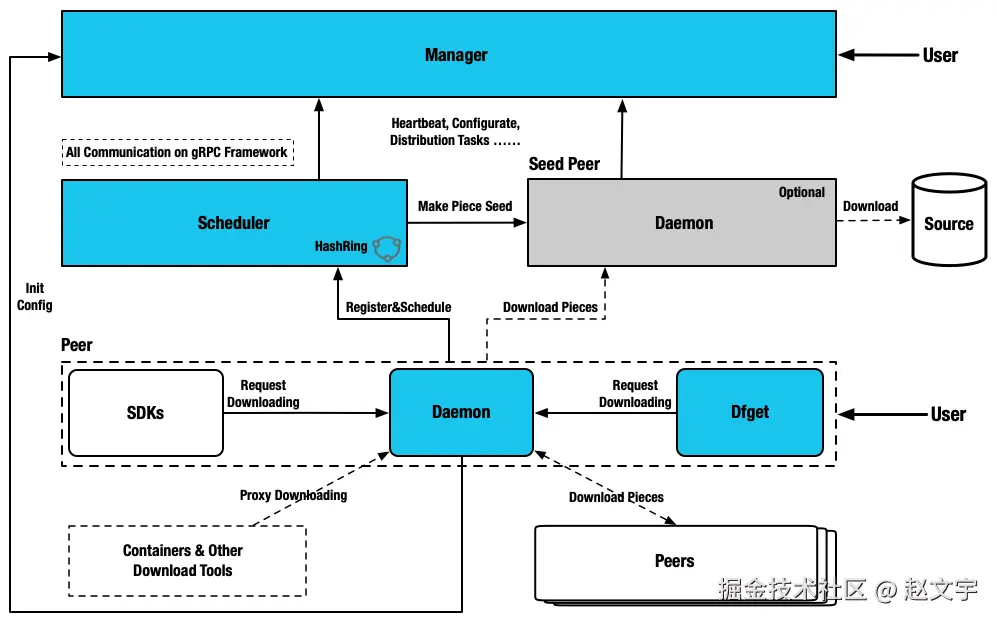
Dragonfly模块为四类:管理器、调度器、种子对等节点和对等节点。
- 管理器(Manager):维护各P2P集群之间的关系,主要提供动态配置管理和数据采集等功能。此外,还配备了一个前端控制台,方便用户以可视化方式操作和管理集群。
- 调度器(Scheduler):为下载节点选择最佳的下载父节点。在适当的时间,触发Seed Peer执行回源下载,或Peer执行回源下载。
- 种子节点(Seed Peer):提供上传和下载功能,可在P2P网络中作为根节点,使调度器能够主动发起回源。
- 节点(Peer):提供上传和下载功能。
Dragonfly部署
Dragonfly官方提供了推荐的 Kubernetes Helm Chart 部署方案
分析其 HelmChart 部署方案,搭建一套 dragonfly 环境主要是部署 manager、scheduler、client 3个镜像,其中 seed-peer 和 peer 使用的是同一个 client 只是配置文件差异。
本文方案注意事项:
- 由于我这边目前规模不大,没有 Kuberentes 集群,是基于 docker-compose 部署方式。
- Dragonfly运行依赖 MySQL(或PostgreSQL),以及 Redis 数据库。我这边使用的外部单独部署。
- docker-compose.yml 中的镜像是 v2.3.4 版本已经迁移到国内的,可以正常拉取使用。
- seed-client 和 client 本质是同一个镜像,如果在同一台机器上运行需要修改端口。
基于 docker-compose.yml 搭建服务端
挂载的配置文件详情在文章结尾提供参考,使用 docker compose up -d启动服务。
yaml
services:
  manager:
    image: registry.cncfstack.com/docker.io/dragonflyoss/manager:v2.3.4
    container_name: manager
    restart: always
    volumes:
      - /data/logs/dragonfly/manager:/var/log/dragonfly
      - ./config/manager.yaml:/etc/dragonfly/manager.yaml:ro
    healthcheck:
      test: ["CMD-SHELL", "/bin/grpc_health_probe -addr=:65003 || exit 1"]
      interval: 1s
      timeout: 2s
      retries: 30
    ports:
      - 65003:65003
      - 8080:8080

  scheduler:
    image: registry.cncfstack.com/docker.io/dragonflyoss/scheduler:v2.3.4
    depends_on:
      - manager
    container_name: scheduler
    restart: always
    healthcheck:
      test: ["CMD-SHELL", "/bin/grpc_health_probe -addr=:8002 || exit 1"]
      interval: 1s
      timeout: 2s
      retries: 30
    volumes:
      - /data/logs/dragonfly/scheduler:/var/log/dragonfly
      - ./config/scheduler.yaml:/etc/dragonfly/scheduler.yaml:ro
    ports:
      - 8002:8002

  seed-client:
    image: registry.cncfstack.com/docker.io/dragonflyoss/client:v1.1.7
    network_mode: "host"
    depends_on:
      - manager
      - scheduler
    container_name: seed-client
    restart: always
    healthcheck:
      test: ["CMD-SHELL", "/bin/grpc_health_probe -addr=unix:///var/run/dragonfly/dfdaemon.sock || exit 1"]
      interval: 1s
      timeout: 2s
      retries: 30
    volumes:
      - /data/logs/dragonfly/seed-client:/var/log/dragonfly
      - ./config/seed-client.yaml:/etc/dragonfly/dfdaemon.yaml:ro
    ports:
      - 4010:4010
      - 4011:4011
      - 4012:4012
服务端搭建完成后,可以通过 manager 的的 8080 端口访问。
藏云阁提供在线体验环境 dragonfly.cncfstack.com ,公众号发送【dragonfly体验】,即可获取体验账号密码
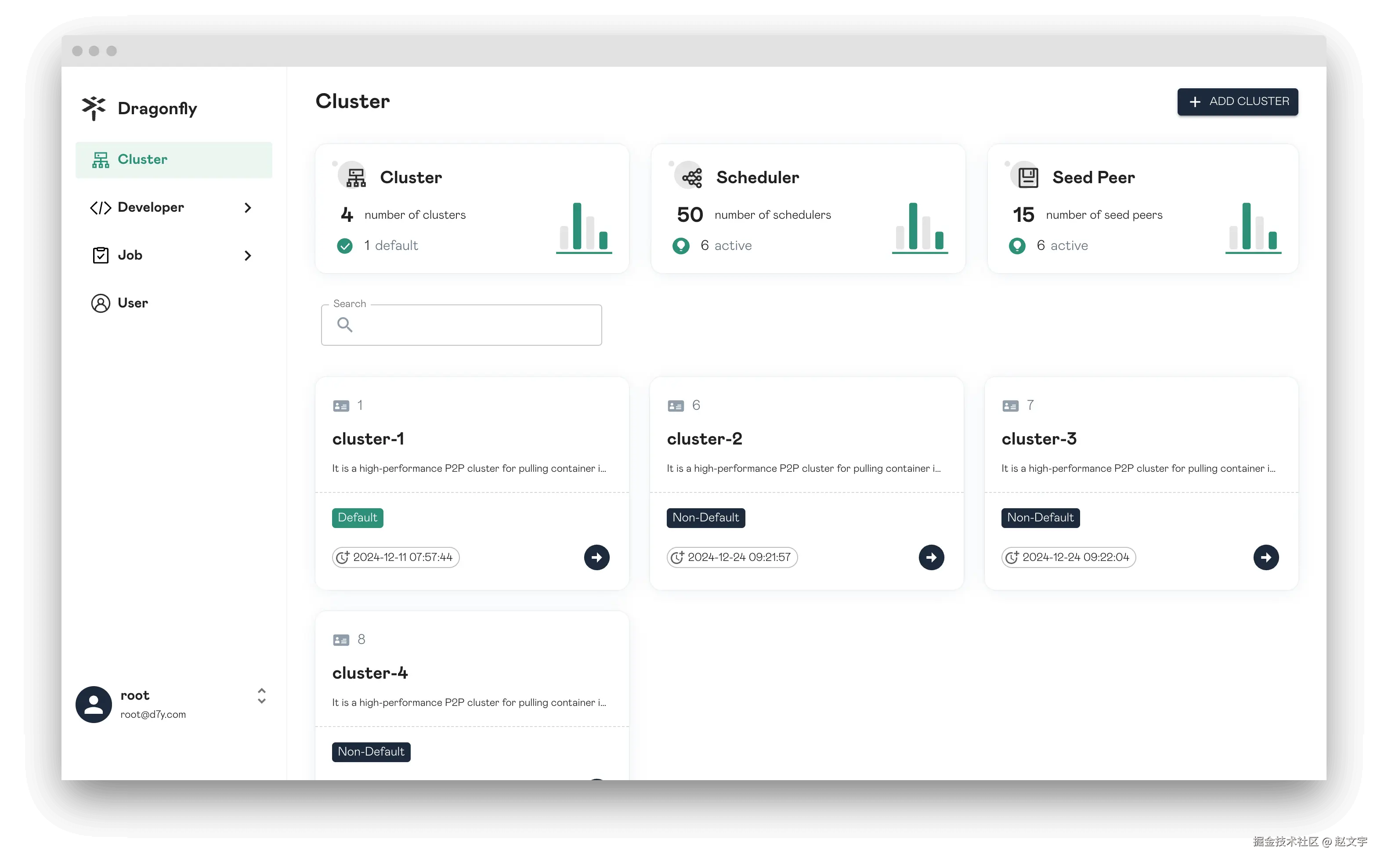
客户端搭建
客户端需要在所有节点搭建,在 Kubernetes 上使用的是 DaemonSet。本地可以基于 docker 运行即可。
bash
docker run -itd --name dfd \
    -v ./log/client:/var/log/dragonfly \
	-v ./p2p-client.conf:/etc/dragonfly/dfdaemon.yaml:ro  \
    -p 4100:4000 \
    -p 4101:4001 \
    -p 4202:4002 \
    registry.cncfstack.com/docker.io/dragonflyoss/client:v1.1.7
客户端使用
- Docker作为客户端拉取镜像
参考下文的"不支持 docker 工具加速"章节
- Containerd 运行时
在 containerd 运行时的节点上,修改或添加一个配置: /etc/containerd/certs.d/docker.io/hosts.toml, 其中 http://127.0.0.1:4001 就是本地运行的 seed 的代理端口。
toml
server = "https://registry.cncfstack.com"

[host."http://127.0.0.1:4001"]
capabilities = ["pull", "resolve"]

[host."http://127.0.0.1:4001".header]
X-Dragonfly-Registry = "https://registry.cncfstack.com"
Dragonfly使用限制
经过体验和查阅官方文档,在使用 Dragonfly加速镜像拉取时,会存在如下限制:
不支持 docker 工具加速
对 docker pull 拉取镜像不友好,官方也明确说明不支持 Docker。
主要是 Docker 的HTTP_PROXY配置机制问题,添加了之后是可以拉取加速镜像,但是所有的请求都会走代理影响其他功能使用,加速完了后需要移除这个代理并重启docker,使用上很麻烦。对于其他 contaienrd、podman等工具,可以进行配置,不存在 Docker 的这种问题。
在给 docker 提供镜像加速时候,需要修改 docker 的 systemd 配置,添加代理的环境变量配置并重启 docker 服务。需要注意的是在 shell 终端 export 设置的环境变量不生效,因为 Docker 是C/S架构,在 Client 客户端配置的环境变量,无法在 Server 端生效。
给 dockerd 服务端添加配置:
ini
root@iv-ydsh9xsohswuxjsht8f2:~# cat /etc/systemd/system/docker.service.d/http-proxy.conf
[Service]
Environment="HTTP_PROXY=http://1.2.3.4:4011/"
Environment="HTTPS_PROXY=http://1.2.3.4:4011/"
Environment="NO_PROXY=localhost,127.0.0.1,10.0.0.0/8"
将配置文件中 1.2.3.4 修改成 peer 的地址即可。
不支持开放网络
peer节点需要在同一个网络中,否则会导致其他peer节点无法访问该节点。
在一个 Kuberentes 集群中一般都是在同一个网络环境中,不存在该网络问题。
但是如果在开放的网络,部分节点在公有云,部分节点在公司内网或个人电脑需要拉取镜像时,自己配置成peer后,自己可以正常拉取镜像,但是其他节点无法从该节点拉取镜像,导致其他节点偶发异常(刚好调度到该节点拉取镜像时)。
Dragonfly加速与预热
默认不做任何配置时,在第一次拉取镜像时,peer节点会从种子节点获取镜像,然后种子节点再回源站获取镜像,整个过程会有两次的镜像下载过程。
也可以通过主动预热和结合 Harbor 进行自动预热,提升初次下载体验,或提前分发文件。
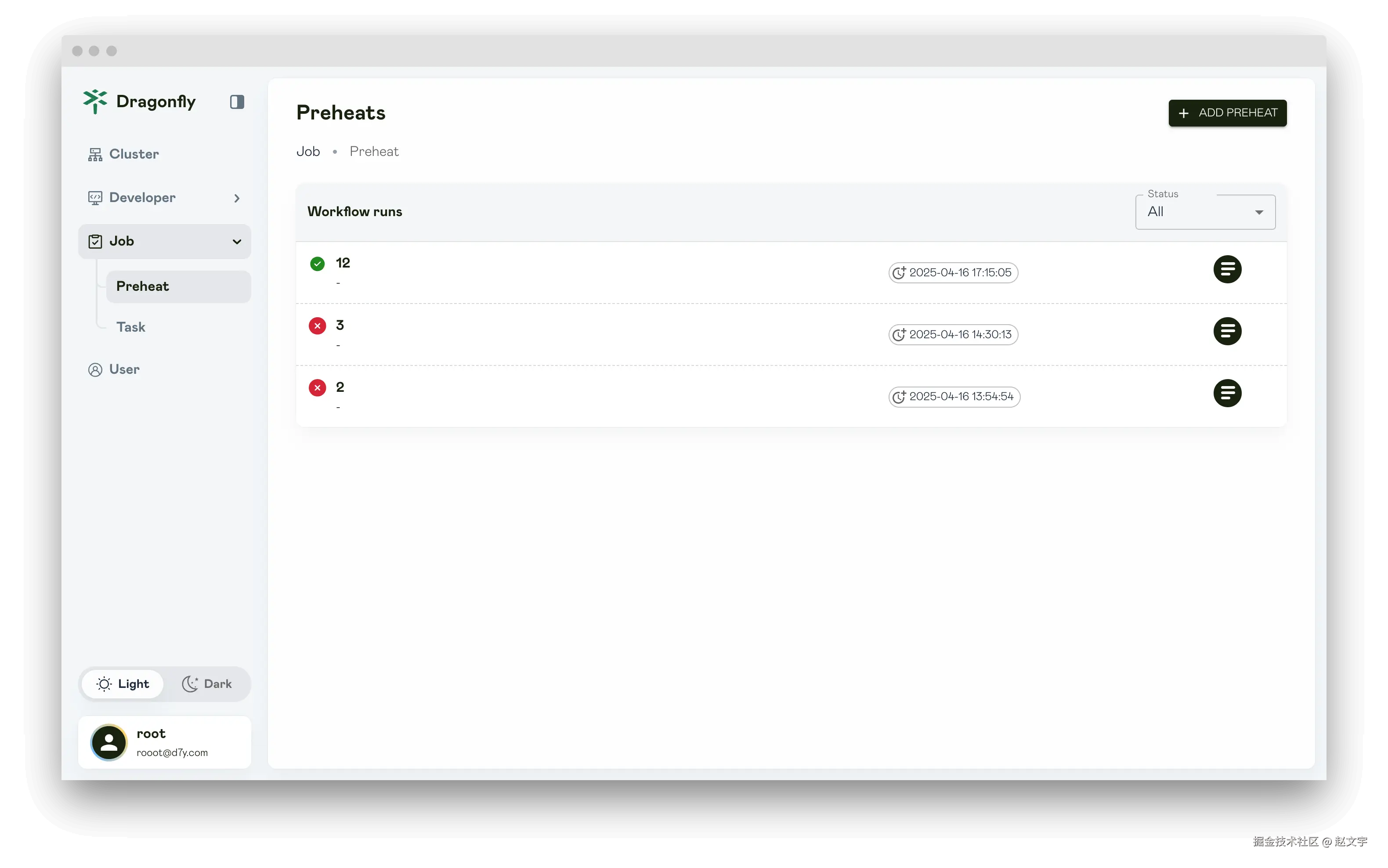
主动预热
主动加速是在 Dragonfly 集群中配置,添加镜像或文件的任务后,Dragonfly 种子节点(seed peer)会自动拉取文件缓存到本地。
这种方式需要人工或通过接口创建任务,比较麻烦。
Habro镜像预热
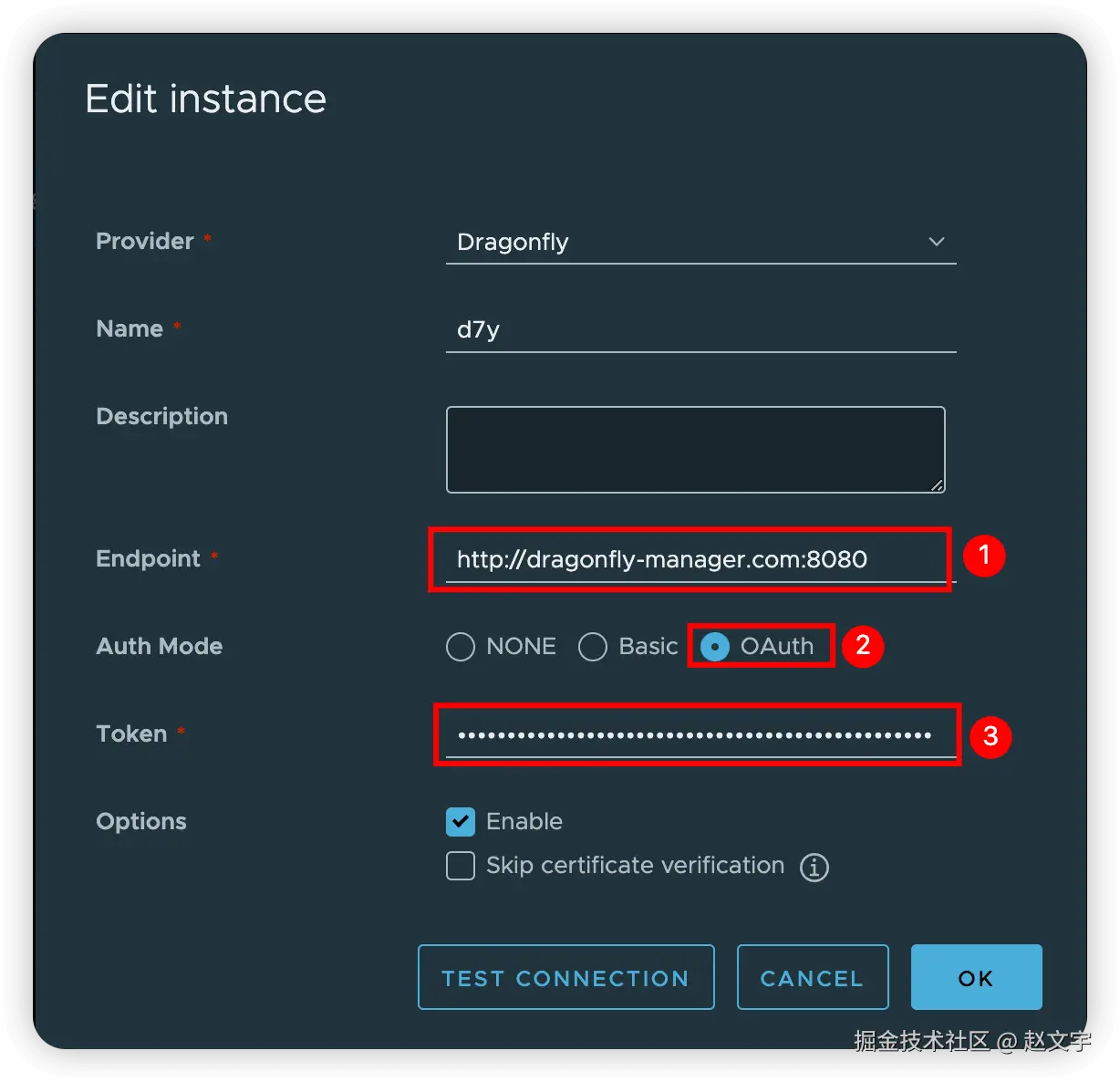
Harbor镜像预热是在 Harbor 集群中配置,将项目的镜像自动推送到 Dragonfly 集群中。
这种方式 harbor 会自动预热推送,配置完成后会自动执行, 详细配置步骤。
Dragonfly的配置文件详解
需要特别注意的配置文件中 __IP__ 需要修改成机器的网卡 IP 地址,我是这样获取IP的
bash
ip=${IP:-$(ip a s eth0 |grep "inet\ "|awk -F'/' '{print $1}'|awk '{print $NF}')}
export ip=${ip}
manager.template.yaml
manager 服务的运行配置,注意配置中 __IP__ 需要修改成机器的网卡 IP 地址。
manager 配置涉及 MySQL(PostgreSQL) 和 Redis 配置,请根据实际情况进行修改。
yaml
#################
# 日志配置
# console是否在控制台输出日志,可使用 logs 命令查看日志
# 日志级别:trace/debug/info/warn/error
console: true
log:
  level: info

server:
  grpc:
    # advertiseIP manager 访问的IP地址,用于 scheduler和seed的访问。
    # 如果本地eth0的 IP 地址和访问的 IP 地址不一致,请设置本字段为访问的 IP 地址
    advertiseIP: __IP__
    # 设置监听的起始和结束端口,如果前面的端口被占用则会自动使用后续的端口,相同时则为固定端口
    port:
      start: 65003
      end: 65003
  # Restful API接口监听的端口,业务Web页面的服务端口
  rest:
    addr: :8080

#安全建议:生产环境务必修改默认的 JWT key!
auth:
  jwt:
    realm: 'Dragonfly'         # 认证域名称
    key: 'ZHJhZxxxuZmx5Cg=='    # JWT签名密钥(base64编码)
    timeout: 48h               # Token有效期
    maxRefresh: 48h            # Token可刷新时间
# 可以配置为mysql,参考配置文件中格式
database:
  type: postgres
  postgres:
    user: pg-user
    password: pg-pwd
    host: pg-ip-or-doman
    port: 5432
    dbname: df_manager
    sslMode: disable
    timezone: UTC
    migrate: true
  redis:
    addrs:
      - "redis-ip-or-domain:6379"
    masterName: ''
    username: ''
    password: redis-pwd
    db: 3
    brokerDB: 1
    backendDB: 2

# Job配置
job:
  rateLimit:
    fillInterval: 1m  # 令牌桶填充间隔
    capacity: 5       # 令牌桶容量
    quantum: 5        # 每次填充的令牌数
  gc:
    # Interval is the interval for garbage collection.
    #interval: 24h
    interval: 1m
    # TTL is the time to live for the job.
    #ttl: 24h
    ttl: 1m
  syncPeers:
    # 设置同步所有 peers 信息的间隔时间,从 scheduler 同步到 manager
    # 注意:代码限制必须MUST > 12h,否则无法启动
    interval: 13h
    # 从 scheduler 同步到 manager时的同步超时时间
    timeout: 10m

  preheat:
    # 请求 registry 获取 token 和 manifest 的超时时间
    registryTimeout: 1m
    tls:
      insecureSkipVerify: false  # 是否跳过TLS验证
scheduler.template.yaml
scheduler 服务的运行配置,注意配置中 __IP__ 需要修改成机器的网卡 IP 地址。
scheduler 配置文件涉及 Redis 配置,请根据实际情况修改。
yaml
server:
  advertiseIP: __IP__
  port: 8002

# Scheduler policy configuration.
scheduler:

  # 调度算法:
  #default:基于规则的调度算法(默认)
  #ml:机器学习调度算法(需要额外配置)
  #plugin:插件扩展算法(需要编译 d7y-scheduler-plugin-evaluator.so)
  algorithm: default

  # 回源设置:
  # 单个任务允许Peer回源的最大次数
  backToSourceCount: 200
  # Peer回源重试限制
  retryBackToSourceLimit: 3
  # 调度重试次数限制
  retryLimit: 5
  # 调度重试间隔
  retryInterval: 400ms

  #GC 参数调优建议:
  #高负载环境:减少 peerGCInterval 和 taskGCInterval
  #内存敏感环境:减少 peerTTL 和 hostTTL
  #网络不稳定环境:增加 pieceDownloadTimeout
  gc:
    pieceDownloadTimeout: 30m   # Piece下载超时时间
    peerGCInterval: 5m          # Peer垃圾回收间隔
    peerTTL: 24h                # Peer存活时间,如果 peer 被其他 peers 下载了,改值会重新刷新
    taskGCInterval: 30m         # 任务垃圾回收间隔
    hostGCInterval: 5m          # Host垃圾回收间隔
    hostTTL: 1h                 # Host存活时间。如果 host 上报了状态,该值会重新刷新

database:
  redis:
    addrs:
      - "redis-ip-or-domain:6379"
    masterName: ''
    username: ''
    password: ''
    brokerDB: 1
    backendDB: 2

# 动态配置
#支持从 Manager 动态拉取配置更新
#无需重启 Scheduler 即可更新部分配置
#用于集群策略的动态调整
dynConfig:
  # 动态配置刷新时间
  refreshInterval: 1m

# 调度器host信息
# 数据中心标识(如:us-east-1)
# 地理位置(如:NewYork)
#设置 idc 和 location 可实现智能调度
#优先调度同 IDC/同地域的 Peer
#减少跨地域网络流量和延迟
host:
  idc: ''
  location: ''

# Manager服务的配置信息
manager:
  addr: "__IP__:65003"
  # 所属集群ID
  schedulerClusterID: 1
  keepAlive:
    interval: 5s

seedPeer:
  # Scheduler enable seed peer as P2P peer,
  # if the value is false, P2P network will not be back-to-source through
  # seed peer but by peer and preheat feature does not work.
  enable: true

#CPU核心数 < 16:   globalWorkerNum = 200-500
#CPU核心数 16-32:  globalWorkerNum = 500-1000
#CPU核心数 > 32:   globalWorkerNum = 1000-2000
job:
  enable: true            # 启用异步作业服务
  globalWorkerNum: 500    # 全局队列工作线程数
  schedulerWorkerNum: 500 # 调度器队列工作线程数
  localWorkerNum: 1000    # 本地队列工作线程数%
seed-client.template.yaml
种子节点的配置,需要修改配置中 __IP__ 为本节点的IP地址
yaml
#################
# 日志配置
# console是否在控制台输出日志,可使用 logs 命令查看日志
# 日志级别:trace/debug/info/warn/error
console: true
log:
  level: info

#################
# 当前运机器的基础信息配置, 设置 idc 和 location 可实现同地域优先调度
# host.idc 该机器所属的数据中心,如us-east-1
# host.location 该机器所属的地理位置(如:Beijing)
# host.hostname 主机名(可选)
# host.ip IP(NAT/多IP场景使用), 注意:peer 节点需要基于该IP地址给其他peer提供下载功能,所以如果内网和外网IP,需要配置为外网IP
# host.schedulerClusterID 所属调度器集群ID。需要基于 scheduler 中的 ID 配置,该配置添加后,idc/location 会被忽略
host:
  ip: __IP__


#################
#插件和缓存配置
# server.cacheDir 缓存文件存储的目录
# server.pluginDir 保存插件的目录
server:
  pluginDir: /var/lib/dragonfly/plugins/dfdaemon/
  cacheDir: /var/cache/dragonfly/dfdaemon/


#################
# 下载配置
# download.protocol 中 peers下载资源时支持的协议,如 tcp 或 quic:
# TCP:适用于高带宽、低延迟、局域网环境
# QUIC:适用于高延迟、高丢包率、移动网络环境
# socketPath:dfdaemon GRPC service的 socket 路径
# requestRateLimit:下载请求速率限制(请求/秒)default is 4000 req/s
# rateLimit: # 下载速率限制(默认50GiB/秒)
# pieceTimeout:从源站下载piece的超时时间
# collectedPieceTimeout:从父节点收集piece的超时时间
# concurrentPieceCount:并发下载的piece数量
download:
  protocol: tcp
  server:
    socketPath: /var/run/dragonfly/dfdaemon.sock
    requestRateLimit: 4000
  rateLimit: 1GiB
  pieceTimeout: 360s
  collectedPieceTimeout: 360s
  concurrentPieceCount: 10


#################
# 上传配置
# upload.server.port 上传的 dfdeamon grpc 服务端口
# upload.disableShared 是否禁止上传数据给其他节点
# rateLimit 上传速度配置,默认10GiB 每秒,支持单位 KiB/MiB/GiB
upload:
  server:
    port: 4010
  disableShared: false
  rateLimit: 10GiB


#################
# 访问 manager 的配置信息
manager:
  addr: http://__IP__:65003


#################
# 种子节点配置
# seedPeer.enable 是否启用种子节点功能
# seedPeer.type 节点类型,可选值:super/sub
# seedPeer.clusterID 节点所属的种子节点集群ID,TODO,是否可以添加多个节点为 seedPeer节点,通过这个ID来组成一个种子节点集群?
# seedPeer.keepaliveInterval 节点向manager上报存活时间间隔
seedPeer:
  enable: true
  type: super
  clusterID: 1
  keepaliveInterval: 15s


#################
# 存储配置
# tcpPort tcp服务端口
# quicPort quic服务端口
# dir:存储tasks元数据和内容的目录
# keep: dfdaemon重启时是否保留任务数据
# writeBufferSize:数据写入磁盘缓冲区大小,默认128KB
# readBufferSize:读取缓冲区大小,默认128KB
storage:
  server:
    tcpPort: 4005
    quicPort: 4006
  dir: /var/lib/dragonfly/
  keep: true
  writeBufferSize: 131072
  readBufferSize: 131072


#################
# 资源GC回收配置
# gc.interval gc任务执行间隔
# gc.policy.taskTTL 任务TTL
# gc.policy.distThreshold 设置磁盘使用率阈值。 如果设置为0或者不设置,则会使用全部磁盘空间。可设置 distThreshold 限制dfdaemon使用的最大磁盘空间
# distHighThresholdPercent 磁盘使用率 > 该值:触发GC,删除旧任务
# distLowThresholdPercent 磁盘使用率 < 该值:停止GC
gc:
  interval: 900s
  policy:
    taskTTL: 21600s
    # distThreshold: 10TiB
    distHighThresholdPercent: 80
    distLowThresholdPercent: 60

#################
# 镜像代理配置
# proxy.server.port 镜像代理服务端口
# proxy.ip 镜像代理服务IP
# proxy.caCert
  # caCert 是代理服务器用于生成服务器证书的根 CA 证书路径(PEM 格式)。
  # 如果 ca_cert 为空,代理将通过 rcgen::generate_simple_self_signed 生成一个示例 CA 证书。
  # 当客户端通过代理发出请求时,客户端不应验证服务器证书,并应将 insecure 设置为 true。
  # 如果 ca_cert 不为空,代理将使用该 CA 证书为服务器证书签名。
  # 如果系统已安装 openssl,您可以使用 openssl 生成根 CA 证书,并使系统信任该根 CA 证书。
  # 然后将 ca_cert 和 ca_key 设置为根 CA 证书和密钥的路径。
  # Dfdaemon 将生成服务器证书和密钥,并使用根 CA 证书对服务器证书进行签名。
  # 当客户端通过代理发出请求时,代理可以通过服务器证书拦截请求。
# proxy.caKey
  # caKey 是代理服务器用于生成服务器证书的根 CA 私钥路径(PEM 格式)。
  # 如果 ca_key 为空,代理将通过 rcgen::generate_simple_self_signed 生成一个示例 CA 私钥。
  # 当客户端通过代理发出请求时,客户端不应验证服务器证书,并应将 insecure 设置为 true。
  # 如果 ca_key 不为空,代理将使用该 CA 私钥为服务器证书签名。如果系统已安装 openssl,
  # 您可以使用 openssl 生成根 CA 证书,并使系统信任该根 CA 证书。
  # 然后将 ca_cert 和 ca_key 设置为根 CA 证书和私钥的路径。
  # Dfdaemon 将生成服务器证书和私钥,并使用根 CA 私钥对服务器证书进行签名。
  # 当客户端通过代理发出请求时,代理可以通过服务器证书拦截请求。
# basicAuth
  # basic_auth 是 dfdaemon 中 HTTP 代理的基本认证配置。
  # 如果 basic_auth 不为空,代理将通过 Authorization 头部使用基本认证来验证客户端身份。
  # Authorization 头部的值为 "Basic base64(username:password)",
  # 具体请参考 https://en.wikipedia.org/wiki/Basic_access_authentication。
  # proxy.basicAuth.username 用户名
  # proxy.basicAuth.password 密码
# proxy.rules 镜像代理规则
# proxy.registryMirror.addr 镜像代理默认镜像仓库地址
# cert
  # # cert 是注册表(registry)的客户端证书路径,采用 PEM 格式。
  # # 如果注册表使用自签名证书,客户端需要为注册表镜像设置此证书。
# disableBackToSource indicates whether disable to download back-to-source when download failed.
  # 是否禁止回源
proxy:
  server:
    port: 4011
  # ip: ""
  # caCert: ""
  # caKey: ""
  # basicAuth:
  #   username: "admin"
  #   password: "dragonfly"
  #
  # rules is the list of rules for the proxy server.
  # regex is the regex of the request url.
  # useTLS indicates whether use tls for the proxy backend.
  # redirect is the redirect url.
  # filteredQueryParams is the filtered query params to generate the task id.
  # When filter is ["Signature", "Expires", "ns"], for example:
  # http://example.com/xyz?Expires=e1&Signature=s1&ns=docker.io and http://example.com/xyz?Expires=e2&Signature=s2&ns=docker.io
  # will generate the same task id.
  # Default value includes the filtered query params of s3, gcs, oss, obs, cos.
  # `X-Dragonfly-Use-P2P` header can instead of the regular expression of the rule. If the value is "true",
  # the request will use P2P technology to distribute the content. If the value is "false",
  # but url matches the regular expression in rules. The request will also use P2P technology to distribute the content.
  rules:
    - regex: 'blobs/sha256.*'
      # useTLS: false
      # redirect: ""
      # filteredQueryParams: []
  registryMirror:
    # addr is the default address of the registry mirror. Proxy will start a registry mirror service for the
    # client to pull the image. The client can use the default address of the registry mirror in
    # configuration to pull the image. The `X-Dragonfly-Registry` header can instead of the default address
    # of registry mirror.
    addr: https://registry.cncfstack.com

  # cert: ""
  disableBackToSource: false
  # prefetch pre-downloads full of the task when download with range request.
  # 是否预取整个文件(针对range请求)
  prefetch: false
  # readBufferSize is the buffer size for reading piece from disk, default is 32KB.
  # 代理读取缓冲区大小
  readBufferSize: 32768

#################
# Prometheus metrics
metrics:
  server:
    port: 4012
  # ip: ""
p2p-client.conf
客户端运行的配置文件, 和 seed-client.template.yaml 配置基本一样,不需要配置种子节点 seedPeer 配置。
其他默认的配置可以不需要配置,按需配置需要的即可,完整的配置参考
yaml
host:
  ip: <上报的当前机器IP,用于其他peer节点连接>
manager:
  addr: http://<manager服务的访问地址>:65003
proxy:
  server:
    port: 4001
  rules:
    - regex: 'blobs/sha256.*'
  registryMirror:
    addr: https://registry.cncfstack.com
  disableBackToSource: false
  prefetch: false
  readBufferSize: 32768