目录
- 一、常见方案分析
-
- [1.1 Loading状态方案](#1.1 Loading状态方案)
- [1.2 请求标记方案](#1.2 请求标记方案)
- [1.3 防抖/节流方案](#1.3 防抖/节流方案)
- [1.4 请求拦截器方案](#1.4 请求拦截器方案)
- [1.5 React Hooks方案](#1.5 React Hooks方案)
- 二、综合方案建议
- 三、使用建议和总结
-
- [3.1 方案选择建议](#3.1 方案选择建议)
- [3.2 最佳实践总结](#3.2 最佳实践总结)
- [3.3 总结](#3.3 总结)
一、常见方案分析
1.1 Loading状态方案
c
// 方案1: 按钮Loading状态
class RequestController {
  constructor() {
    this.loading = false;
  }

  async fetchData(params) {
    if (this.loading) {
      console.log('请求正在进行中,请稍后...');
      return;
    }

    try {
      this.loading = true;
      // 显示loading UI
      this.showLoading();

      const response = await axios.get('/api/data', { params });
      return response.data;
    } catch (error) {
      console.error('请求失败:', error);
      throw error;
    } finally {
      this.loading = false;
      // 隐藏loading UI
      this.hideLoading();
    }
  }

  showLoading() {
    // 显示全局loading或按钮loading
  }

  hideLoading() {
    // 隐藏loading
  }
}优点:
-
实现简单,用户体验直观
-
能有效防止重复点击
-
适用于按钮点击场景
缺点:
-
无法防止并行多个不同请求
-
需要手动管理loading状态
-
页面多个按钮需要分别处理
1.2 请求标记方案
c
// 方案2: 请求唯一标识
class RequestMarker {
  constructor() {
    this.pendingRequests = new Map();
  }

  async request(url, config = {}) {
    const requestKey = this.generateKey(url, config.params || config.data);

    // 检查是否已有相同请求
    if (this.pendingRequests.has(requestKey)) {
      // 可选:返回已有请求的Promise
      return this.pendingRequests.get(requestKey);
    }

    // 创建新的请求
    const requestPromise = axios({
      url,
      ...config,
    }).finally(() => {
      // 请求完成后移除标记
      this.pendingRequests.delete(requestKey);
    });

    // 存储请求
    this.pendingRequests.set(requestKey, requestPromise);

    return requestPromise;
  }

  generateKey(url, params) {
    const sortedParams = params ?
      Object.keys(params).sort().map(key => `${key}=${params[key]}`).join('&') : '';
    return `${url}?${sortedParams}`;
  }

  // 手动取消特定请求
  cancelRequest(url, params) {
    const key = this.generateKey(url, params);
    if (this.pendingRequests.has(key)) {
      // 实际项目中可能需要使用axios的cancel token
      this.pendingRequests.delete(key);
    }
  }
}优点:
-
精确控制重复请求
-
可复用已有请求Promise
-
支持请求取消
缺点:
-
实现相对复杂
-
需要维护请求映射表
-
内存占用需要考虑
1.3 防抖/节流方案
c
// 方案3: 防抖请求
class DebounceRequest {
  constructor(wait = 500) {
    this.timer = null;
    this.lastRequestTime = 0;
  }

  // 防抖版本
  debounceRequest(url, params, wait = 500) {
    return new Promise((resolve, reject) => {
      if (this.timer) {
        clearTimeout(this.timer);
      }

      this.timer = setTimeout(async () => {
        try {
          const response = await axios.get(url, { params });
          resolve(response.data);
        } catch (error) {
          reject(error);
        }
      }, wait);
    });
  }

  // 节流版本
  throttleRequest(url, params, interval = 1000) {
    return new Promise((resolve, reject) => {
      const now = Date.now();

      if (now - this.lastRequestTime < interval) {
        console.log('请求过于频繁');
        reject(new Error('请求过于频繁'));
        return;
      }

      this.lastRequestTime = now;

      axios.get(url, { params })
        .then(response => resolve(response.data))
        .catch(error => reject(error));
    });
  }
}优点:
-
有效控制请求频率
-
减少服务器压力
-
适用于搜索框等高频场景
缺点:
-
可能延迟必要请求
-
不适合所有场景
-
需要合理设置时间间隔
1.4 请求拦截器方案
c
// 方案4: 拦截器全局控制
class AxiosInterceptor {
  constructor() {
    this.pendingRequests = new Map();
    this.setupInterceptors();
  }

  setupInterceptors() {
    // 请求拦截器
    axios.interceptors.request.use(config => {
      // 生成请求唯一标识
      const requestKey = this.generateRequestKey(config);

      // 取消重复请求
      if (this.pendingRequests.has(requestKey)) {
        config.cancelToken = new axios.CancelToken(cancel => {
          cancel('重复请求,已取消');
        });
      } else {
        // 存储cancel函数
        config.cancelToken = config.cancelToken || new axios.CancelToken(cancel => {
          this.pendingRequests.set(requestKey, cancel);
        });
      }

      return config;
    });

    // 响应拦截器
    axios.interceptors.response.use(
      response => {
        // 请求完成后移除
        const requestKey = this.generateRequestKey(response.config);
        this.pendingRequests.delete(requestKey);
        return response;
      },
      error => {
        if (axios.isCancel(error)) {
          console.log('请求被取消:', error.message);
          return Promise.reject(error);
        }

        // 错误时也移除请求
        if (error.config) {
          const requestKey = this.generateRequestKey(error.config);
          this.pendingRequests.delete(requestKey);
        }

        return Promise.reject(error);
      }
    );
  }

  generateRequestKey(config) {
    const { method, url, params, data } = config;
    let key = `${method}-${url}`;

    if (params) {
      key += `-${JSON.stringify(params)}`;
    }

    if (data) {
      key += `-${JSON.stringify(data)}`;
    }

    return key;
  }

  // 取消所有pending请求
  cancelAllRequests() {
    this.pendingRequests.forEach(cancel => {
      cancel();
    });
    this.pendingRequests.clear();
  }
}优点:
-
全局统一处理
-
与业务代码解耦
-
支持精细化控制
缺点:
-
配置复杂
-
可能影响正常请求
-
需要处理边界情况
1.5 React Hooks方案
c
// 方案5: React自定义Hook
import { useRef, useState, useCallback } from 'react';

function usePreventDuplicateRequest() {
  const [loading, setLoading] = useState(false);
  const requestRef = useRef(null);
  const pendingRequests = useRef(new Map());

  // 带loading的请求
  const requestWithLoading = useCallback(async (requestFn, ...args) => {
    if (loading) {
      console.log('已有请求在进行中');
      return;
    }

    setLoading(true);
    try {
      const result = await requestFn(...args);
      return result;
    } finally {
      setLoading(false);
    }
  }, [loading]);

  // 防重复请求
  const requestWithPrevention = useCallback(async (key, requestFn, ...args) => {
    // 检查是否有相同请求
    if (pendingRequests.current.has(key)) {
      console.log('重复请求,使用缓存');
      return pendingRequests.current.get(key);
    }

    try {
      const requestPromise = requestFn(...args);
      pendingRequests.current.set(key, requestPromise);

      const result = await requestPromise;
      return result;
    } finally {
      pendingRequests.current.delete(key);
    }
  }, []);

  // 防抖请求
  const debounceRequest = useCallback((requestFn, delay = 500) => {
    return debounce(requestFn, delay);
  }, []);

  return {
    loading,
    requestWithLoading,
    requestWithPrevention,
    debounceRequest,
  };
}

// 使用示例
function SearchComponent() {
  const { loading, requestWithLoading } = usePreventDuplicateRequest();

  const handleSearch = async (keyword) => {
    return requestWithLoading(
      () => axios.get('/api/search', { params: { q: keyword } })
    );
  };

  return (
    <div>
      <button
        onClick={handleSearch}
        disabled={loading}
      >
        {loading ? '搜索中...' : '搜索'}
      </button>
    </div>
  );
}
二、综合方案建议
推荐实现:分层防重复策略
c
// 综合方案:分层防重复
class ComprehensiveRequestManager {
  constructor(options = {}) {
    this.options = {
      enableLoading: true,
      enableDebounce: true,
      enableRequestDedupe: true,
      debounceTime: 300,
      ...options
    };

    this.loadingStates = new Map();
    this.pendingRequests = new Map();
    this.debounceTimers = new Map();
  }

  // 核心请求方法
  async request(config) {
    const {
      url,
      method = 'GET',
      params,
      data,
      requestId,
      showLoading = true,
      useDebounce = false,
    } = config;

    // 1. 生成请求唯一标识
    const requestKey = requestId || this.generateRequestKey({ url, method, params, data });

    // 2. 防抖处理
    if (useDebounce && this.options.enableDebounce) {
      return this.debounceRequest(requestKey, () =>
        this.executeRequest(requestKey, config, showLoading)
      );
    }

    // 3. 直接执行请求
    return this.executeRequest(requestKey, config, showLoading);
  }

  // 执行请求
  async executeRequest(requestKey, config, showLoading) {
    // 检查重复请求
    if (this.options.enableRequestDedupe && this.pendingRequests.has(requestKey)) {
      console.log(`请求 ${requestKey} 已存在,返回已有Promise`);
      return this.pendingRequests.get(requestKey);
    }

    // 显示loading
    if (showLoading && this.options.enableLoading) {
      this.setLoading(requestKey, true);
    }

    try {
      // 创建请求Promise
      const requestPromise = axios({
        ...config,
        cancelToken: new axios.CancelToken(cancel => {
          // 存储cancel函数
          this.pendingRequests.set(requestKey, { promise: requestPromise, cancel });
        })
      });

      const response = await requestPromise;
      return response.data;
    } catch (error) {
      if (!axios.isCancel(error)) {
        console.error('请求失败:', error);
      }
      throw error;
    } finally {
      // 清理工作
      this.pendingRequests.delete(requestKey);
      if (showLoading && this.options.enableLoading) {
        this.setLoading(requestKey, false);
      }
    }
  }

  // 防抖请求
  debounceRequest(key, requestFn) {
    return new Promise((resolve, reject) => {
      // 清除已有定时器
      if (this.debounceTimers.has(key)) {
        clearTimeout(this.debounceTimers.get(key));
      }

      // 设置新定时器
      const timer = setTimeout(async () => {
        try {
          const result = await requestFn();
          resolve(result);
        } catch (error) {
          reject(error);
        } finally {
          this.debounceTimers.delete(key);
        }
      }, this.options.debounceTime);

      this.debounceTimers.set(key, timer);
    });
  }

  // 工具方法
  generateRequestKey(config) {
    const { url, method, params, data } = config;
    return `${method.toUpperCase()}:${url}:${JSON.stringify(params)}:${JSON.stringify(data)}`;
  }

  setLoading(key, isLoading) {
    this.loadingStates.set(key, isLoading);
    // 触发loading状态变化事件
    this.onLoadingChange(key, isLoading);
  }

  onLoadingChange(key, isLoading) {
    // 可以在这里实现loading UI更新
    console.log(`Loading状态变化: ${key} -> ${isLoading}`);
  }

  // 取消请求
  cancelRequest(key) {
    if (this.pendingRequests.has(key)) {
      const { cancel } = this.pendingRequests.get(key);
      cancel(`手动取消请求: ${key}`);
      this.pendingRequests.delete(key);
    }
  }

  // 取消所有请求
  cancelAllRequests() {
    this.pendingRequests.forEach(({ cancel }, key) => {
      cancel(`取消所有请求: ${key}`);
    });
    this.pendingRequests.clear();
  }
}
三、使用建议和总结
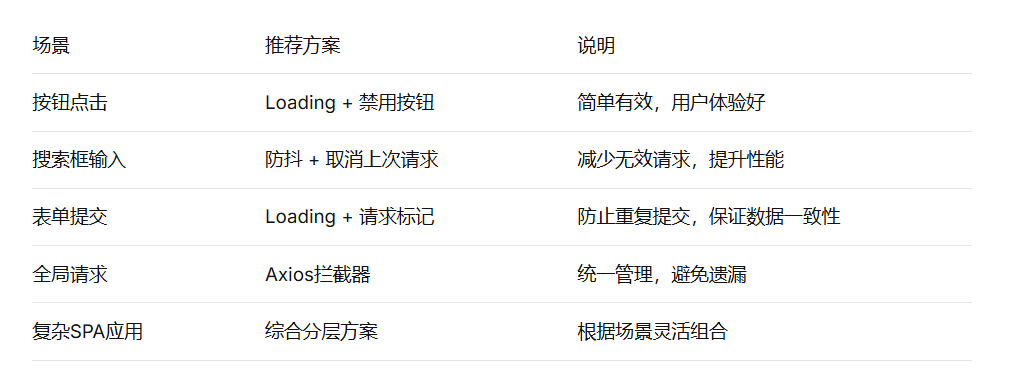
3.1 方案选择建议
3.2 最佳实践总结
分层防御策略:
-
UI层:按钮loading和禁用状态
-
网络层:请求拦截和取消
-
业务层:防抖/节流控制
关键注意事项:
-
区分重复请求和并行请求的业务需求
-
考虑请求失败的重试机制
-
注意内存泄漏,及时清理请求缓存
-
提供手动取消请求的接口
性能优化建议:
-
对于相同请求,考虑使用Promise缓存
-
合理设置防抖时间(通常300-500ms)
-
监控并限制最大并发请求数
3.3 总结
防止接口重复请求是一个系统工程,需要根据具体业务场景选择合适的方案组合。建议:
-
基础防护:使用按钮loading状态,这是最直接的用户反馈
-
核心防护:实现请求拦截和去重,这是技术保障
-
增强防护:根据业务特点添加防抖/节流等优化策略
-
监控反馈:添加请求日志,便于问题排查和优化
在实际项目中,建议采用综合分层方案,既保证用户体验,又确保系统稳定性,同时为后续扩展留出空间。
