简介
终端的颜色控制在两个标准中有定义。一个是ISO/IEC 6429:1992,另一个是ECMA-48。前者的最新版本是Edition 3, 1992,后者的最新版本是5th edition, June 1991。
有趣的是,ISO和ECMA的总部都在日内瓦,而IEC和ITU也是。
这两个标准中关于颜色的定义部分为SGR (SELECT GRAPHIC RENDITION)。在 ISO/IEC 6429:1992 中的章节为 8.3.118 SGR - SELECT GRAPHIC RENDITION;在ECMA-48中的章节为:8.3.117 SGR - SELECT GRAPHIC RENDITION。前者是收费的,后者可以从这里下载。
两个标准关于SGR的定义是一致的。在下面的标准引用中,如无特殊说明,均为ECMA。
SGR标准是跨平台的终端控制协议,它既不是操作系统(如 Linux)的组成部分,也不是命令解释器(如 Bash)的功能。尽管本文中的实验是基于Linux Bash的。这也是本文的题目不是"Linux的颜色控制"或"Bash的颜色控制"的原因。
SGR 的格式
在ECMA中,关于SGR的说明如下:
Notation: (Ps...)
Representation: CSI Ps... 06/13
Parameter default value: Ps = 0
# 下面是参数表,此处省略
...
其中:
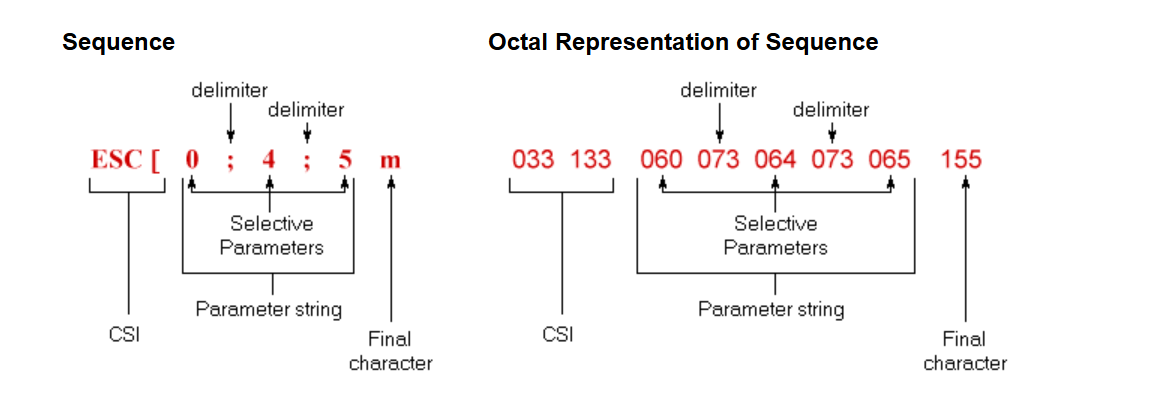
- CSI表示CONTROL SEQUENCE INTRODUCER,CSI是控制序列的起始标志,为Esc+[键,即
\e[。 - Ps表示Parameters,Ps...表示可以多个参数。( )表示为可选参数。
- 06/13 就是字符
m,即0x6D。这是最关键的,m表示此CSI序列为SGR。 - 参数间的分隔符是
;,是在标准的5.4.2节说明的,Parameter sub-strings are separated by one bit combination 03/11.。
bash
$ echo -e '\x6d'
m
$ printf '%d\n' 0x6d
109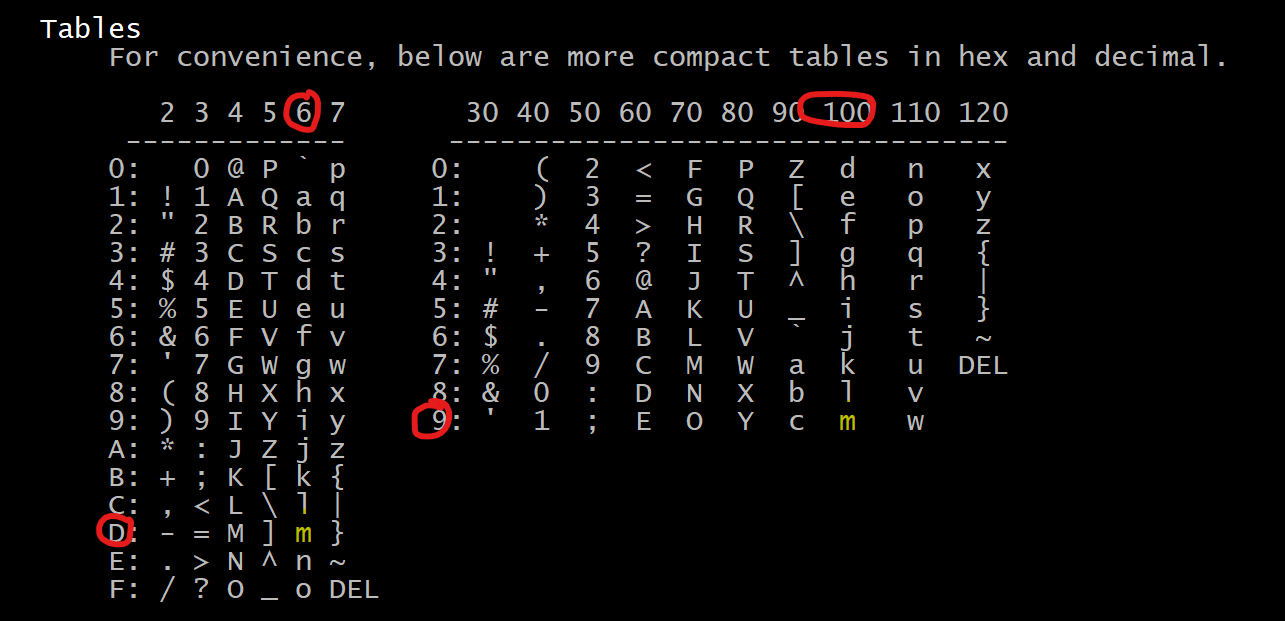
以下图示来自VT100的帮助文档:
简单实验
SGR的参数可以从标准中获得,但最方便的还是从console_codes的man page中获得。
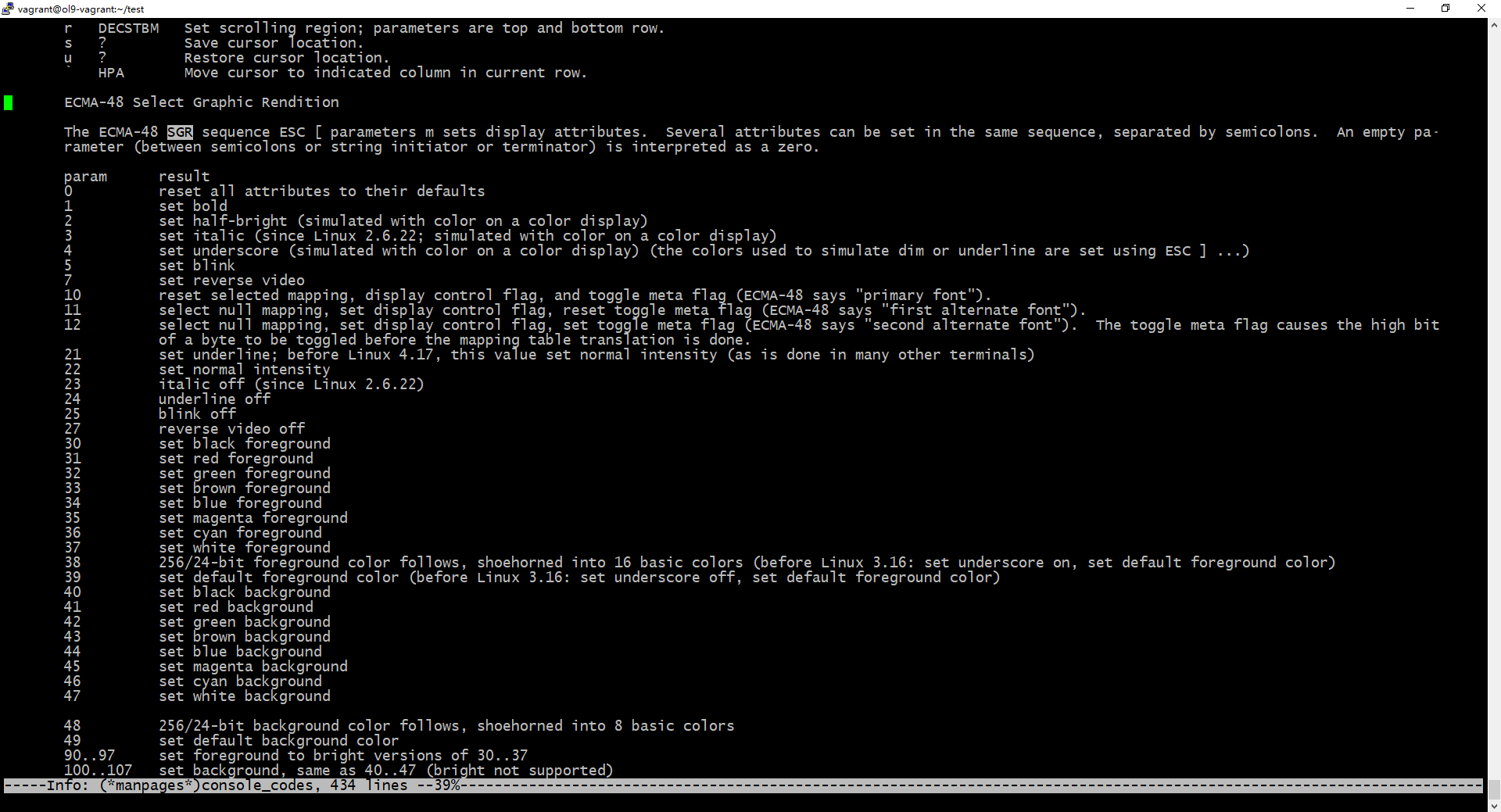
也可参考下表:
表1:SGR属性表
| 参数 | 含义 | 备注 |
|---|---|---|
| 0 | Attributes off / Reset all | 默认值 |
| 1 | Bold or increased intensity | |
| 2 | Faint, decreased intensity | 较少支持 |
| 3 | Italic | 不一定所有终端支持 |
| 4 | Underscore | |
| 5 | Blink (slow) | |
| 6 | Blink (rapid) | 较少支持 |
| 7 | Negative (reverse) image / Inverse | 前景色和背景色互换 |
| 8 | Conceal / Hide | 文字不可见(但可选中) |
| 9 | Crossed-out / Strike-through | 删除线 |
| 21 | Bold off or double underline | 不同终端解释不同 |
| 22 | Normal intensity (neither bold nor faint) | |
| 23 | Not italic | |
| 24 | Underline off | |
| 25 | Blink off | |
| 27 | Positive (normal) image | 取消反显 |
| 28 | Reveal | 取消隐藏 |
| 29 | Not crossed-out | |
| 30--37 | Set foreground color | 非ECMA标准,来自DEC实现 |
| 38 | Set foreground color (extended) | 后接;5;n(256色)或;2;r;g;b(RGB) |
| 39 | Default foreground color | |
| 40--47 | Set background color | 非ECMA标准,来自DEC实现 |
| 48 | Set background color (extended) | 后接;5;n(256色)或;2;r;g;b(RGB) |
| 49 | Default background color | |
| 90--97 | Set bright foreground color | |
| 100--107 | Set bright background color |
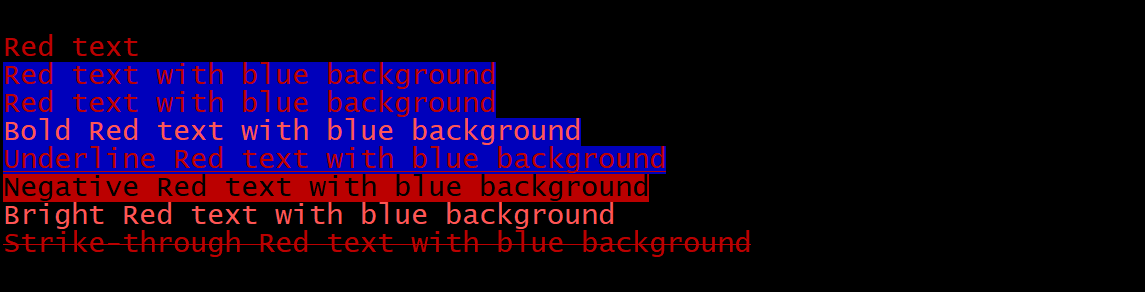
据此,我们可以做几个简单的实验:
bash
echo;echo
printf '\e[31mRed text\e[m\n'
printf '\e[31m\e[44mRed text with blue background\e[m\n'
printf '\e[31;44mRed text with blue background\e[m\n'
printf '\e[31;44;1mBold Red text with blue background\e[m\n'
printf '\e[31;44;4mUnderline Red text with blue background\e[m\n'
printf '\e[31;7mNegative Red text with blue background\e[m\n'
printf '\e[91mBright Red text with blue background\e[m\n'
printf '\e[31;9mStrike-through Red text with blue background\e[m\n'
echo;echo
输出如下:
以上的printf也可以替换为echo -en
高阶实验
在简单实验一节的表1:SGR属性表中,我们看到参数38和48支持256色。
在console_codes的man page中描述道:
Commands 38 and 48 require further arguments:
;5;x 256 color: values 0...15 are IBGR (black, red, green, ... white), 16...231 a 6x6x6 color cube, 232...255 a grayscale ramp
;2;r;g;b 24-bit color, r/g/b components are in the range 0...255
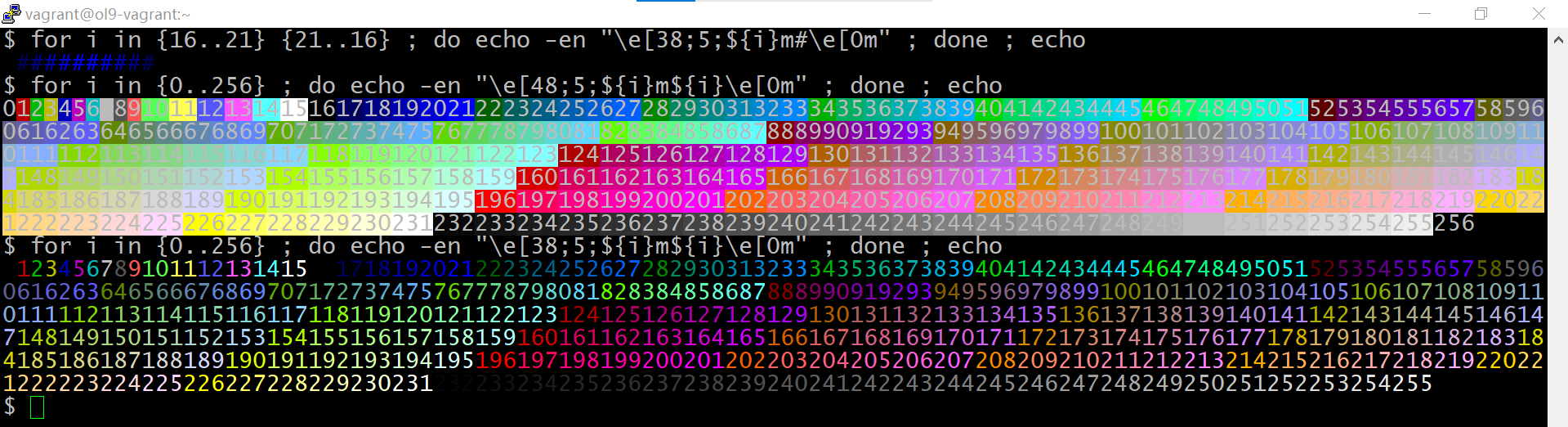
因此可利用其做一些复杂的演示:
bash
# 256色背景
for i in {0..256} ; do echo -en "\e[48;5;${i}m${i}\e[0m" ; done ; echo
# 256色前景
for i in {0..256} ; do echo -en "\e[38;5;${i}m${i}\e[0m" ; done ; echo
其输出如下:
以下脚本256colors.sh让输出排列更整齐:
bash
#!/bin/bash

declare -i width
declare bg_or_fg

if [[ $# == 0 ]]; then
        echo Usage: $0 width fg|bg
        exit 0
fi


width=$1
[[ $width == 0 ]] && width=16

if [[ $2 == "fg" ]]; then
        bgfgcode=38;
elif [[ $2 == "bg" ]]; then
        bgfgcode=48;
else
        bgfgcode=38;
fi


for i in {0..255}
do
        printf "\e[${bgfgcode};5;${i}m%4d\e[0m" $i
        (( (i + 1) % $width == 0 )) && echo
done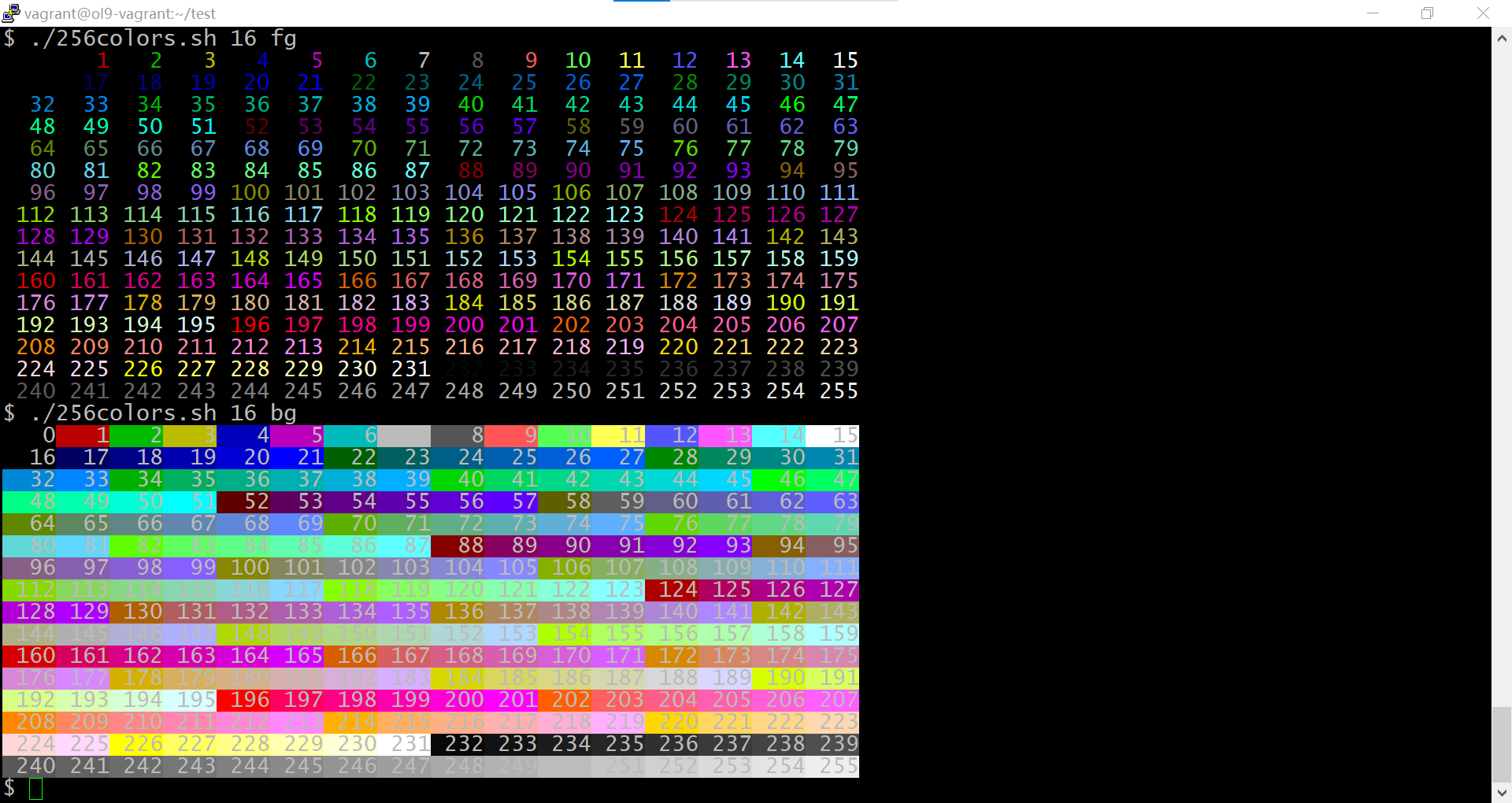
不过这个显示只是花哨而已,最正确的方式还是要参考Bash tips: Colors and formatting (ANSI/VT100 Control sequences)中的256-colors.sh。其代码核心部分如下:
bash
for fgbg in 38 48 ; do # Foreground / Background
    for color in {0..255} ; do # Colors
        # Display the color
        printf "\e[${fgbg};5;%sm  %3s  \e[0m" $color $color
        # Display 6 colors per lines
        if [ $((($color + 1) % 6)) == 4 ] ; then
            echo # New line
        fi
    done
    echo # New line
done
这其中有几个magic number,解读一下。
- 38和48分别表示前景和背景
- 6,是因为对于256色,16-231是6x6x6 color cube。因此6就是每行显示的颜色数
- 4, 是因为对于256色,0-15是BGR,为了保证颜色16在行首,首行显示4个颜色后就必须折行
这个效果就完美了。(为方便查看,我把纵向的输出并排放了)

这也方便你理解作者以下代码的含义了:
bash
# 渐变
for i in {16..21} {21..16} ; do echo -en "\e[38;5;${i}m#\e[0m" ; done ; echo
其他
颜色只是终端的能力之一,要拓展到终端层面,还可以看下terminfo, tput的帮助。
下面给出几个命令:
bash
$ echo $TERM
xterm
$ BOLD=$(tput bold)
$ echo "$BOLD"|od -bc
0000000 033 133 061 155 012
        033   [   1   m  \n
0000005
# 为何红色为1,请看terminfo(5) 的 Color Handling部分
$ RED=$(tput setaf 1)
$ echo "$RED"|od -bc
0000000 033 133 063 061 155 012
        033   [   3   1   m  \n
0000006
$ tput reset
$ tput init
# 显示红色
$ printf "\e${RED}red\e[m\n"
red
## 显示红色粗体
$ printf "\e${RED}\e${BOLD}red\e[m\n"
red
参考 man page
- console_codes
- infocmp
- tput
- terminfo
- dir_colors