【算法介绍】
使用纯OpenCvSharp部署YOLO26-CLS图像分类模型是一项复杂的任务,但可以通过以下步骤实现:
- 准备环境:首先,确保开发环境已安装OpenCvSharp和必要的.NET框架,如VS2019和.NET Framework 4.7.2。同时,需要YOLOv11的ONNX模型文件、配置文件(描述模型架构)和类别名称文件。
- 加载模型:使用OpenCvSharp的DNN模块加载YOLO26-CLS的ONNX模型。这通常涉及将模型文件路径传递给DNN模块的相关函数。
- 预处理图像:对输入图像进行预处理,如调整大小、归一化等,以满足模型的输入要求。
- 推理与后处理:将预处理后的图像输入到模型中,获取分类结果。对结果进行后处理,包括解析输出、应用非极大值抑制(如果需要)等,以获得最终的分类结果。
- 显示结果:将分类结果显示在界面上,可以通过OpenCvSharp的图像显示功能实现。
值得注意的是,YOLO26是一个复杂的模型,其输出可能包含多个层的信息,因此需要仔细解析模型输出,并根据YOLO26的具体实现进行后处理。此外,由于OpenCvSharp的DNN模块对ONNX的支持可能有限,某些YOLO26的特性可能无法在OpenCvSharp中直接实现。在这种情况下,可能需要寻找替代方案,如使用其他深度学习库来加载和运行模型,并通过C#接口与这些库进行交互。
总之,使用纯OpenCvSharp部署YOLO26-CLS图像分类模型需要深入理解YOLO26的模型架构、OpenCvSharp的DNN模块以及ONNX格式。
【效果展示】
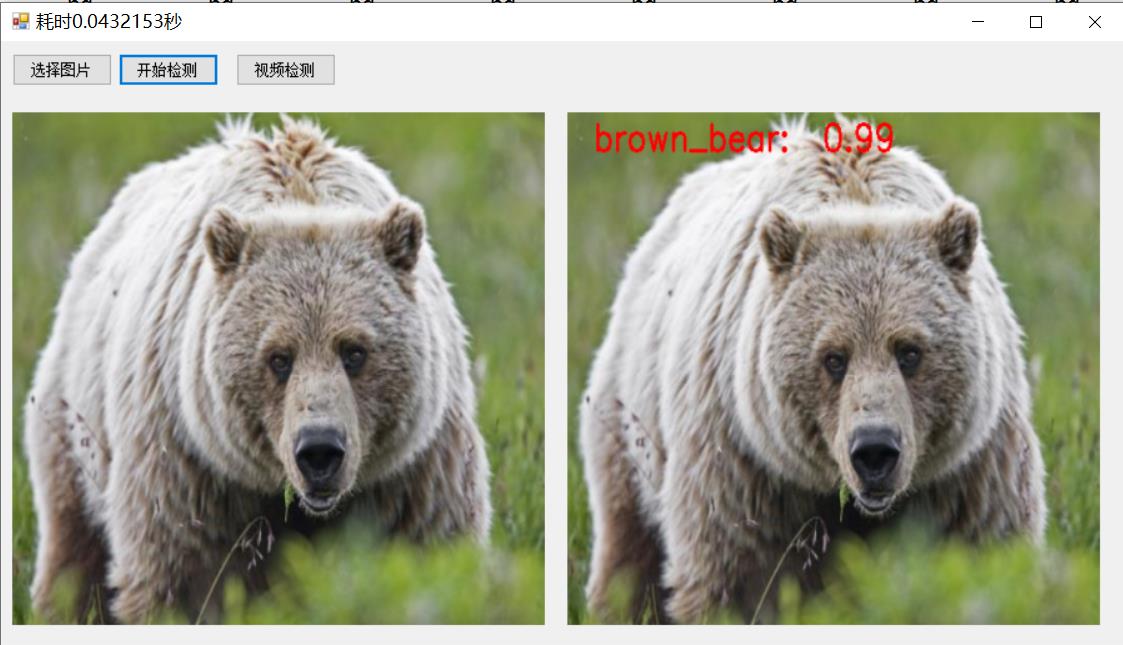
【界面设计和调用模型代码】
using System;
using System.Collections.Generic;
using System.ComponentModel;
using System.Data;
using System.Diagnostics;
using System.Drawing;
using System.Linq;
using System.Text;
using System.Threading.Tasks;
using System.Windows.Forms;
using OpenCvSharp;

namespace FIRC
{
    public partial class Form1 : Form
    {
        Mat src = new Mat();
        Yolo26ClsManager ym = new Yolo26ClsManager();
        public Form1()
        {
            InitializeComponent();
        }

        private void button1_Click(object sender, EventArgs e)
        {
            OpenFileDialog openFileDialog = new OpenFileDialog();
            openFileDialog.Filter = "图文件(*.*)|*.jpg;*.png;*.jpeg;*.bmp";
            openFileDialog.RestoreDirectory = true;
            openFileDialog.Multiselect = false;
            if (openFileDialog.ShowDialog() == DialogResult.OK)
            {

                src = Cv2.ImRead(openFileDialog.FileName);
                pictureBox1.Image = OpenCvSharp.Extensions.BitmapConverter.ToBitmap(src);


            }


        }

        private void button2_Click(object sender, EventArgs e)
        {
            if(pictureBox1.Image==null)
            {
                return;
            }
            Stopwatch sw = new Stopwatch();
            sw.Start();
            var result = ym.Inference(src);
            sw.Stop();
            this.Text = "耗时" + sw.Elapsed.TotalSeconds + "秒";
            var resultMat = ym.DrawImage(src,result);
            pictureBox2.Image= OpenCvSharp.Extensions.BitmapConverter.ToBitmap(resultMat); //Mat转Bitmap
        }

        private void Form1_Load(object sender, EventArgs e)
        {
            ym.LoadWeights(Application.StartupPath+ "\\weights\\yolo26n-cls.onnx", Application.StartupPath + "\\weights\\labels.txt");

        }

        private void btn_video_Click(object sender, EventArgs e)
        {
            var detector = new Yolo26ClsManager();
            detector.LoadWeights(Application.StartupPath + "\\weights\\yolo26n-cls.onnx", Application.StartupPath + "\\weights\\labels.txt");
            VideoCapture capture = new VideoCapture(0);
            if (!capture.IsOpened())
            {
                Console.WriteLine("video not open!");
                return;
            }
            Mat frame = new Mat();
            var sw = new Stopwatch();
            int fps = 0;
            while (true)
            {

                capture.Read(frame);
                if (frame.Empty())
                {
                    Console.WriteLine("data is empty!");
                    break;
                }
                sw.Start();
                var result = detector.Inference(frame);
                var resultImg = detector.DrawImage(frame,result);
                sw.Stop();
                fps = Convert.ToInt32(1 / sw.Elapsed.TotalSeconds);
                sw.Reset();
                Cv2.PutText(resultImg, "FPS=" + fps, new OpenCvSharp.Point(30, 30), HersheyFonts.HersheyComplex, 1.0, new Scalar(255, 0, 0), 3);
                //显示结果
                Cv2.ImShow("Result", resultImg);
                int key = Cv2.WaitKey(10);
                if (key == 27)
                    break;
            }

            capture.Release();

        }
    }
}
【测试环境】
vs2019
net framework4.7.2
opencvsharp4.8.0
使用opencv作为推理引擎,CPU推理无需安装cuda+cudnn
源码地址:https://download.csdn.net/download/FL1623863129/92564673