一、Windows的word转pdf功能
使用的是documents4j转换,maven及版本如下:
java
<dependency>
            <groupId>com.documents4j</groupId>
            <artifactId>documents4j-local</artifactId>
            <version>1.0.3</version>

        </dependency>
        <dependency>
            <groupId>com.documents4j</groupId>
            <artifactId>documents4j-transformer-msoffice-word</artifactId>
            <version>1.0.3</version>
        </dependency>
        <dependency>
            <groupId>org.freemarker</groupId>
            <artifactId>freemarker</artifactId>
            <version>2.3.33</version>
        </dependency>
1、先封装业务参数
java
# 抽出一个封装方法
private void fill(Map<String, Object> templateParam, String key, Object value) {
    if(StringUtils.isEmpty(key)){
        throw new RuntimeException("key不能为空");
    }
    templateParam.put("${"+key+"}", value != null ? value : "");
}

# 业务参数示例
// 备注
if(StringUtils.hasLength(sysInspection.getRemarks())){
    fill(templateParam, "remarks", sysInspection.getRemarks());
}
2、调用word转pdf方法(实际这里的参数传输的是word模板填充模板参数后生成新的word文件的信息)
java
# 注释在方法中会写
String url = wordUtil.generatePdf(
    "E:\\WXWork\\1688857451467088\\Cache\\File\\2026-01\\",
    "处方单-样例.docx",
    templateParam,
    "处方单-"+sysInspection.getNickName(),
    "E:\\WXWork\\1688857451467088\\Cache\\File\\2026-01\\");
3、方法内部实现(主要是两个util工具类,先作解释和可能会修改的地方,将两个文件放在文章最后)
java
/**
     * 生成PDF文件
     * @param basePackagePath 模板文件所在的包路径
     * @param templateFileName 模板文件名
     * @param templateParam 模板参数
     * @param fileName  填充参数后的word文件名
     * @param saveDirectory 填充参数后的word保存文件目录
     * @return
     */
    public String generatePdf(String basePackagePath, String templateFileName, Map<String,Object> templateParam, String fileName, String saveDirectory) {
        try {
            fillTemplate(basePackagePath+templateFileName, saveDirectory+fileName+".docx", templateParam);
            String filePath = saveDirectory + fileName + ".docx";
            File file = new File(filePath);

            // 检查文件是否存在
            if (!file.exists()) {
                throw new FileNotFoundException("文件不存在: " + filePath);
            }

            // 读取文件内容
            byte[] fileContent = new byte[(int) file.length()];
            try (FileInputStream fis = new FileInputStream(file)) {
                fis.read(fileContent);
            }

            String test = pdfUtils.test(fileName + ".docx");
            return test;
        } catch (IOException e) {
            log.error("生成pdf异常,异常原因:{}", e.getMessage(), e);
            throw new RuntimeException("生成pdf异常,异常原因:" + e.getMessage());
        }
    }
4、test()方法的改动
java
    public String test(String fileName){
        // windows环境使用 路径换成填充后的word路径即可
//        String url = "file:///E:\\WXWork\\1688857451467088\\Cache\\File\\2026-01\\"+fileName;
//        String filePath = "E:\\WXWork\\1688857451467088\\Cache\\File\\2026-01";
//        String result = wordToPdf(url,filePath, fileName);
        // linux环境使用 路径换成填充后的word路径即可
        String filePath = "/usr/local/project/template/";
        String result = wordToPdf(filePath, fileName);
        log.info("word转pdf返回结果:" + result);
        return result;
    }
5、工具类
代码层面差不多就是这样,下面把工具类直接贴出来:
PdfUilts工具类
java
package com.ruoyi.web.controller.tool;

import com.documents4j.api.DocumentType;
import com.documents4j.api.IConverter;
import com.documents4j.job.LocalConverter;
import com.ruoyi.system.utils.util.ObsUploadUtil;
import lombok.extern.slf4j.Slf4j;
import org.springframework.beans.factory.annotation.Autowired;
import org.springframework.mock.web.MockMultipartFile;
import org.springframework.stereotype.Component;
import org.springframework.web.multipart.MultipartFile;

import java.io.*;
import java.net.URL;
import java.nio.charset.StandardCharsets;
import java.nio.file.Files;
import java.util.Arrays;
import java.util.List;
import java.util.Map;
import java.util.concurrent.TimeUnit;

@Slf4j
@Component
public class PdfUtils {

    public  String wordToPdf(String url,String filePath, String fileName) {
        try {
            DocumentType documentType = DocumentType.DOC;
            if(url.contains(".docx")){
                documentType = DocumentType.DOCX;
            }
            if(url.contains(".doc")){
                documentType = DocumentType.DOC;
            }
            if(url.contains(".xlsx")){
                documentType = DocumentType.XLSX;
            }else {
                if(url.contains(".xls")){
                    documentType = DocumentType.XLS;
                }
            }
            InputStream inputStream = new URL(url).openStream();
            ByteArrayOutputStream stream = new ByteArrayOutputStream();
            IConverter converter = LocalConverter.builder().build();
            converter.convert(inputStream)
                    .as(documentType)
                    .to(stream)
                    .as(DocumentType.PDF).execute();

            //上传图片
            byte2File(stream.toByteArray(),filePath + "/pdf",fileName.substring(0,fileName.lastIndexOf(".")) + ".pdf");
            MultipartFile multipartFile = convertToMultipartFile(stream,fileName.substring(0,fileName.lastIndexOf(".")) );
            String s = ObsUploadUtil.obsUploadQrCode(multipartFile,fileName.substring(0,fileName.lastIndexOf(".")) + ".pdf");
            stream.close();
            inputStream.close();
            return s;
        } catch (Exception e) {
            e.printStackTrace();
        }
        return null;
    }
    /**
     * word 转 pdf
     *
     */
    public String wordToPdf(String filePath, String fileName) {
        try {
            // 确保路径正确性
            String inputFile = new File(filePath, fileName).getAbsolutePath();
            String outputDir = new File(filePath, "pdf").getAbsolutePath();

            // 创建输出目录
            new File(outputDir).mkdirs();

            // 使用完整的转换参数
            List<String> command = Arrays.asList(
                    "/usr/bin/libreoffice",  // 使用完整路径
                    "--headless",
                    "--norestore",
                    "--convert-to",
                    "pdf:writer_pdf_Export:PDFExport{" +
                            "EmbedStandardFonts=1;" +
                            "EmbedFonts=1;" +
                            "EmbedOnlyUsedFonts=0;" +
                            "UseTaggedPDF=1" +
                            "}",
                    "--outdir",
                    outputDir,
                    inputFile
            );

            // 创建进程构建器
            ProcessBuilder pb = new ProcessBuilder(command);

            // 设置环境变量
            Map<String, String> env = pb.environment();
            env.put("LC_ALL", "zh_CN.UTF-8");
            env.put("LANG", "zh_CN.UTF-8");
            env.put("LANGUAGE", "zh_CN.UTF-8");

            // 重定向错误流到标准输出
            pb.redirectErrorStream(true);

            // 启动进程
            Process process = pb.start();

            // 读取输出
            StringBuilder output = new StringBuilder();
            try (BufferedReader reader = new BufferedReader(
                    new InputStreamReader(process.getInputStream(), StandardCharsets.UTF_8))) {
                String line;
                while ((line = reader.readLine()) != null) {
                    output.append(line).append("\n");
                    System.out.println(line);
                }
            }

            // 等待进程完成,设置超时
            if (!process.waitFor(120, TimeUnit.SECONDS)) {
                process.destroyForcibly();
                throw new RuntimeException("转换超时");
            }

            int exitCode = process.exitValue();
            if (exitCode != 0) {
                throw new RuntimeException("转换失败,退出码:" + exitCode + "\n输出:" + output);
            }

            // 检查生成的PDF文件
            String pdfFileName = fileName.substring(0, fileName.lastIndexOf(".")) + ".pdf";
            File pdfFile = new File(outputDir, pdfFileName);

            if (!pdfFile.exists() || pdfFile.length() == 0) {
                throw new RuntimeException("PDF文件未生成或为空");
            }
            String absolutePath = pdfFile.getAbsolutePath();

            MultipartFile file = convertFileToMultipartFile(pdfFile);
//            String s = tencentCosUtil.upLoadFile(multipartFile,"/wordToPdf");
            String url = ObsUploadUtil.obsUpload(file);
            return url;

        } catch (Exception e) {
            throw new RuntimeException("PDF转换失败: " + e.getMessage(), e);
        }
    }

    public MultipartFile convertFileToMultipartFile(File file) throws IOException {
        // 读取文件内容到字节数组
        byte[] fileContent = Files.readAllBytes(file.toPath());

        // 创建 MultipartFile 对象
        MultipartFile multipartFile = new MockMultipartFile(
                file.getName(),       // 文件名
                file.getName(),       // 原始文件名
                "application/pdf",  // 内容类型,根据实际情况调整
                fileContent           // 文件内容
        );

        return multipartFile;
    }

    // 在使用前检查和配置环境
    public static void setupEnvironment() {
        try {
            // 1. 检查LibreOffice安装
            checkLibreOffice();

            // 2. 检查和安装字体
            installFonts();

            // 3. 配置字体
            configureFonts();

            // 4. 验证环境变量
            checkEnvironment();

        } catch (Exception e) {
            throw new RuntimeException("环境设置失败: " + e.getMessage(), e);
        }
    }

    private static void checkLibreOffice() throws IOException, InterruptedException {
        Process process = Runtime.getRuntime().exec("which libreoffice");
        if (process.waitFor() != 0) {
            throw new RuntimeException("LibreOffice未安装");
        }
    }

    private static void installFonts() throws IOException, InterruptedException {
        // 创建字体安装脚本
        String scriptContent =
                "#!/bin/bash\n" +
                        "apt-get update\n" +
                        "apt-get install -y fonts-wqy-zenhei fonts-wqy-microhei fonts-arphic-ukai fonts-arphic-uming\n" +
                        "fc-cache -fv\n";

        File script = new File("/tmp/install_fonts.sh");
        Files.write(script.toPath(), scriptContent.getBytes());
        script.setExecutable(true);

        // 执行脚本
        Process process = Runtime.getRuntime().exec("sudo /tmp/install_fonts.sh");
        process.waitFor();

        // 清理脚本
        script.delete();
    }

    private static void configureFonts() throws IOException {
        // 创建字体配置文件
        String fontConfig =
                "<?xml version=\"1.0\"?>\n" +
                        "<!DOCTYPE fontconfig SYSTEM \"fonts.dtd\">\n" +
                        "<fontconfig>\n" +
                        "  <match target=\"pattern\">\n" +
                        "    <test name=\"family\"><string>serif</string></test>\n" +
                        "    <edit name=\"family\" mode=\"prepend\">\n" +
                        "      <string>WenQuanYi Zen Hei</string>\n" +
                        "    </edit>\n" +
                        "  </match>\n" +
                        "  <match target=\"pattern\">\n" +
                        "    <test name=\"family\"><string>sans-serif</string></test>\n" +
                        "    <edit name=\"family\" mode=\"prepend\">\n" +
                        "      <string>WenQuanYi Zen Hei</string>\n" +
                        "    </edit>\n" +
                        "  </match>\n" +
                        "</fontconfig>";

        // 写入配置文件
        File configFile = new File(System.getProperty("user.home") + "/.fonts.conf");
        Files.write(configFile.toPath(), fontConfig.getBytes());
    }

    private static void checkEnvironment() {
        // 检查环境变量
        String[] requiredVars = {"LANG", "LC_ALL", "LANGUAGE"};
        for (String var : requiredVars) {
            String value = System.getenv(var);
            if (value == null || !value.contains("zh_CN")) {
                System.err.println("警告: " + var + " 环境变量未正确设置");
            }
        }
    }

    public static MultipartFile convertToMultipartFile(ByteArrayOutputStream baos, String fileName) throws IOException {
        // 创建一个临时文件
        File tempFile = File.createTempFile(fileName, ".pdf");

        // 将ByteArrayOutputStream中的数据写入临时文件
        try (FileOutputStream fos = new FileOutputStream(tempFile)) {
            baos.writeTo(fos);
        } catch (IOException e) {
            e.printStackTrace();
        }

        // 创建一个MultipartFile对象
        return new MockMultipartFile(
                fileName + ".pdf",          // 参数名称
                fileName + ".pdf", // 文件名
                "application/pdf", // 内容类型
                Files.readAllBytes(tempFile.toPath()) // 文件内容
        );
    }

    /**
     * file转byte
     */
    public static byte[] file2byte(File file){
        byte[] buffer = null;
        try{
            FileInputStream fis = new FileInputStream(file);
            ByteArrayOutputStream bos = new ByteArrayOutputStream();
            byte[] b = new byte[1024];
            int n;
            while ((n = fis.read(b)) != -1)
            {
                bos.write(b, 0, n);
            }
            fis.close();
            bos.close();
            buffer = bos.toByteArray();
        }catch (FileNotFoundException e){
            e.printStackTrace();
        }
        catch (IOException e){
            e.printStackTrace();
        }
        return buffer;
    }

    /**
     * byte 转file
     */
    public static File byte2File(byte[] buf, String filePath, String fileName){
        BufferedOutputStream bos = null;
        FileOutputStream fos = null;
        OutputStreamWriter osw = null;
        File file = null;
        try{
            File dir = new File(filePath+"/");
            if (!dir.exists()){
                dir.mkdirs();
            }
            file = new File(filePath +File.separator + fileName);
            fos = new FileOutputStream(file);
            bos = new BufferedOutputStream(fos);
//            osw = new OutputStreamWriter(fos, StandardCharsets.UTF_8);
            bos.write(buf);
        }catch (Exception e){
            e.printStackTrace();
        }
        finally{
            if (bos != null){
                try{
                    bos.close();
                }catch (IOException e){
                    e.printStackTrace();
                }
            }
            if (fos != null){
                try{
                    fos.close();
                }catch (IOException e){
                    e.printStackTrace();
                }
            }
        }
        return file;
    }
    /**
     * multipartFile转File
     **/
    public static File multipartFile2File(MultipartFile multipartFile){
        File file = null;
        if (multipartFile != null){
            try {
                file= File.createTempFile("tmp", null);
                multipartFile.transferTo(file);
                System.gc();
                file.deleteOnExit();
            }catch (Exception e){
                e.printStackTrace();
                log.warn("multipartFile转File发生异常:"+e);
            }
        }
        return file;
    }


    public String test(String fileName){
        // windows
//        String url = "file:///E:\\WXWork\\1688857451467088\\Cache\\File\\2026-01\\"+fileName;
//        String filePath = "E:\\WXWork\\1688857451467088\\Cache\\File\\2026-01";
//        String result = wordToPdf(url,filePath, fileName);
        // linux
        String filePath = "/usr/local/project/template/";
        String result = wordToPdf(filePath, fileName);
        log.info("word转pdf返回结果:" + result);
        return result;
    }

}
WordUtil工具类
java
package com.ruoyi.web.controller.tool;

import com.ruoyi.common.utils.StringUtils;
import com.ruoyi.system.utils.util.ObsUploadUtil;
import freemarker.cache.ClassTemplateLoader;
import freemarker.template.Configuration;
import freemarker.template.Template;
import freemarker.template.TemplateException;
import lombok.extern.slf4j.Slf4j;
import net.coobird.thumbnailator.Thumbnails;
import org.apache.poi.util.Units;
import org.apache.poi.xwpf.usermodel.*;
import org.springframework.mock.web.MockMultipartFile;
import org.springframework.stereotype.Component;
import org.springframework.web.multipart.MultipartFile;

import javax.annotation.Resource;
import java.io.*;
import java.nio.file.Files;
import java.util.*;
import java.util.regex.Matcher;
import java.util.regex.Pattern;

@Slf4j
@Component
public class WordUtil {

    /**
     * 基于模板生成 Word 文档
     *
     * @param basePackagePath  resources 目录下模板所在包路径
     * @param templateFileName 模板文件名
     * @param templateParam    模板参数
     * @param fileName         文件名
     */
    @Resource
    private PdfUtils pdfUtils;
    public static void fillTemplate(String templatePath, String outputPath,Map<String, Object> dataMap) {
        try (FileInputStream fis = new FileInputStream(templatePath)) {
            // 设置默认编码为UTF-8
            System.setProperty("file.encoding", "UTF-8");

            XWPFDocument document = new XWPFDocument(fis);
            XWPFParagraph pic = document.createParagraph();
            Base64.Decoder decoder = Base64.getDecoder();
            // 处理段落
            for (XWPFParagraph paragraph : document.getParagraphs()) {
                replaceParagraph(paragraph, dataMap);
            }

            // 处理表格
            for (XWPFTable table : document.getTables()) {
                for (XWPFTableRow row : table.getRows()) {
                    for (XWPFTableCell cell : row.getTableCells()) {
                        for (XWPFParagraph paragraph : cell.getParagraphs()) {
                            replaceParagraph(paragraph, dataMap);
                        }
                    }
                }
            }

            // 使用UTF-8编码保存文件
            try (FileOutputStream fos = new FileOutputStream(outputPath)) {
                document.write(fos);
            }

            System.err.println("模板填充完成!文件保存在: " + outputPath);

        } catch (Exception e) {
            e.printStackTrace();
        }
    }

    private static void replaceParagraph(XWPFParagraph paragraph, Map<String, Object> dataMap) {
        // 获取段落中所有runs
        List<XWPFRun> runs = paragraph.getRuns();
        if (runs == null || runs.isEmpty()) return;

        // 首先合并所有runs的文本,以便正确识别占位符
        StringBuilder fullText = new StringBuilder();
        for (XWPFRun run : runs) {
            String text = run.getText(0);
            if (text != null) {
                fullText.append(text);
            }
        }

        String paragraphText = fullText.toString();

        // 使用正则表达式查找所有占位符,包括括号内的
        Pattern pattern = Pattern.compile("\\$\\{[^}]+\\}|\\([^)]*\\$\\{[^}]+\\}[^)]*\\)");
        Matcher matcher = pattern.matcher(paragraphText);

        List<ReplacementInfo> replacements = new ArrayList<>();

        // 收集所有需要替换的信息
        while (matcher.find()) {
            String matched = matcher.group();
            int start = matcher.start();
            int end = matcher.end();

            // 找出涉及到的runs
            int startRun = -1;
            int endRun = -1;
            int currentPos = 0;

            for (int i = 0; i < runs.size(); i++) {
                XWPFRun run = runs.get(i);
                String runText = run.getText(0);
                if (runText == null) continue;

                int runLength = runText.length();
                if (startRun == -1 && currentPos + runLength > start) {
                    startRun = i;
                }
                if (currentPos + runLength >= end) {
                    endRun = i;
                    break;
                }
                currentPos += runLength;
            }

            if (startRun != -1 && endRun != -1) {
                // 处理括号内的占位符
                String replacement = processPlaceholder(matched, dataMap);
                replacements.add(new ReplacementInfo(startRun, endRun, matched, replacement));
            }
        }

        // 从后向前替换,避免位置变化影响
        Collections.sort(replacements, (a, b) -> b.startRun - a.startRun);

        for (ReplacementInfo info : replacements) {
            replaceRunRange(paragraph, info);
        }
    }

    private static String processPlaceholder(String text, Map<String, Object> dataMap) {
        // 处理括号内的占位符
        Pattern placeholderPattern = Pattern.compile("\\$\\{([^}]+)\\}");
        Matcher matcher = placeholderPattern.matcher(text);

        StringBuffer result = new StringBuffer();
        while (matcher.find()) {
            String placeholder = matcher.group(0); // 完整的占位符
            String key = matcher.group(1); // 占位符中的键
            String replacement = Objects.nonNull(dataMap.get("${" + key + "}"))?String.valueOf(dataMap.get("${" + key + "}")):"";

            if (replacement != null) {
                // 如果在括号内,保留括号
                if (text.startsWith("(") && text.endsWith(")")) {
                    matcher.appendReplacement(result, replacement);
                } else {
                    matcher.appendReplacement(result, Matcher.quoteReplacement(replacement));
                }
            }
        }
        matcher.appendTail(result);

        return result.toString();
    }

    private static void replaceRunRange(XWPFParagraph paragraph, ReplacementInfo info) {
        List<XWPFRun> runs = paragraph.getRuns();

        // 保存第一个run的样式
        XWPFRun styleRun = runs.get(info.startRun);
        RunStyle style = new RunStyle(styleRun);

        // 删除范围内的所有runs
        for (int i = info.endRun; i >= info.startRun; i--) {
            paragraph.removeRun(i);
        }

        // 创建新的run并设置文本
        XWPFRun newRun = paragraph.insertNewRun(info.startRun);
        newRun.setText(info.replacementText);

        // 应用样式
        style.applyStyle(newRun);
    }

    public String generate(String basePackagePath, String templateFileName, Object templateParam, String fileName, String saveDirectory) {
        try {
            // 创建 Freemarker 的 Configuration 对象,设置默认的不兼容改进选项
            Configuration configuration = new Configuration(Configuration.DEFAULT_INCOMPATIBLE_IMPROVEMENTS);
            configuration.setDefaultEncoding("utf-8");
            // 设置模板加载器,加载模板文件
            configuration.setTemplateLoader(new ClassTemplateLoader(getClass(), basePackagePath));
            Template t = configuration.getTemplate(templateFileName, "utf-8");

            // 使用 URLEncoder 对文件名进行编码,以防止中文文件名在不同浏览器和操作系统下出现乱码问题
//            String encodedFileName = URLEncoder.encode(fileName + "_" + System.currentTimeMillis(), "utf-8");
            String encodedFileName =fileName ;

            // 定义保存文件的路径
            File saveDir = new File(saveDirectory);
            if (!saveDir.exists()) {
                saveDir.mkdirs();
            }

            // 定义文件名
            String filePath = saveDir.getAbsolutePath() + File.separator + encodedFileName + ".doc";

            // 创建 Writer 对象,用于将生成的文档写到文件中,缓存区大小设为 10KB
            Writer out = new BufferedWriter(new FileWriter(filePath), 10240);

            // 将模型数据与模板结合生成 Word 文档,写入到 Writer 对象中
            t.process(templateParam, out);
            out.close();

            File file = new File(filePath);

            // 检查文件是否存在
            if (!file.exists()) {
                throw new FileNotFoundException("文件不存在: " + filePath);
            }

            // 读取文件内容
            byte[] fileContent = new byte[(int) file.length()];
            try (FileInputStream fis = new FileInputStream(file)) {
                fis.read(fileContent);
            }
            MultipartFile mockMultipartFile = new MockMultipartFile(encodedFileName+".doc", fileContent);
            String url = ObsUploadUtil.obsUploadQrCode(mockMultipartFile,"/wordGenerate");
            return url;
        } catch (IOException | TemplateException e) {
            log.error("生成Word文档异常,异常原因:{}", e.getMessage(), e);
            throw new RuntimeException("生成Word文档异常,异常原因:" + e.getMessage());
        }
    }

    /**
     * 生成PDF文件
     * @param basePackagePath 模板文件所在的包路径
     * @param templateFileName 模板文件名
     * @param templateParam 模板参数
     * @param fileName  填充参数后的word文件名
     * @param saveDirectory 填充参数后的word保存文件目录
     * @return
     */
    public String generatePdf(String basePackagePath, String templateFileName, Map<String,Object> templateParam, String fileName, String saveDirectory) {
        try {
            fillTemplate(basePackagePath+templateFileName, saveDirectory+fileName+".docx", templateParam);
            String filePath = saveDirectory + fileName + ".docx";
            File file = new File(filePath);

            // 检查文件是否存在
            if (!file.exists()) {
                throw new FileNotFoundException("文件不存在: " + filePath);
            }

            // 读取文件内容
            byte[] fileContent = new byte[(int) file.length()];
            try (FileInputStream fis = new FileInputStream(file)) {
                fis.read(fileContent);
            }

            String test = pdfUtils.test(fileName + ".docx");
//            MultipartFile mockMultipartFile = new MockMultipartFile(encodedFileName+".doc", fileContent);
//            String s = ObsUploadUtil.obsUpload(mockMultipartFile);
            return test;
        } catch (IOException e) {
            log.error("生成pdf异常,异常原因:{}", e.getMessage(), e);
            throw new RuntimeException("生成pdf异常,异常原因:" + e.getMessage());
        }
    }

    private static class ReplacementInfo {
        int startRun;
        int endRun;
        String originalText;
        String replacementText;

        ReplacementInfo(int startRun, int endRun, String originalText, String replacementText) {
            this.startRun = startRun;
            this.endRun = endRun;
            this.originalText = originalText;
            this.replacementText = replacementText;
        }
    }

    // 用于保存和恢复运行样式的辅助类
    private static class RunStyle {
        String fontFamily;
        int fontSize;
        boolean bold;
        boolean italic;
        String color;
        UnderlinePatterns underline;

        RunStyle(XWPFRun run) {
            this.fontFamily = run.getFontFamily();
            this.fontSize = run.getFontSize();
            this.bold = run.isBold();
            this.italic = run.isItalic();
            this.color = run.getColor();
            this.underline = run.getUnderline();
        }

        void applyStyle(XWPFRun run) {
            if (fontFamily != null) {
                run.setFontFamily(fontFamily);
                run.setFontFamily(fontFamily, XWPFRun.FontCharRange.eastAsia);
            }
            if (fontSize != -1) {
                run.setFontSize(fontSize);
            }
            run.setBold(bold);
            run.setItalic(italic);
            if (color != null) {
                run.setColor(color);
            }
            if (underline != null) {
                run.setUnderline(underline);
            }
        }
    }


}
二、Linux的word转pdf实现
相比较于windows的实现,linux系统多了一些步骤,在业务的实现上大差不差,上述代码包含了两类系统的功能实现,环境有所差异,如下内容解释linux需要的环境部署
1、下载linreoffice环境
java
# 这里是centos系统,使用yum直接下载就行
yum install libreoffice
2、设置语言为中文(否则存在乱码情况)
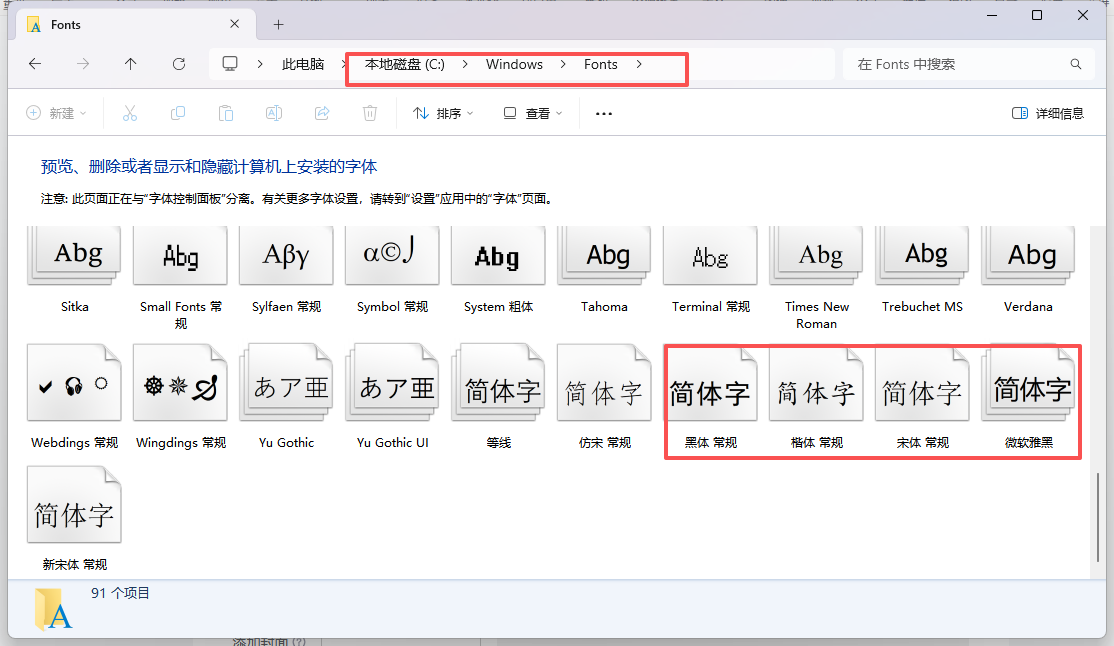
直接将windows的字体拷贝到linux的/usr/share/fonts/chinese路径下,没有chinese文件夹就创建
3、执行权限设置,下载插件
java
# 权限设置
chmod -R 755 /usr/share/fonts/chinese

# 下载
yum -y install ttmkfdir
ttmkfdir -e /usr/share/X11/fonts/encodings/encodings.dir
4、编辑字体配置,将我们的字体路径配置进去
java
vi /etc/fonts/fonts.conf配置内容
java
<dir>/usr/share/fonts/chinese</dir>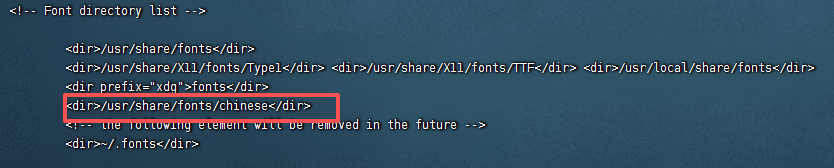
5、刷新系统字体的缓存
java
# 缓存刷新
fc-cache
6、 查询字体信息
java
fc-list :lang=zh
然后就可以开始执行业务流程,进行word转pdf的导出,且可填充参数
三、pdf的图片处理
1、模板处理图片
导出pdf时可能会遇到一些图片处理,多加一个url的图片链接参数,在方法里面进行流处理,文件地址换成自己已存在的操作系统路径即可
java
public static void fillTemplate(String templatePath, String outputPath,Map<String, Object> dataMap,String url) {
        try (FileInputStream fis = new FileInputStream(templatePath)) {
            // 设置默认编码为UTF-8
            System.setProperty("file.encoding", "UTF-8");

            XWPFDocument document = new XWPFDocument(fis);
            XWPFParagraph pic = document.createParagraph();
            Base64.Decoder decoder = Base64.getDecoder();
            if(StringUtils.isNotEmpty(url)){
                byte[] imageByte = decoder.decode(url);
                InputStream stream = new ByteArrayInputStream(imageByte);
//            File tempFile = FileUtil.createTempFile("/usr/local/project/file/temp", ".jpg", true);
                File tempFile = File.createTempFile("/usr/local/project/file/temp", ".jpg");
                tempFile.deleteOnExit(); // 程序结束时删除文件

                try (OutputStream out = Files.newOutputStream(tempFile.toPath());
                     InputStream in = stream) {
                    Thumbnails.of(in).scale(0.8).rotate(270).outputFormat("jpg").toOutputStream(out);
                    byte[] buffer = new byte[1024];
                    int length;
                    // 从原始流读取数据并写入临时文件
                    while ((length = in.read(buffer)) > 0) {
                        out.write(buffer, 0, length);
                    }
                }

                //处理图片
                for (XWPFParagraph paragraph : document.getParagraphs()) {
                    List<XWPFRun> runs = paragraph.getRuns();
                    for (XWPFRun run : runs) {
                        String text = run.getText(0);
                        if (text != null && text.contains("picture")) {
                            run.setText("", 0); // 清除占位符文本
                            run.addPicture(
                                    new FileInputStream(tempFile), XWPFDocument.PICTURE_TYPE_JPEG,
                                    tempFile.getName(),
                                    Units.toEMU(60),
                                    Units.toEMU(30)); // 插入图片
                        }
                    }
                }
            }

            // 处理段落
            for (XWPFParagraph paragraph : document.getParagraphs()) {
                replaceParagraph(paragraph, dataMap);
            }

            // 处理表格
            for (XWPFTable table : document.getTables()) {
                for (XWPFTableRow row : table.getRows()) {
                    for (XWPFTableCell cell : row.getTableCells()) {
                        for (XWPFParagraph paragraph : cell.getParagraphs()) {
                            replaceParagraph(paragraph, dataMap);
                        }
                    }
                }
            }

            // 使用UTF-8编码保存文件
            try (FileOutputStream fos = new FileOutputStream(outputPath)) {
                document.write(fos);
            }

            System.out.println("模板填充完成!文件保存在: " + outputPath);

        } catch (Exception e) {
            e.printStackTrace();
        }
    }