在 腾讯Kuikly 跨平台框架中实现设备信息检测(支持鸿蒙)
前言
Kuikly 是腾讯推出的基于 Kotlin Multiplatform 的跨平台 UI 框架,支持 Android、iOS、HarmonyOS、Web、小程序和 macOS 等多个平台。本文将详细介绍如何在 Kuikly 框架中实现一个首页,显示 "Hello World" 并检测当前运行设备的详细信息。
一、项目背景
在跨平台开发中,了解当前运行设备的平台信息、系统版本、屏幕尺寸等参数对于适配和调试非常重要。本文通过创建一个简单的首页示例,展示如何:
- 创建 Kuikly 页面
- 使用 Kuikly DSL 构建 UI
- 获取和显示设备信息
- 配置多平台默认页面
二、实现步骤
2.1 创建首页页面类
首先,在 demo/src/commonMain/kotlin/com/tencent/kuikly/demo/pages/ 目录下创建 HomePage.kt 文件:
kotlin
package com.tencent.kuikly.demo.pages

import com.tencent.kuikly.core.annotations.Page
import com.tencent.kuikly.core.base.Color
import com.tencent.kuikly.core.base.ViewBuilder
import com.tencent.kuikly.core.utils.PlatformUtils
import com.tencent.kuikly.core.views.Text
import com.tencent.kuikly.core.views.View
import com.tencent.kuikly.demo.pages.base.BasePager

/**
 * 首页 - 显示 Hello World 和设备信息
 */
@Page("HomePage")
internal class HomePage : BasePager() {

    override fun body(): ViewBuilder {
        // 页面实现
    }
}
关键点说明:
@Page("HomePage"):使用@Page注解注册页面,"HomePage"是页面名称,用于路由跳转BasePager:继承自 Kuikly 的基础页面类,提供了页面生命周期和常用功能body():必须实现的方法,返回页面 UI 结构的闭包
2.2 获取设备信息
在 body() 方法中,我们需要获取设备的各种信息:
kotlin
override fun body(): ViewBuilder {
    val ctx = this
    val pageData = ctx.pagerData

    // 获取设备信息
    val platform = PlatformUtils.getPlatform()        // 平台名称
    val osVersion = PlatformUtils.getOSVersion()      // 系统版本
    val deviceWidth = pageData.deviceWidth            // 设备宽度
    val deviceHeight = pageData.deviceHeight          // 设备高度
    val pageViewWidth = pageData.pageViewWidth         // 页面宽度
    val pageViewHeight = pageData.pageViewHeight      // 页面高度
    val density = pageData.density                     // 屏幕密度
    val appVersion = pageData.appVersion              // 应用版本

    // 构建平台描述
    val platformDesc = when {
        PlatformUtils.isAndroid() -> "Android"
        PlatformUtils.isIOS() -> "iOS"
        PlatformUtils.isMacOS() -> "macOS"
        PlatformUtils.isOhOs() -> "HarmonyOS"
        else -> platform
    }

    // 返回 UI 结构
    return { /* UI 代码 */ }
}
设备信息说明:
PlatformUtils:Kuikly 提供的平台工具类,用于判断当前运行平台pageData:页面数据对象,包含设备尺寸、系统信息等- 支持的平台检测方法:
isAndroid():是否为 Android 平台isIOS():是否为 iOS 平台isMacOS():是否为 macOS 平台isOhOs():是否为 HarmonyOS 平台
2.3 构建 UI 界面
使用 Kuikly DSL 构建页面 UI:
kotlin
return {
    attr {
        backgroundColor(Color.WHITE)
        flexDirectionColumn()
        alignItemsCenter()
        justifyContentCenter()
    }

    // Hello World 标题
    View {
        attr {
            marginBottom(40f)
        }
        Text {
            attr {
                text("Hello World")
                fontSize(48f)
                color(Color(0xFF2196F3))
                fontWeightBold()
            }
        }
    }

    // 设备信息容器
    View {
        attr {
            backgroundColor(Color(0xFFF5F5F5))
            borderRadius(12f)
            padding(all = 20f)
            margin(all = 20f)
            width(pageViewWidth * 0.9f)
            flexDirectionColumn()
        }

        // 平台信息部分
        View {
            attr {
                flexDirectionColumn()
                marginBottom(16f)
            }
            Text {
                attr {
                    text("平台信息")
                    fontSize(18f)
                    color(Color(0xFF333333))
                    fontWeightBold()
                    marginBottom(8f)
                }
            }
            Text {
                attr {
                    text("平台: $platformDesc")
                    fontSize(14f)
                    color(Color(0xFF666666))
                    marginTop(4f)
                }
            }
            Text {
                attr {
                    text("系统版本: $osVersion")
                    fontSize(14f)
                    color(Color(0xFF666666))
                    marginTop(4f)
                }
            }
            Text {
                attr {
                    text("应用版本: $appVersion")
                    fontSize(14f)
                    color(Color(0xFF666666))
                    marginTop(4f)
                }
            }
        }

        // 设备尺寸信息部分
        View {
            attr {
                flexDirectionColumn()
                marginTop(16f)
                marginBottom(16f)
            }
            Text {
                attr {
                    text("设备尺寸")
                    fontSize(18f)
                    color(Color(0xFF333333))
                    fontWeightBold()
                    marginBottom(8f)
                }
            }
            Text {
                attr {
                    text("设备宽度: ${deviceWidth.toInt()}px")
                    fontSize(14f)
                    color(Color(0xFF666666))
                    marginTop(4f)
                }
            }
            Text {
                attr {
                    text("设备高度: ${deviceHeight.toInt()}px")
                    fontSize(14f)
                    color(Color(0xFF666666))
                    marginTop(4f)
                }
            }
            Text {
                attr {
                    text("页面宽度: ${pageViewWidth.toInt()}px")
                    fontSize(14f)
                    color(Color(0xFF666666))
                    marginTop(4f)
                }
            }
            Text {
                attr {
                    text("页面高度: ${pageViewHeight.toInt()}px")
                    fontSize(14f)
                    color(Color(0xFF666666))
                    marginTop(4f)
                }
            }
            Text {
                attr {
                    // 格式化密度值,保留两位小数(Kotlin Native 不支持 String.format)
                    val rounded = (density * 100f).toInt() / 100f
                    val formattedDensity = if (rounded == rounded.toInt().toFloat()) {
                        rounded.toInt().toString()
                    } else {
                        rounded.toString()
                    }
                    text("屏幕密度: ${formattedDensity}x")
                    fontSize(14f)
                    color(Color(0xFF666666))
                    marginTop(4f)
                }
            }
        }

        // 其他信息部分
        View {
            attr {
                flexDirectionColumn()
                marginTop(16f)
            }
            Text {
                attr {
                    text("其他信息")
                    fontSize(18f)
                    color(Color(0xFF333333))
                    fontWeightBold()
                    marginBottom(8f)
                }
            }
            Text {
                attr {
                    text("状态栏高度: ${pageData.statusBarHeight.toInt()}px")
                    fontSize(14f)
                    color(Color(0xFF666666))
                    marginTop(4f)
                }
            }
            if (pageData.isIphoneX) {
                Text {
                    attr {
                        text("设备类型: iPhone X 系列")
                        fontSize(14f)
                        color(Color(0xFF666666))
                        marginTop(4f)
                    }
                }
            }
        }
    }
}
UI 构建要点:
- 布局方式 :使用 Flex 布局(
flexDirectionColumn())实现垂直排列 - 样式设置 :通过
attr闭包设置组件属性 - 响应式宽度 :使用
pageViewWidth * 0.9f实现响应式布局 - 条件渲染 :使用
if语句实现条件显示(如 iPhone X 系列检测)
2.4 配置默认页面
为了让应用启动时自动显示 HomePage,需要修改各平台的入口配置:
HarmonyOS 平台
修改 ohosApp/entry/src/main/ets/pages/Index.ets:
typescript
Kuikly({
  pageName: this.pageName ?? 'HomePage',  // 默认页面改为 HomePage
  pageData: this.pageData ?? {},
  // ... 其他配置
})
Android 平台
修改 androidApp/src/main/java/com/tencent/kuikly/android/demo/KuiklyRenderActivity.kt:
kotlin
private val pageName: String
    get() {
        val pn = intent.getStringExtra(KEY_PAGE_NAME) ?: ""
        return pn.ifEmpty { "HomePage" }  // 默认页面改为 HomePage
    }
三、关键技术点
3.1 页面注册机制
Kuikly 使用 KSP(Kotlin Symbol Processing)自动处理 @Page 注解,生成页面注册代码。编译后会在 demo/build/generated/ksp/ohosArm64/ohosArm64Main/kotlin/KuiklyCoreEntry.kt 中生成:
kotlin
BridgeManager.registerPageRouter("HomePage") {
    com.tencent.kuikly.demo.pages.HomePage()
}重要提示:添加新页面后,必须重新编译项目,让 KSP 生成注册代码。
3.2 设备信息获取
Kuikly 提供了两种方式获取设备信息:
- PlatformUtils:平台工具类,提供平台判断方法
- pageData:页面数据对象,包含详细的设备信息
kotlin
// 方式1:使用 PlatformUtils
val isAndroid = PlatformUtils.isAndroid()
val platform = PlatformUtils.getPlatform()

// 方式2:使用 pageData
val deviceWidth = pageData.deviceWidth
val osVersion = pageData.osVersion
3.3 Kotlin Native 兼容性
在 Kotlin Native 平台(如 HarmonyOS),需要注意:
- 不支持
String.format():需要使用其他方式格式化字符串 - 浮点数格式化:使用数学运算实现格式化
kotlin
// ❌ 错误:Kotlin Native 不支持
String.format("%.2f", density)

// ✅ 正确:使用数学运算
val rounded = (density * 100f).toInt() / 100f
val formatted = if (rounded == rounded.toInt().toFloat()) {
    rounded.toInt().toString()
} else {
    rounded.toString()
}
四、遇到的问题和解决方案
4.1 问题1:页面未注册错误
错误信息:
PagerNotFoundException: [createPager]: pager 未注册. pagerName: HomePage原因分析:
- KSP 注解处理器没有处理新的
@Page注解 - 编译的 so 文件是旧版本,不包含新页面注册
解决方案:
- 重新编译项目,让 KSP 生成注册代码
- 重新生成 HarmonyOS 的 so 文件
- 运行构建脚本:
./2.0_ohos_demo_build.sh
4.2 问题2:编译错误 - String.format 未解析
错误信息:
e: Unresolved reference 'format'.原因分析:
- Kotlin Native 平台不支持 Java 的
String.format()方法
解决方案:
使用数学运算替代 String.format():
kotlin
// 格式化浮点数,保留两位小数
val rounded = (density * 100f).toInt() / 100f
val formattedDensity = if (rounded == rounded.toInt().toFloat()) {
    rounded.toInt().toString()
} else {
    rounded.toString()
}
4.3 问题3:构建失败但文件已生成
现象:
- 构建显示
BUILD FAILED - 但 so 文件和头文件已成功生成并复制
原因分析:
- 某些非关键任务失败,但核心编译任务成功
- 构建脚本继续执行复制操作
解决方案:
- 如果关键产物已生成,可以忽略构建错误
- 检查生成的 so 文件时间戳,确认是否为最新版本
五、完整代码示例
以下是 HomePage.kt 的完整代码:
kotlin
/*
 * Tencent is pleased to support the open source community by making KuiklyUI
 * available.
 * Copyright (C) 2025 Tencent. All rights reserved.
 * Licensed under the License of KuiklyUI;
 * you may not use this file except in compliance with the License.
 * You may obtain a copy of the License at
 * https://github.com/Tencent-TDS/KuiklyUI/blob/main/LICENSE
 * Unless required by applicable law or agreed to in writing, software
 * distributed under the License is distributed on an "AS IS" BASIS,
 * WITHOUT WARRANTIES OR CONDITIONS OF ANY KIND, either express or implied.
 * See the License for the specific language governing permissions and
 * limitations under the License.
 */

package com.tencent.kuikly.demo.pages

import com.tencent.kuikly.core.annotations.Page
import com.tencent.kuikly.core.base.Color
import com.tencent.kuikly.core.base.ViewBuilder
import com.tencent.kuikly.core.utils.PlatformUtils
import com.tencent.kuikly.core.views.Text
import com.tencent.kuikly.core.views.View
import com.tencent.kuikly.demo.pages.base.BasePager

/**
 * 首页 - 显示 Hello World 和设备信息
 */
@Page("HomePage")
internal class HomePage : BasePager() {

    override fun body(): ViewBuilder {
        val ctx = this
        val pageData = ctx.pagerData

        // 获取设备信息
        val platform = PlatformUtils.getPlatform()
        val osVersion = PlatformUtils.getOSVersion()
        val deviceWidth = pageData.deviceWidth
        val deviceHeight = pageData.deviceHeight
        val pageViewWidth = pageData.pageViewWidth
        val pageViewHeight = pageData.pageViewHeight
        val density = pageData.density
        val appVersion = pageData.appVersion

        // 构建平台描述
        val platformDesc = when {
            PlatformUtils.isAndroid() -> "Android"
            PlatformUtils.isIOS() -> "iOS"
            PlatformUtils.isMacOS() -> "macOS"
            PlatformUtils.isOhOs() -> "HarmonyOS"
            else -> platform
        }

        return {
            attr {
                backgroundColor(Color.WHITE)
                flexDirectionColumn()
                alignItemsCenter()
                justifyContentCenter()
            }

            // Hello World 标题
            View {
                attr {
                    marginBottom(40f)
                }
                Text {
                    attr {
                        text("Hello World")
                        fontSize(48f)
                        color(Color(0xFF2196F3))
                        fontWeightBold()
                    }
                }
            }

            // 设备信息容器
            View {
                attr {
                    backgroundColor(Color(0xFFF5F5F5))
                    borderRadius(12f)
                    padding(all = 20f)
                    margin(all = 20f)
                    width(pageViewWidth * 0.9f)
                    flexDirectionColumn()
                }

                // 平台信息
                View {
                    attr {
                        flexDirectionColumn()
                        marginBottom(16f)
                    }
                    Text {
                        attr {
                            text("平台信息")
                            fontSize(18f)
                            color(Color(0xFF333333))
                            fontWeightBold()
                            marginBottom(8f)
                        }
                    }
                    Text {
                        attr {
                            text("平台: $platformDesc")
                            fontSize(14f)
                            color(Color(0xFF666666))
                            marginTop(4f)
                        }
                    }
                    Text {
                        attr {
                            text("系统版本: $osVersion")
                            fontSize(14f)
                            color(Color(0xFF666666))
                            marginTop(4f)
                        }
                    }
                    Text {
                        attr {
                            text("应用版本: $appVersion")
                            fontSize(14f)
                            color(Color(0xFF666666))
                            marginTop(4f)
                        }
                    }
                }

                // 设备尺寸信息
                View {
                    attr {
                        flexDirectionColumn()
                        marginTop(16f)
                        marginBottom(16f)
                    }
                    Text {
                        attr {
                            text("设备尺寸")
                            fontSize(18f)
                            color(Color(0xFF333333))
                            fontWeightBold()
                            marginBottom(8f)
                        }
                    }
                    Text {
                        attr {
                            text("设备宽度: ${deviceWidth.toInt()}px")
                            fontSize(14f)
                            color(Color(0xFF666666))
                            marginTop(4f)
                        }
                    }
                    Text {
                        attr {
                            text("设备高度: ${deviceHeight.toInt()}px")
                            fontSize(14f)
                            color(Color(0xFF666666))
                            marginTop(4f)
                        }
                    }
                    Text {
                        attr {
                            text("页面宽度: ${pageViewWidth.toInt()}px")
                            fontSize(14f)
                            color(Color(0xFF666666))
                            marginTop(4f)
                        }
                    }
                    Text {
                        attr {
                            text("页面高度: ${pageViewHeight.toInt()}px")
                            fontSize(14f)
                            color(Color(0xFF666666))
                            marginTop(4f)
                        }
                    }
                    Text {
                        attr {
                            // 格式化密度值,保留两位小数(Kotlin Native 不支持 String.format)
                            val rounded = (density * 100f).toInt() / 100f
                            val formattedDensity = if (rounded == rounded.toInt().toFloat()) {
                                rounded.toInt().toString()
                            } else {
                                rounded.toString()
                            }
                            text("屏幕密度: ${formattedDensity}x")
                            fontSize(14f)
                            color(Color(0xFF666666))
                            marginTop(4f)
                        }
                    }
                }

                // 其他信息
                View {
                    attr {
                        flexDirectionColumn()
                        marginTop(16f)
                    }
                    Text {
                        attr {
                            text("其他信息")
                            fontSize(18f)
                            color(Color(0xFF333333))
                            fontWeightBold()
                            marginBottom(8f)
                        }
                    }
                    Text {
                        attr {
                            text("状态栏高度: ${pageData.statusBarHeight.toInt()}px")
                            fontSize(14f)
                            color(Color(0xFF666666))
                            marginTop(4f)
                        }
                    }
                    if (pageData.isIphoneX) {
                        Text {
                            attr {
                                text("设备类型: iPhone X 系列")
                                fontSize(14f)
                                color(Color(0xFF666666))
                                marginTop(4f)
                            }
                        }
                    }
                }
            }
        }
    }
}
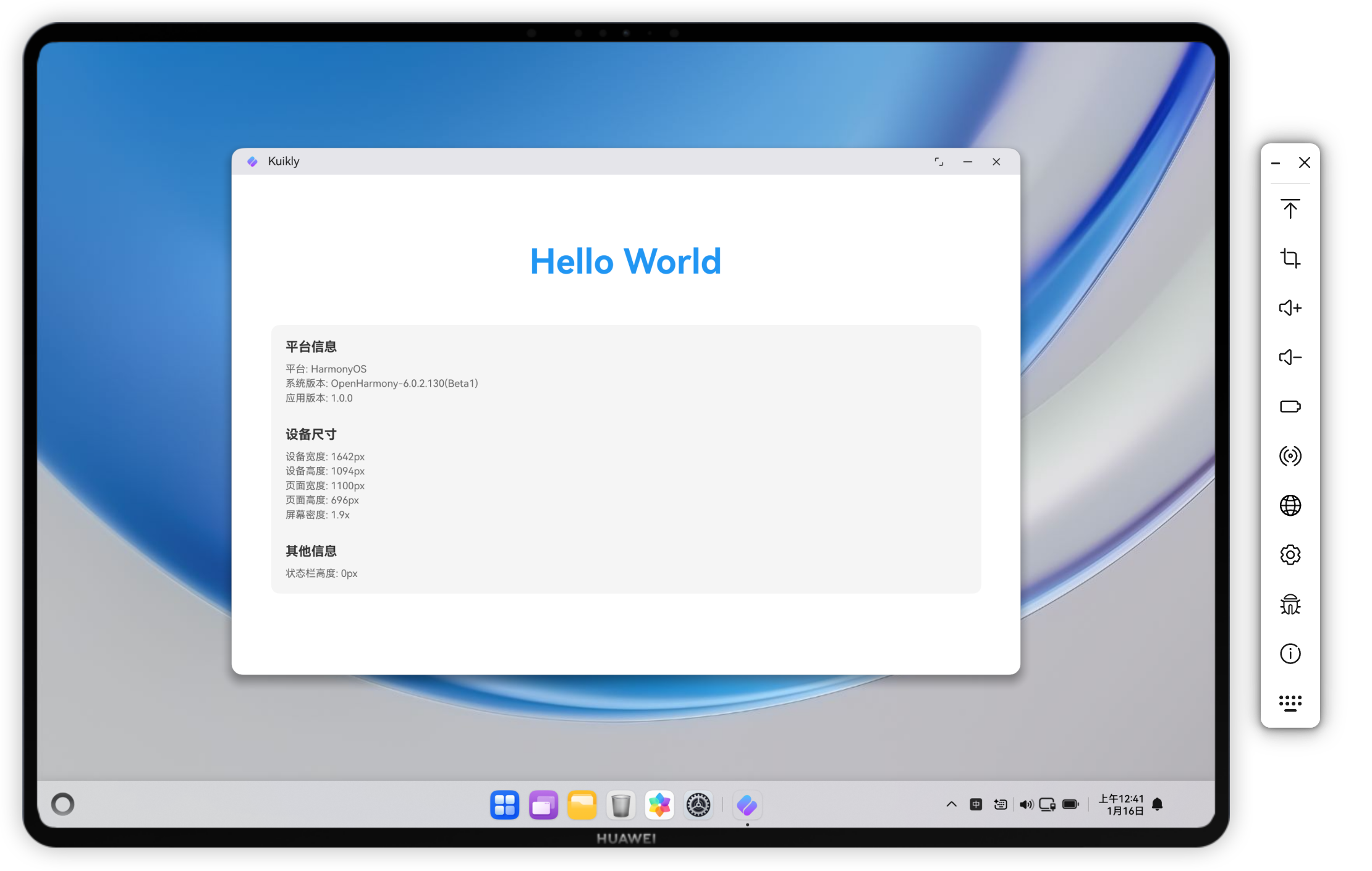
六、运行效果
编译并运行应用后,首页将显示:
- Hello World:大号蓝色标题,居中显示
- 平台信息:显示当前运行平台(Android/iOS/HarmonyOS/macOS)、系统版本、应用版本
- 设备尺寸:显示设备宽度/高度、页面宽度/高度、屏幕密度
- 其他信息:显示状态栏高度,如果是 iPhone X 系列还会显示设备类型
所有信息以卡片形式展示,具有良好的可读性和美观性。
七、总结
本文详细介绍了如何在 Kuikly 跨平台框架中实现首页 Hello World 和设备信息检测功能。主要要点包括:
- 页面创建 :使用
@Page注解注册页面,继承BasePager实现页面逻辑 - 设备信息获取 :通过
PlatformUtils和pageData获取平台和设备信息 - UI 构建:使用 Kuikly DSL 构建声明式 UI,支持 Flex 布局和响应式设计
- 平台兼容性:注意 Kotlin Native 平台的限制,避免使用不支持的 API
- 页面注册:理解 KSP 注解处理机制,确保新页面正确注册
通过这个示例,开发者可以快速上手 Kuikly 框架,了解如何创建页面、获取设备信息和构建 UI。这对于跨平台应用的开发和调试非常有帮助。
八、参考资料
作者 :坚果
日期 :2026年1月
版本:基于 Kuikly 2.0.21