序言
首先要使用SpringAi连接模型. 然后又有各种模型让我们选择,有的还是收费的,不方便研究.并且既然SpringAi会帮我们屏蔽模型的各种调用方式,那我们就选个免费的模型来研究.吐槽一下国内的都没有海外的模型开发商有格局哈cuiyaonan2000@163.com
参考资料
- https://docs.springjava.cn/spring-ai/reference/api/chat/comparison.html
- https://ollama.ac.cn/download
- https://github.com/ollama/ollama/releases/latest/download/OllamaSetup.exe ollama download page
- https://docs.springjava.cn/spring-ai/reference/api/chat/ollama-chat.html ollama API
- https://github.com/ollama/ollama?tab=readme-ov-file#model-library
聊天模型功能一览
https://docs.springjava.cn/spring-ai/reference/api/chat/comparison.html
Ollama
ollama是一款专门管理本地大模型的 "运行时工具 / 模型服务引擎" ------ 它能帮你一键下载、封装、运行不同的开源模型,就像一个 "模型管家",让各种模型能以统一的方式在本地启动和提供服务。
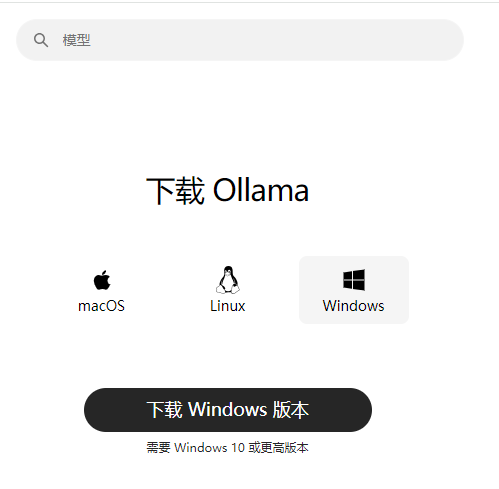
Ollama 下载安装
拉模型
安装完成后还需要下载模型(2026.1.17日支持的模型如下cuiyaonan2000@163.com)
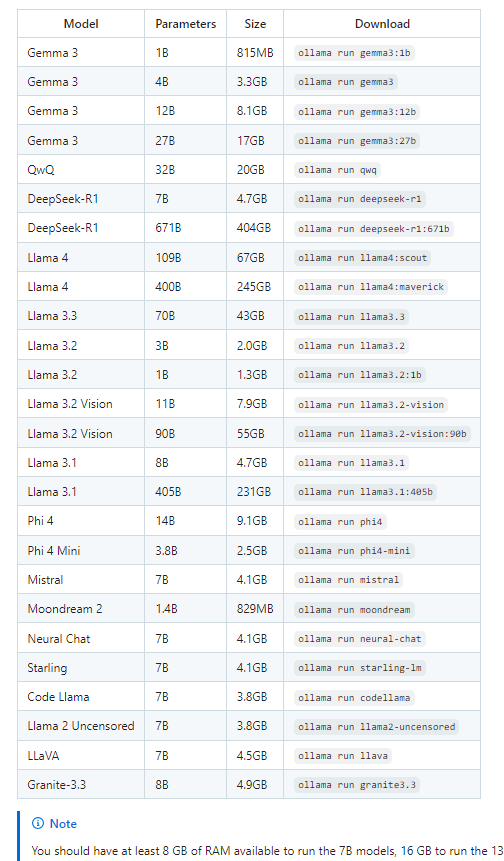
可以使用该命令下载,也可以使用ollama的管理界面下载,也可以在我们程序连接ollama,指定模型后自动下载,总是这些内容都不小
bash
# 拉取 llama3 模型(首次运行会自动下载,约4-5GB)
ollama pull llama3
# 启动 Ollama 服务(默认监听 11434 端口,后台运行)
ollama serve
# 若能在终端和模型对话,说明 Ollama 环境正常
ollama run llama3
Java该工程配置
pom.xml
XML
<?xml version="1.0" encoding="UTF-8"?>
<project xmlns="http://maven.apache.org/POM/4.0.0"
         xmlns:xsi="http://www.w3.org/2001/XMLSchema-instance"
         xsi:schemaLocation="http://maven.apache.org/POM/4.0.0 http://maven.apache.org/xsd/maven-4.0.0.xsd">
    <modelVersion>4.0.0</modelVersion>
    <parent>
        <groupId>nan.yao.cui</groupId>
        <artifactId>SpringAI</artifactId>
        <version>1.0-SNAPSHOT</version>
    </parent>

    <artifactId>DeepSeekChat</artifactId>

    <properties>
        <maven.compiler.source>17</maven.compiler.source>
        <maven.compiler.target>17</maven.compiler.target>
        <project.build.sourceEncoding>UTF-8</project.build.sourceEncoding>
    </properties>

    <dependencies>

        <dependency>
            <groupId>org.springframework.ai</groupId>
            <artifactId>spring-ai-starter-model-deepseek</artifactId>
        </dependency>

        <dependency>
            <groupId>org.springframework.boot</groupId>
            <artifactId>spring-boot-starter-web</artifactId>
        </dependency>

<!--        <dependency>-->
<!--            <groupId>org.springframework.boot</groupId>-->
<!--            <artifactId>spring-boot-starter</artifactId>-->
<!--        </dependency>-->

        <dependency>
            <groupId>org.springframework.ai</groupId>
            <artifactId>spring-ai-starter-model-ollama</artifactId>
        </dependency>

    </dependencies>

</project>
yml配置
html
#会检查终端是否支持ANSI,是的话就采用彩色输出(推荐项)
#这个default-domain 就是给springboot项目取个名字,如果不取名字的话(且2个springboot项目名字一样),则在同一个tomcat下启动会报错(2个项目或以上)
spring:
  jmx:
    default-domain: cuiyaonan2000@163.com
  output:
    ansi:
  ai:
    model:
      #启用 Ollama 聊天模型。
      chat: ollama
    ollama:
      chat:
        options:
          #模型的温度。提高温度将使模型回答更具创意
          temperature: 0.8
          #要使用的支持的模型名称。
          model: llama3
          #返回响应的格式。目前,唯一接受的值是
          format: json
      init:
        #是否在启动时拉取模型以及如何拉取
        pull-model-strategy: always
        #等待模型被拉取的时间。
        timeout: 5m
        #模型拉取操作的最大重试次数。
        max-retries: 1
      #Ollama API 服务器运行的基本 URL。
      base-url: https://127.0.0.1:11434

server:
  port: 9001
  servlet:
    context-path: /luck
各种场景应用代码示例(持续补充)
这个感觉就比较简单了,就是利用API来充分利用不同模型的各种功能了.整下来确实也没什么,难点还是写大模型算法的牛逼人物
待续