前端基础知识(HTML、CSS)
文章目录
一、HTML和CSS基础元素
标签名缩写 对应英文全称
css
h1 h2 ...	head(标题,头)
p	paragraph(段落)
br	break(换行,打断)
strong	strong(加粗的,强壮)
b	bold(黑体的,勇敢的)
em	Emphasized text(强调的文本)
i	italic(斜体)
del	delete(删除)
s	strike out(删除,打击)
u	underscore(下划线,强调)
ins	inserted text(插入文本)
div	division(分区,分割)
span	span(跨度、跨距)
img	image(图片,图像)
a	anchor(锚文本,锚)
table	table(表格)
tr	table row(表格行)
th	table head(表头)
td	table data(表格数据)
thead	table head(表头区域)
tbody	table body(表格主体区域)
li	list(列表)
ul	unordered list(无序列表)
ol	ordered list(有序列表)
dl	definition list(自定义列表)
dt	definition term(自定义列表组)
dd	definition description(自定义列表描述项)
form   form(表单)
input  input(不同类型的用户输入数据方式)
label  label(定义文字标注)
select select(定义下拉列表)
option	option(与select标签配合,定义下拉列表中的选项)
textarea	 textarea(多行的文本输入控件)
src	source(源,水源)
alt	alternative(供代替的选择,供选择的)
href	hypertext reference(超文本链接)
---
二、HTML概况
HTML表单元素的基本使用
css
- form:(表单)里面action里面填写需要传送到后端的具体方法的路径
- method:(方法)确定数据的提交方式
  - get请求:会直接将表单里的数据拼接在地址栏,数据量不能超过2k,
            容易被劫持
  - post请求:会将表单里的数据进行打包并发送,数据量无上限
- input:表示级别的控件
示例1:
html
<!DOCTYPE html>
<html lang="en">
<head>
    <meta charset="UTF-8">
    <title>html页面</title>
</head>
<body>
<form action="#" method="post">
    <label>
        <input type="text" placeholder="输入用户名">
    </label>
    <label>
        <input type="password" placeholder="输入密码">
    </label>
    <label>
        <input type="password" placeholder="再次确认密码">
    </label>

    <br>

    <label>
        <input type="radio" name="choice" checked>
    </label>错误
    <label>
        <input type="radio" name="choice" checked>
    </label>正确

    <label>
        <input type="checkbox" >
    </label>鲁智深
    <label>
        <input type="checkbox" >
    </label>杨志
    <label>
        <input type="checkbox" >
    </label>武松

    <br>

    <label>
        <input type="date">
    </label>年份

    <input type="file">选择路径
    <input type="reset">重置选项
    <input type="submit" value="登录">

    <table >
        <caption>好汉统计表</caption>
        <tr>
            <th>姓名</th>
            <th>(占位)</th>
            <th>年龄</th>
            <th>图片</th>
            <th>简历链接</th>
        </tr>

        <tr>
            <td colspan="2"> 武松 </td>
            <td>25岁</td>
            <td rowspan="1"><img src="../img/badukpan4.png" alt="头像" width="50"></td>
            <td><a href="https://www.baidu.com">武松的简历</a></td>
        </tr>

        <tr>
            <td colspan="2">鲁智深</td>
            <td>35岁</td>
            <td><img src="../img/badukpan4old.png" alt="头像" width="50px"></td>
            <td><a href="https://www.baidu.com">鲁智深的简历</a></td>
        </tr>

    </table>
</form>
</body>
</html>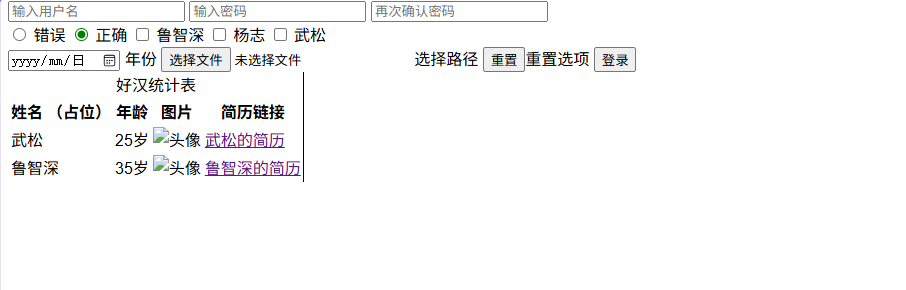
三、CSS概况
css
div:独占一行
span:共占一行,前提是相邻的
block:块级元素的默认值.特点:独占一行,可以修改宽高.包括:h1-h6,p,div
inline:行内元素默认值.特点:共占一行,不可以修改宽高.包括:span,b加粗,i斜体,s删除线,下划线,a超链接i
inline-block:行内块元素的默认值,特点:共占一行,并且可以修改宽高,包括:input控件,img图片
none:隐藏元素。
grid,flex:布局方式
示例:
html
<!DOCTYPE html>
<html lang="en">
<head>
  <meta charset="UTF-8">
  <title>CSS Example</title>
  <style>
    .box {
      width: 200px;
      height: 200px;
      background-color: red; /* 默认背景色为红色 */
    }

    .green-box {
      background-color: rebeccapurple !important; /* 使用 !important 强制背景色为丽贝卡紫 */
    }

    .blue-box {
      background-color: blue ; /* 这个规则没有使用 !important */
    }
  </style>
</head>
<body>
<h1 style="display: inline; border:2px solid blue ;width:200px">围棋天地</h1>
<h1 style="display: block; border:2px solid blue ;width:200px">围棋天地</h1>
<h1 style="display: inline-block; border:2px solid blue ;width:200px">围棋天地</h1>
<div class="box blue-box green-box">这是一个带背景色的盒子。</div>
<!--视频播放-->
<video src="#" controls width="1920" autoplay>这是视频</video>
<!--音频播放-->
<audio src="%" controls>音频</audio>

<!--controls显示控空间-->
<!--autoplay自动播放-->
</body>
</html>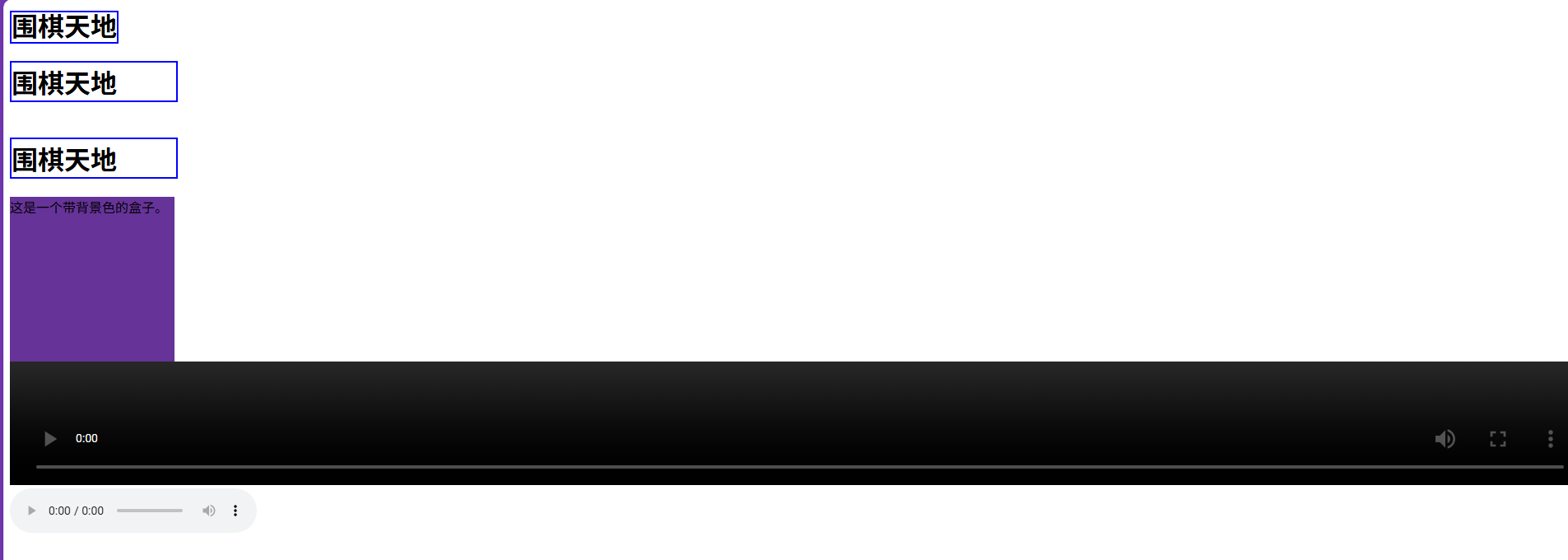
四、常用的框架和工具
css
- bootstrap:一个结合了HTML,css,javaScript.,用于快速构建响应式和移动设备友
            好的网站.他提供了一套预定义的样式和组件,简化了前端开发效率.
- jQuery:一个快速,小巧的JavaScript库.简化了JavaScript在不同浏览器中的操作.
- vue.js:一个轻量级的JavaScript框架,用于构建用户界面.React通过组件化和虚拟
         DOM的概念,提高了灵活性,高效性和可复用的前端开发方式.
- gitgitee/GitHub:第一个是版本控制工具,后面两个是代码托管平台
总结
HTML 是网页的骨架,负责定义内容和结构,如标题、段落、图片、链接等元素;而 CSS 是网页的外衣,负责控制这些元素的外观和布局,包括颜色、字体、间距、位置等样式表现。两者各司其职,HTML 构建内容框架,CSS 实现视觉美化,共同创造出美观、结构清晰的网页。