PDF版本参见这里。
网页版参见这里。
1. Database Server
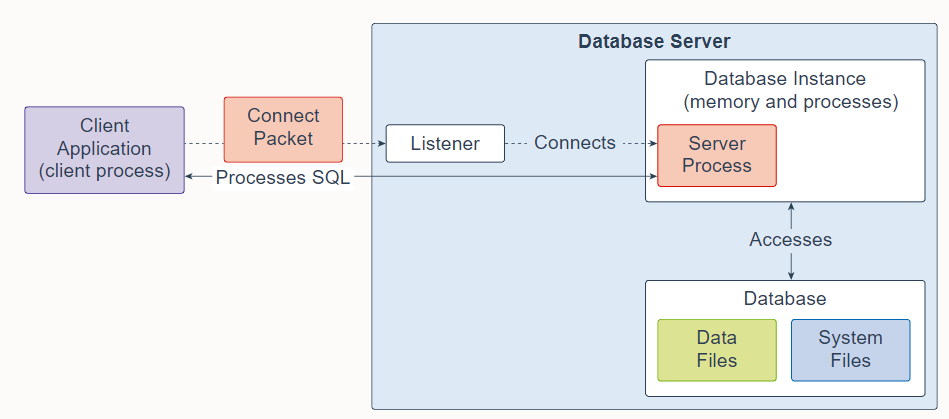
An Oracle Database consists of at least one database instance and one database. The database instance handles memory and processes. The multitenant container database consists of physical files called data files. An Oracle Database also uses several database system files during its operation.
一个 Oracle 数据库至少由一个数据库实例和一个数据库组成。数据库实例处理内存和进程。多租户容器数据库由称为数据文件的物理文件组成。 Oracle 数据库在其运行期间还使用多个数据库系统文件。
A single-instance database architecture consists of one database instance and one database. A one-to-one relationship exists between the database and the database instance. Multiple single-instance databases can be installed on the same server machine. There are separate database instances for each database. This configuration is useful to run different versions of Oracle Database on the same machine.
单实例数据库架构由一个数据库实例和一个数据库组成。数据库和数据库实例之间存在一对一的关系。多个单实例数据库可以安装在同一台服务器机器上。每个数据库都有单独的数据库实例。此配置对于在同一台机器上运行不同版本的 Oracle 数据库很有用。
An Oracle Real Application Clusters (Oracle RAC) database architecture consists of multiple instances that run on separate server machines. All of them share the same database. The cluster of server machines appear as a single server on one end, and end users and applications on the other end. This configuration is designed for high availability, scalability, and high-end performance.
Oracle Real Application Clusters (Oracle RAC) 数据库架构由在不同服务器机器上运行的多个实例组成。 它们都共享同一个数据库。 服务器机器集群在一端显示为单个服务器,在另一端显示为最终用户和应用程序。 此配置旨在实现高可用性、可扩展性和高端性能。
The listener is a database server process. It receives client requests, establishes a connection to the database instance, and then hands over the client connection to the server process. The listener can run locally on the database server or run remotely. Typical Oracle RAC environments are run remotely.
侦听器是一个数据库服务器进程。 它接收客户端请求,建立与数据库实例的连接,然后将客户端连接移交给服务器进程。 侦听器可以在数据库服务器上本地运行,也可以远程运行。 典型的 Oracle RAC 环境是远程运行的。
2. Database Instance
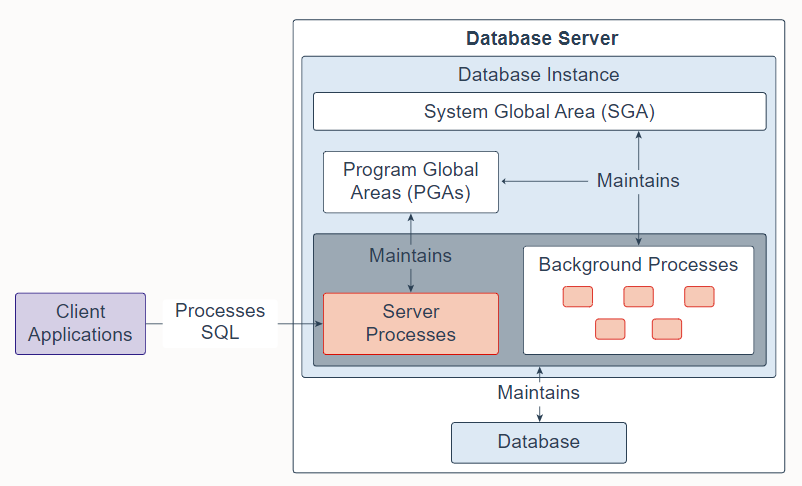
A database instance contains a set of Oracle Database background processes and memory structures. The main memory structures are the System Global Area (SGA) and the Program Global Areas (PGAs). The background processes operate on the stored data (data files) in the database and use the memory structures to do their work. A database instance exists only in memory.
Oracle 数据库还创建服务器进程来代表客户端程序处理与数据库的连接,并为客户端程序执行工作; 例如,解析和运行 SQL 语句,以及检索结果并将结果返回给客户端程序。 这些类型的服务器进程也称为前台进程。
Oracle Database also creates server processes to handle the connections to the database on behalf of client programs, and to perform the work for the client programs; for example, parsing and running SQL statements, and retrieving and returning results to the client programs. These types of server processes are also referred to as foreground processes.
一个数据库实例包含一组 Oracle 数据库后台进程和内存结构。 主要的内存结构是系统全局区(SGA)和程序全局区(PGA)。 后台进程对数据库中存储的数据(数据文件)进行操作,并使用内存结构来完成它们的工作。 数据库实例仅存在于内存中。
有关更多信息,请参阅 Oracle 数据库实例 。
3. System Global Area
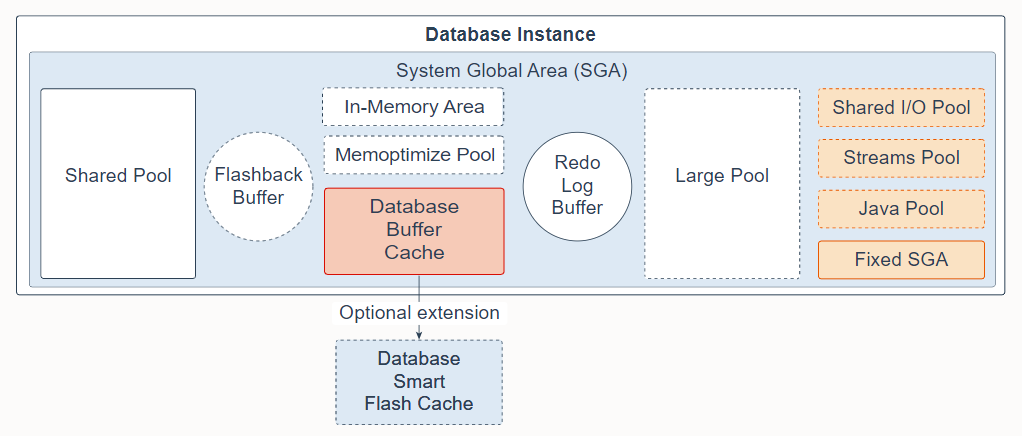
The System Global Area (SGA) is the memory area that contains data and control information for one Oracle Database instance. All server and background processes share the SGA. When you start a database instance, the amount of memory allocated for the SGA is displayed. The SGA includes the following data structures:
系统全局区 (SGA) 是包含一个 Oracle 数据库实例的数据和控制信息的内存区域。所有服务器和后台进程共享 SGA。启动数据库实例时,会显示为 SGA 分配的内存大小。 SGA 包括以下数据结构:
-
Shared pool: Caches various constructs that can be shared among users; for example, the shared pool stores parsed SQL, PL/SQL code, system parameters, and data dictionary information. The shared pool is involved in almost every operation that occurs in the database. For example, if a user executes a SQL statement, then Oracle Database accesses the shared pool.
-
共享池:缓存各种可以在用户之间共享的结构;例如,共享池存储解析后的 SQL、PL/SQL 代码、系统参数和数据字典信息。共享池几乎参与了数据库中发生的所有操作。例如,如果用户执行 SQL 语句,则 Oracle 数据库访问共享池。
-
Flashback buffer: Is an optional component in the SGA. When Flashback Database is enabled, the background process called Recovery Writer Process (RVWR) is started. RVWR periodically copies modified blocks from the buffer cache to the flashback buffer, and sequentially writes Flashback Database data from the flashback buffer to the Flashback Database logs, which are circularly reused.
-
闪回缓冲区:是 SGA 中的可选组件。启用闪回数据库后,将启动称为恢复写入器进程 (RVWR) 的后台进程。 RVWR 定期将修改过的块从缓冲区缓存复制到闪回缓冲区,并将闪回数据库数据从闪回缓冲区顺序写入闪回数据库日志,循环重用。
-
Database buffer cache: Is the memory area that stores copies of data blocks read from data files. A buffer is a main memory address in which the buffer manager temporarily caches a currently or recently used data block. All users concurrently connected to a database instance share access to the buffer cache.
-
数据库缓冲区缓存:是存储从数据文件中读取的数据块副本的内存区域。缓冲区是缓冲区管理器临时缓存当前或最近使用的数据块的主内存地址。同时连接到数据库实例的所有用户共享对缓冲区缓存的访问。
-
Database Smart Flash cache: Is an optional memory extension of the database buffer cache for databases running on Solaris or Oracle Linux. It provides a level 2 cache for database blocks. It can improve response time and overall throughput for both read-intensive online transaction processing (OLTP) workloads and ad-hoc queries and bulk data modifications in a data warehouse (DW) environment. Database Smart Flash Cache resides on one or more flash disk devices, which are solid state storage devices that use flash memory. Database Smart Flash Cache is typically more economical than additional main memory, and is an order of magnitude faster than disk drives.
-
数据库智能闪存缓存:是数据库缓冲区缓存的可选内存扩展,适用于在 Solaris 或 Oracle Linux 上运行的数据库。它为数据库块提供了二级缓存。它可以提高读取密集型在线事务处理 (OLTP) 工作负载以及数据仓库 (DW) 环境中的即席查询和批量数据修改的响应时间和整体吞吐量。数据库智能闪存缓存驻留在一个或多个闪存磁盘设备上,这些设备是使用闪存的固态存储设备。数据库智能闪存缓存通常比配置额外的内存更经济,并且比磁盘驱动器快一个数量级。
-
Redo log buffer: Is a circular buffer in the SGA that holds information about changes made to the database. This information is stored in redo entries. Redo entries contain the information necessary to reconstruct (or redo) changes that are made to the database by data manipulation language (DML), data definition language (DDL), or internal operations. Redo entries are used for database recovery if necessary.
-
重做日志缓冲区:是 SGA 中的一个循环缓冲区,用于保存有关对数据库所做的更改的信息。此信息存储在重做条目中。重做条目包含重建(或重做)通过数据操作语言 (DML)、数据定义语言 (DDL) 或内部操作对数据库所做更改所必需的信息。如有必要,重做条目也用于数据库恢复。
-
Large pool: Is an optional memory area intended for memory allocations that are larger than is appropriate for the shared pool. The large pool can provide large memory allocations for the User Global Area (UGA) for the shared server and the Oracle XA interface (used where transactions interact with multiple databases), message buffers used in the parallel execution of statements, buffers for Recovery Manager (RMAN) I/O workers, and deferred inserts.
-
大池:是一个可选的内存区域,用于分配不适合于共享池的大内存分配。大池可以为共享服务器的用户全局区 (UGA) 和 Oracle XA 接口(当事务与多个数据库交互时使用)、用于并行执行语句的消息缓冲区、Recovery Manager 的缓冲区( RMAN) I/O 工作程序和延迟插入。
-
In-Memory Area: Is an optional component that enables objects (tables, partitions, and other types) to be stored in memory in a new format known as the columnar format. This format enables scans, joins, and aggregates to perform much faster than the traditional on-disk format, thus providing fast reporting and DML performance for both OLTP and DW environments. This feature is particularly useful for analytic applications that operate on a few columns returning many rows rather than for OLTP, which operates on a few rows returning many columns.
-
In-Memory Area:是一个可选组件,它使对象(表、分区和其他类型)能够以一种称为列格式的新格式存储在内存中。这种格式使扫描、连接和聚合的执行速度比传统的磁盘格式快得多,从而为 OLTP 和 DW 环境提供快速报告和 DML 性能。相对于对少量行进行操作并返回许多列的的 OLTP 而言,此功能对于对少量列进行操作并返回许多行分析应用程序特别有用。
-
Memoptimize Pool: Is an optional component that provides high performance and scalability for key-based queries. The Memoptimize Pool contains two parts, the memoptimize buffer area and the hash index. Fast lookup uses the hash index structure in the memoptimize pool providing fast access to the blocks of a given table (enabled for MEMOPTIMIZE FOR READ) permanently pinned in the buffer cache to avoid disk I/O. The buffers in the memoptimize pool are completely separate from the database buffer cache. The hash index is created when the Memoptimized Rowstore is configured, and is maintained automatically by Oracle Database.
-
Memoptimize Pool:是一个可选组件,为基于键的查询提供高性能和可扩展性。 Memoptimize Pool 包含两部分,memoptimize 缓冲区和哈希索引。快速查找使用 memoptimize 池中的哈希索引结构,提供对永久固定在缓冲区缓存中的给定表的块(启用 MEMOPTIMIZE FOR READ)的快速访问,以避免磁盘 I/O。 memoptimize 池中的缓冲区与数据库缓冲区缓存完全分开。哈希索引是在配置 Memoptimized Rowstore 时创建的,并由 Oracle 数据库自动维护。
-
Shared I/O pool (SecureFiles): Is used for large I/O operations on SecureFile Large Objects (LOBs). LOBs are a set of data types that are designed to hold large amounts of data. SecureFile is an LOB storage parameter that allows deduplication, encryption, and compression.
-
共享 I/O 池 (SecureFiles):用于 SecureFile 大对象 (LOB) 上的大型 I/O 操作。 LOB 是一组旨在保存大量数据的数据类型。 SecureFile 是允许重复数据删除、加密和压缩的 LOB 存储参数。
-
Streams pool: Is used by Oracle Streams, Data Pump, and GoldenGate integrated capture and apply processes. The Streams pool stores buffered queue messages, and it provides memory for Oracle Streams capture processes and apply processes. Unless you specifically configure it, the size of the Streams pool starts at zero. The pool size grows dynamically as needed when Oracle Streams is used.
-
Streams 池:供 Oracle Streams、Data Pump 和 GoldenGate 集成捕获和应用进程使用。 Streams 池存储缓冲的队列消息,并为 Oracle Streams 捕获进程和应用进程提供内存。 除非您专门配置它,否则 Streams 池的大小最初为零。 使用 Oracle Streams 时,池大小会根据需要动态增长。
-
Java pool: Is used for all session-specific Java code and data in the Java Virtual Machine (JVM). Java pool memory is used in different ways, depending on the mode in which Oracle Database is running.
-
Java 池:用于 Java 虚拟机 (JVM) 中所有特定于会话的 Java 代码和数据。 Java 池内存的使用方式取决于 Oracle 数据库的运行模式。
-
Fixed SGA: Is an internal housekeeping area containing general information about the state of the database and database instance, and information communicated between processes.
-
固定 SGA:是一个内部管理区域,包含有关数据库和数据库实例状态的一般信息,以及进程之间通信的信息。
有关详细信息,请参阅系统全局区 (SGA) 概述 。
4. Program Global Area
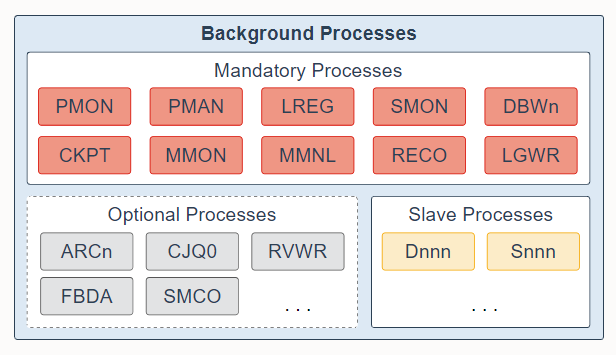
The Program Global Area (PGA) is a non-shared memory region that contains data and control information exclusively for use by server and background processes. Oracle Database creates server processes to handle connections to the database on behalf of client programs. In a dedicated server environment, one PGA gets created for each server and background process that is started. Each PGA consists of stack space, hash area, bitmap merge area and a User Global Area (UGA). A PGA is deallocated when the associated server or background process using it is terminated.
程序全局区 (PGA) 是一个非共享内存区域,其中包含专门供服务器和后台进程使用的数据和控制信息。 Oracle 数据库创建服务器进程来代表客户端程序处理与数据库的连接。 在专用服务器环境中,为每个启动的服务器和后台进程创建一个 PGA。 每个 PGA 由堆栈空间、哈希区域、位图合并区域和用户全局区 (UGA) 组成。 当使用它的关联服务或后台进程终止时,将释放 PGA。
-
In a shared server environment, multiple client users share the server process. The UGA is moved into the large pool, leaving the PGA with only stack space, hash area, and bitmap merge area.
-
在共享服务器环境中,多个客户端用户共享服务器进程。 UGA 被移动到大池中,只留下 PGA 的堆栈空间、散列区域和位图合并区域。
-
In a dedicated server session, the PGA consists of the following components:
-
在专用服务器会话中,PGA 由以下组件组成:
-
SQL work areas: The sort area is used by functions that order data, such as ORDER BY and GROUP BY.
-
SQL 工作区:排序区由对数据排序的函数使用,例如 ORDER BY 和 GROUP BY。
-
Session memory: This user session data storage area is allocated for session variables, such as logon information, and other information required by a database session. The OLAP pool manages OLAP data pages, which are equivalent to data blocks.
-
会话内存:这个用户会话数据存储区域分配给会话变量,例如登录信息,以及数据库会话所需的其他信息。 OLAP 池管理 OLAP 数据页,相当于数据块。
-
Private SQL area: This area holds information about a parsed SQL statement and other session-specific information for processing. When a server process executes SQL or PL/SQL code, the process uses the private SQL area to store bind variable values, query execution state information, and query execution work areas. Multiple private SQL areas in the same or different sessions can point to a single execution plan in the SGA. The persistent area contains bind variable values. The run-time area contains query execution state information. A cursor is a name or handle to a specific area in the private SQL area. You can think of a cursor as a pointer on the client side and as a state on the server side. Because cursors are closely associated with private SQL areas, the terms are sometimes used interchangeably.
-
私有 SQL 区域:该区域保存有关已解析 SQL 语句的信息和其他特定于会话的信息以供处理。 当服务器进程执行 SQL 或 PL/SQL 代码时,该进程使用私有 SQL 区域来存储绑定变量值、查询执行状态信息和查询执行工作区域。 相同或不同会话中的多个私有 SQL 区域可以指向 SGA 中的单个执行计划。 持久化区包含绑定变量值。 运行时区域包含查询执行状态信息。 游标是专用 SQL 区域中特定区域的名称或句柄。 您可以将游标视为客户端的指针和服务器端的状态。 因为游标与私有 SQL 区域密切相关,所以这些术语有时可以互换使用。
-
Stack space: Stack space is memory allocated to hold session variables and arrays.
-
堆栈空间:堆栈空间是分配用于保存会话变量和数组的内存。
-
Hash area: This area is used to perform hash joins of tables.
-
哈希区:该区域用于执行表的哈希连接。
-
Bitmap merge area: This area is used to merge data retrieved from scans of multiple bitmap indexes.
-
位图合并区:该区域用于合并从多个位图索引扫描中检索到的数据。
-
有关详细信息,请参阅程序全局区 (PGA) 概述 。
5. Background Processes
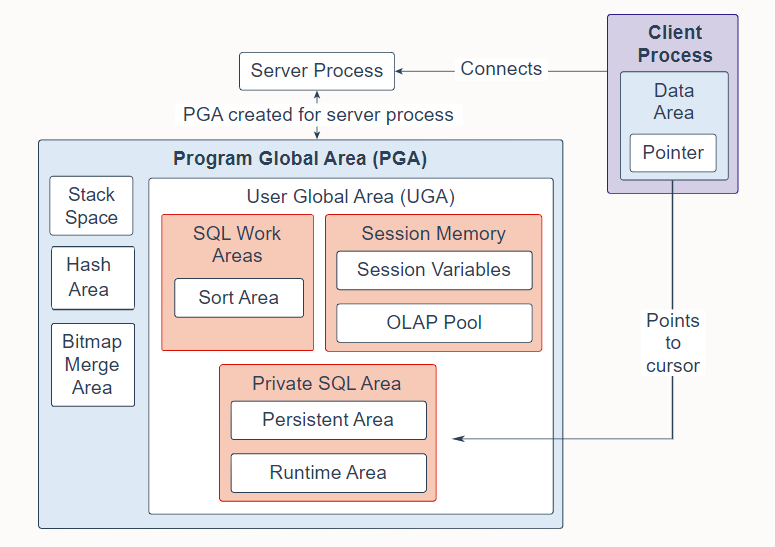
Background processes are part of the database instance and perform maintenance tasks required to operate the database and to maximize performance for multiple users. Each background process performs a unique task, but works with the other processes. Oracle Database creates background processes automatically when you start a database instance. The background processes that are present depend on the features that are being used in the database. When you start a database instance, mandatory background processes automatically start. You can start optional background processes later as required.
后台进程是数据库实例的一部分,它执行操作数据库所需的维护任务,并最大限度地提高多个用户的性能。每个后台进程执行一个独特的任务,但与其他进程一起工作。当您启动数据库实例时,Oracle 数据库会自动创建后台进程。存在的后台进程取决于数据库中使用的功能。当您启动数据库实例时,强制性后台进程会自动启动。您可以稍后根据需要启动可选的后台进程。
Mandatory background processes are present in all typical database configurations. These processes run by default in a read/write database instance started with a minimally configured initialization parameter file. A read-only database instance disables some of these processes. Mandatory background processes include the Process Monitor Process (PMON), Process Manager Process (PMAN), Listener Registration Process (LREG), System Monitor Process (SMON), Database Writer Process (DBWn), Checkpoint Process (CKPT), Manageability Monitor Process (MMON), Manageability Monitor Lite Process (MMNL), Recoverer Process (RECO), and Log Writer Process (LGWR).
所有典型的数据库配置中都存在强制性后台进程。默认情况下,这些进程在以最低配置的初始化参数文件启动的读/写数据库实例中运行。只读数据库实例禁用其中一些进程。强制性后台进程包括进程监控进程(PMON)、进程管理进程(PMAN)、监听注册进程(LREG)、系统监控进程(SMON)、数据库写入进程(DBWn)、检查点进程(CKPT)、可管理性监控进程( MMON)、可管理性监控轻量级进程 (MMNL)、恢复进程 (RECO) 和 日志写进程 (LGWR)。
Most optional background processes are specific to tasks or features. Some common optional processes include Archiver Processes (ARCn), Job Queue Coordinator Process (CJQ0), Recovery Writer Process (RVWR), Flashback Data Archive Process (FBDA), and Space Management Coordinator Process (SMCO).
大多数可选后台进程都与特定任务或功能相关。 一些常见的可选进程包括归档进程 (ARCn)、作业队列协调进程 (CJQ0)、恢复写入进程 (RVWR)、闪回数据归档进程 (FBDA) 和空间管理协调进程 (SMCO)。
Worker processes are background processes that perform work on behalf of other processes; for example, the Dispatcher Process (Dnnn) and Shared Server Process (Snnn).
工作进程是代表其他进程执行工作的后台进程; 例如,调度程序进程 (Dnnn) 和共享服务器进程 (Snnn)。
有关后台进程的完整列表,请参阅后台进程 。
6. Shared Pool
The shared pool is a component of the System Global Area (SGA) and is responsible for caching various types of program data. For example, the shared pool stores parsed SQL, PL/SQL code, system parameters, and data dictionary information. The shared pool is involved in almost every operation that occurs in the database. For example, if a user executes a SQL statement, then Oracle Database accesses the shared pool.
共享池是系统全局区(SGA)的一个组成部分,负责缓存各种类型的程序数据。 例如,共享池存储解析后的 SQL、PL/SQL 代码、系统参数和数据字典信息。 共享池几乎参与了数据库中发生的所有操作。 例如,如果用户执行 SQL 语句,则 Oracle 数据库访问共享池。
The shared pool is divided into several subcomponents:
共享池分为几个子组件:
-
Library cache: Is a shared pool memory structure that stores executable SQL and PL/SQL code. This cache contains the shared SQL and PL/SQL areas and control structures, such as locks and library cache handles. When a SQL statement is executed, the database attempts to reuse previously executed code. If a parsed representation of a SQL statement exists in the library cache and can be shared, the database reuses the code. This action is known as a soft parse or a library cache hit. Otherwise, the database must build a new executable version of the application code, which is known as a hard parse or a library cache miss.
-
库缓存:是一种共享池内存结构,存储可执行的 SQL 和 PL/SQL 代码。 此缓存包含共享的 SQL 和 PL/SQL 区域以及控制结构,例如锁和库缓存句柄。 执行 SQL 语句时,数据库会尝试重用以前执行的代码。 如果 SQL 语句的解析表示存在于库缓存中并且可以共享,则数据库会重用该代码。 此操作称为软解析或库缓存命中。 否则,数据库必须构建应用程序代码的新可执行版本,这称为硬解析或库缓存未命中。
-
Reserved pool: Is a memory area in the shared pool that Oracle Database can use to allocate large contiguous chunks of memory. The database allocates memory from the shared pool in chunks. Chunking allows large objects (over 5 KB) to be loaded into the cache without requiring a single contiguous area. In this way, the database reduces the possibility of running out of contiguous memory because of fragmentation.
-
保留池:是共享池中的一个内存区域,Oracle 数据库可以使用它来分配大的连续内存块。 数据库以块的形式从共享池中分配内存。 分块允许将大型对象(超过 5 KB)加载到缓存中,而无需单个连续区域。 通过这种方式,数据库减少了由于碎片而耗尽连续内存的可能性。
-
Data dictionary cache: Stores information about database objects (that is, dictionary data). This cache is also known as the row cache because it holds data as rows instead of buffers.
-
数据字典缓存:存储有关数据库对象的信息(即字典数据)。 此缓存也称为行缓存,因为它将数据保存为行而不是缓冲区。
-
Server result cache: Is a memory pool within the shared pool and holds result sets. The server result cache contains the SQL query result cache and PL/SQL function result cache, which share the same infrastructure. The SQL query result cache stores the results of queries and query fragments. Most applications benefit from this performance improvement. The PL/SQL function result cache stores function result sets. Good candidates for result caching are frequently invoked functions that depend on relatively static data.
-
服务器结果缓存:是共享池中的一个内存池,用于保存结果集。 服务器结果缓存包含 SQL 查询结果缓存和 PL/SQL 函数结果缓存,它们共享相同的基础结构。 SQL 查询结果缓存存储查询结果和查询片段。 大多数应用程序都受益于这种性能改进。 PL/SQL 函数结果缓存存储函数结果集。 结果缓存非常适合于经常调用并依赖于相对静态数据的函数。
-
Other components: Include enqueues, latches, Information Lifecycle Management (ILM) bitmap tables, Active Session History (ASH) buffers, and other minor memory structures. Enqueues are shared memory structures (locks) that serialize access to database resources. They can be associated with a session or transaction. Examples are: Controlfile Transaction, Datafile, Instance Recovery, Media Recovery, Transaction Recovery, Job Queue, and so on. Latches are used as a low-level serialization control mechanism used to protect shared data structures in the SGA from simultaneous access. Examples are row cache objects, library cache pin, and log file parallel write.
-
其他组件:包括入队、锁存器、信息生命周期管理 (ILM) 位图表、活动会话历史 (ASH) 缓冲区和其他次要的内存结构。 入队是对数据库资源进行序列化访问的共享内存结构(锁)。 它们可以与会话或事务相关联。 例如:控制文件事务、数据文件、实例恢复、介质恢复、事务恢复、作业队列等。 锁存器用作低级序列化控制机制,用于保护 SGA 中的共享数据结构不被同时访问。 示例为行缓存对象、库缓存引脚和日志文件并行写入。
有关详细信息,请参阅共享池 。
7. Large Pool
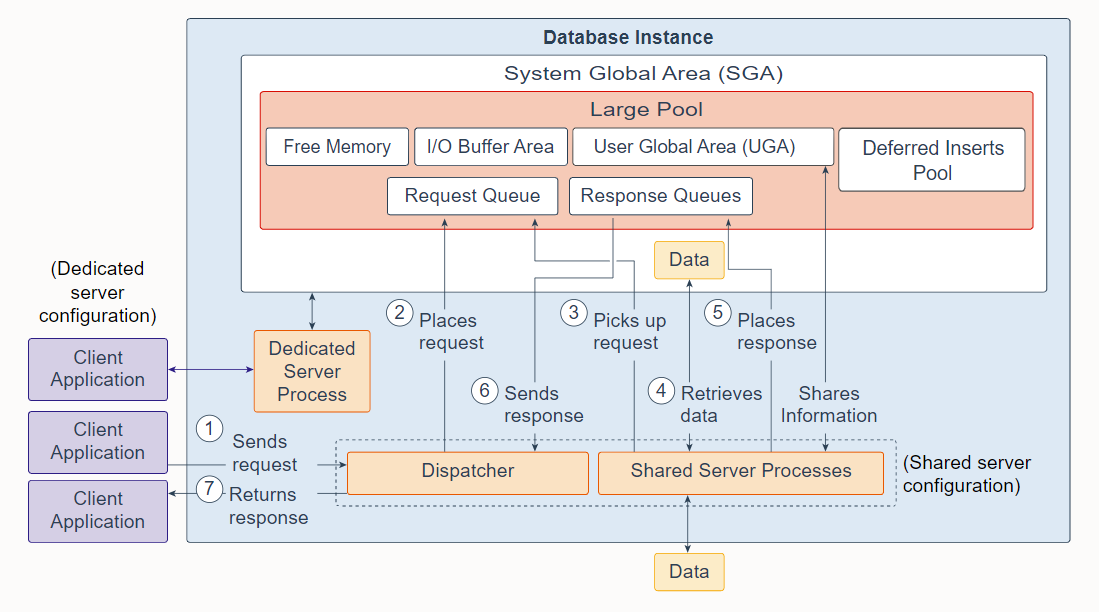
The large pool is an optional memory area that database administrator's can configure to provide large memory allocations for the following:
大池是一个可选的内存区域,数据库管理员可以配置它来为以下提供大内存分配:
-
User Global Area (UGA): Session memory for the shared server and the Oracle XA interface (used where transactions interact with multiple databases)
-
用户全局区 (UGA):共享服务器和 Oracle XA 接口的会话内存(用于事务与多个数据库交互)
-
I/O Buffer Area: I/O server processes, message buffers used in parallel query operations, buffers for Recovery Manager (RMAN) I/O workers, and advanced queuing memory table storage
-
I/O 缓冲区:I/O 服务器进程、并行查询操作中使用的消息缓冲区、Recovery Manager (RMAN) I/O 工作程序的缓冲区以及高级队列内存表存储
-
Deferred Inserts Pool: The fast ingest feature enables high-frequency, single-row data inserts into database for tables defined as MEMOPTIMIZE FOR WRITE. The inserts by fast ingest are also known as deferred inserts. They are initially buffered in the large pool and later written to disk asynchronously by the Space Management Coordinator (SMCO) and Wxxx worker background processes after 1MB worth of writes per session per object or after 60 seconds. Any data buffered in this pool, even committed, cannot be read by any session, including the writer, until the SMCO background process sweeps.
The pool is initialized in the large pool at the first inserted row of a memoptimized table. 2G is allocated from the large pool when there is enough space. If there is not enough space in the large pool, an ORA-4031 is internally discovered and automatically cleared. The allocation is retried with half the requested size. If there is still not enough space in the large pool, the allocation is retried with 512M and 256M after which the feature is disabled until the instance is restarted. Once the pool is initialized, the size remains static. It cannot grow or shrink.
- 延迟插入池:对于定义为 MEMOPTIMIZE FOR WRITE 的表,快速摄取功能支持将高频、单行数据插入到数据库中。 快速摄取的插入也称为延迟插入。 它们最初在大池中缓冲,然后由空间管理协调器 (SMCO) 和 Wxxx 工作程序后台进程在每个对象的每个会话有 1MB可写数据或 60 秒后异步写入磁盘。 在 SMCO 后台进程扫描之前,任何会话(包括写入器)都无法读取此池中缓冲的任何数据,即使已提交。
该池在内存优化表插入第一行时在大池中初始化。 当有足够空间时,从大池中分配2G。 如果大型池中没有足够的空间,则会在内部发现 ORA-4031 并自动清除。 使用请求大小的一半重试分配。 如果大池中仍然没有足够的空间,则使用 512M 和 256M 重试分配,之后禁用该功能,直到重新启动实例。 初始化池后,大小保持不变。 它不能增长或缩小。
- Free memory
- 空闲内存
The large pool is different from reserved space in the shared pool, which uses the same Least Recently Used (LRU) list as other memory allocated from the shared pool. The large pool does not have an LRU list. Pieces of memory are allocated and cannot be freed until they are done being used.
大池与共享池中的保留空间不同,保留空间使用与其他共享池中分配的内存相同的最近最少使用 (LRU) 列表。 大池没有 LRU 列表。 内存块被分配并且在它们被使用完之前不能被释放。
A request from a user is a single API call that is part of the user's SQL statement. In a dedicated server environment, one server process handles requests for a single client process. Each server process uses system resources, including CPU cycles and memory. In a shared server environment, the following actions occur:
来自用户的请求是作为用户 SQL 语句一部分的单个 API 调用。 在专用服务器环境中,一个服务器进程处理单个客户端进程的请求。 每个服务器进程都使用系统资源,包括 CPU 周期和内存。 在共享服务器环境中,会发生以下操作:
-
A client application sends a request to the database instance, and that request is received by the dispatcher.
-
The dispatcher places the request on the request queue in the large pool.
-
The request is picked up by the next available shared server process. The shared server processes check the common request queue for new requests, picking up new requests on a first-in-first-out basis. One shared server process picks up one request in the queue.
-
The shared server process makes all the necessary calls to the database to complete the request. First, the shared server process accesses the library cache in the shared pool to verify the requested items; for example, it checks whether the table exists, whether the user has the correct privileges, and so on. Next, the shared server process accesses the buffer cache to retrieve the data. If the data is not there, the shared server process accesses the disk. A different shared server process can handle each database call. Therefore, requests to parse a query, fetch the first row, fetch the next row, and close the result set may each be processed by a different shared server process. Because a different shared server process may handle each database call, the User Global Area (UGA) must be a Shared Memory area, as the UGA contains information about each client session. Or reversed, the UGA contains information about each client session and must be available to all shared server processes because any shared server process may handle any session's database call.
-
After the request is completed, a shared server process places the response on the calling dispatcher's response queue in the large pool. Each dispatcher has its own response queue.
-
The response queue sends the response to the dispatcher.
-
The dispatcher returns the completed request to the appropriate client application.
-
客户端应用程序向数据库实例发送一个请求,该请求由调度程序接收。
-
调度程序将请求放到大池的请求队列中。
-
请求被下一个可用的共享服务器进程拾取。共享服务器进程检查公共请求队列中的新请求,以先进先出的方式获取新请求。一个共享服务器进程在队列中获取一个请求。
-
共享服务器进程对数据库进行所有必要的调用以完成请求。首先,共享服务器进程访问共享池中的库缓存以验证请求的项目;例如,它检查表是否存在,用户是否具有正确的权限等等。接下来,共享服务器进程访问缓冲区高速缓存以检索数据。如果数据不存在,则共享服务器进程访问磁盘。不同的共享服务器进程可以处理每个数据库调用。因此,解析查询、获取第一行、获取下一行和关闭结果集的请求可能每个都由不同的共享服务器进程处理。因为不同的共享服务器进程可能会处理每个数据库调用,所以用户全局区域 (UGA) 必须是共享内存区域,因为 UGA 包含有关每个客户端会话的信息。或者反过来,UGA 包含有关每个客户端会话的信息,并且必须对所有共享服务器进程可用,因为任何共享服务器进程都可以处理任何会话的数据库调用。
-
请求完成后,共享服务器进程将响应放在调用调度程序的响应队列中的大池中。每个调度程序都有自己的响应队列。
-
响应队列将响应发送给调度程序。
-
调度程序将完成的请求返回给适当的客户端应用程序。
有关详细信息,请参阅大池 。
8. Database Buffer Cache
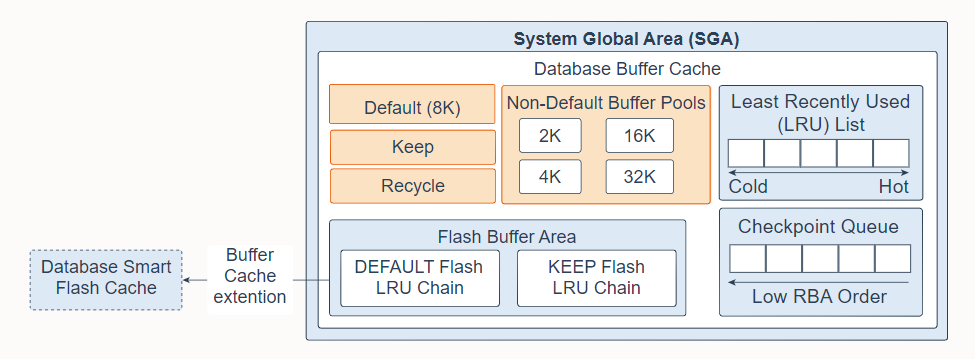
The database buffer cache, also called the buffer cache, is the memory area in the System Global Area (SGA) that stores copies of data blocks read from data files. A buffer is a database block-sized chunk of memory. Each buffer has an address called a Database Buffer Address (DBA). All users concurrently connected to a database instance share access to the buffer cache. The goals of the buffer cache is to optimize physical I/O and to keep frequently accessed blocks in the buffer cache and write infrequently accessed blocks to disk.
数据库缓冲区缓存,也称为缓冲区缓存,是系统全局区 (SGA) 中的内存区域,用于存储从数据文件中读取的数据块的副本。缓冲区是以数据库块大小划分的内存块。每个缓冲区都有一个称为数据库缓冲区地址 (DBA) 的地址。同时连接到数据库实例的所有用户共享对缓冲区高速缓存的访问。缓冲区高速缓存的目标是优化物理 I/O 并将经常访问的块保留在缓冲区高速缓存中,并将不经常访问的块写入磁盘。
The first time an Oracle Database user process requires a particular piece of data, it searches for the data in the database buffer cache. If the process finds the data already in the cache (a cache hit), it can read the data directly from memory. If the process cannot find the data in the cache (a cache miss), it must copy the data block from a data file on disk into a buffer in the cache before accessing the data. Accessing data through a cache hit is faster than accessing data through a cache miss.
Oracle 数据库用户进程第一次需要特定数据时,它会在数据库缓冲区缓存中搜索数据。 如果进程发现数据已经在缓存中(缓存命中),它可以直接从内存中读取数据。 如果进程在缓存中找不到数据(缓存未命中),它必须在访问数据之前将数据块从磁盘上的数据文件复制到缓存中的缓冲区中。 通过缓存命中访问数据比通过缓存未命中访问数据更快。
The buffers in the cache are managed by a complex algorithm that uses a combination of least recently used (LRU) lists and touch count. The LRU helps to ensure that the most recently used blocks tend to stay in memory to minimize disk access.
缓存中的缓冲区由一种复杂的算法管理,该算法使用最近最少使用 (LRU) 列表和接触计数的组合。 LRU 有助于确保最近使用的块倾向于留在内存中以最小化磁盘访问。
The database buffer cache consists of the following:
数据库缓冲区缓存包括以下部分:
-
Default pool: Is the location where blocks are normally cached. The default block size is 8 KB. Unless you manually configure separate pools, the default pool is the only buffer pool. The optional configuration of the other pools has no effect on the default pool.
-
默认池:是数据块通常缓存的位置。 默认块大小为 8 KB。 除非您手动配置单独的池,否则默认池是唯一的缓冲池。 其他池的可选配置对默认池没有影响。
-
Keep pool: Is intended for blocks that were accessed frequently, but which aged out of the default pool because of lack of space. The purpose of the keep buffer pool is to retain specified objects in memory, thus avoiding I/O operations.
-
保留池:用于频繁访问但由于空间不足而从默认池清除的块。 保留缓冲池的目的是将指定的对象保留在内存中,从而避免 I/O 操作。
-
Recycle pool: Is intended for blocks that are used infrequently. A recycle pool prevents specified objects from consuming unnecessary space in the cache.
-
回收池:用于不经常使用的块。 回收池可防止指定对象占用缓存中不必要的空间。
-
Non-default buffer pools: Are for tablespaces that use the nonstandard block sizes of 2 KB, 4 KB, 16 KB, and 32 KB. Each non-default block size has its own pool. Oracle Database manages the blocks in these pools in the same way as in the default pool.
-
非默认缓冲池:用于使用 2 KB、4 KB、16 KB 和 32 KB非标准块大小 的表空间。 每个非默认块大小都有自己的池。 Oracle 数据库以与默认池相同的方式管理这些池中的块。
-
Database Smart Flash Cache (flash cache): Lets you use flash devices to increase the effective size of the buffer cache without adding more main memory. Flash cache can improve database performance by having the database cache's frequently accessed data stored into flash memory instead of reading the data from magnetic disk. When the database requests data, the system first looks in the database buffer cache. If the data is not found, the system then looks in the Database Smart Flash Cache buffer. If it does not find the data there, only then does it look in disk storage. You must configure a flash cache on either all or none of the instances in an Oracle Real Application Clusters environment.
-
数据库智能闪存缓存(闪存缓存):允许您使用闪存设备来增加缓冲区缓存的有效大小,而无需添加更多主内存。 闪存缓存可以通过将数据库缓存中经常访问的数据存储到闪存中而不是从磁盘读取数据来提高数据库性能。 当数据库请求数据时,系统首先在数据库缓冲区缓存中查找。 如果未找到数据,则系统会在数据库智能闪存缓存缓冲区中查找。 如果它没有在那里找到数据,此时它才会在磁盘存储中查找。 您必须在 Oracle Real Application Clusters 环境中的所有实例上配置闪存缓存或者不配置。
-
Least Recently Used list (LRU): Contains pointers to dirty and non-dirty buffers. The LRU list has a hot end and cold end. A cold buffer is a buffer that has not been recently used. A hot buffer is frequently accessed and has been recently used. Conceptually, there is only one LRU, but for data concurrency the database actually uses several LRUs.
-
最近最少使用列表 (LRU):包含指向脏缓冲区和非脏缓冲区的指针。 LRU 列表有热端和冷端。 冷缓冲区是最近未使用的缓冲区。 热缓冲区经常被访问并且最近被使用过。 从概念上讲,只有一个 LRU,但由于数据并发,数据库实际上使用了多个 LRU。
-
Checkpoint queue
-
检查点队列
-
Flash Buffer Area: Consists of a DEFAULT Flash LRU Chain and a KEEP Flash LRU Chain. Without Database Smart Flash Cache, when a process tries to access a block and the block does not exist in the buffer cache, the block will first be read from disk into memory (physical read). When the in-memory buffer cache gets full, a buffer will get evicted out of the memory based on a least recently used (LRU) mechanism. With Database Smart Flash Cache, when a clean in-memory buffer is aged out, the buffer content is written to the flash cache in the background by the Database Writer process (DBWn), and the buffer header is kept in memory as metadata in either the DEFAULT flash or KEEP Flash LRU list, depending on the value of the FLASH_CACHE object attribute. The KEEP flash LRU list is used to maintain the buffer headers on a separate list to prevent the regular buffer headers from replacing them. Thus, the flash buffer headers belonging to an object specified as KEEP tend to stay in the flash cache longer. If the FLASH_CACHE object attribute is set to NONE, the system does not retain the corresponding buffers in the flash cache or in memory. When a buffer that was already aged out of memory is accessed again, the system checks the flash cache. If the buffer is found, it reads it back from the flash cache which takes only a fraction of the time of reading from the disk. The consistency of flash cache buffers across Real Application Clusters (RAC) is maintained in the same way as by Cache Fusion. Because the flash cache is an extended cache and direct path I/O totally bypasses the buffer cache, this feature does not support direct path I/O. Note that the system does not put dirty buffers in flash cache because it may have to read buffers into memory in order to checkpoint them because writing to flash cache does not count for checkpoint.
-
Flash Buffer Area:由一个DEFAULT 闪存LRU 链和一个KEEP 闪存 LRU 链组成。如果没有数据库智能闪存缓存,当一个进程试图访问一个在缓冲区缓存中不存在的块时,该块将首先从磁盘读取到内存中(物理读取)。当内存缓冲区缓存满时,缓冲区将根据最近最少使用 (LRU) 机制从内存中逐出。使用数据库智能闪存缓存,当干净的内存缓冲区过期时,缓冲区内容由 Database Writer 进程 (DBWn) 在后台写入到闪存缓存,并且缓冲区标头作为元数据根据FLASH_CACHE 对象属性的值保存在内存中DEFAULT 闪存或 KEEP 闪存LRU 列表。 KEEP 闪存LRU 列表用于在单独的列表中维护缓冲区标头,以防止常规缓冲区标头替换它们。因此,属于指定为 KEEP 的对象的闪存缓冲区标头往往会在闪存缓存中保留更长时间。如果 FLASH_CACHE 对象属性设置为 NONE,则系统不会在闪存缓存或内存中保留相应的缓冲区。当再次访问已经老化的内存不足的缓冲区时,系统会检查闪存缓存。如果找到缓冲区,它会从闪存缓存中将其读回,这只需要从磁盘读取时间的一小部分。跨 Real Application Clusters (RAC) 的闪存缓存缓冲区的一致性以与缓存融合相同的方式维护。由于闪存缓存是扩展缓存,直接路径 I/O 完全绕过缓冲区缓存,因此此功能不支持直接路径 I/O。请注意,由于写入闪存缓存不计入检查点,系统不会将脏缓冲区放入闪存缓存中,因为它可能必须将缓冲区读入内存才能对它们进行检查点。
有关详细信息,请参阅数据库缓冲区缓存 。
9. In-Memory Area
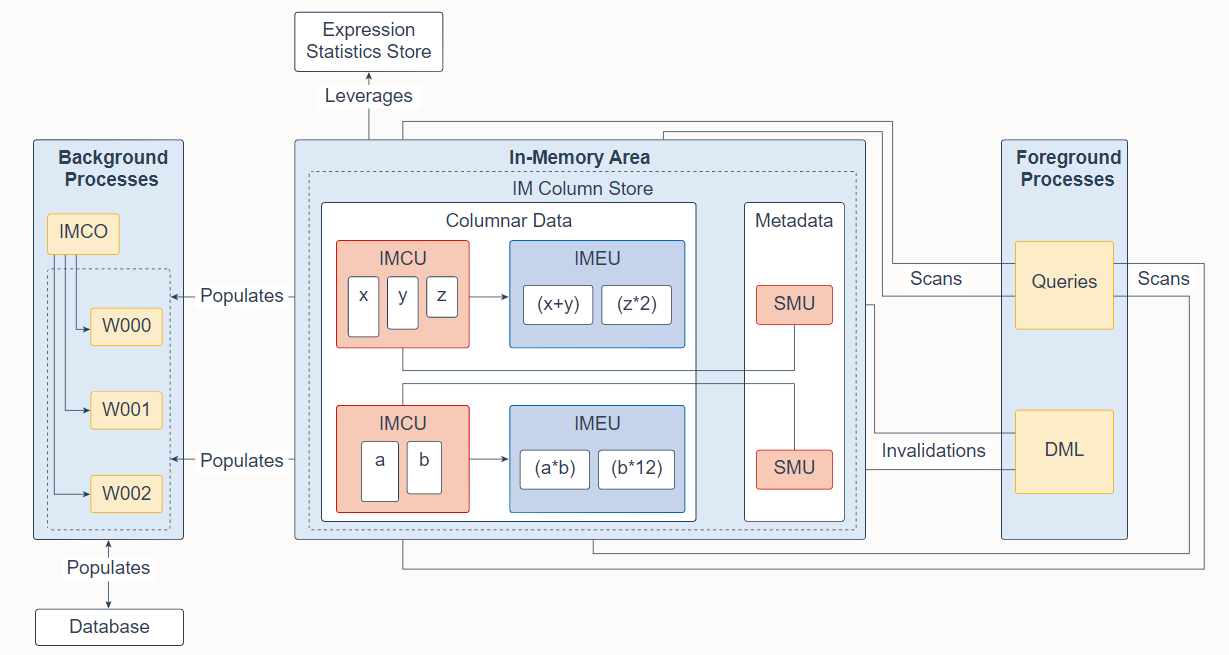
The In-Memory Area is an optional SGA component that contains the In-Memory column store (IM column store), which stores tables and partitions in memory using a columnar format optimized for rapid scans. The IM column store enables data to be simultaneously populated in the SGA in both the traditional row format (in the buffer cache) and a columnar format. The database transparently sends online transactional processing (OLTP) queries, such as primary key lookups, to the buffer cache, and analytic and reporting queries to the IM column store. When fetching data, Oracle Database can also read data from both memory areas within the same query. The dual-format architecture does not double memory requirements. The buffer cache is optimized to run with a much smaller size than the size of the database.
In-Memory Area 是一个可选的 SGA 组件,其中包含 In-Memory 列存储(IM 列存储),它使用针对快速扫描优化的列格式将表和分区存储在内存中。 IM 列存储使数据能够以传统的行格式(在缓冲区高速缓存中)和列格式同时填充到 SGA 中。数据库透明地将联机事务处理 (OLTP) 查询(例如主键查找)发送到缓冲区缓存,并将分析和报告查询发送到 IM 列存储。在获取数据时,Oracle 数据库还可以从同一查询中的两个内存区域读取数据。双格式架构不会使内存需求加倍。缓冲区缓存经过优化,可以在比数据库大小小得多的情况下运行。
You should populate only the most performance-critical data in the IM column store. To add an object to the IM column store, turn on the INMEMORY attribute for an object when creating or altering it. You can specify this attribute on a tablespace (for all new tables and views in the tablespace), table, (sub)partition, materialized view, or subset of columns within an object.
您应该只填充 IM 列存储中对性能最关键的数据。要将对象添加到 IM 列存储,请在创建或更改对象时打开对象的 INMEMORY 属性。您可以在表空间(针对表空间中的所有新表和视图)、表、(子)分区、物化视图或对象内的列子集上指定此属性。
The IM column store manages both data and metadata in optimized storage units, not in traditional Oracle data blocks. An In-Memory Compression Unit (IMCU) is a compressed, read-only storage unit that contains data for one or more columns. A Snapshot Metadata Unit (SMU) contains metadata and transactional information for an associated IMCU. Every IMCU maps to a separate SMU.
IM 列存储在优化的存储单元中管理数据和元数据,而不是在传统的 Oracle 数据块中。内存压缩单元 (IMCU) 是一种压缩的只读存储单元,包含一个或多个列的数据。快照元数据单元 (SMU) 包含相关 IMCU 的元数据和事务信息。每个 IMCU 都对应到一个单独的 SMU。
The Expression Statistics Store (ESS) is a repository that stores statistics about expression evaluation. The ESS resides in the SGA and also persists on disk. When an IM column store is enabled, the database leverages the ESS for its In-Memory Expressions (IM expressions) feature. An In-Memory Expression Unit (IMEU) is a storage container for materialized IM expressions and user-defined virtual columns. Note that the ESS is independent of the IM column store. The ESS is a permanent component of the database and cannot be disabled.
表达式统计存储 (ESS) 是存储有关表达式估值的统计信息的存储库。 ESS 驻留在 SGA 中,也保留在磁盘上。启用 IM 列存储时,数据库将 ESS 用于其内存中表达式(IM 表达式)功能。内存中表达式单元 (IMEU) 是物化 IM 表达式和用户定义的虚拟列的存储容器。请注意,ESS 独立于 IM 列存储。 ESS 是数据库的永久组件,无法禁用。
Conceptually, an IMEU is a logical extension of its parent IMCU. Just as an IMCU can contain multiple columns, an IMEU can contain multiple virtual columns. Every IMEU maps to exactly one IMCU, mapping to the same row set. The IMEU contains expression results for the data contained in its associated IMCU. When the IMCU is populated, the associated IMEU is also populated.
从概念上讲,IMEU 是其父 IMCU 的逻辑扩展。 正如 IMCU 可以包含多个列一样,一个 IMEU 可以包含多个虚拟列。 每个 IMEU 都对应到一个 IMCU,映射到相同的行集。 IMEU 包含其关联 IMCU 中包含的数据的表达式结果。 填充 IMCU 时,也会填充关联的 IMEU。
A typical IM expression involves one or more columns, possibly with constants, and has a one-to-one mapping with the rows in the table. For example, an IMCU for an EMPLOYEES table contains rows 1-1000 for the column weekly_salary. For the rows stored in this IMCU, the IMEU calculates the automatically detected IM expression weekly_salary52, and the user-defined virtual column quarterly_salary defined as weekly_salary12. The third row down in the IMCU maps to the third row down in the IMEU.
典型的 IM 表达式包含一个或多个列,可能带有常量,并且与表中的行具有一对一的映射关系。 例如,EMPLOYEES 表的 IMCU 包含列weekly_salary 的第 1-1000 行。 对于该IMCU中存储的行,IMEU计算自动检测到的IM表达式weekly_salary52,用户自定义的虚拟列Quarterly_salary定义为weekly_salary12。 IMCU 中的第三行映射到 IMEU 中的第三行。
The In-Memory area is sub-divided into two pools: a 1MB columnar data pool used to store the actual column-formatted data populated into memory (IMCUs and IMEUs), and a 64K metadata pool used to store metadata about the objects that are populated into the IM column store. The relative size of the two pools is determined by internal heuristics; the majority of the In-Memory area memory is allocated to the 1MB pool. The size of the In-Memory area is controlled by the initialization parameter INMEMORY_SIZE (default 0) and must have a minimum size of 100MB. Starting in Oracle Database 12.2, you can increase the size of the In-Memory area on the fly by increasing the INMEMORY_SIZE parameter via an ALTER SYSTEM command by at least 128MB. Note that it is not possible to shrink the size of the In-Memory area on the fly.
In-Memory 区域被细分为两个池:一个 1MB 列式数据池,用于存储填充到内存中的实际列格式数据(IMCU 和 IMEU),以及一个 64K 元数据池,用于存储有关对象的元数据。填充到 IM 列存储中。两个池的相对大小由内部启发式确定;大多数 In-Memory 区域内存分配给 1MB 池。 In-Memory 区域的大小由初始化参数 INMEMORY_SIZE(默认为 0)控制,并且至少为 100MB。从 Oracle Database 12.2 开始,您可以通过 ALTER SYSTEM 命令将 INMEMORY_SIZE 参数增加至少 128MB,从而即时增加 In-Memory 区域的大小。请注意,无法即时缩小内存中区域的大小。
Database In-Memory has a new "Base Level" feature that allows its use with up to a 16GB column store without triggering any license tracking.
Database In-Memory 有一个新的"基本级别"功能,最多可以使用 16GB 的列存储,而不会触发任何许可证跟踪。
An in-memory table gets IMCUs allocated in the IM column store at first table data access or at database startup. An in-memory copy of the table is made by doing a conversion from the on-disk format to the new in-memory columnar format. This conversion is done each time the instance restarts as the IM column store copy resides only in memory. When this conversion is done, the in-memory version of the table gradually becomes available for queries. If a table is partially converted, queries are able to use the partial in-memory version and go to disk for the rest, rather than waiting for the entire table to be converted.
在第一次访问表数据或数据库启动时,内存表会在 IM 列存储中分配 IMCU。 通过将磁盘上的格式转换为新的内存中的列格式,可以生成表的内存中副本。 每次实例重新启动时都会完成此转换,因为 IM 列存储副本仅驻留在内存中。 完成此转换后,表的内存版本逐渐可用于查询。 如果一个表被部分转换,查询能够使用部分内存版本并将其余部分转到磁盘,而不是等待整个表被转换。
In-memory hybrid scans can access some data from the IM column store, and some data from the row store, when not all columns in a table have been populated into the In-Memory Column Store, improving performance by orders of magnitude over pure row store queries.
当并非表中的所有列都填充到内存中列存储时,内存混合扫描可以访问 IM 列存储中的部分数据,以及行存储中的一些部分数据。性能可以比纯行存储查询提高了几个数量级。
Automatic In-Memory enables, populates, evicts, and recompresses segments without user intervention. When INMEMORY_AUTOMATIC_LEVEL is set to HIGH, the database automatically enables and populates segments based on their usage patterns. This automation helps maximize the number of objects that can be populated into the In-Memory Column Store at one time.
Automatic In-Memory 无需用户干预即可启用、发布、逐出和重新压缩段对象。当 INMEMORY_AUTOMATIC_LEVEL 设置为 HIGH 时,数据库会根据段的使用模式自动启用和发布段。这种自动化有助于最大限度地增加在某时刻可以填充到内存列存储中的对象数量。
In response to queries and data manipulation language (DML), server processes scan columnar data and update SMU metadata. Background processes populate row data from disk into the IM column store. The In-Memory Coordinator Process (IMCO) is a background process that initiates background population and repopulation of columnar data. The Space Management Coordinator Process (SMCO) and Space Management Worker Processes (Wnnn) are background processes that do the actual populating and repopulating of data on behalf of IMCO. DML block changes are written to the buffer cache, and then to disk. Background processes then repopulate row data from disk into the IM column store based on the metadata invalidations and query requests.
为响应查询和数据操作语言 (DML),服务器进程扫描列数据并更新 SMU 元数据。后台进程将行数据从磁盘填充到 IM 列存储中。 In-Memory Coordinator Process (IMCO) 是一个后台进程,它启动后台发布和重新发布列式数据。 Space Management Coordinator Process (SMCO) 和 Space Management Worker Processes (Wnnn) 是后台进程,它们代表 IMCO 进行数据的实际发布和重新发布。 DML 块更改被写入缓冲区缓存,然后写入磁盘。然后后台进程根据元数据失效和查询请求将行数据从磁盘重新填充到 IM 列存储中。
You can enable the In-Memory FastStart feature to write the columnar data in the IM Column Store back to a tablespace in the database in compressed columnar format. This feature makes database startup faster. Note that this feature does not apply to IMEUs. They are always populated dynamically from the IMCUs.
您可以启用 In-Memory FastStart 功能,将 IM 列存储中的列数据以压缩列格式写回数据库中的表空间。 此功能使数据库启动更快。 请注意,此功能不适用于 IMEU。 它们总是基于IMCU 动态发布。
In-Memory deep vectorization can optimize complex SQL operators by pipelining the physical operators inside each SQL operator and vectorizing them using SIMD techniques. This feature is enabled by default but can be disabled by setting the INMEMORY_DEEP_VECTORIZATION initialization parameter to false.
In-Memory 深度向量化可以优化复杂的 SQL 运算符,方法是在每个 SQL 运算符中管道化物理运算符并使用 SIMD 技术对它们进行矢量化。 此功能默认启用,但可以通过将 INMEMORY_DEEP_VECTORIZATION 初始化参数设置为 false 来禁用。
更多信息,请参阅 Oracle Database In-Memory 简介 。
10. Database Data Files
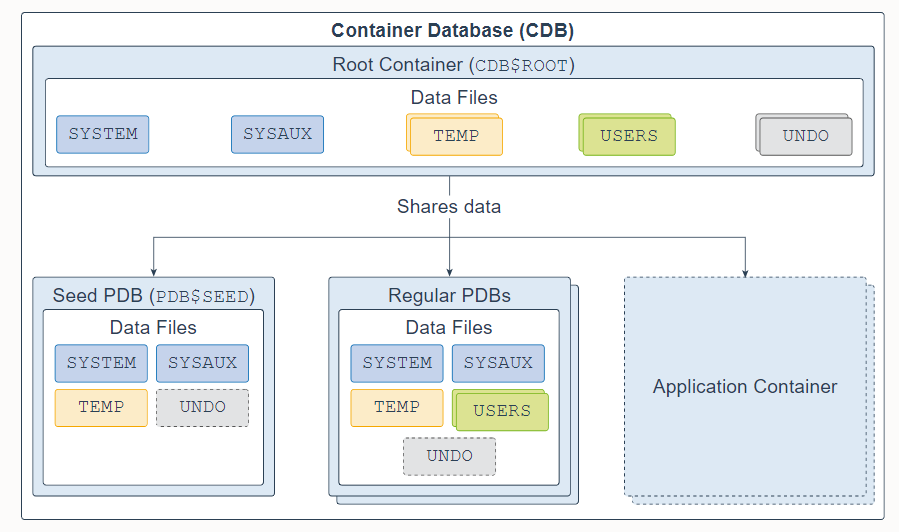
A multitenant container database (CDB) is a set of physical files that store user data and metadata. The metadata consists of structural, configuration, and control information about the database server.
多租户容器数据库 (CDB) 是一组存储用户数据和元数据的物理文件。 元数据由有关数据库服务器的结构、配置和控制信息组成。
A CDB is made up of one CDB root container (also called the root), exactly one seed pluggable database (seed PDB), zero or more user-created pluggable databases (simply referred to as PDBs), and zero or more application containers. The entire CDB is referred to as the system container. To a user or application, PDBs appear logically as separate databases.
一个 CDB 由一个 CDB 根容器(也称为根)、恰好一个种子可插拔数据库(种子 PDB)、零个或多个用户创建的可插拔数据库(简称 PDB)和零个或多个应用程序容器组成。 整个 CDB 称为系统容器。 对于用户或应用程序,PDB 在逻辑上表现为单独的数据库。
The CDB root, named CDB$ROOT, contains multiple data files, control files, redo log files, flashback logs, and archived redo log files. The data files store Oracle-supplied metadata and common users (users that are known in every container), which are shared with all PDBs.
CDB 根,名为 CDB$ROOT,包含多个数据文件、控制文件、重做日志文件、闪回日志和归档重做日志文件。 数据文件存储 Oracle 提供的元数据和公共用户(每个容器中已知的用户),它们与所有 PDB 共享。
The seed PDB, named PDB$SEED, is a system-supplied PDB template containing multiple data files that you can use to create new PDBs.
名为 PDB$SEED 的种子 PDB 是系统提供的 PDB 模板,其中包含可用于创建新 PDB 的多个数据文件。
The regular PDB contains multiple data files that contain the data and code required to support an application; for example, a Human Resources application. Users interact only with the PDBs, and not the seed PDB or root container. You can create multiple PDBs in a CDB. One of the goals of the multitenant architecture is that each PDB has a one-to-one relationship with an application.
常规 PDB 包含多个数据文件,其中包含支持应用程序所需的数据和代码; 例如,人力资源应用程序。 用户仅与 PDB 交互,而不与种子 PDB 或根容器交互。 您可以在一个 CDB 中创建多个 PDB。 多租户架构的目标之一是每个 PDB 与应用程序具有一一对应关系。
An application container is an optional collection of PDBs within a CDB that stores data for an application. The purpose of creating an application container is to have a single master application definition. You can have multiple application containers in a CDB.
应用程序容器是 CDB 中的可选 PDB 集合,用于存储应用程序的数据。 创建应用程序容器的目的是拥有一个单一的主应用程序定义。 您可以在 CDB 中拥有多个应用程序容器。
A database is divided into logical storage units called tablespaces, which collectively store all the database data. Each tablespace represents one or more data files. The root container and regular PDBs have a SYSTEM, SYSAUX, USERS, TEMP, and UNDO tablespace (optional in a regular PDB). A seed PDB has a SYSTEM, SYSAUX, TEMP, and optional UNDO tablespace.
数据库被划分为称为表空间的逻辑存储单元,它们共同存储所有数据库数据。 每个表空间代表一个或多个数据文件。 根容器和常规 PDB 具有 SYSTEM、SYSAUX、USERS、TEMP 和 UNDO 表空间(在常规 PDB 中是可选的)。 种子 PDB 具有 SYSTEM、SYSAUX、TEMP 和可选的 UNDO 表空间。
Oracle Database 21c 不再支持非 CDB,这意味着 Oracle Universal Installer 和 DBCA 不能再创建非 CDB Oracle 数据库实例。
Non-CDBs are desupported in Oracle Database 21c which means that the Oracle Universal Installer and DBCA can no longer create non-CDB Oracle Database instances.
有关详细信息,请参阅多租户架构简介 。
11. Database System Files
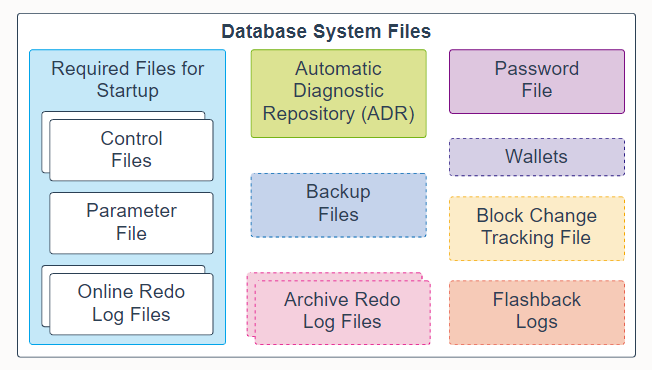
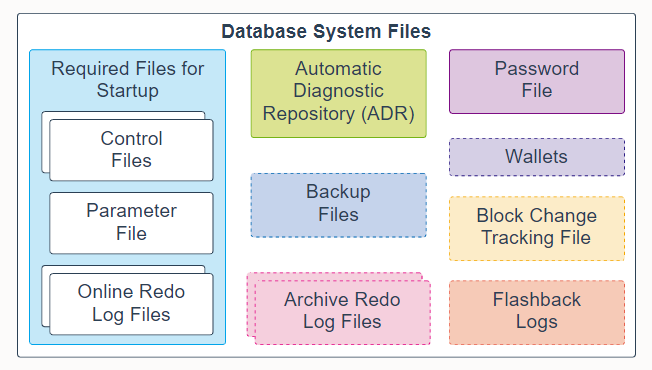
The following database system files are used during the operation of an Oracle Database and reside on the database server. Note that data files are physical files that belong to database containers and are not described here.
以下数据库系统文件在 Oracle 数据库运行期间使用并驻留在数据库服务器上。 请注意,属于数据库容器的数据文件在此处不做描述。
-
Control files: A control file is a required file that stores metadata about the data files and online redo log files; for example, their names and statuses. This information is required by the database instance to open the database. Control files also contain metadata that must be accessible when the database is not open. It is highly recommended that you make several copies of the control file in your database server for high availability.
-
控制文件:控制文件是存储有关数据文件和在线重做日志文件的元数据的必需文件; 例如,他们的命名和状态。 数据库实例需要此信息才能打开数据库。 控制文件还包含在数据库未打开时必须访问的元数据。 强烈建议您在数据库服务器中制作多个控制文件副本以实现高可用性。
-
Parameter file: This required file defines how the database instance is configured when it starts up. It can be either an initialization parameter file (pfile) or a server parameter file (spfile).
-
参数文件:这个必需的文件定义了数据库实例在启动时是如何配置的。 它可以是初始化参数文件 (pfile) 或服务器参数文件 (spfile)。
-
Online redo log files: These required files store changes to the database as they occur and are used for data recovery.
-
联机重做日志文件:这些必需的文件在发生更改时存储对数据库的更改并用于数据恢复。
-
Automatic Diagnostic Repository (ADR): The ADR is a file-based repository for database diagnostic data, such as traces, dumps, the alert log, health monitor reports, and more. It has a unified directory structure across multiple instances and multiple products. The database, Oracle Automatic Storage Management (Oracle ASM), the listener, Oracle Clusterware, and other Oracle products or components store all diagnostic data in the ADR. Each instance of each product stores diagnostic data underneath its own home directory within the ADR.
-
自动诊断存储库 (ADR):ADR 是基于文件的数据库诊断数据存储库,例如跟踪、转储、警报日志、运行状况监视器报告等。它具有跨多个实例和多个产品的统一目录结构。数据库、Oracle 自动存储管理 (Oracle ASM)、侦听器、Oracle 集群和其他 Oracle 产品或组件将所有诊断数据存储在 ADR 中。每个产品的每个实例都将诊断数据存储在 ADR 内其自己的主目录下。
-
Backup files: These optional files are used for database recovery. You typically restore a backup file when a media failure or user error has damaged or deleted the original file.
-
备份文件:这些可选文件用于数据库恢复。 当介质故障或由于用户错误损坏或删除原始文件时,您通常会恢复备份文件。
-
Archived redo log files: These optional files contain an ongoing history of the data changes that are generated by the database instance. Using these files and a backup of the database, you can recover a lost data file. That is, archive logs enable the recovery of restored data files.
-
归档重做日志文件:这些可选文件包含数据库实例生成的数据更改的持续历史记录。 使用这些文件和数据库备份,您可以恢复丢失的数据文件。 也就是说,归档日志可以恢复已复原的数据文件。
-
Password file: This optional file enables users using the SYSDBA, SYSOPER, SYSBACKUP, SYSDG, SYSKM, SYSRAC, and SYSASM roles to connect remotely to the database instance and perform administrative tasks.
-
密码文件:此可选文件使使用 SYSDBA、SYSOPER、SYSBACKUP、SYSDG、SYSKM、SYSRAC 和 SYSASM 角色的用户能够远程连接到数据库实例并执行管理任务。
-
钱包:对于应用程序使用密码凭据连接到数据库的大规模部署,可以将此类凭据存储在客户端 Oracle 钱包中。 Oracle 钱包是一个安全的软件容器,用于存储身份验证和签名凭证。
-
Wallets: For large-scale deployments where applications use password credentials to connect to databases, it is possible to store such credentials in a client-side Oracle wallet. An Oracle wallet is a secure software container that is used to store authentication and signing credentials. Possible wallets include an Oracle wallet for user credentials, Encryption Wallet for Transparent Data Encryption (TDE), and an Oracle Public Cloud (OPC) wallet for the database backup cloud module. A wallet is optional, but recommended.
-
可能的钱包包括用于用户凭据的 Oracle 钱包、用于透明数据加密 (TDE) 的加密钱包和用于数据库备份云模块的 Oracle 公共云 (OPC) 钱包。 钱包是可选的,但建议使用。
-
Block change tracking file: Block change tracking improves the performance of incremental backups by recording changed blocks in the block change tracking file. During an incremental backup, instead of scanning all data blocks to identify which blocks have changed, Oracle Recovery Manager (RMAN) uses this file to identify the changed blocks that need to be backed up. A block change tracking file is optional.
-
块更改跟踪文件:块更改跟踪通过在块更改跟踪文件中记录更改的块来提高增量备份的性能。 在增量备份期间,Oracle 恢复管理器 (RMAN) 不是扫描所有数据块来识别哪些块已更改,而是使用此文件来识别需要备份的更改块。 块更改跟踪文件是可选的。
-
Flashback logs: Flashback Database is similar to conventional point-in-time recovery in its effects. It enables you to return a database to its state at a time in the recent past. Flashback Database uses its own logging mechanism, creating flashback logs and storing them in the fast recovery area. You can use Flashback Database only if flashback logs are available. To take advantage of this feature, you must set up your database in advance to create flashback logs. Flashback logs are optional.
-
闪回日志:闪回数据库的效果类似于传统的时间点恢复。 它使您能够将数据库返回到最近一段时间的状态。 闪回数据库使用自己的日志记录机制,创建闪回日志并将它们存储在快速恢复区。 只有当闪回日志可用时,您才能使用闪回数据库。 要利用此功能,您必须提前设置数据库以创建闪回日志。 闪回日志是可选的。
控制文件、在线重做日志文件和归档重做日志文件可以多路复用,这意味着可以在不同的位置自动维护两个或多个相同的副本。
数据库启动需要控制文件、参数文件和在线重做日志文件。 有关详细信息,请参阅物理存储结构 。
12. Application Containers
An application container is an optional, user-created CDB component that stores data and metadata for application PDBs. A CDB can include zero or more application containers. An application container consists of exactly one application root and one or more application PDBs, which plug into the CDB root. An application root belongs to the CDB root and no other container, and stores the common metadata and data.
应用程序容器是一个可选的、用户创建的 CDB 组件,用于存储应用程序 PDB 的数据和元数据。 一个 CDB 可以包含零个或多个应用程序容器。 一个应用程序容器恰好由一个应用程序根和一个或多个插入 CDB 根的应用程序 PDB 组成。 应用根目录属于 CDB 根目录,不属于其他容器,存储通用元数据和数据。
A typical application installs application common users, metadata-linked common objects, and data-linked common objects. You might create multiple sales-related PDBs within one application container, with these PDBs sharing an application back end that consists of a set of common tables and table definitions.
典型的应用程序安装应用程序公共用户、链接元数据的公共对象和链接数据的公共对象。 您可以在一个应用程序容器中创建多个与销售相关的 PDB,这些 PDB 共享一个由一组公共表和表定义组成的应用程序后端。
The application root, application seed, and application PDB each have a SYSTEM, SYSAUX, TEMP, USERS, and optional UNDO tablespace. Each tablespace represents one or more data files.
应用程序根、应用程序种子和应用程序 PDB 各有一个 SYSTEM、SYSAUX、TEMP、USERS 和可选的 UNDO 表空间。 每个表空间代表一个或多个数据文件。
For more information, see About Application Containers.
有关更多信息,请参阅关于应用程序容器 。
13. Automatic Diagnostic Repository (ADR)
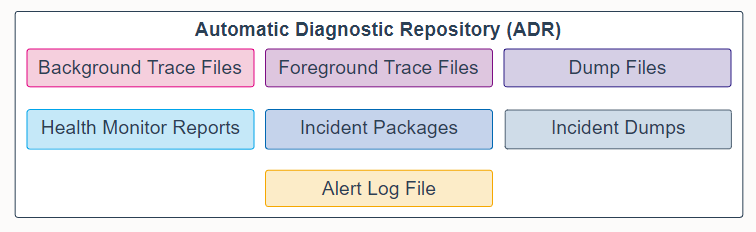
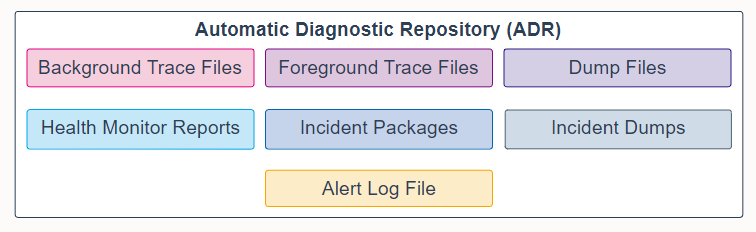
The Automatic Diagnostic Repository (ADR) is a system-wide tracing and logging central repository for database diagnostic data. It includes the following items:
自动诊断存储库 (ADR) 是用于数据库诊断数据的系统范围的跟踪和日志记录中央存储库。 它包括以下部分:
-
Background trace files: Each database background process can write to an associated trace file. When a process detects an internal error, the process dumps information about the error to its trace file. Some of the information written to a trace file is intended for the database administrator, whereas other information is for Oracle Support Services. Typically, database background process trace file names contain the Oracle system identifier (SID), the background process name, and the operating system process number. An example of a trace file for the RECO process is mytest_reco_10355.trc.
-
后台跟踪文件:每个数据库后台进程都可以写入关联的跟踪文件。当进程检测到内部错误时,该进程会将有关错误的信息转储到其跟踪文件中。写入跟踪文件的一些信息是供数据库管理员使用的,而其他信息是供 Oracle 支持服务使用的。通常,数据库后台进程跟踪文件名包含 Oracle 系统标识符 (SID)、后台进程名和操作系统进程号。 RECO 进程的跟踪文件示例是 mytest_reco_10355.trc。
-
Foreground trace files: Each server process can write to an associated trace file. When a process detects an internal error, the process dumps information about the error to its trace file. Server process trace file names contain the Oracle SID, the string ora, and the operating system process number. An example of a server process trace file name is mytest_ora_10304.trc.
-
前台跟踪文件:每个服务器进程都可以写入关联的跟踪文件。 当进程检测到内部错误时,该进程会将有关错误的信息转储到其跟踪文件中。 服务器进程跟踪文件名包含 Oracle SID、字符串 ora 和操作系统进程号。 服务器进程跟踪文件名的一个示例是 mytest_ora_10304.trc。
-
Dump files: A diagnostic dump file is a special type of trace file that contains detailed point-in-time information about a state or structure. A dump file is typically a one-time output of diagnostic data in response to an event whereas a trace file tends to be a continuous output of diagnostic data.
-
转储文件:诊断转储文件是一种特殊类型的跟踪文件,其中包含有关状态或结构的详细时间点信息。 转储文件通常是响应事件的诊断数据的一次性输出,而跟踪文件往往是诊断数据的连续输出。
-
Health monitor reports: Oracle Database includes a framework called Health Monitor for running diagnostic checks on the database. Health checks detect file corruptions, physical and logical block corruptions, undo and redo corruptions, data dictionary corruptions, and more. The health checks generate reports of their findings and, in many cases, recommendations for resolving problems.
-
运行状况监视器报告:Oracle 数据库包含一个称为运行状况监视器的框架,用于对数据库运行诊断检查。运行状况检查可检测文件损坏、物理和逻辑块损坏、撤消和重做损坏、数据字典损坏等。运行状况检查会生成有关其发现的报告,并且在许多情况下会生成解决问题的建议。
-
Incident packages: For the customized approach to uploading diagnostic data to Oracle Support, you first collect the data into an intermediate logical structure called an incident package (package). A package is a collection of metadata that is stored in the ADR and points to diagnostic data files and other files both in and outside of the ADR. When you create a package, you select one or more problems to add to the package. The Support Workbench then automatically adds to the package the problem information, incident information, and diagnostic data (such as trace files and dumps) associated with the selected problems.
-
事件包:对于将诊断数据上传到 Oracle Support 的定制方法,您首先将数据收集到称为事件包(包)的中间逻辑结构中。 包是存储在 ADR 中的元数据集合,指向诊断数据文件和 ADR 内外的其他文件。 创建包时,您可以选择一个或多个问题添加到包中。 然后,支持工作台会自动将与所选问题相关的问题信息、事件信息和诊断数据(例如跟踪文件和转储)添加到包中。
-
Incident dumps: When an incident occurs, the database writes one or more dumps to the incident directory created for the incident. Incident dumps also contain the incident number in the file name.
-
事件转储:发生事件时,数据库会将一个或多个转储写入为事件创建的事件目录。 事件转储还在文件名中包含事件编号。
-
Alert log file: The alert log of a database is an chronological log of messages and errors. Oracle recommends that you review the alert log periodically.
-
警报日志文件:数据库的警报日志是按时间顺序排列的消息和错误日志。 Oracle 建议您定期查看警报日志。
For more information, see Automatic Diagnostic Repository.
有关详细信息,请参阅自动诊断存储库 。
14. Backup Files
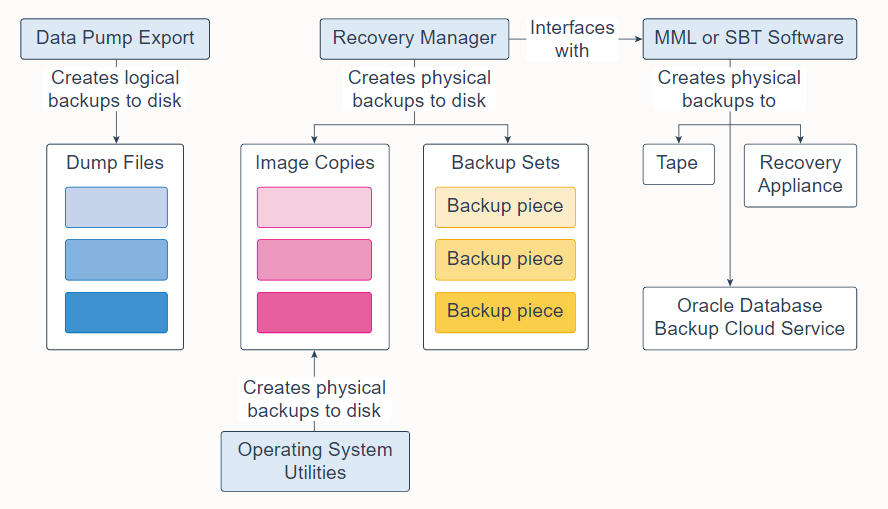
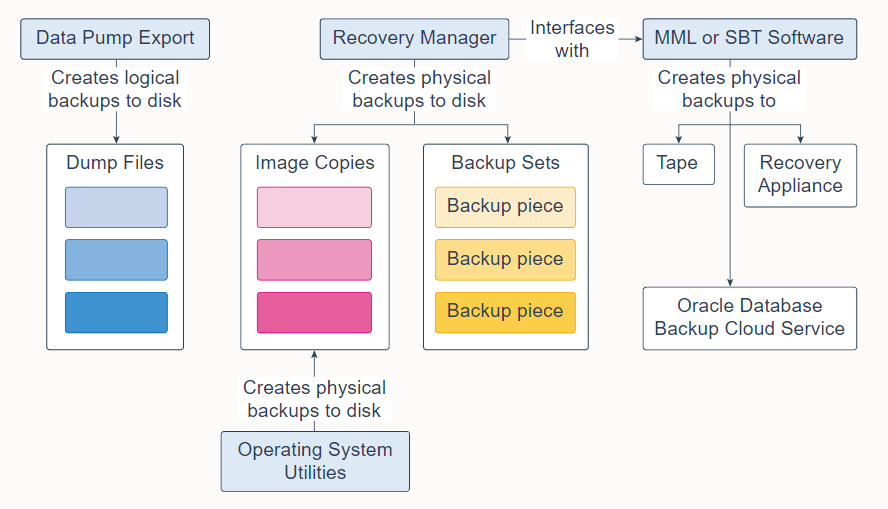
Database backups can be either physical or logical.
- Physical backups are copies of physical database files. You can make physical backups with Recovery Manager (RMAN) or operating system utilities.
- Logical backups contain tables, stored procedures, and other logical data. You can extract logical data with an Oracle Database utility, such as Data Pump Export, and store it in a binary file. Logical backups can supplement physical backups.
数据库备份可以是物理的或逻辑的。
- 物理备份是物理数据库文件的副本。 您可以使用恢复管理器 (RMAN) 或操作系统实用程序进行物理备份。
- 逻辑备份包含表、存储过程和其他逻辑数据。 您可以使用 Oracle 数据库实用程序(例如 Data Pump Export)提取逻辑数据,并将其存储在二进制文件中。 逻辑备份可以补充物理备份。
Database backups created by RMAN are stored as image copies or backup sets.
- An image copy is a bit-for-bit, on-disk duplicate of a data file, control file, or archived redo log file. You can create image copies of physical files with operating system utilities or RMAN and use either tool to restore them. Image copies are useful for disk because you can update them incrementally and recover them in place.
- A backup set is a proprietary format created by RMAN that contains the data from one or more data files, archived redo log files, control files, or server parameter file. The smallest unit of a backup set is a binary file called a backup piece. Backup sets are the only form in which RMAN can write backups to sequential devices, such as tape drives. One advantage of backup sets is that RMAN uses unused block compression to save space in backing up data files. Only those blocks in the data files that have been used to store data are included in the backup set. Backup sets can also be compressed, encrypted, sent to tape, and use advanced unused-space compression that is not available with datafile copies.
RMAN 创建的数据库备份存储为映像拷贝或备份集。
- 映像拷贝是数据文件、控制文件或归档重做日志文件的逐位磁盘副本。您可以使用操作系统实用程序或 RMAN 创建物理文件的映像拷贝,并使用任一工具来还原它们。映像拷贝对磁盘很有用,因为您可以增量更新它们并就地恢复它们。
- 备份集是由 RMAN 创建的专有格式,包含来自一个或多个数据文件、归档重做日志文件、控制文件或服务器参数文件的数据。备份集的最小单位是称为备份片的二进制文件。备份集是 RMAN 可以将备份写入顺序设备(例如磁带驱动器)的唯一形式。备份集的一个优点是 RMAN 可使用未使用块压缩来节省备份数据文件的空间。只有数据文件中用于存储数据的块才包含在备份集中。备份集也可以被压缩、加密、发送到磁带,并可使用对于数据文件拷贝不可用的高级未使用空间压缩。
RMAN can interface with Media Management Library (MML) or System Backup to Tape (SBT) software, which can create backups to tape, Oracle Database Backup Cloud Service, or Zero Data Loss Recovery Appliance (commonly known as Recovery Appliance).
RMAN 可以与介质管理库 (MML) 或系统备份到磁带 (SBT) 软件连接,这些软件可以创建磁带备份、以及Oracle 数据库备份云服务或零数据丢失恢复设备(通常称为恢复设备)。
有关更多信息,请参阅:
15. PMON
Process Monitor Process (PMON) is a background process that periodically scans all processes to find any that have died abnormally. PMON is then responsible for coordinating cleanup performed by the Cleanup Main Process (CLMN) and the Cleanup Worker Process workers (CLnn).
Process Monitor Process (PMON) 是一个后台进程,它定期扫描所有进程以查找任何异常死亡的进程。 然后,PMON 负责协调由 Cleanup Main Process (CLMN) 和 Cleanup Worker Process workers (CLnn) 执行的清理工作。
PMON 作为操作系统进程运行,而不是作为线程运行。 除了数据库实例,PMON 还在 Oracle 自动存储管理 (ASM) 实例和 Oracle ASM 代理实例上运行。
PMON runs as an operating system process, and not as a thread. In addition to database instances, PMON also runs on Oracle Automatic Storage Management (ASM) instances and Oracle ASM Proxy instances.
有关后台进程的完整列表,请参阅后台进程 。
16. Process Manager Process (PMAN)
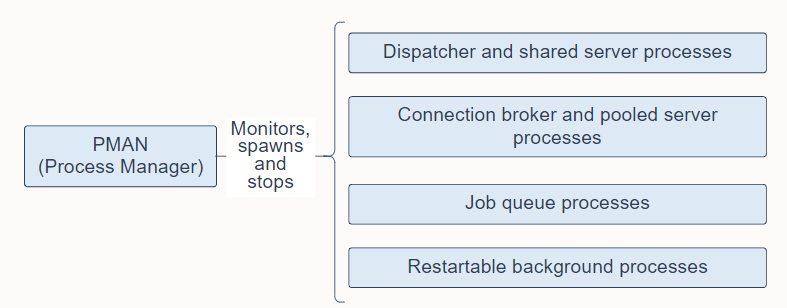
Process Manager Process (PMAN) is a background process that monitors, spawns, and stops the following as needed:
- Dispatcher and shared server processes
- Connection broker and pooled server processes for database resident connection pools
- Job queue processes
- Restartable background processes
Process Manager Process (PMAN) 是一个后台进程,可根据需要监视、生成和停止以下内容:
- 调度程序和共享服务器进程
- 数据库驻留连接池的连接代理和池化服务器进程
- 作业队列进程
- 可重启的后台进程
PMAN runs as an operating system process, and not as a thread. In addition to database instances, PMAN also runs on Oracle Automatic Storage Management (ASM) instances and Oracle ASM Proxy instances.
PMAN 作为操作系统进程运行,而不是作为线程运行。 除了数据库实例,PMAN 还运行在 Oracle 自动存储管理 (ASM) 实例和 Oracle ASM 代理实例上。
有关后台进程的完整列表,请参阅后台进程 。
17. Listener Registration Process (LREG)
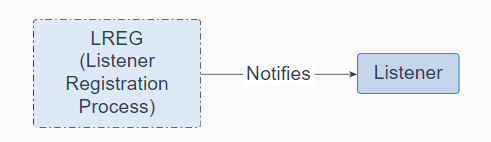
Listener Registration Process (LREG) is a background process that notifies the listeners about instances, services, handlers, and endpoints.
侦听器注册进程 (LREG) 是一个后台进程,用于通知侦听器有关实例、服务、处理程序和端点的信息。
LREG can run as a thread or an operating system process. In addition to database instances, LREG also runs on Oracle Automatic Storage Management (ASM) instances and Oracle Real Application Clusters (RAC).
LREG 可以作为线程或操作系统进程运行。 除了数据库实例,LREG 还运行在 Oracle 自动存储管理 (ASM) 实例和 Oracle 真正应用集群 (RAC) 上。
有关后台进程的完整列表,请参阅后台进程 。
18. System Monitor Process (SMON)
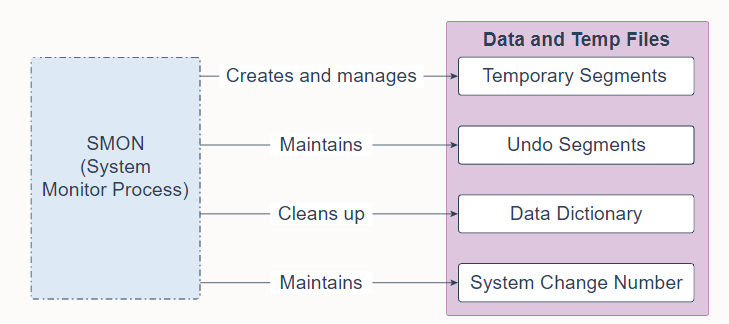
System Monitor Process (SMON) is a background process that performs many database maintenance tasks, including the following:
- Creates and manages the temporary tablespace metadata, and reclaims space used by orphaned temporary segments
- Maintains the undo tablespace by onlining, offlining, and shrinking the undo segments based on undo space usage statistics
- Cleans up the data dictionary when it is in a transient and inconsistent state
- Maintains the System Change Number (SCN) to time mapping table used to support Oracle Flashback features
System Monitor Process (SMON) 是一个后台进程,它执行许多数据库维护任务,包括:
- 创建和管理临时表空间元数据,并回收孤立临时段使用的空间
- 根据撤消空间使用统计信息,通过联机、脱机和收缩撤消段来维护撤消表空间
- 在数据字典处于瞬态和不一致状态时清理它
- 维护用于支持 Oracle 闪回特性的系统更改号 (SCN) 到时间映射表
SMON is resilient to internal and external errors raised during background activities. SMON can run as a thread or an operating system process. In an Oracle Real Application Clusters (RAC) database, the SMON process of one instance can perform instance recovery for other instances that have failed.
SMON 对后台活动期间引发的内部和外部错误具有弹性。 SMON 可以作为线程或操作系统进程运行。 在 Oracle Real Application Clusters (RAC) 数据库中,一个实例的 SMON 进程可以为其他发生故障的实例执行实例恢复。
有关后台进程的完整列表,请参阅后台进程 。
19. Database Writer Process (DBWn)
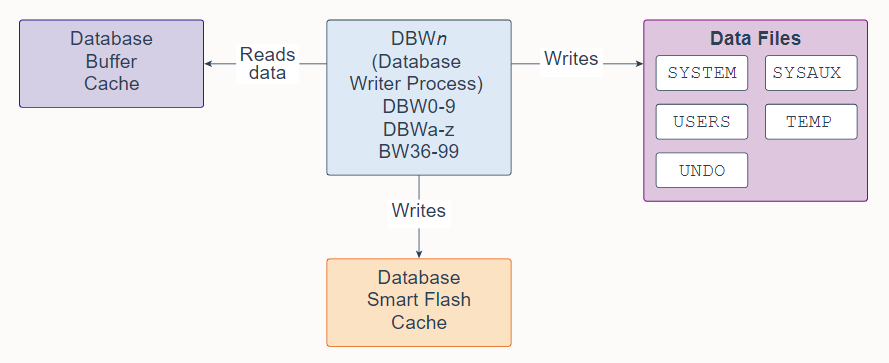
Database Writer Process (DBWn) is a background process that primarily writes data blocks to disk. It also handles checkpoints, file open synchronization, and logging of Block Written records. DBWn also writes to the Database Smart Flash Cache (Flash Cache), when Flash Cache is configured.
数据库写入进程 (DBWn) 是一个后台进程,主要将数据块写入磁盘。它还处理检查点、文件打开同步和块写入记录日志。配置 Flash Cache 时,DBWn 还会写入数据库智能闪存缓存(Flash Cache)。
In many cases the blocks that DBWn writes are scattered throughout the disk. Thus, the writes tend to be slower than the sequential writes performed by the Log Writer Process (LGWR). DBWn performs multi-block writes when possible to improve efficiency. The number of blocks written in a multi-block write varies by operating system.
在许多情况下,DBWn 写入的块分散在整个磁盘中。因此,写入往往比 Log Writer Process (LGWR) 执行的顺序写入慢。 DBWn 在可能的情况下执行多块写入以提高效率。多块写入中写入的块数因操作系统而异。
The DB_WRITER_PROCESSES initialization parameter specifies the number of Database Writer Processes. There can be 1 to 100 Database Writer Processes. The names of the first 36 Database Writer Processes are DBW0-DBW9 and DBWa-DBWz. The names of the 37th through 100th Database Writer Processes are BW36-BW99. The database selects an appropriate default setting for the DB_WRITER_PROCESSES parameter or adjusts a user-specified setting based on the number of CPUs and processor groups.
DB_WRITER_PROCESSES 初始化参数指定数据库写入进程的数量。可以有 1 到 100 个数据库写入器进程。前 36 个数据库写入进程的名称是 DBW0-DBW9 和 DBWa-DBWz。第 37 个到第 100 个数据库写入进程的名称是 BW36-BW99。数据库为 DB_WRITER_PROCESSES 参数选择适当的默认设置,或根据 CPU 和处理器组的数量调整用户指定的设置。
有关后台进程的完整列表,请参阅后台进程 。
20. Checkpoint Process (CKPT)
Checkpoint Process (CKPT) is a background process that, at specific times, starts a checkpoint request by messaging Database Writer Process (DBWn) to begin writing dirty buffers. On completion of individual checkpoint requests, CKPT updates data file headers and control files to record the most recent checkpoint.
检查点进程 (CKPT) 是一个后台进程,它在特定时间通过消息数据库写入进程 (DBWn) 启动检查点请求以开始写入脏缓冲区。 在完成单个检查点请求后,CKPT 更新数据文件头和控制文件以记录最近的检查点。
CKPT checks every three seconds to see whether the amount of memory exceeds the value of the PGA_AGGREGATE_LIMIT initialization parameter, and if so, takes action.
CKPT 每三秒检查一次内存量是否超过了 PGA_AGGREGATE_LIMIT 初始化参数的值,如果是,就采取行动。
CKPT can run as a thread or an operating system process. In addition to database instances, CKPT also runs on Oracle Automatic Storage Management (ASM) instances.
CKPT 可以作为线程或操作系统进程运行。 除了数据库实例,CKPT 还运行在 Oracle 自动存储管理 (ASM) 实例上。
有关后台进程的完整列表,请参阅后台进程 。
21. Manageability Monitor Process (MMON) and Manageability Monitor Lite Process (MMNL)
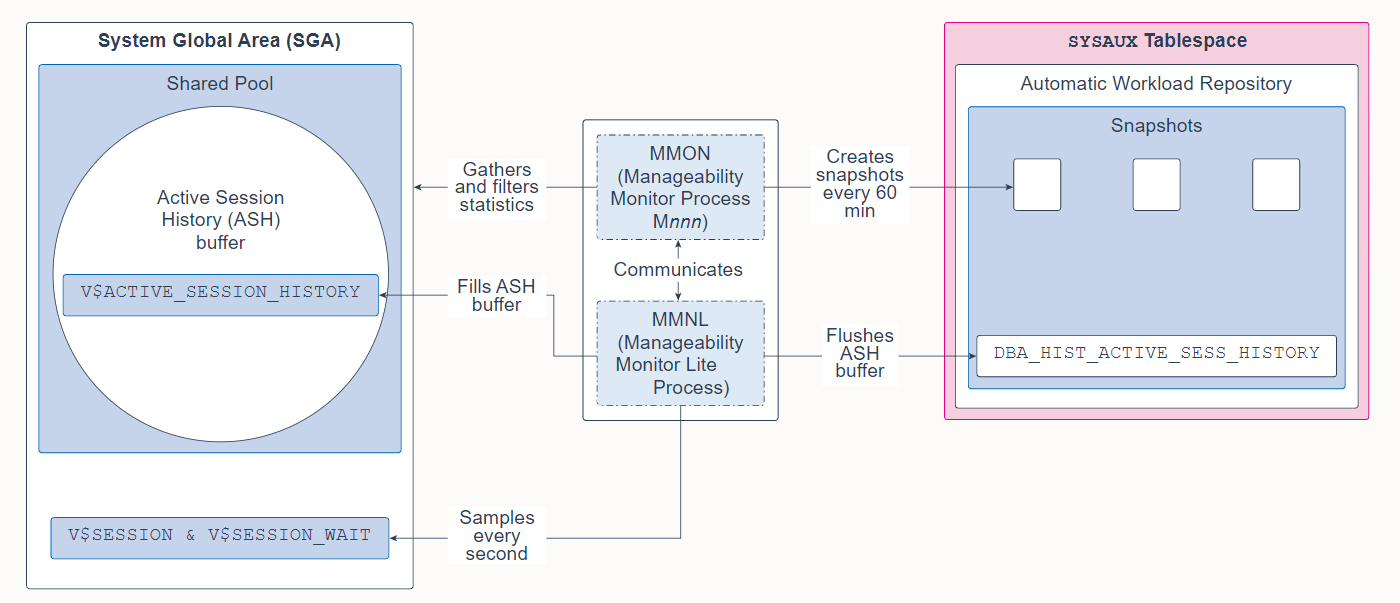
Manageability Monitor Process (MMON) and Manageability Monitor Lite Process (MMNL) are background processes that perform tasks related to the Automatic Workload Repository (AWR). The AWR is a repository of historical performance data that includes cumulative statistics for the system, sessions, individual SQL statements, segments, and services. It is used for problem detection and self-tuning purposes.
Manageability Monitor Process (MMON) 和 Manageability Monitor Lite Process (MMNL) 是执行与自动工作负载存储库 (AWR) 相关任务的后台进程。 AWR 是历史性能数据的存储库,其中包括系统、会话、单个 SQL 语句、段和服务的累积统计信息。 它用于问题检测和自调整目的。
MMON gathers a variety of memory statistics from the SGA, filters them, and then creates snapshots of those statistics every 60 minutes in the Automatic Workload Repository (AWR). 60 minutes is the default value and can be altered. It also performs Automatic Database Diagnostic Monitor (ADDM) analysis and issues alerts for metrics that exceed their threshold values.
MMON 从 SGA 收集各种内存统计信息,对其进行过滤,然后每 60 分钟在自动工作负载存储库 (AWR) 中创建这些统计信息的快照。 60 分钟是默认值,可以更改。 它还执行自动数据库诊断监视器 (ADDM) 分析,并针对超过其阈值的指标发出警报。
MMNL gathers session statistics (such as the user ID, state, the machine, and the SQL it is executing) and stores them in the Active Session History (ASH) buffer. Specifically, MMNL samples the V S E S S I O N a n d V SESSION and V SESSIONandVSESSION_WAIT views every second in the SGA and then records that data in the V$ACTIVE_SESSION_HISTORY view. Inactive sessions are not sampled. The ASH is designed as a rolling buffer in memory, and therefore, earlier information is overwritten when needed. When the ASH buffer becomes full or when MMON takes a snapshot, MMNL flushes (empties) the ASH buffer into the DBA_HIST_ACTIVE_SESS_HISTORY view in the AWR. Because space is expensive, only one in every 10 entries is flushed. MMNL also computes metrics.
MMNL 收集会话统计信息(例如用户 ID、状态、机器和它正在执行的 SQL)并将它们存储在活动会话历史 (ASH) 缓冲区中。 具体来说,MMNL 在 SGA 中每秒对 V S E S S I O N 和 V SESSION 和 V SESSION和VSESSION_WAIT 视图进行采样,然后将这些数据记录在 V$ACTIVE_SESSION_HISTORY 视图中。 不对非活动会话进行采样。 ASH 被设计为内存中的滚动缓冲区,因此,在需要时会覆盖较早的信息。 当 ASH 缓冲区变满或 MMON 拍摄快照时,MMNL 将 ASH 缓冲区刷新(清空)到 AWR 中的 DBA_HIST_ACTIVE_SESS_HISTORY 视图中。 因为空间很昂贵,所以每 10 个条目中只有一个被刷新。 MMNL 还计算指标。
Both MMON and MMNL can run as threads or as an operating system processes. In addition to database instances, MMON and MMNL also run on Automatic Storage Management (ASM) instances.
MMON 和 MMNL 都可以作为线程或操作系统进程运行。 除了数据库实例,MMON 和 MMNL 还运行在自动存储管理 (ASM) 实例上。
有关后台进程的完整列表,请参阅后台进程 。
22. Recoverer Process (RECO)
Recoverer Process (RECO) is a background process that resolves distributed transactions that are pending because of a network or system failure in a distributed database.
Recoverer Process (RECO) 是一个后台进程,用于解决由于分布式数据库中的网络或系统故障而挂起的分布式事务。
RECO can run as a thread or as an operating system process.
RECO 可以作为线程或操作系统进程运行。
有关后台进程的完整列表,请参阅后台进程 。
23. Log Writer Process (LGWR)
Log Writer Process (LGWR) is a background process that writes redo log entries sequentially into a redo log file. Redo log entries are generated in the redo log buffer of the System Global Area (SGA). If the database has a multiplexed redo log, then LGWR writes the same redo log entries to all of the members of a redo log file group.
Log Writer Process (LGWR) 是一个后台进程,它将重做日志条目顺序写入重做日志文件。 重做日志条目在系统全局区 (SGA) 的重做日志缓冲区中生成。 如果数据库有一个多路复用的重做日志,那么 LGWR 将相同的重做日志条目写入重做日志文件组的所有成员。
LGWR handles the operations that are very fast, or must be coordinated, and delegates operations to the Log Writer Worker helper processes (LGnn) that could benefit from concurrent operations, primarily writing the redo from the log buffer to the redo log file and posting the completed write to the foreground process that is waiting.
LGWR 处理需要非常快速或必须协调的操作,并将操作委托给可以从并发操作中受益的 Log Writer Worker 辅助进程 (LGnn),主要是将日志缓冲区中的重做记录写入重做日志文件,并通知正在等待的前台进程已完成写入。
The Redo Transport Worker Process (TT00-zz) ships redo from the current online and standby redo logs to remote standby destinations configured for Asynchronous (ASYNC) redo transport.
重做传输工作进程 (TT00-zz) 将重做从当前在线和备用重做日志传送到配置为异步 (ASYNC) 重做传输的远程备用目标。
LGWR can run as a thread or as an operating system process. In addition to database instances, LGWR also runs on Oracle ASM instances. Each database instance in an Oracle Real Application Clusters (RAC) configuration has its own set of redo log files.
LGWR 可以作为线程或操作系统进程运行。 除了数据库实例,LGWR 还运行在 Oracle ASM 实例上。 Oracle Real Application Clusters (RAC) 配置中的每个数据库实例都有自己的一组重做日志文件。
有关后台进程的完整列表,请参阅后台进程 。
24. Archiver Process (ARCn)
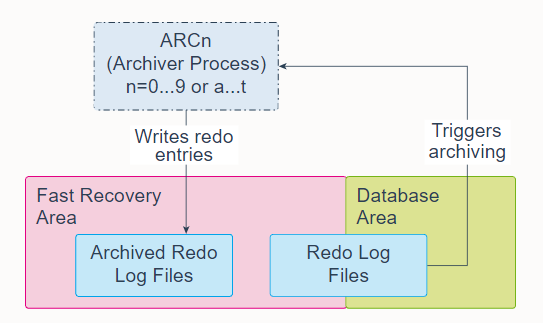
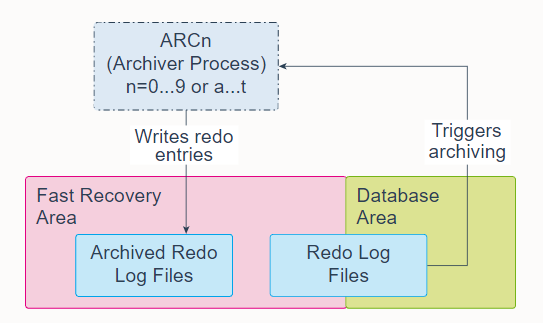
Archiver Processes (ARCn) are background processes that exist only when the database is in ARCHIVELOG mode and automatic archiving is enabled, in which case ARCn automatically archives online redo log files. Log Writer Process (LGWR) cannot reuse and overwrite an online redo log group until it has been archived.
归档进程 (ARCn) 是仅当数据库处于 ARCHIVELOG 模式并启用自动归档时才存在的后台进程,在这种情况下,ARCn 会自动归档在线重做日志文件。 日志写入进程 (LGWR) 在存档之前无法重用和覆盖联机重做日志组。
The database starts multiple archiver processes as needed to ensure that the archiving of filled online redo logs does not fall behind. Possible processes include ARC0-ARC9 and ARCa-ARCt (31 possible destinations).
数据库根据需要启动多个归档进程,以确保填满的在线重做日志的归档不会落后。 可能的进程包括 ARC0-ARC9 和 ARCa-ARCt(31 个可能的目的地)。
The LOG_ARCHIVE_MAX_PROCESSES initialization parameter specifies the number of ARCn processes that the database initially invokes. If you anticipate a heavy workload for archiving, such as during bulk loading of data, you can increase the maximum number of archiver processes. There can also be multiple archive log destinations. It is recommended that there be at least one archiver process for each destination.
LOG_ARCHIVE_MAX_PROCESSES 初始化参数指定数据库最初调用的 ARCn 进程的数量。 如果您预计归档工作量很大,例如在批量加载数据期间,您可以增加归档程序进程的最大数量。 也可以有多个归档日志目的地。 建议每个目的地至少有一个归档进程。
ARCn can run as a thread or as an operating system process.
ARCn 可以作为线程或操作系统进程运行。
有关后台进程的完整列表,请参阅后台进程 。
25. Job Queue Coordinator Process (CJQ0)
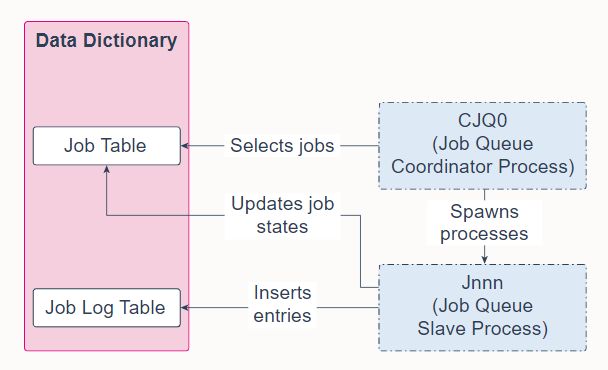
Job Queue Coordinator Process (CJQ0) is a background process that selects jobs that need to be run from the data dictionary and spawns Job Queue Worker Processes (Jnnn) to run the jobs. CJQ0 is automatically started and stopped as needed by Oracle Scheduler. The JOB_QUEUE_PROCESSES initialization parameter specifies the maximum number of processes that can be created for the execution of jobs. CJQ0 starts only as many job queue processes as required by the number of jobs to run and available resources.
Job Queue Coordinator Process (CJQ0) 是一个后台进程,它从数据字典中选择需要运行的作业并生成 Job Queue Worker Processes (Jnnn) 来运行这些作业。 Oracle Scheduler 根据需要自动启动和停止 CJQ0。 JOB_QUEUE_PROCESSES 初始化参数指定可以为执行作业创建的最大进程数。 CJQ0 仅启动与要运行的作业数量和可用资源一样多的作业队列进程。
A Job Queue Worker Process (Jnnn) executes jobs assigned by the job coordinator. When a job is picked for processing, the job worker does the following:
- Gathers all the metadata needed to run the job, for example, program arguments and privilege information.
- Starts a database session as the owner of the job, starts a transaction, and then starts executing the job.
- Once the job is complete, the worker commits and ends the transaction.
- Closes the session.
作业队列工作进程 (Jnnn) 执行作业协调器分配的作业。 当作业以被挑选进行处理时,工作人员执行以下操作:
- 收集运行作业所需的所有元数据,例如程序参数和权限信息。
- 作为作业的所有者启动数据库会话,启动事务,然后开始执行作业。
- 作业完成后,worker 提交并结束事务。
- 关闭会话。
When a job is done, the workers do the following:
- Reschedule the job if required
- Update the state in the job table to reflect whether the job has completed or is scheduled to run again
- Insert an entry into the job log table
- Update the run count, and if necessary, failure and retry counts
- Clean up
- Look for new work (if none, they go to sleep)
工作完成后,workers执行以下操作:
- 如果需要,为任务重新安排运行日程
- 更新作业表中的状态以反映作业是否已完成或计划再次运行
- 在作业日志表中插入一个条目
- 更新运行计数,如有必要,更新失败和重试计数
- 清理
- 寻找新任务(如没有,则进入睡眠)
CJQ0 和 Jnnn 都可以作为线程或操作系统进程运行。
有关后台进程的完整列表,请参阅后台进程 。
26. Recovery Writer Process (RVWR)
Recovery Writer Process (RVWR) is a background process that is used to flashback an entire database or a pluggable database. That is, it undoes transactions from the current state of the database to a time in the past, provided you have the required flashback logs. When flashback is enabled or when there are guaranteed restore points, RVWR writes flashback data to flashback database logs in the fast recovery area.
Recovery Writer Process (RVWR) 是一个后台进程,用于闪回整个数据库或可插拔数据库。 也就是说,只要所需的闪回日志存在,它就可以将事务从数据库当前状态回退到过去某个时间点。 当闪回已启用或存在有保证的还原点时,RVWR 将闪回数据写入快速恢复区中的闪回数据库日志。
RVWR can run as a thread or as an operating system process.
RVWR 可以作为线程或操作系统进程运行。
For a complete list of background processes, see Background Processes.
有关后台进程的完整列表,请参阅后台进程 。
27. Flashback Data Archiver Process (FBDA)
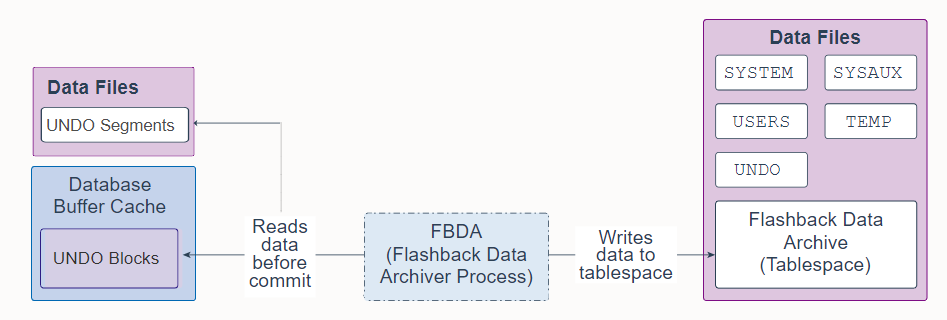
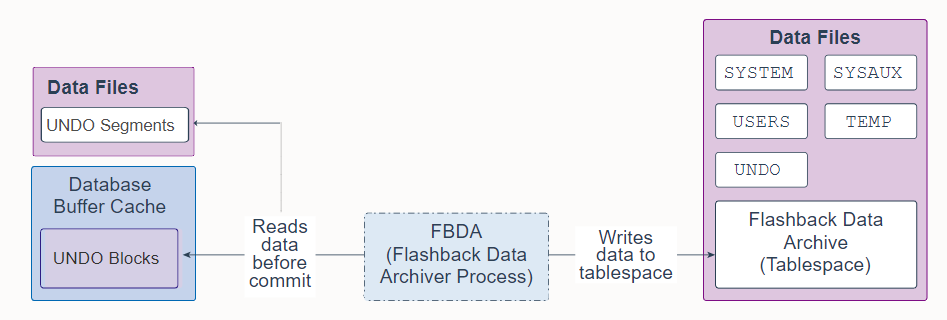
Flashback Data Archiver Process (FBDA) is a background process that provides the ability to track and store transactional changes to a table over its lifetime. This way, you can flashback tables back in time to restore the way they were.
闪回数据归档进程 (FBDA) 是一个后台进程,它提供了在表的生命周期内跟踪和存储对表的事务更改的能力。 这样,您可以及时闪回表以恢复它们的原样。
When a transaction that modifies a tracked table commits, FBDA checks for new undo being generated, filters what is relevant to objects marked for archival and copies that undo information into the Flashback Data Archive tablespace. FBDA maintains metadata on the current rows and tracks how much data has been archived.
当修改被跟踪表的事务提交时,FBDA 检查新生成的撤消,过滤其中与标记为归档的对象的相关内容,并将撤消信息复制到闪回数据归档表空间中。 FBDA 维护当前行的元数据并跟踪已归档的数据量。
FBDA is also responsible for automatically managing the flashback data archive for space, organization (partitioning tablespaces), and retention. FBDA also keeps track of how far the archiving of tracked transactions has progressed.
FBDA 还负责自动管理闪回数据归档的空间、组织(分区表空间)和保留。 FBDA 还跟踪被跟踪事务的归档进度。
FBDA can run as a thread or as an operating system process.
FBDA 可以作为线程或操作系统进程运行。
有关后台进程的完整列表,请参阅后台进程 。
28. Space Management Coordinator Process (SMCO)
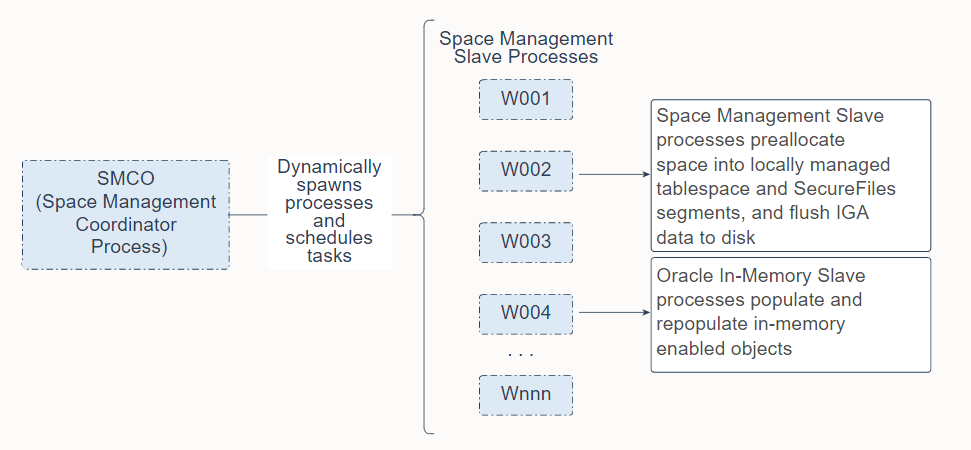
Space Management Coordinator Process (SMCO) is a background process that schedules the execution of various space management tasks, including proactive space allocation and space reclamation. SMCO dynamically spawns Space Management Worker Processes (Wnnn) to implement these tasks. Note that the In-Memory Coordinator Process (IMCO) is a background process that initiates background population and repopulation of columnar data.
空间管理协调进程 (SMCO) 是一个后台进程,用于调度各种空间管理任务的执行,包括主动空间分配和空间回收。 SMCO 动态生成空间管理工作进程 (Wnnn) 来实现这些任务。 请注意,内存中协调器进程 (IMCO) 是一个后台进程,它启动后台发布和重新发布列式数据。
Wnnn worker processes perform work on behalf of Space Management and on behalf of the Oracle In-Memory option.
Wnnn 工作进程代表空间管理和 Oracle In-Memory 选项执行工作。
-
Wnnn processes are worker processes dynamically spawned by SMCO to perform space management tasks in the background. These tasks include preallocating space into locally managed tablespace and SecureFiles segments based on space usage growth analysis, and reclaiming space from dropped segments. The tasks also include fast ingest deferred inserts. After being started, the worker acts as an autonomous agent. After it finishes task execution, it automatically picks up another task from the queue. The process terminates itself after being idle for a long time.
-
Wnnn 进程是由 SMCO 动态生成的工作进程,用于在后台执行空间管理任务。 这些任务包括根据空间使用增长分析将空间预分配到本地管理的表空间和 SecureFiles 段中,以及从丢弃的段中回收空间。 这些任务还包括快速摄取延迟插入。 启动后,worker 充当自治代理。 完成任务执行后,它会自动从队列中提取另一个任务。 该进程在空闲很长时间后自行终止。
-
Wnnn processes populate and repopulate in-memory enabled objects. The In-Memory Coordinator Process (IMCO) initiates background population and repopulation of columnar data. The IMCO background process and foreground processes will utilize Wnnn workers for population and repopulation. Wnnn processes are utilized by IMCO for prepopulation of in-memory enabled objects with priority LOW/MEDIUM/HIGH/CRITICAL, and for repopulation of in-memory objects. In-memory populate and repopulate tasks running on Wnnn workers are also initiated from foreground processes in response to queries and DMLs that reference in-memory enabled objects.
-
Wnnn 进程发布和重新发布启用了in-memory的对象。 In-Memory Coordinator Process (IMCO) 启动后台发布和列式数据的重新发布。 IMCO 后台进程和前台进程将利用 Wnnn 工作程序进行发布和重新发布。 IMCO 使用 Wnnn 进程预发布启用了in-memory且优先级为 LOW/MEDIUM/HIGH/CRITICAL 的对象,以及重新发布in-memory对象。 在 Wnnn 工作程序上运行的内存中发布和重新发布任务也从前台进程启动,以响应引用启用了in-memory对象的查询和 DML。
Both SMCO and Wnnn can run as threads or as operating system processes.
SMCO 和 Wnnn 都可以作为线程或操作系统进程运行。
有关后台进程的完整列表,请参阅后台进程 。
29. Dispatcher Process (Dnnn) and Shared Server Process (Snnn)
In a shared server architecture, clients connect to a Dispatcher Process (Dnnn), which creates a virtual circuit for each connection. When the client sends data to the server, the dispatcher receives the data into the virtual circuit and places the active circuit on the common queue to be picked up by an idle Shared Server process (Snnn). The Snnn then reads the data from the virtual circuit and performs the database work necessary to complete the request. When the Snnn must send data to the client, the Snnn writes the data back into the virtual circuit and the Dnnn sends the data to the client. After the Snnn completes the client request, it releases the virtual circuit back to the Dnnn and is free to handle other clients.
在共享服务器架构中,客户端连接到调度程序进程 (Dnnn),它为每个连接创建一个虚拟链路。 当客户端向服务器发送数据时,调度程序将数据接收到虚拟链路中,并将活动链路放在公共队列上,以便由空闲的共享服务器进程(Snnn)提取。 然后,Snnn 从虚拟链路中读取数据并执行完成请求所需的数据库工作。 当 Snnn 必须向客户端发送数据时,Snnn 将数据写回虚拟链路,Dnnn 将数据发送给客户端。 Snnn 完成客户端请求后,将虚拟链路释放回 Dnnn ,从而可用于处理其他客户端。
Both Snnn and Dnnn can run as threads or as operating system processes. In addition to database instances, Dnnn also runs on shared servers.
Snnn 和 Dnnn 都可以作为线程或操作系统进程运行。除了数据库实例,Dnnn 还在共享服务器上运行。
For information about how Dnnn and Snnn interact with the Large Pool, see the Large Pool slide. For a complete list of background processes, see Background Processes.
he virtual circuit and the Dnnn sends the data to the client. After the Snnn completes the client request, it releases the virtual circuit back to the Dnnn and is free to handle other clients.
在共享服务器架构中,客户端连接到调度程序进程 (Dnnn),它为每个连接创建一个虚拟链路。 当客户端向服务器发送数据时,调度程序将数据接收到虚拟链路中,并将活动链路放在公共队列上,以便由空闲的共享服务器进程(Snnn)提取。 然后,Snnn 从虚拟链路中读取数据并执行完成请求所需的数据库工作。 当 Snnn 必须向客户端发送数据时,Snnn 将数据写回虚拟链路,Dnnn 将数据发送给客户端。 Snnn 完成客户端请求后,将虚拟链路释放回 Dnnn ,从而可用于处理其他客户端。
Both Snnn and Dnnn can run as threads or as operating system processes. In addition to database instances, Dnnn also runs on shared servers.
Snnn 和 Dnnn 都可以作为线程或操作系统进程运行。除了数据库实例,Dnnn 还在共享服务器上运行。
For information about how Dnnn and Snnn interact with the Large Pool, see the Large Pool slide. For a complete list of background processes, see Background Processes.