欢迎各位观众大大浏览阅读我的博客,有空麻烦加一下博客主页关注,谢谢
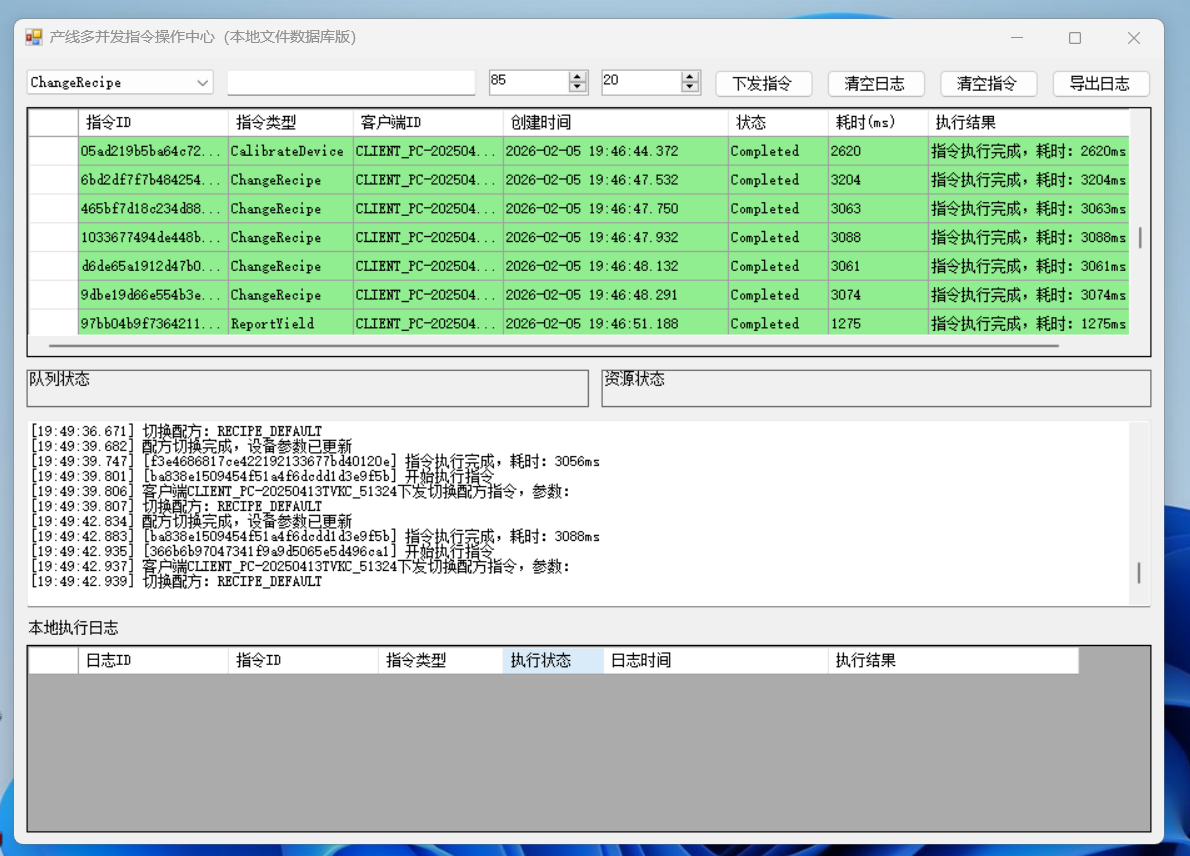
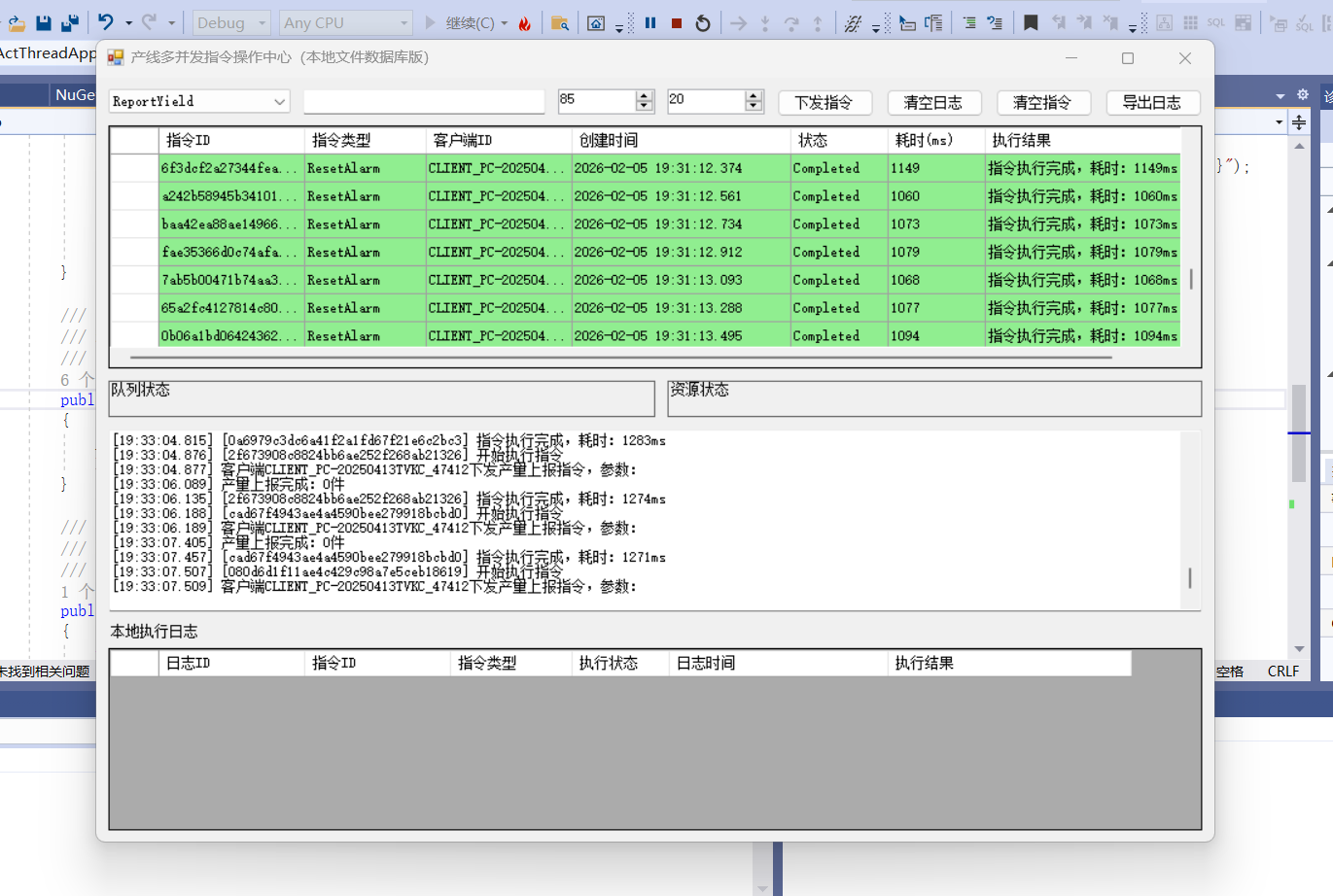
实现相关的工厂产线多并发客户端指令操作场景,封装一个多线程执行事件封装组装多结构场景,用于产线的复杂业务指令操作,提供界面化的Winform本地数据库解决方案
一、方案整体设计思路
针对工厂产线多并发指令操作场景,基于 WinForm+SQLite + 多线程设计核心能力:
- 指令体系:封装产线指令(启停、参数配置、状态查询),支持指令扩展;
- 多线程执行:通过线程池 / 任务并行库(TPL)实现指令并发执行,避免界面卡顿;
- 本地数据持久化:SQLite 存储指令日志、产线状态、执行结果;
- 可视化界面:提供指令下发、状态监控、日志查询、产线管理功能;
- 线程安全:加锁保护共享资源(数据库操作、产线状态缓存)。
二、核心代码实现
1. 项目结构(关键文件)
plaintext
├── FormMain.cs          // 主界面(指令下发、状态展示、日志查看)
├── Models/
│   ├── ProductionLine.cs // 产线实体(编号、状态、参数)
│   └── LineCommand.cs    // 指令实体(指令ID、产线号、类型、参数、状态)
├── Helpers/
│   ├── SQLiteDbHelper.cs // SQLite数据库助手
│   ├── LogHelper.cs      // 日志助手(界面+文件+数据库)
│   └── ThreadSafeHelper.cs // 线程安全辅助类
├── Services/
│   ├── CommandFactory.cs // 指令工厂(创建不同类型指令)
│   ├── CommandExecutor.cs // 指令执行器(多线程执行指令)
│   └── ProductionLineService.cs // 产线业务逻辑
└── App.config           // 配置(数据库连接字符串、线程池数量)
2. 核心实体类
// Models/ProductionLine.cs
using System;

namespace LineControlDemo.Models
{
    /// <summary>
    /// 产线状态枚举
    /// </summary>
    public enum LineStatus
    {
        Idle = 0,    // 空闲
        Running = 1, // 运行
        Error = 2,   // 故障
        Stopped = 3  // 停止
    }

    /// <summary>
    /// 产线实体
    /// </summary>
    public class ProductionLine
    {
        public string LineId { get; set; } // 产线编号
        public string LineName { get; set; } // 产线名称
        public LineStatus Status { get; set; } // 产线状态
        public string Params { get; set; } // 产线参数(JSON格式)
        public DateTime UpdateTime { get; set; } // 状态更新时间
    }
}

// Models/LineCommand.cs
using System;

namespace LineControlDemo.Models
{
    /// <summary>
    /// 指令类型枚举
    /// </summary>
    public enum CommandType
    {
        Start = 0,    // 启动产线
        Stop = 1,     // 停止产线
        SetParam = 2, // 设置参数
        QueryStatus = 3 // 查询状态
    }

    /// <summary>
    /// 指令执行状态
    /// </summary>
    public enum CommandStatus
    {
        Pending = 0,  // 待执行
        Executing = 1,// 执行中
        Success = 2,  // 成功
        Failed = 3    // 失败
    }

    /// <summary>
    /// 产线指令实体
    /// </summary>
    public class LineCommand
    {
        public string CommandId { get; set; } // 指令唯一ID
        public string LineId { get; set; } // 目标产线
        public CommandType Type { get; set; } // 指令类型
        public string CommandParams { get; set; } // 指令参数
        public CommandStatus Status { get; set; } // 执行状态
        public DateTime CreateTime { get; set; } // 创建时间
        public DateTime? ExecuteTime { get; set; } // 执行时间
        public string ErrorMsg { get; set; } // 错误信息
    }
}
3. 数据库助手(SQLite)
// Helpers/SQLiteDbHelper.cs
using System;
using System.Data;
using System.Data.SQLite;
using System.IO;

namespace LineControlDemo.Helpers
{
    public class SQLiteDbHelper
    {
        private static readonly string _connStr;

        static SQLiteDbHelper()
        {
            // 数据库文件存放在程序目录下
            string dbPath = Path.Combine(AppDomain.CurrentDomain.BaseDirectory, "LineControl.db");
            _connStr = $"Data Source={dbPath};Version=3;";

            // 初始化数据库(创建表)
            InitDatabase();
        }

        /// <summary>
        /// 初始化数据库表结构
        /// </summary>
        private static void InitDatabase()
        {
            // 产线表
            ExecuteNonQuery(@"CREATE TABLE IF NOT EXISTS ProductionLine(
                                LineId TEXT PRIMARY KEY,
                                LineName TEXT NOT NULL,
                                Status INTEGER NOT NULL,
                                Params TEXT,
                                UpdateTime DATETIME NOT NULL)");

            // 指令表
            ExecuteNonQuery(@"CREATE TABLE IF NOT EXISTS LineCommand(
                                CommandId TEXT PRIMARY KEY,
                                LineId TEXT NOT NULL,
                                Type INTEGER NOT NULL,
                                CommandParams TEXT,
                                Status INTEGER NOT NULL,
                                CreateTime DATETIME NOT NULL,
                                ExecuteTime DATETIME,
                                ErrorMsg TEXT,
                                FOREIGN KEY(LineId) REFERENCES ProductionLine(LineId))");

            // 日志表
            ExecuteNonQuery(@"CREATE TABLE IF NOT EXISTS OperationLog(
                                LogId INTEGER PRIMARY KEY AUTOINCREMENT,
                                LineId TEXT,
                                CommandId TEXT,
                                Content TEXT NOT NULL,
                                LogLevel INTEGER NOT NULL,
                                CreateTime DATETIME NOT NULL)");
        }

        /// <summary>
        /// 执行非查询SQL
        /// </summary>
        public static int ExecuteNonQuery(string sql, params SQLiteParameter[] parameters)
        {
            using (SQLiteConnection conn = new SQLiteConnection(_connStr))
            {
                try
                {
                    conn.Open();
                    using (SQLiteCommand cmd = new SQLiteCommand(sql, conn))
                    {
                        if (parameters != null && parameters.Length > 0)
                        {
                            cmd.Parameters.AddRange(parameters);
                        }
                        return cmd.ExecuteNonQuery();
                    }
                }
                catch (Exception ex)
                {
                    LogHelper.Error($"SQL执行失败:{sql},错误:{ex.Message}");
                    throw;
                }
            }
        }

        /// <summary>
        /// 执行查询SQL,返回DataTable
        /// </summary>
        public static DataTable ExecuteQuery(string sql, params SQLiteParameter[] parameters)
        {
            using (SQLiteConnection conn = new SQLiteConnection(_connStr))
            {
                try
                {
                    conn.Open();
                    using (SQLiteCommand cmd = new SQLiteCommand(sql, conn))
                    {
                        if (parameters != null && parameters.Length > 0)
                        {
                            cmd.Parameters.AddRange(parameters);
                        }
                        using (SQLiteDataAdapter adapter = new SQLiteDataAdapter(cmd))
                        {
                            DataTable dt = new DataTable();
                            adapter.Fill(dt);
                            return dt;
                        }
                    }
                }
                catch (Exception ex)
                {
                    LogHelper.Error($"SQL查询失败:{sql},错误:{ex.Message}");
                    throw;
                }
            }
        }

        /// <summary>
        /// 执行查询,返回单个值
        /// </summary>
        public static object ExecuteScalar(string sql, params SQLiteParameter[] parameters)
        {
            using (SQLiteConnection conn = new SQLiteConnection(_connStr))
            {
                try
                {
                    conn.Open();
                    using (SQLiteCommand cmd = new SQLiteCommand(sql, conn))
                    {
                        if (parameters != null && parameters.Length > 0)
                        {
                            cmd.Parameters.AddRange(parameters);
                        }
                        return cmd.ExecuteScalar();
                    }
                }
                catch (Exception ex)
                {
                    LogHelper.Error($"SQL查询单个值失败:{sql},错误:{ex.Message}");
                    throw;
                }
            }
        }
    }
}
4. 日志助手(线程安全)
// Helpers/LogHelper.cs
using System;
using System.Data.SQLite;
using System.Threading;

namespace LineControlDemo.Helpers
{
    /// <summary>
    /// 日志级别
    /// </summary>
    public enum LogLevel
    {
        Info = 0,
        Warning = 1,
        Error = 2
    }

    public static class LogHelper
    {
        private static readonly object _lockObj = new object();

        /// <summary>
        /// 记录日志(界面+数据库+文件)
        /// </summary>
        public static void Log(string lineId, string commandId, string content, LogLevel level)
        {
            // 线程安全锁
            lock (_lockObj)
            {
                // 1. 写入数据库
                string sql = @"INSERT INTO OperationLog(LineId, CommandId, Content, LogLevel, CreateTime)
                               VALUES(@LineId, @CommandId, @Content, @LogLevel, @CreateTime)";
                SQLiteDbHelper.ExecuteNonQuery(sql,
                    new SQLiteParameter("@LineId", lineId),
                    new SQLiteParameter("@CommandId", commandId),
                    new SQLiteParameter("@Content", content),
                    new SQLiteParameter("@LogLevel", (int)level),
                    new SQLiteParameter("@CreateTime", DateTime.Now));

                // 2. 触发界面日志更新(跨线程调用)
                OnLogReceived?.Invoke(null, new LogEventArgs(lineId, content, level, DateTime.Now));

                // 3. 可选:写入文件(略)
            }
        }

        public static void Info(string lineId, string commandId, string content)
        {
            Log(lineId, commandId, content, LogLevel.Info);
        }

        public static void Warning(string lineId, string commandId, string content)
        {
            Log(lineId, commandId, content, LogLevel.Warning);
        }

        public static void Error(string lineId, string commandId, string content)
        {
            Log(lineId, commandId, content, LogLevel.Error);
        }

        /// <summary>
        /// 日志接收事件(供界面订阅)
        /// </summary>
        public static event EventHandler<LogEventArgs> OnLogReceived;
    }

    /// <summary>
    /// 日志事件参数
    /// </summary>
    public class LogEventArgs : EventArgs
    {
        public string LineId { get; }
        public string Content { get; }
        public LogLevel Level { get; }
        public DateTime Time { get; }

        public LogEventArgs(string lineId, string content, LogLevel level, DateTime time)
        {
            LineId = lineId;
            Content = content;
            Level = level;
            Time = time;
        }
    }
}
5. 指令工厂 + 多线程执行器
// Services/CommandFactory.cs
using LineControlDemo.Models;
using System;

namespace LineControlDemo.Services
{
    /// <summary>
    /// 指令工厂(创建不同类型的产线指令)
    /// </summary>
    public static class CommandFactory
    {
        /// <summary>
        /// 创建指令
        /// </summary>
        public static LineCommand CreateCommand(string lineId, CommandType type, string param)
        {
            return new LineCommand
            {
                CommandId = Guid.NewGuid().ToString("N"),
                LineId = lineId,
                Type = type,
                CommandParams = param,
                Status = CommandStatus.Pending,
                CreateTime = DateTime.Now
            };
        }
    }

    /// <summary>
    /// 指令执行器(多线程执行)
    /// </summary>
    public class CommandExecutor
    {
        private readonly ProductionLineService _lineService;
        private readonly object _executeLock = new object();

        public CommandExecutor()
        {
            _lineService = new ProductionLineService();
        }

        /// <summary>
        /// 异步执行指令(非阻塞界面)
        /// </summary>
        public async System.Threading.Tasks.Task ExecuteCommandAsync(LineCommand command)
        {
            // 标记为执行中
            command.Status = CommandStatus.Executing;
            command.ExecuteTime = DateTime.Now;
            _lineService.UpdateCommandStatus(command);
            LogHelper.Info(command.LineId, command.CommandId, $"开始执行指令:{command.Type}(产线:{command.LineId})");

            try
            {
                // 线程安全执行指令(避免同一产线并发操作)
                lock (_executeLock)
                {
                    switch (command.Type)
                    {
                        case CommandType.Start:
                            _lineService.StartLine(command.LineId);
                            break;
                        case CommandType.Stop:
                            _lineService.StopLine(command.LineId);
                            break;
                        case CommandType.SetParam:
                            _lineService.SetLineParam(command.LineId, command.CommandParams);
                            break;
                        case CommandType.QueryStatus:
                            var status = _lineService.GetLineStatus(command.LineId);
                            command.CommandParams += $", 查询结果:{status}";
                            break;
                        default:
                            throw new NotSupportedException($"不支持的指令类型:{command.Type}");
                    }
                }

                // 标记为成功
                command.Status = CommandStatus.Success;
                _lineService.UpdateCommandStatus(command);
                LogHelper.Info(command.LineId, command.CommandId, $"指令执行成功:{command.Type}(产线:{command.LineId})");
            }
            catch (Exception ex)
            {
                // 标记为失败
                command.Status = CommandStatus.Failed;
                command.ErrorMsg = ex.Message;
                _lineService.UpdateCommandStatus(command);
                LogHelper.Error(command.LineId, command.CommandId, $"指令执行失败:{command.Type}(产线:{command.LineId}),错误:{ex.Message}");
            }
        }

        /// <summary>
        /// 批量并发执行指令
        /// </summary>
        public async System.Threading.Tasks.Task BatchExecuteCommandsAsync(List<LineCommand> commands)
        {
            // 使用Task.WhenAll实现并发执行
            var tasks = new List<System.Threading.Tasks.Task>();
            foreach (var cmd in commands)
            {
                tasks.Add(ExecuteCommandAsync(cmd));
            }
            await System.Threading.Tasks.Task.WhenAll(tasks);
        }
    }
}

// Services/ProductionLineService.cs
using LineControlDemo.Helpers;
using LineControlDemo.Models;
using System;
using System.Data;
using System.Data.SQLite;

namespace LineControlDemo.Services
{
    /// <summary>
    /// 产线业务逻辑服务
    /// </summary>
    public class ProductionLineService
    {
        /// <summary>
        /// 获取产线状态
        /// </summary>
        public LineStatus GetLineStatus(string lineId)
        {
            string sql = "SELECT Status FROM ProductionLine WHERE LineId=@LineId";
            var result = SQLiteDbHelper.ExecuteScalar(sql, new SQLiteParameter("@LineId", lineId));
            return result == DBNull.Value ? LineStatus.Error : (LineStatus)Convert.ToInt32(result);
        }

        /// <summary>
        /// 启动产线
        /// </summary>
        public void StartLine(string lineId)
        {
            string sql = "UPDATE ProductionLine SET Status=@Status, UpdateTime=@UpdateTime WHERE LineId=@LineId";
            SQLiteDbHelper.ExecuteNonQuery(sql,
                new SQLiteParameter("@Status", (int)LineStatus.Running),
                new SQLiteParameter("@UpdateTime", DateTime.Now),
                new SQLiteParameter("@LineId", lineId));
        }

        /// <summary>
        /// 停止产线
        /// </summary>
        public void StopLine(string lineId)
        {
            string sql = "UPDATE ProductionLine SET Status=@Status, UpdateTime=@UpdateTime WHERE LineId=@LineId";
            SQLiteDbHelper.ExecuteNonQuery(sql,
                new SQLiteParameter("@Status", (int)LineStatus.Stopped),
                new SQLiteParameter("@UpdateTime", DateTime.Now),
                new SQLiteParameter("@LineId", lineId));
        }

        /// <summary>
        /// 设置产线参数
        /// </summary>
        public void SetLineParam(string lineId, string param)
        {
            string sql = "UPDATE ProductionLine SET Params=@Params, UpdateTime=@UpdateTime WHERE LineId=@LineId";
            SQLiteDbHelper.ExecuteNonQuery(sql,
                new SQLiteParameter("@Params", param),
                new SQLiteParameter("@UpdateTime", DateTime.Now),
                new SQLiteParameter("@LineId", lineId));
        }

        /// <summary>
        /// 保存指令到数据库
        /// </summary>
        public void SaveCommand(LineCommand command)
        {
            string sql = @"INSERT INTO LineCommand(CommandId, LineId, Type, CommandParams, Status, CreateTime, ExecuteTime, ErrorMsg)
                           VALUES(@CommandId, @LineId, @Type, @CommandParams, @Status, @CreateTime, @ExecuteTime, @ErrorMsg)";
            SQLiteDbHelper.ExecuteNonQuery(sql,
                new SQLiteParameter("@CommandId", command.CommandId),
                new SQLiteParameter("@LineId", command.LineId),
                new SQLiteParameter("@Type", (int)command.Type),
                new SQLiteParameter("@CommandParams", command.CommandParams),
                new SQLiteParameter("@Status", (int)command.Status),
                new SQLiteParameter("@CreateTime", command.CreateTime),
                new SQLiteParameter("@ExecuteTime", command.ExecuteTime ?? DBNull.Value),
                new SQLiteParameter("@ErrorMsg", command.ErrorMsg ?? DBNull.Value));
        }

        /// <summary>
        /// 更新指令状态
        /// </summary>
        public void UpdateCommandStatus(LineCommand command)
        {
            string sql = @"UPDATE LineCommand SET Status=@Status, ExecuteTime=@ExecuteTime, ErrorMsg=@ErrorMsg
                           WHERE CommandId=@CommandId";
            SQLiteDbHelper.ExecuteNonQuery(sql,
                new SQLiteParameter("@Status", (int)command.Status),
                new SQLiteParameter("@ExecuteTime", command.ExecuteTime ?? DBNull.Value),
                new SQLiteParameter("@ErrorMsg", command.ErrorMsg ?? DBNull.Value),
                new SQLiteParameter("@CommandId", command.CommandId));
        }

        /// <summary>
        /// 获取产线列表
        /// </summary>
        public DataTable GetAllLines()
        {
            return SQLiteDbHelper.ExecuteQuery("SELECT * FROM ProductionLine");
        }

        /// <summary>
        /// 获取指令列表
        /// </summary>
        public DataTable GetAllCommands()
        {
            return SQLiteDbHelper.ExecuteQuery("SELECT * FROM LineCommand ORDER BY CreateTime DESC");
        }
    }
}
6. 主界面(WinForm)核心代码
// FormMain.cs
using LineControlDemo.Helpers;
using LineControlDemo.Models;
using LineControlDemo.Services;
using System;
using System.Data;
using System.Threading.Tasks;
using System.Windows.Forms;

namespace LineControlDemo
{
    public partial class FormMain : Form
    {
        private readonly ProductionLineService _lineService;
        private readonly CommandExecutor _executor;

        public FormMain()
        {
            InitializeComponent();
            _lineService = new ProductionLineService();
            _executor = new CommandExecutor();

            // 初始化界面
            InitUI();
            // 订阅日志事件(跨线程更新界面)
            LogHelper.OnLogReceived += LogHelper_OnLogReceived;
        }

        /// <summary>
        /// 初始化界面
        /// </summary>
        private void InitUI()
        {
            // 加载产线列表
            LoadLineList();
            // 加载指令列表
            LoadCommandList();
            // 绑定指令类型下拉框
            cboCommandType.DataSource = Enum.GetValues(typeof(CommandType));
        }

        /// <summary>
        /// 加载产线列表到DataGridView
        /// </summary>
        private void LoadLineList()
        {
            DataTable dt = _lineService.GetAllLines();
            dgvLines.DataSource = dt;
        }

        /// <summary>
        /// 加载指令列表到DataGridView
        /// </summary>
        private void LoadCommandList()
        {
            DataTable dt = _lineService.GetAllCommands();
            dgvCommands.DataSource = dt;
        }

        /// <summary>
        /// 日志接收事件(跨线程更新界面)
        /// </summary>
        private void LogHelper_OnLogReceived(object sender, LogEventArgs e)
        {
            // 跨线程更新UI
            if (txtLog.InvokeRequired)
            {
                txtLog.Invoke(new Action(() => UpdateLog(e)));
            }
            else
            {
                UpdateLog(e);
            }
        }

        /// <summary>
        /// 更新界面日志
        /// </summary>
        private void UpdateLog(LogEventArgs e)
        {
            string levelStr = e.Level switch
            {
                LogLevel.Info => "[INFO]",
                LogLevel.Warning => "[WARN]",
                LogLevel.Error => "[ERROR]",
                _ => "[UNKNOWN]"
            };
            txtLog.AppendText($"{e.Time:yyyy-MM-dd HH:mm:ss} {levelStr} 产线{e.LineId}:{e.Content}{Environment.NewLine}");
            // 滚动到最新日志
            txtLog.ScrollToCaret();
        }

        /// <summary>
        /// 下发单个指令按钮点击事件
        /// </summary>
        private async void btnSendCommand_Click(object sender, EventArgs e)
        {
            if (string.IsNullOrEmpty(txtLineId.Text))
            {
                MessageBox.Show("请输入产线编号!");
                return;
            }

            // 创建指令
            CommandType cmdType = (CommandType)cboCommandType.SelectedItem;
            LineCommand command = CommandFactory.CreateCommand(txtLineId.Text, cmdType, txtCommandParam.Text);

            // 保存指令到数据库
            _lineService.SaveCommand(command);
            LoadCommandList();

            // 异步执行指令(不阻塞界面)
            await _executor.ExecuteCommandAsync(command);
            LoadCommandList();
            LoadLineList();
        }

        /// <summary>
        /// 批量下发指令按钮点击事件(多并发)
        /// </summary>
        private async void btnBatchSend_Click(object sender, EventArgs e)
        {
            // 模拟批量指令(产线001-003,各下发启动+设置参数指令)
            List<LineCommand> commands = new List<LineCommand>();
            for (int i = 1; i <= 3; i++)
            {
                string lineId = $"00{i}";
                // 启动指令
                commands.Add(CommandFactory.CreateCommand(lineId, CommandType.Start, "Speed=50;Mode=Auto"));
                // 设置参数指令
                commands.Add(CommandFactory.CreateCommand(lineId, CommandType.SetParam, "Temp=25;Pressure=1.2"));
            }

            // 保存所有指令到数据库
            foreach (var cmd in commands)
            {
                _lineService.SaveCommand(cmd);
            }
            LoadCommandList();

            // 并发执行指令
            await _executor.BatchExecuteCommandsAsync(commands);
            LoadCommandList();
            LoadLineList();
        }

        /// <summary>
        /// 清空日志按钮点击事件
        /// </summary>
        private void btnClearLog_Click(object sender, EventArgs e)
        {
            txtLog.Clear();
        }

        /// <summary>
        /// 窗体关闭时取消事件订阅
        /// </summary>
        private void FormMain_FormClosing(object sender, FormClosingEventArgs e)
        {
            LogHelper.OnLogReceived -= LogHelper_OnLogReceived;
        }
    }
}
7. 界面设计(关键控件)
// FormMain.Designer.cs 核心控件定义(关键部分)
private System.Windows.Forms.DataGridView dgvLines;
private System.Windows.Forms.DataGridView dgvCommands;
private System.Windows.Forms.ComboBox cboCommandType;
private System.Windows.Forms.TextBox txtLineId;
private System.Windows.Forms.TextBox txtCommandParam;
private System.Windows.Forms.TextBox txtLog;
private System.Windows.Forms.Button btnSendCommand;
private System.Windows.Forms.Button btnBatchSend;
private System.Windows.Forms.Button btnClearLog;

// 控件布局建议:
// 1. 左侧:产线列表(dgvLines)、指令列表(dgvCommands)
// 2. 中间:指令下发区域(产线编号输入框、指令类型下拉框、参数输入框、下发按钮、批量下发按钮)
// 3. 右侧/底部:日志显示框(txtLog,多行、带滚动条)
三、Demo 运行说明
-
环境准备 :
- Visual Studio 2019/2022(需安装.NET Desktop 开发组件);
- 安装 SQLite NuGet 包:
System.Data.SQLite(版本 >=1.0.118);
-
初始化数据 :
-
首次运行会自动创建 SQLite 数据库文件
LineControl.db; -
手动插入测试产线数据(可通过 SQLite 工具执行): sql
INSERT INTO ProductionLine(LineId, LineName, Status, Params, UpdateTime)
VALUES('001', '一号产线', 0, 'Speed=0;Mode=Manual', '2024-01-01 00:00:00'),
      ('002', '二号产线', 0, 'Speed=0;Mode=Manual', '2024-01-01 00:00:00'),
      ('003', '三号产线', 0, 'Speed=0;Mode=Manual', '2024-01-01 00:00:00');
-
-
功能测试 :
- 单个指令下发:输入产线编号(如 001)、选择指令类型(如 Start)、输入参数,点击 "下发指令";
- 批量指令下发:点击 "批量下发",自动给 001-003 产线下发启动 + 参数设置指令,并发执行;
- 日志查看:实时显示指令执行日志,包含成功 / 失败信息;
- 数据持久化:所有指令、产线状态、日志均存储在本地 SQLite 数据库,重启程序后数据不丢失。
四、核心亮点
- 多线程并发安全:通过锁机制保护同一产线的并发操作,避免状态异常;
- 界面无阻塞 :使用
async/await+TPL 实现异步执行,界面始终响应; - 可扩展指令体系 :通过
CommandType枚举和指令工厂,可快速扩展新指令类型; - 完整的本地数据闭环:SQLite 存储所有核心数据,无需外部数据库依赖;
- 可视化监控:实时日志 + 产线状态 + 指令执行结果,全流程可视化。
五、扩展建议
- 指令优先级:增加指令优先级字段,支持优先执行高优先级指令;
- 产线状态实时刷新:添加定时器,定时刷新产线状态到界面;
- 指令撤销 / 重试:支持对未执行 / 执行失败的指令进行撤销或重试;
- 异常报警:指令执行失败时触发弹窗 / 声音报警;
- 数据导出:支持将指令日志、产线状态导出为 Excel/PDF。