Flutter睡眠记录应用开发教程
项目简介
睡眠记录是一款专业的睡眠追踪和分析应用,帮助用户科学管理睡眠健康、提升睡眠质量。本项目使用Flutter实现了完整的睡眠记录、数据分析、质量评估等功能,让健康睡眠触手可及。
运行效果图
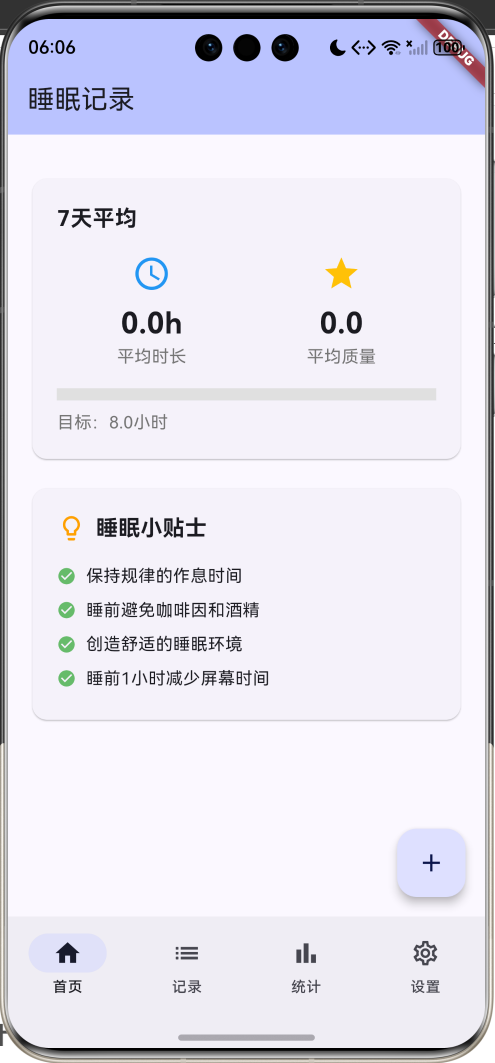
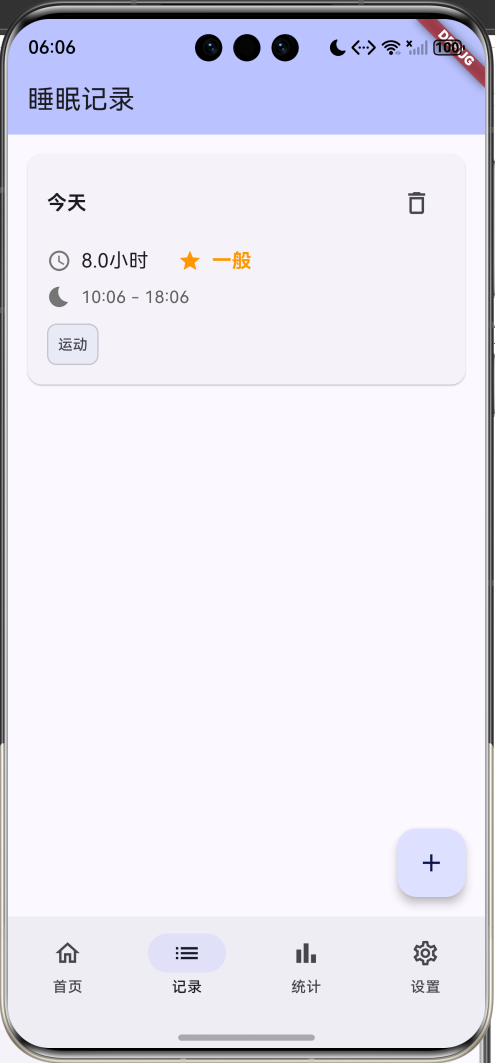
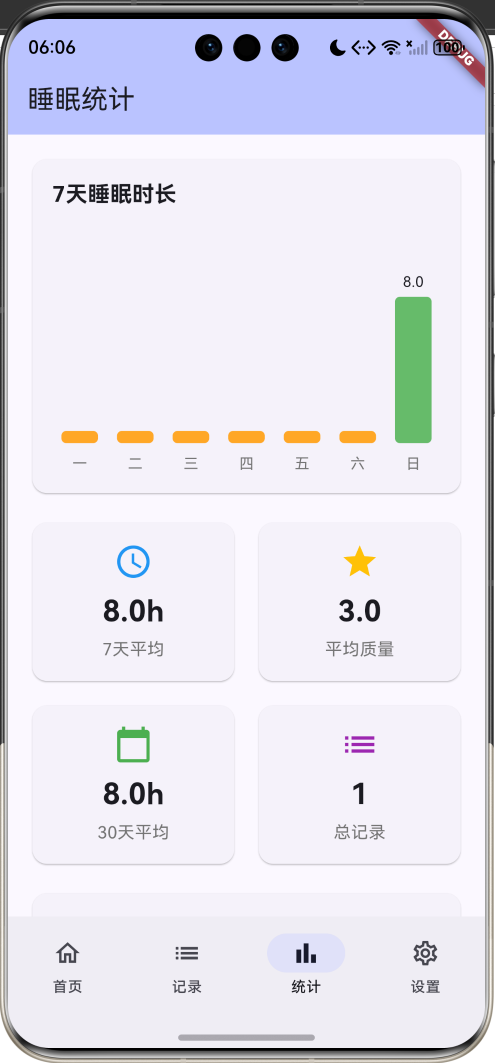
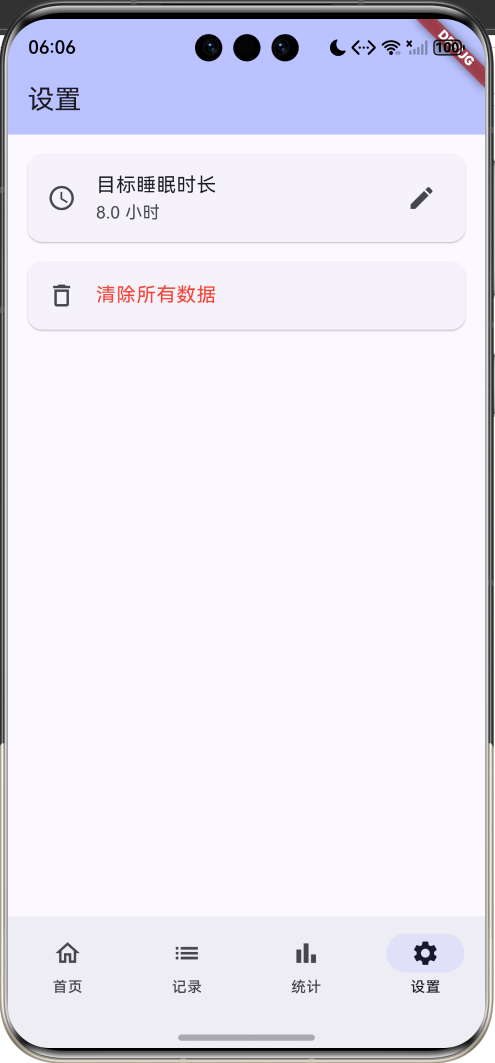
核心特性
- 睡眠记录:记录入睡和起床时间
- 质量评估:5星评分系统
- 时长统计:自动计算睡眠时长
- 影响因素:记录影响睡眠的因素
- 数据分析:7天和30天统计分析
- 可视化图表:直观的柱状图展示
- 目标管理:自定义睡眠目标
- 因素分析:分析影响因素与睡眠质量关系
- 睡眠建议:提供科学的睡眠小贴士
- 数据持久化:本地存储所有记录
技术架构
数据模型设计
睡眠记录模型
dart
class SleepRecord {
  final String id;              // 唯一标识
  final DateTime bedTime;       // 入睡时间
  final DateTime wakeTime;      // 起床时间
  final int sleepQuality;       // 睡眠质量(1-5分)
  final String? notes;          // 备注
  final List<String> factors;   // 影响因素

  Duration get duration => wakeTime.difference(bedTime);
  double get hours => duration.inMinutes / 60.0;
}字段说明:
id:记录唯一标识(使用时间戳)bedTime:入睡时间wakeTime:起床时间sleepQuality:睡眠质量评分(1-5星)notes:用户备注信息factors:影响睡眠的因素列表
计算属性:
duration:睡眠时长(Duration对象)hours:睡眠小时数(浮点数)
睡眠质量评分标准:
| 评分 | 等级 | 颜色 | 说明 |
|---|---|---|---|
| 5星 | 优秀 | 绿色 | 睡眠质量极佳,精神饱满 |
| 4星 | 良好 | 浅绿 | 睡眠质量好,状态良好 |
| 3星 | 一般 | 橙色 | 睡眠质量一般,略有疲惫 |
| 2星 | 较差 | 深橙 | 睡眠质量差,精神不佳 |
| 1星 | 很差 | 红色 | 睡眠质量很差,严重疲劳 |
影响因素列表:
| 因素 | 说明 | 影响 |
|---|---|---|
| 咖啡因 | 咖啡、茶等含咖啡因饮品 | 负面 |
| 运动 | 白天运动情况 | 正面 |
| 压力 | 工作或生活压力 | 负面 |
| 噪音 | 环境噪音干扰 | 负面 |
| 温度 | 室内温度不适 | 负面 |
| 饮酒 | 睡前饮酒 | 负面 |
| 晚餐 | 晚餐时间和内容 | 中性 |
| 屏幕时间 | 睡前使用电子设备 | 负面 |
状态管理
dart
class _SleepTrackerHomePageState extends State<SleepTrackerHomePage> {
  int _selectedIndex = 0;              // 当前选中的底部导航索引
  List<SleepRecord> records = [];      // 所有睡眠记录
  double targetHours = 8.0;            // 目标睡眠时长

  final List<String> sleepFactors = [  // 影响因素列表
    '咖啡因', '运动', '压力', '噪音',
    '温度', '饮酒', '晚餐', '屏幕时间',
  ];
}状态变量说明:
_selectedIndex:底部导航栏当前页面索引(0-3)records:所有睡眠记录列表targetHours:用户设定的目标睡眠时长sleepFactors:可选的影响因素列表
核心功能实现
1. 数据持久化
dart
Future<void> _loadData() async {
  final prefs = await SharedPreferences.getInstance();
  final recordsData = prefs.getStringList('sleep_records') ?? [];
  setState(() {
    records = recordsData
        .map((json) => SleepRecord.fromJson(jsonDecode(json)))
        .toList();
    targetHours = prefs.getDouble('target_hours') ?? 8.0;
  });
}

Future<void> _saveRecords() async {
  final prefs = await SharedPreferences.getInstance();
  final recordsData = records.map((r) => jsonEncode(r.toJson())).toList();
  await prefs.setStringList('sleep_records', recordsData);
}

Future<void> _saveSettings() async {
  final prefs = await SharedPreferences.getInstance();
  await prefs.setDouble('target_hours', targetHours);
}存储策略:
- 使用
SharedPreferences进行本地存储 - 睡眠记录序列化为JSON字符串列表
- 目标时长单独存储为double类型
- 应用启动时自动加载数据
- 数据变更时立即保存
JSON序列化:
dart
Map<String, dynamic> toJson() {
  return {
    'id': id,
    'bedTime': bedTime.toIso8601String(),
    'wakeTime': wakeTime.toIso8601String(),
    'sleepQuality': sleepQuality,
    'notes': notes,
    'factors': factors,
  };
}

factory SleepRecord.fromJson(Map<String, dynamic> json) {
  return SleepRecord(
    id: json['id'],
    bedTime: DateTime.parse(json['bedTime']),
    wakeTime: DateTime.parse(json['wakeTime']),
    sleepQuality: json['sleepQuality'],
    notes: json['notes'],
    factors: List<String>.from(json['factors'] ?? []),
  );
}
2. 睡眠时长计算
dart
Duration get duration => wakeTime.difference(bedTime);

double get hours => duration.inMinutes / 60.0;计算逻辑:
- 使用
difference方法计算时间差 - 获取总分钟数
- 除以60转换为小时数
- 保留小数精度
示例:
- 入睡:23:00
- 起床:07:00
- 时长:8小时
3. 平均值统计
dart
final last7Days = records.take(7).toList();

final avgHours = last7Days.isEmpty
    ? 0.0
    : last7Days.fold<double>(0, (sum, r) => sum + r.hours) / last7Days.length;

final avgQuality = last7Days.isEmpty
    ? 0.0
: last7Days.fold<int>(0, (sum, r) => sum + r.sleepQuality) / last7Days.length;统计流程:
- 获取最近7天的记录
- 使用
fold累加所有时长 - 除以记录数量得到平均值
- 质量评分同理
时间复杂度:O(n),n为记录数量
4. 7天图表数据
dart
final last7Days = List.generate(7, (index) {
  return DateTime.now().subtract(Duration(days: 6 - index));
});

final dailyHours = last7Days.map((date) {
  final dayRecords = records.where((r) {
    final bedDate = DateTime(r.bedTime.year, r.bedTime.month, r.bedTime.day);
    final targetDate = DateTime(date.year, date.month, date.day);
    return bedDate == targetDate;
  });
  return dayRecords.isEmpty ? 0.0 : dayRecords.first.hours;
}).toList();图表生成流程:
- 生成最近7天的日期列表
- 对每一天查找对应的睡眠记录
- 提取睡眠时长
- 没有记录的天数返回0
日期匹配:
- 只比较年月日,忽略时分秒
- 使用
DateTime构造函数创建日期对象
5. 影响因素分析
dart
final factorCounts = <String, int>{};
final factorQuality = <String, List<int>>{};

for (final record in records.take(30)) {
  for (final factor in record.factors) {
    factorCounts[factor] = (factorCounts[factor] ?? 0) + 1;
    factorQuality.putIfAbsent(factor, () => []).add(record.sleepQuality);
  }
}

// 计算每个因素的平均质量
final avgQuality = factorQuality[factor]!.fold<int>(0, (sum, q) => sum + q) /
factorQuality[factor]!.length;分析逻辑:
- 统计每个因素出现的次数
- 记录每个因素对应的睡眠质量
- 计算平均质量评分
- 按出现次数排序
分析结果:
- 因素名称
- 出现次数
- 平均质量评分
- 影响程度
6. 添加记录对话框
dart
Future<void> _showAddRecordDialog() async {
  DateTime bedTime = DateTime.now().subtract(const Duration(hours: 8));
  DateTime wakeTime = DateTime.now();
  int sleepQuality = 3;
  final notesController = TextEditingController();
  final selectedFactors = <String>[];

  final result = await showDialog<SleepRecord>(
    context: context,
    builder: (context) => StatefulBuilder(
      builder: (context, setState) => AlertDialog(
        title: const Text('添加睡眠记录'),
        content: SingleChildScrollView(
          child: Column(
            children: [
              // 入睡时间选择
              ListTile(
                leading: Icon(Icons.bedtime),
                title: Text('入睡时间'),
                subtitle: Text(_formatDateTime(bedTime)),
                onTap: () async {
                  // 日期选择器
                  final date = await showDatePicker(...);
                  // 时间选择器
                  final time = await showTimePicker(...);
                },
              ),
              // 起床时间选择
              ListTile(...),
              // 质量评分
              Row(
                children: List.generate(5, (index) {
                  return GestureDetector(
                    onTap: () {
                      setState(() {
                        sleepQuality = index + 1;
                      });
                    },
                    child: Icon(
                      Icons.star,
                      color: index < sleepQuality ? Colors.amber : Colors.grey,
                    ),
                  );
                }),
              ),
              // 影响因素选择
              Wrap(
                children: sleepFactors.map((factor) {
                  return FilterChip(
                    label: Text(factor),
                    selected: selectedFactors.contains(factor),
                    onSelected: (selected) {
                      setState(() {
                        if (selected) {
                          selectedFactors.add(factor);
                        } else {
                          selectedFactors.remove(factor);
                        }
                      });
                    },
                  );
                }).toList(),
              ),
              // 备注输入
              TextField(
                controller: notesController,
                maxLines: 3,
              ),
            ],
          ),
        ),
      ),
    ),
  );
}对话框特性:
- 使用
StatefulBuilder实现对话框内状态更新 - 日期和时间选择器
- 5星评分交互
- FilterChip多选影响因素
- 备注文本输入
- 数据验证
数据验证:
dart
if (wakeTime.isBefore(bedTime)) {
  ScaffoldMessenger.of(context).showSnackBar(
    const SnackBar(content: Text('起床时间不能早于入睡时间')),
  );
  return;
}
7. 日期时间格式化
dart
String _formatTime(DateTime dateTime) {
  return '${dateTime.hour.toString().padLeft(2, '0')}:${dateTime.minute.toString().padLeft(2, '0')}';
}

String _formatDateTime(DateTime dateTime) {
  return '${dateTime.month}月${dateTime.day}日 ${_formatTime(dateTime)}';
}

String _formatDate(DateTime dateTime) {
  final now = DateTime.now();
  final today = DateTime(now.year, now.month, now.day);
  final yesterday = today.subtract(const Duration(days: 1));
  final dateOnly = DateTime(dateTime.year, dateTime.month, dateTime.day);

  if (dateOnly == today) {
    return '今天';
  } else if (dateOnly == yesterday) {
    return '昨天';
  } else {
    return '${dateTime.month}月${dateTime.day}日';
  }
}

String _getWeekday(DateTime date) {
  const weekdays = ['一', '二', '三', '四', '五', '六', '日'];
  return weekdays[date.weekday - 1];
}格式化规则:
- 时间:HH:MM(补零)
- 日期时间:M月D日 HH:MM
- 相对日期:今天、昨天、M月D日
- 星期:一、二、三...日
UI组件设计
1. 昨晚睡眠卡片
dart
Widget _buildLastNightCard(SleepRecord record) {
  return Card(
    elevation: 4,
    child: Container(
      padding: const EdgeInsets.all(24),
      decoration: BoxDecoration(
        gradient: LinearGradient(
          colors: [Colors.indigo.shade400, Colors.indigo.shade600],
          begin: Alignment.topLeft,
          end: Alignment.bottomRight,
        ),
        borderRadius: BorderRadius.circular(12),
      ),
      child: Column(
        crossAxisAlignment: CrossAxisAlignment.start,
        children: [
          Text('昨晚睡眠', style: TextStyle(color: Colors.white70)),
          Text(
            record.hours.toStringAsFixed(1),
            style: TextStyle(
              color: Colors.white,
              fontSize: 48,
              fontWeight: FontWeight.bold,
            ),
          ),
          Row(
            children: [
              Icon(Icons.bedtime, color: Colors.white70),
              Text('${_formatTime(record.bedTime)} - ${_formatTime(record.wakeTime)}'),
            ],
          ),
          Row(
            children: [
              Icon(Icons.star, color: Colors.white70),
              Text('质量:${record.qualityText}'),
            ],
          ),
        ],
      ),
    ),
  );
}设计特点:
- 渐变紫色背景
- 大字号显示睡眠时长
- 显示入睡和起床时间
- 显示睡眠质量评级
- 圆角卡片阴影
布局结构:
┌─────────────────────────┐
│ 昨晚睡眠                │
│ 7.5 小时                │
│ 🌙 23:00 - 06:30       │
│ ⭐ 质量:良好           │
└─────────────────────────┘
2. 周平均汇总卡片
dart
Widget _buildWeeklySummaryCard(double avgHours, double avgQuality) {
  return Card(
    child: Padding(
      padding: const EdgeInsets.all(20),
      child: Column(
        children: [
          Text('7天平均', style: TextStyle(fontSize: 18, fontWeight: FontWeight.bold)),
          Row(
            children: [
              Expanded(
                child: _buildStatItem(
                  '平均时长',
                  '${avgHours.toStringAsFixed(1)}h',
                  Icons.access_time,
                  Colors.blue,
                ),
              ),
              Expanded(
                child: _buildStatItem(
                  '平均质量',
                  avgQuality.toStringAsFixed(1),
                  Icons.star,
                  Colors.amber,
                ),
              ),
            ],
          ),
          LinearProgressIndicator(
            value: (avgHours / targetHours).clamp(0.0, 1.0),
            backgroundColor: Colors.grey.shade300,
            valueColor: AlwaysStoppedAnimation(
              avgHours >= targetHours ? Colors.green : Colors.orange,
            ),
          ),
          Text('目标:${targetHours.toStringAsFixed(1)}小时'),
        ],
      ),
    ),
  );
}卡片内容:
- 7天平均时长
- 7天平均质量
- 目标完成进度条
- 目标时长显示
进度条颜色:
- 达标:绿色
- 未达标:橙色
3. 睡眠记录卡片
dart
Widget _buildRecordCard(SleepRecord record) {
  return Card(
    child: Padding(
      padding: const EdgeInsets.all(16),
      child: Column(
        crossAxisAlignment: CrossAxisAlignment.start,
        children: [
          Row(
            mainAxisAlignment: MainAxisAlignment.spaceBetween,
            children: [
              Text(_formatDate(record.bedTime), style: TextStyle(fontWeight: FontWeight.bold)),
              IconButton(
                icon: Icon(Icons.delete_outline),
                onPressed: () => _showDeleteDialog(record),
              ),
            ],
          ),
          Row(
            children: [
              Icon(Icons.access_time, color: Colors.grey),
              Text('${record.hours.toStringAsFixed(1)}小时'),
              Icon(Icons.star, color: record.qualityColor),
              Text(record.qualityText, style: TextStyle(color: record.qualityColor)),
            ],
          ),
          Row(
            children: [
              Icon(Icons.bedtime, color: Colors.grey),
              Text('${_formatTime(record.bedTime)} - ${_formatTime(record.wakeTime)}'),
            ],
          ),
          if (record.factors.isNotEmpty)
            Wrap(
              children: record.factors.map((factor) {
                return Chip(
                  label: Text(factor),
                  backgroundColor: Colors.indigo.shade50,
                );
              }).toList(),
            ),
          if (record.notes != null)
            Container(
              padding: EdgeInsets.all(12),
              decoration: BoxDecoration(
                color: Colors.grey.shade100,
                borderRadius: BorderRadius.circular(8),
              ),
              child: Text(record.notes!),
            ),
        ],
      ),
    ),
  );
}卡片结构:
┌────────────────────────────┐
│ 今天                    🗑  │
│ ⏰ 7.5小时  ⭐ 良好        │
│ 🌙 23:00 - 06:30          │
│ [咖啡因] [压力]            │
│ ┌────────────────────┐    │
│ │ 睡前喝了咖啡       │    │
│ └────────────────────┘    │
└────────────────────────────┘
4. 7天睡眠图表
dart
Widget _buildWeeklyChart(List<SleepRecord> records) {
  return Card(
    child: Padding(
      padding: const EdgeInsets.all(16),
      child: Column(
        children: [
          Text('7天睡眠时长', style: TextStyle(fontSize: 18, fontWeight: FontWeight.bold)),
          SizedBox(
            height: 200,
            child: Row(
              crossAxisAlignment: CrossAxisAlignment.end,
              mainAxisAlignment: MainAxisAlignment.spaceAround,
              children: List.generate(7, (index) {
                final height = (dailyHours[index] / maxHours * 150).clamp(10.0, 150.0);
                return Column(
                  mainAxisAlignment: MainAxisAlignment.end,
                  children: [
                    if (dailyHours[index] > 0)
                      Text(dailyHours[index].toStringAsFixed(1)),
                    Container(
                      width: 30,
                      height: height,
                      decoration: BoxDecoration(
                        color: dailyHours[index] >= targetHours
                            ? Colors.green.shade400
                            : Colors.orange.shade400,
                        borderRadius: BorderRadius.circular(4),
                      ),
                    ),
                    Text(_getWeekday(last7Days[index])),
                  ],
                );
              }),
            ),
          ),
        ],
      ),
    ),
  );
}图表特性:
- 柱状图展示
- 自动缩放(基于最大值)
- 显示具体时长
- 星期标签
- 达标/未达标颜色区分
缩放算法:
柱高 = (当日时长 / 最大时长) × 1505. 统计卡片
dart
Widget _buildStatCard(String label, String value, IconData icon, Color color) {
  return Card(
    child: Padding(
      padding: const EdgeInsets.all(16),
      child: Column(
        children: [
          Icon(icon, size: 32, color: color),
          Text(
            value,
            style: TextStyle(
              fontSize: 24,
              fontWeight: FontWeight.bold,
            ),
          ),
          Text(
            label,
            style: TextStyle(
              fontSize: 14,
              color: Colors.grey.shade600,
            ),
          ),
        ],
      ),
    ),
  );
}统计卡片布局:
┌─────────────┐
│    ⏰       │
│   7.5h      │
│  7天平均    │
└─────────────┘使用场景:
- 7天平均时长
- 平均质量评分
- 30天平均时长
- 总记录数
6. 影响因素分析卡片
dart
Widget _buildFactorsAnalysis() {
  return Card(
    child: Padding(
      padding: const EdgeInsets.all(16),
      child: Column(
        crossAxisAlignment: CrossAxisAlignment.start,
        children: [
          Text('影响因素分析', style: TextStyle(fontSize: 18, fontWeight: FontWeight.bold)),
          ...sortedFactors.take(5).map((entry) {
            final avgQuality = factorQuality[entry.key]!.fold<int>(0, (sum, q) => sum + q) /
                factorQuality[entry.key]!.length;
            return Row(
              children: [
                Expanded(flex: 2, child: Text(entry.key)),
                Expanded(
                  flex: 3,
                  child: LinearProgressIndicator(
                    value: entry.value / records.take(30).length,
                  ),
                ),
                Text('${entry.value}次'),
                Icon(Icons.star, color: avgQuality >= 4 ? Colors.green : Colors.orange),
                Text(avgQuality.toStringAsFixed(1)),
              ],
            );
          }),
        ],
      ),
    ),
  );
}分析内容:
- 因素名称
- 出现频率(进度条)
- 出现次数
- 平均质量评分
分析示例:
咖啡因  ████████░░  8次  ⭐ 3.2
运动    ██████░░░░  6次  ⭐ 4.5
压力    █████░░░░░  5次  ⭐ 2.8
7. 睡眠小贴士卡片
dart
Widget _buildQuickTipsCard() {
  return Card(
    child: Padding(
      padding: const EdgeInsets.all(20),
      child: Column(
        crossAxisAlignment: CrossAxisAlignment.start,
        children: [
          Row(
            children: [
              Icon(Icons.lightbulb_outline, color: Colors.amber.shade700),
              Text('睡眠小贴士', style: TextStyle(fontSize: 18, fontWeight: FontWeight.bold)),
            ],
          ),
          _buildTipItem('保持规律的作息时间'),
          _buildTipItem('睡前避免咖啡因和酒精'),
          _buildTipItem('创造舒适的睡眠环境'),
          _buildTipItem('睡前1小时减少屏幕时间'),
        ],
      ),
    ),
  );
}

Widget _buildTipItem(String text) {
  return Row(
    children: [
      Icon(Icons.check_circle, color: Colors.green.shade400, size: 16),
      Expanded(child: Text(text)),
    ],
  );
}贴士内容:
- 作息规律
- 饮食建议
- 环境优化
- 行为习惯
功能扩展建议
1. 睡眠周期分析
dart
class SleepCycle {
  static const Duration cycleLength = Duration(minutes: 90);

  static int calculateCycles(Duration sleepDuration) {
    return sleepDuration.inMinutes ~/ cycleLength.inMinutes;
  }

  static DateTime suggestWakeTime(DateTime bedTime, int cycles) {
    return bedTime.add(Duration(minutes: cycles * 90));
  }

  static List<DateTime> getOptimalWakeTimes(DateTime bedTime) {
    return List.generate(6, (index) {
      final cycles = index + 4; // 4-9个周期(6-13.5小时)
      return suggestWakeTime(bedTime, cycles);
    });
  }
}

Widget _buildSleepCycleCard(DateTime bedTime) {
  final optimalTimes = SleepCycle.getOptimalWakeTimes(bedTime);

  return Card(
    child: Padding(
      padding: EdgeInsets.all(16),
      child: Column(
        crossAxisAlignment: CrossAxisAlignment.start,
        children: [
          Text('最佳起床时间', style: TextStyle(fontSize: 18, fontWeight: FontWeight.bold)),
          Text('基于90分钟睡眠周期计算', style: TextStyle(color: Colors.grey)),
          SizedBox(height: 12),
          ...optimalTimes.map((time) {
            final cycles = SleepCycle.calculateCycles(time.difference(bedTime));
            return ListTile(
              leading: Icon(Icons.alarm, color: Colors.indigo),
              title: Text(_formatTime(time)),
              subtitle: Text('$cycles个睡眠周期'),
              trailing: Icon(Icons.arrow_forward),
              onTap: () {
                // 设置闹钟
              },
            );
          }),
        ],
      ),
    ),
  );
}睡眠周期理论:
- 每个周期约90分钟
- 包含浅睡眠、深睡眠、REM睡眠
- 在周期结束时醒来感觉更清醒
- 建议4-6个周期(6-9小时)
2. 智能闹钟
dart
import 'package:flutter_local_notifications/flutter_local_notifications.dart';

class SmartAlarm {
  final FlutterLocalNotificationsPlugin notifications =
      FlutterLocalNotificationsPlugin();

  Future<void> setSmartAlarm(DateTime targetTime, Duration window) async {
    // 在目标时间前的窗口期内,在浅睡眠阶段唤醒
    final earliestTime = targetTime.subtract(window);

    await notifications.zonedSchedule(
      0,
      '智能闹钟',
      '该起床啦!',
      tz.TZDateTime.from(earliestTime, tz.local),
      const NotificationDetails(
        android: AndroidNotificationDetails(
          'smart_alarm',
          '智能闹钟',
          importance: Importance.high,
          priority: Priority.high,
        ),
      ),
      uiLocalNotificationDateInterpretation:
          UILocalNotificationDateInterpretation.absoluteTime,
    );
  }

  Future<void> setSleepReminder(TimeOfDay bedTime) async {
    // 睡前提醒
    final now = DateTime.now();
    var reminderTime = DateTime(
      now.year,
      now.month,
      now.day,
      bedTime.hour,
      bedTime.minute,
    ).subtract(Duration(minutes: 30));

    if (reminderTime.isBefore(now)) {
      reminderTime = reminderTime.add(Duration(days: 1));
    }

    await notifications.zonedSchedule(
      1,
      '睡眠提醒',
      '该准备睡觉了,保持良好作息!',
      tz.TZDateTime.from(reminderTime, tz.local),
      const NotificationDetails(
        android: AndroidNotificationDetails(
          'sleep_reminder',
          '睡眠提醒',
          importance: Importance.high,
        ),
      ),
      uiLocalNotificationDateInterpretation:
          UILocalNotificationDateInterpretation.absoluteTime,
      matchDateTimeComponents: DateTimeComponents.time,
    );
  }
}智能闹钟功能:
- 在浅睡眠阶段唤醒
- 设置唤醒窗口期
- 睡前提醒功能
- 每日重复提醒
3. 睡眠环境监测
dart
class SleepEnvironment {
  final double temperature;    // 温度(℃)
  final double humidity;        // 湿度(%)
  final double noiseLevel;      // 噪音(分贝)
  final double lightLevel;      // 光照(勒克斯)

  SleepEnvironment({
    required this.temperature,
    required this.humidity,
    required this.noiseLevel,
    required this.lightLevel,
  });

  String get temperatureStatus {
    if (temperature < 16) return '过冷';
    if (temperature > 22) return '过热';
    return '适宜';
  }

  String get humidityStatus {
    if (humidity < 40) return '过干';
    if (humidity > 60) return '过湿';
    return '适宜';
  }

  String get noiseStatus {
    if (noiseLevel > 40) return '过吵';
    return '安静';
  }

  String get lightStatus {
    if (lightLevel > 10) return '过亮';
    return '昏暗';
  }

  int get overallScore {
    int score = 100;
    if (temperature < 16 || temperature > 22) score -= 20;
    if (humidity < 40 || humidity > 60) score -= 15;
    if (noiseLevel > 40) score -= 25;
    if (lightLevel > 10) score -= 20;
    return score.clamp(0, 100);
  }
}

Widget _buildEnvironmentCard(SleepEnvironment env) {
  return Card(
    child: Padding(
      padding: EdgeInsets.all(16),
      child: Column(
        children: [
          Text('睡眠环境评分', style: TextStyle(fontSize: 18, fontWeight: FontWeight.bold)),
          SizedBox(height: 16),
          CircularProgressIndicator(
            value: env.overallScore / 100,
            strokeWidth: 10,
            backgroundColor: Colors.grey.shade300,
            valueColor: AlwaysStoppedAnimation(
              env.overallScore >= 80 ? Colors.green : Colors.orange,
            ),
          ),
          Text('${env.overallScore}分', style: TextStyle(fontSize: 32, fontWeight: FontWeight.bold)),
          Divider(),
          _buildEnvItem('温度', '${env.temperature}℃', env.temperatureStatus),
          _buildEnvItem('湿度', '${env.humidity}%', env.humidityStatus),
          _buildEnvItem('噪音', '${env.noiseLevel}dB', env.noiseStatus),
          _buildEnvItem('光照', '${env.lightLevel}lx', env.lightStatus),
        ],
      ),
    ),
  );
}环境监测指标:
- 温度:16-22℃最佳
- 湿度:40-60%最佳
- 噪音:<40分贝最佳
- 光照:<10勒克斯最佳
4. 睡眠日记
dart
class SleepDiary {
  final String id;
  final DateTime date;
  final String mood;              // 心情
  final String energy;            // 精力水平
  final List<String> activities;  // 白天活动
  final String diet;              // 饮食情况
  final String exercise;          // 运动情况

  SleepDiary({
    required this.id,
    required this.date,
    required this.mood,
    required this.energy,
    required this.activities,
    required this.diet,
    required this.exercise,
  });
}

Widget _buildDiaryForm() {
  return Column(
    children: [
      DropdownButtonFormField<String>(
        decoration: InputDecoration(labelText: '今日心情'),
        items: ['😊 愉快', '😐 一般', '😔 低落'].map((mood) {
          return DropdownMenuItem(value: mood, child: Text(mood));
        }).toList(),
        onChanged: (value) {},
      ),
      DropdownButtonFormField<String>(
        decoration: InputDecoration(labelText: '精力水平'),
        items: ['充沛', '正常', '疲惫'].map((energy) {
          return DropdownMenuItem(value: energy, child: Text(energy));
        }).toList(),
        onChanged: (value) {},
      ),
      TextField(
        decoration: InputDecoration(
          labelText: '白天活动',
          hintText: '记录今天做了什么',
        ),
        maxLines: 3,
      ),
      TextField(
        decoration: InputDecoration(
          labelText: '饮食情况',
          hintText: '记录今天的饮食',
        ),
      ),
      TextField(
        decoration: InputDecoration(
          labelText: '运动情况',
          hintText: '记录今天的运动',
        ),
      ),
    ],
  );
}日记功能:
- 记录每日心情
- 记录精力水平
- 记录白天活动
- 记录饮食和运动
- 分析与睡眠质量的关系
5. 睡眠报告
dart
class SleepReport {
  final DateTime startDate;
  final DateTime endDate;
  final List<SleepRecord> records;

  SleepReport({
    required this.startDate,
    required this.endDate,
    required this.records,
  });

  double get averageHours {
    if (records.isEmpty) return 0;
    return records.fold<double>(0, (sum, r) => sum + r.hours) / records.length;
  }

  double get averageQuality {
    if (records.isEmpty) return 0;
    return records.fold<int>(0, (sum, r) => sum + r.sleepQuality) / records.length;
  }

  int get totalNights => records.length;

  int get goodNights => records.where((r) => r.sleepQuality >= 4).length;

  double get consistency {
    if (records.length < 2) return 0;

    final bedTimes = records.map((r) => r.bedTime.hour * 60 + r.bedTime.minute).toList();
    final avg = bedTimes.fold<int>(0, (sum, t) => sum + t) / bedTimes.length;
    final variance = bedTimes.fold<double>(0, (sum, t) => sum + (t - avg) * (t - avg)) / bedTimes.length;
    final stdDev = sqrt(variance);

    // 标准差越小,一致性越高
    return (1 - (stdDev / 60).clamp(0, 1)) * 100;
  }

  Map<String, int> get factorFrequency {
    final counts = <String, int>{};
    for (final record in records) {
      for (final factor in record.factors) {
        counts[factor] = (counts[factor] ?? 0) + 1;
      }
    }
    return counts;
  }

  String generateReport() {
    return '''
睡眠报告
时间范围:${_formatDate(startDate)} - ${_formatDate(endDate)}

总体情况:
- 记录天数:$totalNights 天
- 平均时长:${averageHours.toStringAsFixed(1)} 小时
- 平均质量:${averageQuality.toStringAsFixed(1)} 分
- 优质睡眠:$goodNights 天 (${(goodNights / totalNights * 100).toStringAsFixed(0)}%)
- 作息规律:${consistency.toStringAsFixed(0)}%

主要影响因素:
${factorFrequency.entries.map((e) => '- ${e.key}: ${e.value}次').join('\n')}

建议:
${_generateSuggestions()}
    ''';
  }

  String _generateSuggestions() {
    final suggestions = <String>[];

    if (averageHours < 7) {
      suggestions.add('- 睡眠时间不足,建议增加睡眠时长');
    }
    if (averageQuality < 3.5) {
      suggestions.add('- 睡眠质量较差,建议改善睡眠环境');
    }
    if (consistency < 70) {
      suggestions.add('- 作息不规律,建议保持固定的睡眠时间');
    }

    final caffeine = factorFrequency['咖啡因'] ?? 0;
    if (caffeine > totalNights * 0.5) {
      suggestions.add('- 咖啡因摄入频繁,建议减少睡前咖啡因');
    }

    return suggestions.isEmpty ? '- 保持当前良好的睡眠习惯' : suggestions.join('\n');
  }
}

Future<void> exportReport(SleepReport report) async {
  final directory = await getApplicationDocumentsDirectory();
  final file = File('${directory.path}/sleep_report.txt');
  await file.writeAsString(report.generateReport());
  await Share.shareXFiles([XFile(file.path)]);
}报告内容:
- 时间范围
- 总体统计
- 平均时长和质量
- 优质睡眠占比
- 作息规律性
- 影响因素分析
- 个性化建议
6. 睡眠音乐
dart
import 'package:audioplayers/audioplayers.dart';

class SleepMusic {
  final AudioPlayer player = AudioPlayer();

  final List<SleepSound> sounds = [
    SleepSound(id: '1', name: '雨声', file: 'rain.mp3', icon: '🌧️'),
    SleepSound(id: '2', name: '海浪', file: 'ocean.mp3', icon: '🌊'),
    SleepSound(id: '3', name: '森林', file: 'forest.mp3', icon: '🌲'),
    SleepSound(id: '4', name: '白噪音', file: 'white_noise.mp3', icon: '📻'),
    SleepSound(id: '5', name: '钢琴', file: 'piano.mp3', icon: '🎹'),
  ];

  Future<void> play(String file, {Duration? duration}) async {
    await player.play(AssetSource(file));
    player.setReleaseMode(ReleaseMode.loop);

    if (duration != null) {
      Future.delayed(duration, () {
        stop();
      });
    }
  }

  Future<void> stop() async {
    await player.stop();
  }

  Future<void> setVolume(double volume) async {
    await player.setVolume(volume);
  }
}

class SleepSound {
  final String id;
  final String name;
  final String file;
  final String icon;

  SleepSound({
    required this.id,
    required this.name,
    required this.file,
    required this.icon,
  });
}

Widget _buildSleepMusicCard() {
  return Card(
    child: Padding(
      padding: EdgeInsets.all(16),
      child: Column(
        crossAxisAlignment: CrossAxisAlignment.start,
        children: [
          Text('助眠音乐', style: TextStyle(fontSize: 18, fontWeight: FontWeight.bold)),
          SizedBox(height: 12),
          GridView.builder(
            shrinkWrap: true,
            physics: NeverScrollableScrollPhysics(),
            gridDelegate: SliverGridDelegateWithFixedCrossAxisCount(
              crossAxisCount: 3,
              childAspectRatio: 1.2,
              crossAxisSpacing: 12,
              mainAxisSpacing: 12,
            ),
            itemCount: sleepMusic.sounds.length,
            itemBuilder: (context, index) {
              final sound = sleepMusic.sounds[index];
              return InkWell(
                onTap: () => sleepMusic.play(sound.file),
                child: Container(
                  decoration: BoxDecoration(
                    color: Colors.indigo.shade50,
                    borderRadius: BorderRadius.circular(12),
                  ),
                  child: Column(
                    mainAxisAlignment: MainAxisAlignment.center,
                    children: [
                      Text(sound.icon, style: TextStyle(fontSize: 32)),
                      SizedBox(height: 4),
                      Text(sound.name, style: TextStyle(fontSize: 14)),
                    ],
                  ),
                ),
              );
            },
          ),
          SizedBox(height: 12),
          Row(
            children: [
              Text('定时:'),
              Expanded(
                child: Slider(
                  value: 30,
                  min: 0,
                  max: 120,
                  divisions: 12,
                  label: '30分钟',
                  onChanged: (value) {},
                ),
              ),
            ],
          ),
        ],
      ),
    ),
  );
}音乐功能:
- 多种助眠音效
- 循环播放
- 音量调节
- 定时停止
- 自定义播放时长
7. 睡眠挑战
dart
class SleepChallenge {
  final String id;
  final String name;
  final String description;
  final int durationDays;
  final Map<String, dynamic> goals;

  SleepChallenge({
    required this.id,
    required this.name,
    required this.description,
    required this.durationDays,
    required this.goals,
  });
}

class ChallengeManager {
  final List<SleepChallenge> challenges = [
    SleepChallenge(
      id: '1',
      name: '早睡早起21天',
      description: '连续21天在23:00前入睡,7:00前起床',
      durationDays: 21,
      goals: {
        'bedTimeBefore': TimeOfDay(hour: 23, minute: 0),
        'wakeTimeBefore': TimeOfDay(hour: 7, minute: 0),
      },
    ),
    SleepChallenge(
      id: '2',
      name: '优质睡眠7天',
      description: '连续7天睡眠质量达到4星以上',
      durationDays: 7,
      goals: {
        'minQuality': 4,
      },
    ),
    SleepChallenge(
      id: '3',
      name: '规律作息30天',
      description: '30天内作息时间波动不超过30分钟',
      durationDays: 30,
      goals: {
        'maxVariation': 30,
      },
    ),
  ];

  bool checkChallengeProgress(SleepChallenge challenge, List<SleepRecord> records) {
    final recentRecords = records.take(challenge.durationDays).toList();

    if (recentRecords.length < challenge.durationDays) {
      return false;
    }

    if (challenge.id == '1') {
      return recentRecords.every((r) {
        final bedTime = TimeOfDay.fromDateTime(r.bedTime);
        final wakeTime = TimeOfDay.fromDateTime(r.wakeTime);
        final targetBed = challenge.goals['bedTimeBefore'] as TimeOfDay;
        final targetWake = challenge.goals['wakeTimeBefore'] as TimeOfDay;

        return _isTimeBefore(bedTime, targetBed) &&
               _isTimeBefore(wakeTime, targetWake);
      });
    } else if (challenge.id == '2') {
      final minQuality = challenge.goals['minQuality'] as int;
      return recentRecords.every((r) => r.sleepQuality >= minQuality);
    } else if (challenge.id == '3') {
      final maxVariation = challenge.goals['maxVariation'] as int;
      final bedTimes = recentRecords.map((r) =>
        r.bedTime.hour * 60 + r.bedTime.minute
      ).toList();

      final minTime = bedTimes.reduce(min);
      final maxTime = bedTimes.reduce(max);

      return (maxTime - minTime) <= maxVariation;
    }

    return false;
  }

  bool _isTimeBefore(TimeOfDay time, TimeOfDay target) {
    return time.hour < target.hour ||
           (time.hour == target.hour && time.minute <= target.minute);
  }
}

Widget _buildChallengeCard(SleepChallenge challenge, bool isCompleted) {
  return Card(
    child: ListTile(
      leading: CircleAvatar(
        backgroundColor: isCompleted ? Colors.green : Colors.grey,
        child: Icon(
          isCompleted ? Icons.check : Icons.flag,
          color: Colors.white,
        ),
      ),
      title: Text(challenge.name),
      subtitle: Text(challenge.description),
      trailing: Text('${challenge.durationDays}天'),
      onTap: () {
        // 查看挑战详情
      },
    ),
  );
}挑战类型:
- 早睡早起挑战
- 优质睡眠挑战
- 规律作息挑战
- 自定义挑战
8. 睡眠社区
dart
class SleepPost {
  final String id;
  final String userId;
  final String userName;
  final String content;
  final DateTime createTime;
  final int likes;
  final List<String> tags;

  SleepPost({
    required this.id,
    required this.userId,
    required this.userName,
    required this.content,
    required this.createTime,
    required this.likes,
    required this.tags,
  });
}

class SleepCommunity {
  Future<List<SleepPost>> getPosts({String? tag}) async {
    // 从服务器获取帖子
    return [];
  }

  Future<void> createPost(String content, List<String> tags) async {
    // 发布帖子
  }

  Future<void> likePost(String postId) async {
    // 点赞
  }

  Future<void> commentPost(String postId, String comment) async {
    // 评论
  }
}

Widget _buildCommunityPage() {
  return ListView(
    children: [
      // 热门话题
      Card(
        child: Padding(
          padding: EdgeInsets.all(16),
          child: Column(
            crossAxisAlignment: CrossAxisAlignment.start,
            children: [
              Text('热门话题', style: TextStyle(fontSize: 18, fontWeight: FontWeight.bold)),
              Wrap(
                spacing: 8,
                children: [
                  '#失眠怎么办',
                  '#早起技巧',
                  '#睡眠环境',
                  '#助眠食物',
                ].map((tag) {
                  return ActionChip(
                    label: Text(tag),
                    onPressed: () {
                      // 查看话题
                    },
                  );
                }).toList(),
              ),
            ],
          ),
        ),
      ),
      // 帖子列表
      ...posts.map((post) => _buildPostCard(post)),
    ],
  );
}

Widget _buildPostCard(SleepPost post) {
  return Card(
    child: Padding(
      padding: EdgeInsets.all(16),
      child: Column(
        crossAxisAlignment: CrossAxisAlignment.start,
        children: [
          Row(
            children: [
              CircleAvatar(child: Text(post.userName[0])),
              SizedBox(width: 8),
              Column(
                crossAxisAlignment: CrossAxisAlignment.start,
                children: [
                  Text(post.userName, style: TextStyle(fontWeight: FontWeight.bold)),
                  Text(_formatTime(post.createTime), style: TextStyle(fontSize: 12, color: Colors.grey)),
                ],
              ),
            ],
          ),
          SizedBox(height: 12),
          Text(post.content),
          SizedBox(height: 8),
          Wrap(
            spacing: 8,
            children: post.tags.map((tag) {
              return Chip(
                label: Text(tag, style: TextStyle(fontSize: 12)),
                backgroundColor: Colors.indigo.shade50,
              );
            }).toList(),
          ),
          Row(
            children: [
              IconButton(
                icon: Icon(Icons.thumb_up_outlined),
                onPressed: () {},
              ),
              Text('${post.likes}'),
              IconButton(
                icon: Icon(Icons.comment_outlined),
                onPressed: () {},
              ),
              IconButton(
                icon: Icon(Icons.share_outlined),
                onPressed: () {},
              ),
            ],
          ),
        ],
      ),
    ),
  );
}社区功能:
- 发布睡眠心得
- 热门话题讨论
- 点赞和评论
- 经验分享
- 互相鼓励
性能优化
1. 数据缓存
dart
class DataCache {
  static final Map<String, dynamic> _cache = {};
  static DateTime? _lastUpdate;

  static T? get<T>(String key) {
    if (_lastUpdate != null &&
        DateTime.now().difference(_lastUpdate!) > Duration(minutes: 5)) {
      clear();
    }
    return _cache[key] as T?;
  }

  static void set<T>(String key, T value) {
    _cache[key] = value;
    _lastUpdate = DateTime.now();
  }

  static void clear() {
    _cache.clear();
    _lastUpdate = null;
  }
}

// 使用缓存
double get avgHours {
  final cached = DataCache.get<double>('avgHours');
  if (cached != null) return cached;

  final avg = records.take(7).fold<double>(0, (sum, r) => sum + r.hours) / 7;
  DataCache.set('avgHours', avg);
  return avg;
}
2. 图表优化
dart
class ChartPainter extends CustomPainter {
  final List<double> data;
  final double maxValue;

  ChartPainter({required this.data, required this.maxValue});

  @override
  void paint(Canvas canvas, Size size) {
    final paint = Paint()
      ..color = Colors.blue
      ..style = PaintingStyle.fill;

    final barWidth = size.width / data.length;

    for (int i = 0; i < data.length; i++) {
      final height = (data[i] / maxValue) * size.height;
      final rect = Rect.fromLTWH(
        i * barWidth,
        size.height - height,
        barWidth * 0.8,
        height,
      );
      canvas.drawRect(rect, paint);
    }
  }

  @override
  bool shouldRepaint(ChartPainter oldDelegate) {
    return oldDelegate.data != data || oldDelegate.maxValue != maxValue;
  }
}
3. 列表优化
dart
ListView.builder(
  itemCount: records.length,
  itemBuilder: (context, index) {
    return _buildRecordCard(records[index]);
  },
  cacheExtent: 500,
)
数据流程图
添加记录
查看统计
修改设置
应用启动
加载本地数据
显示首页
用户操作
选择时间
评分质量
选择因素
保存记录
更新统计
计算7天数据
生成图表
分析因素
显示统计页
更新目标
保存设置
状态管理流程
用户添加
用户删除
切换页面
初始化
加载数据
空闲状态
添加记录
选择时间
评分质量
选择因素
保存数据
更新UI
删除记录
查看统计
计算统计
生成图表
睡眠质量评估算法
评分公式
$
\text{综合评分} = w_1 \times \text{时长分} + w_2 \times \text{质量分} + w_3 \times \text{规律分}
$
其中:
- w1=0.4w_1 = 0.4w1=0.4(时长权重)
- w2=0.4w_2 = 0.4w2=0.4(质量权重)
- w3=0.2w_3 = 0.2w3=0.2(规律权重)
时长评分
$
\text{时长分} = \begin{cases}
100 & \text{if } 7 \leq h \leq 9 \
100 - 10 \times |h - 8| & \text{otherwise}
\end{cases}
$
质量评分
$
\text{质量分} = \frac{\text{睡眠质量}}{5} \times 100
$
规律评分
$
\text{规律分} = \left(1 - \frac{\sigma}{60}\right) \times 100
$
其中 σ\sigmaσ 为入睡时间的标准差(分钟)
实际计算
dart
class SleepScorer {
  static double calculateScore(List<SleepRecord> records) {
    if (records.isEmpty) return 0;

    final durationScore = _calculateDurationScore(records);
    final qualityScore = _calculateQualityScore(records);
    final consistencyScore = _calculateConsistencyScore(records);

    return 0.4 * durationScore + 0.4 * qualityScore + 0.2 * consistencyScore;
  }

  static double _calculateDurationScore(List<SleepRecord> records) {
    final avgHours = records.fold<double>(0, (sum, r) => sum + r.hours) / records.length;

    if (avgHours >= 7 && avgHours <= 9) {
      return 100;
    } else {
      return (100 - 10 * (avgHours - 8).abs()).clamp(0, 100);
    }
  }

  static double _calculateQualityScore(List<SleepRecord> records) {
    final avgQuality = records.fold<int>(0, (sum, r) => sum + r.sleepQuality) / records.length;
    return (avgQuality / 5) * 100;
  }

  static double _calculateConsistencyScore(List<SleepRecord> records) {
    if (records.length < 2) return 100;

    final bedTimes = records.map((r) => r.bedTime.hour * 60 + r.bedTime.minute).toList();
    final avg = bedTimes.fold<int>(0, (sum, t) => sum + t) / bedTimes.length;
    final variance = bedTimes.fold<double>(0, (sum, t) => sum + (t - avg) * (t - avg)) / bedTimes.length;
    final stdDev = sqrt(variance);

    return ((1 - (stdDev / 60).clamp(0, 1)) * 100).clamp(0, 100);
  }
}
核心算法详解
1. 睡眠周期计算
dart
int calculateSleepCycles(Duration duration) {
  const cycleMinutes = 90;
  return duration.inMinutes ~/ cycleMinutes;
}

DateTime suggestOptimalWakeTime(DateTime bedTime, int targetCycles) {
  return bedTime.add(Duration(minutes: targetCycles * 90));
}时间复杂度:O(1)
2. 作息规律性分析
dart
double calculateConsistency(List<SleepRecord> records) {
  if (records.length < 2) return 100;

  // 计算入睡时间的标准差
  final bedTimes = records.map((r) {
    return r.bedTime.hour * 60 + r.bedTime.minute;
  }).toList();

  final mean = bedTimes.fold<int>(0, (sum, t) => sum + t) / bedTimes.length;

  final variance = bedTimes.fold<double>(0, (sum, t) {
    return sum + pow(t - mean, 2);
  }) / bedTimes.length;

  final stdDev = sqrt(variance);

  // 标准差越小,规律性越高
  return (1 - (stdDev / 60).clamp(0, 1)) * 100;
}
时间复杂度 :O(n)
空间复杂度:O(n)
3. 影响因素相关性分析
dart
Map<String, double> analyzeFactorCorrelation(List<SleepRecord> records) {
  final correlations = <String, double>{};
  final allFactors = <String>{};

  // 收集所有因素
  for (final record in records) {
    allFactors.addAll(record.factors);
  }

  // 计算每个因素与睡眠质量的相关性
  for (final factor in allFactors) {
    final withFactor = records.where((r) => r.factors.contains(factor));
    final withoutFactor = records.where((r) => !r.factors.contains(factor));

    if (withFactor.isEmpty || withoutFactor.isEmpty) continue;

    final avgQualityWith = withFactor.fold<int>(0, (sum, r) => sum + r.sleepQuality) /
        withFactor.length;
    final avgQualityWithout = withoutFactor.fold<int>(0, (sum, r) => sum + r.sleepQuality) /
        withoutFactor.length;

    // 正值表示正相关,负值表示负相关
    correlations[factor] = avgQualityWith - avgQualityWithout;
  }

  return correlations;
}时间复杂度:O(n × m),n为记录数,m为因素数
用户体验优化
1. 加载状态
dart
class LoadingOverlay extends StatelessWidget {
  final bool isLoading;
  final Widget child;

  @override
  Widget build(BuildContext context) {
    return Stack(
      children: [
        child,
        if (isLoading)
          Container(
            color: Colors.black54,
            child: Center(
              child: CircularProgressIndicator(),
            ),
          ),
      ],
    );
  }
}
2. 空状态
dart
Widget _buildEmptyState() {
  return Center(
    child: Column(
      mainAxisAlignment: MainAxisAlignment.center,
      children: [
        Icon(Icons.bedtime_outlined, size: 80, color: Colors.grey.shade400),
        SizedBox(height: 16),
        Text('暂无睡眠记录', style: TextStyle(fontSize: 16, color: Colors.grey.shade600)),
        SizedBox(height: 8),
        Text('点击右下角按钮添加记录', style: TextStyle(fontSize: 14, color: Colors.grey.shade500)),
      ],
    ),
  );
}
3. 成功反馈
dart
void showSuccessSnackBar(BuildContext context, String message) {
  ScaffoldMessenger.of(context).showSnackBar(
    SnackBar(
      content: Row(
        children: [
          Icon(Icons.check_circle, color: Colors.white),
          SizedBox(width: 8),
          Text(message),
        ],
      ),
      backgroundColor: Colors.green,
      behavior: SnackBarBehavior.floating,
    ),
  );
}
4. 动画效果
dart
class FadeInCard extends StatefulWidget {
  final Widget child;

  @override
  State<FadeInCard> createState() => _FadeInCardState();
}

class _FadeInCardState extends State<FadeInCard> with SingleTickerProviderStateMixin {
  late AnimationController _controller;
  late Animation<double> _animation;

  @override
  void initState() {
    super.initState();
    _controller = AnimationController(
      duration: Duration(milliseconds: 500),
      vsync: this,
    );
    _animation = CurvedAnimation(parent: _controller, curve: Curves.easeIn);
    _controller.forward();
  }

  @override
  Widget build(BuildContext context) {
    return FadeTransition(
      opacity: _animation,
      child: widget.child,
    );
  }

  @override
  void dispose() {
    _controller.dispose();
    super.dispose();
  }
}
测试建议
1. 单元测试
dart
import 'package:flutter_test/flutter_test.dart';

void main() {
  group('睡眠时长计算测试', () {
    test('基础计算', () {
      final record = SleepRecord(
        id: '1',
        bedTime: DateTime(2024, 1, 1, 23, 0),
        wakeTime: DateTime(2024, 1, 2, 7, 0),
        sleepQuality: 4,
      );

      expect(record.hours, 8.0);
    });

    test('跨天计算', () {
      final record = SleepRecord(
        id: '1',
        bedTime: DateTime(2024, 1, 1, 23, 30),
        wakeTime: DateTime(2024, 1, 2, 6, 30),
        sleepQuality: 4,
      );

      expect(record.hours, 7.0);
    });
  });

  group('平均值统计测试', () {
    test('7天平均', () {
      final records = List.generate(7, (i) {
        return SleepRecord(
          id: '$i',
          bedTime: DateTime.now().subtract(Duration(days: i, hours: 8)),
          wakeTime: DateTime.now().subtract(Duration(days: i)),
          sleepQuality: 4,
        );
      });

      final avgHours = records.fold<double>(0, (sum, r) => sum + r.hours) / records.length;
      expect(avgHours, 8.0);
    });
  });
}
2. Widget测试
dart
void main() {
  testWidgets('昨晚睡眠卡片显示测试', (WidgetTester tester) async {
    final record = SleepRecord(
      id: '1',
      bedTime: DateTime(2024, 1, 1, 23, 0),
      wakeTime: DateTime(2024, 1, 2, 7, 0),
      sleepQuality: 4,
    );

    await tester.pumpWidget(
      MaterialApp(
        home: Scaffold(
          body: LastNightCard(record: record),
        ),
      ),
    );

    expect(find.text('8.0'), findsOneWidget);
    expect(find.text('良好'), findsOneWidget);
  });
}
3. 集成测试
dart
void main() {
  testWidgets('完整记录流程测试', (WidgetTester tester) async {
    await tester.pumpWidget(MyApp());

    // 点击添加按钮
    await tester.tap(find.byType(FloatingActionButton));
    await tester.pumpAndSettle();

    // 选择时间
    await tester.tap(find.text('入睡时间'));
    await tester.pumpAndSettle();

    // 评分
    await tester.tap(find.byIcon(Icons.star).at(3));
    await tester.pumpAndSettle();

    // 确认添加
    await tester.tap(find.text('添加'));
    await tester.pumpAndSettle();

    // 验证记录已添加
    expect(find.byType(RecordCard), findsOneWidget);
  });
}
常见问题解决
1. 时间计算错误
问题:跨天时间计算不准确
解决方案:
dart
Duration calculateDuration(DateTime bedTime, DateTime wakeTime) {
  // 确保起床时间晚于入睡时间
  if (wakeTime.isBefore(bedTime)) {
    wakeTime = wakeTime.add(Duration(days: 1));
  }
  return wakeTime.difference(bedTime);
}
2. 数据丢失
问题:应用重启后数据丢失
解决方案:
dart
Future<void> _saveData() async {
  try {
    final prefs = await SharedPreferences.getInstance();
    final data = records.map((r) => jsonEncode(r.toJson())).toList();
    await prefs.setStringList('sleep_records', data);
  } catch (e) {
    print('保存失败: $e');
  }
}
3. 图表显示异常
问题:图表柱子高度为0
解决方案:
dart
final height = maxHours > 0
    ? (hours / maxHours * 150).clamp(10.0, 150.0)
    : 10.0;
最佳实践
1. 代码组织
dart
// 将常量提取到单独文件
class AppConstants {
  static const double defaultTargetHours = 8.0;
  static const int maxQuality = 5;
  static const List<String> sleepFactors = [
    '咖啡因', '运动', '压力', '噪音',
    '温度', '饮酒', '晚餐', '屏幕时间',
  ];
}

// 使用扩展方法
extension SleepRecordExtension on SleepRecord {
  bool isGoodSleep() => sleepQuality >= 4 && hours >= 7;

  String get durationText {
    final h = duration.inHours;
    final m = duration.inMinutes % 60;
    return '${h}小时${m}分钟';
  }
}

// 使用枚举
enum SleepQualityLevel {
  excellent,
  good,
  fair,
  poor,
  veryPoor,
}
2. 错误处理
dart
class ErrorHandler {
  static void handle(BuildContext context, dynamic error) {
    String message = '操作失败';

    if (error is FormatException) {
      message = '数据格式错误';
    } else if (error is Exception) {
      message = error.toString();
    }

    ScaffoldMessenger.of(context).showSnackBar(
      SnackBar(
        content: Text(message),
        backgroundColor: Colors.red,
      ),
    );
  }
}
3. 性能优化
dart
// 使用const构造函数
const Text('标题', style: TextStyle(fontSize: 18));

// 避免在build方法中创建对象
class MyWidget extends StatelessWidget {
  static const textStyle = TextStyle(fontSize: 16);

  @override
  Widget build(BuildContext context) {
    return Text('内容', style: textStyle);
  }
}

// 使用ListView.builder
ListView.builder(
  itemCount: records.length,
  itemBuilder: (context, index) => RecordCard(records[index]),
)
4. 可维护性
dart
// 使用命名参数
SleepRecord({
  required this.id,
  required this.bedTime,
  required this.wakeTime,
  required this.sleepQuality,
  this.notes,
  this.factors = const [],
});

// 添加文档注释
/// 计算睡眠质量评分
///
/// [records] 睡眠记录列表
/// [days] 统计天数
///
/// 返回0-100的评分
double calculateScore(List<SleepRecord> records, int days) {
  // ...
}
项目结构
lib/
├── main.dart
├── models/
│   ├── sleep_record.dart
│   ├── sleep_cycle.dart
│   └── sleep_environment.dart
├── screens/
│   ├── home_page.dart
│   ├── records_page.dart
│   ├── stats_page.dart
│   └── settings_page.dart
├── widgets/
│   ├── last_night_card.dart
│   ├── record_card.dart
│   ├── weekly_chart.dart
│   └── stat_card.dart
├── services/
│   ├── storage_service.dart
│   ├── alarm_service.dart
│   └── music_service.dart
└── utils/
    ├── constants.dart
    ├── date_formatter.dart
    └── sleep_scorer.dart
依赖包
yaml
dependencies:
  flutter:
    sdk: flutter
  shared_preferences: ^2.2.2      # 本地存储

  # 可选扩展
  audioplayers: ^6.0.0            # 音频播放
  flutter_local_notifications: ^17.0.0  # 本地通知
  path_provider: ^2.1.2           # 文件路径
  share_plus: ^7.2.2              # 分享功能
  fl_chart: ^0.66.0               # 高级图表
睡眠健康建议
理想睡眠时长
| 年龄段 | 推荐时长 |
|---|---|
| 18-25岁 | 7-9小时 |
| 26-64岁 | 7-9小时 |
| 65岁以上 | 7-8小时 |
睡眠环境标准
| 指标 | 理想范围 |
|---|---|
| 温度 | 16-22℃ |
| 湿度 | 40-60% |
| 噪音 | <40分贝 |
| 光照 | <10勒克斯 |
改善睡眠的方法
1. 作息规律
- 每天同一时间入睡和起床
- 周末也保持规律作息
- 避免长时间午睡
2. 睡前准备
- 睡前1小时停止使用电子设备
- 避免剧烈运动
- 可以进行轻度拉伸或冥想
- 洗个热水澡
3. 饮食建议
- 睡前4小时避免咖啡因
- 睡前2小时避免大量进食
- 避免睡前饮酒
- 可以喝温牛奶或花茶
4. 环境优化
- 保持卧室安静、黑暗、凉爽
- 使用舒适的床垫和枕头
- 必要时使用耳塞或眼罩
- 保持良好通风
5. 心理调节
- 睡前避免思考压力问题
- 可以写日记释放情绪
- 进行深呼吸或冥想
- 听轻柔的音乐
睡眠障碍识别
失眠症状
- 入睡困难(>30分钟)
- 夜间频繁醒来
- 早醒无法再入睡
- 白天疲劳困倦
何时就医
- 失眠持续超过3周
- 严重影响日常生活
- 伴有其他健康问题
- 自我调节无效
总结
本项目实现了一个功能完整的睡眠记录应用,涵盖以下核心技术:
- 数据模型:SleepRecord模型设计和序列化
- 时长计算:自动计算睡眠时长
- 质量评估:5星评分系统
- 数据统计:7天和30天统计分析
- 可视化图表:柱状图展示睡眠趋势
- 因素分析:分析影响因素与睡眠质量关系
- 数据持久化:SharedPreferences本地存储
- UI设计:卡片布局、图表、评分交互
通过本教程,你可以学习到:
- 时间日期的处理和计算
- 复杂数据统计和分析
- 图表绘制和可视化
- 评分系统设计
- 本地数据持久化
- Material 3设计规范
- 用户体验优化
这个项目可以作为学习Flutter应用开发的实用案例,通过扩展睡眠周期分析、智能闹钟、环境监测等功能,可以打造更加专业的睡眠健康管理平台。
睡眠科学知识
睡眠周期
睡眠分为4个阶段:
- 浅睡眠(N1):5-10分钟,容易被唤醒
- 轻度睡眠(N2):20分钟,体温下降,心率减慢
- 深度睡眠(N3):30-40分钟,身体修复和生长
- 快速眼动睡眠(REM):10-20分钟,做梦阶段
一个完整周期约90分钟,每晚经历4-6个周期。
睡眠的重要性
身体健康
- 增强免疫系统
- 促进细胞修复
- 调节激素分泌
- 维持心血管健康
心理健康
- 巩固记忆
- 提高学习能力
- 调节情绪
- 减轻压力
日常表现
- 提高注意力
- 增强反应速度
- 改善决策能力
- 提升创造力
睡眠不足的危害
- 免疫力下降
- 记忆力减退
- 情绪不稳定
- 增加慢性病风险
- 影响工作效率
- 增加事故风险
使用技巧
1. 记录技巧
- 每天固定时间记录
- 详细记录影响因素
- 添加备注说明特殊情况
- 保持记录的连续性
2. 分析技巧
- 定期查看统计数据
- 关注睡眠趋势变化
- 分析影响因素
- 调整睡眠习惯
3. 改善技巧
- 设定合理的睡眠目标
- 逐步调整作息时间
- 优化睡眠环境
- 坚持良好习惯
4. 数据管理
- 定期导出数据备份
- 清理过期记录
- 分享睡眠报告
- 参考专业建议
欢迎加入开源鸿蒙跨平台社区:https://openharmonycrossplatform.csdn.net