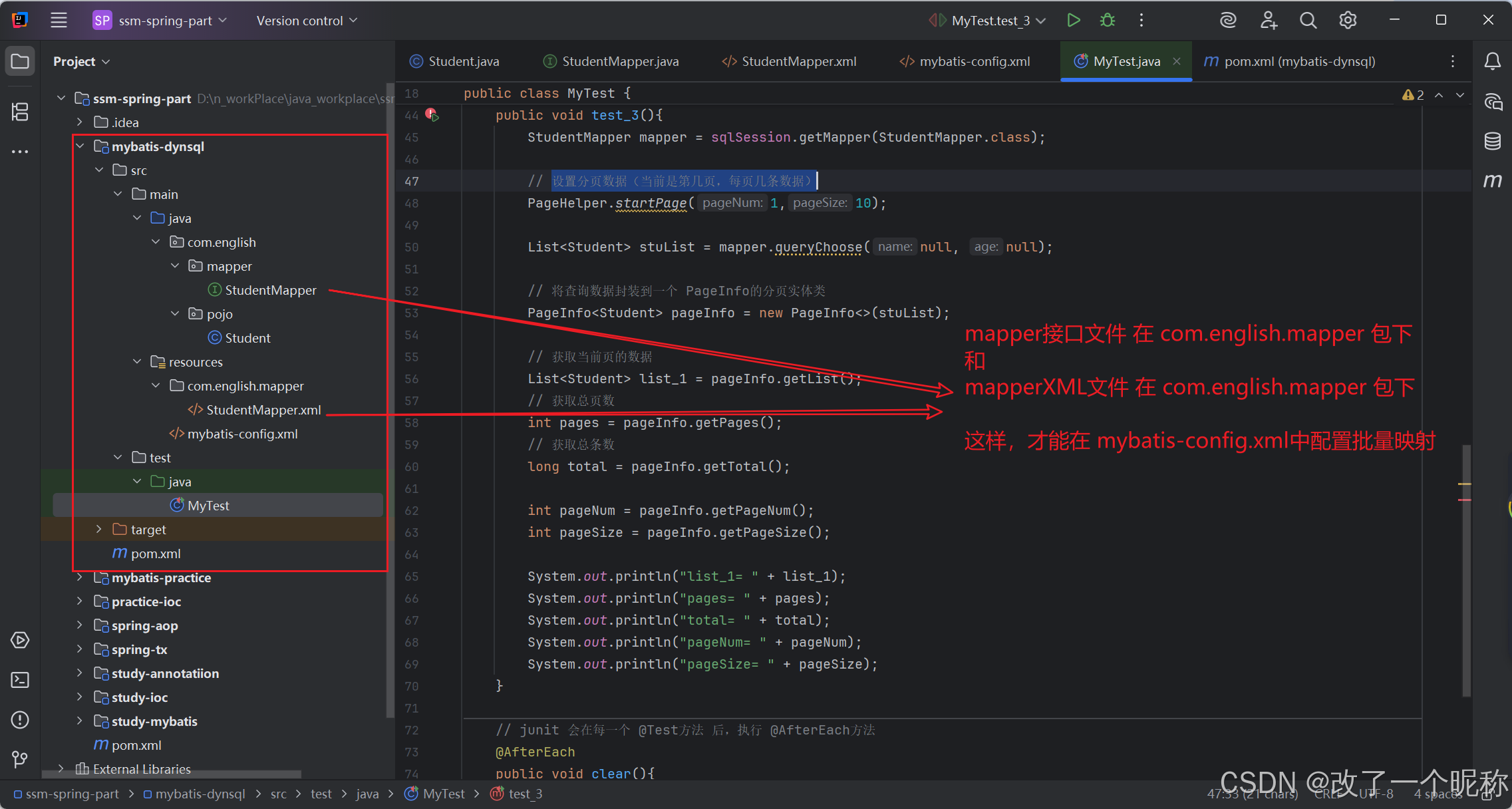
动态语句
pom.xml
<?xml version="1.0" encoding="UTF-8"?>
<project xmlns="http://maven.apache.org/POM/4.0.0"
         xmlns:xsi="http://www.w3.org/2001/XMLSchema-instance"
         xsi:schemaLocation="http://maven.apache.org/POM/4.0.0 http://maven.apache.org/xsd/maven-4.0.0.xsd">
    <modelVersion>4.0.0</modelVersion>
    <parent>
        <groupId>com.english</groupId>
        <artifactId>ssm-spring-part</artifactId>
        <version>1.0-SNAPSHOT</version>
    </parent>

    <artifactId>mybatis-dynsql</artifactId>

    <properties>
        <maven.compiler.source>17</maven.compiler.source>
        <maven.compiler.target>17</maven.compiler.target>
        <project.build.sourceEncoding>UTF-8</project.build.sourceEncoding>
    </properties>

    <dependencies>
        <!-- mybatis依赖 -->
        <dependency>
            <groupId>org.mybatis</groupId>
            <artifactId>mybatis</artifactId>
        </dependency>

        <!-- 数据库驱动 -->
        <dependency>
            <groupId>mysql</groupId>
            <artifactId>mysql-connector-java</artifactId>
        </dependency>

        <!--junit5测试-->
        <dependency>
            <groupId>org.junit.jupiter</groupId>
            <artifactId>junit-jupiter-api</artifactId>
        </dependency>

        <dependency>
            <groupId>org.projectlombok</groupId>
            <artifactId>lombok</artifactId>
        </dependency>

        <!-- SLF4J API(日志门面) -->
        <dependency>
            <groupId>org.slf4j</groupId>
            <artifactId>slf4j-api</artifactId>
        </dependency>

        <!-- 具体日志实现(如 Logback) -->
        <dependency>
            <groupId>ch.qos.logback</groupId>
            <artifactId>logback-classic</artifactId>
        </dependency>

        <!-- 分页插件 -->
        <dependency>
            <groupId>com.github.pagehelper</groupId>
            <artifactId>pagehelper</artifactId>
        </dependency>
    </dependencies>
</project>
实体类 Student
package com.english.pojo;

import lombok.Data;

@Data
public class Student {
    private Integer id;
    private String name;
    private String gender;
    private Integer age;
    private String classes;
}
实体类Student对应的mapper接口文件
package com.english.mapper;

import com.english.pojo.Student;
import org.apache.ibatis.annotations.Param;
import java.util.List;

public interface StudentMapper {
    // 根据 姓名、年龄 查询学生信息
    List<Student> query(@Param("name") String name, @Param("age") Integer age);

    // 根据 学生id 更新学生的数据,要求传入的 name、age不为null的才更新
    int updateById(@Param("id") Integer id, @Param("name") String name, @Param("age") Integer age);

    // 如果name不为null,就根据name查询;如果name为null,age不为null,就根据age查询;如果name、age都为null,就查询全部
    List<Student> queryChoose(@Param("name") String name, @Param("age") Integer age);

    // 根据 id 批量查询
    List<Student> queryBatch(@Param("ids") List<Integer> ids);

    // 根据 id 批量删除
    int deleteBatch(@Param("ids") List<Integer> ids);

    // 根据 id 批量插入
    int insertBatch(@Param("list")  List<Student> list);

    // 根据 id 批量修改
    int updateBatch(@Param("list")  List<Student> list);
}
然后是StudentMapper.xml
<?xml version="1.0" encoding="UTF-8" ?>
<!DOCTYPE mapper
PUBLIC "-//mybatis.org//DTO Config 3.0//EN"
"https://mybatis.org/dtd/mybatis-3-mapper.dtd">
<mapper namespace="com.english.mapper.StudentMapper">
<!--
if标签的test属性中,能访问实体类的属性,不能访问数据库表的字段;
if标签中,">" 用 ">" "<" 用 "<"
-->
<!-- List<Student> query(@Param("name") String name, @Param("age") Integer age); -->
<select id="query" resultType="student">
select * from students
<where>
<if test="name != null">
name = #{name}
</if>
<if test="age != null and age > 20">
and age = #{age}
</if>
</where>
</select>
<!-- int updateById(Integer id, @Param("name") String name, @Param("age") Integer age); -->
<update id="updateById">
update students
<set>
<if test="name != null">
name = #{name}, <!-- 这里必须有个 逗号,否则就报错 -->
</if>
<if test="age != null">
age = #{age}
</if>
</set>
where id = #{id}
</update>
<!-- 如果name不为null,就根据name查询;如果name为null,age不为null,就根据age查询;如果name、age都为null,就查询全部 -->
<!-- List<Student> queryChoose(@Param("name") String name, @Param("age") Integer age); -->
<select id="queryChoose" resultType="student">
select * from students where
<choose>
<when test="name != null">
name = #{name}
</when>
<when test="age != null">
age = #{age}
</when>
<otherwise>1=1</otherwise>
</choose>
</select>
<!-- 根据 id 批量查询 -->
<!-- List<Student> queryBatch(@Param("ids") List<Integer> ids); -->
<select id="queryBatch" resultType="student">
select * from students where id in
<!-- 假设要遍历的数据ids = (1, 2, 3, 4)
collection:要遍历的数据
open:遍历之前,要追加的字符串,这里是 "("
separator:每次遍历的分隔符号,这里是 "," 如果是最后一次,就不追加
close:遍历之后,要追加的字符串,这里是 ")"
item:获取每个遍历项,这里是"1 2 3 4"
-->
<foreach collection="ids" open="(" separator="," close=")" item="id">
<!-- 遍历的内容,就是,item属性的值 -->
#{id}
</foreach>
</select>
<!-- 根据 id 批量删除 -->
<!-- int deleteBatch(@Param("ids") List<Integer> ids); -->
<delete id="deleteBatch">
delete from students where id in
<foreach collection="ids" open="(" separator="," close=")" item="id">
#{id}
</foreach>
</delete>
<!-- 根据 id 批量插入 -->
<!-- int insertBatch(@Param("list") List<Student> list); -->
<insert id="insertBatch">
<!-- insert into students (id, name, gender, age, class)
values (11, "咯咯咯", "男", 8, "高中八班"), (12, "呵呵呵", "男", 110, "高中八班") -->
insert into students (id, name, gender, age, class)
values
<foreach collection="list" separator="," item="student">
(#{student.id}, #{student.name}, #{student.gender}, #{student.age}, #{student.class})
</foreach>
</insert>
<!-- 根据 id 批量修改 -->
<!-- int updateBatch(@Param("list") List<Student> list); -->
<!--
批量插入的例子本质上是一条SQL语句,
而批量更新,则需要多条SQL语句拼起来,用分号分开,也就是一次性发送多条SQL语句让数据库执行,
需要配置 allowMultiQueries = true 才行
<property name="url" value="jdbc:mysql:///my_study_db?allowMultiQueries=true"/>
-->
<update id="updateBatch">
<!-- update students set name = "改名1", age = 55 WHERE id = 5-->
<foreach collection="list" item="stu">
update students set name = #{stu.name}, age = #{stu.age} WHERE id = #{id}
</foreach>
</update>
</mapper>
mybatis-config.xml配置文件
<?xml version="1.0" encoding="UTF-8" ?>
<!DOCTYPE configuration
        PUBLIC "-//mybatis.org//DTO Config 3.0//EN"
        "http://mybatis.org/dtd/mybatis-3-config.dtd">

<configuration>
    <settings>
        <!-- 开启mybatis的日志输出,使用system进行控制台输出 -->
        <setting name="logImpl" value="STDOUT_LOGGING"/>

        <!-- 开启,驼峰式自动映射(数据库表中某列是a_col,映射到java中就成了aCol) -->
        <setting name="mapUnderscoreToCamelCase" value="true"/>
    </settings>

    <typeAliases>
        <!-- 方式1:单独定义-->
        <!-- <typeAlias type="com.atguigu.pojo.Employee" alias="ergouzi"/> -->

        <!-- 方式2:批量将包下的类,给与别名,别名就是类的首字母小写 -->
        <package name="com.english.pojo" />
        <!-- 在方式2的情况下,如果某个文件需要单独设置别名,将注解@Alias("ergouzi")加到这个类上即可 -->
    </typeAliases>

    <!-- 配置分页插件-->
    <plugins>
        <plugin interceptor="com.github.pagehelper.PageInterceptor">
            <property name="helperDialect" value="mysql"/>
        </plugin>
    </plugins>

    <!-- 配置mybatis的开发环境,使用 default 指定实际运行时使用的环境 -->
    <environments default="development">
        <environment id="development">
            <!-- transactionManager:配置 Mybatis 的 内置事务管理器,type设置为JDBC,表示,使用MyBatis内置的JDBC事务管理器 -->
            <transactionManager type="JDBC"></transactionManager>

            <!-- dataSource:配置数据源,type属性设置为POOLED,表示使用连接池 -->
            <dataSource type="POOLED">
                <property name="driver" value="com.mysql.cj.jdbc.Driver"/>
                <property name="url" value="jdbc:mysql:///my_study_db?allowMultiQueries=true"/>
                <property name="username" value="root"/>
                <property name="password" value="root"/>
            </dataSource>
        </environment>
    </environments>

    <!-- mappers:用于配置Mapper映射文件,这里注册了一个位于mappers目录下的EmployeeMapper.xml文件。-->
<!--    <mappers>-->
<!--        <mapper resource="mappers/StudentMapper.xml"/>-->
<!--    </mappers>-->

    <!-- 优化:不需要一个一个把 XxxMapper.xml 在这里注册了 -->
    <mappers>
        <!-- 批量注册mapper.xml
            1、要求 Mapper.xml 与 mapper接口名必须相同
            2、最终打包的位置要一致
                在 resources 目录下创建 mapper接口对应是xml文件时,也创建个com.english.mapper包 就行了,
                然后在这个包里面创建Mapper.xml文件
        -->
        <package name="com.english.mapper"/>
    </mappers>
</configuration>
最后的测试类
import com.english.mapper.StudentMapper;
import com.english.pojo.Student;
import com.github.pagehelper.PageHelper;
import com.github.pagehelper.PageInfo;
import lombok.extern.slf4j.Slf4j;
import org.apache.ibatis.io.Resources;
import org.apache.ibatis.session.SqlSession;
import org.apache.ibatis.session.SqlSessionFactoryBuilder;
import org.junit.jupiter.api.AfterEach;
import org.junit.jupiter.api.BeforeEach;
import org.junit.jupiter.api.Test;

import java.io.IOException;
import java.io.InputStream;
import java.util.List;

@Slf4j
public class MyTest {
    private SqlSession  sqlSession;

    // junit 会在每一个 @Test方法 前,执行 @BeforeEach方法
    @BeforeEach
    public void init() throws IOException {
        InputStream ipt = Resources.getResourceAsStream("mybatis-config.xml");
        sqlSession = new SqlSessionFactoryBuilder().build(ipt).openSession();
    }

    @Test
    public void test_1(){
        StudentMapper mapper = sqlSession.getMapper(StudentMapper.class);
        List<Student> list = mapper.query(null, 88);
        System.out.println("list= " + list);
    }

    @Test
    public void test_2(){
        StudentMapper mapper = sqlSession.getMapper(StudentMapper.class);
        int a = mapper.updateById(2, "哈哈哈", 18);
        System.out.println("a=" + a);
    }

    // 使用分页插件
    @Test
    public void test_3(){
        StudentMapper mapper = sqlSession.getMapper(StudentMapper.class);

        // 设置分页数据(当前是第几页,每页几条数据)
        PageHelper.startPage(1,10);

        List<Student> stuList = mapper.queryChoose(null, null);

        // 将查询数据封装到一个 PageInfo的分页实体类
        PageInfo<Student> pageInfo = new PageInfo<>(stuList);

        // 获取当前页的数据
        List<Student> list_1 = pageInfo.getList();
        // 获取总页数
        int pages = pageInfo.getPages();
        // 获取总条数
        long total = pageInfo.getTotal();

        int pageNum = pageInfo.getPageNum();
        int pageSize = pageInfo.getPageSize();

        System.out.println("list_1= " + list_1);
        System.out.println("pages= " + pages);
        System.out.println("total= " + total);
        System.out.println("pageNum= " + pageNum);
        System.out.println("pageSize= " + pageSize);
    }

    // junit 会在每一个 @Test方法 后,执行 @AfterEach方法
    @AfterEach
    public void clear(){
        sqlSession.commit();
        sqlSession.close();
    }
}