CUDA Programming Guide: 2.1. Intro to CUDA C++
- [2. Programming GPUs in CUDA](#2. Programming GPUs in CUDA)
-
- [2.1. Intro to CUDA C++](#2.1. Intro to CUDA C++)
-
- [2.1.1. Compilation with NVCC](#2.1.1. Compilation with NVCC)
- [2.1.2. Kernels](#2.1.2. Kernels)
-
- [2.1.2.1. Specifying Kernels](#2.1.2.1. Specifying Kernels)
- [2.1.2.2. Launching Kernels](#2.1.2.2. Launching Kernels)
-
- [2.1.2.2.1. Triple Chevron Notation](#2.1.2.2.1. Triple Chevron Notation)
- [2.1.2.3. Thread and Grid Index Intrinsics](#2.1.2.3. Thread and Grid Index Intrinsics)
-
- [2.1.2.3.1. Bounds Checking](#2.1.2.3.1. Bounds Checking)
- References
CUDA and the CUDA Programming Guide
https://docs.nvidia.com/cuda/cuda-programming-guide/index.html
CUDA is a parallel computing platform and programming model developed by NVIDIA that enables dramatic increases in computing performance by harnessing the power of the GPU. It allows developers to accelerate compute-intensive applications and is widely used in fields such as deep learning, scientific computing, and high-performance computing (HPC).
harness [ˈhɑː(r)nɪs]
n. 马具;挽具;(用于人,起固定或保护作用的) 背带
v. 控制;给 (马等) 上挽具;用挽具把...套到...上
This CUDA Programming Guide is the official, comprehensive resource on the CUDA programming model and how to write code that executes on the GPU using the CUDA platform. This guide covers everything from the the CUDA programming model and the CUDA platform to the details of language extensions and covers how to make use of specific hardware and software features. This guide provides a pathway for developers to learn CUDA if they are new, and also provides an essential resource for developers as they build applications using CUDA.
essential [ɪ'senʃ(ə)l]
n. 要点;要素;实质;必需品
adj. 完全必要的;必不可少的;极其重要的;本质的
2. Programming GPUs in CUDA
2.1. Intro to CUDA C++
This programming guide focuses on the CUDA runtime API. The CUDA runtime API is the most commonly used way of using CUDA in C++ and is built on top of the lower level CUDA driver API.
This guide assumes the CUDA Toolkit and NVIDIA Driver are installed and that a supported NVIDIA GPU is present. See The CUDA Quickstart Guide for instructions on installing the necessary CUDA components.
CUDA Quick Start Guide
https://docs.nvidia.com/cuda/cuda-quick-start-guide/index.html
/home/yongqiang/cuda_work/cuda_samples/vector_addition.cu
/**
 * Vector Addition: C = A + B.
 *
 * This sample is a very basic sample that implements element by element
 * vector addition.
 */

#include <stdio.h>

/**
 * CUDA Kernel: Device code
 *
 * Computes the vector addition of A and B into C. The 3 vectors have the same
 * number of elements numElements.
 */
__global__ void VectorAdd(const float *A, const float *B, float *C, const int numElements)
{
    const int i = blockIdx.x * blockDim.x + threadIdx.x;

    if (i < numElements)
    {
        C[i] = A[i] + B[i] + 0.0f;
    }
}

/**
 * Host main routine
 */
int main(void)
{
    // Error code to check return values for CUDA calls
    cudaError_t err = cudaSuccess;

    // Print the vector length to be used, and compute its size
    const int numElements = (1 << 20);
    const size_t size = numElements * sizeof(float);
    printf("[Vector Addition of %d elements]\n", numElements);

    // Allocate the host input vector A
    float *h_A = (float *)malloc(size);
    // Allocate the host input vector B
    float *h_B = (float *)malloc(size);
    // Allocate the host output vector C
    float *h_C = (float *)malloc(size);

    // Verify that allocations succeeded
    if ((h_A == NULL) || (h_B == NULL) || (h_C == NULL))
    {
        fprintf(stderr, "Failed to allocate host vectors!\n");
        exit(EXIT_FAILURE);
    }

    // Initialize the host input vectors
    for (int i = 0; i < numElements; ++i)
    {
        h_A[i] = rand() / (float)RAND_MAX;
        h_B[i] = rand() / (float)RAND_MAX;
    }

    // Allocate the device input vector A
    float *d_A = NULL;
    err = cudaMalloc((void **)&d_A, size);
    if (err != cudaSuccess)
    {
        fprintf(stderr, "Failed to allocate device vector A (error code %s)!\n", cudaGetErrorString(err));
        exit(EXIT_FAILURE);
    }

    // Allocate the device input vector B
    float *d_B = NULL;
    err = cudaMalloc((void **)&d_B, size);
    if (err != cudaSuccess)
    {
        fprintf(stderr, "Failed to allocate device vector B (error code %s)!\n", cudaGetErrorString(err));
        exit(EXIT_FAILURE);
    }

    // Allocate the device output vector C
    float *d_C = NULL;
    err = cudaMalloc((void **)&d_C, size);
    if (err != cudaSuccess)
    {
        fprintf(stderr, "Failed to allocate device vector C (error code %s)!\n", cudaGetErrorString(err));
        exit(EXIT_FAILURE);
    }

    // Copy the host input vectors A and B in host memory to the device input vectors in device memory
    printf("Copy input data from the host memory to the CUDA device\n");
    err = cudaMemcpy(d_A, h_A, size, cudaMemcpyHostToDevice);
    if (err != cudaSuccess)
    {
        fprintf(stderr, "Failed to copy vector A from host to device (error code %s)!\n", cudaGetErrorString(err));
        exit(EXIT_FAILURE);
    }

    err = cudaMemcpy(d_B, h_B, size, cudaMemcpyHostToDevice);
    if (err != cudaSuccess)
    {
        fprintf(stderr, "Failed to copy vector B from host to device (error code %s)!\n", cudaGetErrorString(err));
        exit(EXIT_FAILURE);
    }

    // Launch the Vector Add CUDA Kernel
    const int threadsPerBlock = 256;
    const int blocksPerGrid = (numElements + threadsPerBlock - 1) / threadsPerBlock;
    printf("CUDA kernel launch with %d blocks of %d threads\n", blocksPerGrid, threadsPerBlock);
    VectorAdd<<<blocksPerGrid, threadsPerBlock>>>(d_A, d_B, d_C, numElements);
    err = cudaGetLastError();
    if (err != cudaSuccess)
    {
        fprintf(stderr, "Failed to launch vectorAdd kernel (error code %s)!\n", cudaGetErrorString(err));
        exit(EXIT_FAILURE);
    }

    // Copy the device result vector in device memory to the host result vector in host memory.
    printf("Copy output data from the CUDA device to the host memory\n");
    err = cudaMemcpy(h_C, d_C, size, cudaMemcpyDeviceToHost);
    if (err != cudaSuccess)
    {
        fprintf(stderr, "Failed to copy vector C from device to host (error code %s)!\n", cudaGetErrorString(err));
        exit(EXIT_FAILURE);
    }

    // Verify that the result vector is correct
    for (int i = 0; i < numElements; ++i)
    {
        if (fabs(h_A[i] + h_B[i] - h_C[i]) > 1e-5)
        {
            fprintf(stderr, "Result verification failed at element %d!\n", i);
            exit(EXIT_FAILURE);
        }
    }

    printf("Test PASSED\n");

    // Free device global memory
    err = cudaFree(d_A);
    if (err != cudaSuccess)
    {
        fprintf(stderr, "Failed to free device vector A (error code %s)!\n", cudaGetErrorString(err));
        exit(EXIT_FAILURE);
    }

    err = cudaFree(d_B);
    if (err != cudaSuccess)
    {
        fprintf(stderr, "Failed to free device vector B (error code %s)!\n", cudaGetErrorString(err));
        exit(EXIT_FAILURE);
    }

    err = cudaFree(d_C);
    if (err != cudaSuccess)
    {
        fprintf(stderr, "Failed to free device vector C (error code %s)!\n", cudaGetErrorString(err));
        exit(EXIT_FAILURE);
    }

    // Free host memory
    free(h_A);
    free(h_B);
    free(h_C);

    printf("Yongqiang Cheng\n");
    return 0;
}

(base) yongqiang@yongqiang:~/cuda_work/cuda_samples$ ls
vector_addition.cu
(base) yongqiang@yongqiang:~/cuda_work/cuda_samples$ nvcc vector_addition.cu -o vector_addition
(base) yongqiang@yongqiang:~/cuda_work/cuda_samples$ ls
vector_addition  vector_addition.cu
(base) yongqiang@yongqiang:~/cuda_work/cuda_samples$ ./vector_addition
[Vector Addition of 1048576 elements]
Copy input data from the host memory to the CUDA device
CUDA kernel launch with 4096 blocks of 256 threads
Copy output data from the CUDA device to the host memory
Test PASSED
Yongqiang Cheng
(base) yongqiang@yongqiang:~/cuda_work/cuda_samples$
2.1.1. Compilation with NVCC
GPU code written in C++ is compiled using the NVIDIA Cuda Compiler, nvcc. nvcc is a compiler driver that simplifies the process of compiling C++ or PTX code: It provides simple and familiar command line options and executes them by invoking the collection of tools that implement the different compilation stages.
This guide will show nvcc command lines which can be used on any Linux system with the CUDA Toolkit installed, at a Windows command line or power shell, or on Windows Subsystem for Linux with the CUDA Toolkit. The nvcc chapter of this guide covers common use cases of nvcc, and complete documentation is provided by the nvcc user manual.
NVIDIA CUDA Compiler Driver NVCC
https://docs.nvidia.com/cuda/cuda-compiler-driver-nvcc/index.html
2.1.2. Kernels
As mentioned in the introduction to the CUDA Programming Model, functions which execute on the GPU which can be invoked from the host are called kernels. Kernels are written to be run by many parallel threads simultaneously.
2.1.2.1. Specifying Kernels
The code for a kernel is specified using the __global__ declaration specifier. This indicates to the compiler that this function will be compiled for the GPU in a way that allows it to be invoked from a kernel launch. A kernel launch is an operation which starts a kernel running, usually from the CPU. Kernels are functions with a void return type.
__global__ void VectorAdd(const float *A, const float *B, float *C, const int numElements)
{
...
}
2.1.2.2. Launching Kernels
The number of threads that will execute the kernel in parallel is specified as part of the kernel launch. This is called the execution configuration. Different invocations of the same kernel may use different execution configurations, such as a different number of threads or thread blocks.
There are two ways of launching kernels from CPU code, Triple Chevron Notation and cudaLaunchKernelEx. Triple chevron notation, the most common way of launching kernels, is introduced here. An example of launching a kernel using cudaLaunchKernelEx is shown and discussed in detail in in section Section 3.1.1.
chevron ['ʃevrən]
n. V 形线条;V 形图案
2.1.2.2.1. Triple Chevron Notation
Triple chevron notation is a CUDA C++ Language Extension which is used to launch kernels. It is called triple chevron because it uses three chevron characters to encapsulate the execution configuration for the kernel launch, i.e. <<< >>>. Execution configuration parameters are specified as a comma separated list inside the chevrons, similar to parameters to a function call. The syntax for a kernel launch of the VectorAdd kernel is shown below.
__global__ void VectorAdd(const float *A, const float *B, float *C, const int numElements)
{
...
}

int main(void)
{
...
    // Launch the Vector Add CUDA Kernel
    const int threadsPerBlock = 256;
    const int blocksPerGrid = (numElements + threadsPerBlock - 1) / threadsPerBlock;
    printf("CUDA kernel launch with %d blocks of %d threads\n", blocksPerGrid, threadsPerBlock);
    VectorAdd<<<blocksPerGrid, threadsPerBlock>>>(d_A, d_B, d_C, numElements);
...
}
The first two parameters to the triple chevron notation are the grid dimensions and the thread block dimensions, respectively. When using 1-dimensional thread blocks or grids, integers can be used to specify dimensions.
Each thread will execute the exact same kernel code.
There is a limit to the number of threads per block, since all threads of a block reside on the same streaming multiprocessor(SM) and must share the resources of the SM. On current GPUs, a thread block may contain up to 1024 threads. If resources allow, more than one thread block can be scheduled on an SM simultaneously.
Kernel launches are asynchronous with respect to the host thread. That is, the kernel will be setup for execution on the GPU, but the host code will not wait for the kernel to complete (or even start) executing on the GPU before proceeding. Some form of synchronization between the GPU and CPU must be used to determine that the kernel has completed. The most basic version, completely synchronizing the entire GPU, is shown in Synchronizing CPU and GPU. More sophisticated methods of synchronization are covered in Asynchronous Execution.
When using 2 or 3-dimensional grids or thread blocks, the CUDA type dim3 is used as the grid and thread block dimension parameters. The code fragment below shows a kernel launch of a MatAdd kernel using 16 by 16 grid of thread blocks, each thread block is 8 by 8.
    dim3 blocksPerGrid(16, 16);
    dim3 threadsPerBlock(8, 8);
    MatAdd<<<blocksPerGrid, threadsPerBlock>>>(A, B, C);
2.1.2.3. Thread and Grid Index Intrinsics
Within kernel code, CUDA provides intrinsics to access parameters of the execution configuration and the index of a thread or block.
-
threadIdxgives the index of a thread within its thread block. Each thread in a thread block will have a different index. -
blockDimgives the dimensions of the thread block, which was specified in the execution configuration of the kernel launch. -
blockIdxgives the index of a thread block within the grid. Each thread block will have a different index. -
gridDimgives the dimensions of the grid, which was specified in the execution configuration when the kernel was launched.
Each of these intrinsics is a 3-component vector with a .x, .y, and .z member. Dimensions not specified by a launch configuration will default to 1. threadIdx and blockIdx are zero indexed. That is, threadIdx.x will take on values from 0 up to and including blockDim.x-1. .y and .z operate the same in their respective dimensions.
Similarly, blockIdx.x will have values from 0 up to and including gridDim.x-1, and the same for .y and .z dimensions, respectively.
These allow an individual thread to identify what work it should carry out. Returning to the VectorAdd kernel, the kernel takes three parameters, each is a vector of floats. The kernel performs an element-wise addition of A and B and stores the result in C. The kernel is parallelized such that each thread will perform one addition. Which element it computes is determined by its thread and grid index.
__global__ void VectorAdd(const float *A, const float *B, float *C, const int numElements)
{
    const int i = blockIdx.x * blockDim.x + threadIdx.x;  // workIndex

    if (i < numElements)
    {
        // Perform computation
        C[i] = A[i] + B[i] + 0.0f;
    }
}

int main(void)
{
...
    // Launch the Vector Add CUDA Kernel
    const int threadsPerBlock = 256;
    const int blocksPerGrid = (numElements + threadsPerBlock - 1) / threadsPerBlock;  // 4096
    printf("CUDA kernel launch with %d blocks of %d threads\n", blocksPerGrid, threadsPerBlock);
    VectorAdd<<<blocksPerGrid, threadsPerBlock>>>(d_A, d_B, d_C, numElements);
...
}
In this example, 4096 thread blocks of 256 threads are used to add a vector of 1048576 elements. In the first thread block, blockIdx.x will be zero, and so each thread's workIndex will simply be its threadIdx.x. In the second thread block, blockIdx.x will be 1, so blockIdx.x * blockDim.x will be the same as blockDim.x, which is 256 in this case. The workIndex for each thread in the second thread block will be its threadIdx.x + 256. In the third thread block workIndex will be threadIdx.x + 512.
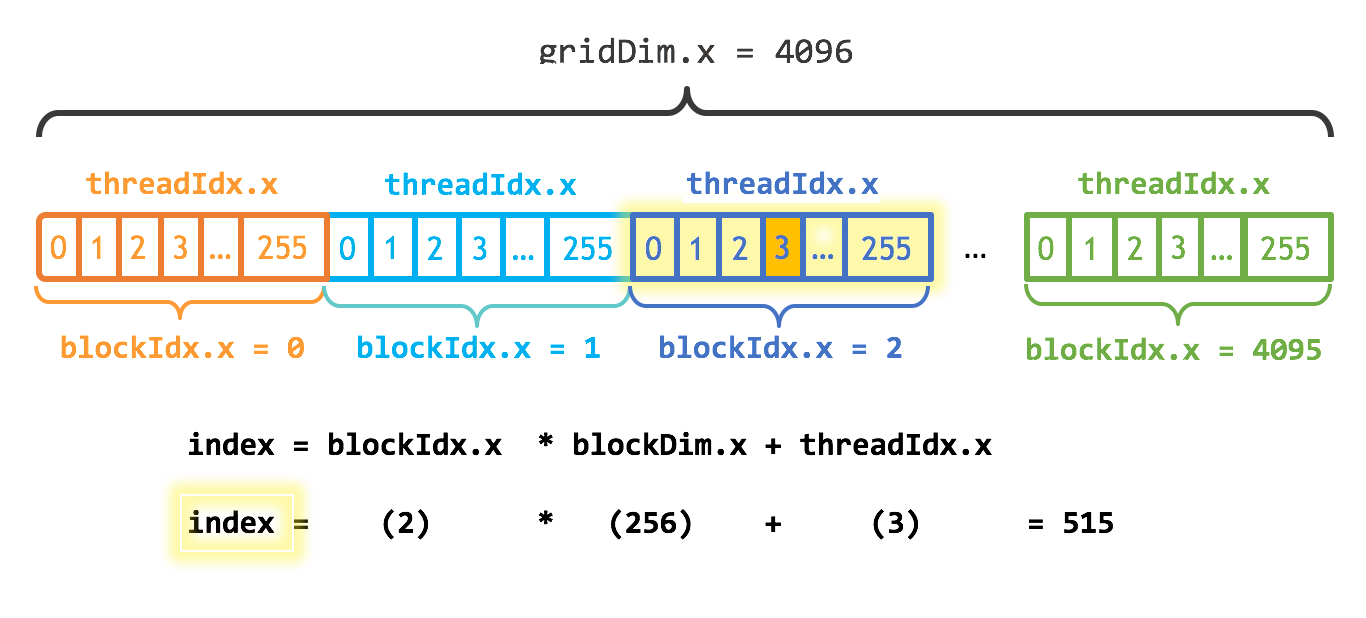
This computation of workIndex is very common for 1-dimensional parallelizations. Expanding to two or three dimensions often follows the same pattern in each of those dimensions.
2.1.2.3.1. Bounds Checking
To make the kernel handle any vector length, we can add checks that the memory access is not exceeding the bounds of the arrays as shown below, and then launch one thread block which will have some inactive threads.
__global__ void VectorAdd(const float *A, const float *B, float *C, const int numElements)
{
    const int i = blockIdx.x * blockDim.x + threadIdx.x;  // workIndex

    if (i < numElements)
    {
        // Perform computation
        C[i] = A[i] + B[i] + 0.0f;
    }
}
With the above kernel code, more threads than needed can be launched without causing out-of-bounds accesses to the arrays. When workIndex exceeds numElements, threads exit and do not do any work. Launching extra threads in a block that do no work does not incur a large overhead cost, however launching thread blocks in which no threads do work should be avoided. This kernel can now handle vector lengths which are not a multiple of the block size.
在一个 thread block 中启动一些不执行任何工作的额外线程不会产生很大的开销,但是应该避免启动没有任何线程执行工作的 thread block。
The number of thread blocks which are needed can be calculated as the ceiling of the number of threads needed, the vector length in this case, divided by the number of threads per block. That is, the integer division of the number of threads needed by the number of threads per block, rounded up. A common way of expressing this as a single integer division is given below. By adding threads - 1 before the integer division, this behaves like a ceiling function, adding another thread block only if the vector length is not divisible by the number of threads per block.
    // Launch the Vector Add CUDA Kernel
    const int threadsPerBlock = 256;
    const int blocksPerGrid = (numElements + threadsPerBlock - 1) / threadsPerBlock;  // 4096
    printf("CUDA kernel launch with %d blocks of %d threads\n", blocksPerGrid, threadsPerBlock);
    VectorAdd<<<blocksPerGrid, threadsPerBlock>>>(d_A, d_B, d_C, numElements);
The CUDA Core Compute Library (CCCL) provides a convenient utility, cuda::ceil_div, for doing this ceiling divide to calculate the number of blocks needed for a kernel launch. This utility is available by including the header <cuda/cmath>.
    // Launch the Vector Add CUDA Kernel
    const int threadsPerBlock = 256;
    // const int blocksPerGrid = (numElements + threadsPerBlock - 1) / threadsPerBlock;
    const int blocksPerGrid = cuda::std::ceil_div(numElements, threadsPerBlock);
    printf("CUDA kernel launch with %d blocks of %d threads\n", blocksPerGrid, threadsPerBlock);
    VectorAdd<<<blocksPerGrid, threadsPerBlock>>>(d_A, d_B, d_C, numElements);
The choice of 256 threads per block here is arbitrary, but this is quite often a good value to start with.
References
1 Yongqiang Cheng (程永强), https://yongqiang.blog.csdn.net/
2 CUDA Programming Guide, https://docs.nvidia.com/cuda/cuda-programming-guide/index.html
3 CUDA Samples, https://github.com/NVIDIA/cuda-samples
4 CUDA C++ Programming Guide (Legacy), https://docs.nvidia.com/cuda/cuda-c-programming-guide/