一、文本溢出概述
当文本内容超出容器范围时,需要使用overflow属性来控制溢出行为。
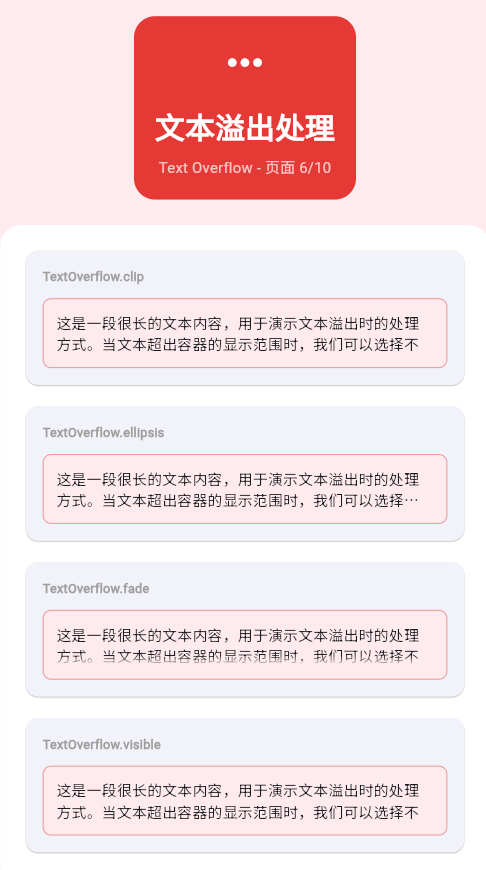
TextOverflow类型
TextOverflow
clip 裁剪
fade 渐隐
ellipsis 省略号
visible 可见
| TextOverflow | 说明 | 效果 |
|---|---|---|
| clip | 直接裁剪超出部分 | 硬性截断 |
| fade | 超出部分渐隐 | 柔和过渡 |
| ellipsis | 显示省略号(...) | 常用方式 |
| visible | 完整显示(可能溢出) | 默认行为 |
二、maxLines基础
限制行数
dart
Column(
  children: [
    // 不限制行数
    Container(
      width: 200,
      child: Text(
        '这是一段很长的文本,不限制行数时会全部显示。这是一段很长的文本,不限制行数时会全部显示。',
      ),
    ),
    SizedBox(height: 8),
    // 限制1行
    Container(
      width: 200,
      child: Text(
        '这是一段很长的文本,限制1行时只显示一行。',
        maxLines: 1,
      ),
    ),
    SizedBox(height: 8),
    // 限制2行
    Container(
      width: 200,
      child: Text(
        '这是一段很长的文本,限制2行时会显示两行内容,超出的部分会被处理。',
        maxLines: 2,
      ),
    ),
  ],
)
三、Overflow模式详解
clip裁剪模式
dart
Container(
  width: 200,
  child: Text(
    '这是一段很长的文本,使用clip模式时超出部分会被直接裁剪掉,没有其他提示。',
    maxLines: 2,
    overflow: TextOverflow.clip,
    style: TextStyle(fontSize: 16),
  ),
)
fade渐隐模式
dart
Container(
  width: 200,
  child: Text(
    '这是一段很长的文本,使用fade模式时超出部分会逐渐淡出,视觉效果更柔和。',
    maxLines: 2,
    overflow: TextOverflow.fade,
    style: TextStyle(fontSize: 16),
  ),
)
ellipsis省略号模式
dart
Container(
  width: 200,
  child: Text(
    '这是一段很长的文本,使用ellipsis模式时会在末尾显示省略号,提示用户还有更多内容。',
    maxLines: 2,
    overflow: TextOverflow.ellipsis,
    style: TextStyle(fontSize: 16),
  ),
)
visible可见模式
dart
Container(
  width: 200,
  decoration: BoxDecoration(
    border: Border.all(color: Colors.red),
  ),
  child: Text(
    '这是一段很长的文本,使用visible模式时会完整显示,可能会超出容器边界。',
    maxLines: 2,
    overflow: TextOverflow.visible,
    style: TextStyle(fontSize: 16),
  ),
)
四、软换行处理
使用softWrap
dart
Column(
  children: [
    // 启用软换行(默认)
    Container(
      width: 200,
      child: Text(
        '这是一段很长的文本,启用软换行时会自动换行显示。',
        softWrap: true,
      ),
    ),
    SizedBox(height: 8),
    // 禁用软换行
    Container(
      width: 200,
      child: Text(
        '这是一段很长的文本,禁用软换行时文本不会自动换行。',
        softWrap: false,
        overflow: TextOverflow.fade,
      ),
    ),
  ],
)
五、实际应用场景
文章标题
dart
Container(
  width: 200,
  child: Text(
    '这是一篇关于Flutter开发的非常长而且很有吸引力的文章标题',
    style: TextStyle(
      fontSize: 18,
      fontWeight: FontWeight.bold,
    ),
    maxLines: 2,
    overflow: TextOverflow.ellipsis,
  ),
)
商品描述
dart
Container(
  width: 200,
  height: 80,
  child: Text(
    '这是一款非常优秀的商品,具有很多优秀的功能和特点,深受用户喜爱和好评。',
    style: TextStyle(
      fontSize: 14,
      color: Colors.grey.shade700,
    ),
    maxLines: 3,
    overflow: TextOverflow.ellipsis,
  ),
)
用户签名
dart
Container(
  width: 300,
  child: Text(
    '这是一个很长的用户个性签名,展示个人的独特风格和个性特点。',
    style: TextStyle(
      fontSize: 12,
      color: Colors.grey.shade500,
      fontStyle: FontStyle.italic,
    ),
    maxLines: 1,
    overflow: TextOverflow.ellipsis,
  ),
)
六、完整示例
dart
class TextOverflowExample extends StatelessWidget {
  const TextOverflowExample({super.key});

  @override
  Widget build(BuildContext context) {
    return Scaffold(
      appBar: AppBar(title: Text('文本溢出')),
      body: SingleChildScrollView(
        padding: EdgeInsets.all(16),
        child: Column(
          crossAxisAlignment: CrossAxisAlignment.start,
          children: [
            _buildSection('溢出模式对比'),
            _buildOverflowModes(),
            SizedBox(height: 24),
            _buildSection('不同行数限制'),
            _buildMaxLinesExamples(),
            SizedBox(height: 24),
            _buildSection('实际应用'),
            _buildRealWorldExamples(),
          ],
        ),
      ),
    );
  }

  Widget _buildSection(String title) {
    return Text(
      title,
      style: TextStyle(fontSize: 20, fontWeight: FontWeight.bold),
    );
  }

  Widget _buildOverflowModes() {
    final longText = '这是一段很长的文本,用于演示不同的溢出处理效果。';

    return Column(
      children: [
        _buildOverflowCard('clip裁剪', longText, TextOverflow.clip),
        SizedBox(height: 8),
        _buildOverflowCard('fade渐隐', longText, TextOverflow.fade),
        SizedBox(height: 8),
        _buildOverflowCard('ellipsis省略号', longText, TextOverflow.ellipsis),
        SizedBox(height: 8),
        _buildOverflowCard('visible可见', longText, TextOverflow.visible),
      ],
    );
  }

  Widget _buildOverflowCard(String title, String text, TextOverflow overflow) {
    return Container(
      width: double.infinity,
      padding: EdgeInsets.all(12),
      decoration: BoxDecoration(
        color: Colors.grey.shade100,
        borderRadius: BorderRadius.circular(8),
      ),
      child: Column(
        crossAxisAlignment: CrossAxisAlignment.start,
        children: [
          Text(
            title,
            style: TextStyle(
              fontWeight: FontWeight.bold,
              color: Colors.blue.shade700,
            ),
          ),
          SizedBox(height: 8),
          Container(
            width: 200,
            child: Text(
              text,
              maxLines: 2,
              overflow: overflow,
              style: TextStyle(fontSize: 14),
            ),
          ),
        ],
      ),
    );
  }

  Widget _buildMaxLinesExamples() {
    final longText = '这是一段很长的文本,用于演示不同行数限制的效果。这是一段很长的文本,用于演示不同行数限制的效果。';

    return Column(
      children: [
        _buildLinesCard('1行', longText, 1),
        SizedBox(height: 8),
        _buildLinesCard('2行', longText, 2),
        SizedBox(height: 8),
        _buildLinesCard('3行', longText, 3),
      ],
    );
  }

  Widget _buildLinesCard(String title, String text, int maxLines) {
    return Container(
      width: double.infinity,
      padding: EdgeInsets.all(12),
      decoration: BoxDecoration(
        color: Colors.green.shade50,
        borderRadius: BorderRadius.circular(8),
      ),
      child: Column(
        crossAxisAlignment: CrossAxisAlignment.start,
        children: [
          Text(
            title,
            style: TextStyle(fontWeight: FontWeight.bold),
          ),
          SizedBox(height: 8),
          Text(
            text,
            maxLines: maxLines,
            overflow: TextOverflow.ellipsis,
            style: TextStyle(fontSize: 14),
          ),
        ],
      ),
    );
  }

  Widget _buildRealWorldExamples() {
    return Column(
      children: [
        // 文章标题
        Card(
          child: Padding(
            padding: EdgeInsets.all(16),
            child: Column(
              crossAxisAlignment: CrossAxisAlignment.start,
              children: [
                Text(
                  '这是一篇关于Flutter开发的非常长而且很有吸引力的文章标题',
                  style: TextStyle(
                    fontSize: 18,
                    fontWeight: FontWeight.bold,
                  ),
                  maxLines: 2,
                  overflow: TextOverflow.ellipsis,
                ),
                SizedBox(height: 8),
                Text(
                  '这是一段文章摘要,展示了文本溢出在实际应用中的使用场景和效果。',
                  style: TextStyle(color: Colors.grey.shade600),
                ),
              ],
            ),
          ),
        ),
        SizedBox(height: 16),
        // 商品卡片
        Card(
          child: Padding(
            padding: EdgeInsets.all(16),
            child: Row(
              children: [
                Container(
                  width: 80,
                  height: 80,
                  color: Colors.grey.shade300,
                  child: Icon(Icons.shopping_bag, size: 40),
                ),
                SizedBox(width: 16),
                Expanded(
                  child: Column(
                    crossAxisAlignment: CrossAxisAlignment.start,
                    children: [
                      Text(
                        '这是一款非常优秀的商品名称,具有很多优秀的功能',
                        style: TextStyle(fontWeight: FontWeight.bold),
                        maxLines: 2,
                        overflow: TextOverflow.ellipsis,
                      ),
                      SizedBox(height: 4),
                      Text(
                        '¥99.99',
                        style: TextStyle(
                          color: Colors.red,
                          fontSize: 18,
                          fontWeight: FontWeight.bold,
                        ),
                      ),
                    ],
                  ),
                ),
              ],
            ),
          ),
        ),
      ],
    );
  }
}
七、最佳实践
| 实践 | 说明 | 效果 |
|---|---|---|
| 使用ellipsis | 最常用、最直观 | 用户体验好 |
| 合理设置maxLines | 根据实际需求 | 界面整洁 |
| 结合softWrap | 控制换行行为 | 布局可控 |
| 考虑可访问性 | 确保文本可读 | 提升可用性 |
欢迎加入开源鸿蒙跨平台社区:https://openharmonycrossplatform.csdn.net