Flutter书籍借阅管理器应用开发教程
项目简介
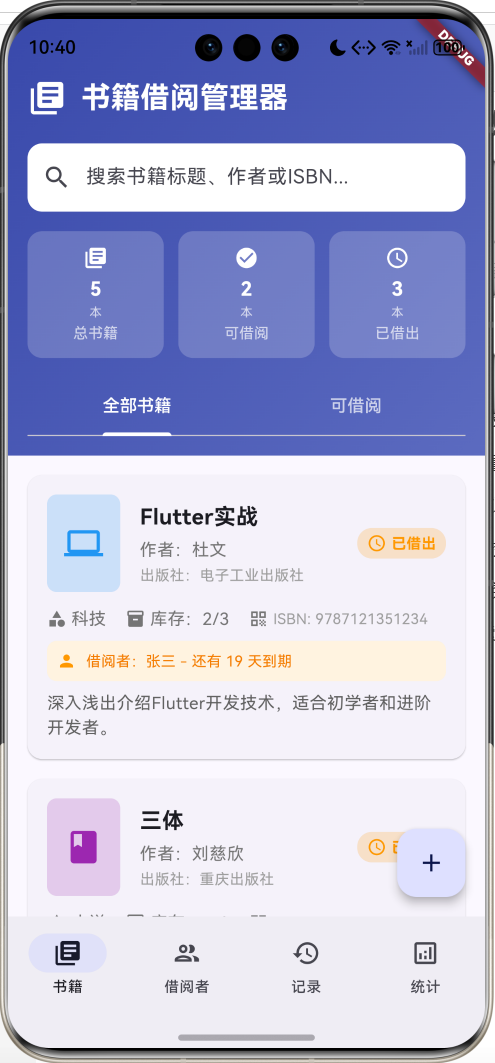
书籍借阅管理器是一款专为图书馆、学校或个人图书管理设计的移动应用。应用采用Flutter框架开发,提供完整的图书借阅管理功能,包括书籍管理、借阅者管理、借阅记录跟踪和统计分析等核心功能。
运行效果图
核心功能
- 书籍管理:添加、查看、编辑书籍信息,支持分类管理
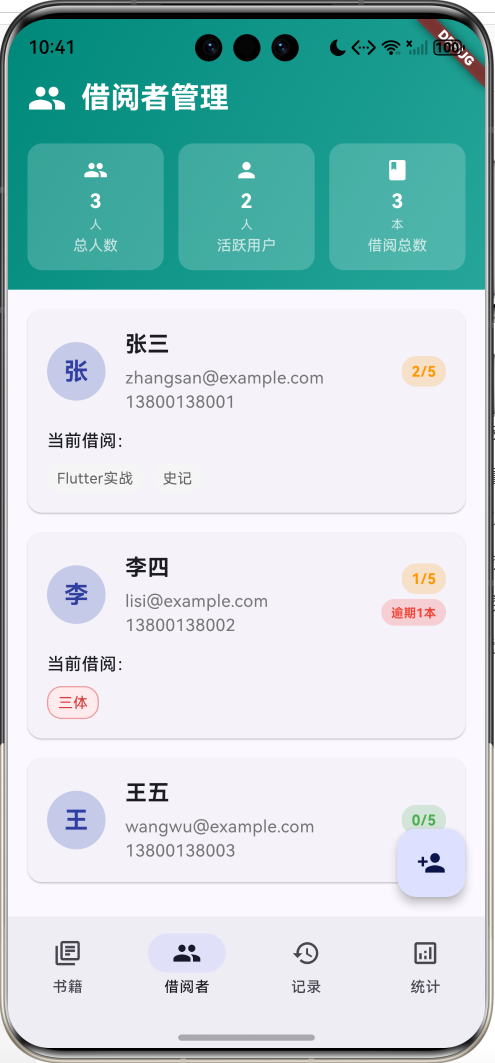
- 借阅者管理:注册和管理借阅者信息,设置借阅限额
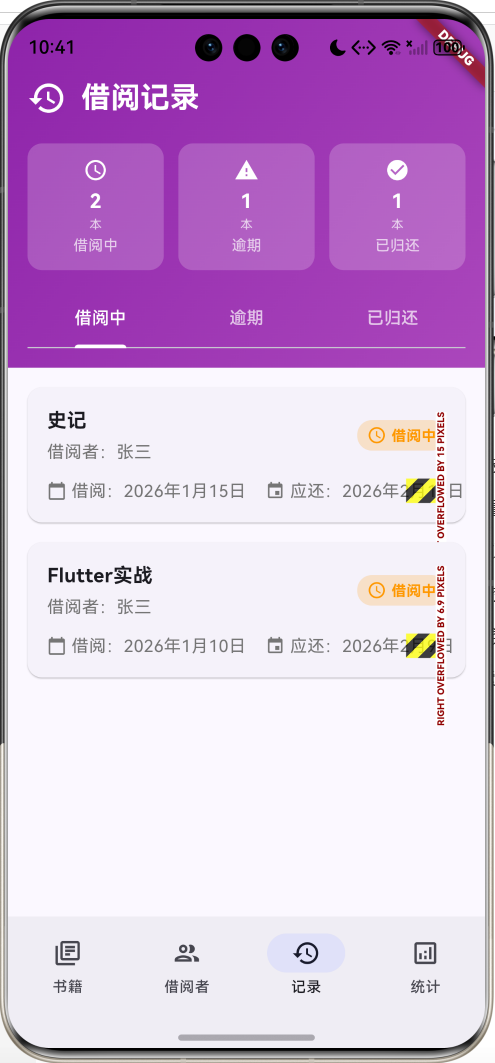
- 借阅流程:完整的借阅和归还流程,自动记录借阅历史
- 逾期管理:自动识别逾期书籍,提供逾期提醒
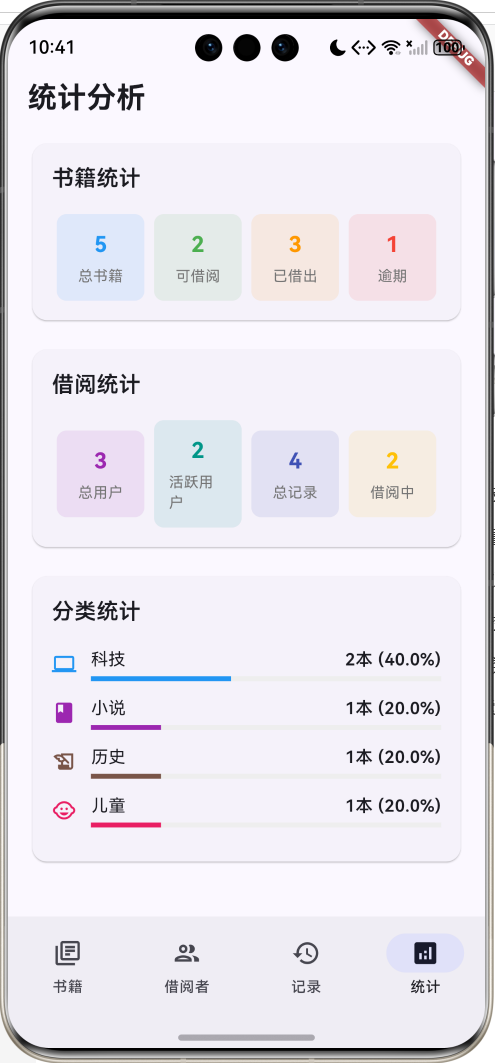
- 统计分析:提供书籍状态、借阅情况、分类分布等统计
- 搜索功能:支持按标题、作者、ISBN搜索书籍
技术特点
- 单文件架构,代码结构清晰易懂
- Material Design 3设计风格
- 完整的数据模型和业务逻辑
- 丰富的交互功能和用户体验
- 响应式布局,适配不同屏幕尺寸
项目架构设计
整体架构
BookLendingApp
BookLendingHomePage
书籍管理页面
借阅者管理页面
借阅记录页面
统计分析页面
数据模型
Book
Borrower
BorrowRecord
对话框组件
AddBookDialog
AddBorrowerDialog
BookDetailsDialog
BorrowerDetailsDialog
RecordDetailsDialog
页面结构
应用采用底部导航栏设计,包含四个主要页面:
- 书籍页面:展示所有书籍,支持搜索和分类筛选
- 借阅者页面:管理所有注册的借阅者信息
- 记录页面:显示借阅记录,按状态分类展示
- 统计页面:提供各种统计分析图表
数据模型设计
Book 书籍模型
dart
class Book {
  final String id;              // 唯一标识
  final String title;           // 书籍标题
  final String author;          // 作者
  final String isbn;            // ISBN编号
  final String category;        // 分类
  final String publisher;       // 出版社
  final DateTime publishDate;   // 出版日期
  final String description;     // 描述
  final String coverUrl;        // 封面图片URL
  final BookStatus status;      // 书籍状态
  final String? borrowerId;     // 借阅者ID
  final String? borrowerName;   // 借阅者姓名
  final DateTime? borrowDate;   // 借阅日期
  final DateTime? dueDate;      // 应还日期
  final int totalCopies;        // 总册数
  final int availableCopies;    // 可借册数
}
Borrower 借阅者模型
dart
class Borrower {
  final String id;                    // 唯一标识
  final String name;                  // 姓名
  final String email;                 // 邮箱
  final String phone;                 // 电话
  final String address;               // 地址
  final DateTime registrationDate;    // 注册日期
  final List<String> borrowedBookIds; // 已借书籍ID列表
  final int maxBorrowLimit;           // 最大借阅限额
}
BorrowRecord 借阅记录模型
dart
class BorrowRecord {
  final String id;              // 唯一标识
  final String bookId;          // 书籍ID
  final String borrowerId;      // 借阅者ID
  final DateTime borrowDate;    // 借阅日期
  final DateTime dueDate;       // 应还日期
  final DateTime? returnDate;   // 实际归还日期
  final BorrowStatus status;    // 借阅状态
  final String notes;           // 备注
}
枚举定义
dart
// 书籍状态
enum BookStatus {
  available,    // 可借阅
  borrowed,     // 已借出
  reserved,     // 已预约
  maintenance,  // 维护中
}

// 借阅状态
enum BorrowStatus {
  active,       // 借阅中
  returned,     // 已归还
  overdue,      // 逾期
}

// 书籍分类
enum BookCategory {
  fiction,      // 小说
  nonFiction,   // 非小说
  science,      // 科学
  technology,   // 技术
  history,      // 历史
  biography,    // 传记
  children,     // 儿童读物
  education,    // 教育
}
核心功能实现
1. 主页面结构
主页面使用StatefulWidget实现,包含底部导航栏和对应的页面内容:
dart
class _BookLendingHomePageState extends State<BookLendingHomePage>
    with TickerProviderStateMixin {
  int _selectedIndex = 0;
  late TabController _booksTabController;
  late TabController _recordsTabController;

  // 数据列表
  final List<Book> _books = [];
  final List<Borrower> _borrowers = [];
  final List<BorrowRecord> _borrowRecords = [];

  @override
  Widget build(BuildContext context) {
    return Scaffold(
      body: [
        _buildBooksPage(),      // 书籍页面
        _buildBorrowersPage(),  // 借阅者页面
        _buildRecordsPage(),    // 记录页面
        _buildStatsPage(),      // 统计页面
      ][_selectedIndex],
      bottomNavigationBar: NavigationBar(
        selectedIndex: _selectedIndex,
        onDestinationSelected: (index) {
          setState(() {
            _selectedIndex = index;
          });
        },
        destinations: const [
          NavigationDestination(icon: Icon(Icons.library_books_outlined), label: '书籍'),
          NavigationDestination(icon: Icon(Icons.people_outlined), label: '借阅者'),
          NavigationDestination(icon: Icon(Icons.history_outlined), label: '记录'),
          NavigationDestination(icon: Icon(Icons.analytics_outlined), label: '统计'),
        ],
      ),
    );
  }
}
2. 书籍管理功能
书籍列表展示
dart
Widget _buildBooksList(bool onlyAvailable) {
  var filteredBooks = _books.where((book) {
    // 搜索过滤
    if (_searchQuery.isNotEmpty) {
      final query = _searchQuery.toLowerCase();
      if (!book.title.toLowerCase().contains(query) &&
          !book.author.toLowerCase().contains(query) &&
          !book.isbn.toLowerCase().contains(query)) {
        return false;
      }
    }

    // 状态过滤
    if (onlyAvailable && book.status != BookStatus.available) {
      return false;
    }

    return true;
  }).toList();

  return ListView.builder(
    padding: const EdgeInsets.all(16),
    itemCount: filteredBooks.length,
    itemBuilder: (context, index) {
      final book = filteredBooks[index];
      return _buildBookCard(book);
    },
  );
}
书籍卡片设计
dart
Widget _buildBookCard(Book book) {
  final statusConfig = _statusConfigs[book.status]!;
  final categoryConfig = _categoryConfigs[book.category];

  return Card(
    child: InkWell(
      onTap: () => _showBookDetails(book),
      child: Padding(
        padding: const EdgeInsets.all(16),
        child: Column(
          crossAxisAlignment: CrossAxisAlignment.start,
          children: [
            Row(
              children: [
                // 书籍封面占位符
                Container(
                  width: 60, height: 80,
                  decoration: BoxDecoration(
                    color: categoryConfig?.color.withValues(alpha: 0.2),
                    borderRadius: BorderRadius.circular(8),
                  ),
                  child: Icon(categoryConfig?.icon ?? Icons.book),
                ),
                // 书籍信息
                Expanded(
                  child: Column(
                    crossAxisAlignment: CrossAxisAlignment.start,
                    children: [
                      Text(book.title, style: const TextStyle(fontSize: 18, fontWeight: FontWeight.bold)),
                      Text('作者:${book.author}'),
                      if (book.publisher.isNotEmpty) Text('出版社:${book.publisher}'),
                    ],
                  ),
                ),
                // 状态标签
                Container(
                  padding: const EdgeInsets.symmetric(horizontal: 8, vertical: 4),
                  decoration: BoxDecoration(
                    color: statusConfig.color.withValues(alpha: 0.2),
                    borderRadius: BorderRadius.circular(12),
                  ),
                  child: Row(
                    mainAxisSize: MainAxisSize.min,
                    children: [
                      Icon(statusConfig.icon, size: 16, color: statusConfig.color),
                      Text(statusConfig.name),
                    ],
                  ),
                ),
              ],
            ),
            // 其他信息和逾期提醒
          ],
        ),
      ),
    ),
  );
}
3. 借阅流程实现
借阅功能
dart
void _borrowBook(String bookId, String borrowerId, String borrowerName) {
  final bookIndex = _books.indexWhere((book) => book.id == bookId);
  final borrowerIndex = _borrowers.indexWhere((borrower) => borrower.id == borrowerId);

  if (bookIndex != -1 && borrowerIndex != -1) {
    final book = _books[bookIndex];
    final borrower = _borrowers[borrowerIndex];

    if (book.availableCopies > 0 && borrower.canBorrowMore) {
      final borrowDate = DateTime.now();
      final dueDate = borrowDate.add(const Duration(days: 30)); // 30天借阅期

      // 创建借阅记录
      final record = BorrowRecord(
        id: DateTime.now().millisecondsSinceEpoch.toString(),
        bookId: bookId,
        borrowerId: borrowerId,
        borrowDate: borrowDate,
        dueDate: dueDate,
        status: BorrowStatus.active,
      );

      setState(() {
        // 更新书籍状态
        _books[bookIndex] = book.copyWith(
          status: book.availableCopies == 1 ? BookStatus.borrowed : book.status,
          availableCopies: book.availableCopies - 1,
          borrowerId: borrowerId,
          borrowerName: borrowerName,
          borrowDate: borrowDate,
          dueDate: dueDate,
        );

        // 更新借阅者信息
        _borrowers[borrowerIndex] = borrower.copyWith(
          borrowedBookIds: [...borrower.borrowedBookIds, bookId],
        );

        // 添加借阅记录
        _borrowRecords.add(record);
      });
    }
  }
}
归还功能
dart
void _returnBook(String bookId) {
  final bookIndex = _books.indexWhere((book) => book.id == bookId);

  if (bookIndex != -1) {
    final book = _books[bookIndex];
    final borrowerIndex = _borrowers.indexWhere((b) => b.id == book.borrowerId);
    final recordIndex = _borrowRecords.indexWhere((r) =>
        r.bookId == bookId && r.status == BorrowStatus.active);

    if (borrowerIndex != -1 && recordIndex != -1) {
      final borrower = _borrowers[borrowerIndex];
      final record = _borrowRecords[recordIndex];

      setState(() {
        // 更新书籍状态
        _books[bookIndex] = book.copyWith(
          status: BookStatus.available,
          availableCopies: book.availableCopies + 1,
          borrowerId: null,
          borrowerName: null,
          borrowDate: null,
          dueDate: null,
        );

        // 更新借阅者信息
        final updatedBorrowedBooks = borrower.borrowedBookIds.where((id) => id != bookId).toList();
        _borrowers[borrowerIndex] = borrower.copyWith(
          borrowedBookIds: updatedBorrowedBooks,
        );

        // 更新借阅记录
        _borrowRecords[recordIndex] = record.copyWith(
          returnDate: DateTime.now(),
          status: BorrowStatus.returned,
        );
      });
    }
  }
}
4. 逾期管理
逾期检测
dart
// 在Book模型中
bool get isOverdue {
  if (dueDate == null || status != BookStatus.borrowed) return false;
  return DateTime.now().isAfter(dueDate!);
}

int get daysUntilDue {
  if (dueDate == null) return 0;
  return dueDate!.difference(DateTime.now()).inDays;
}

// 在BorrowRecord模型中
bool get isOverdue {
  if (status != BorrowStatus.active) return false;
  return DateTime.now().isAfter(dueDate);
}

int get daysOverdue {
  if (!isOverdue) return 0;
  return DateTime.now().difference(dueDate).inDays;
}
逾期显示
dart
if (book.status == BookStatus.borrowed) ...[
  const SizedBox(height: 8),
  Container(
    padding: const EdgeInsets.all(8),
    decoration: BoxDecoration(
      color: book.isOverdue ? Colors.red.shade50 : Colors.orange.shade50,
      borderRadius: BorderRadius.circular(8),
    ),
    child: Row(
      children: [
        Icon(
          book.isOverdue ? Icons.warning : Icons.person,
          size: 16,
          color: book.isOverdue ? Colors.red : Colors.orange,
        ),
        const SizedBox(width: 8),
        Expanded(
          child: Text(
            book.isOverdue
                ? '逾期 ${-book.daysUntilDue} 天 - 借阅者:${book.borrowerName}'
                : '借阅者:${book.borrowerName} - 还有 ${book.daysUntilDue} 天到期',
            style: TextStyle(
              fontSize: 12,
              color: book.isOverdue ? Colors.red : Colors.orange.shade700,
            ),
          ),
        ),
      ],
    ),
  ),
],
5. 搜索功能实现
dart
// 搜索控制器
final TextEditingController _searchController = TextEditingController();
String _searchQuery = '';

// 搜索框UI
TextField(
  controller: _searchController,
  decoration: InputDecoration(
    hintText: '搜索书籍标题、作者或ISBN...',
    prefixIcon: const Icon(Icons.search),
    suffixIcon: _searchQuery.isNotEmpty
        ? IconButton(
            icon: const Icon(Icons.clear),
            onPressed: () {
              _searchController.clear();
              setState(() {
                _searchQuery = '';
              });
            },
          )
        : null,
    filled: true,
    fillColor: Colors.white,
    border: OutlineInputBorder(
      borderRadius: BorderRadius.circular(12),
      borderSide: BorderSide.none,
    ),
  ),
  onChanged: (value) {
    setState(() {
      _searchQuery = value;
    });
  },
),

// 搜索过滤逻辑
var filteredBooks = _books.where((book) {
  if (_searchQuery.isNotEmpty) {
    final query = _searchQuery.toLowerCase();
    if (!book.title.toLowerCase().contains(query) &&
        !book.author.toLowerCase().contains(query) &&
        !book.isbn.toLowerCase().contains(query)) {
      return false;
    }
  }
  return true;
}).toList();
UI组件设计
1. 渐变头部设计
每个页面都使用渐变色头部提升视觉效果:
dart
Container(
  padding: const EdgeInsets.fromLTRB(16, 48, 16, 16),
  decoration: BoxDecoration(
    gradient: LinearGradient(
      colors: [Colors.indigo.shade600, Colors.indigo.shade400],
      begin: Alignment.topLeft,
      end: Alignment.bottomRight,
    ),
  ),
  child: Column(
    children: [
      // 标题行
      Row(
        children: [
          const Icon(Icons.library_books, color: Colors.white, size: 32),
          const SizedBox(width: 12),
          const Text('书籍借阅管理器', style: TextStyle(fontSize: 24, color: Colors.white)),
        ],
      ),
      // 搜索框和统计卡片
      // ...
    ],
  ),
)
2. 统计卡片组件
dart
Widget _buildSummaryCard(String title, String value, String unit, IconData icon) {
  return Container(
    padding: const EdgeInsets.all(12),
    decoration: BoxDecoration(
      color: Colors.white.withValues(alpha: 0.2),
      borderRadius: BorderRadius.circular(12),
    ),
    child: Column(
      children: [
        Icon(icon, color: Colors.white, size: 20),
        const SizedBox(height: 4),
        Text(value, style: const TextStyle(fontSize: 16, fontWeight: FontWeight.bold, color: Colors.white)),
        Text(unit, style: const TextStyle(fontSize: 10, color: Colors.white70)),
        Text(title, style: const TextStyle(fontSize: 12, color: Colors.white70)),
      ],
    ),
  );
}
3. 状态标签组件
dart
Container(
  padding: const EdgeInsets.symmetric(horizontal: 8, vertical: 4),
  decoration: BoxDecoration(
    color: statusConfig.color.withValues(alpha: 0.2),
    borderRadius: BorderRadius.circular(12),
  ),
  child: Row(
    mainAxisSize: MainAxisSize.min,
    children: [
      Icon(statusConfig.icon, size: 16, color: statusConfig.color),
      const SizedBox(width: 4),
      Text(
        statusConfig.name,
        style: TextStyle(
          fontSize: 12,
          fontWeight: FontWeight.bold,
          color: statusConfig.color,
        ),
      ),
    ],
  ),
)
4. 借阅者头像组件
dart
CircleAvatar(
  radius: 24,
  backgroundColor: Colors.indigo.shade100,
  child: Text(
    borrower.name.isNotEmpty ? borrower.name[0] : '?',
    style: TextStyle(
      fontSize: 20,
      fontWeight: FontWeight.bold,
      color: Colors.indigo.shade700,
    ),
  ),
)
对话框组件实现
1. 添加书籍对话框
dart
class _AddBookDialog extends StatefulWidget {
  final List<String> categories;
  final Function(Book) onSave;

  @override
  Widget build(BuildContext context) {
    return AlertDialog(
      title: const Text('添加书籍'),
      content: SizedBox(
        width: 400, height: 500,
        child: Form(
          key: _formKey,
          child: SingleChildScrollView(
            child: Column(
              children: [
                // 标题输入框
                TextFormField(
                  controller: _titleController,
                  decoration: const InputDecoration(
                    labelText: '书籍标题 *',
                    prefixIcon: Icon(Icons.title),
                  ),
                  validator: (value) => value?.trim().isEmpty == true ? '请输入书籍标题' : null,
                ),
                // 作者输入框
                TextFormField(
                  controller: _authorController,
                  decoration: const InputDecoration(
                    labelText: '作者 *',
                    prefixIcon: Icon(Icons.person),
                  ),
                  validator: (value) => value?.trim().isEmpty == true ? '请输入作者' : null,
                ),
                // 其他表单字段...
              ],
            ),
          ),
        ),
      ),
      actions: [
        TextButton(onPressed: () => Navigator.pop(context), child: const Text('取消')),
        ElevatedButton(onPressed: _saveBook, child: const Text('保存')),
      ],
    );
  }
}
2. 书籍详情对话框
dart
class _BookDetailsDialog extends StatelessWidget {
  final Book book;
  final List<Borrower> borrowers;
  final Function(String, String) onBorrow;
  final VoidCallback onReturn;

  @override
  Widget build(BuildContext context) {
    return AlertDialog(
      title: Text(book.title),
      content: SizedBox(
        width: 400, height: 500,
        child: SingleChildScrollView(
          child: Column(
            crossAxisAlignment: CrossAxisAlignment.start,
            children: [
              _buildDetailRow('作者', book.author),
              _buildDetailRow('ISBN', book.isbn),
              _buildDetailRow('分类', book.category),
              _buildDetailRow('状态', _getStatusText(book.status)),
              _buildDetailRow('库存', '${book.availableCopies}/${book.totalCopies}'),
              // 借阅信息(如果已借出)
              if (book.status == BookStatus.borrowed) ...[
                _buildDetailRow('借阅者', book.borrowerName ?? ''),
                _buildDetailRow('借阅日期', book.borrowDate != null ? _formatDate(book.borrowDate!) : ''),
                _buildDetailRow('应还日期', book.dueDate != null ? _formatDate(book.dueDate!) : ''),
              ],
            ],
          ),
        ),
      ),
      actions: [
        // 借阅/归还按钮
        if (book.status == BookStatus.available && book.availableCopies > 0)
          ElevatedButton(onPressed: () => _showBorrowDialog(context), child: const Text('借阅')),
        if (book.status == BookStatus.borrowed)
          ElevatedButton(onPressed: () { Navigator.pop(context); onReturn(); }, child: const Text('归还')),
        TextButton(onPressed: () => Navigator.pop(context), child: const Text('关闭')),
      ],
    );
  }
}
统计分析功能
1. 书籍统计
dart
Widget _buildBookStats() {
  final totalBooks = _books.length;
  final availableBooks = _books.where((book) => book.status == BookStatus.available).length;
  final borrowedBooks = _books.where((book) => book.status == BookStatus.borrowed).length;
  final overdueBooks = _books.where((book) => book.isOverdue).length;

  return Card(
    child: Padding(
      padding: const EdgeInsets.all(16),
      child: Column(
        crossAxisAlignment: CrossAxisAlignment.start,
        children: [
          const Text('书籍统计', style: TextStyle(fontSize: 18, fontWeight: FontWeight.w600)),
          const SizedBox(height: 16),
          Row(
            children: [
              Expanded(child: _buildStatItem('总书籍', totalBooks, Colors.blue)),
              Expanded(child: _buildStatItem('可借阅', availableBooks, Colors.green)),
              Expanded(child: _buildStatItem('已借出', borrowedBooks, Colors.orange)),
              Expanded(child: _buildStatItem('逾期', overdueBooks, Colors.red)),
            ],
          ),
        ],
      ),
    ),
  );
}
2. 分类统计
dart
Widget _buildCategoryStats() {
  final categoryStats = <String, int>{};
  for (final book in _books) {
    if (book.category.isNotEmpty) {
      categoryStats[book.category] = (categoryStats[book.category] ?? 0) + 1;
    }
  }

  return Card(
    child: Column(
      children: categoryStats.entries.map((entry) {
        final config = _categoryConfigs[entry.key];
        final percentage = _books.isNotEmpty ? (entry.value / _books.length) * 100 : 0.0;

        return Row(
          children: [
            Icon(config?.icon ?? Icons.book, color: config?.color ?? Colors.grey),
            Expanded(
              child: Column(
                children: [
                  Row(
                    mainAxisAlignment: MainAxisAlignment.spaceBetween,
                    children: [
                      Text(entry.key),
                      Text('${entry.value}本 (${percentage.toStringAsFixed(1)}%)'),
                    ],
                  ),
                  LinearProgressIndicator(
                    value: percentage / 100,
                    valueColor: AlwaysStoppedAnimation<Color>(config?.color ?? Colors.grey),
                  ),
                ],
              ),
            ),
          ],
        );
      }).toList(),
    ),
  );
}
状态管理
1. 本地状态管理
应用使用setState进行简单的本地状态管理:
dart
class _BookLendingHomePageState extends State<BookLendingHomePage> {
  // 数据列表
  final List<Book> _books = [];
  final List<Borrower> _borrowers = [];
  final List<BorrowRecord> _borrowRecords = [];

  // 添加书籍
  void _addBook(Book book) {
    setState(() {
      _books.add(book);
    });
  }

  // 删除书籍
  void _deleteBook(String bookId) {
    setState(() {
      _books.removeWhere((book) => book.id == bookId);
    });
  }

  // 更新书籍
  void _updateBook(Book updatedBook) {
    setState(() {
      final index = _books.indexWhere((b) => b.id == updatedBook.id);
      if (index != -1) {
        _books[index] = updatedBook;
      }
    });
  }
}
2. 数据持久化扩展
虽然当前版本使用内存存储,但可以轻松扩展为持久化存储:
dart
// 保存数据到本地存储
Future<void> _saveData() async {
  final prefs = await SharedPreferences.getInstance();

  // 保存书籍数据
  final booksJson = _books.map((book) => book.toJson()).toList();
  await prefs.setString('books', jsonEncode(booksJson));

  // 保存借阅者数据
  final borrowersJson = _borrowers.map((borrower) => borrower.toJson()).toList();
  await prefs.setString('borrowers', jsonEncode(borrowersJson));

  // 保存借阅记录
  final recordsJson = _borrowRecords.map((record) => record.toJson()).toList();
  await prefs.setString('borrow_records', jsonEncode(recordsJson));
}

// 从本地存储加载数据
Future<void> _loadData() async {
  final prefs = await SharedPreferences.getInstance();

  // 加载书籍数据
  final booksString = prefs.getString('books');
  if (booksString != null) {
    final booksList = jsonDecode(booksString) as List;
    _books.addAll(booksList.map((json) => Book.fromJson(json)));
  }

  // 加载借阅者数据
  final borrowersString = prefs.getString('borrowers');
  if (borrowersString != null) {
    final borrowersList = jsonDecode(borrowersString) as List;
    _borrowers.addAll(borrowersList.map((json) => Borrower.fromJson(json)));
  }

  // 加载借阅记录
  final recordsString = prefs.getString('borrow_records');
  if (recordsString != null) {
    final recordsList = jsonDecode(recordsString) as List;
    _borrowRecords.addAll(recordsList.map((json) => BorrowRecord.fromJson(json)));
  }
}
工具方法实现
1. 日期格式化
dart
String _formatDate(DateTime date) {
  return '${date.year}年${date.month}月${date.day}日';
}

String _formatDateTime(DateTime dateTime) {
  return '${dateTime.year}年${dateTime.month}月${dateTime.day}日 ${dateTime.hour}:${dateTime.minute.toString().padLeft(2, '0')}';
}
2. 状态文本转换
dart
String _getStatusText(BookStatus status) {
  switch (status) {
    case BookStatus.available:
      return '可借阅';
    case BookStatus.borrowed:
      return '已借出';
    case BookStatus.reserved:
      return '已预约';
    case BookStatus.maintenance:
      return '维护中';
  }
}

String _getBorrowStatusText(BorrowRecord record) {
  if (record.isOverdue) return '逾期';
  switch (record.status) {
    case BorrowStatus.active:
      return '借阅中';
    case BorrowStatus.returned:
      return '已归还';
    case BorrowStatus.overdue:
      return '逾期';
  }
}
3. 数据验证方法
dart
// 验证ISBN格式
bool _isValidISBN(String isbn) {
  final cleanISBN = isbn.replaceAll(RegExp(r'[^0-9X]'), '');
  return cleanISBN.length == 10 || cleanISBN.length == 13;
}

// 验证邮箱格式
bool _isValidEmail(String email) {
  return RegExp(r'^[\w-\.]+@([\w-]+\.)+[\w-]{2,4}$').hasMatch(email);
}

// 验证手机号格式
bool _isValidPhone(String phone) {
  return RegExp(r'^1[3-9]\d{9}$').hasMatch(phone);
}
4. 搜索和筛选方法
dart
// 搜索书籍
List<Book> _searchBooks(String query) {
  if (query.isEmpty) return _books;

  final lowerQuery = query.toLowerCase();
  return _books.where((book) {
    return book.title.toLowerCase().contains(lowerQuery) ||
           book.author.toLowerCase().contains(lowerQuery) ||
           book.isbn.toLowerCase().contains(lowerQuery) ||
           book.publisher.toLowerCase().contains(lowerQuery);
  }).toList();
}

// 按分类筛选书籍
List<Book> _filterBooksByCategory(String category) {
  if (category.isEmpty) return _books;
  return _books.where((book) => book.category == category).toList();
}

// 按状态筛选书籍
List<Book> _filterBooksByStatus(BookStatus status) {
  return _books.where((book) => book.status == status).toList();
}

// 获取逾期书籍
List<Book> _getOverdueBooks() {
  return _books.where((book) => book.isOverdue).toList();
}
功能扩展建议
1. 条码扫描功能
dart
// 添加条码扫描依赖
dependencies:
  barcode_scan2: ^4.2.4

// 实现扫描功能
Future<void> _scanBarcode() async {
  try {
    final result = await BarcodeScanner.scan();
    if (result.rawContent.isNotEmpty) {
      setState(() {
        _isbnController.text = result.rawContent;
      });
    }
  } catch (e) {
    ScaffoldMessenger.of(context).showSnackBar(
      SnackBar(content: Text('扫描失败:$e')),
    );
  }
}

// 在ISBN输入框添加扫描按钮
TextFormField(
  controller: _isbnController,
  decoration: InputDecoration(
    labelText: 'ISBN',
    suffixIcon: IconButton(
      icon: const Icon(Icons.qr_code_scanner),
      onPressed: _scanBarcode,
    ),
  ),
)
2. 通知提醒功能
dart
// 添加本地通知依赖
dependencies:
  flutter_local_notifications: ^17.2.2

// 设置到期提醒
Future<void> _scheduleReturnReminder(Book book) async {
  if (book.dueDate == null) return;

  final flutterLocalNotificationsPlugin = FlutterLocalNotificationsPlugin();

  // 提前3天提醒
  final reminderDate = book.dueDate!.subtract(const Duration(days: 3));

  await flutterLocalNotificationsPlugin.schedule(
    book.id.hashCode,
    '图书到期提醒',
    '《${book.title}》将在3天后到期,请及时归还',
    reminderDate,
    const NotificationDetails(
      android: AndroidNotificationDetails(
        'book_reminder',
        '图书提醒',
        channelDescription: '图书到期提醒',
        importance: Importance.high,
        priority: Priority.high,
      ),
    ),
  );
}
3. 数据导出功能
dart
// 添加CSV导出依赖
dependencies:
  csv: ^6.0.0
  path_provider: ^2.1.4

// 导出书籍数据为CSV
Future<void> _exportBooksToCSV() async {
  final List<List<dynamic>> rows = [
    ['标题', '作者', 'ISBN', '分类', '出版社', '状态', '总册数', '可借册数'],
    ..._books.map((book) => [
      book.title,
      book.author,
      book.isbn,
      book.category,
      book.publisher,
      _getStatusText(book.status),
      book.totalCopies,
      book.availableCopies,
    ]),
  ];

  final csvString = const ListToCsvConverter().convert(rows);

  final directory = await getApplicationDocumentsDirectory();
  final file = File('${directory.path}/books_export.csv');
  await file.writeAsString(csvString);

  ScaffoldMessenger.of(context).showSnackBar(
    SnackBar(content: Text('数据已导出到:${file.path}')),
  );
}
4. 高级搜索功能
dart
// 高级搜索对话框
class _AdvancedSearchDialog extends StatefulWidget {
  final Function(Map<String, dynamic>) onSearch;

  @override
  Widget build(BuildContext context) {
    return AlertDialog(
      title: const Text('高级搜索'),
      content: Column(
        mainAxisSize: MainAxisSize.min,
        children: [
          TextFormField(
            decoration: const InputDecoration(labelText: '标题'),
            onChanged: (value) => _searchCriteria['title'] = value,
          ),
          TextFormField(
            decoration: const InputDecoration(labelText: '作者'),
            onChanged: (value) => _searchCriteria['author'] = value,
          ),
          DropdownButtonFormField<String>(
            decoration: const InputDecoration(labelText: '分类'),
            items: _categories.map((category) =>
              DropdownMenuItem(value: category, child: Text(category))).toList(),
            onChanged: (value) => _searchCriteria['category'] = value,
          ),
          DropdownButtonFormField<BookStatus>(
            decoration: const InputDecoration(labelText: '状态'),
            items: BookStatus.values.map((status) =>
              DropdownMenuItem(value: status, child: Text(_getStatusText(status)))).toList(),
            onChanged: (value) => _searchCriteria['status'] = value,
          ),
        ],
      ),
      actions: [
        TextButton(onPressed: () => Navigator.pop(context), child: const Text('取消')),
        ElevatedButton(
          onPressed: () {
            widget.onSearch(_searchCriteria);
            Navigator.pop(context);
          },
          child: const Text('搜索'),
        ),
      ],
    );
  }
}
5. 用户权限管理
dart
// 用户角色枚举
enum UserRole {
  admin,      // 管理员
  librarian,  // 图书管理员
  reader,     // 读者
}

// 用户模型
class User {
  final String id;
  final String username;
  final String password;
  final UserRole role;
  final String name;
  final String email;

  const User({
    required this.id,
    required this.username,
    required this.password,
    required this.role,
    required this.name,
    required this.email,
  });
}

// 权限检查
class PermissionManager {
  static bool canAddBook(UserRole role) {
    return role == UserRole.admin || role == UserRole.librarian;
  }

  static bool canDeleteBook(UserRole role) {
    return role == UserRole.admin;
  }

  static bool canManageBorrowers(UserRole role) {
    return role == UserRole.admin || role == UserRole.librarian;
  }

  static bool canViewStats(UserRole role) {
    return role == UserRole.admin || role == UserRole.librarian;
  }
}
性能优化策略
1. 列表性能优化
dart
// 使用ListView.builder进行懒加载
ListView.builder(
  itemCount: filteredBooks.length,
  itemBuilder: (context, index) {
    final book = filteredBooks[index];
    return _buildBookCard(book);
  },
  // 添加缓存范围
  cacheExtent: 1000,
)

// 使用AutomaticKeepAliveClientMixin保持页面状态
class _BooksPageState extends State<BooksPage>
    with AutomaticKeepAliveClientMixin {
  @override
  bool get wantKeepAlive => true;

  @override
  Widget build(BuildContext context) {
    super.build(context); // 必须调用
    return /* 页面内容 */;
  }
}
2. 搜索性能优化
dart
// 使用防抖动搜索
Timer? _searchTimer;

void _onSearchChanged(String query) {
  _searchTimer?.cancel();
  _searchTimer = Timer(const Duration(milliseconds: 500), () {
    setState(() {
      _searchQuery = query;
    });
  });
}

// 建立搜索索引
class SearchIndex {
  final Map<String, List<Book>> _titleIndex = {};
  final Map<String, List<Book>> _authorIndex = {};

  void buildIndex(List<Book> books) {
    _titleIndex.clear();
    _authorIndex.clear();

    for (final book in books) {
      // 按标题建立索引
      final titleWords = book.title.toLowerCase().split(' ');
      for (final word in titleWords) {
        _titleIndex.putIfAbsent(word, () => []).add(book);
      }

      // 按作者建立索引
      final authorWords = book.author.toLowerCase().split(' ');
      for (final word in authorWords) {
        _authorIndex.putIfAbsent(word, () => []).add(book);
      }
    }
  }

  List<Book> search(String query) {
    final queryWords = query.toLowerCase().split(' ');
    final results = <Book>{};

    for (final word in queryWords) {
      results.addAll(_titleIndex[word] ?? []);
      results.addAll(_authorIndex[word] ?? []);
    }

    return results.toList();
  }
}
3. 内存管理
dart
// 及时释放资源
@override
void dispose() {
  _searchController.dispose();
  _booksTabController.dispose();
  _recordsTabController.dispose();
  _searchTimer?.cancel();
  super.dispose();
}

// 使用对象池管理大量对象
class BookCardPool {
  final Queue<Widget> _pool = Queue();

  Widget getCard(Book book) {
    if (_pool.isNotEmpty) {
      final card = _pool.removeFirst();
      // 更新卡片数据
      return card;
    }
    return _buildBookCard(book);
  }

  void returnCard(Widget card) {
    if (_pool.length < 50) { // 限制池大小
      _pool.add(card);
    }
  }
}
测试指南
1. 单元测试
dart
// test/models/book_test.dart
import 'package:flutter_test/flutter_test.dart';
import 'package:book_lending/models/book.dart';

void main() {
  group('Book Tests', () {
    test('should calculate overdue correctly', () {
      final book = Book(
        id: '1',
        title: 'Test Book',
        author: 'Test Author',
        publishDate: DateTime.now(),
        status: BookStatus.borrowed,
        dueDate: DateTime.now().subtract(const Duration(days: 5)),
      );

      expect(book.isOverdue, isTrue);
      expect(book.daysUntilDue, equals(-5));
    });

    test('should create copy with updated values', () {
      final original = Book(
        id: '1',
        title: 'Original',
        author: 'Original Author',
        publishDate: DateTime.now(),
      );

      final updated = original.copyWith(title: 'Updated');

      expect(updated.title, equals('Updated'));
      expect(updated.author, equals('Original Author'));
    });
  });
}
2. Widget测试
dart
// test/widgets/book_card_test.dart
import 'package:flutter/material.dart';
import 'package:flutter_test/flutter_test.dart';
import 'package:book_lending/main.dart';

void main() {
  testWidgets('BookCard displays correct information', (tester) async {
    final book = Book(
      id: '1',
      title: 'Test Book',
      author: 'Test Author',
      publishDate: DateTime.now(),
      status: BookStatus.available,
    );

    await tester.pumpWidget(
      MaterialApp(
        home: Scaffold(
          body: BookCard(book: book),
        ),
      ),
    );

    expect(find.text('Test Book'), findsOneWidget);
    expect(find.text('作者:Test Author'), findsOneWidget);
    expect(find.text('可借阅'), findsOneWidget);
  });
}
3. 集成测试
dart
// integration_test/app_test.dart
import 'package:flutter/material.dart';
import 'package:flutter_test/flutter_test.dart';
import 'package:integration_test/integration_test.dart';
import 'package:book_lending/main.dart' as app;

void main() {
  IntegrationTestWidgetsFlutterBinding.ensureInitialized();

  group('Book Lending App Tests', () {
    testWidgets('should add new book', (tester) async {
      app.main();
      await tester.pumpAndSettle();

      // 点击添加按钮
      await tester.tap(find.byType(FloatingActionButton));
      await tester.pumpAndSettle();

      // 填写表单
      await tester.enterText(find.byKey(const Key('title_field')), 'Test Book');
      await tester.enterText(find.byKey(const Key('author_field')), 'Test Author');

      // 保存书籍
      await tester.tap(find.text('保存'));
      await tester.pumpAndSettle();

      // 验证书籍已添加
      expect(find.text('Test Book'), findsOneWidget);
    });

    testWidgets('should borrow and return book', (tester) async {
      app.main();
      await tester.pumpAndSettle();

      // 点击书籍卡片
      await tester.tap(find.text('Flutter实战'));
      await tester.pumpAndSettle();

      // 点击借阅按钮
      await tester.tap(find.text('借阅'));
      await tester.pumpAndSettle();

      // 选择借阅者
      await tester.tap(find.text('张三'));
      await tester.pumpAndSettle();

      // 验证借阅成功
      expect(find.text('借阅成功'), findsOneWidget);
    });
  });
}
部署指南
1. Android部署
bash
# 构建APK
flutter build apk --release

# 构建App Bundle(推荐用于Google Play)
flutter build appbundle --release

# 安装到设备
flutter install
2. iOS部署
bash
# 构建iOS应用
flutter build ios --release

# 使用Xcode打开项目进行签名和发布
open ios/Runner.xcworkspace
3. Web部署
bash
# 构建Web版本
flutter build web --release

# 部署到服务器
# 将build/web目录下的文件上传到Web服务器
4. 桌面应用部署
bash
# Windows
flutter build windows --release

# macOS
flutter build macos --release

# Linux
flutter build linux --release
项目总结
技术亮点
- 完整的业务逻辑:实现了图书管理的完整流程,包括借阅、归还、逾期管理
- 用户友好的界面:Material Design 3风格,直观的操作体验
- 强大的搜索功能:支持多字段搜索,实时过滤结果
- 丰富的统计分析:提供多维度的数据统计和可视化
- 扩展性强:模块化设计,易于添加新功能
- 性能优化:列表懒加载,搜索防抖动,内存管理
学习价值
- Flutter进阶:复杂状态管理、自定义组件、对话框设计
- 业务建模:完整的数据模型设计和业务逻辑实现
- UI设计:现代化的界面设计和用户体验优化
- 数据处理:搜索、筛选、统计等数据操作技巧
- 项目架构:大型应用的代码组织和模块划分
这个书籍借阅管理器应用展示了Flutter在企业级应用开发中的强大能力,从数据建模到界面设计,从业务逻辑到性能优化,为学习Flutter开发提供了完整的实践案例。通过这个项目,开发者可以掌握构建复杂业务应用的核心技能。
欢迎加入开源鸿蒙跨平台社区:https://openharmonycrossplatform.csdn.net