1. IPC底层核心逻辑
进程是OS分配资源的基本单位,进程地址空间独立(用户空间隔离,内核空间共享)->这个特性保证了进程安全,但也导致进程间无法直接访问彼此数据
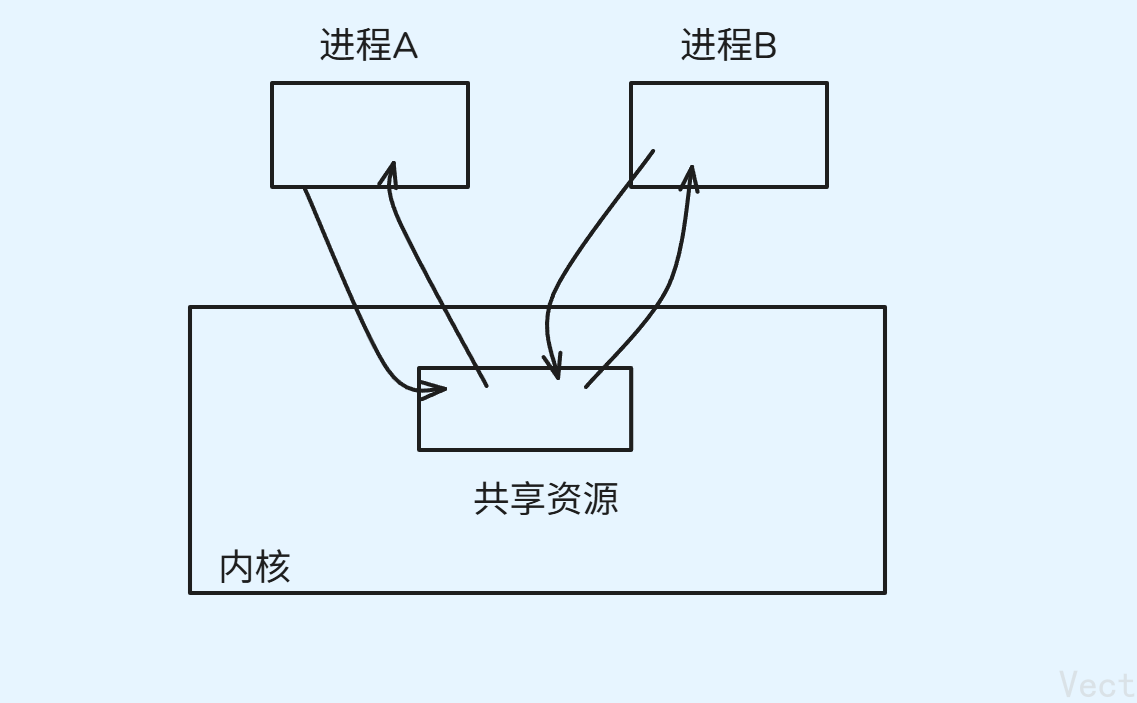
所以,进程间通信的前提是:让不同的进程看到同一份资源 ,核心是:通过内核提供的共享资源或中间介质,实现进程的数据传输、资源共享、事件通知及进程控制
2. 管道(pipe):最古老的IPC方式
底层原理
管道是内核中的缓冲区,把一个进程连接到另一个进程的一个数据流称为一个管道
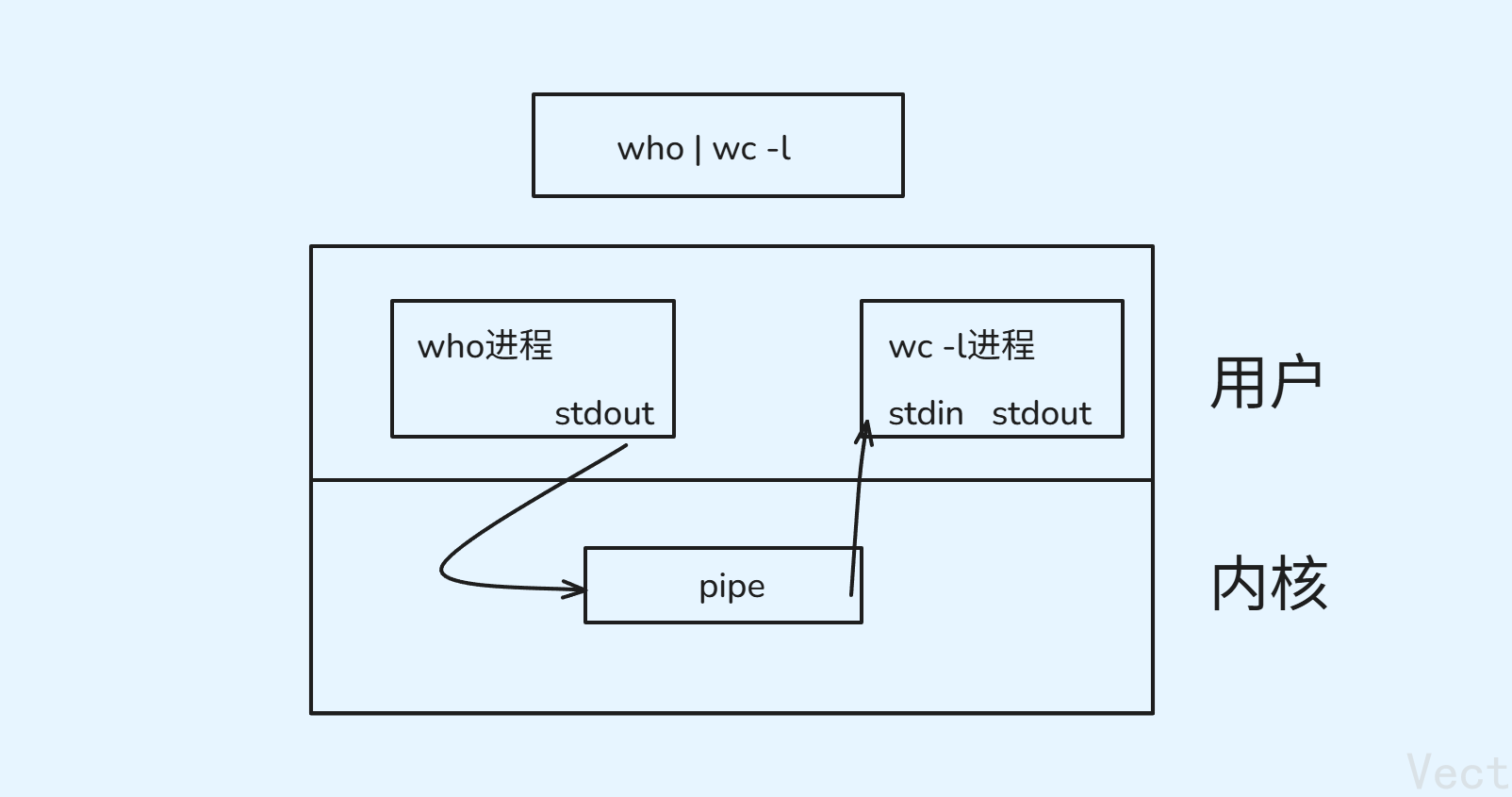
如上图,who和wc -l两个不同的指令就是两个不同进程,两个进程通过|管道连接数据流
管道分为:
匿名管道: 通过
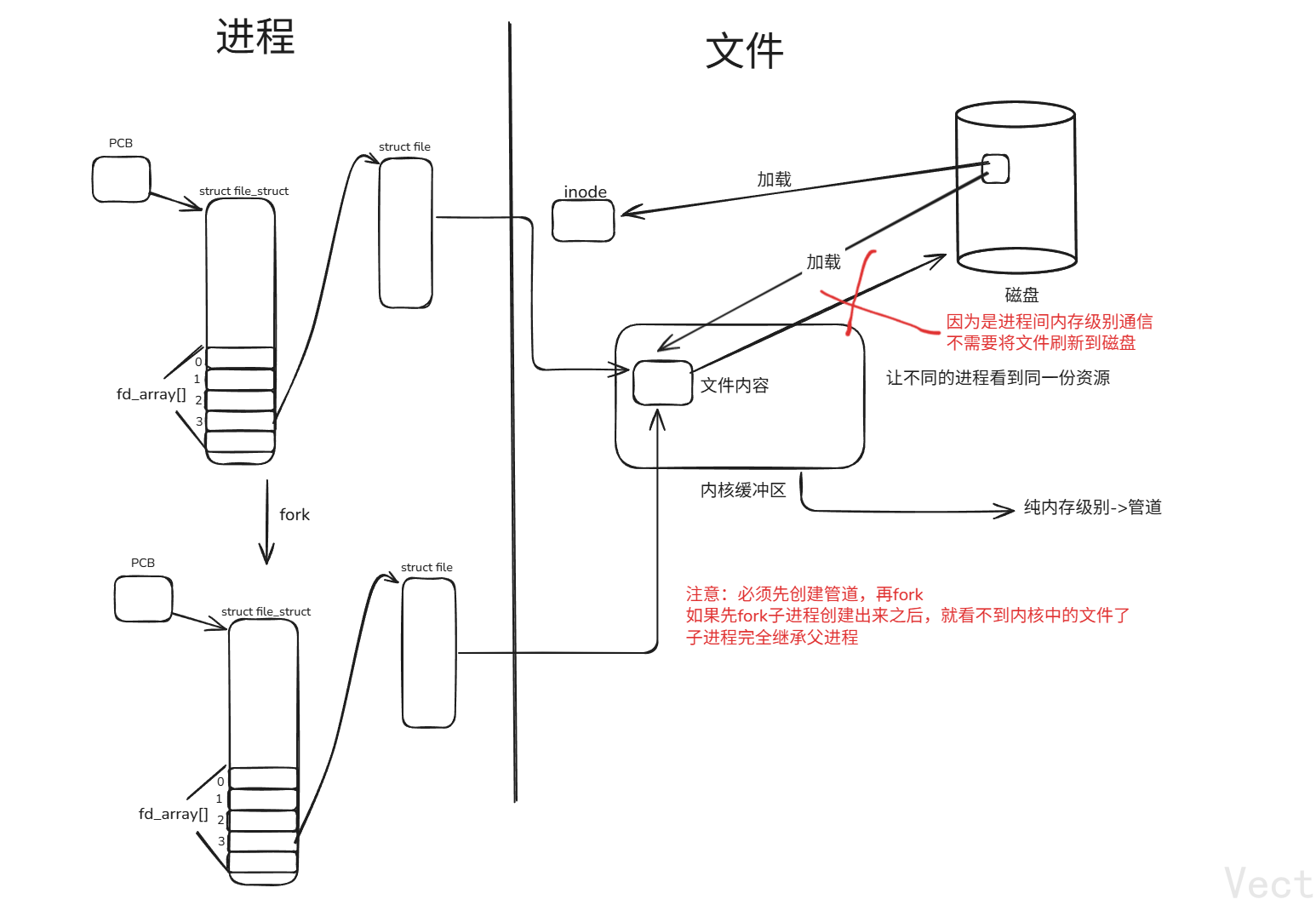
pipe()创建,只能在**有亲缘关系的进程(父子,兄弟)**之间通信,因为管道的文件描述符只能通过fork()继承
fork()后,父子进程各自持有一份fd_array数组,指向同一个内核管道和缓冲区**命名管道:**通过
mkfifo()创建,可在无亲缘关系的进程间通信,进程通过open()打开文件获取文件描述符
匿名管道
匿名管道没有路径,没有名字,所以得名
核心函数
cpp
#include <unistd.h>
// 创建匿名管道 输出两个文件描述符
int pipe(int fd[2]);
// 返回值: 0成功 -1失败fd[0]:读端,仅支持read
fd[1]:写端,仅支持write
父子进程匿名管道通信
cpp
#include <iostream>
#include <sys/wait.h>
#include <sys/types.h>
#include <unistd.h>
#include <string>
#include <cstring>

// 父进程 读端
// 子进程 写端
int main(){
    // 1. 创建匿名管道
    int fds[2] = {0};
    int ret = pipe(fds);
    if (ret == -1)
    {
        std::cerr << "pipe err\n";
        return 1;
    }


    // 2. 创建子进程
    pid_t pid = fork();
    if (pid < 0){
        std::cerr << "fork err\n";
        return 2;
    }else if(pid == 0){
        // 子进程写入

        // 先关闭读端
        ::close(fds[0]);

        std::string msg = "hello\n";
        int cnt = 5;
        int total = 0;
        while(cnt--){
            // write 返回值是写入字节流的大小
            total += ::write(fds[1], msg.c_str(), msg.size());
            std::cout << "child: total written bytes: " << total << std::endl;
            sleep(1);
        }
        std::cout << "child: write 10 times, quit now\n";

        // 关闭写端
        ::close(fds[1]);
        exit(0);
    }else{
        // 父进程读取
        ::close(fds[1]);

        char buffer[1024] = {0};
        while(1){
            // 留一字节给\0
            ssize_t n = ::read(fds[0], buffer, sizeof(buffer) - 1);

            if(n > 0){
                buffer[n] = '\0';
                std::cout << "father: read from child msg: " << buffer << std::endl;
            }else if(n == 0){
                std::cout << "father: child quit, me too\n";
                ::close(fds[0]);
                break;
            }else{
                std::cerr << "father: read pipe err\n";
                ::close(fds[0]);
                break;
            }
        }

        // 回收子进程
        int status = 0;
        pid_t rid = waitpid(pid, &status, 0);
        if(rid == -1){
            std::cerr << "wait err\n";
            return 3;
        }else{
            std::cout << "father: wait child success, "
                      << "child pid: " << getpid()
                      << " exit code: " << ((status << 8) & 0xFF)
                      << " exit signal: " << (status & 0x7F) << std::endl;
        }
    }

    return 0;
}
注意点:
- **必须在fork()前创建管道:**否则子进程无法继承管道文件描述符,通信失败
- 为什么必须关闭无用的文件描述符?
- 避免文件描述符泄漏:系统分配的文件描述符数量有限,不用的不关闭会耗尽资源
- 确保读端
read返回0:只有所有写端都被关闭 ,读端读完管道数据之后,read才会返回0read的阻塞特性: 管道为空&&写端未关闭,read会阻塞,指导有数据写入或读端关闭
流程:创建管道->创建子进程->子进程写入->父进程读取->回收子进程
进程池
设计目标
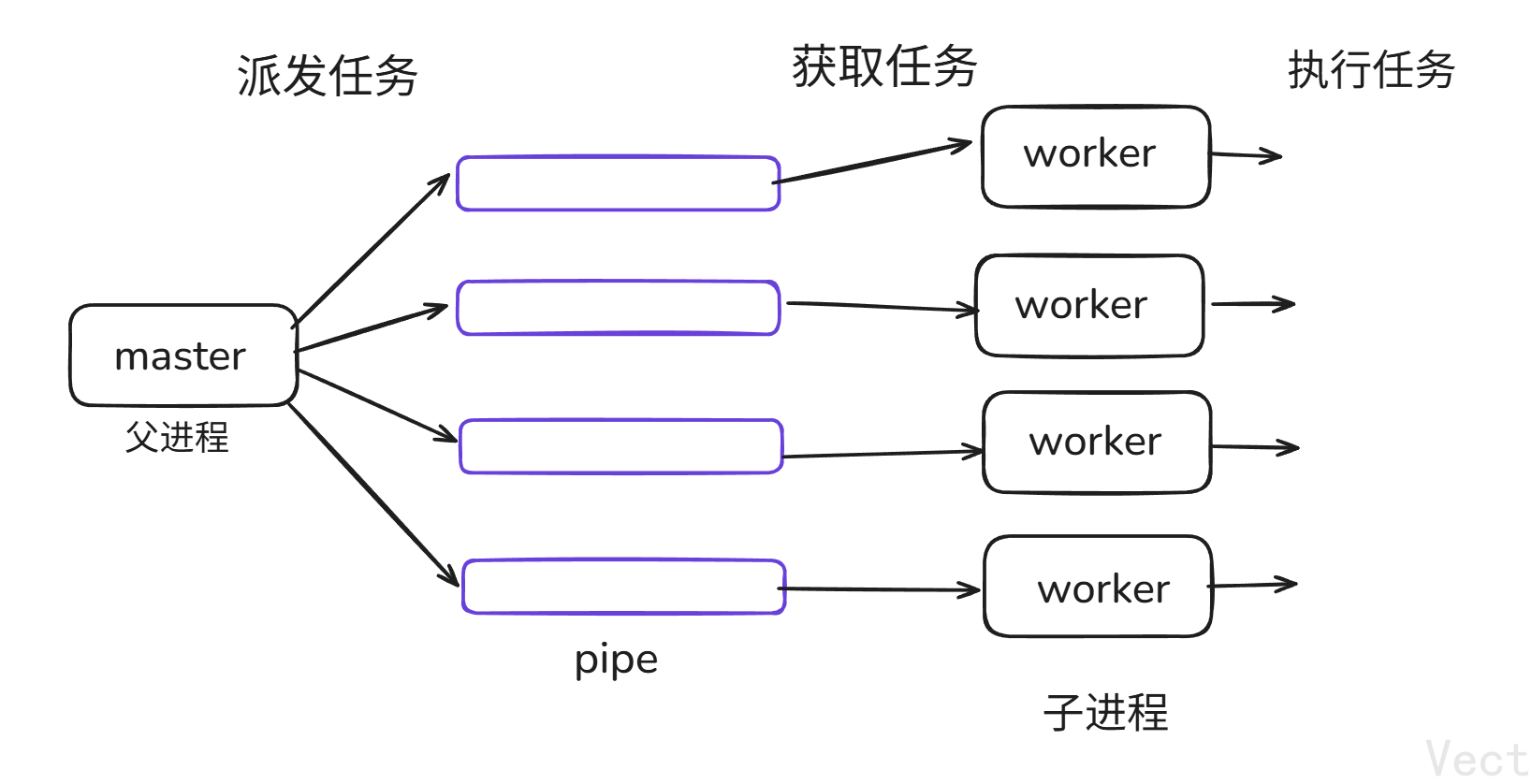
创建N个子进程作为工作进程,父进程(master)通过匿名管道想子进程派发任务,子进程(worker)读取任务并执行,实现任务并发处理
核心组件关系
| 组件 | 核心作用 |
|---|---|
ProcessPool |
进程池核心类,管理子进程、管道(Channel)、任务派发 / 进程回收逻辑 |
Channel |
封装管道写端 fd + 子进程 PID,提供任务发送、fd 关闭等接口 |
TaskManger |
任务管理,提供任务生成、选择、执行逻辑 |
Worker |
子进程的工作函数,从管道读端读取任务编号并执行对应任务 |
#### 完整代码
cpp
// Channel.hpp
#pragma once

#include <iostream>
#include <string>
#include <unistd.h>

class Channel{
public:
    // 构造 建立信道
    Channel(int wfd, pid_t who)
        :_wfd(wfd)
        ,_who(who)
        {
            // Channel-fdwho
            _name = "Channel-" + std::to_string(wfd) + "-" + std::to_string(who);
        }

        int getWfd() const { return _wfd; }
        pid_t getWho() const { return _who; }
        std::string getName() const { return _name; }

        // 发送指令->写入管道 父进程调用
        void Send(int cmd) { ::write(_wfd, &cmd, sizeof(cmd)); }
        // 关闭管道
        void Close() { ::close(_wfd); }

private:
    int _wfd;           // 写端文件描述符
    pid_t _who;          // 绑定的子进程
    std::string _name;  // 指令名称
};

// Taks.hpp
#pragma once

#include <iostream>
#include <vector>
#include <ctime>
#include <functional>
#include <unistd.h>
#include <sys/types.h>
#include <sys/wait.h>


using task_t = std::function<void()>;

class TaskManager{
public:
    TaskManager(){
        srand(time(nullptr));
        // [](){}
        tasks.push_back([](){
            std::cout << "process " << getpid() << " task1\n";
        });
        tasks.push_back([](){
            std::cout << "process " << getpid() << " task2\n";
        });
        tasks.push_back([](){
            std::cout << "process " << getpid() << " task3\n";
        });
    }

    // 选择任务
    int SelectTask() { return rand() % tasks.size(); }
    void Excute(unsigned int number) { tasks[number](); }
private:
    std::vector<task_t> tasks;      // 任务列表
};

TaskManager tm;

void Worker(){
    int cmd = 0;
    while(1){
        ssize_t n = ::read(0, &cmd, sizeof(cmd));
        if(n == sizeof(cmd)) tm.Excute(cmd);
        else if(n == 0){
            std::cout << "child: " << getpid() << " quit...\n";
            break;
        }else{
            std::cerr << "read err" << std::endl;
            break;
        }
    }
}

// ProcessPool.hpp
#pragma once

#include "Task.hpp"
#include "Channel.hpp"

#include <iostream>
#include <string>
#include <sys/wait.h>
#include <unistd.h>
#include <sys/types.h>

enum STATUS{
    OK = 0,
    USAGEERR,
    PIPEERR,
    FORKERR
};

using work_t = std::function<void()>;

class ProcessPool{
private:
    int _processNum;
    std::vector<Channel> _channel;
    work_t _work;
public:

    ProcessPool(int processNum, work_t work)
        :_processNum(processNum)
        ,_work(work)
        {}

    // 1. 初始化进程池
    int ProcessInit(){
        // 创建指定个数子进程
        for(int i = 0; i < _processNum; i++){
            // 创建管道
            int fds[2] = { 0 };
            int pipeRet = pipe(fds);
            if(pipeRet < 0){
                std::cerr << "pipe err \n";
                return PIPEERR;
            }

            // 创建子进程
            pid_t pid = fork();
            if(pid < 0){
                std::cerr << " fork err \n";
                return FORKERR;
            }
            // 建立通信信道
            else if(pid == 0){
                // 子进程 执行任务
                // 关闭历史wfd
                std::cout << getpid() << ", child close history fd: ";
                for(auto& c : _channel){
                    std::cout << c.getWfd() << " ";
                    c.Close();
                }
                std::cout << "over\n";

                // 子进程读取指令 关闭写端
                ::close(fds[1]);

                std::cout << "debug: " << fds[0] << std::endl;
                dup2(fds[0], 0);            // 命令行重定向到管道读端
                _work();                    // 执行命令
                ::exit(0);
            }else{
                //  父进程
                ::close(fds[0]);
                _channel.emplace_back(fds[1], pid);
            }
        }
        return OK;
    }

    // 2. 派发任务
    void DispatchTask(){
        int who = 0;
        int num = 10;
        while(num--){
            // 选择一个任务
            int task = tm.SelectTask();
            // 选择一个子进程
            Channel& cur = _channel[who++];
            who %= _channel.size();

            std::cout << "&&&&&&&&&&&&&&&&&&&&&&&&&&&&&&&&&&&&\n";
            std::cout << "send " << task << " to " << cur.getName()
                      << " , 剩余任务数: " << num << std::endl;

            // 派发任务
            cur.Send(task);
            sleep(1);
        }
    }

    // 3. 清理进程池
    void CleanProcessPool(){
        for(auto& c : _channel){
            c.Close();
            pid_t waitRet = waitpid(c.getWho(), nullptr, 0);
            if(waitRet > 0){
                std::cout << "child " << waitRet << " wait success...\n";
            }
        }
    }

};

// main.cc
#include "Task.hpp"
#include "ProcessPool.hpp"

void Usager(std::string proc){
    std::cout << "Usage: " << proc << " process-num\n";
}

int main(int argc, char* argv[]){
    if(2 != argc){
        Usager(argv[0]);
        return USAGEERR;
    }

    int num = std::atoi(argv[1]);
    ProcessPool* pp = new ProcessPool(num, Worker);

    pp->ProcessInit();
    pp->DispatchTask();
    pp->CleanProcessPool();

    delete pp;
    pp = nullptr;
    return 0;

}
Makefile
makefile
BIN=processpool
CC=g++
FLAGS=-c -Wall -std=c++11
LDFLAGS=-o
SRC=$(wildcard *.cc)
OBJ=$(SRC:.cc=.o)

$(BIN):$(OBJ)
	$(CC) $(LDFLAGS) $@ $^
%.o:%.cc
	$(CC) $(FLAGS) $<

.PHONY:clean
clean:
	rm -f $(BIN) $(OBJ)

.PHONY:test
test:
	@echo $(SRC)
	@echo $(OBJ)
注意点:子进程和管道创建问题
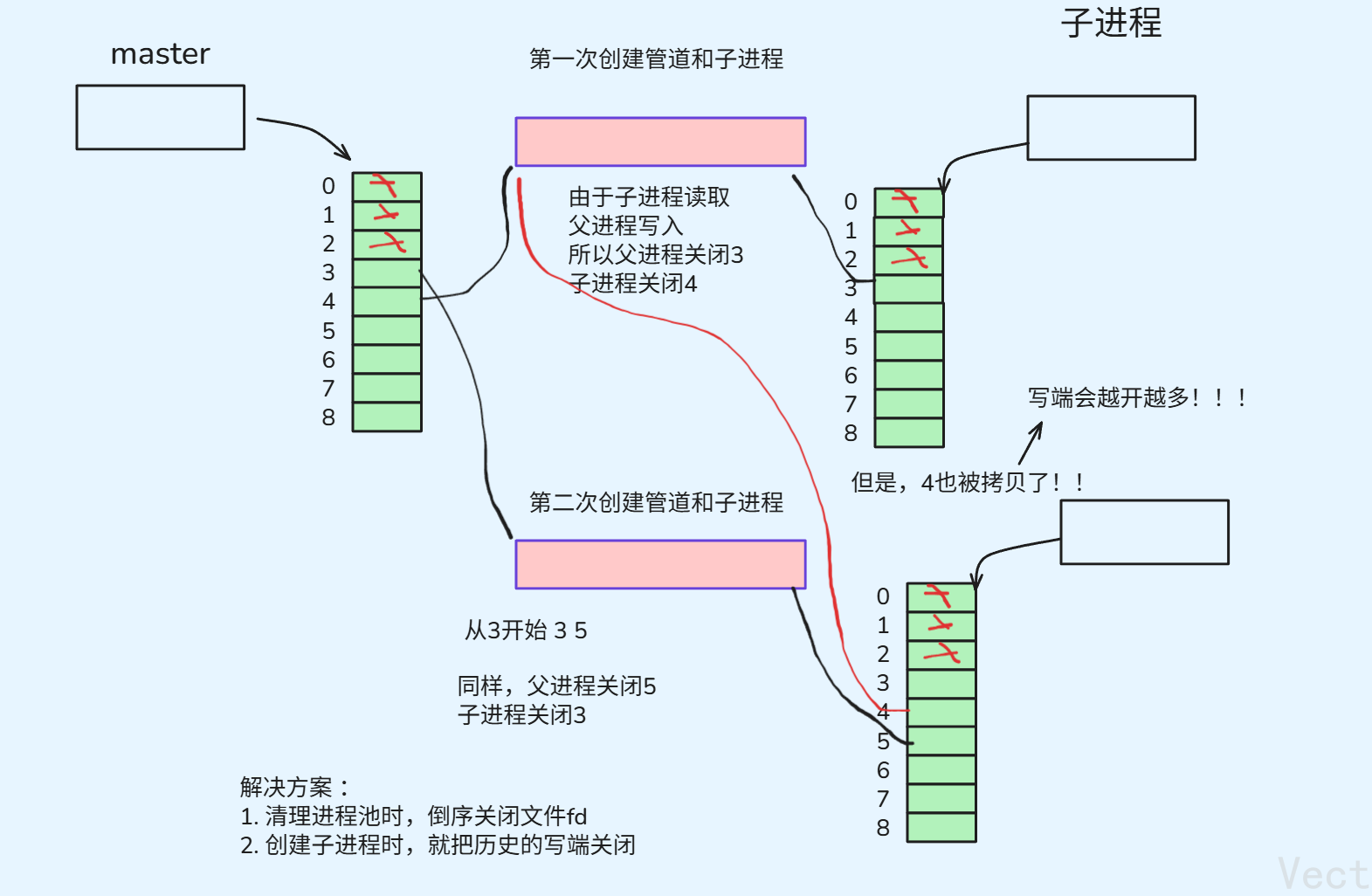
所以,创建子进程时,设计为关闭了历史写端
cpp
if(pid == 0){
    // 子进程 执行任务
    // 关闭历史wfd
    std::cout << getpid() << ", child close history fd: ";
    for(auto& c : _channel){
        std::cout << c.getWfd() << " ";
        c.Close();
    }
    std::cout << "over\n";
匿名管道四大现象
管道为空&&写端正常,read阻塞
写端正常,且管道为空时,read()会进入阻塞状态,直到有数据写入或者写端被关闭(此时read返回0)
cpp
#include <unistd.h>
#include <sys/types.h>
#include <sys/wait.h>
#include <iostream>
#include <string.h>

int main(){
    // 1. 创建管道
    int fds[2] = { 0 };
    int ret = pipe(fds);
    if(ret == -1){
        std::cerr << "pipe err\n";
        return 1;
    }

    // 2. 创建子进程
    pid_t pid = fork();
    if(pid == -1){
        std::cerr << "fork err\n";
        return 2;
    }else if(pid == 0){
        // 子进程 保留写端但不写入数据
        ::close(fds[0]);
        std::cout << "child working, atfter 10s begins to write...\n ";
        sleep(10);

        std::string msg = "hello(after 10s)\n";
        ::write(fds[1], msg.c_str(), msg.size());
        std::cout << "child had written msg\n";

        ::close(fds[1]);
        exit(0);
    }else{
        // 父进程读取空管道
        ::close(fds[1]);

        char buffer[1024] = { 0 };
        std::cout << "father: reading pipe(pipe is empty)...\n";

        // 管道为空&&写端未关闭 read阻塞
        ssize_t n = ::read(fds[0], buffer, sizeof(buffer) - 1);

        if(n > 0){
            buffer[n] = '\0';
            std::cout << "father: read msg :" << buffer;
        }
        ::close(fds[0]);
        waitpid(pid, nullptr, 0);
        exit(0);
    }
    return 0;
}管道为满&&读端正常,write阻塞
读端正常,且管道被写满(Ubuntu默认64KB)时,write会进入阻塞状态,直到读端读取数据释放管道空间或者读端被关闭(OS发送SIGPIPE信号终止进程)
cpp
#include <unistd.h>
#include <sys/types.h>
#include <iostream>

int main() {
    int fds[2];
    pipe(fds);
    pid_t pid = fork();

    if (pid == 0) { // 子进程:持续写入,直到管道满(阻塞)
        close(fds[0]);
        char buf[1024] = {0};
        long long total = 0;
        std::cout << "开始写入,直到管道满(阻塞)...\n";
        while (1) {
            write(fds[1], buf, 1024); // 每次写1KB
            total += 1024;
            if (total % 16384 == 0) { // 每16KB打印一次,看进度
                std::cout << "已写:" << total/1024 << "KB\n";
            }
        }
        close(fds[1]);
    } else { // 父进程:不读取,让管道满,3秒后再读取
        close(fds[1]);
        sleep(10); // 10秒内不读取,子进程写满管道后阻塞
        char tmp[65536] = {0};
        read(fds[0], tmp, 65536); // 读取64KB,释放缓冲区
        std::cout << "父进程读取数据,子进程可继续写入\n";
        close(fds[0]);
    }
    return 0;
}
写端关闭&&读端正常,读端读到0,表示读到文件结尾
read()系统调用中,「返回 0」是内核定义的字节流结束标识(EOF,End of File),专门用于告知调用者 "当前字节流已无更多数据,且后续也不会有新数据"
cpp
#include <unistd.h>
#include <sys/types.h>
#include <iostream>

int main() {
    int fds[2];
    pipe(fds);
    pid_t pid = fork();

    if (pid == 0) { // 子进程:写入少量数据后,关闭写端
        close(fds[0]);
        write(fds[1], "hello", 5);
        close(fds[1]); // 核心:关闭写端
        exit(0);
    } else { // 父进程:循环读取,直到返回0
        close(fds[1]);
        char buf[10];
        ssize_t n;
        while (1) {
            n = read(fds[0], buf, sizeof(buf));
            std::cout << "读取返回值:" << n << "\n"; // 先返回5,再返回0
            if (n == 0) break; // 读到0(EOF),退出循环
        }
        close(fds[0]);
    }
    return 0;
}
写端正常&&读端关闭,OS杀掉写入进程
内核的保护机制,避免无意义的写入导致内核zi'yuan
cpp
#include <unistd.h>
#include <sys/types.h>
#include <sys/wait.h>
#include <iostream>

int main() {
    int fds[2];
    pipe(fds);
    pid_t pid = fork();

    if (pid == 0) { // 子进程:持续写入(读端已被父进程关闭)
        close(fds[0]);
        char buf[10] = {0};
        std::cout << "子进程尝试写入...\n";
        while (1) {
            write(fds[1], buf, 10); // 核心:读端已关,写入触发SIGPIPE
        }
    } else { // 父进程:立即关闭读端,不读取
        close(fds[0]); // 核心:关闭读端,让管道异常
        close(fds[1]);
        int status;
        waitpid(pid, &status, 0); // 回收子进程,查看终止信号
        std::cout << "子进程终止信号:" << (status & 0x7F) << "\n"; // SIGPIPE=13
    }
    return 0;
}
匿名管道五大特性
- **面向字节流:**管道数据传输以字节为最小单位
- 仅允许亲缘进程通信: 只能父子间或兄弟间,祖孙间通信,通信的前提是继承管道的文件描述符
- **生命周期随进程:**管道没有文件名和
inode节点,是内核创建的临时缓冲器- 单向通信
- 自带内核级同步和互斥保护机制
命名管道
创建一个命名管道
命名管道是一个真正存在的文件,有自己的路径和文件名,具有唯一性
可以在命令行上创建
mkfifo filename
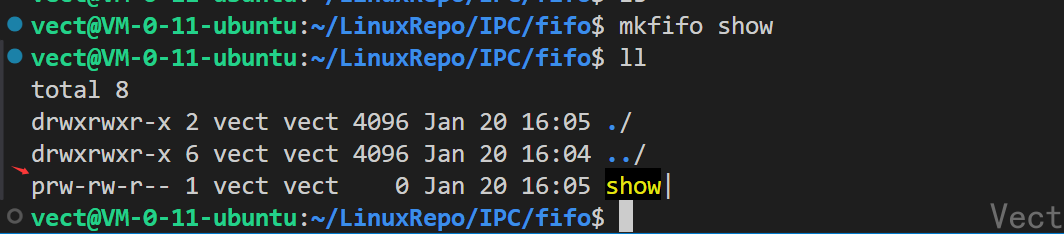
"p"代表的文件类型就是命名管道
可以使用函数创建
cpp
#include <sys/types.h>
#include <sys/stat.h>
// 返回值:成功返回0 失败返回-1
// 参数1:文件路径
// 参数2: 文件权限
int mkfifo(const char *pathname, mode_t mode);

// 删除命名管道
#include <unistd.h>

int unlink(const char* pathname);
所以,对于命名管道的操作就是对文件的操作
用命名管道实现server&client通信
思路:客户端->服务端单向通信:客户端输入小心并发送,服务端接收消息并打印,以下是结构:
| 文件 | 功能 |
|---|---|
Comm.hpp |
定义公共常量(路径、权限、缓冲区大小等)+ 工具函数(打开 / 关闭管道) |
Server.hpp/.cc |
服务端逻辑:创建管道、打开读端、循环接收消息、退出时销毁管道 |
Client.hpp/.cc |
客户端逻辑:打开写端、循环读取用户输入、发送消息到管道 |
Makefile |
编译脚本 |
-
公共模块,抽离复用逻辑
cpp// 核心常量:定义管道的唯一标识、权限、打开模式 const std::string gpipeFile = "./fifo"; const mode_t gmode = 0600; const int gForRead = O_RDONLY; const int gForWrite = O_WRONLY; // 工具函数:封装open/close,避免重复代码 int OpenPipe(int flag) { int fd = ::open(gpipeFile.c_str(), flag); if (fd < 0) std::cerr << "open error" << std::endl; return fd; } void ClosePipeHelper(int fd) { if (fd >= 0) ::close(fd); } -
服务端:读端
创建管道->阻塞打开读端->循环读取消息->检测写端退出->销毁管道
管道的创建:
cppclass Init { public: Init() { umask(0); if (::mkfifo(gpipeFile.c_str(), gmode) < 0) // 创建FIFO std::cerr << "mkfifo error" << std::endl; } ~Init() { if (::unlink(gpipeFile.c_str()) < 0) // 销毁FIFO std::cerr << "unlink error" << std::endl; } }; Init init; // 全局对象:启动创建,退出销毁读端逻辑:
cppclass Server { private: int _fd; // 管道文件描述符 public: bool OpenPipeForRead() { _fd = OpenPipe(gForRead); // 阻塞打开读端(无写端则卡在此处) return _fd >= 0; } int RecvPipe(std::string *out) { // 读取管道数据 char buffer[gsize]; ssize_t n = ::read(_fd, buffer, sizeof(buffer)-1); // 读数据 if (n > 0) { buffer[n] = 0; // 字符串结束符 *out = buffer; } return n; // n=0:写端关闭;n<0:读错误;n>0:读取字节数 } }; // main函数:循环读消息,检测写端退出 int main() { Server server; server.OpenPipeForRead(); // 阻塞等客户端连接 std::string message; while (true) { if (server.RecvPipe(&message) > 0) // 读到消息则打印 std::cout << "client Say# " << message << std::endl; else break; // 写端关闭,退出循环 } server.ClosePipe(); // 关闭管道 return 0; } -
客户端:写端
阻塞打开写端->循环读取用户输入->发送消息到管道
cppclass Client { private: int _fd; public: bool OpenPipeForWrite() { _fd = OpenPipe(gForWrite); // 阻塞打开写端(无读端则卡在此处) return _fd >= 0; } int SendPipe(const std::string &in) { // 写数据到管道 return ::write(_fd, in.c_str(), in.size()); } }; // main函数:循环读取用户输入并发送 int main() { Client client; client.OpenPipeForWrite(); // 阻塞等服务端读端打开 std::string message; while(true) { std::cout << "Please Enter# "; std::getline(std::cin, message); // 读取用户输入 client.SendPipe(message); // 发送到管道 } client.ClosePipe(); return 0; }
命名管道实现了两个无亲缘属性的进程之间的通信
执行之后,可以打开两个终端,实现一个终端写消息,一个终端读消息的操作