1. 文件
- 文件在磁盘上的存储是永久性的
- 对外设的输入和输出操作,简称IO
- 0 KB 的空文件是占用磁盘空间的
- 文件 = 属性(元数据)+ 内容
2. C文件接口
2.1 打开文件并写入
cpp
#include <cstdio>
#include <cstring>

int main()
{
    FILE *fp=fopen("myfile","w");
    if(!fp)
    {
        perror("fopen");
        return 1;
    }

    const char *msg="hello ssp!\n";
    int count=5;
    while(count--)
    {
        fwrite(msg,         //要写的数据
            strlen(msg),    //一条数据的大小
            1,              //要写几条数据
            fp              //文件指针(写到哪里)
        );
    }

    fclose(fp);
    return 0;
}
2.2 读取文件内容
cpp
#include <cstdio>
#include <cstring>

int main()
{
    FILE *fp=fopen("myfile","r");
    if(!fp)
    {
        perror("fopen");
        return 1;
    }

    char buf[1024];

    while(1)
    {
        size_t s=fread(buf, //要写入的位置
            1,              //读取的每个单元的大小
            sizeof(buf)-1,  //一次读取多少单元
            fp              //从什么文件读
        );

        if(s>0)
        {
            buf[s]=0;   //要按字符串方式打印,在末尾加/0
            printf("%s",buf);
        }
        if(feof(fp))    //判断文件是否读取结束
            break;
    }

    fclose(fp);
    return 0;
}
2.3 输入输出流
- C会默认打开三个输入输出流
- stdin --- 标准输入
- stdout --- 标准输出
- stderr --- 标准错误
2.4 文件打开方式
- r --- 读方式;文件不存在报错
- r+ --- 读写方式;文件不存在报错
- w --- 写方式,打开会自动清空文件;文件不存在则创建
- w+ --- 读写方式,打开自动清空文件;文件不存在则创建
- a --- 写方式,追加内容方式打开,不会清空文件,只能写;文件不存在则创建
- a+ --- 读写方式,追加内容方式打开,不会情况文件,又能写又能读;文件不存在则创建
3. 系统文件I/0
- 系统才是打开文件最底层的方案
3.1 写入文件
cpp
#include <cstdio>
#include <cstring>
#include <sys/types.h>
#include <sys/stat.h>
#include <unistd.h>
#include <fcntl.h>

int main()
{
    int fd=open("myfile",O_WRONLY | O_CREAT,0664);
    if(fd<0)
    {
        perror("open");
        return 1;
    }

    int cnt=6;
    const char *msg="hello sp!\n";
    while(cnt--)
    {
        write(fd,msg,strlen(msg));
    }

    close(fd);
    return 0;
}
3.2 读文件
cpp
#include <cstdio>
#include <cstring>
#include <sys/types.h>
#include <sys/stat.h>
#include <unistd.h>
#include <fcntl.h>

int main()
{
    int fd=open("myfile",O_RDONLY);
    if(fd<0)
    {
        perror("open");
        return 1;
    }

    char buf[1024];
    while(1)
    {
        ssize_t s=read(fd,buf,sizeof(buf)-1);
        if(s>0)
        {
            buf[s]=0;
            printf("%s",buf);
        }
        else
            break;
    }

    close(fd);
    return 0;
}
3.3 接口介绍
cpp
#include <sys/types.h>
#include <sys/stat.h>
#include <fcntl.h>

int open(const char *pathname, int flags);
int open(const char *pathname, int flags, mode_t mode);- 参数列表
- pathname:要打开或创建的目标文件
- flags:打开方式,用一个或多个通过"或"运算构成
- O_RDONLY:只读打开
- O_WRONLY:只写打开
- O_RDWR:读、写打开
- O_CREAT:若文件不存在,则创建它;需要搭配使用mode选项,指明新文件的访问权限
- O_APPEND:追加写
- O_TRUNC:打开时清空文件
- 返回值
- 成功:新打开的文件描述符
- 失败:-1
3.4 系统调用和库函数
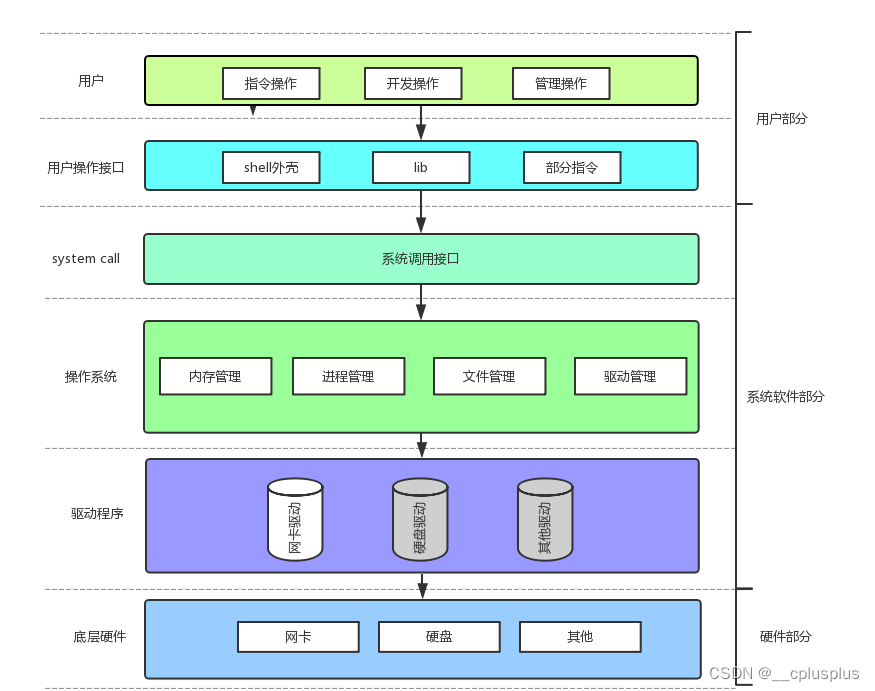
- 上面的fopen,fclose,fread,fwrite是C标准库中的函数,叫做库函数
- open,close,read,write是系统提供的接口,叫做系统调用接口
- 库函数封装了系统调用接口
3.5 文件描述符fd
3.5.1 0,1,2
-
默认情况下,Linux进程会打开三个文件描述符
- 标准输入0,对应的物理设备一般是键盘
- 标准输出1,对应的物理设备一般是显示器
- 标准错误2,对应的物理设备一般是显示器
-
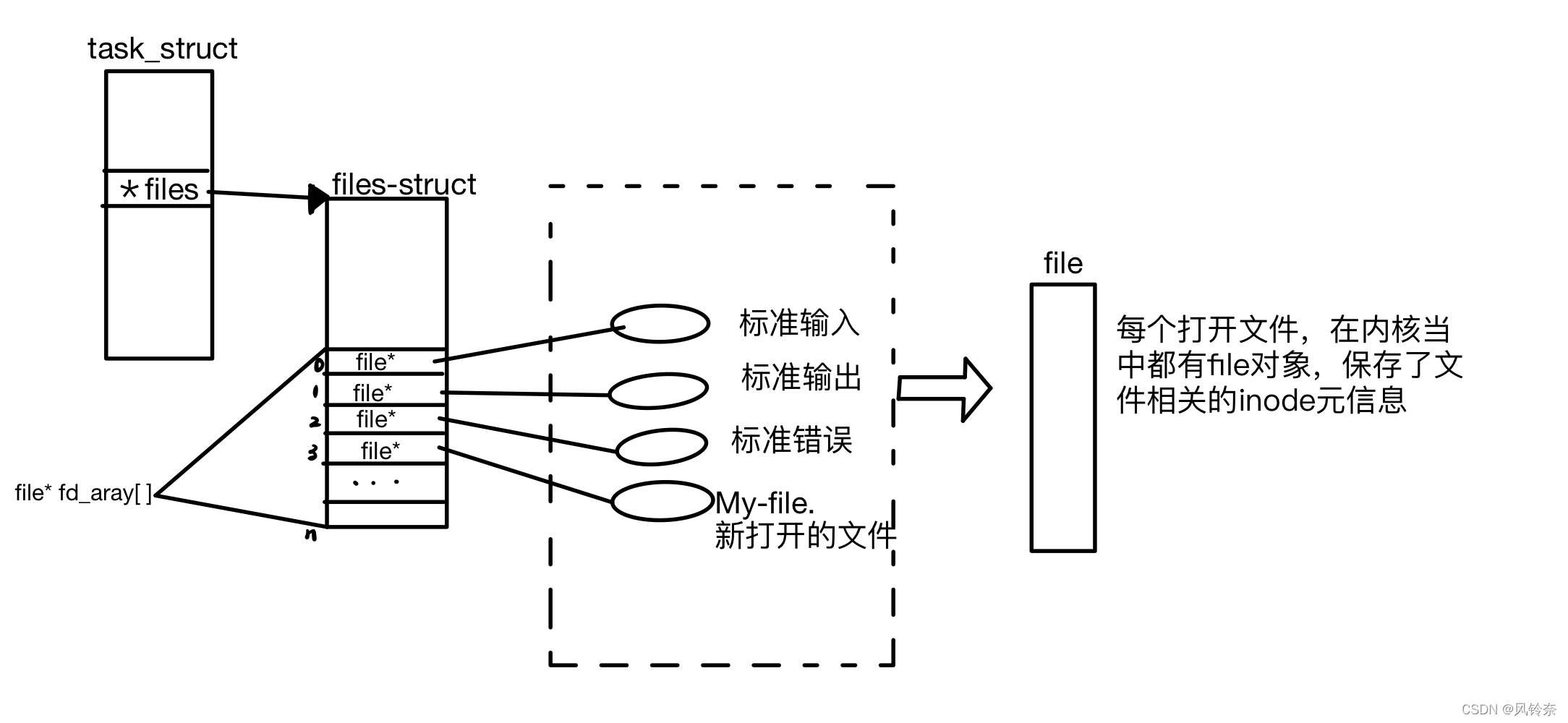
每个进程都有一个 *files 指针,指向一张 files_struct 表,该表最重要的部分就是一个指针数组
- 本质上,文件描述符就是该指针数组的下标
- 只要拿着文件描述符,就能找到对应的文件
3.5.2 文件描述符分配规则
- stdin:0,stdout:1,stderr:2
- 新开的文件文件描述符从3开始递增
- 在 files_struct 数组中,找到当前没有被使用的最小的一个下标,作为新的文件描述符
3.5.3 重定向
cpp
#include <cstdio>
#include <cstdlib>
#include <sys/types.h>
#include <sys/stat.h>
#include <fcntl.h>
#include <unistd.h>

int main()
{
    close(1); // 关闭stdout对应的文件描述符
    int fd = open("myfile", O_WRONLY | O_TRUNC | O_CREAT, 0664);
    if (fd < 0)
    {
        perror("open");
        return 1;
    }
    printf("fd:%d", fd); // fd:1
    fflush(stdout);
    close(fd);
    exit(0);
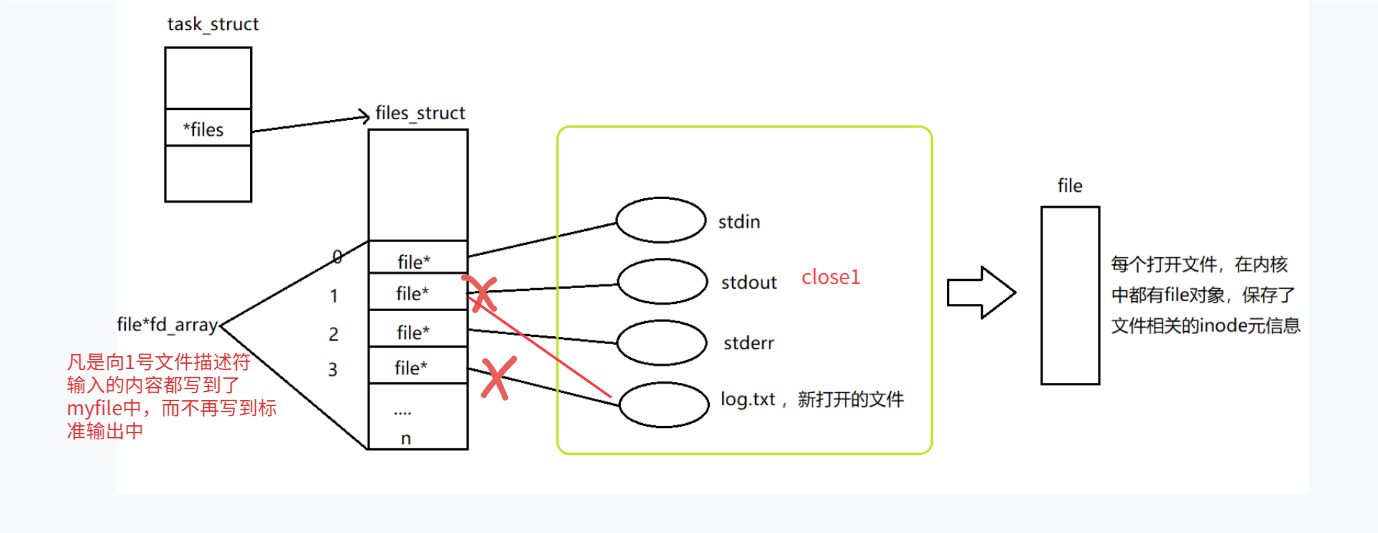
}- 本该输出到显示器上的内容,输出到了文件 myfile 中,而且 fd=1,这叫输出重定向
- 常见重定向
*:输出重定向,会删除原来的内容
-
:追加重定向,不删除原来内容
- <:输入重定向
-
3.5.4 使用 dup2 系统调用
cpp
#include <unistd.h>

int dup2(int oldfd, int newfd)- 功能:用 newfd 替换 oldfd
- 参数:
- oldfd:旧的文件描述符
- newfd:新的文件描述符
- 返回值
- 成功,返回新的文件描述符
- 失败,返回-1
cpp
#include <cstdio>
#include <unistd.h>
#include <fcntl.h>

int main()
{
    int fd=open("myfile",O_WRONLY | O_CREAT,0664);
    if(fd<0)
    {
        perror("open");
        return 1;
    }
    dup2(fd,1); //让原本应该打印到显示器的内容输入到 myfile 中
    while(1)
    {
        char buf[1024]={0};
        ssize_t read_size=read(0,buf,sizeof(buf)-1);
        //从显示器读取内容
        if(read_size<0)
        {
            perror("read");
            break;
        }
        printf("%s",buf);
        fflush(stdout);
    }
    return 0;
}
4. 重新理解"一切皆文件"
- 开发者仅需要使用一套 API 和开发工具,即可调取 Linux 系统中绝大部分的资源
5. 缓冲区
5.1 什么是缓冲区
- 缓冲区是内存空间的一部分
- 在内存空间中预留了一定的存储空间,用来缓冲输入和输出的数据,这部分预留的空间就是缓冲区
- 可分为输入缓冲区和输出缓冲区
5.2 为什么引入缓冲区
- 系统调用是有成本的,频繁调用会降低效率,所以C语言提供了对应的缓冲区,printf等就是把数据拼接到缓冲区中,未来一次刷新就可以了
- 减少磁盘的读写次数,再加上计算机对缓冲区的操作大大快于对磁盘的操作,故应用缓冲区可以大大提高计算机的运行速度
5.3 缓冲类型
- 标准I/O提供了三种类型的缓冲区
- 全缓冲区
- 满了刷新,效率最高,普通文件采用这种刷新方式
- 行缓冲区(行刷新)
- 遇到换行符时,标准I/O库函数将会执行系统调用操作,显示器用这这种缓冲区
- 无缓冲区(立即刷新)
- 标准I/O库不对字符进行缓冲,直接调用系统调用,如标准错误流stderr
- 全缓冲区
- 引发缓冲区刷新的其他情况
- 缓冲区满时
- 执行flush语句,把C标准缓冲区里的数据,强制刷新到内核,如 fflush(stdout);
- 进程结束
- 使用库函数调用 close 时,有数据还在C语言缓冲区里,必须强制刷新到文件内核缓冲区之后再close,否则不会写入到文件中
cpp
	printf("hello world: %d\n", fd);
    fflush(stdout);
    close(fd);
    //你的代码
    //    ↓
    //【C 标准缓冲区】(库函数自带,在用户态)
        ↓
    //【内核缓冲区】(系统调用管理)
        ↓
     //磁盘文件
5.4 FILE
- 本质上,访问文件都是通过 fd 访问的
- C语言库中的 FILE 结构体内部,必定封装了 fd
cpp
#include <cstdio>
#include <cstring>
#include <unistd.h>
#include <fcntl.h>

int main()
{
    const char *msg0 = "hello printf\n";
    const char *msg1 = "hello fwrite\n";
    const char *msg2 = "hello write\n";
    printf("%s", msg0);
    fwrite(msg1, strlen(msg0), 1, stdout);
    write(1, msg2, strlen(msg2));
    fork();
    return 0;
}-
直接运行结果和输出重定向不同
//直接运行
hello printf
hello fwrite
hello write//输出重定向./a.out > myfile
hello write
hello printf
hello fwrite
hello printf
hello fwrite -
⼀般C库函数写入文件是全缓冲的,而写入显示器是行缓冲的
-
原因
- 直接运行是在显示器写入,是行刷新
- 向文件写入是全缓冲
- 重定向改变了文件的写入方式
- 我们放在缓冲区中的数据不会立即刷新,但是fork之后,父子数据发生写时拷贝,父进程准备刷新的时候,子进程有了同样的一份数据,随机产生了两份数据
- write 没有变化,说明没有所谓的缓冲
-
printf,fwrite库函数自带缓冲区,而 write 系统调用没有带缓冲区