Flutter实战:打造手写签名板应用
前言
手写签名板是一款实用的工具应用,广泛应用于电子合同、快递签收、会议签到等场景。本文将带你从零开始,使用Flutter开发一个功能完整的手写签名板应用,支持签名保存、导出图片、多种笔触设置等功能。
应用特色
- ✍️ 流畅书写:基于CustomPainter的流畅绘制
- 🎨 笔触设置:8种颜色、粗细可调(1-10)
- 🌈 背景颜色:6种预设背景颜色
- 💾 签名保存:本地保存多个签名
- 📤 导出分享:导出PNG图片并分享
- ↩️ 撤销功能:支持撤销上一笔
- 🗑️ 清空画布:一键清空重新签名
- 📁 签名管理:查看、加载、删除已保存的签名
- 🖼️ 缩略图预览:签名列表显示缩略图
- 💫 压感支持:根据压力调整笔触粗细
效果展示
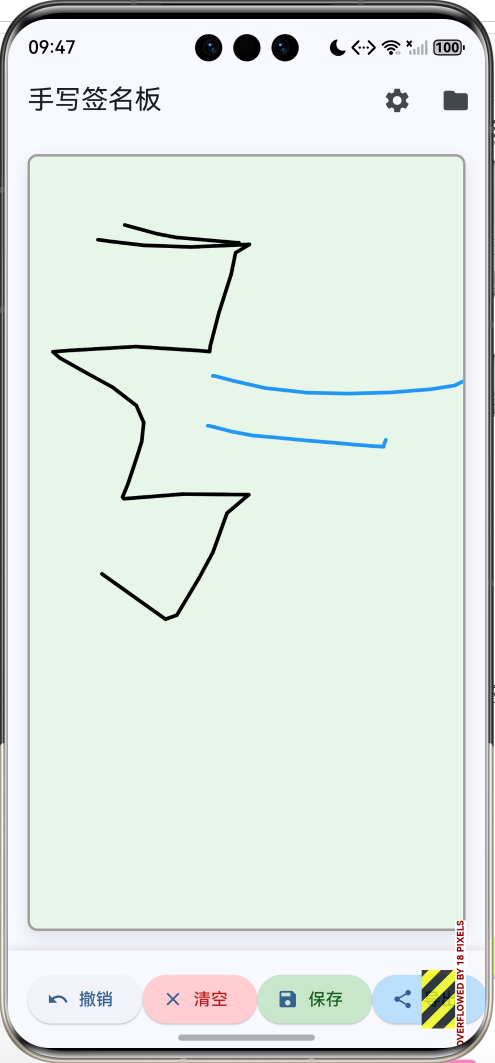
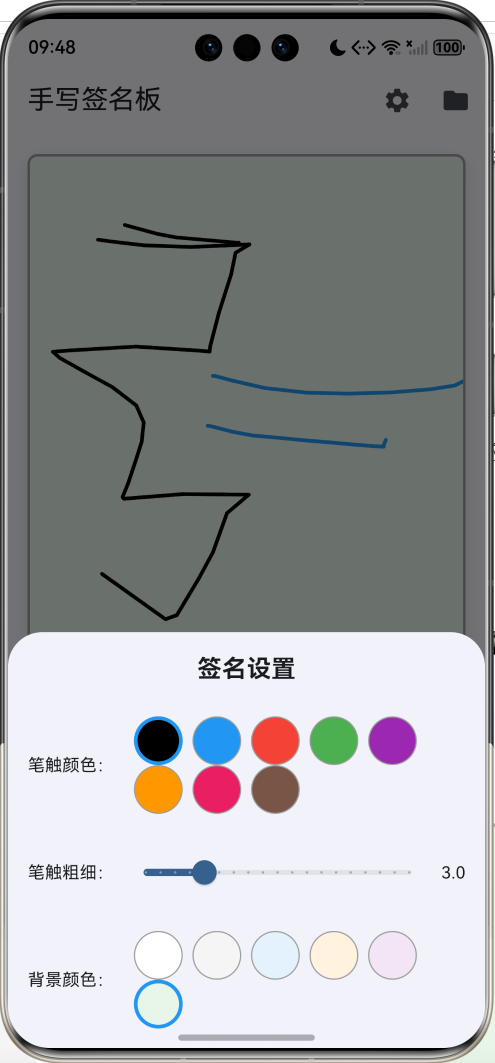
手写签名板
绘制功能
流畅书写
实时渲染
路径记录
压感支持
笔触设置
8种颜色
粗细调节
圆润笔触
平滑连接
背景设置
6种颜色
纯色背景
实时切换
签名管理
保存签名
命名管理
加载签名
删除签名
导出功能
PNG格式
高清导出
分享功能
数据模型设计
1. 签名点
dart
class SignaturePoint {
  final Offset offset;
  final double pressure;

  SignaturePoint(this.offset, this.pressure);

  Map<String, dynamic> toJson() => {
        'x': offset.dx,
        'y': offset.dy,
        'pressure': pressure,
      };

  factory SignaturePoint.fromJson(Map<String, dynamic> json) {
    return SignaturePoint(
      Offset(json['x'], json['y']),
      json['pressure'] ?? 1.0,
    );
  }
}
2. 签名路径
dart
class SignaturePath {
  final List<SignaturePoint> points;
  final Color color;
  final double strokeWidth;

  SignaturePath({
    required this.points,
    required this.color,
    required this.strokeWidth,
  });

  Map<String, dynamic> toJson() => {
        'points': points.map((p) => p.toJson()).toList(),
        'color': color.value,
        'strokeWidth': strokeWidth,
      };

  factory SignaturePath.fromJson(Map<String, dynamic> json) {
    return SignaturePath(
      points: (json['points'] as List)
          .map((p) => SignaturePoint.fromJson(p))
          .toList(),
      color: Color(json['color']),
      strokeWidth: json['strokeWidth'],
    );
  }
}
3. 签名数据
dart
class SignatureData {
  final String id;
  final String name;
  final DateTime timestamp;
  final List<SignaturePath> paths;

  SignatureData({
    required this.id,
    required this.name,
    required this.timestamp,
    required this.paths,
  });

  Map<String, dynamic> toJson() => {
        'id': id,
        'name': name,
        'timestamp': timestamp.toIso8601String(),
        'paths': paths.map((p) => p.toJson()).toList(),
      };

  factory SignatureData.fromJson(Map<String, dynamic> json) {
    return SignatureData(
      id: json['id'],
      name: json['name'],
      timestamp: DateTime.parse(json['timestamp']),
      paths: (json['paths'] as List)
          .map((p) => SignaturePath.fromJson(p))
          .toList(),
    );
  }
}
核心功能实现
1. 手势捕获
使用GestureDetector捕获手指移动:
dart
GestureDetector(
  onPanStart: _onPanStart,
  onPanUpdate: _onPanUpdate,
  onPanEnd: _onPanEnd,
  child: CustomPaint(
    painter: SignaturePainter(
      paths: _paths,
      currentPoints: _currentPoints,
      currentColor: _currentColor,
      currentStrokeWidth: _currentStrokeWidth,
    ),
    size: Size.infinite,
  ),
)
2. 路径记录
dart
void _onPanStart(DragStartDetails details) {
  setState(() {
    _currentPoints.clear();
    _currentPoints.add(SignaturePoint(
      details.localPosition,
      1.0,
    ));
  });
}

void _onPanUpdate(DragUpdateDetails details) {
  setState(() {
    _currentPoints.add(SignaturePoint(
      details.localPosition,
      1.0,
    ));
  });
}

void _onPanEnd(DragEndDetails details) {
  if (_currentPoints.isNotEmpty) {
    setState(() {
      _paths.add(SignaturePath(
        points: List.from(_currentPoints),
        color: _currentColor,
        strokeWidth: _currentStrokeWidth,
      ));
      _currentPoints.clear();
    });
  }
}路径记录流程:
onPanStart:开始新路径,清空当前点列表onPanUpdate:持续添加点到当前路径onPanEnd:完成路径,保存到路径列表
3. 自定义绘制
使用CustomPainter绘制签名:
dart
class SignaturePainter extends CustomPainter {
  final List<SignaturePath> paths;
  final List<SignaturePoint> currentPoints;
  final Color currentColor;
  final double currentStrokeWidth;

  SignaturePainter({
    required this.paths,
    required this.currentPoints,
    required this.currentColor,
    required this.currentStrokeWidth,
  });

  @override
  void paint(Canvas canvas, Size size) {
    // 绘制已完成的路径
    for (var path in paths) {
      _drawPath(canvas, path.points, path.color, path.strokeWidth);
    }

    // 绘制当前路径
    if (currentPoints.isNotEmpty) {
      _drawPath(canvas, currentPoints, currentColor, currentStrokeWidth);
    }
  }

  void _drawPath(
    Canvas canvas,
    List<SignaturePoint> points,
    Color color,
    double strokeWidth,
  ) {
    if (points.isEmpty) return;

    final paint = Paint()
      ..color = color
      ..strokeCap = StrokeCap.round
      ..strokeJoin = StrokeJoin.round
      ..style = PaintingStyle.stroke;

    for (int i = 0; i < points.length - 1; i++) {
      final p1 = points[i];
      final p2 = points[i + 1];

      // 根据压力调整笔触粗细
      final width = strokeWidth * p1.pressure;
      paint.strokeWidth = width;

      canvas.drawLine(p1.offset, p2.offset, paint);
    }
  }

  @override
  bool shouldRepaint(SignaturePainter oldDelegate) {
    return oldDelegate.paths != paths ||
        oldDelegate.currentPoints != currentPoints ||
        oldDelegate.currentColor != currentColor ||
        oldDelegate.currentStrokeWidth != currentStrokeWidth;
  }
}绘制要点:
StrokeCap.round:圆润的笔触端点StrokeJoin.round:圆润的笔触连接drawLine:连接相邻点绘制线段- 压感支持:根据pressure调整笔触粗细
4. 签名保存
dart
Future<void> _saveSignature() async {
  if (_paths.isEmpty) {
    ScaffoldMessenger.of(context).showSnackBar(
      const SnackBar(content: Text('请先签名')),
    );
    return;
  }

  final controller = TextEditingController();

  final result = await showDialog<String>(
    context: context,
    builder: (context) => AlertDialog(
      title: const Text('保存签名'),
      content: TextField(
        controller: controller,
        decoration: const InputDecoration(
          labelText: '签名名称',
          hintText: '例如:工作签名',
          border: OutlineInputBorder(),
        ),
        autofocus: true,
      ),
      actions: [
        TextButton(
          onPressed: () => Navigator.pop(context),
          child: const Text('取消'),
        ),
        FilledButton(
          onPressed: () => Navigator.pop(context, controller.text),
          child: const Text('保存'),
        ),
      ],
    ),
  );

  if (result != null && result.isNotEmpty) {
    final signature = SignatureData(
      id: DateTime.now().millisecondsSinceEpoch.toString(),
      name: result,
      timestamp: DateTime.now(),
      paths: List.from(_paths),
    );

    setState(() {
      _savedSignatures.insert(0, signature);
    });

    await _saveSignatures();

    if (mounted) {
      ScaffoldMessenger.of(context).showSnackBar(
        const SnackBar(content: Text('签名已保存')),
      );
    }
  }
}
5. 数据持久化
使用SharedPreferences保存签名数据:
dart
Future<void> _loadSignatures() async {
  final prefs = await SharedPreferences.getInstance();
  final String? signaturesJson = prefs.getString('signatures');
  if (signaturesJson != null) {
    final List<dynamic> decoded = json.decode(signaturesJson);
    setState(() {
      _savedSignatures =
          decoded.map((item) => SignatureData.fromJson(item)).toList();
    });
  }
}

Future<void> _saveSignatures() async {
  final prefs = await SharedPreferences.getInstance();
  final String encoded =
      json.encode(_savedSignatures.map((s) => s.toJson()).toList());
  await prefs.setString('signatures', encoded);
}
6. 导出图片
使用RepaintBoundary捕获签名为图片:
dart
Future<void> _exportImage() async {
  if (_paths.isEmpty) {
    ScaffoldMessenger.of(context).showSnackBar(
      const SnackBar(content: Text('请先签名')),
    );
    return;
  }

  try {
    final boundary = _signatureKey.currentContext!.findRenderObject()
        as RenderRepaintBoundary;
    final image = await boundary.toImage(pixelRatio: 3.0);
    final byteData = await image.toByteData(format: ui.ImageByteFormat.png);
    final pngBytes = byteData!.buffer.asUint8List();

    await Share.shareXFiles(
      [XFile.fromData(pngBytes, mimeType: 'image/png', name: 'signature.png')],
      text: '我的签名',
    );
  } catch (e) {
    if (mounted) {
      ScaffoldMessenger.of(context).showSnackBar(
        SnackBar(content: Text('导出失败: $e')),
      );
    }
  }
}
UI组件设计
1. 签名画布
dart
Container(
  margin: const EdgeInsets.all(16),
  decoration: BoxDecoration(
    color: _backgroundColor,
    border: Border.all(color: Colors.grey, width: 2),
    borderRadius: BorderRadius.circular(8),
    boxShadow: [
      BoxShadow(
        color: Colors.black.withOpacity(0.1),
        blurRadius: 10,
        offset: const Offset(0, 5),
      ),
    ],
  ),
  child: ClipRRect(
    borderRadius: BorderRadius.circular(6),
    child: RepaintBoundary(
      key: _signatureKey,
      child: GestureDetector(
        onPanStart: _onPanStart,
        onPanUpdate: _onPanUpdate,
        onPanEnd: _onPanEnd,
        child: CustomPaint(
          painter: SignaturePainter(
            paths: _paths,
            currentPoints: _currentPoints,
            currentColor: _currentColor,
            currentStrokeWidth: _currentStrokeWidth,
          ),
          size: Size.infinite,
        ),
      ),
    ),
  ),
)
2. 工具栏
dart
Widget _buildToolbar() {
  return Container(
    padding: const EdgeInsets.all(16),
    decoration: BoxDecoration(
      color: Theme.of(context).colorScheme.surface,
      boxShadow: [
        BoxShadow(
          color: Colors.black.withOpacity(0.1),
          blurRadius: 5,
          offset: const Offset(0, -2),
        ),
      ],
    ),
    child: Row(
      mainAxisAlignment: MainAxisAlignment.spaceEvenly,
      children: [
        ElevatedButton.icon(
          onPressed: _paths.isEmpty ? null : _undo,
          icon: const Icon(Icons.undo),
          label: const Text('撤销'),
        ),
        ElevatedButton.icon(
          onPressed: _paths.isEmpty ? null : _clear,
          icon: const Icon(Icons.clear),
          label: const Text('清空'),
        ),
        ElevatedButton.icon(
          onPressed: _saveSignature,
          icon: const Icon(Icons.save),
          label: const Text('保存'),
        ),
        ElevatedButton.icon(
          onPressed: _exportImage,
          icon: const Icon(Icons.share),
          label: const Text('导出'),
        ),
      ],
    ),
  );
}
3. 设置面板
dart
void _showSettings() {
  showModalBottomSheet(
    context: context,
    builder: (context) => StatefulBuilder(
      builder: (context, setModalState) {
        return Container(
          padding: const EdgeInsets.all(16),
          child: Column(
            mainAxisSize: MainAxisSize.min,
            children: [
              const Text(
                '签名设置',
                style: TextStyle(
                  fontSize: 20,
                  fontWeight: FontWeight.bold,
                ),
              ),
              const SizedBox(height: 24),
              // 笔触颜色选择
              Row(
                children: [
                  const Text('笔触颜色:'),
                  const SizedBox(width: 16),
                  Expanded(
                    child: Wrap(
                      spacing: 8,
                      children: _colors.map((color) {
                        return InkWell(
                          onTap: () {
                            setState(() {
                              _currentColor = color;
                            });
                            setModalState(() {});
                          },
                          child: Container(
                            width: 40,
                            height: 40,
                            decoration: BoxDecoration(
                              color: color,
                              shape: BoxShape.circle,
                              border: Border.all(
                                color: _currentColor == color
                                    ? Colors.blue
                                    : Colors.grey,
                                width: _currentColor == color ? 3 : 1,
                              ),
                            ),
                          ),
                        );
                      }).toList(),
                    ),
                  ),
                ],
              ),
              const SizedBox(height: 24),
              // 笔触粗细滑块
              Row(
                children: [
                  const Text('笔触粗细:'),
                  Expanded(
                    child: Slider(
                      value: _currentStrokeWidth,
                      min: 1.0,
                      max: 10.0,
                      divisions: 18,
                      label: _currentStrokeWidth.toStringAsFixed(1),
                      onChanged: (value) {
                        setState(() {
                          _currentStrokeWidth = value;
                        });
                        setModalState(() {});
                      },
                    ),
                  ),
                  Text(_currentStrokeWidth.toStringAsFixed(1)),
                ],
              ),
            ],
          ),
        );
      },
    ),
  );
}
4. 签名列表
dart
ListView.builder(
  controller: scrollController,
  itemCount: _savedSignatures.length,
  itemBuilder: (context, index) {
    final signature = _savedSignatures[index];
    return Card(
      margin: const EdgeInsets.only(bottom: 12),
      child: ListTile(
        leading: Container(
          width: 60,
          height: 60,
          decoration: BoxDecoration(
            border: Border.all(color: Colors.grey),
            borderRadius: BorderRadius.circular(8),
          ),
          child: CustomPaint(
            painter: SignaturePainter(
              paths: signature.paths,
              currentPoints: const [],
              currentColor: Colors.black,
              currentStrokeWidth: 3.0,
            ),
          ),
        ),
        title: Text(signature.name),
        subtitle: Text(
          _formatDateTime(signature.timestamp),
          style: const TextStyle(fontSize: 12),
        ),
        trailing: Row(
          mainAxisSize: MainAxisSize.min,
          children: [
            IconButton(
              icon: const Icon(Icons.edit),
              onPressed: () => _loadSignature(signature),
              tooltip: '加载',
            ),
            IconButton(
              icon: const Icon(Icons.delete),
              onPressed: () => _deleteSignature(signature),
              color: Colors.red,
              tooltip: '删除',
            ),
          ],
        ),
      ),
    );
  },
)
技术要点详解
1. CustomPainter
自定义绘制签名:
dart
class SignaturePainter extends CustomPainter {
  @override
  void paint(Canvas canvas, Size size) {
    // 绘制逻辑
  }

  @override
  bool shouldRepaint(SignaturePainter oldDelegate) {
    // 判断是否需要重绘
    return true;
  }
}
2. Paint配置
dart
final paint = Paint()
  ..color = color                    // 颜色
  ..strokeCap = StrokeCap.round      // 圆润端点
  ..strokeJoin = StrokeJoin.round    // 圆润连接
  ..style = PaintingStyle.stroke     // 描边模式
  ..strokeWidth = width;             // 笔触粗细
3. Canvas绘制
dart
canvas.drawLine(p1.offset, p2.offset, paint);连接相邻两点绘制线段,多个线段组成平滑曲线。
4. RepaintBoundary
dart
RepaintBoundary(
  key: _signatureKey,
  child: // 签名画布
)作用:
- 创建独立渲染层
- 可以转换为图片
- 优化重绘性能
5. JSON序列化
dart
// 序列化
Map<String, dynamic> toJson() => {
  'x': offset.dx,
  'y': offset.dy,
  'pressure': pressure,
};

// 反序列化
factory SignaturePoint.fromJson(Map<String, dynamic> json) {
  return SignaturePoint(
    Offset(json['x'], json['y']),
    json['pressure'] ?? 1.0,
  );
}
应用场景
1. 电子合同
dart
class ContractSignature {
  String contractId;
  String signerName;
  SignatureData signature;
  DateTime signTime;

  ContractSignature({
    required this.contractId,
    required this.signerName,
    required this.signature,
    required this.signTime,
  });
}
2. 快递签收
dart
class DeliverySignature {
  String trackingNumber;
  String recipientName;
  SignatureData signature;
  String location;

  DeliverySignature({
    required this.trackingNumber,
    required this.recipientName,
    required this.signature,
    required this.location,
  });
}
3. 会议签到
dart
class MeetingSignIn {
  String meetingId;
  String attendeeName;
  SignatureData signature;
  DateTime checkInTime;

  MeetingSignIn({
    required this.meetingId,
    required this.attendeeName,
    required this.signature,
    required this.checkInTime,
  });
}
功能扩展建议
1. 手写识别
dart
import 'package:google_ml_kit/google_ml_kit.dart';

Future<String> _recognizeSignature() async {
  final inputImage = InputImage.fromBytes(
    bytes: pngBytes,
    metadata: InputImageMetadata(
      size: Size(width, height),
      rotation: InputImageRotation.rotation0deg,
      format: InputImageFormat.nv21,
      bytesPerRow: width,
    ),
  );

  final textRecognizer = TextRecognizer();
  final recognizedText = await textRecognizer.processImage(inputImage);

  return recognizedText.text;
}
2. 签名验证
dart
class SignatureVerifier {
  bool verify(SignatureData signature1, SignatureData signature2) {
    // 比较两个签名的相似度
    final similarity = _calculateSimilarity(signature1, signature2);
    return similarity > 0.8; // 80%相似度阈值
  }

  double _calculateSimilarity(
    SignatureData sig1,
    SignatureData sig2,
  ) {
    // 实现签名相似度算法
    // 可以比较路径数量、点的分布、笔画方向等
    return 0.0;
  }
}
3. 水印添加
dart
void _addWatermark(Canvas canvas, Size size) {
  final textPainter = TextPainter(
    text: TextSpan(
      text: '${DateTime.now()}',
      style: TextStyle(
        color: Colors.grey.withOpacity(0.3),
        fontSize: 12,
      ),
    ),
    textDirection: TextDirection.ltr,
  );

  textPainter.layout();
  textPainter.paint(
    canvas,
    Offset(size.width - textPainter.width - 10, size.height - 20),
  );
}
4. 签名模板
dart
class SignatureTemplate {
  String id;
  String name;
  List<SignatureField> fields;

  SignatureTemplate({
    required this.id,
    required this.name,
    required this.fields,
  });
}

class SignatureField {
  String label;
  Rect bounds;
  bool required;

  SignatureField({
    required this.label,
    required this.bounds,
    this.required = true,
  });
}
5. 批量签名
dart
class BatchSignature {
  List<String> documentIds;
  SignatureData signature;

  Future<void> signAll() async {
    for (var docId in documentIds) {
      await _applySignature(docId, signature);
    }
  }
}
6. 签名加密
dart
import 'package:crypto/crypto.dart';

String _generateSignatureHash(SignatureData signature) {
  final jsonStr = json.encode(signature.toJson());
  final bytes = utf8.encode(jsonStr);
  final digest = sha256.convert(bytes);
  return digest.toString();
}
性能优化
1. 路径简化
dart
List<SignaturePoint> _simplifyPath(List<SignaturePoint> points) {
  if (points.length <= 2) return points;

  final simplified = <SignaturePoint>[points.first];

  for (int i = 1; i < points.length - 1; i++) {
    final prev = points[i - 1];
    final curr = points[i];
    final next = points[i + 1];

    // 计算角度变化
    final angle1 = _calculateAngle(prev.offset, curr.offset);
    final angle2 = _calculateAngle(curr.offset, next.offset);

    // 如果角度变化大于阈值,保留该点
    if ((angle2 - angle1).abs() > 0.1) {
      simplified.add(curr);
    }
  }

  simplified.add(points.last);
  return simplified;
}
2. 使用Path代替多个drawLine
dart
void _drawPath(Canvas canvas, List<SignaturePoint> points, Paint paint) {
  if (points.isEmpty) return;

  final path = Path();
  path.moveTo(points.first.offset.dx, points.first.offset.dy);

  for (int i = 1; i < points.length; i++) {
    path.lineTo(points[i].offset.dx, points[i].offset.dy);
  }

  canvas.drawPath(path, paint);
}
3. 限制路径数量
dart
void _onPanEnd(DragEndDetails details) {
  if (_currentPoints.isNotEmpty) {
    setState(() {
      _paths.add(SignaturePath(
        points: List.from(_currentPoints),
        color: _currentColor,
        strokeWidth: _currentStrokeWidth,
      ));

      // 限制路径数量
      if (_paths.length > 100) {
        _paths.removeAt(0);
      }

      _currentPoints.clear();
    });
  }
}
常见问题解答
Q1: 如何实现更平滑的签名?
A: 可以使用贝塞尔曲线插值,或者增加采样点密度。
Q2: 如何支持压感?
A: 需要使用支持压感的设备和API,Flutter的Listener可以获取压力信息。
Q3: 导出的图片如何去除背景?
A: 设置背景为透明色,使用RGBA格式导出。
项目结构
lib/
├── main.dart                    # 主程序入口
├── models/
│   ├── signature_point.dart    # 签名点模型
│   ├── signature_path.dart     # 签名路径模型
│   └── signature_data.dart     # 签名数据模型
├── screens/
│   ├── signature_page.dart     # 签名页面
│   └── signature_list_page.dart # 签名列表页面
├── widgets/
│   ├── signature_painter.dart  # 签名绘制器
│   ├── toolbar_widget.dart     # 工具栏组件
│   └── settings_panel.dart     # 设置面板
└── utils/
    ├── signature_exporter.dart # 签名导出工具
    └── storage_helper.dart     # 存储辅助工具
总结
本文实现了一个功能完整的手写签名板应用,涵盖了以下核心技术:
- CustomPainter:自定义绘制签名
- GestureDetector:捕获手势输入
- 路径记录:记录签名轨迹
- 数据持久化:JSON序列化和SharedPreferences
- 图片导出:RepaintBoundary转换为图片
- 分享功能:share_plus实现图片分享
通过本项目,你不仅学会了如何实现手写签名板,还掌握了Flutter中自定义绘制、手势处理、数据序列化的核心技术。这些知识可以应用到更多绘图和手写应用的开发。
留下你的专属签名!
欢迎加入开源鸿蒙跨平台社区:https://openharmonycrossplatform.csdn.net