Flutter思维导图开发教程
项目简介
思维导图是一款可视化思维整理工具,帮助用户以图形化方式组织和展示思维结构。本项目使用Flutter实现了完整的思维导图编辑器,支持节点创建、拖动、连接、样式编辑等核心功能。
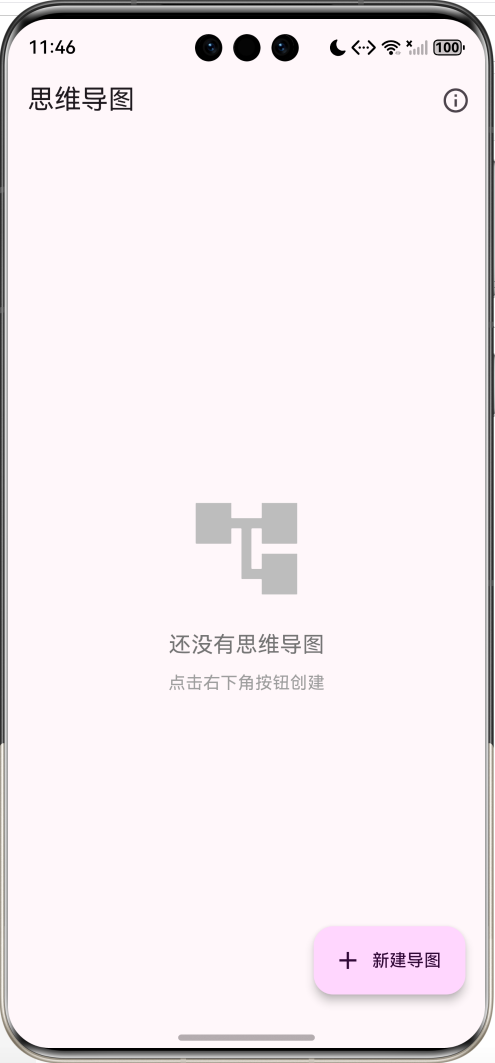
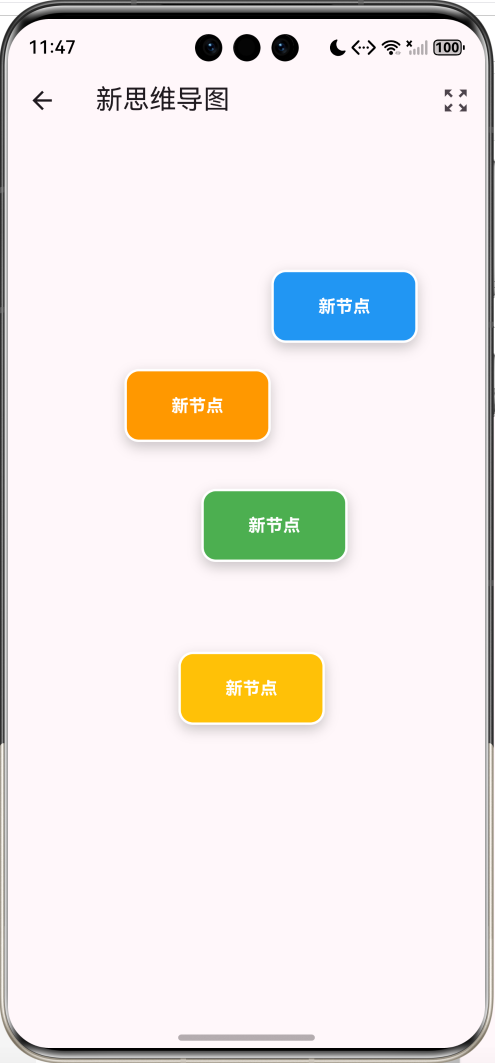
运行效果图
核心特性
- 节点管理:创建、编辑、删除节点
- 自由布局:拖动节点自由排列
- 节点连接:长按拖动建立父子关系
- 样式编辑:8种预设颜色可选
- 画布缩放:支持缩放和平移
- 数据持久化:自动保存到本地
- 多导图管理:支持创建多个思维导图
- 贝塞尔曲线:优美的连接线
- 箭头指示:清晰的方向标识
- 响应式交互:流畅的手势操作
技术架构
数据模型设计
思维导图信息
dart
class MindMapInfo {
  String id;              // 唯一标识
  String title;           // 标题
  DateTime createdAt;     // 创建时间
  DateTime updatedAt;     // 更新时间

  Map<String, dynamic> toJson() => {
    'id': id,
    'title': title,
    'createdAt': createdAt.toIso8601String(),
    'updatedAt': updatedAt.toIso8601String(),
  };

  factory MindMapInfo.fromJson(Map<String, dynamic> json) => MindMapInfo(
    id: json['id'],
    title: json['title'],
    createdAt: DateTime.parse(json['createdAt']),
    updatedAt: DateTime.parse(json['updatedAt']),
  );
}
思维节点
dart
class MindNode {
  String id;                  // 节点ID
  String text;                // 节点文本
  Offset position;            // 节点位置
  Color color;                // 节点颜色
  List<String> childrenIds;   // 子节点ID列表

  MindNode({
    required this.id,
    required this.text,
    required this.position,
    required this.color,
    List<String>? childrenIds,
  }) : childrenIds = childrenIds ?? [];
}数据结构说明:
- 使用ID引用建立父子关系
- 位置使用Offset存储(x, y)坐标
- 颜色使用Color对象
- 子节点列表存储子节点ID
状态管理
dart
class _MindMapEditorPageState extends State<MindMapEditorPage> {
  List<MindNode> nodes = [];                    // 所有节点
  String? selectedNodeId;                       // 选中的节点
  String? connectingFromId;                     // 连接起点节点
  Offset? connectingToPosition;                 // 连接终点位置

  final TransformationController _transformationController =
      TransformationController();               // 画布变换控制器
  final TextEditingController _textController =
      TextEditingController();                  // 文本输入控制器

  final List<Color> nodeColors = [             // 预设颜色
    Colors.blue, Colors.green, Colors.orange,
    Colors.purple, Colors.red, Colors.teal,
    Colors.pink, Colors.amber,
  ];
}
核心功能实现
1. 节点创建
dart
void _addNode(Offset position) {
  final newNode = MindNode(
    id: DateTime.now().millisecondsSinceEpoch.toString(),
    text: '新节点',
    position: position,
    color: nodeColors[Random().nextInt(nodeColors.length)],
  );
  setState(() {
    nodes.add(newNode);
  });
  _saveNodes();
}创建流程:
- 生成唯一ID(时间戳)
- 设置默认文本
- 记录点击位置
- 随机选择颜色
- 添加到节点列表
- 保存到本地
2. 节点拖动
dart
GestureDetector(
  onPanUpdate: (details) {
    setState(() {
      node.position += details.delta;
    });
  },
  onPanEnd: (_) => _saveNodes(),
  child: Container(
    // 节点UI
  ),
)拖动实现:
onPanUpdate:实时更新位置details.delta:拖动增量onPanEnd:拖动结束保存
3. 节点连接
dart
void _startConnecting(String nodeId) {
  setState(() {
    connectingFromId = nodeId;
  });
}

void _updateConnectingPosition(Offset position) {
  setState(() {
    connectingToPosition = position;
  });
}

void _finishConnecting(String? toNodeId) {
  if (connectingFromId != null &&
      toNodeId != null &&
      connectingFromId != toNodeId) {
    final fromNode = nodes.firstWhere((n) => n.id == connectingFromId);
    if (!fromNode.childrenIds.contains(toNodeId)) {
      setState(() {
        fromNode.childrenIds.add(toNodeId);
      });
      _saveNodes();
    }
  }
  setState(() {
    connectingFromId = null;
    connectingToPosition = null;
  });
}连接流程:
是
否
长按节点
开始连接
记录起点节点ID
拖动手指
更新连接线终点
释放在节点上?
建立连接关系
取消连接
添加到子节点列表
保存数据
清除连接状态
手势处理:
onLongPressStart:开始连接onLongPressMoveUpdate:更新连接线onLongPressEnd:完成连接
4. 贝塞尔曲线绘制
dart
void paint(Canvas canvas, Size size) {
  final paint = Paint()
    ..strokeWidth = 2
    ..style = PaintingStyle.stroke;

  for (var node in nodes) {
    for (var childId in node.childrenIds) {
      final child = nodes.firstWhere((n) => n.id == childId);

      paint.color = node.color.withOpacity(0.6);

      // 绘制贝塞尔曲线
      final path = Path();
      path.moveTo(node.position.dx, node.position.dy);

      // 计算控制点
      final controlPoint1 = Offset(
        node.position.dx + (child.position.dx - node.position.dx) / 2,
        node.position.dy,
      );
      final controlPoint2 = Offset(
        node.position.dx + (child.position.dx - node.position.dx) / 2,
        child.position.dy,
      );

      // 三次贝塞尔曲线
      path.cubicTo(
        controlPoint1.dx, controlPoint1.dy,
        controlPoint2.dx, controlPoint2.dy,
        child.position.dx, child.position.dy,
      );

      canvas.drawPath(path, paint);

      // 绘制箭头
      _drawArrow(canvas, paint, child.position, node.position);
    }
  }
}贝塞尔曲线原理:
- 起点:父节点位置
- 终点:子节点位置
- 控制点1:水平中点,父节点高度
- 控制点2:水平中点,子节点高度
- 效果:平滑的S形曲线
三次贝塞尔曲线公式 :
B(t)=(1−t)3P0+3(1−t)2tP1+3(1−t)t2P2+t3P3 B(t) = (1-t)^3P_0 + 3(1-t)^2tP_1 + 3(1-t)t^2P_2 + t^3P_3 B(t)=(1−t)3P0+3(1−t)2tP1+3(1−t)t2P2+t3P3
其中:
- P0P_0P0:起点
- P1,P2P_1, P_2P1,P2:控制点
- P3P_3P3:终点
- t∈0,1t \in 0, 1t∈0,1
5. 箭头绘制
dart
void _drawArrow(Canvas canvas, Paint paint, Offset to, Offset from) {
  final direction = (to - from);
  final angle = atan2(direction.dy, direction.dx);

  final arrowSize = 10.0;
  final arrowAngle = pi / 6;  // 30度

  final path = Path();
  path.moveTo(to.dx, to.dy);

  // 左侧箭头线
  path.lineTo(
    to.dx - arrowSize * cos(angle - arrowAngle),
    to.dy - arrowSize * sin(angle - arrowAngle),
  );

  path.moveTo(to.dx, to.dy);

  // 右侧箭头线
  path.lineTo(
    to.dx - arrowSize * cos(angle + arrowAngle),
    to.dy - arrowSize * sin(angle + arrowAngle),
  );

  canvas.drawPath(path, paint);
}箭头计算:
- 计算连接线方向角度
- 在终点绘制两条线
- 与主线成30度角
- 长度为10像素
角度计算:
dart
angle = atan2(dy, dx)6. 画布缩放和平移
dart
InteractiveViewer(
  transformationController: _transformationController,
  boundaryMargin: const EdgeInsets.all(1000),
  minScale: 0.1,
  maxScale: 4.0,
  child: CustomPaint(
    size: const Size(2000, 2000),
    painter: MindMapPainter(...),
    child: Stack(
      children: nodes.map((node) => ...).toList(),
    ),
  ),
)InteractiveViewer特性:
- 缩放:双指捏合缩放
- 平移:单指拖动平移
- 边界:1000像素边界
- 缩放范围:0.1x - 4.0x
- 画布大小:2000×2000
坐标转换:
dart
// 屏幕坐标转画布坐标
final matrix = _transformationController.value.clone();
matrix.invert();
final transformedPosition = MatrixUtils.transformPoint(
  matrix,
  localPosition
);
7. 数据持久化
dart
Future<void> _saveNodes() async {
  final prefs = await SharedPreferences.getInstance();
  final data = {
    'nodes': nodes.map((n) => n.toJson()).toList(),
  };
  await prefs.setString(
    'mind_map_${widget.info.id}',
    jsonEncode(data)
  );

  // 更新导图信息
  widget.info.updatedAt = DateTime.now();
  final maps = prefs.getStringList('mind_maps') ?? [];
  final index = maps.indexWhere((m) {
    final info = MindMapInfo.fromJson(jsonDecode(m));
    return info.id == widget.info.id;
  });
  if (index != -1) {
    maps[index] = jsonEncode(widget.info.toJson());
    await prefs.setStringList('mind_maps', maps);
  }
}存储策略:
- 每个导图独立存储
- 键名:
mind_map_${id} - 格式:JSON字符串
- 包含所有节点数据
- 同步更新导图列表
UI组件设计
1. 导图列表页
dart
Widget build(BuildContext context) {
  return Scaffold(
    appBar: AppBar(
      title: const Text('思维导图'),
    ),
    body: mindMaps.isEmpty
        ? _buildEmptyState()
        : ListView.builder(
            itemCount: mindMaps.length,
            itemBuilder: (context, index) {
              final map = mindMaps[index];
              return Card(
                child: ListTile(
                  leading: CircleAvatar(
                    child: Icon(Icons.account_tree),
                  ),
                  title: Text(map.title),
                  subtitle: Text('更新于 ${_formatDate(map.updatedAt)}'),
                  trailing: IconButton(
                    icon: Icon(Icons.delete_outline),
                    onPressed: () => _deleteMindMap(map),
                  ),
                  onTap: () => _openMindMap(map),
                ),
              );
            },
          ),
    floatingActionButton: FloatingActionButton.extended(
      onPressed: _createNewMindMap,
      icon: const Icon(Icons.add),
      label: const Text('新建导图'),
    ),
  );
}设计特点:
- 卡片式列表
- 显示标题和更新时间
- 快速删除按钮
- 悬浮创建按钮
- 空状态提示
2. 节点渲染
dart
Container(
  width: 120,
  height: 60,
  decoration: BoxDecoration(
    color: node.color,
    borderRadius: BorderRadius.circular(12),
    border: Border.all(
      color: selectedNodeId == node.id ? Colors.black : Colors.white,
      width: selectedNodeId == node.id ? 3 : 2,
    ),
    boxShadow: [
      BoxShadow(
        color: Colors.black.withOpacity(0.2),
        blurRadius: 8,
        offset: const Offset(0, 4),
      ),
    ],
  ),
  child: Center(
    child: Padding(
      padding: const EdgeInsets.all(8),
      child: Text(
        node.text,
        style: const TextStyle(
          color: Colors.white,
          fontWeight: FontWeight.bold,
          fontSize: 14,
        ),
        textAlign: TextAlign.center,
        maxLines: 2,
        overflow: TextOverflow.ellipsis,
      ),
    ),
  ),
)视觉效果:
- 圆角矩形
- 彩色背景
- 白色文字
- 选中时黑色粗边框
- 阴影增加立体感
3. 编辑对话框
dart
void _showEditDialog(MindNode node) {
  _textController.text = node.text;
  showDialog(
    context: context,
    builder: (context) => AlertDialog(
      title: const Text('编辑节点'),
      content: TextField(
        controller: _textController,
        decoration: const InputDecoration(
          labelText: '节点文本',
          border: OutlineInputBorder(),
        ),
        maxLines: 3,
        autofocus: true,
      ),
      actions: [
        TextButton(
          onPressed: () => Navigator.pop(context),
          child: const Text('取消'),
        ),
        TextButton(
          onPressed: () {
            _updateNodeText(node.id, _textController.text);
            Navigator.pop(context);
          },
          child: const Text('确定'),
        ),
      ],
    ),
  );
}交互设计:
- 多行文本输入
- 自动聚焦
- 取消/确定按钮
- 实时更新
4. 颜色选择器
dart
void _showColorPicker(MindNode node) {
  showDialog(
    context: context,
    builder: (context) => AlertDialog(
      title: const Text('选择颜色'),
      content: Wrap(
        spacing: 8,
        runSpacing: 8,
        children: nodeColors.map((color) {
          return GestureDetector(
            onTap: () {
              _updateNodeColor(node.id, color);
              Navigator.pop(context);
            },
            child: Container(
              width: 50,
              height: 50,
              decoration: BoxDecoration(
                color: color,
                shape: BoxShape.circle,
                border: Border.all(
                  color: node.color == color
                      ? Colors.black
                      : Colors.transparent,
                  width: 3,
                ),
              ),
            ),
          );
        }).toList(),
      ),
    ),
  );
}颜色方案:
- 8种预设颜色
- 圆形色块
- 当前颜色黑色边框
- 点击即选
功能扩展建议
1. 自动布局算法
dart
class AutoLayout {
  // 树形布局
  void treeLayout(List<MindNode> nodes, MindNode root) {
    final levels = _buildLevels(nodes, root);

    double y = 100;
    for (var level in levels) {
      double x = 200;
      final spacing = 800 / level.length;

      for (var node in level) {
        node.position = Offset(x, y);
        x += spacing;
      }
      y += 150;
    }
  }

  // 径向布局
  void radialLayout(List<MindNode> nodes, MindNode root) {
    root.position = const Offset(400, 400);

    final children = nodes.where((n) =>
        root.childrenIds.contains(n.id)).toList();

    final angleStep = 2 * pi / children.length;
    final radius = 200.0;

    for (int i = 0; i < children.length; i++) {
      final angle = i * angleStep;
      children[i].position = Offset(
        root.position.dx + radius * cos(angle),
        root.position.dy + radius * sin(angle),
      );
    }
  }

  // 力导向布局
  void forceDirectedLayout(List<MindNode> nodes) {
    const iterations = 100;
    const repulsion = 1000;
    const attraction = 0.1;

    for (int iter = 0; iter < iterations; iter++) {
      // 计算斥力
      for (var node1 in nodes) {
        Offset force = Offset.zero;

        for (var node2 in nodes) {
          if (node1.id != node2.id) {
            final diff = node1.position - node2.position;
            final distance = diff.distance;
            if (distance > 0) {
              force += diff / distance * repulsion / (distance * distance);
            }
          }
        }

        node1.position += force * 0.01;
      }

      // 计算引力
      for (var node in nodes) {
        for (var childId in node.childrenIds) {
          final child = nodes.firstWhere((n) => n.id == childId);
          final diff = child.position - node.position;
          final force = diff * attraction;

          node.position += force * 0.5;
          child.position -= force * 0.5;
        }
      }
    }
  }
}
2. 导出功能
dart
class MindMapExporter {
  // 导出为图片
  Future<void> exportToImage(
    List<MindNode> nodes,
    String filename,
  ) async {
    final recorder = ui.PictureRecorder();
    final canvas = Canvas(recorder);

    // 绘制思维导图
    final painter = MindMapPainter(nodes: nodes);
    painter.paint(canvas, const Size(2000, 2000));

    final picture = recorder.endRecording();
    final image = await picture.toImage(2000, 2000);
    final byteData = await image.toByteData(
      format: ui.ImageByteFormat.png,
    );

    // 保存文件
    final file = File(filename);
    await file.writeAsBytes(byteData!.buffer.asUint8List());
  }

  // 导出为Markdown
  String exportToMarkdown(List<MindNode> nodes, MindNode root) {
    final buffer = StringBuffer();
    buffer.writeln('# ${root.text}\n');

    _writeMarkdownNode(buffer, nodes, root, 0);

    return buffer.toString();
  }

  void _writeMarkdownNode(
    StringBuffer buffer,
    List<MindNode> nodes,
    MindNode node,
    int level,
  ) {
    final indent = '  ' * level;

    for (var childId in node.childrenIds) {
      final child = nodes.firstWhere((n) => n.id == childId);
      buffer.writeln('$indent- ${child.text}');
      _writeMarkdownNode(buffer, nodes, child, level + 1);
    }
  }

  // 导出为JSON
  String exportToJson(List<MindNode> nodes) {
    return jsonEncode({
      'nodes': nodes.map((n) => n.toJson()).toList(),
      'version': '1.0',
      'exportedAt': DateTime.now().toIso8601String(),
    });
  }
}
3. 主题系统
dart
class MindMapTheme {
  final String name;
  final List<Color> nodeColors;
  final Color backgroundColor;
  final Color lineColor;
  final TextStyle textStyle;

  static final themes = {
    'default': MindMapTheme(
      name: '默认',
      nodeColors: [Colors.blue, Colors.green, Colors.orange],
      backgroundColor: Colors.white,
      lineColor: Colors.grey,
      textStyle: TextStyle(color: Colors.white),
    ),
    'dark': MindMapTheme(
      name: '暗黑',
      nodeColors: [Colors.indigo, Colors.teal, Colors.amber],
      backgroundColor: Colors.grey.shade900,
      lineColor: Colors.grey.shade700,
      textStyle: TextStyle(color: Colors.white),
    ),
    'pastel': MindMapTheme(
      name: '柔和',
      nodeColors: [
        Color(0xFFFFB3BA),
        Color(0xFFBAE1FF),
        Color(0xFFFFDFBA),
      ],
      backgroundColor: Color(0xFFFFFAF0),
      lineColor: Color(0xFFE0E0E0),
      textStyle: TextStyle(color: Colors.black87),
    ),
  };
}
4. 协作功能
dart
class CollaborativeEditor {
  final FirebaseFirestore firestore;
  final String documentId;

  Stream<List<MindNode>> watchNodes() {
    return firestore
        .collection('mindmaps')
        .doc(documentId)
        .snapshots()
        .map((snapshot) {
      final data = snapshot.data();
      if (data == null) return [];

      return (data['nodes'] as List)
          .map((n) => MindNode.fromJson(n))
          .toList();
    });
  }

  Future<void> updateNode(MindNode node) async {
    await firestore
        .collection('mindmaps')
        .doc(documentId)
        .update({
      'nodes': FieldValue.arrayUnion([node.toJson()]),
      'updatedAt': FieldValue.serverTimestamp(),
      'updatedBy': currentUserId,
    });
  }

  Future<void> addComment(String nodeId, String comment) async {
    await firestore
        .collection('mindmaps')
        .doc(documentId)
        .collection('comments')
        .add({
      'nodeId': nodeId,
      'comment': comment,
      'userId': currentUserId,
      'createdAt': FieldValue.serverTimestamp(),
    });
  }
}
5. 快捷键支持
dart
class KeyboardShortcuts extends StatelessWidget {
  @override
  Widget build(BuildContext context) {
    return Focus(
      autofocus: true,
      onKey: (node, event) {
        if (event is RawKeyDownEvent) {
          // Ctrl+N: 新建节点
          if (event.isControlPressed &&
              event.logicalKey == LogicalKeyboardKey.keyN) {
            _addNode();
            return KeyEventResult.handled;
          }

          // Delete: 删除节点
          if (event.logicalKey == LogicalKeyboardKey.delete) {
            _deleteSelectedNode();
            return KeyEventResult.handled;
          }

          // Ctrl+Z: 撤销
          if (event.isControlPressed &&
              event.logicalKey == LogicalKeyboardKey.keyZ) {
            _undo();
            return KeyEventResult.handled;
          }

          // Ctrl+Y: 重做
          if (event.isControlPressed &&
              event.logicalKey == LogicalKeyboardKey.keyY) {
            _redo();
            return KeyEventResult.handled;
          }
        }
        return KeyEventResult.ignored;
      },
      child: child,
    );
  }
}
6. 撤销重做
dart
class UndoRedoManager {
  final List<MindMapState> _history = [];
  int _currentIndex = -1;

  void saveState(List<MindNode> nodes) {
    // 删除当前位置之后的历史
    if (_currentIndex < _history.length - 1) {
      _history.removeRange(_currentIndex + 1, _history.length);
    }

    // 添加新状态
    _history.add(MindMapState(
      nodes: nodes.map((n) => n.copy()).toList(),
      timestamp: DateTime.now(),
    ));

    _currentIndex++;

    // 限制历史记录数量
    if (_history.length > 50) {
      _history.removeAt(0);
      _currentIndex--;
    }
  }

  List<MindNode>? undo() {
    if (_currentIndex > 0) {
      _currentIndex--;
      return _history[_currentIndex].nodes;
    }
    return null;
  }

  List<MindNode>? redo() {
    if (_currentIndex < _history.length - 1) {
      _currentIndex++;
      return _history[_currentIndex].nodes;
    }
    return null;
  }
}
7. 搜索功能
dart
class MindMapSearch {
  List<MindNode> search(List<MindNode> nodes, String query) {
    if (query.isEmpty) return [];

    return nodes.where((node) {
      return node.text.toLowerCase().contains(query.toLowerCase());
    }).toList();
  }

  void highlightSearchResults(
    Canvas canvas,
    List<MindNode> results,
  ) {
    final paint = Paint()
      ..color = Colors.yellow.withOpacity(0.3)
      ..style = PaintingStyle.fill;

    for (var node in results) {
      canvas.drawCircle(
        node.position,
        70,
        paint,
      );
    }
  }
}
性能优化
1. 节点裁剪
dart
@override
void paint(Canvas canvas, Size size) {
  // 获取可见区域
  final visibleRect = Rect.fromLTWH(0, 0, size.width, size.height);

  // 只绘制可见节点
  for (var node in nodes) {
    final nodeRect = Rect.fromCenter(
      center: node.position,
      width: 120,
      height: 60,
    );

    if (visibleRect.overlaps(nodeRect)) {
      _drawNode(canvas, node);
    }
  }
}
2. 连接线优化
dart
// 使用路径缓存
Map<String, Path> _pathCache = {};

Path _getConnectionPath(MindNode from, MindNode to) {
  final key = '${from.id}_${to.id}';

  if (_pathCache.containsKey(key)) {
    return _pathCache[key]!;
  }

  final path = Path();
  // 计算路径
  // ...

  _pathCache[key] = path;
  return path;
}
3. 批量更新
dart
void batchUpdate(List<Function> updates) {
  setState(() {
    for (var update in updates) {
      update();
    }
  });
  _saveNodes();
}
常见问题解决
1. 节点重叠
问题 :节点创建时可能重叠
解决:
dart
Offset _findEmptyPosition() {
  const gridSize = 150.0;

  for (int x = 0; x < 10; x++) {
    for (int y = 0; y < 10; y++) {
      final pos = Offset(x * gridSize + 100, y * gridSize + 100);

      bool isEmpty = true;
      for (var node in nodes) {
        if ((node.position - pos).distance < 100) {
          isEmpty = false;
          break;
        }
      }

      if (isEmpty) return pos;
    }
  }

  return Offset(Random().nextDouble() * 1000, Random().nextDouble() * 1000);
}
2. 连接线穿过节点
问题 :连接线可能穿过其他节点
解决:
dart
// 使用A*算法避开节点
Path _findPath(Offset start, Offset end, List<MindNode> obstacles) {
  // 实现A*路径查找
  // ...
}
3. 性能问题
问题 :节点过多时卡顿
解决:
dart
// 使用虚拟化
class VirtualizedMindMap extends StatelessWidget {
  @override
  Widget build(BuildContext context) {
    return CustomScrollView(
      slivers: [
        SliverList(
          delegate: SliverChildBuilderDelegate(
            (context, index) {
              return _buildNode(visibleNodes[index]);
            },
            childCount: visibleNodes.length,
          ),
        ),
      ],
    );
  }
}
项目结构
lib/
├── main.dart
├── models/
│   ├── mind_map_info.dart
│   ├── mind_node.dart
│   └── mind_map_state.dart
├── screens/
│   ├── mind_map_list_page.dart
│   ├── mind_map_editor_page.dart
│   └── settings_page.dart
├── widgets/
│   ├── node_widget.dart
│   ├── connection_line.dart
│   └── toolbar.dart
├── painters/
│   └── mind_map_painter.dart
├── services/
│   ├── storage_service.dart
│   ├── export_service.dart
│   └── auto_layout_service.dart
└── utils/
    ├── constants.dart
    └── helpers.dart
依赖包
yaml
dependencies:
  flutter:
    sdk: flutter
  shared_preferences: ^2.2.2  # 本地存储

  # 可选扩展
  path_provider: ^2.1.2       # 文件路径
  share_plus: ^7.2.2          # 分享功能
  firebase_core: ^2.24.2      # Firebase核心
  cloud_firestore: ^4.14.0    # 云端协作
总结
本项目实现了一个功能完整的思维导图编辑器,涵盖以下核心技术:
- 自定义绘制:CustomPainter绘制连接线和箭头
- 手势处理:拖动、长按、双击等复杂手势
- 贝塞尔曲线:优美的连接线效果
- 画布变换:InteractiveViewer实现缩放平移
- 数据持久化:JSON序列化和本地存储
- 响应式布局:自适应不同屏幕尺寸
通过本教程,你可以学习到:
- 自定义绘制和动画
- 复杂手势处理
- 数学图形算法
- 数据结构设计
- 性能优化技巧
这个项目可以作为学习Flutter高级特性的优秀案例,通过扩展功能可以打造更加强大的思维导图工具。
欢迎加入开源鸿蒙跨平台社区:https://openharmonycrossplatform.csdn.net