bash
<el-table class="mt-10" :data="weldingdataList"  style="width: 100%"   height="330">
                                <el-table-column
                                    v-for="(column) in weldingcolumnList"
                                    header-align="center"
                                    :sortable="false"
                                    :key="column.prop + column.propName"
                                    :prop="column.prop"
                                    :label="column.propName"
                                    align="center"
                                    :show-overflow-tooltip="true"
                                >
                                    <!-- 作用域插槽自定义单元格内容 -->
                                    <template slot-scope="scope">
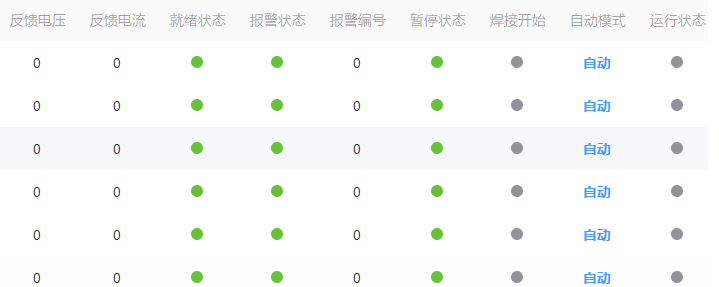
                                        <!-- 根据displayType渲染不同内容 -->
                                        <span
                                            v-if="['switch', 'remind'].includes(column.displayType)"
                                            :class="getCellStyle(column.displayType, scope.row[column.prop])"
                                            class="status-dot" >
                                        </span>
                                        <span
                                            v-else
                                            :class="getCellStyle(column.displayType, scope.row[column.prop])">
                                            {{ formatCellValue(column.displayType, scope.row[column.prop]) }}
                                        </span>
                                    </template>
                                </el-table-column>
                            </el-table>
bash
getdevicewelding(){
            devicewelding().then(response => {
                this.weldingcolumnList=response.data.columnList
                this.weldingdataList=response.data.dataList
            });
        },
         // 根据displayType和值获取单元格样式类名
        getCellStyle(displayType, value) {
            // 统一转换为字符串比较
            const val = String(value)

            switch(displayType) {
                // 模拟量 - 数值展示,无特殊颜色
                case 'analog':
                return 'cell-analog';

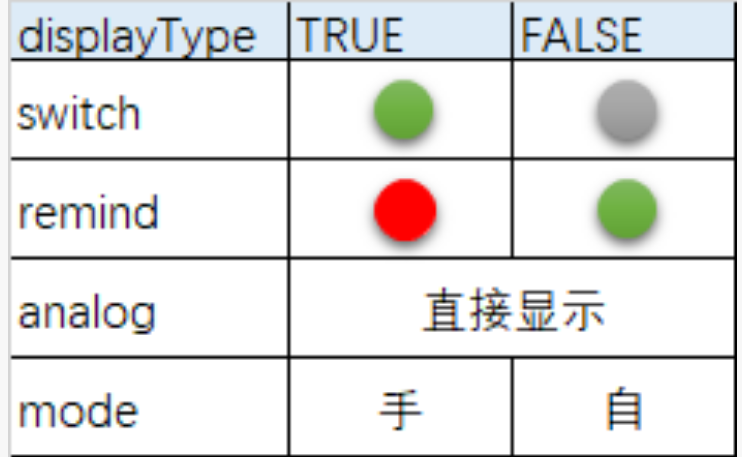
                // 开关状态 - 1=开启(绿色),0=关闭(灰色)
                case 'switch':
                return val === '1' ? 'cell-switch-on' : 'cell-switch-off';

                // 提醒状态 - 1=异常(红色),0=正常(绿色)
                case 'remind':
                return val === '1' ? 'cell-remind-warning' : 'cell-remind-normal';

                // 模式状态 - 1=自动(蓝色),0=手动(橙色)
                case 'mode':
                return val === '1' ? 'cell-mode-auto' : 'cell-mode-manual';

                // 默认样式
                default:
                return 'cell-default';
            }
        },
        formatCellValue(displayType, value) {
            const val = String(value);
            switch(displayType) {
                case 'mode':
                return val === '1' ? '自动' : '手动';
                default:
                return value; // analog类型显示数值,switch/remind已用图标替代
            }
        },
bash
 /* 模拟量样式 */
  .cell-analog {
  color: #333;
}

/* 开关状态样式 - 圆形 */
.cell-switch-on {
  background-color: #67c23a; /* 绿色-开启 */
}
.cell-switch-off {
  background-color: #909399; /* 灰色-关闭 */
}

/* 提醒状态样式 - 圆形 */
.cell-remind-warning {
  background-color: #f56c6c; /* 红色-异常 */
}
.cell-remind-normal {
  background-color: #67c23a; /* 绿色-正常 */
}

/* 模式状态样式 */
.cell-mode-auto {
  color: #409eff; /* 蓝色-自动 */
  font-weight: bold;
}
.cell-mode-manual {
  color: #e6a23c; /* 橙色-手动 */
  font-weight: bold;
}

/* 圆形样式统一设置 */
.status-dot {
  display: inline-block;
  width: 12px;   /* 圆形大小 */
  height: 12px;  /* 宽高一致才是正圆 */
  border-radius: 50%; /* 圆角50%实现圆形 */
}

/* 默认样式 */
.cell-default {
  color: #333;
}