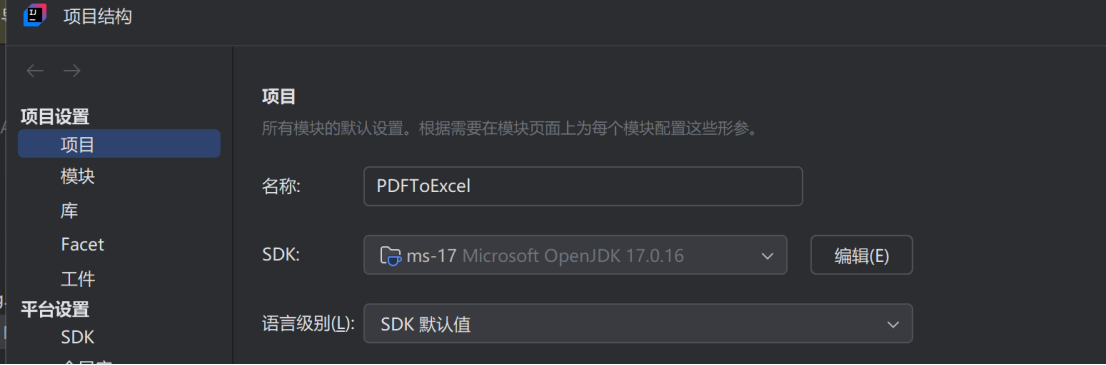
一、新建Java项目,依赖选Maven,jdk版本选择jdk17(选jdk24可能会报错)
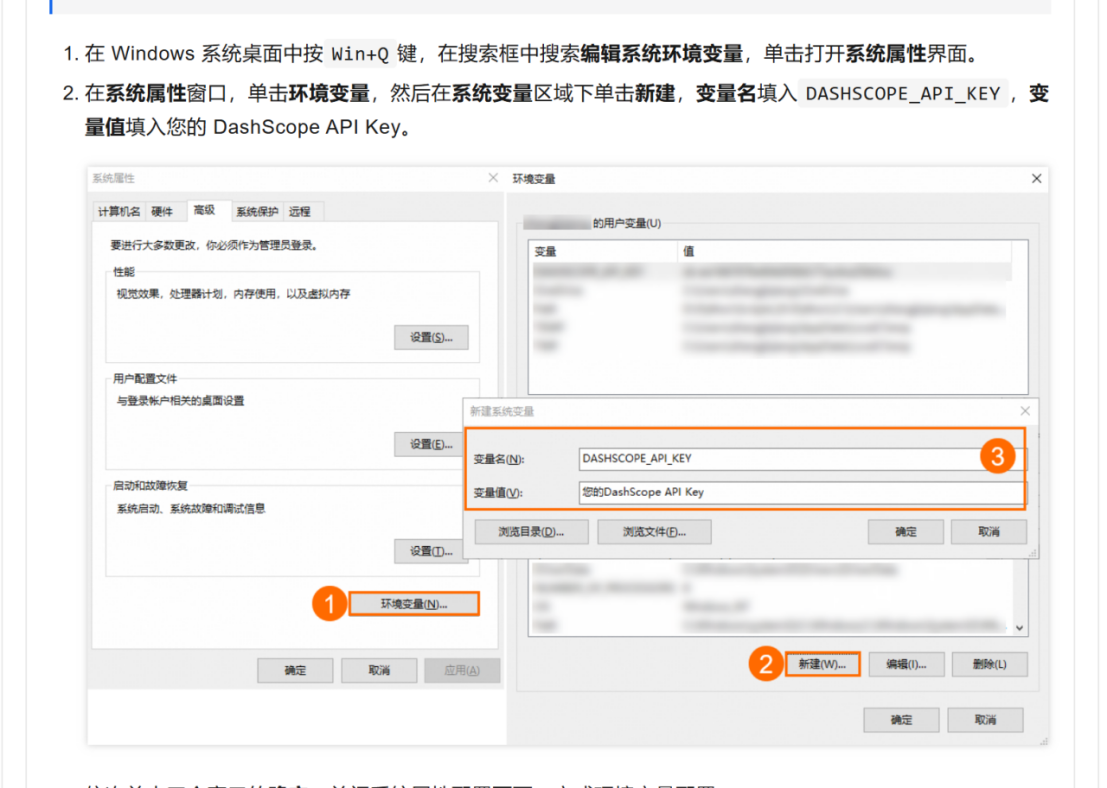
二、获取API KEY,配置到环境变量

三、在根目录的pom.xml添加依赖
java
<repositories>
        <repository>
            <id>aliyunmaven</id>
            <url>https://maven.aliyun.com/repository/public</url>
        </repository>
    </repositories>
<dependencies>
    <dependency>
        <groupId>com.alibaba</groupId>
        <artifactId>dashscope-sdk-java</artifactId>
        <version>2.12.0</version> <!-- 使用最新版本 -->
    </dependency>

    <!-- Apache POI 用于 Excel 读写 -->
    <dependency>
        <groupId>org.apache.poi</groupId>
        <artifactId>poi</artifactId>
        <version>5.2.5</version>
    </dependency>
    <dependency>
        <groupId>org.apache.poi</groupId>
        <artifactId>poi-ooxml</artifactId>
        <version>5.2.5</version>
    </dependency>

    <!-- Apache PDFBox 用于 PDF 解析 -->
    <dependency>
        <groupId>org.apache.pdfbox</groupId>
        <artifactId>pdfbox</artifactId>
        <version>2.0.32</version>
    </dependency>

    <!-- 添加 Log4j2 核心实现包 -->
    <dependency>
        <groupId>org.apache.logging.log4j</groupId>
        <artifactId>log4j-core</artifactId>
        <version>2.20.0</version>
    </dependency>

    <!-- 可选:添加控制台日志格式支持 -->
    <dependency>
        <groupId>org.apache.logging.log4j</groupId>
        <artifactId>log4j-slf4j-impl</artifactId>
        <version>2.20.0</version>
    </dependency>
</dependencies>
四、项目代码
java
package org.example;

import com.alibaba.dashscope.exception.ApiException;
import com.alibaba.dashscope.exception.InputRequiredException;
import com.alibaba.dashscope.exception.NoApiKeyException;

import java.io.IOException;

/**
 * PDF转Excel主程序
 * 整合所有工具类,提供完整的PDF转Excel功能
 */
public class PdfToExcelApp {

    public static void main(String[] args) {
        // **************************
        // 请在这里配置你的文件路径
        // **************************
        String pdfFilePath = "test.pdf"; // 替换为实际PDF路径,如:D:/data/test.pdf
        String excelOutputPath = "result.xlsx";   // 输出Excel文件路径

        try {
            // 步骤1:读取PDF内容
            System.out.println("=== 开始读取PDF文件 ===");
            String pdfText = PdfTextReader.readPdfToString(pdfFilePath);
            System.out.println("PDF文本读取完成,内容长度:" + pdfText.length() + " 字符");

            // 步骤2:调用大模型转换为Excel格式
            System.out.println("\n=== 调用大模型解析PDF内容 ===");
            String excelContent = LLMClient.convertPdfTextToExcelFormat(pdfText);
            System.out.println("大模型返回结果:\n" + excelContent);

            // 步骤3:保存为Excel文件
            System.out.println("\n=== 生成Excel文件 ===");
            ExcelWriter.saveToExcel(excelContent, excelOutputPath);

            System.out.println("\n✅ 操作完成!Excel文件已保存至:" + excelOutputPath);

        } catch (IOException e) {
            System.err.println("\n❌ 文件操作错误:" + e.getMessage());
            e.printStackTrace();
        } catch (ApiException | NoApiKeyException | InputRequiredException e) {
            System.err.println("\n❌ 大模型调用错误:" + e.getMessage());
            System.out.println("请检查API Key配置,参考文档:https://help.aliyun.com/model-studio/developer-reference/error-code");
            e.printStackTrace();
        } catch (Exception e) {
            System.err.println("\n❌ 程序运行异常:" + e.getMessage());
            e.printStackTrace();
        }
    }
}
java
package org.example;

import org.apache.pdfbox.pdmodel.PDDocument;
import org.apache.pdfbox.text.PDFTextStripper;

import java.io.File;
import java.io.FileInputStream;
import java.io.IOException;

/**
 * PDF文本读取工具类
 * 负责从PDF文件中提取纯文本内容
 */
public class PdfTextReader {

    /**
     * 读取PDF文件内容为文本
     * @param pdfFilePath PDF文件路径
     * @return PDF中的纯文本内容
     * @throws IOException 文件读取异常
     */
    public static String readPdfToString(String pdfFilePath) throws IOException {
        File file = new File(pdfFilePath);

        // 检查文件是否存在
        if (!file.exists()) {
            throw new IOException("PDF文件不存在:" + pdfFilePath);
        }

        try (PDDocument document = PDDocument.load(new FileInputStream(file))) {
            // 检查PDF是否加密
            if (document.isEncrypted()) {
                throw new IOException("PDF文件已加密,无法读取内容");
            }

            PDFTextStripper stripper = new PDFTextStripper();
            // 获取PDF全部文本内容
            return stripper.getText(document);
        }
    }
}
java
package org.example;

import com.alibaba.dashscope.aigc.generation.Generation;
import com.alibaba.dashscope.aigc.generation.GenerationParam;
import com.alibaba.dashscope.aigc.generation.GenerationResult;
import com.alibaba.dashscope.common.Message;
import com.alibaba.dashscope.common.Role;
import com.alibaba.dashscope.exception.ApiException;
import com.alibaba.dashscope.exception.InputRequiredException;
import com.alibaba.dashscope.exception.NoApiKeyException;

import java.util.Arrays;

/**
 * 大模型客户端工具类
 * 负责调用阿里云百炼大模型处理文本转换
 */
public class LLMClient {

    /**
     * 将PDF文本转换为Excel格式的结构化数据
     * @param pdfText PDF提取的文本内容
     * @return Excel格式的结构化文本(逗号分隔,分行)
     * @throws ApiException API调用异常
     * @throws NoApiKeyException 缺少API Key异常
     * @throws InputRequiredException 输入参数缺失异常
     */
    public static String convertPdfTextToExcelFormat(String pdfText)
            throws ApiException, NoApiKeyException, InputRequiredException {
        Generation gen = new Generation();

        // 系统提示词:明确大模型的处理规则
        Message systemMsg = Message.builder()
                .role(Role.SYSTEM.getValue())
                .content("你是一个专业的数据处理助手,擅长将非结构化的PDF文本解析成结构化的Excel表格数据。" +
                        "请遵循以下规则:" +
                        "1. 分析PDF文本中的核心数据,提取有价值的结构化信息(如表格、列表、键值对等)" +
                        "2. 输出格式要求:先输出Excel的表头(用逗号分隔),然后每行数据也用逗号分隔,每行数据单独一行" +
                        "3. 确保数据的准确性和完整性,不要遗漏关键信息" +
                        "4. 只输出Excel格式的数据内容,不要输出多余的解释性文字")
                .build();

        // 用户提示词:传入PDF文本
        Message userMsg = Message.builder()
                .role(Role.USER.getValue())
                .content("请解析以下PDF文本并转换成Excel格式的数据:\n" + pdfText)
                .build();

        GenerationParam param = GenerationParam.builder()
                .apiKey(System.getenv("DASHSCOPE_API_KEY")) // 从环境变量获取API Key
                .model("qwen-plus") // 使用通义千问plus模型
                .messages(Arrays.asList(systemMsg, userMsg))
                .resultFormat(GenerationParam.ResultFormat.MESSAGE)
                .temperature(0.1f) // 降低随机性,保证输出稳定
                .build();

        GenerationResult result = gen.call(param);
        // 返回大模型生成的Excel格式内容
        return result.getOutput().getChoices().get(0).getMessage().getContent();
    }
}
java
package org.example;

import org.apache.poi.ss.usermodel.*;
import org.apache.poi.xssf.usermodel.XSSFWorkbook;

import java.io.FileOutputStream;
import java.io.IOException;

/**
 * Excel文件写入工具类
 * 负责将结构化文本保存为标准Excel文件
 */
public class ExcelWriter {

    /**
     * 将文本内容保存为Excel文件
     * @param excelContent 逗号分隔的Excel格式文本
     * @param outputExcelPath 输出Excel文件路径
     * @throws IOException 文件写入异常
     */
    public static void saveToExcel(String excelContent, String outputExcelPath) throws IOException {
        // 创建新的Excel工作簿(XSSF对应.xlsx格式)
        Workbook workbook = new XSSFWorkbook();
        Sheet sheet = workbook.createSheet("PDF解析结果");

        // 按行分割内容(处理不同换行符)
        String[] lines = excelContent.split("\\r?\\n");
        int rowNum = 0;

        for (String line : lines) {
            // 跳过空行和空白内容
            String trimmedLine = line.trim();
            if (trimmedLine.isEmpty() || trimmedLine.equals("---")) {
                continue;
            }

            // 创建行
            Row row = sheet.createRow(rowNum++);
            // 按逗号分割列(处理可能的空格)
            String[] cells = trimmedLine.split(",\\s*");
            int cellNum = 0;

            for (String cellContent : cells) {
                // 创建单元格并设置内容
                Cell cell = row.createCell(cellNum++);
                cell.setCellValue(cellContent.trim());
            }
        }

        // 自动调整列宽(优化显示效果)
        if (rowNum > 0) {
            for (int i = 0; i < sheet.getRow(0).getLastCellNum(); i++) {
                sheet.autoSizeColumn(i);
            }
        }

        // 保存Excel文件
        try (FileOutputStream outputStream = new FileOutputStream(outputExcelPath)) {
            workbook.write(outputStream);
        }

        // 关闭工作簿释放资源
        workbook.close();
    }
}
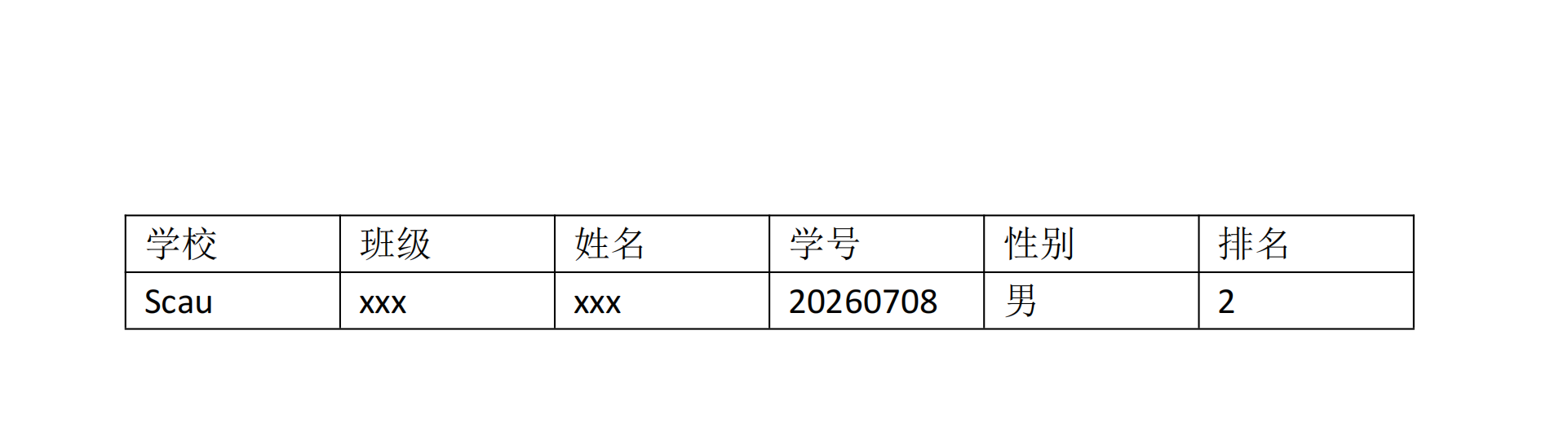
五、测试
这是一个pdf文件
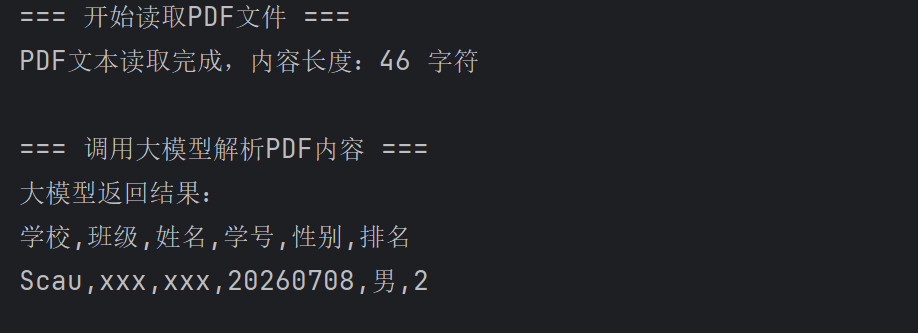
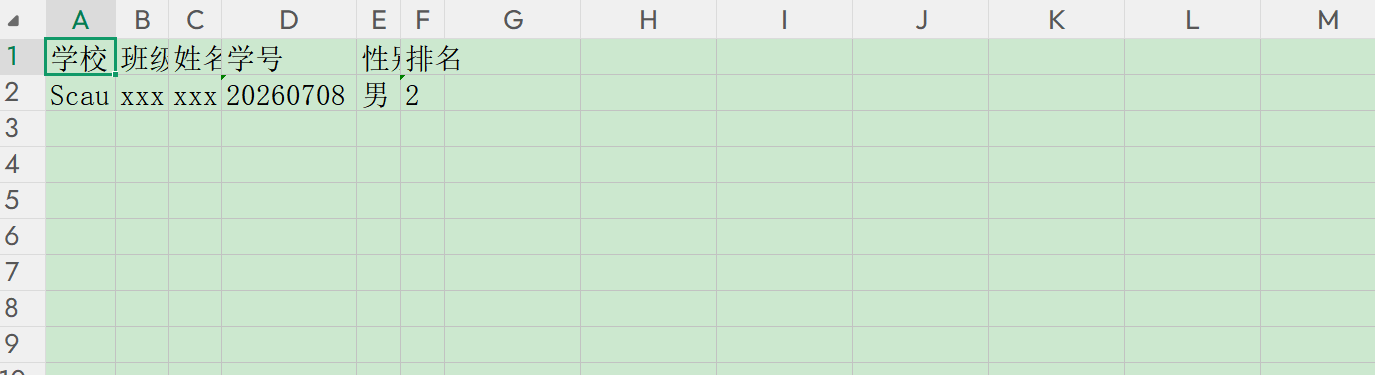
解析出来的excel文件