参考资料
agent记忆的概念和实现
对记忆系统产生最基本的认识,可以参考AI Agent 记忆系统:从短期到长期的技术架构与实践
- 短期记忆参与模型推理,随着会话进行需要进行上下文工程策略(压缩、卸载、摘要等),可能的上下文管理策略可以参考AgentScope AutoContextMemory
- 长期记忆从短期记忆中抽取。此外长期记忆的内容会经过检索注入短期记忆辅助推理。长期记忆通常是独立的第三方组件,其内部有相对比较复杂的流程(信息提取、向量化、存储、检索等),以及多种记忆类型(用户记忆,工具记忆、任务记忆)。
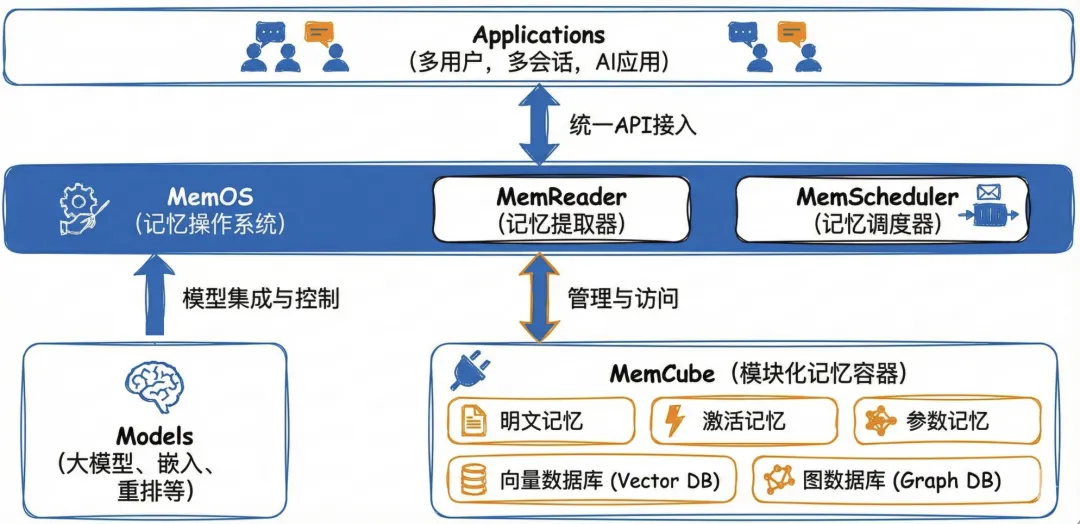
- 常见的长期记忆组件包括 Mem0、Zep、Memos、ReMe 等。长期记忆相关的核心组件包括,大模型,向量数据库,图数据库,rerank,sql数据库等,关于这些组件具体的作用和场景可以参考特定实现,例如MemOS 深度拆解:构建企业级 Agent 的高性能记忆底座
aws strands agent框架也通过社区工具包的方式提供了记忆支持,但是除了mem0_memory之外都似乎需要和Bedrock集成,实际上是基于mem0库封装的工具类,可以集成opensearch,neptune做向量和图数据库实现,具体参考Mem0 Memory Agent - Personalized Context Through Persistent Memory
py
from mem0 import Memory as Mem0Memory
def _initialize_client(self, config: Optional[Dict] = None) -> Any:
	...
	Mem0Memory.from_config(config_dict=merged_config)
agentscope提供了短期和长期记忆的实现,两者并不是通过简单的时间维度进行的划分,而是是否跨 Session 会话
短期(会话级)记忆,用户和智能体 Agent 在一个会话中的多轮交互,支持内存和关系非关系型数据库作为记忆存储,实现自定义的短期记忆需要从 MemoryBase 继承并实现特定方法。
py
async def in_memory_example():
    memory = InMemoryMemory()
    await memory.add(
        Msg("Alice", "我喜欢吃蔬菜", "user"),
    )
长期(跨会话)记忆,从用户和智能体 Agent 的多个会话中抽取的通用信息,可以跨会话辅助 Agent 推理,目前已经有基于Mem0和ReMe的记忆实现,实现自定义的长期记忆继承 LongTermMemoryBase 并实现特定方法即可。Mem0实现默认使用Qdrant作为向量存储。
- 可以通过VectorStoreConfig指定使用向量存储库类型,这里修改为使用chroma
- 默认会连接chroma cloud,为了指定嵌入的chroma数据库,还需要修改path为
/tmp/my_chroma
py
import os
import asyncio

from agentscope.message import Msg
from agentscope.memory import InMemoryMemory, Mem0LongTermMemory
from agentscope.agent import ReActAgent
from agentscope.embedding import OpenAITextEmbedding
from agentscope.model import OpenAIChatModel
from mem0.vector_stores.configs import VectorStoreConfig

# 使用 Chroma 作为向量数据库
vector_store_config = VectorStoreConfig(
    provider="chroma",
    config={
        "path": "/tmp/my_chroma",  # Chroma 数据存储路径
    }
)

long_term_memory = Mem0LongTermMemory(
    agent_name="你是一个名为 Friday 的助手,具有长期记忆能力。",
    user_name="user_0",
    model=OpenAIChatModel(
        model_name="qwen3-vl",
        api_key= "sk-uzpq0u0n5FN14HorW45hUw",
        client_kwargs={"base_url": "http://localhost:4000"},
        stream=False,
    ),
    embedding_model=OpenAITextEmbedding(
        model_name="embed-text-v2",
        dimensions=1024,
        base_url="http://localhost:4000",
        api_key="sk-uzpq0u0n5FN14HorW45hUw",
    ),
    vector_store_config=vector_store_config,
    on_disk=False,
)

async def basic_usage():
    # 记录记忆
    await long_term_memory.record([Msg("user", "我喜欢吃蔬菜,但是不喜欢吃胡萝卜", "user")])

    # 检索记忆
    results = await long_term_memory.retrieve(
        [Msg("user", "我的喜欢吃什么蔬菜", "user")],
    )
    print(f"检索结果: {results}")

asyncio.run(basic_usage())
以上代码运行报错"RuntimeError: Error generating embedding using agentscope model: Connection error" 的问题,可能是一个异步运行时的异常。经过AI帮助修改了修改了/.venv/lib/python3.13/site-packages/agentscope/memory/_long_term_memory/_mem0/_mem0_utils.py中的 AgentScopeEmbedding.embed 方法
- mem0 在异步上下文中通过 asyncio.to_thread 调用 embedding
- agentscope 的 embedding 模型是异步的,内部使用 OpenAI AsyncClient
- 如果在子线程中直接使用 asyncio.run 创建新事件循环,会导致 OpenAI AsyncClient 连接池问题
py
def embed(self, text, ...):
    # 添加线程锁,防止并发问题
    with self._lock:
        try:
            loop = asyncio.get_running_loop()
            # 已有事件循环,使用 run_coroutine_threadsafe 线程安全调度
            asyncio.run_coroutine_threadsafe(
                self.agentscope_model(text_list),
                loop
            ).result(timeout=30)
        except RuntimeError:
            # 无事件循环,直接使用 asyncio.run
            asyncio.run(self.agentscope_model(text_list))
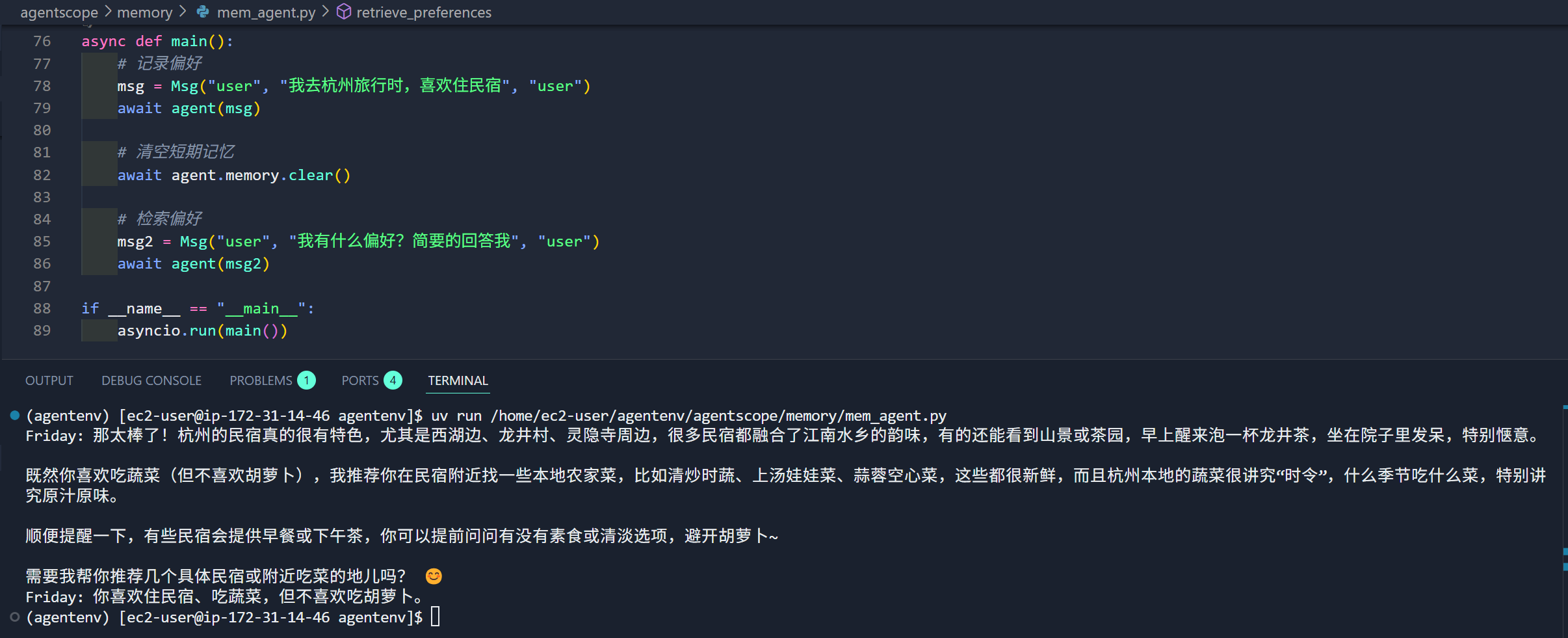
修改完毕后可以正常触发记忆流程
通过agent-memory-server部署记忆服务
agent-memory-server是一个使用 Redis 为agent和 AI 应用提供记忆的方案,尝试通过它来实现自定义记忆扩展。
agent-memory-server中将短期和长期记忆区分为Working Memory和Long-Term Memory。启动apiserver时在dev环境中通过指定--task-backend=asyncio会在单进程中运行,prod环境中使用docker作为后端worker负责上下文管理和记忆转移的工作。
# uv run agent-memory api --task-backend=asyncio
uv run agent-memory api --port 8000官方提供了dockerfile构建可用镜像,使用如下的docker-compose配置启动服务,可见api,worker和mcp使用相同的镜像,只是入口不同
yaml
version: '3.8'
services:
  redis:
    image: redis/redis-stack:latest
    ports:
      - "6379:6379"
    volumes:
      - redis_data:/data

  api:
    image: redis-agent-memory:latest
    ports:
      - "8000:8000"
    environment:
      - REDIS_URL=redis://redis:6379
      - DISABLE_AUTH=true
    command: uv run agent-memory api
    depends_on:
      - redis

  worker:
    image: redis-agent-memory:latest
    environment:
      - REDIS_URL=redis://redis:6379
    command: uv run agent-memory task-worker --concurrency 10
    depends_on:
      - redis
    deploy:
      replicas: 2

  mcp:
    image: redis-agent-memory:latest
    ports:
      - "9000:9000"
    environment:
      - REDIS_URL=redis://redis:6379
    command: uv run agent-memory mcp --mode sse --port 9000 --task-backend docket
    depends_on:
      - redis

volumes:
redis_data:实际运行配置自己的litellm平台会报错,检查发现agent_memory_server/models.py中只支持特定的模型,为了避免修改配置,在litellm直接将模型改为如下环境变量配置gpt-4o-mini和text-embedding-3-small
REDIS_URL=redis://localhost:6379
PORT=8000
LONG_TERM_MEMORY=true
OPENAI_API_KEY=sk-uzpq0u0n5FN14HorW45hUw
OPENAI_BASE_URL=http://172.31.14.46:4000
GENERATION_MODEL=gpt-4o-mini
EMBEDDING_MODEL=text-embedding-3-small
DISABLE_AUTH=true
然后启动api服务端
uv run agent-memory api --task-backend=asyncio使用如下客户端测试记忆
py
import asyncio
import openai
from agent_memory_client import MemoryAPIClient, MemoryClientConfig
from agent_memory_client.models import WorkingMemory, MemoryMessage

memory_client = MemoryAPIClient(
    config=MemoryClientConfig(base_url="http://localhost:8000")
)

openai_client = openai.AsyncClient(
    api_key="sk-uzpq0u0n5FN14HorW45hUw",
    base_url="http://default.test.com:4000/v1"
)

def normalize_messages(messages):
    normalized = []
    for msg in messages:
        if isinstance(msg.get("content"), dict):
            normalized.append({
                "role": msg["role"],
                "content": msg["content"].get("text", "")
            })
        elif isinstance(msg.get("content"), str):
            normalized.append(msg)
        else:
            normalized.append(msg)
    return normalized

async def chat_with_memory(message: str, session_id: str):
    context = await memory_client.memory_prompt(
        query=message,
        session_id=session_id,
        model_name="gpt-4o-mini",
        long_term_search={
            "text": message,
            "limit": 5
        }
    )

    messages = normalize_messages(context.get("messages", [])) + [{"role": "user", "content": message}]

    response = await openai_client.chat.completions.create(
        model="gpt-4o-mini",
        messages=messages
    )

    working_memory = WorkingMemory(
        session_id=session_id,
        messages=[
            MemoryMessage(role="user", content=message),
            MemoryMessage(role="assistant", content=response.choices[0].message.content)
        ]
    )
    await memory_client.put_working_memory(session_id, working_memory)

    return response.choices[0].message.content

async def main():
    response1 = await chat_with_memory(
        "Hi! User works as a software engineer specializing in Python and web development. User prefers morning meetings and hates scheduling calls after 4 PM",
        "my-session-123"
    )
    print(f"AI: {response1}")

asyncio.run(main())
然后修改msg再次询问
async def main():
    response1 = await chat_with_memory(
        "Hi! Please tell me about User",
        "my-session-123"
    )
    print(f"AI: {response1}")

asyncio.run(main())
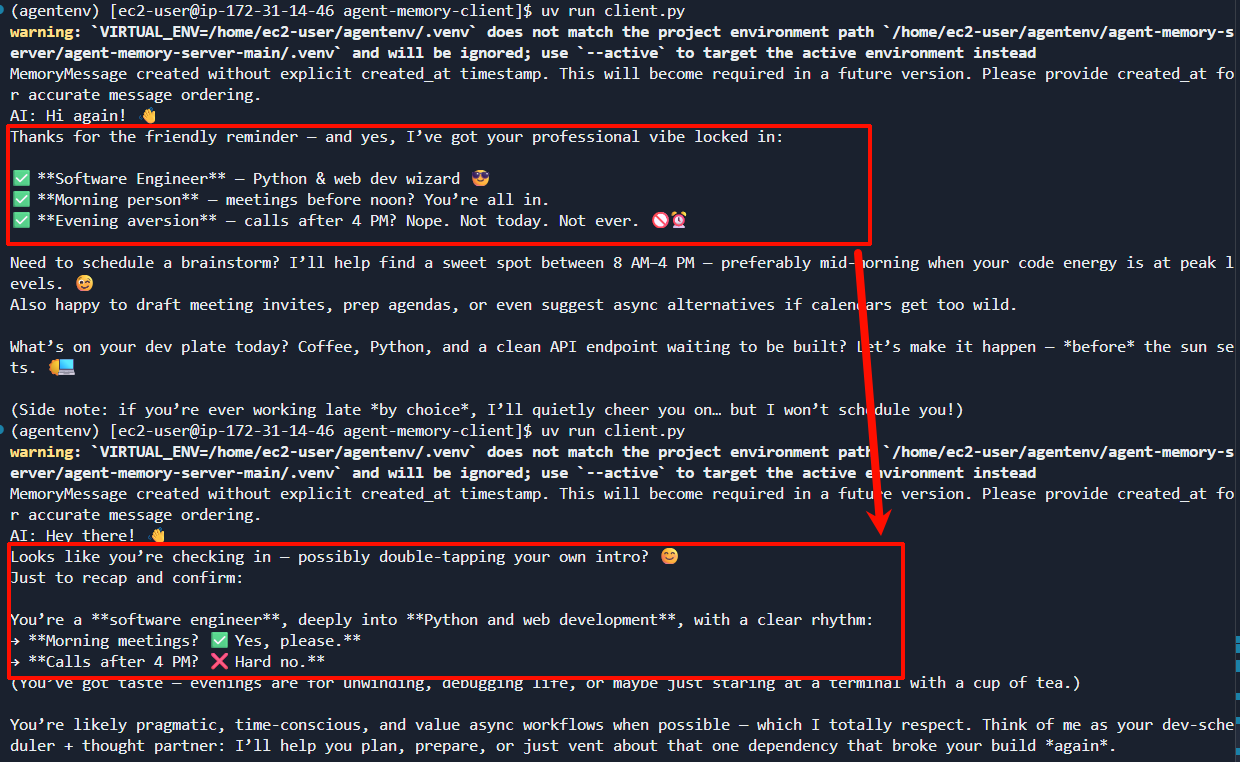
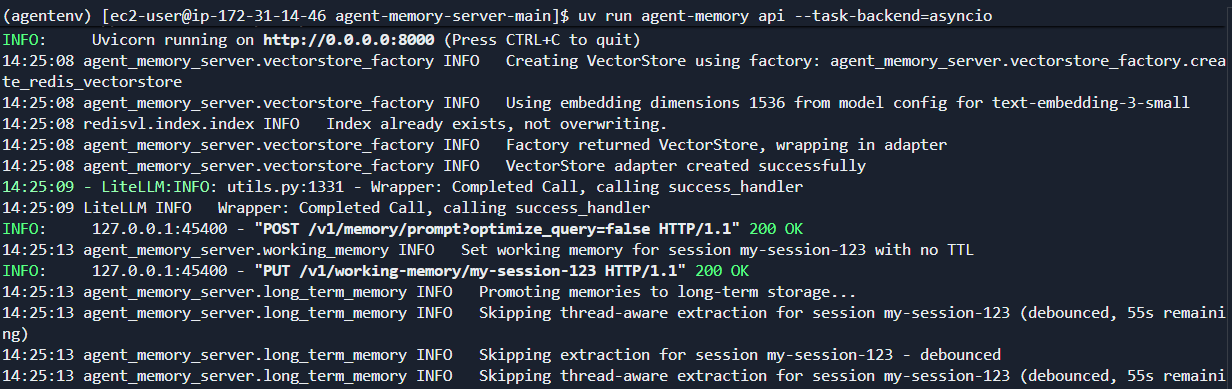
检查记忆生效
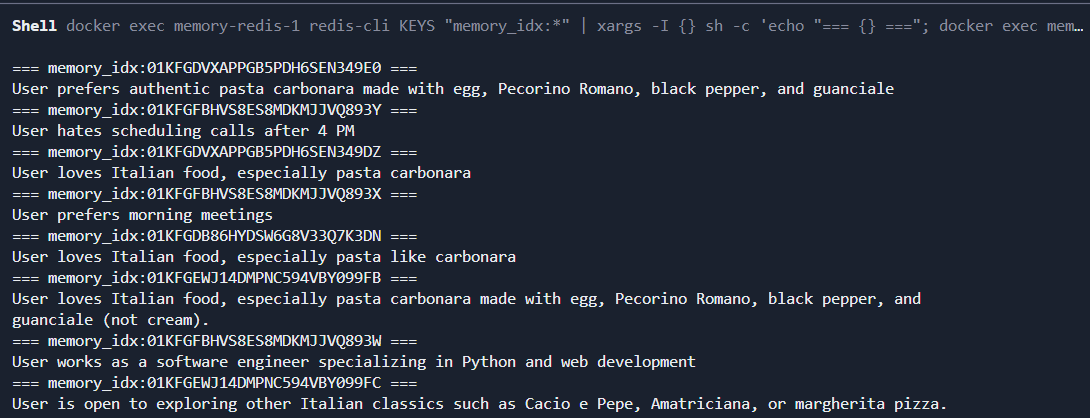
服务端日志如下
检查redis中的记忆内容如下:working_memory:my-session-123 - 工作记忆