我们经常会遇到几个颜色场景:
- 使用颜色,尤其是figma,经常需要计算百分比;
- 我们经常需要选择满意的颜色,不太知道当前的RGB值或者HEX值;
- 通过颜色取色器,比如系统自带的或者飞书带的,只知道其中一种;
- 有时候想把ARGB转成一个类似的不带透明度的颜色值,那么就可以通过该工具后重新取色即可。
就是一个简单的html网页,保存后,使用浏览器打开: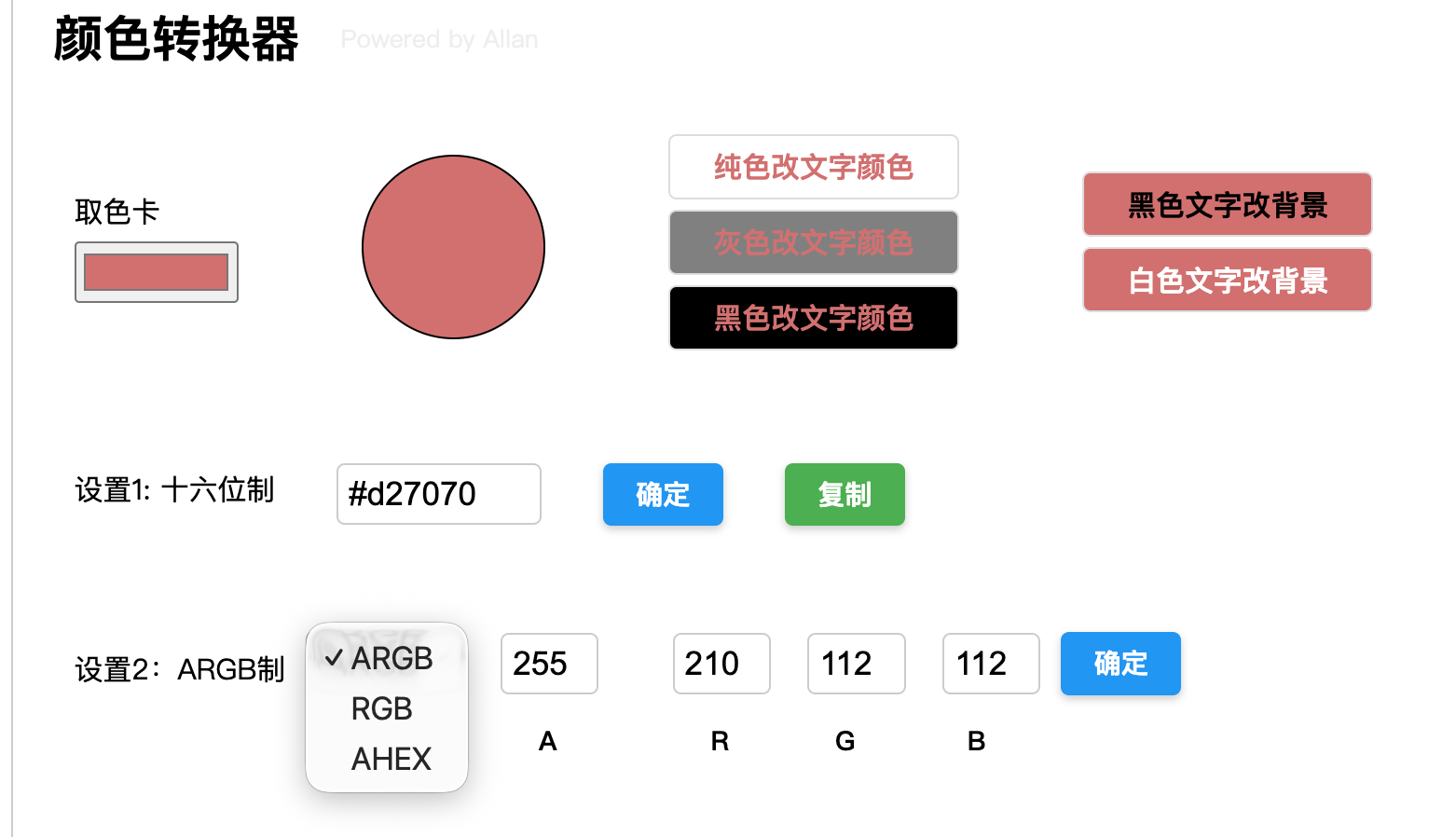 复制如下代码:
html
<!DOCTYPE html>
<html lang="zh-CN">
<head>
    <meta charset="UTF-8">
    <meta name="viewport" content="width=device-width, initial-scale=1.0">
    <title>颜色转换器</title>
    <style>
        body {
            font-family: sans-serif;
            padding: 20px;
        }
        .main-container {
            padding: 20px;
            border: 1px solid #ccc;
            border-radius: 4px;
            display: flex;
            flex-direction: column;
            gap: 20px;
            max-width: 800px;
        }
        .vbox {
            display: flex;
            flex-direction: column;
        }
        .hbox {
            display: flex;
            flex-direction: row;
            align-items: center;
            gap: 10px;
        }
        .title-label-big {
            font-size: 24px;
            font-weight: bold;
            margin-bottom: 10px;
        }
        .normal-label {
            font-size: 14px;
            margin-bottom: 5px;
        }
        /* Controls */
        input[type="color"] {
            width: 80px;
            height: 30px;
            cursor: pointer;
        }
        .circle {
            width: 88px; /* radius 44 * 2 */
            height: 88px;
            border-radius: 50%;
            border: 1px solid black;
            background-color: white;
            margin-left: 50px;
            transition: background-color 0.3s;
        }
        .stack-pane {
            display: flex;
            align-items: center;
            justify-content: center;
            width: 140px;
            height: 30px;
            margin-bottom: 5px;
            border: 1px solid #ddd;
            border-radius: 4px;
        }
        .white-bg { background-color: white; }
        .gray-bg { background-color: #808080; }
        .black-bg { background-color: black; }

        .title-label-big-bold {
            font-weight: bold;
            font-size: 14px;
        }
        .white-bg .title-label-big-bold { color: black; }
        .gray-bg .title-label-big-bold { color: white; }
        .black-bg .title-label-big-bold { color: white; }

        /* Standard Inputs */
        input[type="text"] {
            padding: 5px;
            border: 1px solid #ccc;
            border-radius: 4px;
            font-size: 16px;
            outline: none;
            transition: border-color 0.2s;
        }
        input[type="text"]:focus {
            border-color: #2196F3;
        }

        button {
            padding: 6px 16px;
            cursor: pointer;
            background-color: #2196F3;
            color: white;
            border: none;
            border-radius: 4px;
            font-weight: bold;
            box-shadow: 0 2px 4px rgba(0,0,0,0.2);
            transition: background-color 0.2s, box-shadow 0.2s;
        }
        button:hover {
            background-color: #1976D2;
            box-shadow: 0 4px 8px rgba(0,0,0,0.2);
        }
        button:active {
            box-shadow: 0 1px 2px rgba(0,0,0,0.2);
            transform: translateY(1px);
        }

        .copy-btn {
            background-color: #4CAF50; /* Green */
        }
        .copy-btn:hover {
            background-color: #45a049;
        }

        select {
            padding: 5px;
            border: 1px solid #ccc;
            border-radius: 4px;
            outline: none;
            font-size: 16px;
        }

        /* Margins helpers */
        .ml-20 { margin-left: 20px; }
        .ml-50 { margin-left: 50px; }
        .mt-30 { margin-top: 30px; }

        .powered-by {
            font-size: 12px;
            color: #eeeeee;
            margin-left: 10px; /* Gap after title */
            align-self: flex-end; /* Align bottom */
            margin-bottom: 8px; /* Fine tune vertical alignment */
        }
    </style>
</head>
<body>

<div class="main-container">
    <div class="hbox" style="align-items: flex-end;">
        <div class="title-label-big" style="margin-bottom: 0;">颜色转换器</div>
        <div class="powered-by">Powered by Allan</div>
    </div>

    <!-- HBox 1: 取色卡 -->
    <div class="hbox" style="margin-top: 10px; margin-left: 10px;">
        <div class="vbox">
            <span class="normal-label">取色卡</span>
            <input type="color" id="colorPicker" value="#ffffff">
        </div>

        <div id="circle" class="circle"></div>

        <div class="vbox ml-50">
            <div class="stack-pane white-bg">
                <span id="exampleLabel" class="title-label-big-bold">纯色改文字颜色</span>
            </div>
            <div class="stack-pane gray-bg">
                <span id="exampleLabel2" class="title-label-big-bold">灰色改文字颜色</span>
            </div>
            <div class="stack-pane black-bg">
                <span id="exampleLabel3" class="title-label-big-bold">黑色改文字颜色</span>
            </div>
        </div>

        <div class="vbox ml-50">
            <div id="exampleBg1" class="stack-pane">
                <span class="title-label-big-bold" style="color: black;">黑色文字改背景</span>
            </div>
            <div id="exampleBg2" class="stack-pane">
                <span class="title-label-big-bold" style="color: white;">白色文字改背景</span>
            </div>
        </div>
    </div>

    <!-- HBox 2: 设置1 -->
    <div class="hbox mt-30" style="margin-left: 10px;">
        <span class="normal-label">设置1: 十六位制</span>
        <input type="text" id="hexColorInput" class="ml-20" style="width: 88px;">
        <button id="enterForHexBtn" class="ml-20">确定</button>
        <button id="copyHexBtn" class="ml-20 copy-btn">复制</button>
    </div>

    <!-- HBox 3: 设置2 -->
    <div class="hbox mt-30" style="margin-left: 10px;">
        <span class="normal-label" style="margin-top: 10px;">设置2:ARGB制</span>

        <select id="chooseAlphaModeCombo" style="width: 77px;">
            <option value="ARGB">ARGB</option>
            <option value="RGB">RGB</option>
            <option value="AHEX">AHEX</option>
        </select>

        <div class="vbox" style="margin-left: 8px;">
            <input type="text" id="sA" style="width: 36px; display: none;">
        </div>

        <div class="vbox" style="margin-left: 8px;">
            <input type="text" id="fHex" style="width: 80px; display: none;">
        </div>

        <div id="boxR" class="vbox" style="margin-left: 8px;">
            <input type="text" id="fR" style="width: 36px;">
        </div>

        <div id="boxG" class="vbox" style="margin-left: 8px;">
            <input type="text" id="fG" style="width: 36px;">
        </div>

        <div id="boxB" class="vbox" style="margin-left: 8px;">
            <input type="text" id="fB" style="width: 36px;">
        </div>

        <button id="enterForRGBBtn">确定</button>
    </div>

    <!-- HBox 4: 标签行 -->
    <div class="hbox" style="margin-left: 10px; margin-top: -12px;">
        <span style="width: 195px;"></span> <!-- Spacer for label + combo (77+8+20 = 105) -->

        <div style="width: 36px; text-align: center; margin-left: 8px;">
            <span id="fALabel" class="normal-label" style="display: none; font-size: 13px; font-weight: bold;">A</span>
        </div>

        <div style="width: 80px; text-align: center; margin-left: 8px;">
            <span id="fHexLabel" class="normal-label" style="display: none; font-size: 13px; font-weight: bold;">Hex</span>
        </div>

        <div id="labelR" style="width: 36px; text-align: center; margin-left: 38px;">
            <span class="normal-label" style="font-size: 13px; font-weight: bold;">R</span>
        </div>

        <div id="labelG" style="width: 36px; text-align: center; margin-left: 15px;">
            <span class="normal-label" style="font-size: 13px; font-weight: bold;">G</span>
        </div>

        <div id="labelB" style="width: 36px; text-align: center; margin-left: 18px;">
            <span class="normal-label" style="font-size: 13px; font-weight: bold;">B</span>
        </div>
    </div>

    <span id="errorInfo" class="normal-label" style="color: red;"></span>
</div>

<script>
    // 简单的交互逻辑:颜色选择器改变圆的颜色
    const colorPicker = document.getElementById('colorPicker');
    const circle = document.getElementById('circle');
    const hexInput = document.getElementById('hexColorInput');

    // 文本元素(修改文字颜色)
    const exampleLabel = document.getElementById('exampleLabel');
    const exampleLabel2 = document.getElementById('exampleLabel2');
    const exampleLabel3 = document.getElementById('exampleLabel3');

    // 背景元素(修改背景颜色)
    const exampleBg1 = document.getElementById('exampleBg1');
    const exampleBg2 = document.getElementById('exampleBg2');

    // 预览更新函数:仅更新圆、文本和背景颜色,不更新输入框
    function applyPreviewColors(color) {
        circle.style.backgroundColor = color;

        // 更新前3个文本的文字颜色
        exampleLabel.style.color = color;
        exampleLabel2.style.color = color;
        exampleLabel3.style.color = color;

        // 更新后2个文本的背景颜色
        exampleBg1.style.backgroundColor = color;
        exampleBg2.style.backgroundColor = color;
    }

    // 原始 updateColors 保留给取色器使用(会更新输入框)
    function updateColors(color) {
        applyPreviewColors(color);
        hexInput.value = color;

        // 同步填充设置2的所有输入框
        // color 格式为 #RRGGBB
        const r = parseInt(color.substring(1, 3), 16);
        const g = parseInt(color.substring(3, 5), 16);
        const b = parseInt(color.substring(5, 7), 16);
        const a = 255;

        document.getElementById('fR').value = r;
        document.getElementById('fG').value = g;
        document.getElementById('fB').value = b;
        document.getElementById('sA').value = a;

        // 同步 Hex 输入框 (AHEX 模式用)
        const toHex = (n) => {
            const h = n.toString(16).toUpperCase();
            return h.length === 1 ? '0' + h : h;
        };
        document.getElementById('fHex').value = toHex(r) + toHex(g) + toHex(b);
    }

    colorPicker.addEventListener('input', (e) => {
        updateColors(e.target.value);
    });

    // 示例:十六进制输入改变颜色
    document.getElementById('enterForHexBtn').addEventListener('click', () => {
        let hex = hexInput.value.trim();
        if (hex.startsWith('#')) {
            hex = hex.substring(1);
        }

        let r, g, b, a = 255;
        let valid = false;

        // 正则校验:6位 hex (RRGGBB) 或 8位 hex (AARRGGBB)
        if (/^[0-9A-Fa-f]{6}$/.test(hex)) {
            r = parseInt(hex.substring(0, 2), 16);
            g = parseInt(hex.substring(2, 4), 16);
            b = parseInt(hex.substring(4, 6), 16);
            valid = true;
        } else if (/^[0-9A-Fa-f]{8}$/.test(hex)) {
            // Android 格式:AARRGGBB
            a = parseInt(hex.substring(0, 2), 16);
            r = parseInt(hex.substring(2, 4), 16);
            g = parseInt(hex.substring(4, 6), 16);
            b = parseInt(hex.substring(6, 8), 16);
            valid = true;
        }

        if (valid) {
            // 1. 联动预览 (使用 CSS rgba)
            const cssColor = `rgba(${r}, ${g}, ${b}, ${a / 255})`;
            applyPreviewColors(cssColor);

            // 2. 联动取色卡 (仅 RGB,格式 #RRGGBB)
            // 辅助函数:转 hex 补 0
            const toHex = (n) => {
                const h = n.toString(16);
                return h.length === 1 ? '0' + h : h;
            };
            colorPicker.value = '#' + toHex(r) + toHex(g) + toHex(b);

            // 3. 填充设置2
            document.getElementById('fR').value = r;
            document.getElementById('fG').value = g;
            document.getElementById('fB').value = b;

            // 如果当前模式是 ARGB,则填充 A;否则仅在内存中保留(这里直接填充即可,反正隐藏了也不影响)
            document.getElementById('sA').value = a;

            // 补充:填充 AHEX 模式的 Hex 输入框
            document.getElementById('fHex').value = toHex(r) + toHex(g) + toHex(b);

        } else {
            alert('请输入有效的十六进制颜色代码!\n格式支持:RRGGBB 或 AARRGGBB (例如 #FFFFFF 或 FF800000)');
        }
    });

    // 复制按钮点击逻辑
    document.getElementById('copyHexBtn').addEventListener('click', () => {
        const hex = hexInput.value.trim();
        if (hex) {
            navigator.clipboard.writeText(hex).then(() => {
                alert('已复制到剪贴板: ' + hex);
            }).catch(err => {
                console.error('无法复制文本: ', err);
                // 降级处理
                const tempInput = document.createElement('input');
                tempInput.value = hex;
                document.body.appendChild(tempInput);
                tempInput.select();
                document.execCommand('copy');
                document.body.removeChild(tempInput);
                alert('已复制到剪贴板: ' + hex);
            });
        } else {
            alert('没有内容可复制');
        }
    });

    // 示例:ARGB/RGB 切换显示
    const combo = document.getElementById('chooseAlphaModeCombo');
    const sA = document.getElementById('sA');
    const fALabel = document.getElementById('fALabel');

    // AHEX模式相关元素
    const fHex = document.getElementById('fHex');
    const fHexLabel = document.getElementById('fHexLabel').parentElement; // Parent div
    const boxR = document.getElementById('boxR');
    const boxG = document.getElementById('boxG');
    const boxB = document.getElementById('boxB');
    const labelR = document.getElementById('labelR');
    const labelG = document.getElementById('labelG');
    const labelB = document.getElementById('labelB');
    const labelA = document.getElementById('fALabel').parentElement; // Parent div

    combo.addEventListener('change', (e) => {
        const val = e.target.value;
        // 重置所有显示
        sA.style.display = 'none';
        labelA.style.display = 'none';
        fHex.style.display = 'none';
        fHexLabel.style.display = 'none';

        boxR.style.display = 'flex';
        boxG.style.display = 'flex';
        boxB.style.display = 'flex';
        labelR.style.display = 'block';
        labelG.style.display = 'block';
        labelB.style.display = 'block';

        if (val === 'ARGB') {
            sA.style.display = 'block';
            labelA.style.display = 'block';
            document.getElementById('fALabel').style.display = 'inline'; // Ensure text is visible
        } else if (val === 'AHEX') {
            // AHEX模式:显示 A 和 Hex,隐藏 RGB
            sA.style.display = 'block';
            labelA.style.display = 'block';
            document.getElementById('fALabel').style.display = 'inline';

            fHex.style.display = 'block';
            fHexLabel.style.display = 'block';
            document.getElementById('fHexLabel').style.display = 'inline';

            boxR.style.display = 'none';
            boxG.style.display = 'none';
            boxB.style.display = 'none';
            labelR.style.display = 'none';
            labelG.style.display = 'none';
            labelB.style.display = 'none';
        }
    });

    // 初始化触发一次以隐藏A
    combo.dispatchEvent(new Event('change'));

    // 设置2(ARGB/RGB)确定按钮点击逻辑
    document.getElementById('enterForRGBBtn').addEventListener('click', () => {
        const mode = document.getElementById('chooseAlphaModeCombo').value;
        const rStr = document.getElementById('fR').value.trim();
        const gStr = document.getElementById('fG').value.trim();
        const bStr = document.getElementById('fB').value.trim();
        let aStr = document.getElementById('sA').value.trim();

        let r, g, b, a = 255;
        const toHex = (n) => {
            const h = n.toString(16).toUpperCase();
            return h.length === 1 ? '0' + h : h;
        };
        const isValid = (n) => !isNaN(n) && n >= 0 && n <= 255;

        // 辅助函数:处理 Alpha 输入(支持百分比)
        // 返回 [value, isPercent]
        // 如果是百分比,解析为 0-255 并返回
        // 如果是普通数值,解析为 0-255 并返回
        // 如果无效,返回 null
        const parseAlpha = (str) => {
            str = str.trim();
            if (str.endsWith('%')) {
                const p = parseFloat(str.substring(0, str.length - 1));
                if (isNaN(p) || p < 0 || p > 100) return null;
                return Math.round((p / 100) * 255);
            } else {
                const n = parseInt(str, 10);
                if (isNaN(n) || n < 0 || n > 255) return null;
                return n;
            }
        };

        // AHEX 模式处理
        if (mode === 'AHEX') {
            const hexStr = document.getElementById('fHex').value.trim();

            if (!aStr || !hexStr) {
                return; // 任意为空不工作
            }

            // 校验 A (支持百分比)
            const parsedA = parseAlpha(aStr);
            if (parsedA === null) {
                alert('Alpha数值必须在 0-255 之间,或 0%-100%');
                return;
            }
            a = parsedA;
            // 将转换后的 A 填回去(如果是百分比输入,转成 0-255)
            document.getElementById('sA').value = a;

            // 校验 Hex (#RRGGBB 或 RRGGBB)
            let cleanHex = hexStr;
            if (cleanHex.startsWith('#')) {
                cleanHex = cleanHex.substring(1);
            }
            if (!/^[0-9A-Fa-f]{6}$/.test(cleanHex)) {
                alert('Hex必须是 RRGGBB 格式 (例如 #FF0000)');
                return;
            }

            r = parseInt(cleanHex.substring(0, 2), 16);
            g = parseInt(cleanHex.substring(2, 4), 16);
            b = parseInt(cleanHex.substring(4, 6), 16);

            // 填充其他输入框以便切换模式时数据同步 (可选)
            document.getElementById('fR').value = r;
            document.getElementById('fG').value = g;
            document.getElementById('fB').value = b;

        } else {
            // ARGB / RGB 模式处理
            // 基础非空校验
            if (!rStr || !gStr || !bStr) {
                return; // 任意为空不工作
            }
            if (mode === 'ARGB' && !aStr) {
                return; // ARGB模式下A为空也不工作
            }

            // 解析数值
            r = parseInt(rStr, 10);
            g = parseInt(gStr, 10);
            b = parseInt(bStr, 10);

            // 数值范围校验 (0-255)
            if (!isValid(r) || !isValid(g) || !isValid(b)) {
                alert('RGB数值必须在 0-255 之间');
                return;
            }

            if (mode === 'ARGB') {
                const parsedA = parseAlpha(aStr);
                if (parsedA === null) {
                    alert('Alpha数值必须在 0-255 之间,或 0%-100%');
                    return;
                }
                a = parsedA;
                // 将转换后的 A 填回去
                document.getElementById('sA').value = a;
            }
        }

        // 1. 联动预览
        const cssColor = `rgba(${r}, ${g}, ${b}, ${a / 255})`;
        applyPreviewColors(cssColor);

        // 2. 联动取色卡 (仅 RGB)
        colorPicker.value = '#' + toHex(r) + toHex(g) + toHex(b);

        // 3. 反向填充设置1 (#AARRGGBB 或 #RRGGBB)
        // 注意:AHEX模式最终也是输出 AARRGGBB 格式到设置1
        if (mode === 'ARGB' || mode === 'AHEX') {
            hexInput.value = '#' + toHex(a) + toHex(r) + toHex(g) + toHex(b);
        } else {
            hexInput.value = '#' + toHex(r) + toHex(g) + toHex(b);
        }
    });
</script>

</body>
</html>