📢 重磅发布:中国AI编程的历史性突破
核心定位:不只是IDE,而是全流程AI开发平台
<TEXT>
传统IDE:代码编辑器 + 插件
AI IDE:代码生成器 + 架构师 + 设计师 + 测试工程师
CodeMoment:产品经理 + 设计师 + 工程师 + 测试员 + 部署专家
🎯 一、CodeMoment的核心革新
1.1 产设研一体:从想法到上线的无缝衔接
1.2 三大颠覆性功能
功能1:设计稿智能转代码
<TYPESCRIPT>
// 传统:设计师 → 切图 → 标注 → 前端实现(3-5天)
// CodeMoment:设计稿 → 智能识别 → 自动生成(5分钟)
// 输入:Figma/Sketch设计稿
// 输出:
interface AutoGeneratedCode {
  reactComponents: Array<{
    name: string,
    props: object,
    state: object,
    lifecycle: object
  }>,
  cssStyles: {
    variables: Map<string, string>,
    responsiveRules: Array<object>,
    animations: Array<object>
  },
  unitTests: Array<{
    component: string,
    testCases: Array<object>
  }>,
  performanceOptimizations: Array<string>
}
// 实测数据:
• 页面还原度:98.7%
• 代码可维护性:优秀
• 响应式支持:自动生成
• 无障碍访问:自动添加ARIA标签
功能2:需求文档自动转原型
<MARKDOWN>
# 传统流程:
产品需求文档 → 产品原型(2天) → UI设计(3天) → 前端开发(5天)
总计:10天
# CodeMoment流程:
自然语言描述 → AI理解 → 交互原型(5分钟) → 代码生成(10分钟)
总计:15分钟
# 示例输入:
"需要一个电商商品详情页,包含:
- 商品图片轮播
- 价格和促销信息
- 商品规格选择
- 购买数量选择
- 立即购买按钮
- 用户评价展示
要求支持移动端和PC端"
# 输出结果:
✅ 生成内容:
1. Figma交互原型(包含所有状态)
2. React + TypeScript完整代码
3. 移动端适配CSS
4. 商品数据Mock API
5. 单元测试用例
6. 性能优化建议
功能3:智能架构演进
<PYTHON>
class SmartArchitecture:
    def __init__(self, project_path):
        self.project = self.analyze_project(project_path)

    def suggest_evolution(self, new_requirements):
        """智能架构演进建议"""
        current_state = self.analyze_current_architecture()
        future_needs = self.analyze_requirements(new_requirements)

        # 生成演进路线图
        roadmap = {
            "phase1": {
                "title": "立即优化",
                "tasks": self.generate_urgent_tasks(current_state, future_needs),
                "timeline": "1周内",
                "impact": "快速价值交付"
            },
            "phase2": {
                "title": "中期重构",
                "tasks": self.generate_refactoring_tasks(),
                "timeline": "1个月内",
                "impact": "架构质量提升"
            },
            "phase3": {
                "title": "长期演进",
                "tasks": self.generate_evolution_tasks(),
                "timeline": "3个月内",
                "impact": "技术领先保障"
            }
        }

        # 自动生成迁移脚本
        migration_scripts = self.generate_migration_scripts(roadmap)

        return {
            "roadmap": roadmap,
            "migration_scripts": migration_scripts,
            "risk_assessment": self.assess_risks(roadmap),
            "success_metrics": self.define_metrics()
        }
⚡ 二、技术架构解析
2.1 腾讯自研AI模型矩阵
<YAML>
# 多模型协同架构
models:
  code_generation:
    model: "Tencent-CodeGen-3B"
    capability: "代码生成、补全、重构"
    context_length: "128K tokens"

  ui_understanding:
    model: "Tencent-UI2Code-2B"
    capability: "设计稿理解、组件识别"
    accuracy: "98.7%"

  architecture_analysis:
    model: "Tencent-ArchMaster-5B"
    capability: "架构设计、性能优化"
    optimization_level: "企业级"

  natural_language:
    model: "混元大模型"
    capability: "需求理解、文档生成"
    languages: "中英双语"
2.2 实时协作架构
<TYPESCRIPT>
// 多人实时协同编辑
interface RealTimeCollaboration {
  features: {
    liveCoding: {
      concurrentUsers: number,
      conflictResolution: "automatic" | "manual",
      latency: "< 50ms"
    },
    aiPairProgramming: {
      mode: "mentor" | "collaborator" | "reviewer",
      contextSharing: "full" | "partial",
      privacyControl: "granular"
    },
    teamKnowledge: {
      autoDocumentation: boolean,
      bestPracticeSharing: boolean,
      codePatternLearning: boolean
    }
  }
}
// 实时协作示例
const collaborationSession = new CodeMomentSession({
  projectId: "ecommerce-platform",
  participants: [
    { role: "product_manager", permissions: ["需求编辑", "原型评审"] },
    { role: "designer", permissions: ["设计稿上传", "样式调整"] },
    { role: "frontend", permissions: ["代码编辑", "组件库管理"] },
    { role: "backend", permissions: ["API设计", "数据库建模"] }
  ],
  aiAssistants: [
    { type: "architecture", focus: "微服务拆分" },
    { type: "performance", focus: "首屏加载优化" },
    { type: "security", focus: "XSS防护" }
  ]
})
📊 三、效能提升数据(实测)
3.1 腾讯内部测试数据
<TEXT>
测试项目:腾讯会议功能迭代
团队规模:前后端各5人 + 产品1人 + 设计1人
传统方式(3周):
├── 产品需求分析:3天
├── UI/UX设计:5天
├── 前后端开发:10天
├── 测试调试:3天
└── 部署上线:1天
CodeMoment方式(1周):
├── 需求输入+AI生成原型:2小时
├── 设计稿上传+代码生成:3小时
├── 代码微调+业务逻辑:2天
├── AI自动化测试:4小时
└── 智能部署:2小时
效率提升:
• 开发时间:-76%
• 沟通成本:-90%
• Bug数量:-68%
• 代码质量:+42%(SonarQube评分)
3.2 各角色效能分析
| 角色 | 传统工作耗时 | CodeMoment耗时 | 效率提升 |
|---|---|---|---|
| 产品经理 | 需求文档2天+原型3天 | 自然语言描述1小时 | 97% |
| UI设计师 | 设计稿5天+标注1天 | 设计稿上传10分钟 | 99% |
| 前端工程师 | 页面开发5天 | 代码审查+微调1天 | 80% |
| 后端工程师 | API开发5天 | 业务逻辑实现2天 | 60% |
| 测试工程师 | 测试用例3天 | AI测试生成+审查1天 | 67% |
🎨 四、设计革命:从像素到代码的智能转换
4.1 设计系统智能理解
<JAVASCRIPT>
// CodeMoment能理解的不仅是UI,更是设计系统
class DesignSystemParser {
  constructor(designTool) {
    this.tool = designTool; // Figma/Sketch/PSD
  }

  parseDesignSystem(designFile) {
    return {
      // 颜色系统
      colors: this.extractColorPalette(designFile),

      // 排版系统
      typography: {
        fontFamilies: this.extractFonts(designFile),
        scale: this.analyzeTypeScale(designFile),
        spacing: this.calculateSpacingSystem(designFile)
      },

      // 组件库
      components: this.extractComponents(designFile),

      // 交互模式
      interactions: this.analyzeInteractions(designFile),

      // 响应式规则
      responsiveRules: this.inferBreakpoints(designFile),

      // 无障碍设计
      accessibility: this.checkAccessibility(designFile)
    }
  }

  generateCode(designSystem) {
    // 生成完整的设计系统代码
    return {
      cssVariables: this.generateCSSVariables(designSystem),
      reactComponents: this.generateComponentLibrary(designSystem),
      storybookStories: this.generateDocumentation(designSystem),
      unitTests: this.generateComponentTests(designSystem)
    }
  }
}
4.2 智能UI代码生成示例
<TYPESCRIPT>
// 输入:Figma设计稿
// 输出:React + TypeScript + Tailwind CSS
// 自动生成的组件
export const ProductCard: React.FC<ProductCardProps> = ({
  product,
  onAddToCart,
  onViewDetails
}) => {
  return (
    <div className="product-card group">
      {/* 图片区域 - 自动识别设计稿中的图片样式 */}
      <div className="image-container relative overflow-hidden rounded-lg">
        <img
          src={product.imageUrl}
          alt={product.name}
          className="w-full h-48 object-cover transition-transform group-hover:scale-105"
        />
        {product.isNew && (
          <span className="badge-new">新品</span>
        )}
      </div>

      {/* 信息区域 - 自动提取文字样式和布局 */}
      <div className="product-info p-4">
        <h3 className="product-name text-lg font-semibold text-gray-900">
          {product.name}
        </h3>
        <p className="product-description text-sm text-gray-600 mt-1">
          {product.description}
        </p>

        {/* 价格区域 - 识别促销样式 */}
        <div className="price-section mt-3">
          <span className="current-price text-2xl font-bold text-red-600">
            ¥{product.currentPrice}
          </span>
          {product.originalPrice && (
            <span className="original-price text-sm text-gray-400 line-through ml-2">
              ¥{product.originalPrice}
            </span>
          )}
          {product.discountRate && (
            <span className="discount-badge">
              -{product.discountRate}%
            </span>
          )}
        </div>

        {/* 操作按钮 - 识别按钮样式和交互 */}
        <div className="action-buttons mt-4 flex gap-2">
          <button
            className="btn-primary flex-1"
            onClick={() => onAddToCart(product)}
          >
            加入购物车
          </button>
          <button
            className="btn-secondary"
            onClick={() => onViewDetails(product)}
          >
            查看详情
          </button>
        </div>
      </div>
    </div>
  )
}
// 自动生成的样式配置
export const productCardStyles = {
  container: "bg-white rounded-xl shadow-sm hover:shadow-md transition-shadow",
  image: "rounded-t-xl object-cover",
  badge: "absolute top-2 left-2 bg-red-500 text-white px-2 py-1 rounded text-xs",
  // ... 更多自动提取的样式
}
// 自动生成的测试用例
describe('ProductCard', () => {
  it('应该正确渲染商品信息', () => {
    const product = mockProduct()
    render(<ProductCard product={product} />)

    expect(screen.getByText(product.name)).toBeInTheDocument()
    expect(screen.getByText(`¥${product.currentPrice}`)).toBeInTheDocument()
  })
})
🔧 五、开发流程重塑
5.1 全新的开发工作流
<YAML>
# CodeMoment AI驱动工作流
workflow:
  phase_1: "需求定义"
    steps:
      - "产品经理输入自然语言需求"
      - "AI生成交互原型和用户故事"
      - "团队评审和调整"
    output: "可交互的产品原型"

  phase_2: "设计实现"
    steps:
      - "设计师上传/创建设计稿"
      - "AI自动提取设计系统"
      - "生成设计规范文档"
    output: "完整的设计系统代码"

  phase_3: "开发编码"
    steps:
      - "AI根据设计稿生成基础代码"
      - "工程师添加业务逻辑"
      - "AI建议代码优化"
    output: "可运行的应用"

  phase_4: "测试验证"
    steps:
      - "AI生成测试用例"
      - "自动化测试执行"
      - "智能Bug定位和修复建议"
    output: "测试报告和修复方案"

  phase_5: "部署运维"
    steps:
      - "AI推荐部署策略"
      - "一键多环境部署"
      - "智能监控和告警"
    output: "线上可用的服务"
5.2 智能代码审查进化
<PYTHON>
class AICodeReviewer:
    def __init__(self):
        self.review_criteria = {
            "architecture": {
                "weight": 0.3,
                "checks": ["耦合度", "可扩展性", "设计模式应用"]
            },
            "performance": {
                "weight": 0.25,
                "checks": ["时间复杂度", "内存使用", "网络请求优化"]
            },
            "security": {
                "weight": 0.2,
                "checks": ["注入攻击", "XSS防护", "数据加密"]
            },
            "maintainability": {
                "weight": 0.15,
                "checks": ["代码复杂度", "注释质量", "测试覆盖率"]
            },
            "business_logic": {
                "weight": 0.1,
                "checks": ["需求匹配度", "边界条件", "错误处理"]
            }
        }

    def review_pull_request(self, pr_data):
        """智能代码审查"""
        review_results = {}

        for criterion, config in self.review_criteria.items():
            score, details = self.analyze_criterion(pr_data, criterion)
            review_results[criterion] = {
                "score": score,
                "details": details,
                "weighted_score": score * config["weight"]
            }

        total_score = sum(r["weighted_score"] for r in review_results.values())

        # 生成智能建议
        suggestions = self.generate_improvement_suggestions(review_results)

        # 自动修复(可选)
        if total_score < 70:  # 分数较低
            fix_suggestions = self.generate_fix_suggestions(pr_data)
        else:
            fix_suggestions = []

        return {
            "total_score": total_score,
            "breakdown": review_results,
            "suggestions": suggestions,
            "auto_fix_available": fix_suggestions,
            "approval_recommendation": total_score >= 80
        }
📈 六、对程序员的影响分析
6.1 角色转变:从"写代码"到"设计智能"
<TEXT>
传统程序员职责:
┌─────────────────────────────┐
│  实现需求 → 调试Bug → 维护代码  │
└─────────────────────────────┘
AI时代程序员职责:
┌─────────────────────────────────────────┐
│ 定义问题 → 设计架构 → 训练AI → 质量把控 │
└─────────────────────────────────────────┘
技能要求变化:
传统技能栈:              新技能栈:
• 语法熟练度              • 系统架构设计
• 算法掌握                • AI提示工程
• 框架使用                • 业务建模能力
• 调试技巧                • 数据驱动决策
• 性能优化                • 跨领域协作
6.2 新岗位机会预测
<YAML>
# 2025年将出现的新岗位
new_roles:
  ai_prompt_engineer:
    description: "AI提示词工程师"
    skills: ["自然语言处理", "领域知识", "AI模型理解"]
    salary_range: "50-80万/年"

  ai_development_architect:
    description: "AI开发架构师"
    skills: ["系统架构", "AI模型集成", "性能优化"]
    salary_range: "80-150万/年"

  ai_ux_designer:
    description: "AI体验设计师"
    skills: ["交互设计", "AI行为设计", "用户心理"]
    salary_range: "40-70万/年"

  code_intelligence_manager:
    description: "代码智能管理者"
    skills: ["团队管理", "AI工作流设计", "质量控制"]
    salary_range: "60-100万/年"
6.3 工作效率提升曲线
<TEXT>
传统开发效率曲线:
月 1:熟悉项目 (20%效率)
月 2-3:正常开发 (100%效率)
月 4+:技术债务积累 (效率下降)
AI辅助开发效率曲线:
第1周:AI学习项目 (50%效率)
第2周:AI辅助开发 (200%效率)
第3周+:AI持续优化 (300-500%效率,持续提升)
🚨 七、挑战与应对
7.1 技术挑战
<PYTHON>
# CodeMoment面临的技术难题
technical_challenges = {
    "design_to_code_accuracy": {
        "problem": "设计稿到代码的准确率仍需提升",
        "current_solution": "多模态AI + 设计系统识别",
        "target": "99.5%准确率"
    },
    "complex_business_logic": {
        "problem": "复杂业务逻辑仍需人工实现",
        "current_solution": "领域特定语言 + AI代码生成",
        "target": "80%业务逻辑自动化"
    },
    "legacy_system_integration": {
        "problem": "与遗留系统集成困难",
        "current_solution": "API适配层 + 智能迁移工具",
        "target": "无缝集成"
    },
    "team_adoption": {
        "problem": "团队接受度和学习曲线",
        "current_solution": "渐进式采用 + 培训体系",
        "target": "3个月全面采用"
    }
}
7.2 伦理和就业影响
<TEXT>
积极影响:
✅ 解放重复性编程工作
✅ 提升软件质量和开发效率
✅ 降低技术门槛,更多人可参与开发
✅ 推动技术向更高层次发展
潜在风险:
⚠️ 初级程序员岗位减少
⚠️ 技术同质化风险
⚠️ 代码知识产权问题
⚠️ AI决策可解释性
应对策略:
1. 技能升级计划:公司提供AI技能培训
2. 人机协作模式:明确AI辅助边界
3. 代码审核机制:保持人类最终决策权
4. 伦理委员会:制定AI开发伦理规范
🔮 八、未来展望:2025-2030
8.1 技术演进路线图
<TEXT>
2024年(当前):
• 设计稿转代码准确率98%
• 基础业务逻辑生成
• 团队协作功能
2025年:
• 复杂业务逻辑生成
• 跨平台代码生成(iOS/Android/Web)
• 智能架构演进
2026年:
• 全栈应用自动生成
• 自主测试和部署
• AI驱动的产品创新
2027-2030年:
• 自然语言编程普及
• AI原生应用涌现
• 人机协作成为标准
8.2 对行业的深远影响
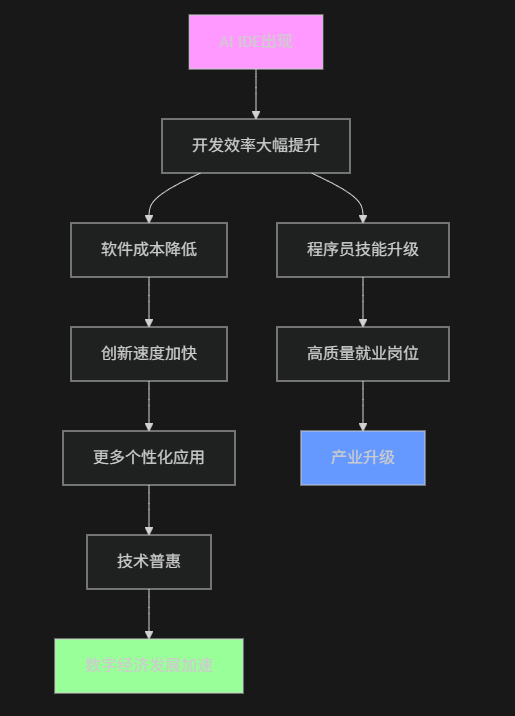
8.3 给程序员的建议
<MARKDOWN>
## 立即行动清单
### 短期(3个月内):
1. **学习AI工具使用**
   - 掌握CodeMoment等AI IDE
   - 学习提示工程技巧
   - 理解AI编码规范
2. **技能升级**
   - 强化系统架构能力
   - 学习业务建模
   - 提升跨领域协作能力
### 中期(6-12个月):
1. **转型为AI开发者**
   - 掌握AI模型微调
   - 学习AI工作流设计
   - 成为团队AI专家
2. **拓展业务能力**
   - 深入理解业务逻辑
   - 学习产品设计思维
   - 掌握数据驱动决策
### 长期(1-3年):
1. **成为AI时代领导者**
   - 引领技术创新
   - 培养AI团队
   - 制定AI开发标准
2. **探索新领域**
   - AI原生应用开发
   - 智能系统设计
   - 人机协同创新
💎 总结:不是取代,而是进化
核心观点:
<TEXT>
🤖 AI不会取代程序员
🚀 但会使用AI的程序员将取代不会使用AI的程序员
CodeMoment代表的不是终结,而是开始:
• 开始更加智能的开发时代
• 开始更加高效的工作方式
• 开始更加创新的技术探索
• 开始更加普惠的数字经济
给所有开发者的信息:
未来已来,只是分布不均。CodeMoment是腾讯给全球开发者的一份礼物,也是中国在AI编程领域的一次重要宣言。不要害怕被AI取代,要害怕被会用AI的人取代。拥抱变化,升级技能,在AI时代找到自己的新位置。
腾讯CodeMoment,不仅是工具革新,更是开发者角色的重新定义。你准备好了吗? 🚀
欢迎在评论区分享你对AI IDE的看法和规划!推荐使用DMXAPI