【嵌入式linux学习】设备驱动 IO 控制原理
设备驱动 IO 控制原理
在内核3.0 以前, ioctI接口的名字叫ioctl;内核3.0以后, ioctl接口的名字叫unlocked_ioctl.unlocked_ioctl就是 ioctl接口,但是功能和对应的系统调用均没有发生变化。unlocked_ioctl和 read/write函数有什么异同呢﹖相同点:都可以往内核写数据。不同点: read函数只能完成读的功能,write 只能完成写的功能。读取大数据的时候效率高。ioctl 既可以读也可以写,读取大数据的时候效率不高。
我们现在有了ioctl函数,内核已经把工作的任务给我们区分了,定义命令就不再使用read和 write 函数了,而是使用ioctl函数,因为ioctl函数的任务就是对我们的工作参数进行设置和查询,write和 read函数专注于数据传输。
文章目录
- [【嵌入式linux学习】设备驱动 IO 控制原理](#【嵌入式linux学习】设备驱动 IO 控制原理)
ioctl 的 32 位
在 Linux 中,一个 ioctl 命令通常由 32 位(4字节)组成,被划分为四个字段。
c
第一个分区:0-7,命令的编号,范围是 0-255.
第二个分区:8-15,命令的幻数。
第一个分区和第二个分区主要作用是用来区分命令的。

第三个分区:16-29 表示传递的数据大小。
第四个分区:30-31 代表读写的方向。
00:表示用户程序和驱动程序没有数据传递
10:表示用户程序从驱动里面读数据
01:表示用户程序向驱动里面写数据
11:先写数据到驱动里面然后在从驱动里面把数据读出来。
合成宏:
c
_IO(type,nr):用来定义没有数据传递的命令
_IOR(type,nr,size):用来定义从驱动中读取数据的命令
_IOW(type,nr,size):用来定义向驱动写入数据的命令
_IOWR(type,nr,size) :用来定义数据交换类型的命令,先写入数据,再读取数据这类命令。
参数说明:
type:表示命令组成的魔数,也就是 8~15 位
nr:表示命令组成的编号,也就是 0~7 位
size:表示命令组成的参数传递大小,注意这里不是传递数字,而是数据类型,如要传递 4 字节,就可
以写成 int。分解宏:
c
_IOC_DIR(nr):分解命令的方向,也就是上面说 30~31 位的值
_IOC_TYPE(nr):分解命令的魔数,也就是上面说 8~15 位的值
_IOC_NR(nr):分解命令的编号,也就是上面说 0~7 位
_IOC_SIZE(nr):分解命令的复制数据大小,也就是上面说的 16~29 位

nr :要分解的命令
一般通用的位定义如下(不同架构略有不同,但通常遵循此逻辑):
| 位段 (Bit range) | 含义 (Meaning) | 宏 (Macro) | 解释 |
|---|---|---|---|
| 30-31 | 方向 (Direction) | _IOC_DIR |
读、写、或者无数据传输。 |
| 16-29 | 大小 (Size) | _IOC_SIZE |
传输数据类型的字节大小。 |
| 8-15 | 类型 (Type) | _IOC_TYPE |
驱动程序的"幻数"或标识符 (Magic Number)。 |
| 0-7 | 序号 (Nr) | _IOC_NR |
命令的序列号。 |
代码举例介绍
c
#include <stdio.h>
#include <sys/types.h>
#include <sys/stat.h>
#include <fcntl.h>
#include <unistd.h>
#include <sys/ioctl.h>
#define CMD_TEST0 _IO('L', 0)
#define CMD_TEST1 _IO('A', 1)
#define CMD_TEST2 _IOW('L', 2, int)
#define CMD_TEST3 _IOR('L', 3, int)

int main(int argc, char const *argv[])
{
    printf("30-31 is %d \n", _IOC_DIR(CMD_TEST0));
    printf("30-31 is %d \n", _IOC_DIR(CMD_TEST3));
    printf("7-15 is %c \n", _IOC_TYPE(CMD_TEST0));
    printf("7-15 is %c \n", _IOC_TYPE(CMD_TEST1));
    printf("0-7 is %d \n", _IOC_NR(CMD_TEST2));
    return 0;
}


/*
最后打印的部分:
30-31 is 0
30-31 is 2
7-15 is L
7-15 is A
0-7 is 2

*/
宏定义部分
这部分定义了四个不同的测试命令:
c
#define CMD_TEST0 _IO('L', 0)        // 定义一个无数据传输的命令,类型'L',序号0
#define CMD_TEST1 _IO('A', 1)        // 定义一个无数据传输的命令,类型'A',序号1
#define CMD_TEST2 _IOW('L', 2, int)  // 定义一个写(Write)命令,类型'L',序号2,数据是int
#define CMD_TEST3 _IOR('L', 3, int)  // 定义一个读(Read)命令,类型'L',序号3,数据是int
_IO(type, nr): 构造没有参数传输的命令。_IOW(type, nr, size): 构造向设备写入数据(Write)的命令。_IOR(type, nr, size): 构造从设备读取数据(Read)的命令。
主函数解析部分
这部分使用了 _IOC_* 系列宏将上述打包好的命令"解包",还原出原始信息。
-
解析方向 (Direction)
cprintf("30-31 is %d \n", _IOC_DIR(CMD_TEST0)); printf("30-31 is %d \n", _IOC_DIR(CMD_TEST3));CMD_TEST0使用了_IO,表示没有数据传输(None)。CMD_TEST3使用了_IOR,表示读方向(Read)。- 结果 :这里会打印出代表"无方向"和"读方向"的整数值(具体数值取决于系统头文件定义,通常
_IOC_NONE是 0 或 1,_IOC_READ是 2)。
-
解析类型 (Type/Magic Number)
cprintf("7-15 is %c \n", _IOC_TYPE(CMD_TEST0)); printf("7-15 is %c \n", _IOC_TYPE(CMD_TEST1));- 这里提取的是我们在定义时传入的字符(幻数)。
- 结果 :第一行打印
L,第二行打印A。这是因为_IOC_TYPE宏把那 8 个位取出来并作为字符输出了。
-
解析序号 (Number)
cprintf("0-7 is %d \n", _IOC_NR(CMD_TEST2));- 这里提取的是命令的序列号。
- 结果 :打印
2,因为CMD_TEST2定义时的序号参数就是 2。
关于幻数
c
#define CMD_TEST0 _IO('L',0)
#define CMD_TEST1 _IO('A',1)
#define CMD_TEST2 _IOW('L',2,int)
#define CMD_TEST3 _IOW('L',3,int)
#define CMD_TEST4 _IOR('L', 4, int)在这段代码中,'L' 和 'A' 被称为 "幻数" (Magic Number) 或者 "类型标识" (Type)。
1. 它们的作用是什么?
在 Linux 系统中,有很多很多的驱动程序(比如串口、摄像头、显卡等)。每个驱动程序都有一套自己的控制命令(ioctl 命令)。
为了防止不同驱动程序的命令发生冲突 (例如:摄像头驱动有一个"复位"命令是 1,串口驱动也有一个"复位"命令是 1),我们需要给每个驱动分配一个独一无二的标识符。
'L':在这段代码中,可能代表这是属于 "Module L" 或者某个特定设备的命令(比如 Light、Log 等,具体取决于程序员的意图)。'A':在这段代码中,代表这是属于另一个设备(Module A)的命令。
2. 为什么用字符(如 'L', 'A')?
ioctl 的命令结构中,分配给"类型(Type)"的空间是 8个比特(8-bit)。 8个比特刚好能存放一个 ASCII 字符(0-255)。
程序员习惯用字符来定义幻数,因为这样可读性更强:
- 用
'k'可能代表 Kernel 相关的设备。 - 用
's'可能代表 Socket 相关的设备。 - 用
'L'可能代表 LED 灯的驱动。
3. 在这段代码中的体现
CMD_TEST0、CMD_TEST2、CMD_TEST3都是'L'家族 的命令。CMD_TEST1是'A'家族 的命令。
当你运行代码中的 printf("7-15 is %c \n", _IOC_TYPE(CMD_TEST1)); 时,程序会从 32 位的整数中提取出那 8 位,发现是 ASCII 码的 65,也就是字符 'A'。
总结
- A 和 L 是自定义的分类标签。
- 它们告诉内核和应用程序:"这条命令是发给 'L' 类型设备的,而不是发给 'A' 类型设备的。"
- 在正式的 Linux 内核开发中,为了避免和官方驱动冲突,通常需要查阅内核文档
Documentation/userspace-api/ioctl/ioctl-number.rst来选择一个没被占用的字符。但在自己写测试代码时,随便选个字母(比如 'L' 或 'A')即可。
编写测试------不传递数据
注:以下所有程序 更改部分都是这一部分
驱动程序
c
#include<linux/init.h>
#include<linux/module.h>
#include<linux/miscdevice.h>
#include<linux/fs.h>
#include<linux/uaccess.h>
#include<linux/io.h>
#include<linux/kernel.h>

#define CMD_TEST1 _IO('A',1)
#define CMD_TEST0 _IO('L',0)

ssize_t misc_read(struct file *file, char __user *ubuf, size_t size, loff_t *loff_t)
{
    printk("misc_read\n ");
    return 0;
}

ssize_t misc_write(struct file *file, const char __user *ubuf, size_t size, loff_t *loff_t){
    char kbuf[64] = {0};
    // copy_from_user 从应用层传递数据给内核层
    if (copy_from_user(kbuf, ubuf, size) != 0)
    {
        // copy_from_user 传递失败打印
        printk("copy_from_user error \n ");
        return -1;
    }
    //打印传递进内核的数据
    printk("kbuf is %d\n ", kbuf[0]);
    return 0;
}

int misc_release(struct inode *inode, struct file *file)
{
    printk("hello misc_relaease bye bye \n ");
    return 0;
}

int misc_open(struct inode *inode, struct file *file)
{
    printk("hello misc_open\n ");
    return 0;
}

long misc_ioctl(struct file *file, unsigned int cmd, unsigned long value)
{
    printk("LED ON \n");
    switch (cmd) //根据命令进行对应的操作
    {
        case CMD_TEST0:
            printk("LED ON \n");
            break;
        case CMD_TEST1:
            printk("LED OFF \n");
            break;
    }
    return 0;
}

struct file_operations misc_fops = {
    .owner = THIS_MODULE,
    .open = misc_open,
    .release = misc_release,
    .read = misc_read,
    .write = misc_write,
    .unlocked_ioctl = misc_ioctl
};
struct miscdevice misc_dev = {
    .minor = MISC_DYNAMIC_MINOR,
    .name = "hello_misc",
    .fops = &misc_fops,
};

static int misc_init(void)
{
    int ret;
    ret = misc_register(&misc_dev);
    if (ret < 0)
    {
        printk("misc registe is error \n");
    }
    printk("misc registe is succeed \n");
    return 0;
}

static void misc_exit(void)
{
    misc_deregister(&misc_dev);
    printk(" misc gooodbye! \n");
}

module_init(misc_init);
module_exit(misc_exit);
MODULE_LICENSE("GPL");
应用程序
c
#include <stdio.h>
#include <sys/types.h>
#include <sys/stat.h>
#include <fcntl.h>
#include <unistd.h>
#include <sys/ioctl.h>
#define CMD_TEST0 _IO('L',0)
#define CMD_TEST1 _IO('A',1)
//#define CMD_TEST2 _IOW('L',2,int)
//#define CMD_TEST3 _IOR('L',3,int)
int main(int argc,char *argv[])
{
    int fd;
    char buf[64] ={0};
    fd = open("/dev/hello_misc",O_RDWR);
    if(fd < 0)
    {
        perror("open error \n");
        return fd;
    }
    while(1)
    {
        ioctl(fd,CMD_TEST0);
        sleep(2);
        ioctl(fd,CMD_TEST1);
    }
    return 0;
}
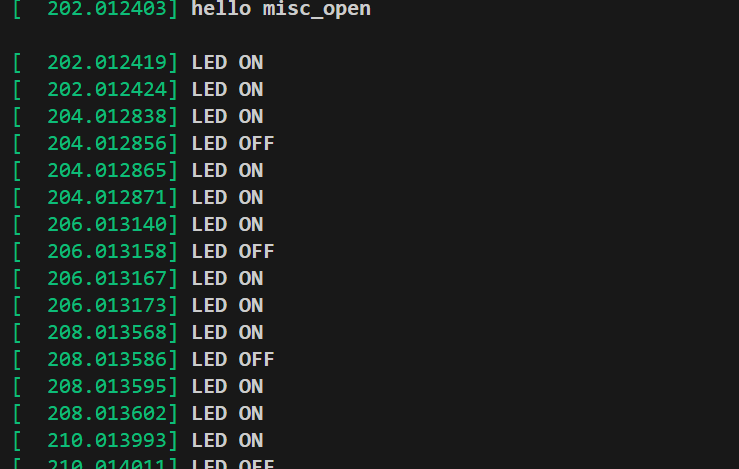
最终结果
写数据
驱动程序
c
#include<linux/init.h>
#include<linux/module.h>
#include<linux/miscdevice.h>
#include<linux/fs.h>
#include<linux/uaccess.h>
#include<linux/io.h>
#include<linux/kernel.h>

#define CMD_TEST1 _IO('A',1)
#define CMD_TEST0 _IO('L',0)
#define CMD_TEST2 _IOW('L', 2, int)
#define CMD_TEST3 _IOW('L', 3, int)
ssize_t misc_read(struct file *file, char __user *ubuf, size_t size, loff_t *loff_t)
{
    printk("misc_read\n ");
    return 0;
}

ssize_t misc_write(struct file *file, const char __user *ubuf, size_t size, loff_t *loff_t){
    char kbuf[64] = {0};
    // copy_from_user 从应用层传递数据给内核层
    if (copy_from_user(kbuf, ubuf, size) != 0)
    {
        // copy_from_user 传递失败打印
        printk("copy_from_user error \n ");
        return -1;
    }
    //打印传递进内核的数据
    printk("kbuf is %d\n ", kbuf[0]);
    return 0;
}

int misc_release(struct inode *inode, struct file *file)
{
    printk("hello misc_relaease bye bye \n ");
    return 0;
}

int misc_open(struct inode *inode, struct file *file)
{
    printk("hello misc_open\n ");
    return 0;
}

long misc_ioctl(struct file *file, unsigned int cmd, unsigned long value)
{
    printk("LED ON \n");
    switch (cmd) //根据命令进行对应的操作
    {
        case CMD_TEST2:
            printk("LED ON \n");
            printk("value is %ld\n", value);
            break;
        case CMD_TEST3:
            printk("LED OFF \n");
            printk("value is %ld\n", value);
            break;
    }
    return 0;
}

struct file_operations misc_fops = {
    .owner = THIS_MODULE,
    .open = misc_open,
    .release = misc_release,
    .read = misc_read,
    .write = misc_write,
    .unlocked_ioctl = misc_ioctl
/* 64 bit system special */};
struct miscdevice misc_dev = {
    .minor = MISC_DYNAMIC_MINOR,
    .name = "hello_misc",
    .fops = &misc_fops,
};

static int misc_init(void)
{
    int ret;
    ret = misc_register(&misc_dev);
    if (ret < 0)
    {
        printk("misc registe is error \n");
    }
    printk("misc registe is succeed \n");
    return 0;
}

static void misc_exit(void)
{
    misc_deregister(&misc_dev);
    printk(" misc gooodbye! \n");
}

module_init(misc_init);
module_exit(misc_exit);
MODULE_LICENSE("GPL");
应用程序
c
#include <stdio.h>
#include <sys/types.h>
#include <sys/stat.h>
#include <fcntl.h>
#include <unistd.h>
#include <sys/ioctl.h>
#define CMD_TEST0 _IO('L',0)
#define CMD_TEST1 _IO('A',1)
#define CMD_TEST2 _IOW('L',2,int)
#define CMD_TEST3 _IOW('L',3,int)
//#define CMD_TEST3 _IOR('L',3,int)
int main(int argc,char *argv[])
{
    int fd;
    char buf[64] ={0};
    fd = open("/dev/hello_misc",O_RDWR);
    if(fd < 0)
    {
        perror("open error \n");
        return fd;
    }
    while(1)
    {
        ioctl(fd,CMD_TEST2,0);//传value
        sleep(2);
        ioctl(fd,CMD_TEST3,1);//传value
    }
    return 0;
}
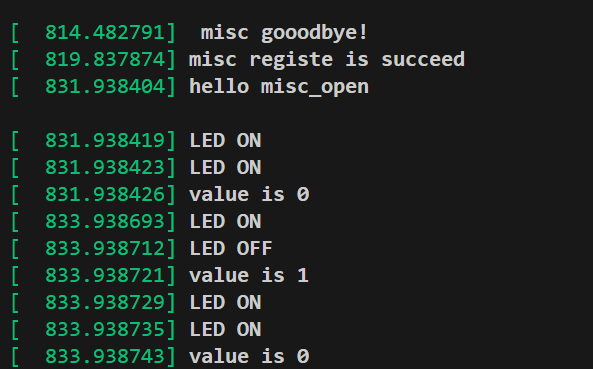
结果
读数据
驱动程序
c
#include<linux/init.h>
#include<linux/module.h>
#include<linux/miscdevice.h>
#include<linux/fs.h>
#include<linux/uaccess.h>
#include<linux/io.h>
#include<linux/kernel.h>

#define CMD_TEST1 _IO('A',1)
#define CMD_TEST0 _IO('L',0)
#define CMD_TEST2 _IOW('L', 2, int)
#define CMD_TEST3 _IOW('L', 3, int)
#define CMD_TEST4 _IOR('L', 4, int)
ssize_t misc_read(struct file *file, char __user *ubuf, size_t size, loff_t *loff_t)
{
    printk("misc_read\n ");
    return 0;
}

ssize_t misc_write(struct file *file, const char __user *ubuf, size_t size, loff_t *loff_t){
    char kbuf[64] = {0};
    // copy_from_user 从应用层传递数据给内核层
    if (copy_from_user(kbuf, ubuf, size) != 0)
    {
        // copy_from_user 传递失败打印
        printk("copy_from_user error \n ");
        return -1;
    }
    //打印传递进内核的数据
    printk("kbuf is %d\n ", kbuf[0]);
    return 0;
}

int misc_release(struct inode *inode, struct file *file)
{
    printk("hello misc_relaease bye bye \n ");
    return 0;
}

int misc_open(struct inode *inode, struct file *file)
{
    printk("hello misc_open\n ");
    return 0;
}

long misc_ioctl(struct file *file, unsigned int cmd, unsigned long value)
{
    int val;
    printk("LED ON \n");
    switch (cmd) //根据命令进行对应的操作
    {
        case CMD_TEST2:
            printk("LED ON \n");
            printk("value is %ld\n", value);
            break;
        case CMD_TEST3:
            printk("LED OFF \n");
            printk("value is %ld\n", value);
            break;

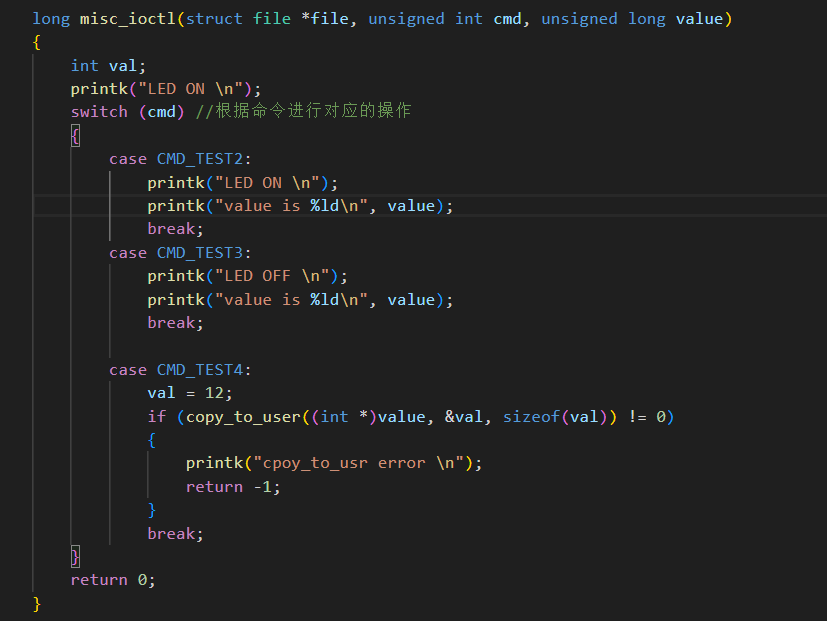
        case CMD_TEST4:
            val = 12;
            if (copy_to_user((int *)value, &val, sizeof(val)) != 0)
            {
                printk("cpoy_to_usr error \n");
                return -1;
            }
            break;
    }
    return 0;
}

struct file_operations misc_fops = {
    .owner = THIS_MODULE,
    .open = misc_open,
    .release = misc_release,
    .read = misc_read,
    .write = misc_write,
    .unlocked_ioctl = misc_ioctl
/* 64 bit system special */};
struct miscdevice misc_dev = {
    .minor = MISC_DYNAMIC_MINOR,
    .name = "hello_misc",
    .fops = &misc_fops,
};

static int misc_init(void)
{
    int ret;
    ret = misc_register(&misc_dev);
    if (ret < 0)
    {
        printk("misc registe is error \n");
    }
    printk("misc registe is succeed \n");
    return 0;
}

static void misc_exit(void)
{
    misc_deregister(&misc_dev);
    printk(" misc gooodbye! \n");
}

module_init(misc_init);
module_exit(misc_exit);
MODULE_LICENSE("GPL");
应用程序
c
#include <stdio.h>
#include <sys/types.h>
#include <sys/stat.h>
#include <fcntl.h>
#include <unistd.h>
#include <sys/ioctl.h>
#define CMD_TEST0 _IO('L',0)
#define CMD_TEST1 _IO('A',1)
#define CMD_TEST2 _IOW('L',2,int)
#define CMD_TEST3 _IOW('L',3,int)
#define CMD_TEST4 _IOR('L', 4, int)
int main(int argc,char *argv[])
{
    int fd;
    int value;
    char buf[64] ={0};
    fd = open("/dev/hello_misc",O_RDWR);
    if(fd < 0)
    {
        perror("open error \n");
        return fd;
    }
    while(1)
    {
       ioctl(fd, CMD_TEST4, &value);
       printf("value is %d \n", value);
    }
    return 0;
}
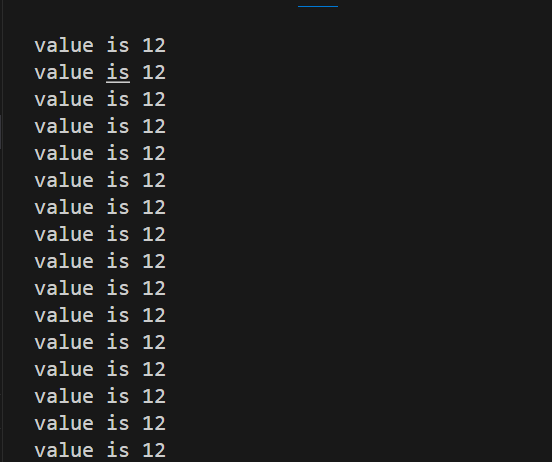
结果