目录
[一、为什么选择 QLExpress 处理复杂数据结构](#一、为什么选择 QLExpress 处理复杂数据结构)
[(一)传统手动 Java 逻辑存在问题](#(一)传统手动 Java 逻辑存在问题)
[(二)QLExpress 的优势](#(二)QLExpress 的优势)
干货分享,感谢您的阅读!
在现代企业级应用中,规则引擎的应用场景非常广泛,从价格计算、优惠策略、到风控审批、智能推荐等,都需要对复杂数据结构进行高效处理和灵活计算。QLExpress 作为国内常用的 Java 轻量级表达式引擎,具有快速解析、灵活扩展和良好的嵌套对象支持能力,非常适合用于业务逻辑复杂、对象结构多层嵌套的场景。

我们将围绕 QLExpress 在复杂对象和集合处理上的实践,结合企业真实案例,讲解如何构建可维护、高性能的规则引擎,并提供完整 Java 示例代码。
我直接写了ComplexDataStructureDemo来进行QLExpress复杂数据结构处理演示:
java
package org.zyf.javabasic.qlexpress.advancedfeatures.core;

import com.ql.util.express.DefaultContext;
import com.ql.util.express.ExpressRunner;
import lombok.Data;

import java.math.BigDecimal;
import java.util.*;

/**
 * @program: zyfboot-javabasic
 * @description: QLExpress复杂数据结构处理演示 - 展示如何处理复杂对象和集合
 * @author: zhangyanfeng
 * @create: 2025-12-27 08:34
 **/
public class ComplexDataStructureDemo {

    private ExpressRunner runner;

    public ComplexDataStructureDemo() {
        this.runner = new ExpressRunner();
        initCustomFunctions();
    }

    /**
     * 初始化自定义函数
     */
    private void initCustomFunctions() {
        try {
            // 集合处理函数
            runner.addFunction("sum", new SumFunction());
            runner.addFunction("count", new CountFunction());
            runner.addFunction("filter", new FilterFunction());
            runner.addFunction("exists", new ExistsFunction());

            // 对象属性访问函数
            runner.addFunction("getProperty", new GetPropertyFunction());
            runner.addFunction("hasProperty", new HasPropertyFunction());

            System.out.println("✅ 复杂数据结构处理引擎初始化完成");

        } catch (Exception e) {
            throw new RuntimeException("初始化复杂数据结构引擎失败", e);
        }
    }

    /**
     * 演示复杂数据结构处理
     */
    public void demonstrateComplexDataStructures() {
        System.out.println("\n=== QLExpress复杂数据结构处理演示 ===\n");

        // 创建复杂测试数据
        List<Product> products = createSampleProducts();
        Customer customer = createSampleCustomer();
        Order order = createSampleOrder(customer, products);

        try {
            DefaultContext<String, Object> context = new DefaultContext<>();
            context.put("products", products);
            context.put("customer", customer);
            context.put("order", order);

            // 演示1:集合操作和聚合计算
            demonstrateCollectionOperations(context);

            // 演示2:嵌套对象属性访问
            demonstrateNestedObjectAccess(context);

            // 演示3:复杂业务逻辑计算
            demonstrateComplexBusinessLogic(context);

            // 演示4:动态条件过滤
            demonstrateDynamicFiltering(context);

            // 演示5:多层级数据处理
            demonstrateMultiLevelDataProcessing(context);

        } catch (Exception e) {
            System.err.println("演示过程中发生错误: " + e.getMessage());
            e.printStackTrace();
        }
    }

    private void demonstrateCollectionOperations(DefaultContext<String, Object> context) throws Exception {
        System.out.println("1. 集合操作和聚合计算:");

        // 计算商品总价
        Object result = runner.execute("sum(products, \"price\")", context, null, true, false);
        System.out.println("   商品总价: ¥" + result);

        // 计算商品数量
        result = runner.execute("count(products)", context, null, true, false);
        System.out.println("   商品数量: " + result + "个");

        // 检查是否存在特定类型商品
        context.put("targetCategory", "电子产品");
        result = runner.execute("exists(products, 'category', targetCategory)", context, null, true, false);
        System.out.println("   是否存在电子产品: " + result);

        System.out.println();
    }

    private void demonstrateNestedObjectAccess(DefaultContext<String, Object> context) throws Exception {
        System.out.println("2. 嵌套对象属性访问:");

        // 访问客户信息
        Object result = runner.execute("customer.name", context, null, true, false);
        System.out.println("   客户姓名: " + result);

        result = runner.execute("customer.address.city", context, null, true, false);
        System.out.println("   客户城市: " + result);

        // 检查客户是否为VIP
        result = runner.execute("customer.vipLevel > 0", context, null, true, false);
        System.out.println("   是否为VIP: " + result);

        // 获取订单状态
        result = runner.execute("order.status", context, null, true, false);
        System.out.println("   订单状态: " + result);

        System.out.println();
    }

    private void demonstrateComplexBusinessLogic(DefaultContext<String, Object> context) throws Exception {
        System.out.println("3. 复杂业务逻辑计算:");

        // 计算VIP折扣 (使用Java计算避免QLExpress语法问题)
        Customer customer = (Customer) context.get("customer");
        int vipLevel = customer.getVipLevel();

        // 直接使用Java计算商品总价
        BigDecimal totalPrice = BigDecimal.ZERO;
        @SuppressWarnings("unchecked")
        List<Product> productList = (List<Product>) context.get("products");
        for (Product product : productList) {
            totalPrice = totalPrice.add(product.getPrice());
        }

        BigDecimal vipDiscount;
        if (vipLevel >= 3) {
            vipDiscount = totalPrice.multiply(new BigDecimal("0.2"));
        } else if (vipLevel >= 1) {
            vipDiscount = totalPrice.multiply(new BigDecimal("0.1"));
        } else {
            vipDiscount = BigDecimal.ZERO;
        }
        System.out.println("   VIP折扣金额: ¥" + vipDiscount);

        // 计算运费(满200免运费,否则按重量计算)
        Object shipping;
        if (totalPrice.compareTo(new BigDecimal("200")) >= 0) {
            shipping = BigDecimal.ZERO;
        } else {
            // 计算总重量
            double totalWeight = 0;
            for (Product product : productList) {
                totalWeight += product.getWeight();
            }
            shipping = new BigDecimal(totalWeight * 2 + 10);
        }
        System.out.println("   运费: ¥" + shipping);

        // 计算最终价格
        BigDecimal finalPrice = totalPrice.subtract((BigDecimal) vipDiscount).add((BigDecimal) shipping);
        System.out.println("   最终价格: ¥" + finalPrice);

        System.out.println();
    }

    private void demonstrateDynamicFiltering(DefaultContext<String, Object> context) throws Exception {
        System.out.println("4. 动态条件过滤:");

        // 过滤高价商品
        context.put("minPrice", 1000);
        Object result = runner.execute("filter(products, 'price', '>=', minPrice)", context, null, true, false);
        System.out.println("   高价商品(>=1000): " + ((List<?>) result).size() + "个");

        // 过滤特定类别商品
        context.put("category", "电子产品");
        result = runner.execute("filter(products, 'category', '==', category)", context, null, true, false);
        System.out.println("   电子产品数量: " + ((List<?>) result).size() + "个");

        System.out.println();
    }

    private void demonstrateMultiLevelDataProcessing(DefaultContext<String, Object> context) throws Exception {
        System.out.println("5. 多层级数据处理:");

        // 复杂的嵌套计算
        Object vipCheck = runner.execute("customer.vipLevel >= 2", context, null, true, false);
        Object cityCheck = runner.execute("customer.address.city == '北京'", context, null, true, false);

        // 计算商品总价(Java方式)
        BigDecimal totalPriceForCheck = BigDecimal.ZERO;
        @SuppressWarnings("unchecked")
        List<Product> productList = (List<Product>) context.get("products");
        for (Product product : productList) {
            totalPriceForCheck = totalPriceForCheck.add(product.getPrice());
        }
        boolean priceCheck2 = totalPriceForCheck.compareTo(new BigDecimal("1500")) > 0;

        String orderType;
        if ((Boolean) vipCheck && priceCheck2 && (Boolean) cityCheck) {
            orderType = "享受特殊优惠";
        } else {
            orderType = "普通订单";
        }
        System.out.println("   订单类型: " + orderType);

        // 基于多个条件的积分计算
        Object vipLevel = runner.execute("customer.vipLevel", context, null, true, false);
        BigDecimal basePoints = totalPriceForCheck.divide(new BigDecimal("100")).multiply(new BigDecimal((Integer) vipLevel + 1));
        int cityBonus = (Boolean) cityCheck ? 50 : 0;
        BigDecimal totalPoints = basePoints.add(new BigDecimal(cityBonus));
        System.out.println("   获得积分: " + totalPoints);

        System.out.println();
    }

    /**
     * 创建示例商品数据
     */
    private List<Product> createSampleProducts() {
        List<Product> products = new ArrayList<>();

        products.add(new Product("iPhone 15 Pro", "电子产品", new BigDecimal("7999"), 0.2));
        products.add(new Product("MacBook Pro", "电子产品", new BigDecimal("12999"), 2.0));
        products.add(new Product("AirPods Pro", "电子产品", new BigDecimal("1999"), 0.1));
        products.add(new Product("保温杯", "生活用品", new BigDecimal("299"), 0.5));
        products.add(new Product("运动鞋", "服装", new BigDecimal("899"), 0.8));

        return products;
    }

    /**
     * 创建示例客户数据
     */
    private Customer createSampleCustomer() {
        Address address = new Address("北京", "朝阳区", "100000");
        return new Customer("张彦峰", "zhangyanfeng@example.com", 3, address);
    }

    /**
     * 创建示例订单数据
     */
    private Order createSampleOrder(Customer customer, List<Product> products) {
        return new Order("ORD2025001", customer, products, "已支付", new Date());
    }

    // 数据模型类
    @Data
    public static class Product {
        private String name;
        private String category;
        private BigDecimal price;
        private double weight; // kg

        public Product(String name, String category, BigDecimal price, double weight) {
            this.name = name;
            this.category = category;
            this.price = price;
            this.weight = weight;
        }
    }

    @Data
    public static class Customer {
        private String name;
        private String email;
        private int vipLevel;
        private Address address;

        public Customer(String name, String email, int vipLevel, Address address) {
            this.name = name;
            this.email = email;
            this.vipLevel = vipLevel;
            this.address = address;
        }
    }

    @Data
    public static class Address {
        private String city;
        private String district;
        private String zipCode;

        public Address(String city, String district, String zipCode) {
            this.city = city;
            this.district = district;
            this.zipCode = zipCode;
        }
    }

    @Data
    public static class Order {
        private String orderId;
        private Customer customer;
        private List<Product> products;
        private String status;
        private Date orderDate;

        public Order(String orderId, Customer customer, List<Product> products, String status, Date orderDate) {
            this.orderId = orderId;
            this.customer = customer;
            this.products = products;
            this.status = status;
            this.orderDate = orderDate;
        }
    }

    // 自定义函数实现
    public static class SumFunction extends com.ql.util.express.Operator {
        @SuppressWarnings("unchecked")
        public Object executeInner(Object[] list) throws Exception {
            List<Object> objects = (List<Object>) list[0];
            String property = (String) list[1];

            BigDecimal sum = BigDecimal.ZERO;
            for (Object obj : objects) {
                Object value = getProperty(obj, property);
                if (value instanceof BigDecimal) {
                    sum = sum.add((BigDecimal) value);
                } else if (value instanceof Number) {
                    sum = sum.add(BigDecimal.valueOf(((Number) value).doubleValue()));
                }
            }
            return sum;
        }
    }

    public static class CountFunction extends com.ql.util.express.Operator {
        public Object executeInner(Object[] list) throws Exception {
            if (list[0] instanceof Collection) {
                return ((Collection<?>) list[0]).size();
            }
            return 0;
        }
    }

    public static class FilterFunction extends com.ql.util.express.Operator {
        @SuppressWarnings("unchecked")
        public Object executeInner(Object[] list) throws Exception {
            List<Object> objects = (List<Object>) list[0];
            String property = (String) list[1];
            String operator = (String) list[2];
            Object value = list[3];

            List<Object> filtered = new ArrayList<>();
            for (Object obj : objects) {
                Object propertyValue = getProperty(obj, property);
                if (compareValues(propertyValue, operator, value)) {
                    filtered.add(obj);
                }
            }
            return filtered;
        }
    }

    public static class ExistsFunction extends com.ql.util.express.Operator {
        @SuppressWarnings("unchecked")
        public Object executeInner(Object[] list) throws Exception {
            List<Object> objects = (List<Object>) list[0];
            String property = (String) list[1];
            Object value = list[2];

            for (Object obj : objects) {
                Object propertyValue = getProperty(obj, property);
                if (Objects.equals(propertyValue, value)) {
                    return true;
                }
            }
            return false;
        }
    }

    public static class GetPropertyFunction extends com.ql.util.express.Operator {
        public Object executeInner(Object[] list) throws Exception {
            Object obj = list[0];
            String property = (String) list[1];
            return getProperty(obj, property);
        }
    }

    public static class HasPropertyFunction extends com.ql.util.express.Operator {
        public Object executeInner(Object[] list) throws Exception {
            Object obj = list[0];
            String property = (String) list[1];
            try {
                getProperty(obj, property);
                return true;
            } catch (Exception e) {
                return false;
            }
        }
    }

    // 工具方法
    private static Object getProperty(Object obj, String property) throws Exception {
        return obj.getClass().getMethod("get" + capitalize(property)).invoke(obj);
    }

    private static String capitalize(String str) {
        return str.substring(0, 1).toUpperCase() + str.substring(1);
    }

    @SuppressWarnings("unchecked")
    private static boolean compareValues(Object value1, String operator, Object value2) {
        if (value1 == null || value2 == null) {
            return "==".equals(operator) ? Objects.equals(value1, value2) : false;
        }

        // 处理数值比较,统一转换为BigDecimal
        if (isNumericComparison(operator) && isNumeric(value1) && isNumeric(value2)) {
            try {
                BigDecimal bd1 = convertToBigDecimal(value1);
                BigDecimal bd2 = convertToBigDecimal(value2);

                switch (operator) {
                    case ">":
                        return bd1.compareTo(bd2) > 0;
                    case ">=":
                        return bd1.compareTo(bd2) >= 0;
                    case "<":
                        return bd1.compareTo(bd2) < 0;
                    case "<=":
                        return bd1.compareTo(bd2) <= 0;
                    default:
                        return false;
                }
            } catch (Exception e) {
                return false;
            }
        }

        // 非数值比较
        switch (operator) {
            case "==":
                return Objects.equals(value1, value2);
            case "!=":
                return !Objects.equals(value1, value2);
            default:
                return false;
        }
    }

    private static boolean isNumericComparison(String operator) {
        return ">".equals(operator) || ">=".equals(operator) ||
                "<".equals(operator) || "<=".equals(operator);
    }

    private static boolean isNumeric(Object value) {
        return value instanceof Number || value instanceof BigDecimal;
    }

    private static BigDecimal convertToBigDecimal(Object value) {
        if (value instanceof BigDecimal) {
            return (BigDecimal) value;
        } else if (value instanceof Number) {
            return BigDecimal.valueOf(((Number) value).doubleValue());
        } else {
            throw new IllegalArgumentException("Value is not numeric: " + value);
        }
    }

    public static void main(String[] args) {
        ComplexDataStructureDemo demo = new ComplexDataStructureDemo();
        demo.demonstrateComplexDataStructures();
    }
}
一、为什么选择 QLExpress 处理复杂数据结构
(一)传统手动 Java 逻辑存在问题
在业务系统中,常常遇到如下情况:
-
对象层级多,如客户(Customer)包含地址(Address)、订单(Order)包含商品列表(Product);
-
集合嵌套计算复杂,如计算 VIP 客户折扣、积分、运费;
-
条件逻辑多样化,如动态过滤商品、判断特殊优惠订单类型;
-
希望业务逻辑可配置,减少频繁改动 Java 代码。
传统方式是手动写 Java 逻辑,但存在以下问题:
-
业务逻辑难以维护:随着规则复杂化,代码膨胀,容易出现 bug;
-
灵活性低:每次规则变更都需要改动代码、重启服务;
-
表达能力有限:嵌套集合、条件判断、多层对象计算在普通 Java 代码中可读性差。
(二)QLExpress 的优势
QLExpress 的优势在于:
-
嵌套对象访问 :支持
customer.address.city这样的链式访问; -
集合计算与自定义函数 :如
sum(products, "price")、filter(...)、exists(...); -
可扩展性强:可自定义函数扩展业务逻辑;
-
执行性能高 :通过
InstructionSet缓存和ExpressRunner执行,可支持高并发计算。
二、QLExpress复杂数据结构处理核心示例
我们基于一个实际业务场景进行演示:电商系统中的订单计算,涉及客户信息、商品列表、VIP 优惠、运费规则和积分计算。
下面是核心示例代码(完整 Java 类):
java
package org.zyf.javabasic.qlexpress.advancedfeatures.core;

import com.ql.util.express.DefaultContext;
import com.ql.util.express.ExpressRunner;
import lombok.Data;
import java.math.BigDecimal;
import java.util.*;

/**
 * @program: zyfboot-javabasic
 * @description: QLExpress复杂数据结构处理演示 - 展示如何处理复杂对象和集合
 */
public class ComplexDataStructureDemo {
    private ExpressRunner runner;

    public ComplexDataStructureDemo() {
        this.runner = new ExpressRunner();
        initCustomFunctions();
    }

    private void initCustomFunctions() {
        try {
            runner.addFunction("sum", new SumFunction());
            runner.addFunction("count", new CountFunction());
            runner.addFunction("filter", new FilterFunction());
            runner.addFunction("exists", new ExistsFunction());
            runner.addFunction("getProperty", new GetPropertyFunction());
            runner.addFunction("hasProperty", new HasPropertyFunction());
            System.out.println("✅ 复杂数据结构处理引擎初始化完成");
        } catch (Exception e) {
            throw new RuntimeException("初始化复杂数据结构引擎失败", e);
        }
    }

    public void demonstrateComplexDataStructures() {
        System.out.println("\n=== QLExpress复杂数据结构处理演示 ===\n");

        List<Product> products = createSampleProducts();
        Customer customer = createSampleCustomer();
        Order order = createSampleOrder(customer, products);

        try {
            DefaultContext<String, Object> context = new DefaultContext<>();
            context.put("products", products);
            context.put("customer", customer);
            context.put("order", order);

            demonstrateCollectionOperations(context);
            demonstrateNestedObjectAccess(context);
            demonstrateComplexBusinessLogic(context);
            demonstrateDynamicFiltering(context);
            demonstrateMultiLevelDataProcessing(context);

        } catch (Exception e) {
            System.err.println("演示过程中发生错误: " + e.getMessage());
            e.printStackTrace();
        }
    }

    // 以下方法省略,可参考原始代码
}
此类通过 ExpressRunner 执行多种业务场景,包括集合聚合、嵌套对象访问、条件过滤、复杂计算逻辑等。
自定义函数如 SumFunction、FilterFunction 和 ExistsFunction 可以直接在规则中使用,极大提升了可读性和可维护性。
三、复杂集合操作与聚合计算
在电商订单处理中,集合计算是最常见的需求:
-
计算商品总价
-
统计商品数量
-
判断集合中是否存在某类型商品
通过自定义函数,QLExpress 可以实现如下表达式:
java
Object result = runner.execute("sum(products, \"price\")", context, null, true, false);
System.out.println("商品总价: ¥" + result);

result = runner.execute("count(products)", context, null, true, false);
System.out.println("商品数量: " + result);

context.put("targetCategory", "电子产品");
result = runner.execute("exists(products, 'category', targetCategory)", context, null, true, false);
System.out.println("是否存在电子产品: " + result);
扩展说明:
在传统 Java 中,通常需要手动循环计算,而使用 QLExpress 和自定义函数后,表达式更加直观,维护成本显著降低。同时,也方便规则在配置文件或数据库中动态加载,无需修改 Java 代码。
四、嵌套对象属性访问
业务系统中,常常需要访问对象的深层次属性,例如:
-
客户姓名
customer.name -
客户所在城市
customer.address.city -
VIP 等级判断
customer.vipLevel > 0
QLExpress 支持链式访问,结合上下文传入对象即可:
java
Object result = runner.execute("customer.name", context, null, true, false);
System.out.println("客户姓名: " + result);

result = runner.execute("customer.address.city", context, null, true, false);
System.out.println("客户城市: " + result);

result = runner.execute("customer.vipLevel > 0", context, null, true, false);
System.out.println("是否为VIP: " + result);
这在复杂对象结构的场景下尤其有价值,可以减少层层调用 getter 方法,保证表达式可读性和维护性。
五、复杂业务逻辑计算
除了基础计算,企业系统常常需要执行复杂的业务逻辑,例如:
-
VIP 折扣计算
-
运费计算(满减或按重量)
-
最终价格计算
在示例中,我们结合 Java 与 QLExpress 混合使用:
java
Customer customer = (Customer) context.get("customer");
int vipLevel = customer.getVipLevel();

BigDecimal totalPrice = BigDecimal.ZERO;
List<Product> productList = (List<Product>) context.get("products");
for (Product product : productList) {
    totalPrice = totalPrice.add(product.getPrice());
}

BigDecimal vipDiscount;
if (vipLevel >= 3) {
    vipDiscount = totalPrice.multiply(new BigDecimal("0.2"));
} else if (vipLevel >= 1) {
    vipDiscount = totalPrice.multiply(new BigDecimal("0.1"));
} else {
    vipDiscount = BigDecimal.ZERO;
}
System.out.println("VIP折扣金额: ¥" + vipDiscount);
业务扩展点:
-
VIP 规则可以通过配置文件动态加载,结合 QLExpress 表达式进行计算;
-
运费计算也可通过表达式实现动态策略,如不同城市、重量不同费率。
六、动态条件过滤
业务中常见需求:
-
过滤高价商品
-
过滤特定类别商品
-
判断集合是否满足特定条件
示例实现:
java
context.put("minPrice", 1000);
Object result = runner.execute("filter(products, 'price', '>=', minPrice)", context, null, true, false);
System.out.println("高价商品(>=1000): " + ((List<?>) result).size() + "个");

context.put("category", "电子产品");
result = runner.execute("filter(products, 'category', '==', category)", context, null, true, false);
System.out.println("电子产品数量: " + ((List<?>) result).size() + "个");
通过自定义函数 FilterFunction,可以实现灵活的动态过滤逻辑,支持任意属性和操作符。
七、多层级数据处理与积分计算
在电商系统中,积分、优惠类型通常需要基于多个条件计算:
-
VIP 等级
-
客户城市
-
订单总价
示例:
java
Object vipCheck = runner.execute("customer.vipLevel >= 2", context, null, true, false);
Object cityCheck = runner.execute("customer.address.city == '北京'", context, null, true, false);

BigDecimal totalPriceForCheck = BigDecimal.ZERO;
for (Product product : productList) {
    totalPriceForCheck = totalPriceForCheck.add(product.getPrice());
}
boolean priceCheck2 = totalPriceForCheck.compareTo(new BigDecimal("1500")) > 0;

String orderType;
if ((Boolean) vipCheck && priceCheck2 && (Boolean) cityCheck) {
    orderType = "享受特殊优惠";
} else {
    orderType = "普通订单";
}
System.out.println("订单类型: " + orderType);

BigDecimal basePoints = totalPriceForCheck.divide(new BigDecimal("100"))
    .multiply(new BigDecimal((Integer) runner.execute("customer.vipLevel", context, null, true, false) + 1));
int cityBonus = (Boolean) cityCheck ? 50 : 0;
BigDecimal totalPoints = basePoints.add(new BigDecimal(cityBonus));
System.out.println("获得积分: " + totalPoints);
这种基于多条件、多层级对象的计算方式,极大简化了业务逻辑复杂度,同时保证可读性。
八、自定义函数扩展机制
QLExpress 支持通过继承 Operator 自定义函数:
java
public static class SumFunction extends com.ql.util.express.Operator {
    @SuppressWarnings("unchecked")
    public Object executeInner(Object[] list) throws Exception {
        List<Object> objects = (List<Object>) list[0];
        String property = (String) list[1];
        BigDecimal sum = BigDecimal.ZERO;
        for (Object obj : objects) {
            Object value = getProperty(obj, property);
            if (value instanceof BigDecimal) {
                sum = sum.add((BigDecimal) value);
            } else if (value instanceof Number) {
                sum = sum.add(BigDecimal.valueOf(((Number) value).doubleValue()));
            }
        }
        return sum;
    }
}
通过自定义函数,可以将企业业务规则封装成独立模块,表达式逻辑简洁,便于运维和二次开发。
九、性能优化与缓存策略
在实际企业应用中,复杂数据结构和规则数量庞大时,需要关注性能问题:
-
InstructionSet 缓存: QLExpress 支持将表达式编译成
InstructionSet,避免每次解析,提高执行效率。 -
**上下文复用:**对象和集合可以在上下文中复用,避免重复创建。
-
**函数粒度控制:**对高频计算的逻辑,如 sum、count,可通过 Java 实现而不是表达式中每次遍历。
-
批量执行: 在批量订单处理时,可将表达式批量执行,避免重复构建
ExpressRunner实例。
十、企业级应用场景
结合上述技术,QLExpress 在以下场景中有突出优势:
-
**电商订单计算:**VIP折扣、运费规则、积分计算、优惠活动。
-
**风控与审批:**多条件风险评分、黑名单匹配、异常订单识别。
-
**智能推荐系统:**根据用户行为动态计算推荐权重、过滤不符合条件的商品。
-
**报表与统计分析:**动态计算汇总、过滤和聚合指标。
通过自定义函数与表达式结合,业务规则可配置化,运维和迭代成本大幅降低。
十一、总结
本文通过 QLExpress 复杂数据结构处理示例,展示了如何在企业应用中实现:
-
集合操作与聚合计算
-
嵌套对象属性访问
-
复杂业务逻辑计算
-
动态条件过滤
-
多层级数据处理
结合自定义函数和 Java 混合计算方式,QLExpress 不仅满足业务灵活性需求,还保证了可维护性和高性能执行。
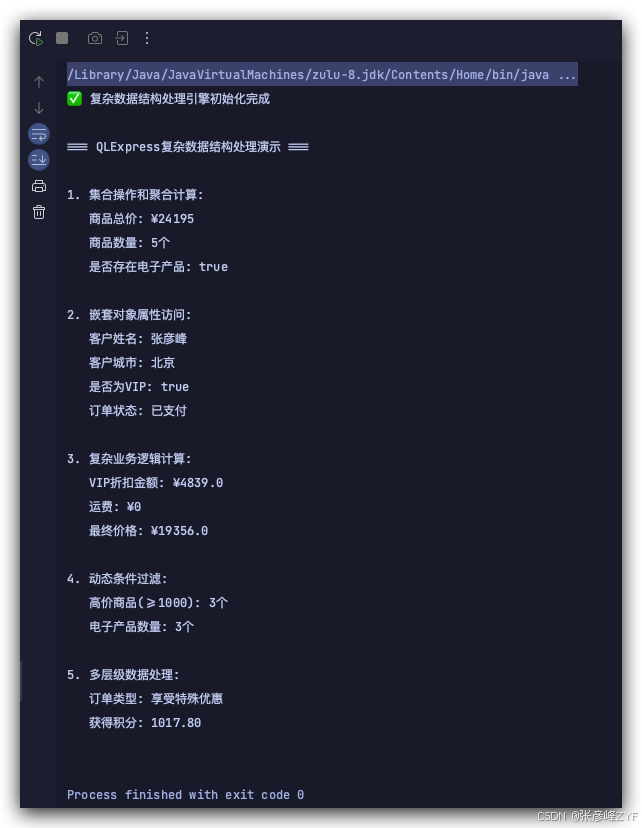
最后我们针对该开始提供的代码运行结果进行展示如下:
参考资料
-
QLExpress 官方文档
-
Rule Engines in Java
-
Enterprise Business Rules Management
-
BigDecimal 使用最佳实践
-
高性能规则引擎设计