HarmonyOS6 - 鸿蒙聊天页面语音转文字案例
开发环境为:
开发工具:DevEco Studio 6.0.1 Release
API版本是:API21
本文所有代码都已使用模拟器测试成功!
1. 效果
效果如下图所示:
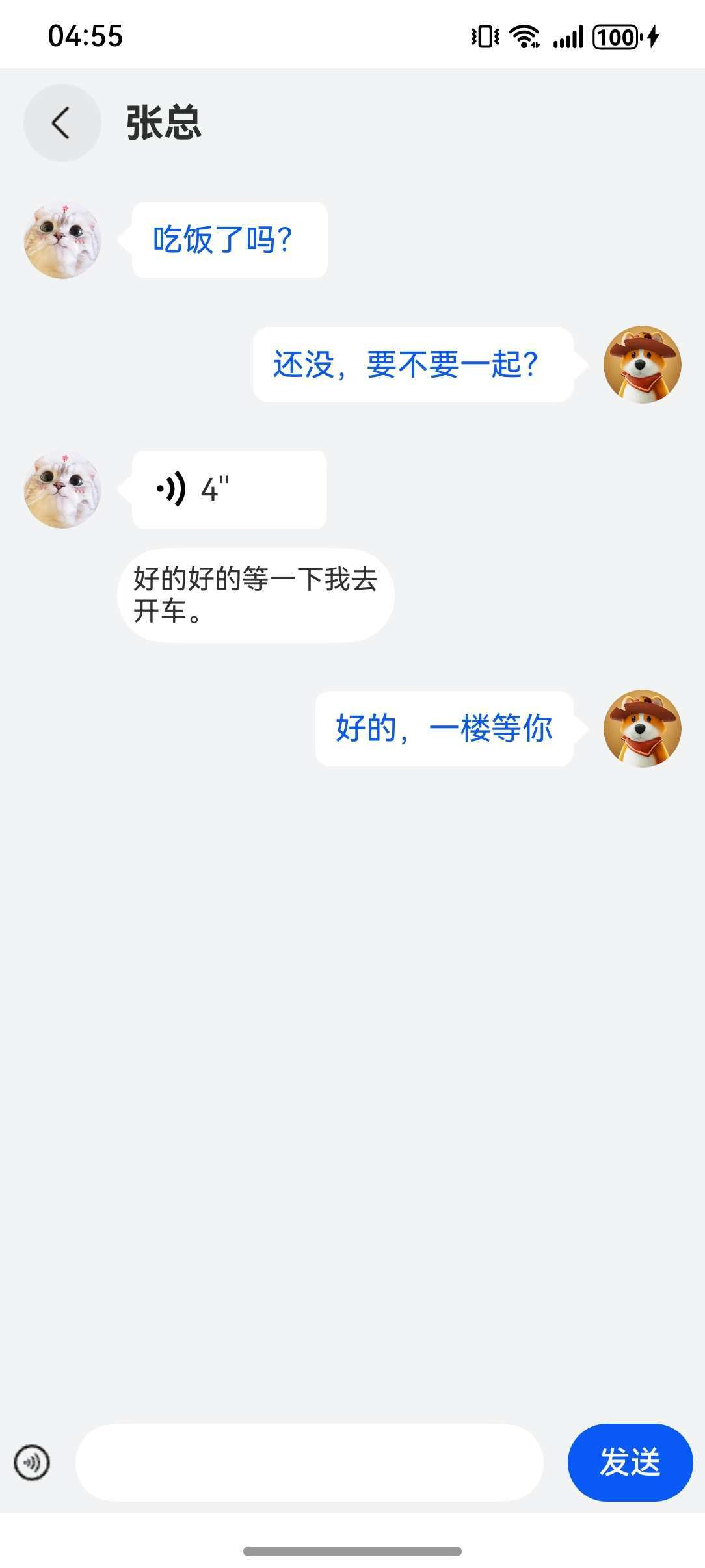
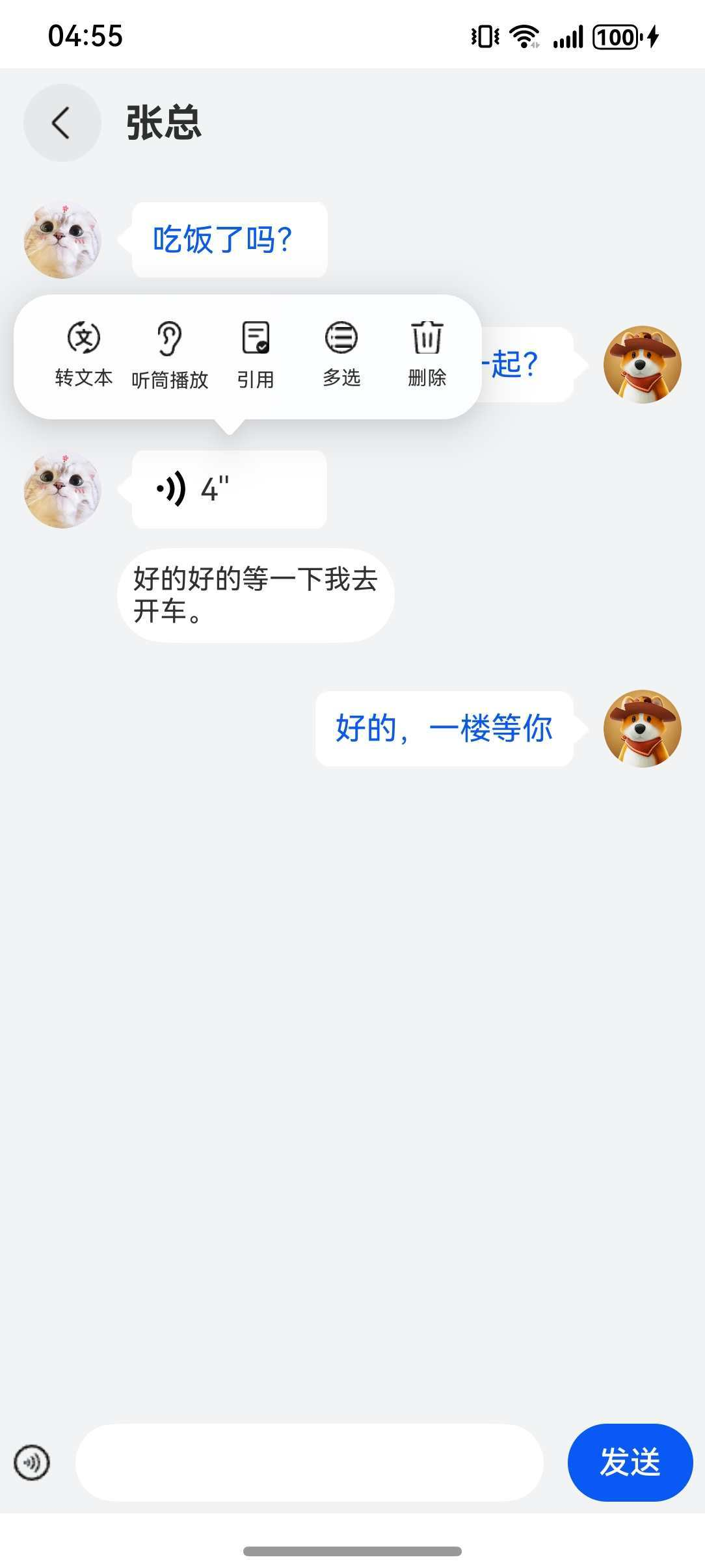
长按语音可以出现菜单,如下图所示:
2. 需求
具体需求如下:
- 可以发送文字和语音,可以切换
- 发送的语音可以播放
- 长按语音可以出现菜单,选择转文本,可实现语音内容转文字
3. 分析
根据以上效果图和需求描述,以下是详细的分析思路步骤:
一、总体设计思路
这是一个集成语音录制、播放和实时语音转文字功能的聊天应用。核心设计围绕语音优先的交互理念,让用户在文字输入和语音输入间无缝切换,同时提供语音消息到文字信息的智能转换能力。
二、模块化架构设计
1. 音频处理层
- 录音模块:负责高质量PCM音频采集
- 播放模块:实现语音消息的重放功能
- 文件管理:音频文件的本地存储与生命周期管理
2. 语音识别层
- 引擎管理:语音识别引擎的创建与维护
- 流式识别:支持音频流的实时文字转换
- 结果处理:识别结果的格式化与展示
3. UI表现层
- 消息展示:语音/文字消息的差异化呈现
- 交互控制:长按录音、点击播放等手势操作
- 状态反馈:录音状态、播放动画等视觉反馈
三、开发实现步骤
阶段一:基础环境搭建
- 项目初始化
- 创建ArkTS鸿蒙应用项目
- 配置音频和语音识别的API依赖
- 设置必要的权限声明(麦克风、存储)
- 工程结构规划
- 设计清晰的目录结构(common、pages等)
- 创建工具类模块(Logger等)
- 统一错误处理机制
阶段二:核心功能模块开发
- 音频录制功能实现
- 配置音频录制参数(采样率、声道、格式)
- 实现音频数据的实时采集与缓存
- 设计录音状态机(开始、暂停、停止)
- 添加录音时长计算与显示
- 音频播放功能实现
- 配置与录制匹配的播放参数
- 实现PCM文件的流式读取与播放
- 设计播放状态控制(播放、暂停、停止)
- 添加播放进度反馈机制
- 语音识别功能实现
- 初始化语音识别引擎(在线模式)
- 配置识别参数(语言、识别模式)
- 实现音频数据流式写入识别引擎
- 设计识别结果回调处理机制
阶段三:用户界面开发
- 聊天主界面设计
- 采用经典聊天界面布局(标题栏、消息区、输入区)
- 设计两种消息展示模式(语音消息、文字消息)
- 实现消息列表的滚动与加载
- 输入区域交互设计
- 文字输入模式:文本输入框+发送按钮
- 语音输入模式:长按录音按钮+实时反馈
- 模式切换:一键切换输入方式
- 语音消息交互设计
- 播放控制:点击语音消息播放音频
- 操作菜单:长按语音消息弹出功能菜单
- 视觉反馈:播放时的声波动画效果
- 转文字功能:语音消息转为文字显示
阶段四:状态管理与业务逻辑
- 应用状态设计
- 消息数据模型定义(语音/文字统一抽象)
- 输入模式状态管理
- 播放/录音状态同步
- 权限状态管理
- 数据流设计
- 录音数据流:麦克风 → 内存缓存 → 文件系统
- 播放数据流:文件系统 → 音频解码 → 扬声器
- 识别数据流:文件系统 → 识别引擎 → 文字结果
- UI数据流:用户操作 → 状态更新 → 界面刷新
- 生命周期管理
- 音频资源的创建与释放时机
- 识别引擎的生命周期控制
- 文件句柄的打开与关闭管理
阶段五:高级功能增强
- 权限管理优化
- 运行时权限动态申请
- 权限拒绝时的降级处理
- 权限状态的可视化提示
- 错误处理与健壮性
- 网络异常的识别失败处理
- 存储空间不足的优雅降级
- 音频设备不可用的用户引导
- 性能优化
- 音频数据的缓冲区优化
- 识别引擎的资源复用
- 列表渲染的性能优化
阶段六:用户体验优化
- 交互反馈设计
- 录音时的实时音量可视化
- 操作成功/失败的toast提示
- 加载状态的loading指示
- 动画效果
- 语音播放的连贯声波动画
- 界面切换的平滑过渡
- 弹出菜单的优雅展示
- 可访问性
- 支持屏幕阅读器
- 键盘导航支持
- 高对比度模式适配
四、关键设计决策
- 音频格式选择:采用PCM原始格式保证音质,同时兼容语音识别需求
- 识别时机:用户主动触发转文字,避免不必要的识别计算
- 文件管理:使用应用缓存目录,避免污染用户存储空间
- 权限策略:使用时申请,明确告知用户权限用途
- 状态同步:通过装饰器模式实现UI与数据的自动同步
4. 开发
根据以上分析思路步骤,开始进行编码
主页面代码如下:
js
import { LengthMetrics, PromptAction } from '@kit.ArkUI';
import { abilityAccessCtrl, bundleManager, common, Permissions } from '@kit.AbilityKit';
import { BusinessError } from '@kit.BasicServicesKit';
import { hilog } from '@kit.PerformanceAnalysisKit';
import { MyAudioRenderer } from '../common/chat/MyAudioRenderer';
import Logger from '../common/utils/Logger';
import { MyAudioCapturer } from '../common/chat/MyAudioCapturer';
import { MySpeechRecognizer } from '../common/chat/MySpeechRecognizer';
export enum EditMenuAction {
NONE,
SPEECH,
EMOJI
}
export const RICHCONTROLLER: RichEditorController = new RichEditorController();
//申请麦克风权限
const PERMISSIONS: Array<Permissions> = ['ohos.permission.MICROPHONE'];
function reqPermissionsFromUser(permissions: Array<Permissions>, context: common.UIAbilityContext): void {
let atManager: abilityAccessCtrl.AtManager = abilityAccessCtrl.createAtManager();
// requestPermissionsFromUser会判断权限的授权状态来决定是否唤起弹窗
atManager.requestPermissionsFromUser(context, permissions).then(() => {
}).catch((err: BusinessError) => {
Logger.error(`Failed to request permissions from user. Code is ${err.code}, message is ${err.message}`);
});
}
@ObservedV2
class OneVoice {
filename: string;
during: number;
@Trace isShow: boolean;
@Trace context: string;
@Trace textMsg: string;
constructor(filename: string, during: number, isShow: boolean,
context: string, textMsg: string) {
this.filename = filename;
this.during = during;
this.isShow = isShow;
this.context = context;
this.textMsg = textMsg;
}
}
/**
* 语音转文字案例
*/
@Entry
@Component
struct Page10 {
listScroller: Scroller = new Scroller();
@State curMenuAction: EditMenuAction = EditMenuAction.NONE;
@State handlePopup: boolean = false;
@State handlePopup_1: boolean = false;
@State audioImageAnimation: AnimationStatus = AnimationStatus.Initial;
@State audioImageAnimation_1: AnimationStatus = AnimationStatus.Initial;
@State isTextInput: boolean = true;
@State cIndex: number = 0;
@State @Watch('calcTime') audioCapturer: MyAudioCapturer = new MyAudioCapturer();
@State audioRenderer: MyAudioRenderer = new MyAudioRenderer();
@State @Watch('result') speechRecognizer: MySpeechRecognizer = new MySpeechRecognizer();
@State filename: string = '';
@State during: number = 0;
@State @Watch('onChangedData') messageArr: OneVoice[] = [];
@State eIndex: number = -1;
@State tmpMsg: string = '';
controller: TextInputController = new TextInputController();
@StorageProp('bottomRectHeight')
bottomRectHeight: number = 0;
@StorageProp('topRectHeight')
topRectHeight: number = 0;
uiContext: UIContext = this.getUIContext();
promptAction: PromptAction = this.uiContext.getPromptAction();
context: Context = this.uiContext.getHostContext() as common.UIAbilityContext;
@State tokenID: number = 0;
result() {
this.messageArr[this.cIndex].context = this.speechRecognizer.message;
}
calcTime() {
this.during = (this.audioCapturer.time2 - this.audioCapturer.time1) / 1000;
}
aboutToAppear(): void {
let bundleFlags = bundleManager.BundleFlag.GET_BUNDLE_INFO_WITH_APPLICATION;
try {
bundleManager.getBundleInfoForSelf(bundleFlags).then((data) => {
hilog.info(0x0000, 'testTag', 'getBundleInfoForSelf successfully. Data: %{public}s', JSON.stringify(data));
this.tokenID = data.appInfo.accessTokenId;
}).catch((err: BusinessError) => {
hilog.error(0x0000, 'testTag', 'getBundleInfoForSelf failed. Cause: %{public}s', err.message);
});
} catch (err) {
let message = (err as BusinessError).message;
hilog.error(0x0000, 'testTag', 'getBundleInfoForSelf failed: %{public}s', message);
}
let context = this.getUIContext().getHostContext() as common.UIAbilityContext;
reqPermissionsFromUser(PERMISSIONS, context);
}
onChangedData() {
this.listScroller.scrollEdge(Edge.End);
}
@Builder
getAudioUI(index: number, one: OneVoice) {
if (this.messageArr[index].textMsg) {
Row() {
Row() {
Text(this.messageArr[index].textMsg)
.fontSize(16)
.fontWeight(400)
.fontColor('#0A59F7');
}
.backgroundImage($r('app.media.img_16'))
.backgroundImageSize(ImageSize.FILL)
.padding(10);
Image($r('app.media.img_17'))
.height(15)
.rotate({ angle: 180 });
}.height(40);
} else {
Column() {
Row() {
Row({ space: 5 }) {
// 秒数
Text(Math.ceil(one.during) + `''`);
ImageAnimator()
.images([
{
src: $r('app.media.ic_public_voice3')
},
{
src: $r('app.media.ic_public_voice1')
},
{
src: $r('app.media.ic_public_voice2')
},
{
src: $r('app.media.ic_public_voice3')
}
])
.state(this.cIndex === index ? this.audioImageAnimation_1 : AnimationStatus.Stopped)
.iterations(5)
.rotate({
angle: 180
})
.width(20)
.height(20);
}
.justifyContent(FlexAlign.End)
.width(100)
.backgroundImage($r('app.media.img_16'))
.backgroundImageSize(ImageSize.FILL)
.padding(10)
.margin({
left: 10,
})
.onClick(() => {
this.audioRenderer.createPlayOn(one.filename, this.context);
this.cIndex = index;
this.audioImageAnimation_1 = AnimationStatus.Initial;
this.audioImageAnimation_1 = AnimationStatus.Running;
setTimeout(
() => {
this.audioImageAnimation_1 = AnimationStatus.Stopped;
}, one.during * 1000);
})
.gesture(
LongPressGesture({ repeat: false })
.onAction((event: GestureEvent | undefined) => {
if (!this.speechRecognizer.asrEngine) {
this.speechRecognizer.createByCallback();
}
this.cIndex = index;
this.handlePopup_1 = true;
})
.onActionEnd(() => {
})
)
.bindPopup(this.cIndex === index ? this.handlePopup_1 : false, {
builder: this.voicePopup(index, one.filename),
placement: Placement.Top,
onStateChange: (e) => { // 返回当前的气泡状态
if (!e.isVisible) {
this.handlePopup_1 = false;
}
}
});
Image($r('app.media.img_17')).height(15)
.rotate({ angle: 180 });
}.height(40);
if (this.messageArr[index].context) {
Row() {
Text(this.messageArr[index].context)
.fontSize(14);
}
.borderRadius('40%')
.padding(8)
.backgroundColor(Color.White)
.margin({ top: 10 });
}
}.width(150)
.alignItems(HorizontalAlign.End);
}
}
@Builder
getAudioUI_1(index: number, one: OneVoice) {
if (this.messageArr[index].textMsg) {
Row() {
Image($r('app.media.img_17'))
.height(15);
Row() {
Text(this.messageArr[index].textMsg)
.fontSize(16)
.fontWeight(400)
.fontColor('#0A59F7');
}
.backgroundImage($r('app.media.img_16'))
.backgroundImageSize(ImageSize.FILL)
.padding(10);
}.height(40);
} else {
Column() {
Row() {
Image($r('app.media.img_17'))
.height(15);
Row({ space: 5 }) {
ImageAnimator()
.images([
{
src: $r('app.media.ic_public_voice3')
},
{
src: $r('app.media.ic_public_voice1')
},
{
src: $r('app.media.ic_public_voice2')
},
{
src: $r('app.media.ic_public_voice3')
}
])
.state(this.cIndex === index ? this.audioImageAnimation : AnimationStatus.Stopped)
.iterations(2)
.width(20)
.height(20);
// 秒数
Text(Math.ceil(one.during) + `''`);
}
.justifyContent(FlexAlign.Start)
.width(100)
.backgroundImage($r('app.media.img_16'))
.backgroundImageSize(ImageSize.FILL)
.padding(10)
.margin({
right: 10
})
.onClick(() => {
this.audioRenderer.createPlayOn(one.filename, this.context);
this.cIndex = index;
this.audioImageAnimation = AnimationStatus.Initial;
this.audioImageAnimation = AnimationStatus.Running;
setTimeout(
() => {
this.audioImageAnimation = AnimationStatus.Stopped;
}, one.during * 1000
);
})
.gesture(
LongPressGesture({ repeat: false })
.onAction((event: GestureEvent | undefined) => {
if (!this.speechRecognizer.asrEngine) {
this.speechRecognizer.createByCallback();
}
this.cIndex = index;
this.handlePopup_1 = true;
})
.onActionEnd(() => {
})
)
.bindPopup(this.cIndex === index ? this.handlePopup_1 : false, {
builder: this.voicePopup(index, one.filename),
placement: Placement.Top,
onStateChange: (e) => { // 返回当前的气泡状态
if (!e.isVisible) {
this.handlePopup_1 = false;
}
}
});
}.height(40);
if (this.messageArr[index].context) {
Row() {
Text(this.messageArr[index].context)
.fontSize(14);
}
.padding(8)
.borderRadius('40%')
.backgroundColor(Color.White)
.margin({ top: 10 });
}
}.alignItems(HorizontalAlign.Start)
.width(150);
}
}
@Builder
textInput() {
Row() {
Image($r('app.media.img_14'))
.width(20)
.height(20)
.onClick(() => {
this.isTextInput = !this.isTextInput;
});
TextInput({ controller: this.controller, text: this.tmpMsg })
.width(240)
.borderRadius('50%')
.backgroundColor(Color.White)
.onChange((value: string) => {
this.tmpMsg = value;
});
Button('发送')
.onClick(() => {
if (this.tmpMsg) {
this.messageArr.push(new OneVoice('', 0, false, '', this.tmpMsg));
this.controller.stopEditing();
this.tmpMsg = '';
} else {
this.promptAction.showToast({
message: '无法发送空信息',
duration: 500
});
}
});
}
.justifyContent(FlexAlign.SpaceAround)
.margin({ top: 6, bottom: 6 })
.width('100%')
.height(40);
}
@Builder
voiceInput() {
Row() {
Image($r('app.media.ic_public_keyboard'))
.margin({ left: 14, right: 14 })
.width(20)
.height(20)
.onClick(() => {
this.isTextInput = !this.isTextInput;
});
Button('按住说话')
.width(228)
.type(ButtonType.Capsule)
.borderRadius(2)
.backgroundColor('#08000000')
.layoutWeight(1)
.fontColor(0x2A2929)
.gesture(
LongPressGesture({ repeat: false })
.onAction((event: GestureEvent | undefined) => {
this.filename = new Date().getTime().toString();
this.audioCapturer.createrOn(this.filename, this.context);
this.handlePopup = true;
})
.onActionEnd(() => {
try {
this.audioCapturer.stopAndRelease();
this.handlePopup = false;
let atManager: abilityAccessCtrl.AtManager = abilityAccessCtrl.createAtManager();
; // 系统应用可以通过bundleManager.getApplicationInfo获取,三方应用可以通过bundleManager.getBundleInfoForSelf获取
let permissionName: Permissions = 'ohos.permission.MICROPHONE';
let data: abilityAccessCtrl.GrantStatus = atManager.checkAccessTokenSync(this.tokenID, permissionName);
if (data !== 0) {
this.promptAction.showToast({
message: '请前往应用设置授予麦克风权限',
duration: 3000
});
} else {
this.messageArr.push(new OneVoice(this.filename, this.during, false, '', ''));
}
} catch (e) {
Logger.error(JSON.stringify(e));
}
})
)
.bindPopup(this.handlePopup, {
message: '语音录制中',
onStateChange: (e) => { // 返回当前的气泡状态
if (!e.isVisible) {
this.handlePopup = false;
}
}
});
Image($r('app.media.ic_public_emoji'))
.margin({ right: 10, left: 10 })
.width(22)
.height(22);
Image($r('app.media.ic_public_add_norm'))
.margin({ right: 10, left: 10 })
.width(22)
.height(22);
}
.margin({ top: 6, bottom: 6 })
.width('100%')
.height(40);
}
@Builder
voicePopup(index: number, filename: string) {
Flex({
direction: FlexDirection.Column,
}) {
Row() {
Column() {
Stack() {
Image($r('app.media.img_5'))
.width(16.51)
.height(16.51)
.margin({ bottom: 6 });
Image($r('app.media.img_6'))
.width(8.51)
.height(8.51)
.margin({ bottom: 6 });
};
Text('转文本')
.height(13)
.width(32)
.fontSize(10)
.textAlign(TextAlign.Center);
}
.onClick(() => {
this.eIndex = index;
this.messageArr[index].isShow = true;
this.speechRecognizer.writeAudio(new Date().getTime().toString(), filename, this.context);
this.handlePopup_1 = false;
})
.margin({ left: 16 })
.width(40)
.height(40);
Column() {
Image($r('app.media.img_7'))
.width(12)
.height(18)
.margin({ bottom: 6 });
Text('听筒播放')
.height(13)
.width(40)
.fontSize(10)
.textAlign(TextAlign.Center);
}
.margin({ left: 4 })
.width(40)
.height(40);
Column() {
Stack() {
Image($r('app.media.img_9'))
.width(13.51)
.height(16.51)
.margin({ bottom: 7 });
Image($r('app.media.img_10'))
.width(6.51)
.height(6.51)
.margin({ bottom: 7 })
.position({
right: 0,
bottom: 0
});
};
Text('引用')
.height(13)
.width(32)
.fontSize(10)
.textAlign(TextAlign.Center);
}
.margin({ left: 4 })
.width(40)
.height(40);
Column() {
Stack() {
Image($r('app.media.img_11'))
.width(16.51)
.height(16.51)
.margin({ bottom: 6 });
Image($r('app.media.img_12'))
.width(10.51)
.height(10.51)
.margin({ bottom: 6 });
};
Text('多选')
.height(13)
.width(32)
.fontSize(10)
.textAlign(TextAlign.Center);
}
.margin({ left: 4 })
.width(40)
.height(40);
Column() {
Image($r('app.media.img_4'))
.width(16.51)
.height(16.51)
.margin({ bottom: 6 });
Text('删除')
.height(13)
.width(32)
.fontSize(10)
.textAlign(TextAlign.Center);
}
.margin({ left: 4 })
.width(40)
.height(40);
}
.width('100%')
.margin({ top: 16, bottom: 13 });
}
.width(240)
.height(64);
}
build() {
Column() {
Row() {
Image($r('app.media.img_8'))
.width(40)
.height(40);
Text('张总')
.height(27)
.fontSize(20)
.fontWeight(700)
.textAlign(TextAlign.Start)
.margin({ left: 12 });
}.padding({ left: 12 })
.height(56)
.width('100%');
List({ scroller: this.listScroller }) {
ForEach(this.messageArr, (item: OneVoice, index: number) => {
ListItem() {
Flex({
direction: index % 2 !== 0 ? FlexDirection.RowReverse : FlexDirection.Row,
space: { main: LengthMetrics.vp(8) }
}) {
Image(index % 2 !== 0 ? $r('app.media.img_2') : $r('app.media.img_3'))
.width(40)
.borderRadius(50)
.aspectRatio(1);
if (index % 2 !== 0) {
this.getAudioUI(index, item);
} else {
this.getAudioUI_1(index, item);
}
}
.width('100%');
}
.margin(12);
}, (item: OneVoice) => JSON.stringify(item));
}
.width('100%')
.height('100%')
.layoutWeight(1)
.scrollBar(BarState.Off)
.edgeEffect(EdgeEffect.None) // 设置无边缘滑动效果
.onClick(() => {
RICHCONTROLLER.stopEditing();
this.curMenuAction = EditMenuAction.NONE;
});
Column() {
if (this.isTextInput) {
this.textInput();
} else {
this.voiceInput();
}
}
.height(52)
.width('100%');
}
.padding({ top: this.uiContext.px2vp(this.topRectHeight), bottom: this.uiContext.px2vp(this.bottomRectHeight) })
.height('100%')
.width('100%')
.backgroundColor('#F1F3F5');
}
}该页面依赖的其他文件代码如下:
MyAudioRenderer.ets文件代码如下:
js
import { audio } from '@kit.AudioKit';
import fs from '@ohos.file.fs';
import { BusinessError } from '@kit.BasicServicesKit';
import Logger from '../utils/Logger';

export class MyAudioRenderer {
  audioRenderer: audio.AudioRenderer | undefined = undefined;

  //创建播放实例
  createPlayOn(filename: string, context: Context) {

    let audioStreamInfo: audio.AudioStreamInfo = {
      samplingRate: audio.AudioSamplingRate.SAMPLE_RATE_16000, // 采样率
      channels: audio.AudioChannel.CHANNEL_1, // 通道
      sampleFormat: audio.AudioSampleFormat.SAMPLE_FORMAT_S16LE, // 采样格式
      encodingType: audio.AudioEncodingType.ENCODING_TYPE_RAW // 编码格式
    };
    let audioRendererInfo: audio.AudioRendererInfo = {
      usage: audio.StreamUsage.STREAM_USAGE_VOICE_MESSAGE,
      rendererFlags: 0
    };
    let audioRendererOptions: audio.AudioRendererOptions = {
      streamInfo: audioStreamInfo,
      rendererInfo: audioRendererInfo
    };
    audio.createAudioRenderer(audioRendererOptions, (err, data) => {
      if (err) {
        Logger.error(`Invoke createAudioRenderer failed, code is ${err.code}, message is ${err.message}`);
        return;
      } else {
        Logger.info('Invoke createAudioRenderer succeeded.创建AudioRenderer成功');
        this.audioRenderer = data;

        class Options {
          offset?: number;
          length?: number;
        }

        let path = context.cacheDir;
        //确保该路径下存在该资源
        let filePath = path + `/${filename}.pcm`;
        let file: fs.File = fs.openSync(filePath, fs.OpenMode.READ_ONLY);
        let fileSize: number = fs.statSync(filePath).size;
        let bufferSize: number = 0;

        let writeDataCallback = (buffer: ArrayBuffer) => {
          if (bufferSize >= fileSize) {
            return;
          }
          let options: Options = {
            offset: bufferSize,
            length: buffer.byteLength
          };
          let bytesRead = fs.readSync(file.fd, buffer, options);
          bufferSize += bytesRead;
          if (bufferSize >= fileSize) {
            fs.close(file);
            this.stopAndRelease();
          }
        };
        this.audioRenderer.on('writeData', writeDataCallback);
        Logger.info('监听成功');
        this.palyAudio();

      }
    });
  }

  //播放音频
  palyAudio() {
    this.audioRenderer?.start();
  }

  //停止音频并销毁实例
  stopAndRelease() {
    this.audioRenderer?.stop().then(() => {
      this.audioRenderer?.release();
    }).catch((err: BusinessError) => {
      Logger.error('stop失败' + err.code + err.message);
    });
  }
}
MyAudioCapturer.ets文件代码如下:
js
import { audio } from '@kit.AudioKit';
import fs from '@ohos.file.fs';
import { BusinessError } from '@kit.BasicServicesKit';
import Logger from '../utils/Logger';

export class MyAudioCapturer {
  audioCapturer: audio.AudioCapturer | undefined = undefined;
  url: string = '';
  time1: number = 0;
  time2: number = 0;

  //创建实例并开启监听
  createrOn(filename: string, context: Context) {
    let audioStreamInfo: audio.AudioStreamInfo = {
      samplingRate: audio.AudioSamplingRate.SAMPLE_RATE_16000, // 采样率
      channels: audio.AudioChannel.CHANNEL_1, // 通道
      sampleFormat: audio.AudioSampleFormat.SAMPLE_FORMAT_S16LE, // 采样格式
      encodingType: audio.AudioEncodingType.ENCODING_TYPE_RAW // 编码格式
    };
    let audioCapturerInfo: audio.AudioCapturerInfo = {
      source: audio.SourceType.SOURCE_TYPE_MIC,
      capturerFlags: 0
    };
    let audioCapturerOptions: audio.AudioCapturerOptions = {
      streamInfo: audioStreamInfo,
      capturerInfo: audioCapturerInfo
    };
    audio.createAudioCapturer(audioCapturerOptions, (err, data) => {
      if (err) {
        Logger.error(`Invoke createAudioCapturer failed, code is ${err.code}, message is ${err.message}`);
      } else {
        Logger.info('Invoke createAudioCapturer succeeded.示例创建成功');
        this.audioCapturer = data;
        let bufferSize: number = 0;

        class Options {
          offset?: number;
          length?: number;
        }

        let path = context.cacheDir;
        let filePath = path + `/${filename}.pcm`;
        let file: fs.File = fs.openSync(filePath, fs.OpenMode.READ_WRITE | fs.OpenMode.CREATE);
        this.url = 'fd://' + file.fd;
        let readDataCallback = (buffer: ArrayBuffer) => {
          let options: Options = {
            offset: bufferSize,
            length: buffer.byteLength
          };
          fs.writeSync(file.fd, buffer, options);
          bufferSize += buffer.byteLength;
        };
        this.audioCapturer.on('readData', readDataCallback);
        this.audioCapturer.on('stateChange', (state: audio.AudioState) => {
          if (state === 4) {
            fs.close(file);
          }
        });
        Logger.info('开启监听成功');
        this.startRecording();
      }
    });
  }

  //开始录制
  startRecording() {
    this.time1 = new Date().getTime();
    this.audioCapturer?.start().then(() => {
      Logger.info('开始录音');
    }).catch((err: BusinessError) => {
      Logger.error('录制录音' + err.code + err.message);
    });
  }

  //停止录制并销毁实例
  stopAndRelease() {
    this.time2 = new Date().getTime();
    if (this.audioCapturer) {
      this.audioCapturer.stop().then(() => {
        this.audioCapturer?.release();
      }).catch((err: BusinessError) => {
        Logger.error('录音停止失败' + err.code + err.message);
      });
    }
  }
}
MySpeechRecognizer.ets文件代码如下:
js
import { speechRecognizer } from '@kit.CoreSpeechKit';
import { BusinessError } from '@kit.BasicServicesKit';
import fileIo from '@ohos.file.fs';
import Logger from '../utils/Logger';

export class MySpeechRecognizer {
  // 创建引擎,通过callback形式返回
  asrEngine: speechRecognizer.SpeechRecognitionEngine | undefined = undefined;
  message: string = '';

  createByCallback() {
    // 设置创建引擎参数
    let extraParam: Record<string, Object> = { 'locate': 'CN', 'recognizerMode': 'short' };
    let initParamsInfo: speechRecognizer.CreateEngineParams = {
      language: 'zh-CN',
      online: 1,
      extraParams: extraParam
    };


    // 调用createEngine方法
    speechRecognizer.createEngine(initParamsInfo, (err: BusinessError, speechRecognitionEngine:
      speechRecognizer.SpeechRecognitionEngine) => {
      if (!err) {
        Logger.info('Succeeded in creating engine.');
        // 接收创建引擎的实例
        this.asrEngine = speechRecognitionEngine;
        this.setListener();
      } else {
        // 无法创建引擎时返回错误码1002200001,原因:语种不支持、模式不支持、初始化超时、资源不存在等导致创建引擎失败
        // 无法创建引擎时返回错误码1002200006,原因:引擎正在忙碌中,一般多个应用同时调用语音识别引擎时触发
        // 无法创建引擎时返回错误码1002200008,原因:引擎已被销毁
        Logger.error(`Failed to create engine. Code: ${err.code}, message: ${err.message}.`);
      }
    });
  }

  // 设置回调
  setListener() {
    // 创建回调对象
    let setListener: speechRecognizer.RecognitionListener = {
      // 开始识别成功回调
      onStart: (sessionId: string, eventMessage: string) => {
        Logger.info(`onStart sessionId: ${sessionId} eventMessage: ${eventMessage}`);
      },
      // 事件回调
      onEvent: (sessionId: string, eventCode: number, eventMessage: string) => {
        Logger.info(
          `onEvent sessionId: ${sessionId} eventCode: ${eventCode} eventMessage: ${eventMessage}`);
      },
      // 识别结果回调,包括中间结果和最终结果
      onResult: (sessionId: string, result: speechRecognizer.SpeechRecognitionResult) => {
        Logger.info(`onResult sessionId: ${sessionId} result: ${result.result}`);
        if (result.result) {
          this.message = result.result;
        }

      },
      // 识别完成回调
      onComplete: (sessionId: string, eventMessage: string) => {
        Logger.info(`onComplete sessionId: ${sessionId} eventMessage: ${eventMessage}`);
      },
      onError: (sessionId: string, errorCode: number, errorMessage: string) => {
        Logger.error(
          `onError sessionId: ${sessionId} errorCode: ${errorCode} errorMessage: ${errorMessage}`);
      }
    };
    try {
      // 设置回调
      this.asrEngine?.setListener(setListener);
      Logger.info(`已设置监听回调`);
    } catch (e) {
      Logger.error(`设置监听回调失败`);
    }
  };

  // 写音频流
  async writeAudio(sessionId: string, filename: string, context: Context) {
    this.message = '';
    this.startListeningForWriteAudio(sessionId);
    let path = context.cacheDir;
    let filePath = path + `/${filename}.pcm`;
    let file = fileIo.openSync(filePath, fileIo.OpenMode.READ_WRITE);
    try {
      let buf: ArrayBuffer = new ArrayBuffer(1280);
      let offset: number = 0;
      while (1280 === fileIo.readSync(file.fd, buf, {
        offset: offset
      })) {
        let uint8Array: Uint8Array = new Uint8Array(buf);
        this.asrEngine?.writeAudio(sessionId, uint8Array);
        await this.countDownLatch(1);
        offset = offset + 1280;
      }
    } catch (err) {
      Logger.error(`Failed to read from file. Code: ${err.code}, message: ${err.message}.`);
    } finally {
      if (null != file) {
        this.asrEngine?.finish(sessionId);
        fileIo.closeSync(file);
      }
    }
  }

  startListeningForWriteAudio(sessionId: string) {
    // 设置开始识别的相关参数
    let recognizerParams: speechRecognizer.StartParams = {
      sessionId: sessionId,
      audioInfo: {
        audioType: 'pcm',
        sampleRate: 16000,
        soundChannel: 1,
        sampleBit: 16
      } //audioInfo参数配置请参考AudioInfo
    };
    // 调用开始识别方法
    this.asrEngine?.startListening(recognizerParams);
  };

  // 计时
  async countDownLatch(count: number) {
    while (count > 0) {
      await this.sleep(40);
      count--;
    }
  }

  // 睡眠
  sleep(ms: number): Promise<void> {
    return new Promise(resolve => setTimeout(resolve, ms));
  }
}
Logger.ets文件代码如下:
js
import hilog from '@ohos.hilog';

const LOGGER_PREFIX: string = 'bobo_log';

/*
 * Desc: 记录日志工具类
 */
class Logger {
  private domain: number;
  private prefix: string;

  // format Indicates the log format string.
  private format: string = '%{public}s';

  /**
   * constructor.
   *
   * @param prefix Identifies the log tag.
   * @param domain Indicates the service domain, which is a hexadecimal integer ranging from 0x0 to 0xFFFFF
   * @param args Indicates the log parameters.
   */
  constructor(prefix: string = '', domain: number = 0xFF00) {
    this.prefix = prefix;
    this.domain = domain;
  }

  debug(...args: string[]): void {
    hilog.debug(this.domain, this.prefix, this.format, args);
  }

  info(...args: string[]): void {
    hilog.info(this.domain, this.prefix, this.format, args);
  }

  warn(...args: string[]): void {
    hilog.warn(this.domain, this.prefix, this.format, args);
  }

  error(...args: string[]): void {
    hilog.error(this.domain, this.prefix, this.format, args);
  }
}

export default new Logger(LOGGER_PREFIX, 0xFF02);
在真机上运行页面就可以测试效果了
最后
- 希望本文对你有所帮助!
- 本人如有任何错误或不当之处,请留言指出,谢谢!