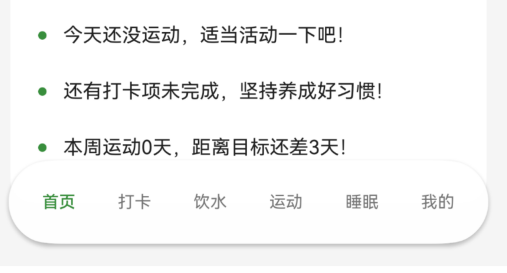
之前我们讲了如何在API22里面,实现一个简易的悬浮导航栏。
往期回顾:【HarmonyOS 6】底部导航实战:Tabs 与玻璃导航栏联动
但是在API23中,官方给了更为便捷的方案。
一、适配工具代码
这是底部导航尺寸适配和底部安全冗余的基础,必须有。
typescript
import mediaquery from '@ohos.mediaquery';
import { deviceInfo } from '@kit.BasicServicesKit';

export enum BreakpointType {
  SM = 'sm',  // 手机 320vp - 600vp
  MD = 'md',  // 平板 600vp - 840vp
  LG = 'lg'   // 2in1/大屏 840vp+
}

export class BreakpointValue<T> {
  sm: T;
  md: T;
  lg: T;

  constructor(sm: T, md: T, lg: T) {
    this.sm = sm;
    this.md = md;
    this.lg = lg;
  }
}

export function getValueByBreakpoint<T>(breakpoint: BreakpointType, config: BreakpointValue<T>): T {
  switch (breakpoint) {
    case BreakpointType.SM:
      return config.sm;
    case BreakpointType.MD:
      return config.md;
    case BreakpointType.LG:
      return config.lg;
    default:
      return config.sm;
  }
}

export function getPagePadding(breakpoint: BreakpointType): number {
  return getValueByBreakpoint(breakpoint, new BreakpointValue<number>(16, 24, 32));
}

// 底部悬浮导航的安全冗余:避免遮挡页面最后内容
export function getFloatingNavSafePadding(breakpoint: BreakpointType): number {
  return getValueByBreakpoint(breakpoint, new BreakpointValue<number>(84, 92, 0));
}

export type DeviceType = 'phone' | 'tablet' | '2in1' | 'unknown';

export function getDeviceType(): DeviceType {
  const rawType: string = deviceInfo.deviceType;
  switch (rawType) {
    case 'phone':
      return 'phone';
    case 'tablet':
      return 'tablet';
    case '2in1':
      return '2in1';
    default:
      return 'unknown';
  }
}

export function is2In1Device(): boolean {
  return getDeviceType() === '2in1';
}

export function shouldEnableHover(): boolean {
  return is2In1Device();
}

export class BreakpointManager {
  private currentBreakpoint: BreakpointType = BreakpointType.SM;
  private smListener: mediaquery.MediaQueryListener | null = null;
  private mdListener: mediaquery.MediaQueryListener | null = null;
  private lgListener: mediaquery.MediaQueryListener | null = null;
  private callbacks: ((breakpoint: BreakpointType) => void)[] = [];

  constructor() {
    this.initListeners();
  }

  private initListeners(): void {
    this.smListener = mediaquery.matchMediaSync('(320vp<=width<600vp)');
    this.smListener.on('change', (result: mediaquery.MediaQueryResult) => {
      if (result.matches) {
        this.updateBreakpoint(BreakpointType.SM);
      }
    });

    this.mdListener = mediaquery.matchMediaSync('(600vp<=width<840vp)');
    this.mdListener.on('change', (result: mediaquery.MediaQueryResult) => {
      if (result.matches) {
        this.updateBreakpoint(BreakpointType.MD);
      }
    });

    this.lgListener = mediaquery.matchMediaSync('(840vp<=width)');
    this.lgListener.on('change', (result: mediaquery.MediaQueryResult) => {
      if (result.matches) {
        this.updateBreakpoint(BreakpointType.LG);
      }
    });
  }

  private updateBreakpoint(breakpoint: BreakpointType): void {
    if (this.currentBreakpoint !== breakpoint) {
      this.currentBreakpoint = breakpoint;
      this.callbacks.forEach(callback => callback(breakpoint));
    }
  }

  getCurrentBreakpoint(): BreakpointType {
    return this.currentBreakpoint;
  }

  onChange(callback: (breakpoint: BreakpointType) => void): void {
    this.callbacks.push(callback);
  }

  removeCallback(callback: (breakpoint: BreakpointType) => void): void {
    const index = this.callbacks.indexOf(callback);
    if (index > -1) {
      this.callbacks.splice(index, 1);
    }
  }
}

let globalBreakpointManager: BreakpointManager | null = null;

export function getBreakpointManager(): BreakpointManager {
  if (!globalBreakpointManager) {
    globalBreakpointManager = new BreakpointManager();
  }
  return globalBreakpointManager;
}
二、导航核心代码:状态、图标、底栏组件
这部分是底部导航的"公共层",两种移动方案都依赖它。
typescript
import { BreakpointManager, BreakpointType, BreakpointValue, getBreakpointManager, getFloatingNavSafePadding, getPagePadding, getValueByBreakpoint, is2In1Device, shouldEnableHover } from '../utils/BreakpointUtils';
import { ExerciseTabContent } from './ExerciseTabContent';
import { SleepTabContent } from './SleepTabContent';
import { ProfileTabContent } from './ProfileTabContent';
import { WaterTabContent } from './WaterTabContent';
import { CheckInTabContent } from './CheckInTabContent';

import common from '@ohos.app.ability.common';
import { deviceInfo } from '@kit.BasicServicesKit';
import { HdsTabs, HdsTabsController } from '@kit.UIDesignKit';
import { SymbolGlyphModifier } from '@kit.ArkUI';

@Entry
@Component
struct Index {
  @State currentTabIndex: number = 0;
  @State hoverNavIndex: number = -1;
  @State currentBreakpoint: BreakpointType = getBreakpointManager().getCurrentBreakpoint();
  @State useApi23FloatingNav: boolean = false;

  private tabController: TabsController = new TabsController();
  private hdsTabController: HdsTabsController = new HdsTabsController();
  private breakpointManager: BreakpointManager | null = null;
  private breakpointListener: ((breakpoint: BreakpointType) => void) | null = null;

  aboutToAppear(): void {
    const ctx = getContext(this) as common.UIAbilityContext;
    this.detectApi23FloatingNav();

    this.breakpointManager = getBreakpointManager();
    this.currentBreakpoint = this.breakpointManager.getCurrentBreakpoint();
    this.breakpointListener = (breakpoint: BreakpointType) => {
      this.currentBreakpoint = breakpoint;
    };
    this.breakpointManager.onChange(this.breakpointListener);
  }

  aboutToDisappear(): void {
    if (this.breakpointManager && this.breakpointListener) {
      this.breakpointManager.removeCallback(this.breakpointListener);
    }
  }

  private detectApi23FloatingNav(): void {
    try {
      const sdkApiVersion: number = deviceInfo.sdkApiVersion;
      this.useApi23FloatingNav = sdkApiVersion >= 23;
    } catch (error) {
      this.useApi23FloatingNav = false;
    }
  }

  private isDesktopMode(): boolean {
    return is2In1Device();
  }

  private switchToTab(index: number): void {
    this.currentTabIndex = index;
    if (!this.isDesktopMode()) {
      if (this.useApi23FloatingNav) {
        this.hdsTabController.changeIndex(index);
      } else {
        this.tabController.changeIndex(index);
      }
    }
    if (index === 0) {
      this.refreshHomeData();
    }
  }

  private getMobileNavHeight(): number {
    return getValueByBreakpoint(this.currentBreakpoint, new BreakpointValue<number>(60, 64, 68));
  }

  private getMobileNavRadius(): number {
    return getValueByBreakpoint(this.currentBreakpoint, new BreakpointValue<number>(30, 32, 34));
  }

  private getMobileNavItemRadius(): number {
    return getValueByBreakpoint(this.currentBreakpoint, new BreakpointValue<number>(16, 18, 20));
  }

  private getMobileNavTextSize(): number {
    return getValueByBreakpoint(this.currentBreakpoint, new BreakpointValue<number>(12, 13, 14));
  }

  @Builder
  TabBuilder(title: string, index: number) {
    Column() {
      Text(title)
        .fontSize(getValueByBreakpoint(this.currentBreakpoint, new BreakpointValue<number>(12, 14, 16)))
        .fontWeight(this.currentTabIndex === index ? FontWeight.Medium : FontWeight.Normal)
        .fontColor(this.currentTabIndex === index ? $r('app.color.primary_color') : $r('app.color.inactive_color'))
    }
    .width('100%')
    .height('100%')
    .justifyContent(FlexAlign.Center)
  }

  private buildTabSymbol(symbol: Resource, selected: boolean): SymbolGlyphModifier {
    return new SymbolGlyphModifier(symbol)
      .fontColor([selected ? $r('app.color.primary_color') : $r('app.color.inactive_color')]);
  }

  private getTabSymbol(index: number): Resource {
    switch (index) {
      case 0:
        return $r('sys.symbol.house');
      case 1:
        return $r('sys.symbol.square_and_pencil');
      case 2:
        return $r('sys.symbol.cup');
      case 3:
        return $r('sys.symbol.figure_run');
      case 4:
        return $r('sys.symbol.sleep');
      default:
        return $r('sys.symbol.person');
    }
  }

  @Builder
  MobileNavItem(title: string, index: number) {
    Column({ space: 4 }) {
      if (this.useApi23FloatingNav) {
        SymbolGlyph(this.getTabSymbol(index))
          .fontSize(getValueByBreakpoint(this.currentBreakpoint, new BreakpointValue<number>(16, 18, 20)))
          .fontColor([this.currentTabIndex === index ? $r('app.color.primary_dark') : $r('app.color.text_secondary')])
      }

      Text(title)
        .fontSize(this.getMobileNavTextSize())
        .fontWeight(this.currentTabIndex === index ? FontWeight.Medium : FontWeight.Normal)
        .fontColor(this.currentTabIndex === index ? $r('app.color.primary_dark') : $r('app.color.text_secondary'))
    }
    .padding({ left: 12, right: 12, top: 6, bottom: 6 } as Padding)
    .borderRadius(this.getMobileNavItemRadius())
    .backgroundColor(this.currentTabIndex === index ? $r('app.color.glass_nav_active') : Color.Transparent)
    .onClick(() => {
      this.switchToTab(index);
    })
  }

  @Builder
  MobileNavBar() {
    Row() {
      this.MobileNavItem('首页', 0)
      this.MobileNavItem('打卡', 1)
      this.MobileNavItem('饮水', 2)
      this.MobileNavItem('运动', 3)
      this.MobileNavItem('睡眠', 4)
      this.MobileNavItem('我的', 5)
    }
    .width('92%')
    .height(this.getMobileNavHeight())
    .padding({ left: 8, right: 8 } as Padding)
    .justifyContent(FlexAlign.SpaceAround)
    .alignItems(VerticalAlign.Center)
    .backgroundColor($r('app.color.glass_nav_background'))
    .border({ width: 1, color: $r('app.color.glass_nav_border') })
    .borderRadius(this.getMobileNavRadius())
    .shadow({ radius: 12, color: $r('app.color.shadow_color'), offsetY: 6 })
    .margin({ bottom: 16 } as Padding)
  }

  // ... 其他业务代码
}
三、移动端导航实现
这部分是最关键代码:API23+ 走官方提供的悬浮底栏,低版本自动回退。
typescript
@Builder
Api23FloatingMobileTabs() {
  HdsTabs({ controller: this.hdsTabController }) {
    TabContent() {
      this.HomeContent()
    }
    .tabBar(new BottomTabBarStyle({
      normal: this.buildTabSymbol(this.getTabSymbol(0), false),
      selected: this.buildTabSymbol(this.getTabSymbol(0), true)
    }, '首页'))

    TabContent() {
      CheckInTabContent()
    }
    .tabBar(new BottomTabBarStyle({
      normal: this.buildTabSymbol(this.getTabSymbol(1), false),
      selected: this.buildTabSymbol(this.getTabSymbol(1), true)
    }, '打卡'))

    TabContent() {
      WaterTabContent({ currentTab: this.currentTabIndex })
    }
    .tabBar(new BottomTabBarStyle({
      normal: this.buildTabSymbol(this.getTabSymbol(2), false),
      selected: this.buildTabSymbol(this.getTabSymbol(2), true)
    }, '饮水'))

    TabContent() {
      ExerciseTabContent()
    }
    .tabBar(new BottomTabBarStyle({
      normal: this.buildTabSymbol(this.getTabSymbol(3), false),
      selected: this.buildTabSymbol(this.getTabSymbol(3), true)
    }, '运动'))

    TabContent() {
      SleepTabContent()
    }
    .tabBar(new BottomTabBarStyle({
      normal: this.buildTabSymbol(this.getTabSymbol(4), false),
      selected: this.buildTabSymbol(this.getTabSymbol(4), true)
    }, '睡眠'))

    TabContent() {
      ProfileTabContent({ currentTab: this.currentTabIndex })
    }
    .tabBar(new BottomTabBarStyle({
      normal: this.buildTabSymbol(this.getTabSymbol(5), false),
      selected: this.buildTabSymbol(this.getTabSymbol(5), true)
    }, '我的'))
  }
  .width('100%')
  .height('100%')
  .barOverlap(true)
  .barPosition(BarPosition.End)
  .vertical(false)
  .barFloatingStyle({
    barBottomMargin: 16,
    gradientMask: { maskColor: '#66F1F3F5', maskHeight: 92 }
  })
  .onChange((index: number) => {
    this.currentTabIndex = index;
    if (index === 0) {
      this.refreshHomeData();
    }
  })
}

@Builder
LegacyMobileTabs() {
  Stack({ alignContent: Alignment.Bottom }) {
    Tabs({ barPosition: BarPosition.End, controller: this.tabController }) {
      TabContent() {
        this.HomeContent()
      }
      .tabBar(this.TabBuilder('首页', 0))

      TabContent() {
        CheckInTabContent()
      }
      .tabBar(this.TabBuilder('打卡', 1))

      TabContent() {
        WaterTabContent({ currentTab: this.currentTabIndex })
      }
      .tabBar(this.TabBuilder('饮水', 2))

      TabContent() {
        ExerciseTabContent()
      }
      .tabBar(this.TabBuilder('运动', 3))

      TabContent() {
        SleepTabContent()
      }
      .tabBar(this.TabBuilder('睡眠', 4))

      TabContent() {
        ProfileTabContent({ currentTab: this.currentTabIndex })
      }
      .tabBar(this.TabBuilder('我的', 5))
    }
    .width('100%')
    .height('100%')
    .barHeight(0)
    .edgeEffect(EdgeEffect.Spring)
    .onChange((index: number) => {
      this.currentTabIndex = index;
      if (index === 0) {
        this.refreshHomeData();
      }
    })

    this.MobileNavBar()
  }
  .width('100%')
  .height('100%')
}

build() {
  if (this.isDesktopMode()) {
    Row() {
      this.DesktopSidebar()
      Column() {
        this.DesktopContent()
      }
      .layoutWeight(1)
      .height('100%')
      .backgroundColor($r('app.color.background_color'))
    }
    .width('100%')
    .height('100%')
    .backgroundColor($r('app.color.background_color'))
  } else {
    if (this.useApi23FloatingNav) {
      this.Api23FloatingMobileTabs();
    } else {
      this.LegacyMobileTabs();
    }
  }
}
而且官方提供的悬浮底栏,还支持沉浸光感、以及迷你栏的功能。目前我们只是实现了一个最简易的导航栏。下次我们可以继续细讲一下剩下的内容。
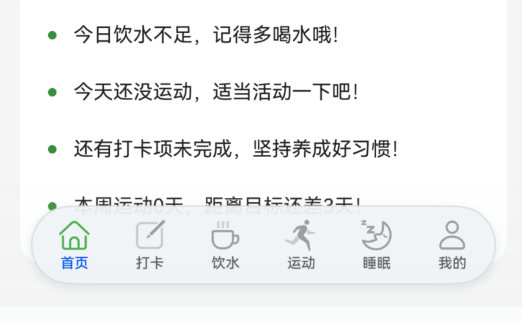
四、最终实现效果
API23:
API22及以下: