定义实体类和数据库上下文
新建一个Web API项目,使用NuGet引入如下组件
Microsoft.EntityFrameworkCore
Microsoft.EntityFrameworkCore.SqlServer
Microsoft.EntityFrameworkCore.Design
Microsoft.EntityFrameworkCore.Tools
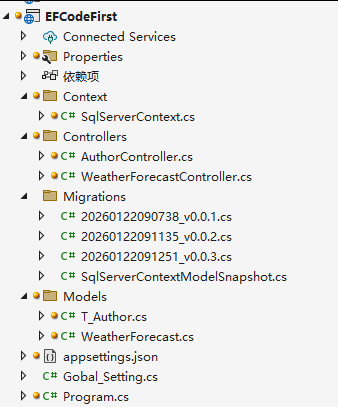
SqlServerContext 代码如下:
cs
using Canteen.Services;
using EFCodeFirst.Models;
using Microsoft.EntityFrameworkCore;

namespace EFCodeFirst.Context
{
    public class SqlServerContext:DbContext
    {
        public SqlServerContext()
        {

        }
        public SqlServerContext(DbContextOptions<SqlServerContext> options) : base(options) { }
        protected override void OnConfiguring(DbContextOptionsBuilder optionsBuilder)
        {
            if (!optionsBuilder.IsConfigured)
            {
                var sqlServerConString = ConfigurationHelper.GetConfigValueByKey("ConnectionStrings:MSSQLDbConnection");// Gobal_Setting.Instance.GetSettingValue("ConnectionStrings:MSSQLDbConnection");
                optionsBuilder.UseSqlServer(sqlServerConString, sqlOptions =>
                {
                    sqlOptions.EnableRetryOnFailure(5, TimeSpan.FromSeconds(10), null); // 连接重试策略
                });
            }
            base.OnConfiguring(optionsBuilder);
        }
        protected override void OnModelCreating(ModelBuilder modelBuilder)
        {
            modelBuilder.Entity<T_Author>();
            base.OnModelCreating(modelBuilder);
        }

        public virtual DbSet<T_Author> Author { get; set; }
    }
}添加Author代码:
cs
using System.ComponentModel.DataAnnotations;
using System.ComponentModel.DataAnnotations.Schema;

namespace EFCodeFirst.Models
{
    [Table("T_Author")]
    public class T_Author
    {
        [Key]
        public int Id { get; set; }
        [Required]
        [StringLength(20)]
        public string gName {  get; set; }

        [StringLength(50)]
        public string CardID { get; set; }

        /// <summary>
        /// 信息
        /// </summary>
        [NotMapped]
        public string Info { get => $"姓名:{gName},地址:{CardID}"; }
    }
}在NuGet控制台中输入如下命令:
cs
Add-Migration m1然后更新数据库:
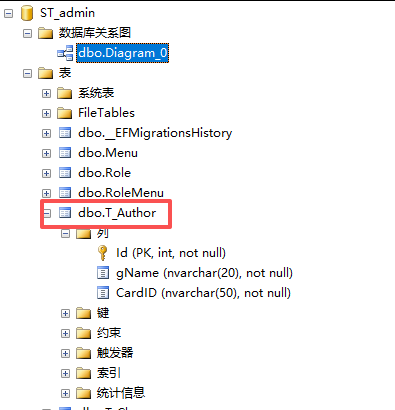
cs
Update-Database数据库里会添加表T_Author