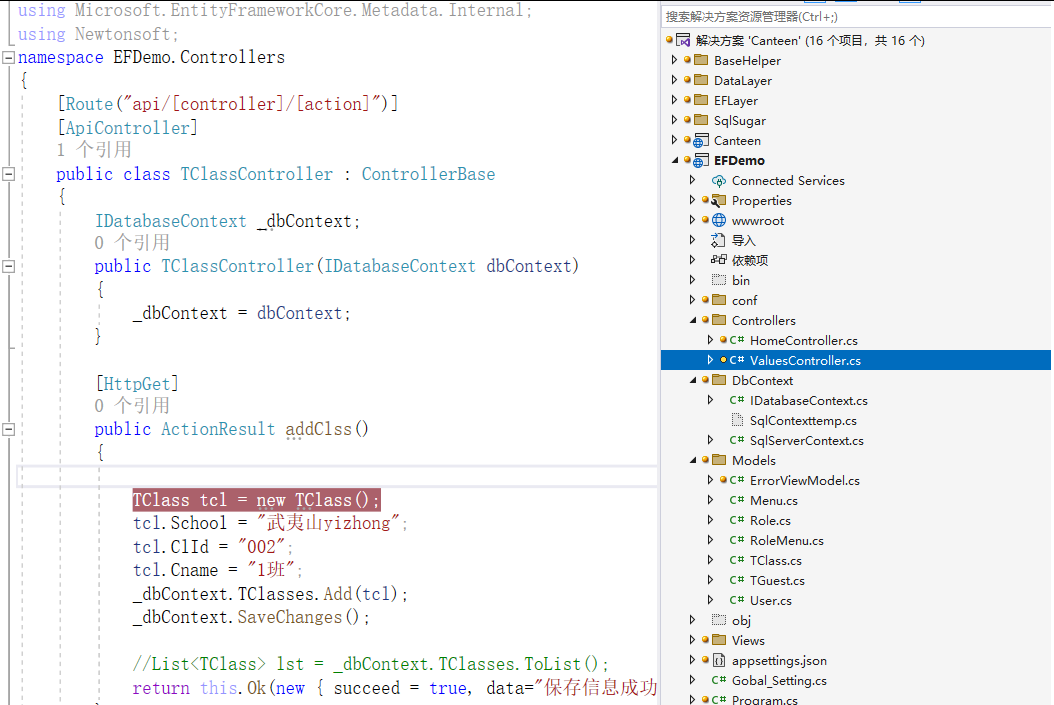
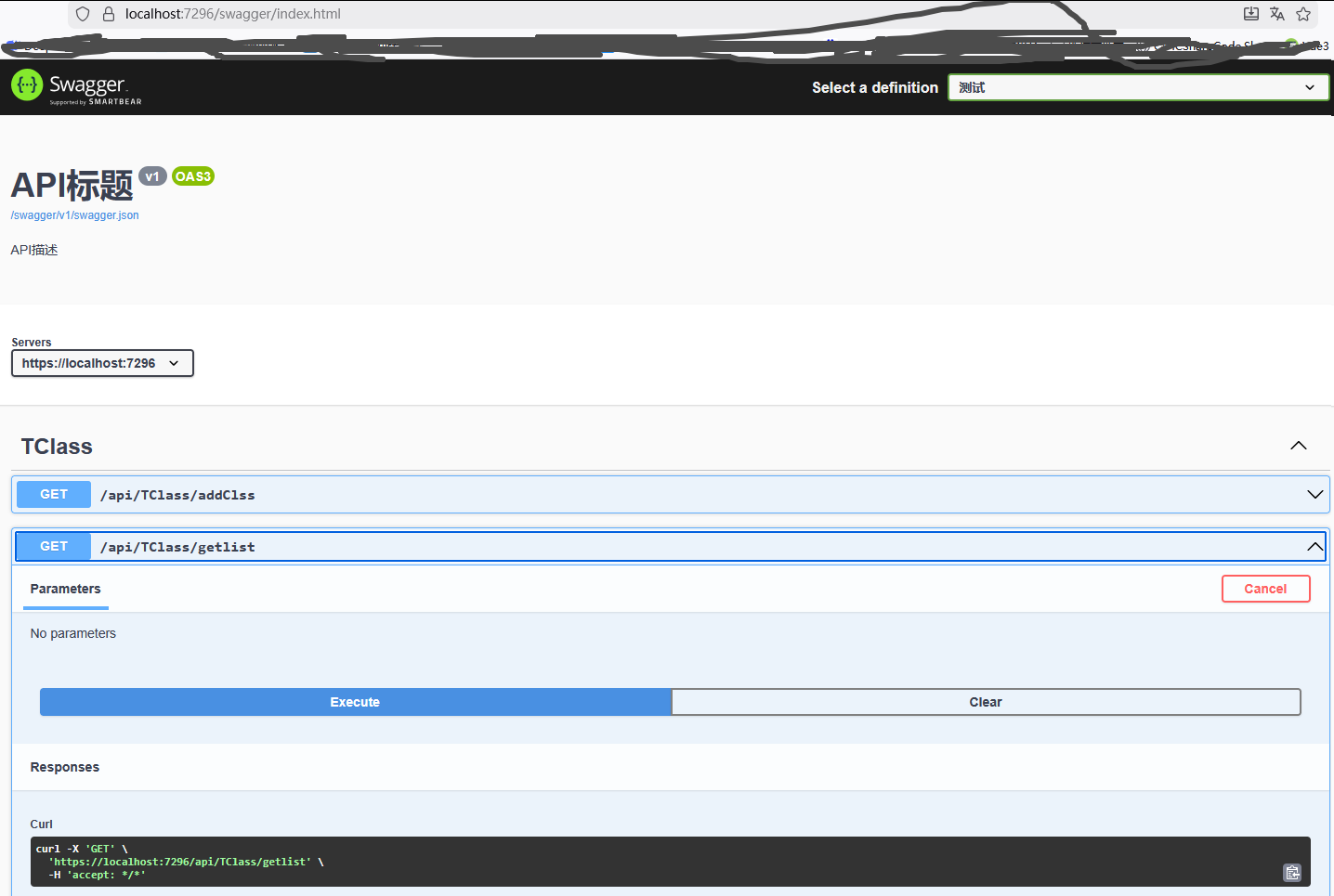
一、引入EFCore相关组件
创建一个Web API项目,使用NuGet引入如下四个组
Microsoft.EntityFrameworkCore
Microsoft.EntityFrameworkCore.SqlServer
Microsoft.EntityFrameworkCore.Design
Microsoft.EntityFrameworkCore.Tools
二、生成实体类和数据库上下文
在EFCore中,使用DB First模式生成实体类和数据库上下文时需要使用Scaffold-DbContext命令,该命令的格式如下所示:
Scaffold-DbContext [-Connection] <String> [-Provider] <String> [-OutputDir <String>] [-ContextDir <String>] [-Context <String>] [-Schemas <String[]>] [-Tables <String[]>] [-DataAnnotations] [-UseDatabaseNames] [-Force] [-Project <String>] [-StartupProject <String>][<CommonParameters>]Scaffold-DbContext命令中的参数说明如下表所示:
|------------------|------------------------------------------------------|
| 名称 | 含义 |
| -Connection | 指定数据库的连接字符串 |
| -Provider | 指定要使用的提供程序。例如Microsoft.EntityFrameworkCore.SqlServer |
| -OutputDir | 指定用于输出类的目录。如果省略,则使用顶级项目目录 |
| -ContextDir | 指定存放DbContext的目录 |
| -Context | 指定生成的DbContext类的名称 |
| -Schemas | 指定要为其生成类的模式 |
| -Tables | 指定要为其生成类的表 |
| -DataAnnotations | 使用DataAnnotation属性在可能的情况下配置模型 |
| -Force | 强制脚手架覆盖现有文件 |
| -Project | 指定实体类和数据库上下文存放在的项目名称 |
| -StartupProject | 指定启动项目名称 |
打开NuGet控制台,输入如下命令
Scaffold-DbContext -Connection "database=ST_admin;Persist Security Info=true;password=123;User ID =sa;server =DESKTOP-RSH1EVH\SQL2012;TrustServerCertificate=True" -Provider Microsoft.EntityFrameworkCore.SqlServer -OutputDir Models -ContextDir DbContext -Context SqlContexttemp -Force可以发现已经创建了实体类Country、Province和数据库上下文类SqlContext。到此为止,我们已经可以通过Scaffold-DbContext命令生成实体类和数据库上下文了。
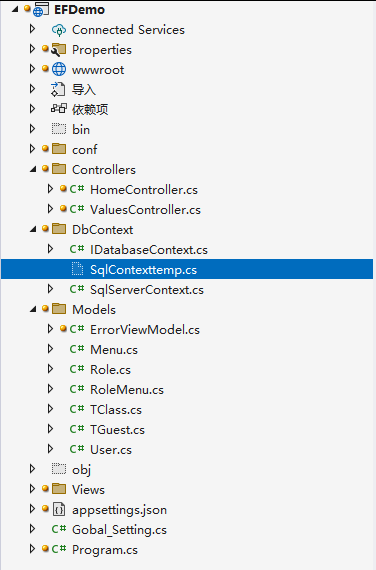
对实体类和数据库上下文进行更新了,我们只需要在Scaffold-DbContext命令后面加上-Force参数即可,它可以帮助我们重新生成实体类和数据库上下文并覆盖原有文件
三、分层项目中如何在其他类库中生成实体类和数据库上下文?
在实际开发过程中,很多项目都会进行分层操作,例如新建一个Demo.Models类库用来存放实体类和数据库上下文
首先在Demo.Models中使用NuGet引入EFCore的相关组件
Microsoft.EntityFrameworkCore
Microsoft.EntityFrameworkCore.SqlServer
Microsoft.EntityFrameworkCore.Design
Microsoft.EntityFrameworkCore.Tools
最后在Scaffold-DbContext命令中设置-Project和-StartupProject参数,代码如下:
cs
Scaffold-DbContext -Connection "database=ST_admin;Persist Security Info=true;password=123;User ID =sa;server =DESKTOP-RSH1EVH\SQL2012;TrustServerCertificate=True" -Provider Microsoft.EntityFrameworkCore.SqlServer -OutputDir Models -ContextDir DbContext -Context SqlContexttemp -Force -Project Demo.Models -StartupProject Demo.Models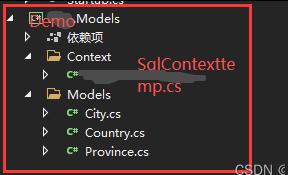
四、在Startup.cs文件中添加数据库上下文,代码如下所示:
cs
using Canteen.Services;
using EFDemo;
using Microsoft.EntityFrameworkCore;
using NPOI.OpenXmlFormats.Dml;
using Microsoft.AspNetCore.Authentication.JwtBearer;
using Microsoft.OpenApi.Models;

var builder = WebApplication.CreateBuilder(args);

// Add services to the container.
builder.Services.AddControllersWithViews();
Canteen.Services.ConfigurationHelper.Configure(builder.Configuration);

// 添加其他配置文件
var configurationBuilder = new ConfigurationBuilder();
Gobal_Setting.Instance.AddConfs().ForEach(x => configurationBuilder.AddJsonFile(x, optional: true, reloadOnChange: true));
var configuration = configurationBuilder.Build();
builder.Configuration.AddConfiguration(configuration);// 替换默认配置

//string tempv = Gobal_Setting.Instance.GetSettingValue("name");
//string id = Gobal_Setting.Instance.GetSettingValue("id");
//string school = Gobal_Setting.Instance.GetSettingValue("school");

// 配置数据库上下文
builder.Services.AddDbContext<SqlServerContext>(options =>
{
    var sqlServerConString = ConfigurationHelper.GetConfigValueByKey("ConnectionStrings:MSSQLDbConnection");// Gobal_Setting.Instance.GetSettingValue("ConnectionStrings:MSSQLDbConnection");
    options.UseSqlServer(sqlServerConString);
});

builder.Services.AddCors(policy =>
{
    policy.AddPolicy("AnyPolicy", opt => opt
            //.WithOrigins(Gobal_Setting.Instance.GetSettingValue("urls_ui").Split(','))
            .AllowAnyOrigin()
            .AllowAnyMethod()
            //.AllowCredentials()
            .AllowAnyHeader());
});

builder.Services.AddScoped<IDatabaseContext, SqlServerContext>();
builder.Services.AddSwaggerGen(options =>
{
    //http://localhost:38041/swagger/index.html
    options.SwaggerDoc("v1", new OpenApiInfo
    {
        Version = "v1",
        Title = "API标题",
        Description = "API描述"
    });
    var xmlFile = AppContext.BaseDirectory;

});

var app = builder.Build();

app.UseSwagger();
app.UseSwaggerUI(c =>
{
    c.SwaggerEndpoint("/swagger/v1/swagger.json", "测试");
    c.DocumentTitle = "API";
    //http://localhost:38041/swagger/index.html
});

app.UseCors("AnyPolicy");
// Configure the HTTP request pipeline.
if (!app.Environment.IsDevelopment())
{
    app.UseExceptionHandler("/Home/Error");
    // The default HSTS value is 30 days. You may want to change this for production scenarios, see https://aka.ms/aspnetcore-hsts.
    app.UseHsts();
}

app.UseHttpsRedirection();
app.UseStaticFiles();

app.UseRouting();

app.UseAuthorization();

app.MapControllerRoute(
    name: "default",
    pattern: "{controller=Home}/{action=Index}/{id?}");

app.Run();
ConfigurationHelper代码如下:
cs
using Microsoft.Extensions.Configuration;
using System;
using System.Collections.Generic;
using System.Text;

namespace Canteen.Services
{
    public class ConfigurationHelper
    {
        public static void Configure(IConfiguration config)
        {
            _configuration = config;
        }

        public static IConfiguration _configuration;

        public static string GetConfigValueByKey(string key)
        {
            return _configuration[key];
        }

    }
}
Gobal_Setting 代码如下:
cs
using Newtonsoft.Json;
using Newtonsoft.Json.Linq;
using System.Collections.Concurrent;
using System.Text;
using System.Text.RegularExpressions;
using Microsoft.Extensions.Configuration;

namespace EFDemo
{
    public class Gobal_Setting
    {
        private static Gobal_Setting _obj = null;

        public static Gobal_Setting Instance
        {
            get
            {
                if (_obj == null)
                    _obj = new Gobal_Setting();
                return _obj;
            }
        }

        private readonly List<string> ConfileList = new List<string>();

        private readonly ConcurrentDictionary<string, object> _settingDictionary = new ConcurrentDictionary<string, object>();

        #region 递归获取文件树
        private List<string> GetPathList(string path = "")
        {
            List<string> pathList = new List<string>();

            try
            {
                DirectoryInfo folder = new DirectoryInfo(path);

                if (folder.Exists)
                {
                    foreach (FileInfo file in folder.GetFiles().OrderByDescending(fi => fi.Name))//根据名称排线,最后的覆盖
                    {
                        pathList.Add(file.FullName);
                    }

                    foreach (DirectoryInfo dir in folder.GetDirectories().OrderByDescending(fdir => fdir.Name))
                    {
                        pathList.AddRange(GetPathList(dir.FullName));
                    }
                }
            }
            catch (Exception ex) { Console.WriteLine(ex.Message); }

            return pathList;
        }
        #endregion

        /// <summary>
        /// 添加配置文件夹
        /// </summary>
        public List<string> AddConfs(string ConfDirectory = "conf")
        {
            string ConfPath = Path.Combine(AppDomain.CurrentDomain.BaseDirectory, ConfDirectory);
            List<string> jsonfiles = GetPathList(ConfPath);
            jsonfiles.ForEach(x => AddJsonFile(x));
            return ConfileList;
        }

        public void AddJsonFile(string ConfigFullFilePath)
        {
            try
            {
                if (!ConfigFullFilePath.Contains("/") && !ConfigFullFilePath.Contains("\\"))
                    ConfigFullFilePath = Path.Combine(AppDomain.CurrentDomain.BaseDirectory, ConfigFullFilePath);

                string Config_json = ReadConfig(ConfigFullFilePath);
                if (string.IsNullOrEmpty(Config_json))
                    return;

                var kv = JsonConvert.DeserializeObject<Dictionary<string, object>>(Config_json);
                foreach (KeyValuePair<string, object> item in kv)
                {
                    if (!_settingDictionary.Keys.Contains(item.Key))
                        _settingDictionary.TryAdd(item.Key, item.Value);
                    else
                        _settingDictionary[item.Key] = item.Value;
                }

                if (!ConfileList.Contains(ConfigFullFilePath))
                    ConfileList.Add(ConfigFullFilePath);

                //AddSettings(JsonConvert.DeserializeObject<Dictionary<string, object>>(Config_json));
            }
            catch (Exception ex) { Console.WriteLine("AddJsonFile Error :" + ex.Message); }
        }

        public int GetCount()
        {
            return _settingDictionary.Count;
        }
        public List<KeyValuePair<string, object>> GetItems()
        {
            return _settingDictionary.ToArray().ToList();
        }

        public int AddSettings(Dictionary<string, object> dictionary)
        {
            if (dictionary != null && dictionary.Count > 0)
            {
                foreach (var item in dictionary)
                {
                    _settingDictionary[item.Key] = item.Value;
                }
            }
            return _settingDictionary.Count;
        }

        public string GetSettingValue(string settingKey)
        {
            try
            {
                if (settingKey.Contains(":"))
                {
                    string[] ary = settingKey.Split(':');
                    _settingDictionary.TryGetValue(ary[0], out object? v0);

                    JToken retDataJson = JToken.Parse(v0?.ToString());
                    return retDataJson?.SelectToken(ary[1])?.ToString();

                    //JArray jArray = v.result;
                    //foreach (JToken jt in jArray)
                    //{
                    //    dynamic v1 = JsonConvert.DeserializeObject(jt.ToString().Replace("/r/n", ""));
                    //    string v1_uuid = v1.uuid;
                    //    string v1_name = v1.name;
                    //}
                }
                else
                {
                    _settingDictionary.TryGetValue(settingKey, out object val);
                    return val?.ToString();
                }
            }
            catch { return ""; }
        }

        public int GetSettingValue_Int(string settingKey)
        {
            var value = GetSettingValue(settingKey);
            int ret;
            int.TryParse(value?.ToString(), out ret);
            return ret;
        }

        public string SetSettingValue(string settingKey, string settingValue)
        {
            _settingDictionary[settingKey] = settingValue;
            return settingValue;
        }

        public int SetSettingValue_Int(string settingKey, int settingValue)
        {
            _settingDictionary[settingKey] = settingValue;
            return settingValue;
        }

        //public ConcurrentDictionary<string, object> GetSetting()
        //{
        //    return _settingDictionary;
        //}

        #region 读配置文件
        /// <summary>
        /// 读取配置文件
        /// </summary>
        /// <param name="ConfigFullFilePath"></param>
        /// <returns></returns>
        private string ReadConfig(string ConfigFullFilePath)
        {
            try
            {
                if (!System.IO.File.Exists(ConfigFullFilePath))
                    return "";

                //单行双斜杆注释正则表达式
                Regex reg = new Regex("^[^\"]*((((?<=@)\"[^\"]*\")|((?<!@)\"(\\\\\\\\|\\\\\"|[^\"])*\"))[^\"]*)*//");

                StringBuilder Context = new StringBuilder();
                string[] Lines = File.ReadAllLines(ConfigFullFilePath);
                foreach (string line in Lines)
                {
                    bool hasComment = reg.IsMatch(line);
                    if (hasComment)
                    {
                        string v = reg.Match(line).Value.Trim();
                        int x = v.LastIndexOf("//");
                        if (x > 0)
                            Context.Append(v.Substring(0, x));
                    }
                    else
                        Context.Append(line);
                }

                return Context.ToString();
            }
            catch (Exception ex)
            {
                Console.WriteLine(ex.Message);
                return "";
            }
            finally
            {

            }
        }
        #endregion

        #region 写配置文件
        /// <summary>
        /// 写配置文件
        /// </summary>
        /// <param name="Key"></param>
        /// <param name="oValue"></param>
        public bool WriteConfig(string Key, object oValue)
        {
            try
            {
                if (oValue.GetType() != typeof(string) && oValue.GetType() != typeof(int))
                    return false;

                foreach (var ConfigFullFilePath in ConfileList)
                {
                    if (!File.Exists(ConfigFullFilePath))
                        continue;

                    var config_w = new ConfigurationBuilder()
                      .AddJsonFile(ConfigFullFilePath)
                      .Build();

                    if (config_w[Key] != null)
                    {
                        StringBuilder Context = new StringBuilder();
                        string[] Lines = File.ReadAllLines(ConfigFullFilePath);
                        string[] KeySectionArray = Key.Split(':');

                        int StartLine = 0;
                        string SerachKey = Key;
                        if (KeySectionArray.Length > 1)
                            SerachKey = KeySectionArray[0];

                        for (int i = 0; i < Lines.Length; i++)
                        {
                            string line = Lines[i];

                            if (StartLine == 0 && KeySectionArray.Length > 1)
                            {
                                if (line.Contains("\"" + SerachKey + "\""))
                                {
                                    StartLine = i;
                                    SerachKey = KeySectionArray[1];
                                }
                                else
                                    continue;
                            }

                            if (line.Contains("\"" + SerachKey + "\""))
                            {
                                //TODO:替换时候,判断字符串还是数字,字符串需要匹配引号才更正确
                                Lines[i] = line.Replace(config_w[Key], oValue.ToString());
                                break;
                            }
                        }


                        Console.WriteLine("WriteConfig:" + ConfigFullFilePath);
                        File.WriteAllLines(ConfigFullFilePath, Lines);
                        return true;
                    }
                }

                return false;
            }
            catch (Exception ex)
            {
                Console.WriteLine(ex.Message);
                return false;
            }
        }


        public object SetSettingValue(string settingKey, object settingValue)
        {
            throw new NotImplementedException();
        }

        public int AddSettings(KeyValuePair<string, object> kv)
        {
            throw new NotImplementedException();
        }

        public int AddSettings(string key, object value)
        {
            throw new NotImplementedException();
        }
        #endregion

    }
}
五、新增控制器