相关基础知识可也参考几年前的博文:
https://blog.csdn.net/carcarrot/article/details/104063233
https://blog.csdn.net/carcarrot/article/details/104061696
本文实践参考自以下两篇文章:
https://www.cnblogs.com/chenxizhaolu/p/18743273
https://blog.51cto.com/zhouwenhao/11662144?articleABtest=0
【说明】:相关知识介绍之前或以上来源处皆有介绍,此文不再赘述,这里只提供实验源码帮助说明
【注意事项】:当服务器使用了横向扩展,SignalR传输类型为Long Polling时,注意需要使用Sticky Sessions (粘性会话,比如:Nginx会话保持之nginx-sticky-module模块)实现会话保持 https://blog.csdn.net/carcarrot/article/details/104063233#t6
服务端代码
1、Program.cs 程序入口中增加相关服务: AddSignalR()、AddHostedService<Worker>()等。
A、使用ChatHub2测试案例:
cs
using Microsoft.AspNetCore.Http.Connections;
using WebAPI_Test.SignalR;

var builder = WebApplication.CreateBuilder(args);

// Add services to the container.

builder.Services.AddControllers();
// Learn more about configuring Swagger/OpenAPI at https://aka.ms/aspnetcore/swashbuckle
builder.Services.AddEndpointsApiExplorer();
builder.Services.AddSwaggerGen();
builder.Services.AddSignalR().AddJsonProtocol(options =>
{
    options.PayloadSerializerOptions.PropertyNamingPolicy = null;
});

//builder.WebHost.UseUrls("http://localhost:7000");

//增加主机管理服务作为实时推送功能服务:
builder.Services.AddHostedService<Worker>();

var app = builder.Build();

// Configure the HTTP request pipeline.
//if (app.Environment.IsDevelopment())
{
    app.UseSwagger();
    app.UseSwaggerUI();
}

//app.UseHttpsRedirection();
//app.UseCors("AllowAll");
app.UseCors(x => x.AllowAnyHeader().AllowAnyOrigin().AllowAnyMethod());
//注意:不能同时"AllowAnyOrigin()"又"AllowCredentials()",  此处设置AllowAnyOrigin为了方便本机测试,客户端库需配合将withCredentials选项设为false
app.UseRouting();

//app.UseAuthorization();

app.MapHub<ChatHub2>("chatHub", options =>
{
    options.Transports = HttpTransportType.WebSockets | HttpTransportType.LongPolling;
    //options.Transports = HttpTransportType.LongPolling;
    //options.Transports = HttpTransportType.ServerSentEvents;
});
//app.MapHub<ChatHub2>("chatHub");

app.MapControllers();

app.Run();
B、使用ChatHub测试案例
cs
//// Test With "ChatHub.cs":

//using WebAPI_Test.SignalR;

//var builder = WebApplication.CreateBuilder(args);
//builder.Services.AddCors(options =>
//{
//    options.AddPolicy("AllowAll", policy =>
//    {
//        policy.AllowAnyOrigin()
//              //.WithOrigins("http://127.0.0.1:5500") // 允许所有来源
//              .AllowAnyMethod() // 允许所有 HTTP 方法
//              .AllowAnyHeader()// 允许所有请求头
//              ;//.AllowCredentials();
//              //注意:不能同时"AllowAnyOrigin()"又"AllowCredentials()",  此处设置AllowAnyOrigin为了方便本机测试,客户端库需配合将withCredentials选项设为false

//    });
//});

//builder.Services.AddCors();

//builder.Services.AddSignalR();
//builder.WebHost.UseUrls("http://localhost:5000");
//var app = builder.Build();


//// 启用 CORS 中间件
//app.UseCors("AllowAll");
////app.UseCors(x=>x.AllowAnyHeader().AllowAnyMethod().AllowAnyOrigin());   //注意:不能同时"AllowAnyOrigin()"又"AllowCredentials()"

//app.UseRouting();

//app.MapHub<ChatHub>("/chatHub");
//app.Run();
2、实时推送功能的后台服务
cs
using Microsoft.AspNetCore.SignalR;

namespace WebAPI_Test.SignalR
{
    //实时推送功能的后台服务 BackgroundService为IHostedService
    public class Worker : BackgroundService
    {
        private readonly ILogger<Worker> _logger;
        private readonly IHubContext<ChatHub2> _chatHubContext;
        public Worker(ILogger<Worker> logger, IHubContext<ChatHub2> chatHubContext)
        {
            _logger = logger;
            _chatHubContext = chatHubContext;
        }
        protected override async Task ExecuteAsync(CancellationToken stoppingToken)
        {
            while (!stoppingToken.IsCancellationRequested)
            {
                _logger.LogInformation("Worker running at: {time}", DateTimeOffset.Now);

                await _chatHubContext.Clients.All.SendAsync("OnlineUsers", "System", $"当前在线Connection: {string.Join(',', ChatHub2.ConnectedConnections.Keys)}");
                await Task.Delay(10000, stoppingToken);
            }
        }
    }
}
3、声明"用于(方案A的ChatHub2测试案例使用的)的强类型SignalR Hub调用的客户端及相应方法"
cs
namespace WebAPI_Test.SignalR
{
    public interface IChatClient
    {
        Task ClientMethod(object message);
    }
}
4A、 (A测试案例用) 强类型SignalR Hub ------ ChatHub2.cs
cs
using Microsoft.AspNetCore.SignalR;

namespace WebAPI_Test.SignalR
{
    public class ChatHub2 : Hub<IChatClient>
    {
        ILogger<ChatHub2> logger;
        public static Dictionary<string, object> ConnectedConnections = [];

        public ChatHub2(ILogger<ChatHub2> logger)
        {
            this.logger = logger;
        }
        //readonly CommonService _common;


        public override Task OnConnectedAsync()
        {
            var id = Context.ConnectionId;
            logger.LogInformation($"Client ConnectionId=> [[{id}]] Already Connection Sever!");
            ConnectedConnections.Add(id, id);

            Task taskResult = base.OnConnectedAsync();

            Clients.All.ClientMethod(new { A = 1, b = 2, msg = $"signal connected to server with id={id}" });
            Clients.All.ClientMethod(new { A = 3, b = 4, msg = $"signal connected to server with id={id}" });

            return taskResult;
        }

        public override Task OnDisconnectedAsync(Exception? exception)
        {
            var id = Context.ConnectionId;
            logger.LogInformation($"Client ConnectionId=> [[{id}]] Already Close Connection Sever!");
            Clients.All.ClientMethod(new { A = 3, b = 4, msg = $"Disconnected On Server side with id={id}" });
            return base.OnDisconnectedAsync(exception);
        }

        public void ServerMethod(string message)
        {
            Console.WriteLine("There is a ServerMethod call from client with message: " + message);
            Clients.All.ClientMethod(new { A = 5, b = 6, msg = $"Client Call Server side Method with msg"{message}" successfully!" });
        }

    }
}
4B、 (B测试案例用) SignalR Hub ------ ChatHub2.cs
cs
using Microsoft.AspNetCore.SignalR;

namespace WebAPI_Test.SignalR
{
    public class ChatHub : Hub
    {
        //public void InvokeClientFunc()
        //{
        //    Clients.All.SendAsync("funcServerInvokeClient", "1", "2");
        //}
        public async Task SendMessage(string user, string message)
        {
            await Clients.All.SendAsync("ReceiveMessage", user, "服务端收到了客户端的消息:" + message);
        }
        public override async Task OnConnectedAsync()
        {
            await Clients.All.SendAsync("ReceiveMessage", "System", $"{Context.ConnectionId} joined the chat");
            await base.OnConnectedAsync();
        }
        public override async Task OnDisconnectedAsync(Exception? exception)
        {
            await Clients.All.SendAsync("ReceiveMessage", "System", $"{Context.ConnectionId} left the chat");
            await base.OnDisconnectedAsync(exception);
        }
    }
}
客户端代码
对应B测试案例:
html
<!DOCTYPE html>
<html>
<head>
    <meta http-equiv="Content-Type" content="text/html; charset=utf-8" />
    <meta http-equiv="X-UA-Compatible" content="IE=edge,chrome=1,IE=9;IE=8;IE=7;" />
    <meta name="viewport" content="width=device-width,initial-scale=1,maximum-scale=1,user-scalable=no" />
    <title>TestSignalR</title>

	<script src="https://cdnjs.cloudflare.com/ajax/libs/microsoft-signalr/6.0.1/signalr.min.js"></script>

    <script>
		const connection = new signalR.HubConnectionBuilder()
            //.withUrl("http://localhost:7000/chatHub", { withCredentials: true }) // 允许发送凭证
            .withUrl("http://localhost:7000/chatHub", { withCredentials: false }) // 不允许发送凭证
            .configureLogging(signalR.LogLevel.Information)
            .build();

		// 接收消息(客户端方法参数可以有多,但服务端那边的方法可要匹配才行)
        connection.on("ClientMethod", (params1, params2) => {
			//debugger;
            const msg = document.createElement("div");
            msg.textContent = `ClientMethod is invoked by Server with params: 【${JSON.stringify(params1)}, ${JSON.stringify(params2)}】`;
            document.getElementById("messages").appendChild(msg);
            //window.scrollTo(0, document.body.scrollHeight);
        });
		connection.on("OnlineUsers", (params1, params2) => {
			//debugger;
			const msg = document.createElement("div");
			msg.style.background = "#d99f9836";
            msg.textContent = `服务端推送调用客户带消息: 【用户:${params1}, 消息:${params2}】`;
            document.getElementById("messages").appendChild(msg);
		});

        function testConnectSignalR(){
			debugger;
			// 启动连接
			connection.start().then(() => {
				console.log("SignalR 连接已建立");
				alert('SignalR 连接已建立');
			}).catch(err => console.log(err.toString()));
		}

		async function sendMsgToServer(){
			await connection.invoke("ServerMethod", "TestMessageFromClient");
		}

		//没监听没法直接调用的无效方法
		function funcServerInvokeClient(arg1,arg2){
			alert('server invoked successfully');
			console.log("arguments from server:",arg1,arg2);
		}
    </script>
</head>
<body>
	<div>
		<button type="button" onclick="testConnectSignalR();" >测试连接SignalR</button>
		<button type="button" onclick="sendMsgToServer();" >发送消息给服务端,让其调用客户端方法</button>
	</div>

	<div id="messages" style="height: 800px; width: 1200px; background: #afc9a836; border: solid 2px blue; overflow: auto;">
	</div>
</body>
</html>
对应A测试案例:
html
<!-- wwwroot/index.html -->
<!DOCTYPE html>
<html lang="zh-CN">
<head>
    <meta charset="UTF-8">
    <title>SignalR 聊天</title>
    <link href="https://cdn.jsdelivr.net/npm/bootstrap@5.3.0/dist/css/bootstrap.min.css" rel="stylesheet">
    <style>
        body {
            padding-top: 50px;
        }

        #messages {
            height: 400px;
            overflow-y: scroll;
            border: 1px solid #ccc;
            padding: 10px;
            margin-bottom: 10px;
        }
    </style>
</head>
<body>
    <div class="container">
        <h1 class="mt-5">SignalR 聊天</h1>
        <div id="messages"></div>
        <input type="text" id="userInput" class="form-control mt-2" placeholder="你的名字">
        <input type="text" id="messageInput" class="form-control mt-2" placeholder="输入消息...">
        <button id="sendButton" class="btn btn-primary mt-2">发送</button>
    </div>

    <script src="https://cdn.jsdelivr.net/npm/bootstrap@5.3.0/dist/js/bootstrap.bundle.min.js"></script>
    <script src="https://cdnjs.cloudflare.com/ajax/libs/microsoft-signalr/6.0.1/signalr.min.js"></script>
    <script>
        const connection = new signalR.HubConnectionBuilder()
            .withUrl("http://localhost:5000/chatHub", { withCredentials: false }) // 允许发送凭证
            .configureLogging(signalR.LogLevel.Information)
            .build();

        // 启动连接
        connection.start().then(() => {
            console.log("SignalR 连接已建立");
        }).catch(err => console.error(err.toString()));

        // 接收消息
        connection.on("ReceiveMessage", (user, message) => {
            const msg = document.createElement("div");
            msg.textContent = `${user}: ${message}`;
            document.getElementById("messages").appendChild(msg);
            window.scrollTo(0, document.body.scrollHeight);
        });

        // 发送消息
        document.getElementById("sendButton").addEventListener("click", async () => {
            const user = document.getElementById("userInput").value;
            const message = document.getElementById("messageInput").value;
            await connection.invoke("SendMessage", user, message);
            document.getElementById("messageInput").value = "";
        });
    </script>
</body>
</html>
测试结果
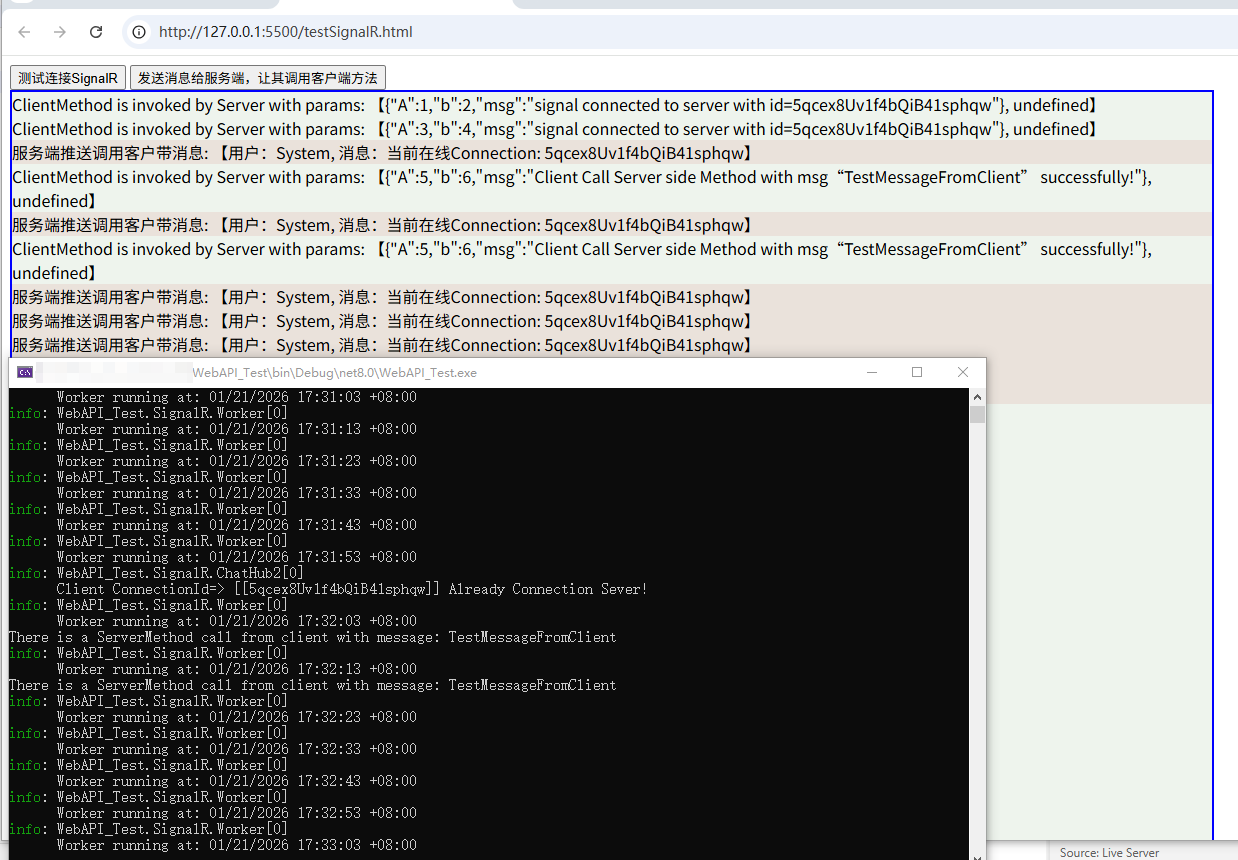
在VS Code中通过LiveServer 打开客户端,启动服务端进行测试,测试过程如下图所示