目录
前言
接着【C++】C++11(一)列表初始化、右值引用、lambda表达式详情点击查看,今天继续学习【C++】C++11(二)可变模板参数模板、新的类功能、包装器(function、bind)
一、可变模板参数模板
基本语法和原理
- C++11支持可变参数模板,也就是说支持可变数量参数的函数模板和类模板,可变数目的参数被称为参数包,存在两种参数包:模板参数包,表示零或多个模板参数;函数参数包:表示零或多个函数参数
我们用省略号来指出一个模板参数或函数参数的表示一个包,在模板参数列表中,
class...或typename...指出接下来的参数表示零或多个类型列表;在函数参数列表中,类型名后面跟...指出接下来表示零或多个形参对象列表;函数参数包可以用左值引用或右值引用表示,跟前面的普通模板一样,每个参数实例化时遵循引用折叠规则
template <class ...Args> void Func(Args... args) {}template <class ...Args> void Func(Args&... args) {}template <class ...Args> void Func(Args&... args) {}
- 可变参数模板的原理跟模板类似,本质还是去实例化对应类型和个数的多个函数
- 使用sizeof...运算符去计算参数包中参数的个数
cpp
template <class ...Args>
void Print(Args&&... args)
{
	cout << sizeof...(args) << endl;
}
int main()
{
	double x = 2.2;
	Print(); // 包里有0个参数
	Print(1); // 包里有1个参数
	Print(1, string("xxxxx")); // 包里有2个参数
	Print(1.1, string("xxxxx"), x); // 包里有3个参数
	return 0;
}
- 编译本质这里会结合引用折叠规则实例化出以下四个函数 :
void Print(); void Print(int&& arg1); void Print(int&& arg1, string&& arg2); void Print(double&& arg1, string&& arg2, double& arg3);- 更本质去看没有可变参数模板,我们实现出这样的多个函数模板才能支持这里的功能,有了可变参数模板,我们进一步被解放,他是类型泛化基础上叠加数量变化,让我们泛型编程更灵活。
void Print();template < class T1> void Print(T1&& arg1);template <class T1, class T2> void Print(T1&& arg1, T2&& arg2);template <class T1, class T2, class T3> void Print(T1&& arg1, T2&& arg2, T3&& arg3);
包扩展
- 对于一个参数包,我们除了能计算他的参数个数,我们能做的唯一的事情就是扩展它,当扩展一个包时,我们还要提供用于每个扩展元素的模式,扩展一个包就是将它分解为构成的元素,对每个元素应用模式,获得扩展后的列表。我们通过在模式的右边放一个省略号(...)来触发扩展操作
- 现在我需要将可变参数拿出来去干其他的事情,怎么拿到这个可变参数呢?这里就需要包扩展知识
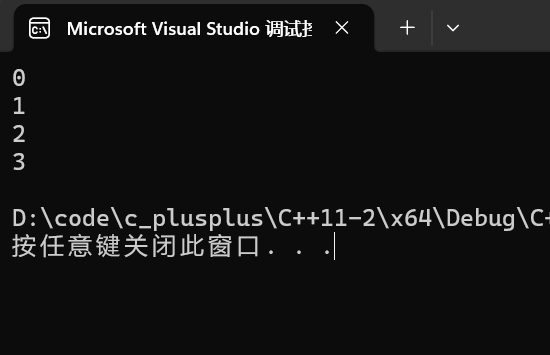
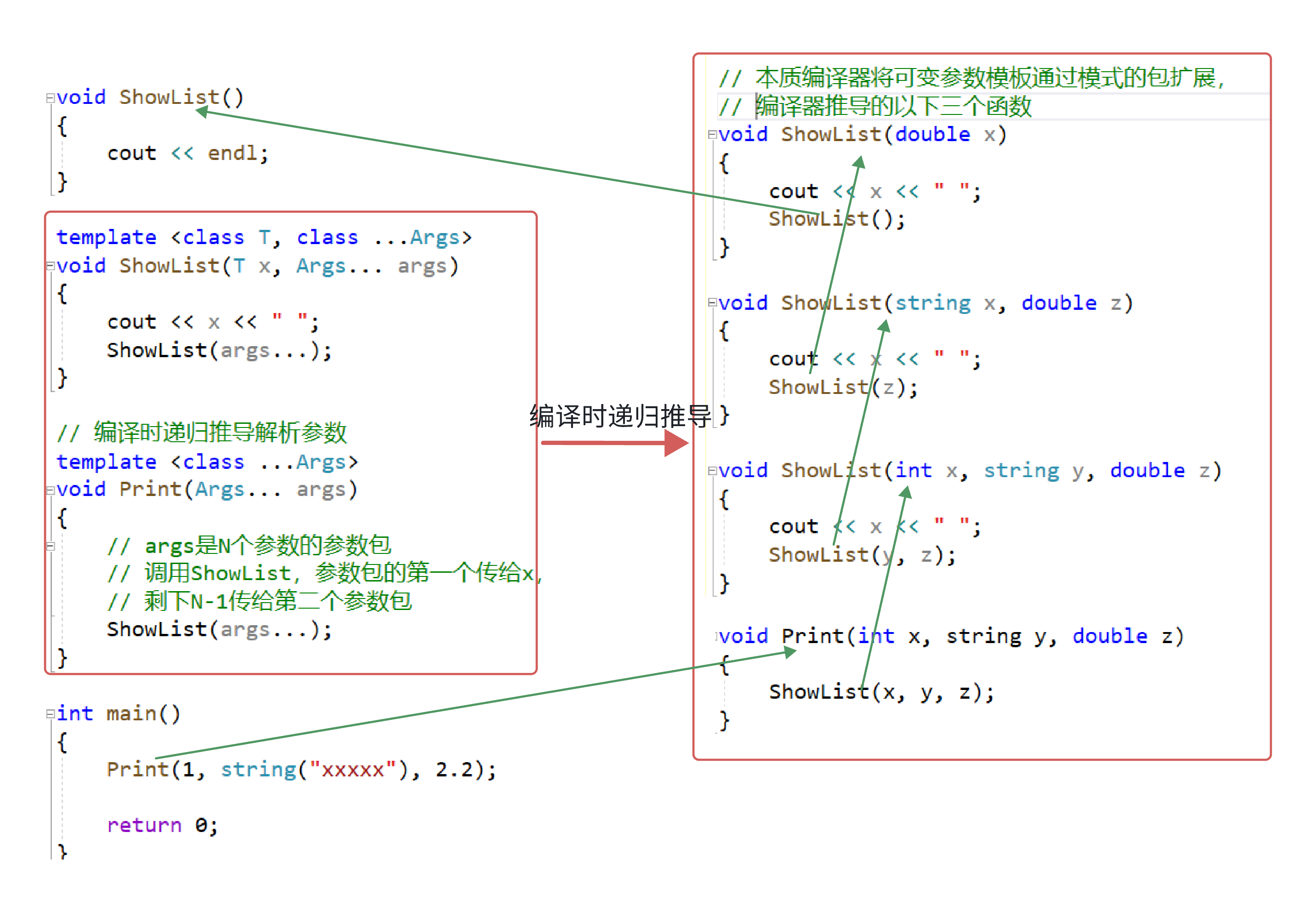
编译时递归操作来完成
cpp
void ShowList()
{
	// 编译器时递归的终⽌条件,参数包是0个时,直接匹配这个函数
	cout << endl;
}
template <class T, class ...Args>
void ShowList(T x, Args... args)
{
	cout << x << " ";
	// args是N个参数的参数包
	// 调⽤ShowList,参数包的第⼀个传给x,剩下N-1传给第⼆个参数包
	ShowList(args...);
}

// 编译时递归推导解析参数
template <class ...Args>
void Print(Args... args)
{
	ShowList(args...);
}

int main()
{
	Print();
	Print(1);
	Print(1, string("xxxxx"));
	Print(1, string("xxxxx"), 2.2);
	return 0;
}
empalce系列接口
template <class... Args> void emplace_back (Args&&... args);template <class... Args> iterator emplace (const_iterator position, Args&&... args);- C++11以后STL容器新增了empalce系列的接口,empalce系列的接口均为模板可变参数,功能上兼容push和insert系列,但是empalce还支持新玩法,假设容器为container< T>,empalce还支持直接插入构造T对象的参数,这样有些场景会更高效一些,可以直接在容器空间上构造T对象
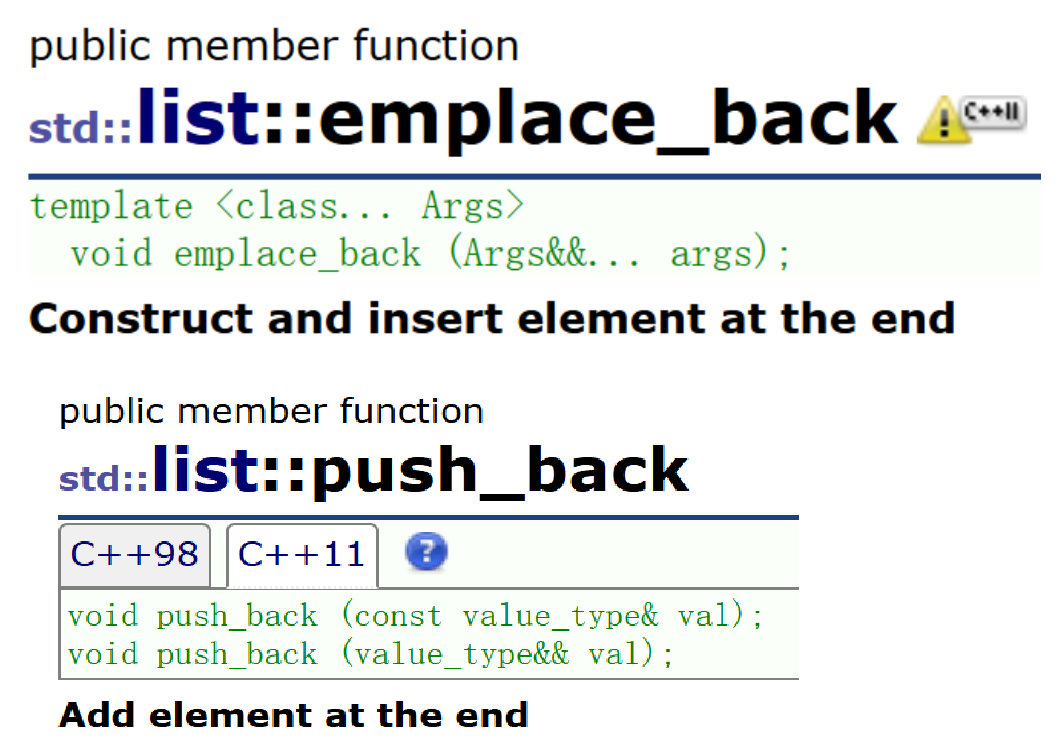
- emplace_back总体而言是更高效,推荐以后使用emplace系列替代insert和push系列
- push_back参数是确定的类型T,而emplace系列是一个可变参数,0-N个参数包的万能引用
- 使用我们自己实现的string类,使用emplace验证emplace_back的高效性
cpp
namespace gy
{
	class string
	{
	public:
		typedef char* iterator;
		typedef const char* const_iterator;
		iterator begin()
		{
			return _str;
		}
		iterator end()
		{
			return _str + _size;
		}
		const_iterator begin() const
		{
			return _str;
		}
		const_iterator end() const
		{
			return _str + _size;
		}
		string(const char* str = "")
			:_size(strlen(str))
			, _capacity(_size)
		{
			cout << "string(char* str)-构造" << endl;
			_str = new char[_capacity + 1];
			strcpy(_str, str);
		}
		void swap(string& s)
		{
			::swap(_str, s._str);
			::swap(_size, s._size);
			::swap(_capacity, s._capacity);
		}
		string(const string& s)
			:_str(nullptr)
		{
			cout << "string(const string& s) -- 拷贝构造" << endl;
			reserve(s._capacity);
			for (auto ch : s)
			{
				push_back(ch);
			}
		}

		// 移动构造
		string(string&& s)
		{
			cout << "string(string&& s) -- 移动构造" << endl;
			swap(s);
		}
		string& operator=(const string& s)
		{
			cout << "string& operator=(const string& s) -- 拷贝赋值" << endl;
			if (this != &s)
			{
				_str[0] = '\0';
				_size = 0;
				reserve(s._capacity);
				for (auto ch : s)
				{
					push_back(ch);
				}
			}
			return *this;
		}

		// 移动赋值
		string& operator=(string&& s)
		{
			cout << "string& operator=(string&& s) -- 移动赋值" << endl;
			swap(s);
			return *this;
		}
		~string()
		{
			cout << "~string() -- 析构" << endl;
			delete[] _str;
			_str = nullptr;
		}
		char& operator[](size_t pos)
		{
			assert(pos < _size);
			return _str[pos];
		}
		void reserve(size_t n)
		{
			if (n > _capacity)
			{
				char* tmp = new char[n + 1];
				if (_str)
				{
					strcpy(tmp, _str);
					delete[] _str;
				}
				_str = tmp;
				_capacity = n;
			}
		}
		void push_back(char ch)
		{
			if (_size >= _capacity)
			{
				size_t newcapacity = _capacity == 0 ? 4 : _capacity *
					2;
				reserve(newcapacity);
			}
			_str[_size] = ch;
			++_size;
			_str[_size] = '\0';
		}
		string& operator+=(char ch)
		{
			push_back(ch);
			return *this;
		}
		const char* c_str() const
		{
			return _str;
		}
		size_t size() const
		{
			return _size;
		}
	private:
		char* _str = nullptr;
		size_t _size = 0;
		size_t _capacity = 0;
	};
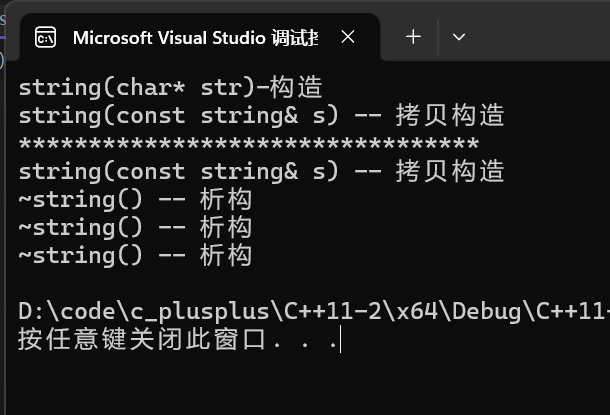
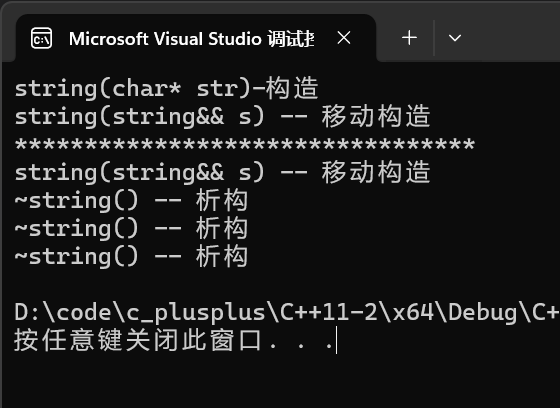
}- emplace系列传入左值,和push_back是一样的,走拷贝构造
cpp
int main()
{
	list<gy::string> lt;
	gy::string s1("111111111111");
	lt.emplace_back(s1);
	cout << "*********************************" << endl;
	lt.push_back(s1);

	//list<pair<gy::string, int>> lt1;
	//pair<gy::string, int> kv("苹果", 1);
	//lt1.emplace_back(kv);
	//cout << "*********************************" << endl;
	return 0;
}
- emplace系列传入右值,和push_back是一样,走移动构造
cpp
int main()
{
	list<gy::string> lt;
	gy::string s1("111111111111");
	lt.emplace_back(move(s1));
	cout << "*********************************" << endl;
	lt.push_back(move(s1));

	//list<pair<gy::string, int>> lt1;
	//pair<gy::string, int> kv("苹果", 1);
	//lt1.emplace_back(move(kv));
	return 0;
}
- 直接把构造string参数包往下传,直接用string参数包构造string,这里push_back是达不到emplace_back的效果的
cpp
int main()
{
	list<gy::string> lt;
	lt.emplace_back("111111111111");
	cout << "*********************************" << endl;
	lt.push_back("111111111111");
	return 0;
}
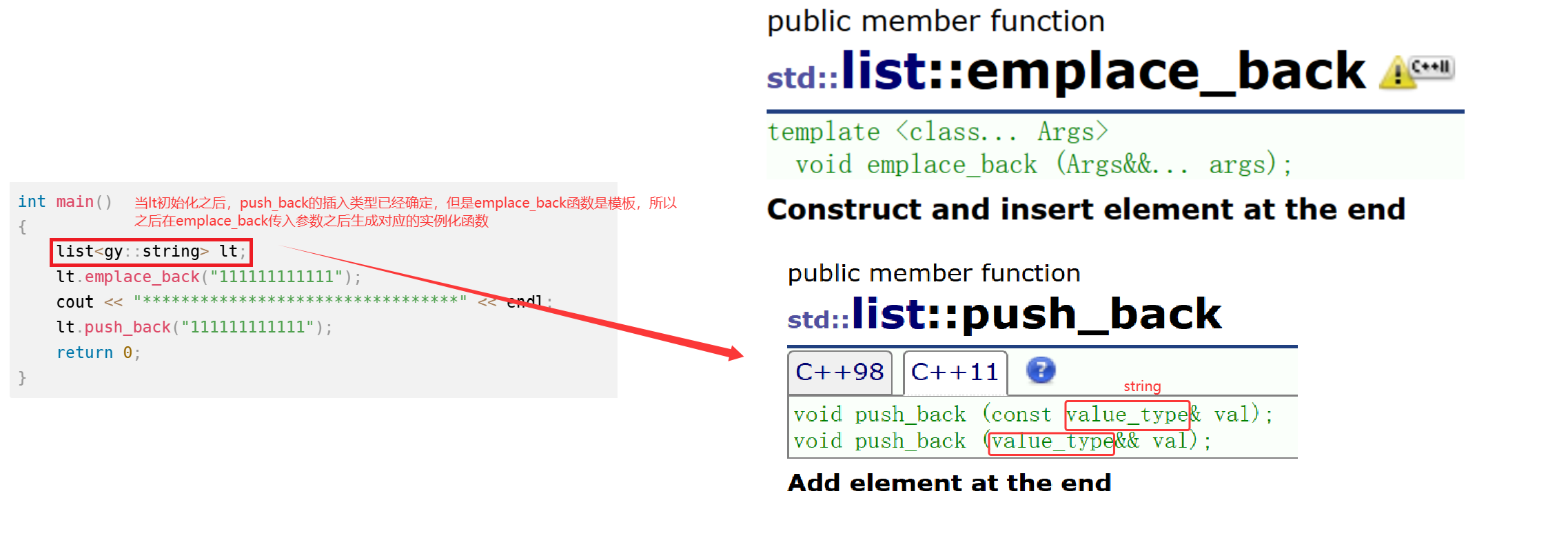
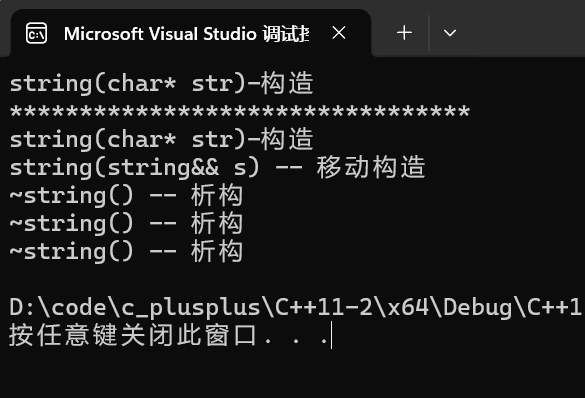
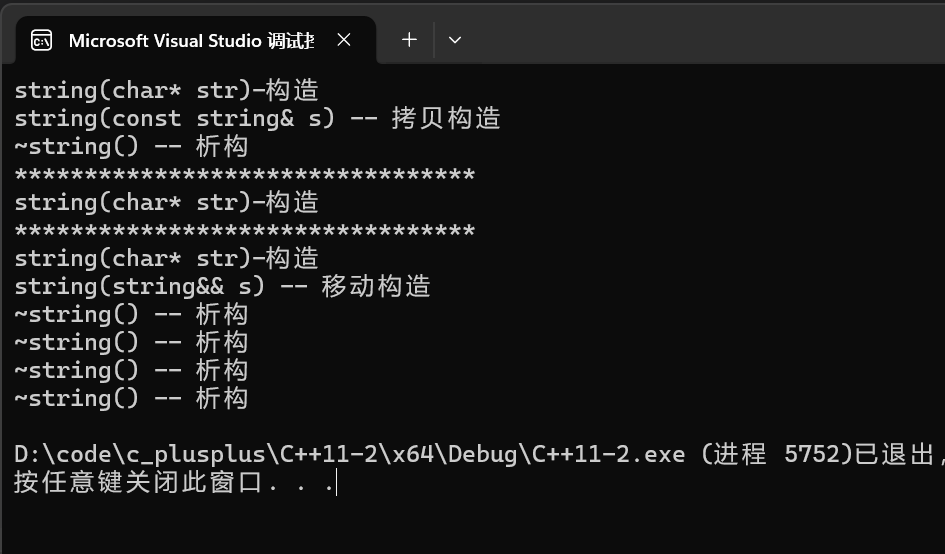
- emplace_back直接用string参数包构造string,而push_back是构造+移动构造,emplace_back是怎么达到只需要构造就直接插入成功的?
- push_back在list对象初始化出来的时候插入类型已经确定了是string,因此插入"111111111111"(char* )走隐式类型转换构造一个string临时对象,再将临时对象(右值)传入push_back走移动构造去构造list节点的string,完成插入
- emplace_back是一个模板函数,因此lt初始化之后,并没有确定类型,只有emplace_back传入类型之后,模板才会实例化出对应参数的函数,
lt.emplace_back("111111111111"),传入的是const char* 类型,直接实例化出const char* 参数的右值的emplace_back函数(const char* && agrs),直接用这个类型去构造list节点的string了
- 和上面的传入const char* 类型一样,emplace_back传入
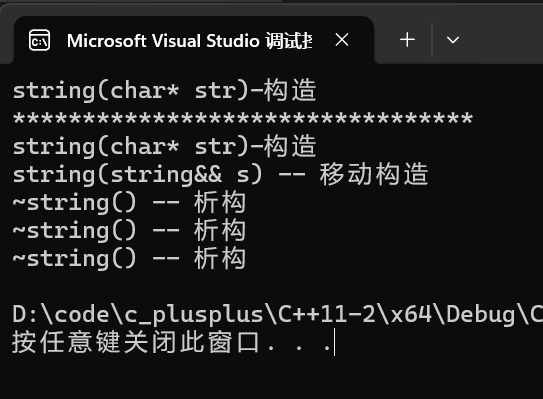
{"苹果", 1}也是直接构造,push_back传入{ "苹果", 1 },先走多参数隐式类型转换为pair类型,再走移动构造到list节点中
cpp
	int main()
{
	list<pair<gy::string, int>> lt1;
	lt1.emplace_back("苹果", 1);
	cout << "*********************************" << endl;
	lt1.push_back({ "苹果", 1 });
	return 0;
}
- 自定义list的emplace和emplace_back函数实现
- 实现emplace_back和emplace,Node的节点初始化也要有可变参数模板来实现
cpp
template <class T>
struct list_node
{
	list_node<T>* prev;
	list_node<T>* next;
	T _data;
	template <class... Args>
	list_node(Args&&... args)
		: prev(nullptr)
		, next(nullptr)
		, _data(forward<Args>(args)...)
	{}
};

template <class... Args>
void emplace_back(Args&&... args)
{
	emplace(end(), forward<Args>(args)...);
}

template <class... Args>
void emplace(iterator pos, Args&&... args)
{
	Node* cur = pos._node;
	Node* prev = cur->prev;

	Node* newnode = new Node(forward<Args>(args)...); // 传入到Node的可变参数模板的初始化代码进行节点初始化

	prev->next = newnode;
	newnode->prev = prev;
	newnode->next = cur;
	cur->prev = newnode;
	++_size;
}

int main()
{
	gy::list<pair<gy::string, int>> lt1;
	cout << "*********************************" << endl;
	lt1.emplace_back("苹果", 1);
	cout << "*********************************" << endl;
	lt1.push_back({ "苹果", 1 });
	return 0;
}
二、新的类功能
默认的移动构造和移动赋值
- 原来C++类中,有6个默认成员函数:
构造函数/析构函数/拷贝构造函数/拷贝赋值重载/取地址重载/const取地址重载,最后重要的是前4个,后两个用处不大,默认成员函数就是我们不写编译器会生成一个默认的。C++11新增了两个默认成员函数 ,移动构造函数和移动赋值运算符重载 - 如果没有自己实现移动构造函数,且没有实现析构函数、拷贝构造、拷贝赋值重载 中的任意一个。那么编译器会自动生成一个默认移动构造。
默认生成的移动构造函数,对于内置类型 成员会执行逐成员按字节拷贝,自定义类型成员,则需要看这个成员是否实现移动构造,如果实现了就调用移动构造,没有实现就调用拷贝构造(默认移动赋值跟移动构造完全类似) - 提供了移动构造或者移动赋值,编译器不会自动提供拷贝构造和拷贝赋值
defult和delete
- C++11可以更好的控制要使用的默认函数。假设你要使用某个默认的函数,但是因为一些原因这个函数没有默认生成。比如:我们提供了拷贝构造,就不会生成移动构造了,那么我们可以使用default关键字显示指定移动构造生成
- 如果想要限制某些默认函数的生成,在C++98中,是该函数设置成private,并且只声明补丁已,这样只要其他人想要调用就会报错。在C++11中更简单,只需在该函数声明加上=delete即可,该语法指示编译器不生成对应函数的默认版本,称**=delete修饰的函数为删除函数**
cpp
class Person
{
public:
	Person(const char* name = "", int age = 0)
		:_name(name)
		, _age(age)
	{
	}
	Person(const Person& p)
		:_name(p._name)
		, _age(p._age)
	{
	}
	Person(Person&& p) = default;

	//Person(const Person& p) = delete;
private:
	gy::string _name;
	int _age;
};
int main()
{
	Person s1;
	Person s2 = s1;
	Person s3 = std::move(s1);
	return 0;
}
三、包装器
function
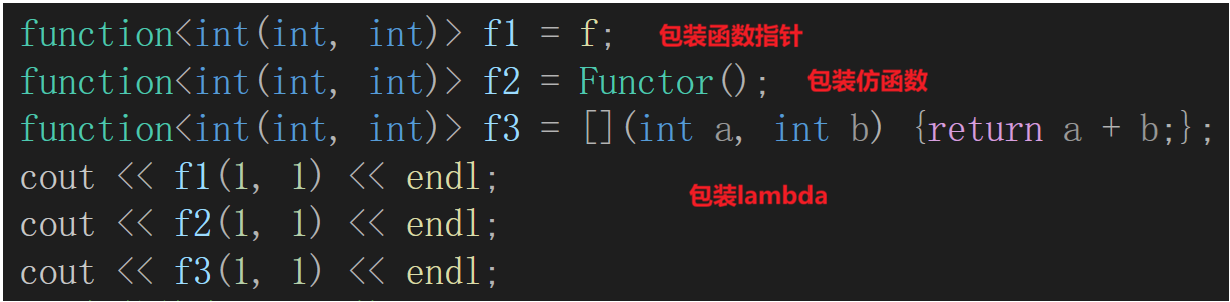
- std::function 是一个类模板,也是一个包装器。std::function 的实例对象可以包装存储其他的可以调用对象,包括函数指针、仿函数、 lambda 等,只有参数和返回类型相同才能够包装
- 以上是 function 的原型,他被定义< functional>头文件中。std::function-cppreference.com是function的官方文件链接
cpp
template <class T>
class function; // undefined

template <class Ret, class... Args>
class function<Ret(Args...)>;
cpp
#include<functional>
int f(int a, int b)
{
	return a + b;
}
struct Functor
{
public:
	int operator() (int a, int b)
	{
		return a + b;
	}
};

class Plus
{
public:
	Plus(int n = 10)
		:_n(n)
	{
	}
	static int plusi(int a, int b)
	{
		return a + b;
	}
	double plusd(double a, double b)
	{
		return (a + b) * _n;
	}
private:
	int _n;
};

int main()
{
	// 包装各种可调用对象
	function<int(int, int)> f1 = f;
	function<int(int, int)> f2 = Functor();
	function<int(int, int)> f3 = [](int a, int b) {return a + b;};
	cout << f1(1, 1) << endl;
	cout << f2(1, 1) << endl;
	cout << f3(1, 1) << endl;
	return 0;
}
- 包装成员函数指针:
- 包装静态成员函数时,成员函数要指定类域并且前面加&才能获取地址
- 包装普通成员函数,普通成 函数还有一个隐含的this指针参数,所以绑定时传对象或者对象的指针过去都可以
cpp
function<int(int, int)> f4 = &Plus::plusi;
cout << f4(1, 1) << endl;

function<double(Plus*, double, double)> f5 = &Plus::plusd;
Plus pd;
cout << f5(&pd, 1.1, 1.1) << endl;

function<double(Plus&, double, double)> f6 = &Plus::plusd;
Plus ps;
cout << f6(pd, 1.1, 1.1) << endl;

function<double(Plus, double, double)> f7 = &Plus::plusd;
cout << f7(Plus(), 1.1, 1.1) << endl;

//function<double(Plus&&, double, double)> f7 = &Plus::plusd;
//cout << f7(Plus(), 1.1, 1.1) << endl;
bind
cpp
simple(1)
template <class Fn, class... Args>
 /* unspecified */ bind (Fn&& fn, Args&&... args);

with return type (2)
template <class Ret, class Fn, class... Args>
/* unspecified */ bind (Fn&& fn, Args&&... args);- bind 是一个函数模板,它也是一个可调用对象的包装器,可以把他看做一个函数适配器,对接收的fn可调用对象进行处理后返回一个可调用对象。 bind 可以用来调整参数个数和参数顺序。bind也在< functional >这个头文件中
- 调用bind的一般形式: auto newCallable = bind(callable,arg_list); 其中newCallable本身是一个可调用对象,arg_list是一个逗号分隔的参数列表,对应给定的callable的参数。当我们调用newCallable时,newCallable会调用callable,并传给它arg_list中的参数
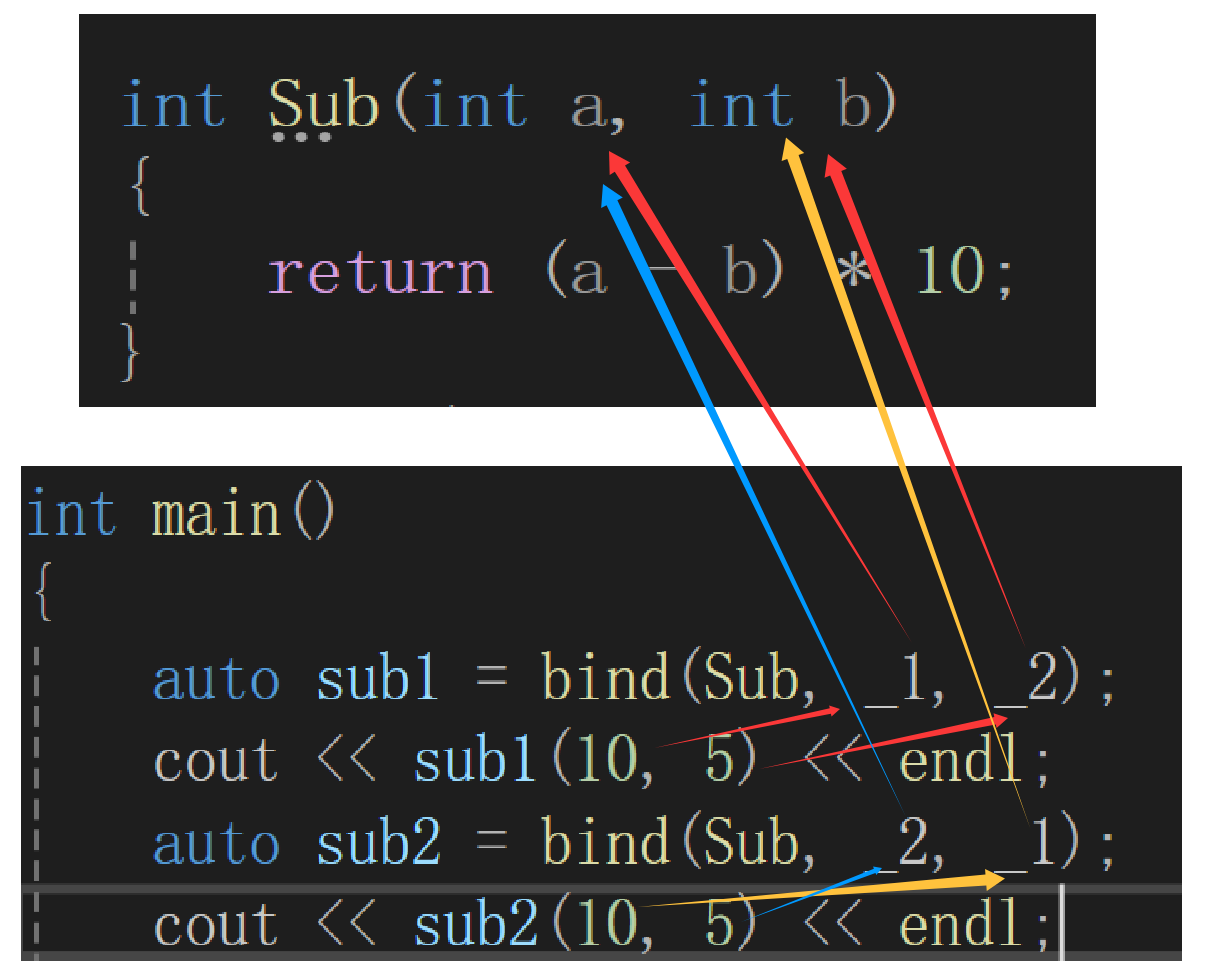
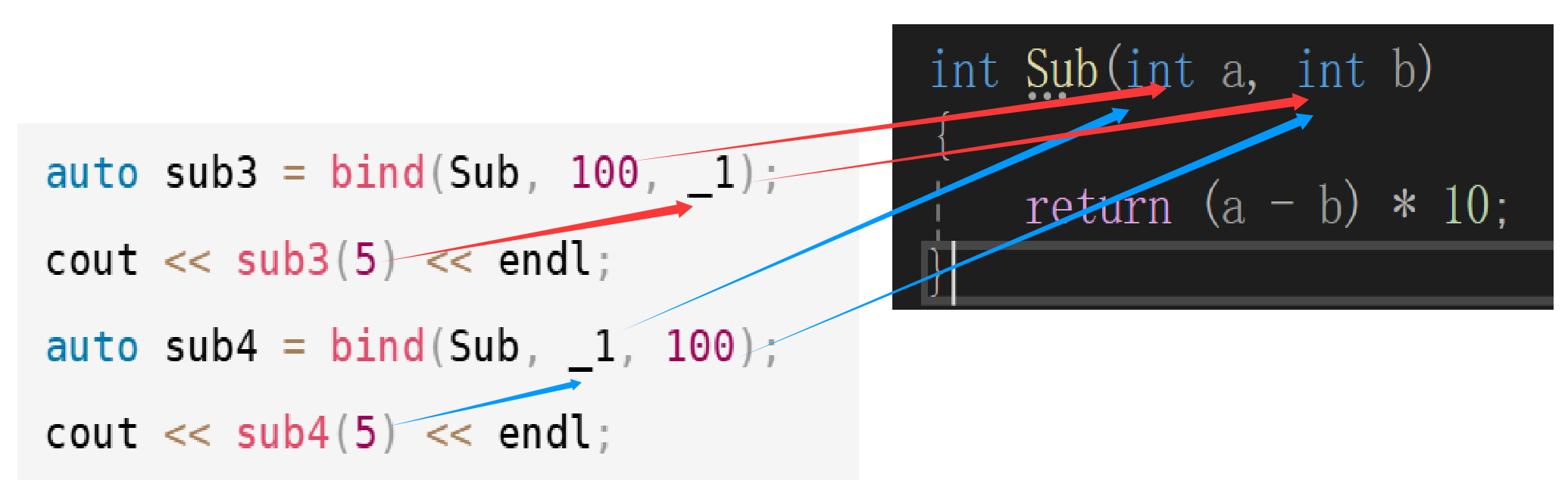
- arg_list中的参数可能包含形如_n的名字,其中n是一个整数,这些参数是占位符,表示newCallable的参数,它们占据了传递给newCallable的参数的位置。数值n表示生成的可调用对象中参数的位置:_1为newCallable的第一个参数,_2为第二个参数,以此类推。_1/_2/_3...这些占位符放到placeholders的一个命名空间中
- bind 本质返回的一个仿函数对象,_1代表第一个参数,_2代表第二个参数
调整参数顺序(不常用)
cpp
using placeholders::_1;
using placeholders::_2;
using placeholders::_3;
cpp
int Sub(int a, int b)
{
	return (a - b) * 10;
}
int main()
{
	auto sub1 = bind(Sub, _1, _2);
	cout << sub1(10, 5) << endl;
	auto sub2 = bind(Sub, _2, _1);
	cout << sub2(10, 5) << endl;
	return 0;
}
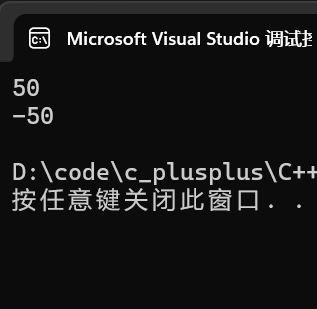
_1始终代表第一个参数,_2代表第二个参数,传参的时候还是根据顺序传参,所以sub1(10, 5) 为50,sub2(10, 5) 为-50
调整参数个数(常用)
- 绑死某个参数变量
cpp
auto sub3 = bind(Sub, 100, _1);
cout << sub3(5) << endl;
auto sub4 = bind(Sub, _1, 100);
cout << sub4(5) << endl;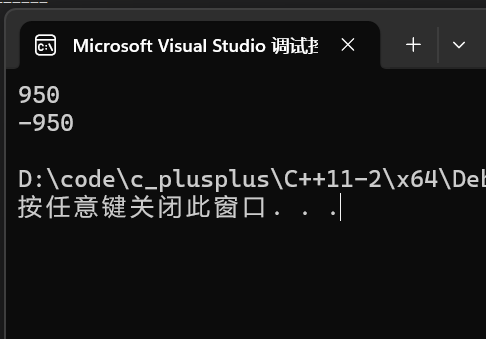
成员函数对象进行绑死
- 上面我们使用functon包装成员函数,每次调用都需要传递函数对象
cpp
function<double(Plus&&, double, double)> f6 = &Plus::plusd;
Plus pd;
cout << f6(move(pd), 1.1, 1.1) << endl;
cout << f6(Plus(), 1.1, 1.1) << endl;- 使用bind绑定函数之后,就不需要每次传递Plus()函数对象
cpp
function<double(double, double)> f7 = bind(&Plus::plusd, Plus(), _1, _2);
cout << f7(1.1, 1.1) << endl;