最近准备复现Universal Manipulation Interface 遥操,在选择相机时,考虑到先快速验证下视觉模块,刚好手里有台 iphone 15 pro,这不巧了嘛,iphone自带LiDAR,有RGB图像、深度图、pose,刚好满足数据采集的需要。
目录
1.环境搭建
- APP:
Record3D
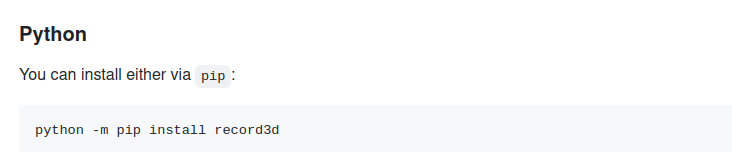
- PC端环境构建:record3d
这里因为需要快速的功能验证,选择Python进行部署:
2.源码和实际使用
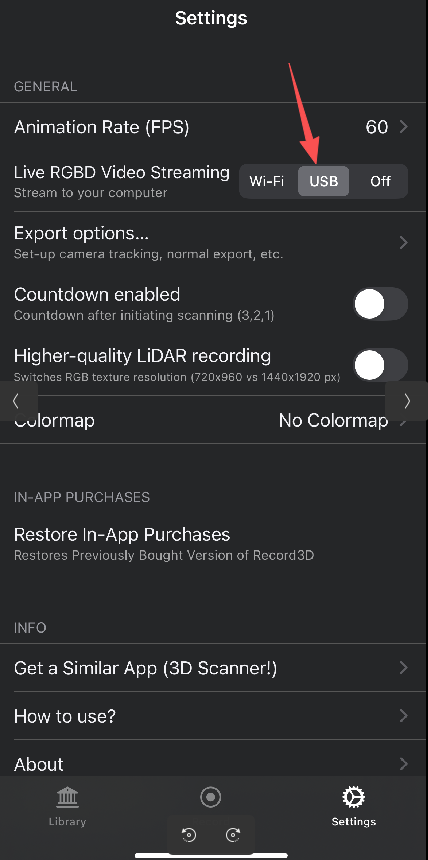
Record3DAPP设置:
需要APP购买USB的使用权限,然后这里设置为USB模式
- 回到
Record界面
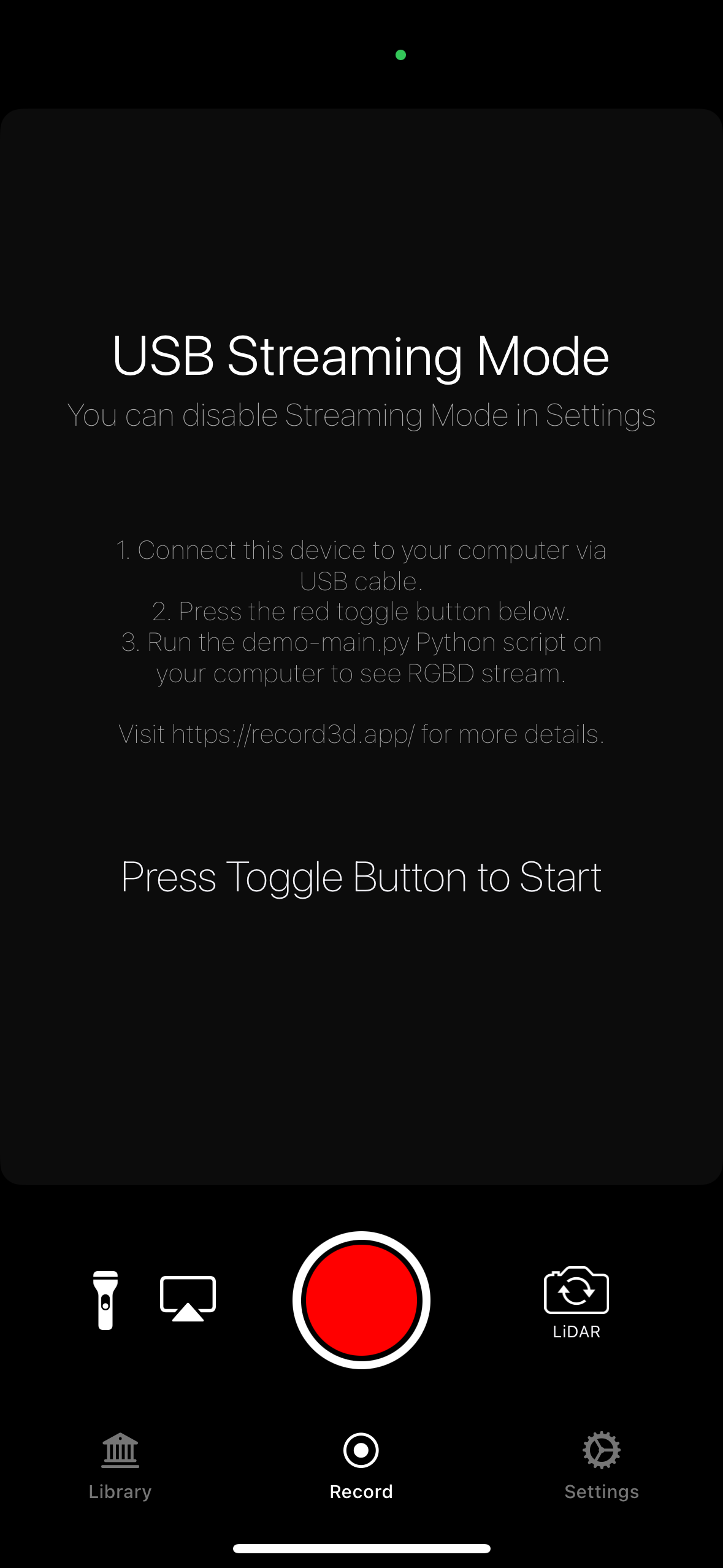
- 将手机和电脑进行连接
- 运行下面的程序,会显示找到了设备,APP上点击红色的启动按钮,PC端可以实时取流并显示。
- 官方
demo-main.py
python
import numpy as np
from record3d import Record3DStream
import cv2
from threading import Event


class DemoApp:
    def __init__(self):
        self.event = Event()
        self.session = None
        self.DEVICE_TYPE__TRUEDEPTH = 0
        self.DEVICE_TYPE__LIDAR = 1

    def on_new_frame(self):
        """
        This method is called from non-main thread, therefore cannot be used for presenting UI.
        """
        self.event.set()  # Notify the main thread to stop waiting and process new frame.

    def on_stream_stopped(self):
        print('Stream stopped')

    def connect_to_device(self, dev_idx):
        print('Searching for devices')
        devs = Record3DStream.get_connected_devices()
        print('{} device(s) found'.format(len(devs)))
        for dev in devs:
            print('\tID: {}\n\tUDID: {}\n'.format(dev.product_id, dev.udid))

        if len(devs) <= dev_idx:
            raise RuntimeError('Cannot connect to device #{}, try different index.'
                               .format(dev_idx))

        dev = devs[dev_idx]
        self.session = Record3DStream()
        self.session.on_new_frame = self.on_new_frame
        self.session.on_stream_stopped = self.on_stream_stopped
        self.session.connect(dev)  # Initiate connection and start capturing

    def get_intrinsic_mat_from_coeffs(self, coeffs):
        return np.array([[coeffs.fx,         0, coeffs.tx],
                         [        0, coeffs.fy, coeffs.ty],
                         [        0,         0,         1]])

    def start_processing_stream(self):
        while True:
            self.event.wait()  # Wait for new frame to arrive

            # Copy the newly arrived RGBD frame
            depth = self.session.get_depth_frame()
            rgb = self.session.get_rgb_frame()
            confidence = self.session.get_confidence_frame()
            intrinsic_mat = self.get_intrinsic_mat_from_coeffs(self.session.get_intrinsic_mat())
            camera_pose = self.session.get_camera_pose()  # Quaternion + world position (accessible via camera_pose.[qx|qy|qz|qw|tx|ty|tz])

            print(intrinsic_mat)

            # You can now e.g. create point cloud by projecting the depth map using the intrinsic matrix.

            # Postprocess it
            if self.session.get_device_type() == self.DEVICE_TYPE__TRUEDEPTH:
                depth = cv2.flip(depth, 1)
                rgb = cv2.flip(rgb, 1)

            rgb = cv2.cvtColor(rgb, cv2.COLOR_RGB2BGR)

            # Show the RGBD Stream
            cv2.imshow('RGB', rgb)
            cv2.imshow('Depth', depth)

            if confidence.shape[0] > 0 and confidence.shape[1] > 0:
                cv2.imshow('Confidence', confidence * 100)

            cv2.waitKey(1)

            self.event.clear()


if __name__ == '__main__':
    app = DemoApp()
    app.connect_to_device(dev_idx=0)
app.start_processing_stream()- 增加获取
camera_pose,实时输出pose并记录存储到文件中。
python
import numpy as np
from record3d import Record3DStream
import cv2
from threading import Event
import time
import math
import csv
import os


class DemoApp:
    def __init__(self):
        self.event = Event()
        self.session = None
        self.DEVICE_TYPE__TRUEDEPTH = 0
        self.DEVICE_TYPE__LIDAR = 1
        # 初始化CSV文件相关
        self.csv_file = None
        self.csv_writer = None
        self.init_csv_file()

    def init_csv_file(self):
        """初始化CSV文件,写入表头"""
        # 生成带时间戳的文件名,避免重复
        timestamp = time.strftime("%Y%m%d_%H%M%S", time.localtime())
        self.csv_file_path = f"camera_pose_data_{timestamp}.csv"

        # 打开文件并写入表头
        self.csv_file = open(self.csv_file_path, 'w', newline='', encoding='utf-8')
        self.csv_writer = csv.writer(self.csv_file)
        # 表头:时间戳,x,y,z,rx,ry,rz
        self.csv_writer.writerow(['timestamp', 'x', 'y', 'z', 'rx', 'ry', 'rz'])
        print(f"相机位姿数据将保存到: {self.csv_file_path}")

    def quaternion_to_euler(self, qx, qy, qz, qw):
        """
        四元数转欧拉角(单位:弧度)
        四元数格式:qx, qy, qz, qw
        欧拉角顺序:roll(x), pitch(y), yaw(z)
        """
        # 计算roll (x轴旋转)
        sinr_cosp = 2 * (qw * qx + qy * qz)
        cosr_cosp = 1 - 2 * (qx * qx + qy * qy)
        roll = math.atan2(sinr_cosp, cosr_cosp)

        # 计算pitch (y轴旋转)
        sinp = 2 * (qw * qy - qz * qx)
        # 限制pitch范围在[-π/2, π/2]
        pitch = math.asin(max(min(sinp, 1), -1))

        # 计算yaw (z轴旋转)
        siny_cosp = 2 * (qw * qz + qx * qy)
        cosy_cosp = 1 - 2 * (qy * qy + qz * qz)
        yaw = math.atan2(siny_cosp, cosy_cosp)

        return roll, pitch, yaw

    def on_new_frame(self):
        """
        This method is called from non-main thread, therefore cannot be used for presenting UI.
        """
        self.event.set()  # Notify the main thread to stop waiting and process new frame.

    def on_stream_stopped(self):
        print('Stream stopped')

    def connect_to_device(self, dev_idx):
        print('Searching for devices')
        devs = Record3DStream.get_connected_devices()
        print('{} device(s) found'.format(len(devs)))
        for dev in devs:
            print('\tID: {}\n\tUDID: {}\n'.format(dev.product_id, dev.udid))

        if len(devs) <= dev_idx:
            raise RuntimeError('Cannot connect to device #{}, try different index.'
                               .format(dev_idx))

        dev = devs[dev_idx]
        self.session = Record3DStream()
        self.session.on_new_frame = self.on_new_frame
        self.session.on_stream_stopped = self.on_stream_stopped
        self.session.connect(dev)  # Initiate connection and start capturing

    def get_intrinsic_mat_from_coeffs(self, coeffs):
        return np.array([[coeffs.fx,         0, coeffs.tx],
                         [        0, coeffs.fy, coeffs.ty],
                         [        0,         0,         1]])

    def start_processing_stream(self):
        try:
            while True:
                self.event.wait()  # Wait for new frame to arrive

                # 获取当前时间戳(毫秒级)
                current_timestamp = int(time.time() * 1000)

                # Copy the newly arrived RGBD frame
                depth = self.session.get_depth_frame()
                rgb = self.session.get_rgb_frame()
                confidence = self.session.get_confidence_frame()
                intrinsic_mat = self.get_intrinsic_mat_from_coeffs(self.session.get_intrinsic_mat())
                camera_pose = self.session.get_camera_pose()  # Quaternion + world position (accessible via camera_pose.[qx|qy|qz|qw|tx|ty|tz])

                print("="*50)
                print("Intrinsic Matrix (内参矩阵):")
                print(intrinsic_mat)

                # 初始化数据变量
                tx = ty = tz = rx = ry = rz = None

                # 获取并输出相机位姿信息
                if camera_pose is not None:
                    # 提取四元数(姿态)
                    qx = camera_pose.qx
                    qy = camera_pose.qy
                    qz = camera_pose.qz
                    qw = camera_pose.qw

                    # 提取世界坐标(位置)
                    tx = camera_pose.tx
                    ty = camera_pose.ty
                    tz = camera_pose.tz

                    # 四元数转欧拉角
                    rx, ry, rz = self.quaternion_to_euler(qx, qy, qz, qw)

                    # 输出位姿信息
                    print("\nCamera Pose (相机位姿):")
                    print(f"Quaternion (四元数) - qx: {qx:.6f}, qy: {qy:.6f}, qz: {qz:.6f}, qw: {qw:.6f}")
                    print(f"World Position (世界坐标) - tx: {tx:.6f}m, ty: {ty:.6f}m, tz: {tz:.6f}m")
                    print(f"Euler Angles (欧拉角/弧度) - rx: {rx:.6f}, ry: {ry:.6f}, rz: {rz:.6f}")
                    print(f"Euler Angles (欧拉角/角度) - rx: {math.degrees(rx):.2f}°, ry: {math.degrees(ry):.2f}°, rz: {math.degrees(rz):.2f}°")
                else:
                    print("\nCamera Pose: Not available (相机位姿不可用)")

                # 保存数据到CSV文件(仅当有有效位姿数据时)
                if all(v is not None for v in [tx, ty, tz, rx, ry, rz]):
                    self.csv_writer.writerow([
                        current_timestamp,
                        round(tx, 6),
                        round(ty, 6),
                        round(tz, 6),
                        round(rx, 6),
                        round(ry, 6),
                        round(rz, 6)
                    ])
                    # 立即刷新缓冲区,确保数据实时写入
                    self.csv_file.flush()
                    os.fsync(self.csv_file.fileno())
                else:
                    self.csv_writer.writerow([current_timestamp, None, None])
                    # 立即刷新缓冲区,确保数据实时写入
                    self.csv_file.flush()
                    os.fsync(self.csv_file.fileno())

                # You can now e.g. create point cloud by projecting the depth map using the intrinsic matrix.

                # Postprocess it
                if self.session.get_device_type() == self.DEVICE_TYPE__TRUEDEPTH:
                    depth = cv2.flip(depth, 1)
                    rgb = cv2.flip(rgb, 1)

                rgb = cv2.cvtColor(rgb, cv2.COLOR_RGB2BGR)

                # Show the RGBD Stream
                cv2.imshow('RGB', rgb)
                cv2.imshow('Depth', depth)

                if confidence.shape[0] > 0 and confidence.shape[1] > 0:
                    cv2.imshow('Confidence', confidence * 100)

                cv2.waitKey(1)

                self.event.clear()
        finally:
            # 清理资源
            cv2.destroyAllWindows()
            if self.csv_file:
                self.csv_file.close()
                print(f"程序退出,数据文件已关闭: {self.csv_file_path}")


if __name__ == '__main__':
    app = DemoApp()
    try:
        app.connect_to_device(dev_idx=0)
        app.start_processing_stream()
    except Exception as e:
        print(f"程序异常: {e}")

        if app.csv_file:
            app.csv_file.close()
        cv2.destroyAllWindows()