Postman测试WebService接口
一、简介
Web Services 可使您的应用程序成为 Web 应用程序。
Web Services 通过 Web 进行发布、查找和使用。
什么是Web Services?
- Web Services 是应用程序组件
- Web Services 使用开放协议进行通信
- Web Services 是独立的(self-contained)并可自我描述
- Web Services 可通过使用UDDI来发现
- Web Services 可被其他应用程序使用
- XML 是 Web Services 的基础
它如何工作?
基础的 Web Services 平台是 XML + HTTP。
HTTP 协议是最常用的因特网协议。
XML 提供了一种可用于不同的平台和编程语言之间的语言。
Web services 平台的元素:
- SOAP (简易对象访问协议)
- UDDI (通用描述、发现及整合)
- WSDL (Web services 描述语言)
二、一个 SOAP 实例(来自菜鸟教程)
在下面的例子中,一个 GetStockPrice 请求被发送到了服务器。此请求有一个 StockName 参数,而在响应中则会返回一个 Price 参数。此功能的命名空间被定义在此地址中: "http://www.example.org/stock"
SOAP 请求:
xml
POST /InStock HTTP/1.1
Host: www.example.org
Content-Type: application/soap+xml; charset=utf-8
Content-Length: nnn

<?xml version="1.0"?>
<soap:Envelope
xmlns:soap="http://www.w3.org/2001/12/soap-envelope"
soap:encodingStyle="http://www.w3.org/2001/12/soap-encoding">

<soap:Body xmlns:m="http://www.example.org/stock">
  <m:GetStockPrice>
    <m:StockName>IBM</m:StockName>
  </m:GetStockPrice>
</soap:Body>

</soap:Envelope>
SOAP 响应:
xml
HTTP/1.1 200 OK
Content-Type: application/soap+xml; charset=utf-8
Content-Length: nnn

<?xml version="1.0"?>
<soap:Envelope
xmlns:soap="http://www.w3.org/2001/12/soap-envelope"
soap:encodingStyle="http://www.w3.org/2001/12/soap-encoding">

<soap:Body xmlns:m="http://www.example.org/stock">
  <m:GetStockPriceResponse>
    <m:Price>34.5</m:Price>
  </m:GetStockPriceResponse>
</soap:Body>

</soap:Envelope>
三、使用步骤
1.确保WS地址可用
WSDL地址:http://localhost:8080/PMPI/services/ControllerService?wsdl
2.获取WSDL地址相关参数
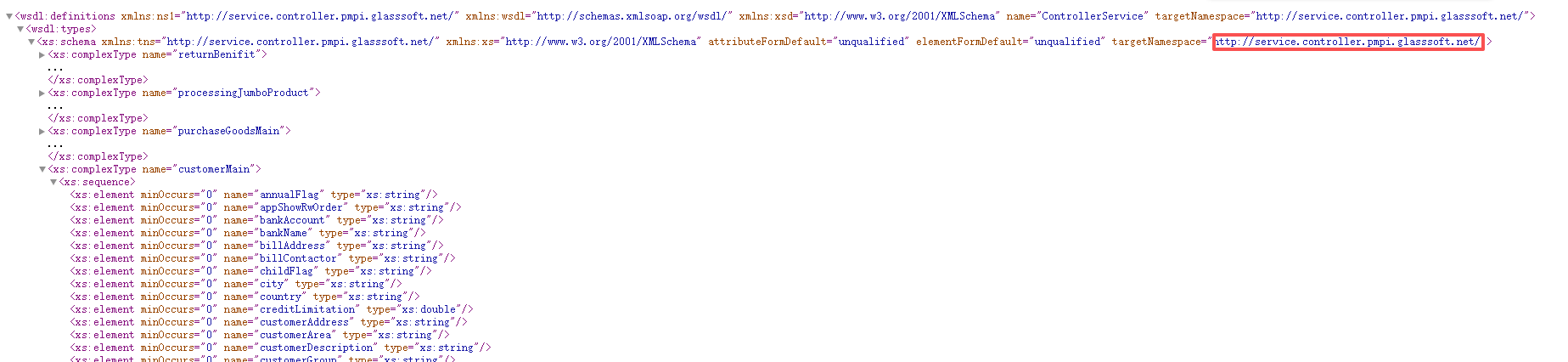
- targetNamespace: http://service.controller.pmpi.glasssoft.net/;所在位置:wsdl:types中
- targetNamespace中第一部分: xfire 这部分后面发送XML内容使用;
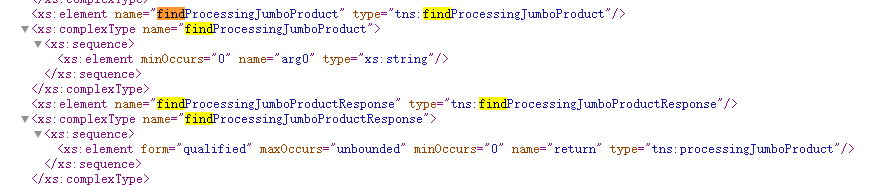
- 请求方法:<xs:element name="findProcessingJumboProduct" type="tns:findProcessingJumboProduct"/>中 name属性值及请求方法,接口允许多个方法。
本次请求方法名称:findProcessingJumboProduct - 请求参数: 请求方法标签中 xs:complexType name="arg0",允许有多个参数。
本次请求参数名称: arg0。
3.Postman请求
1、新建请求
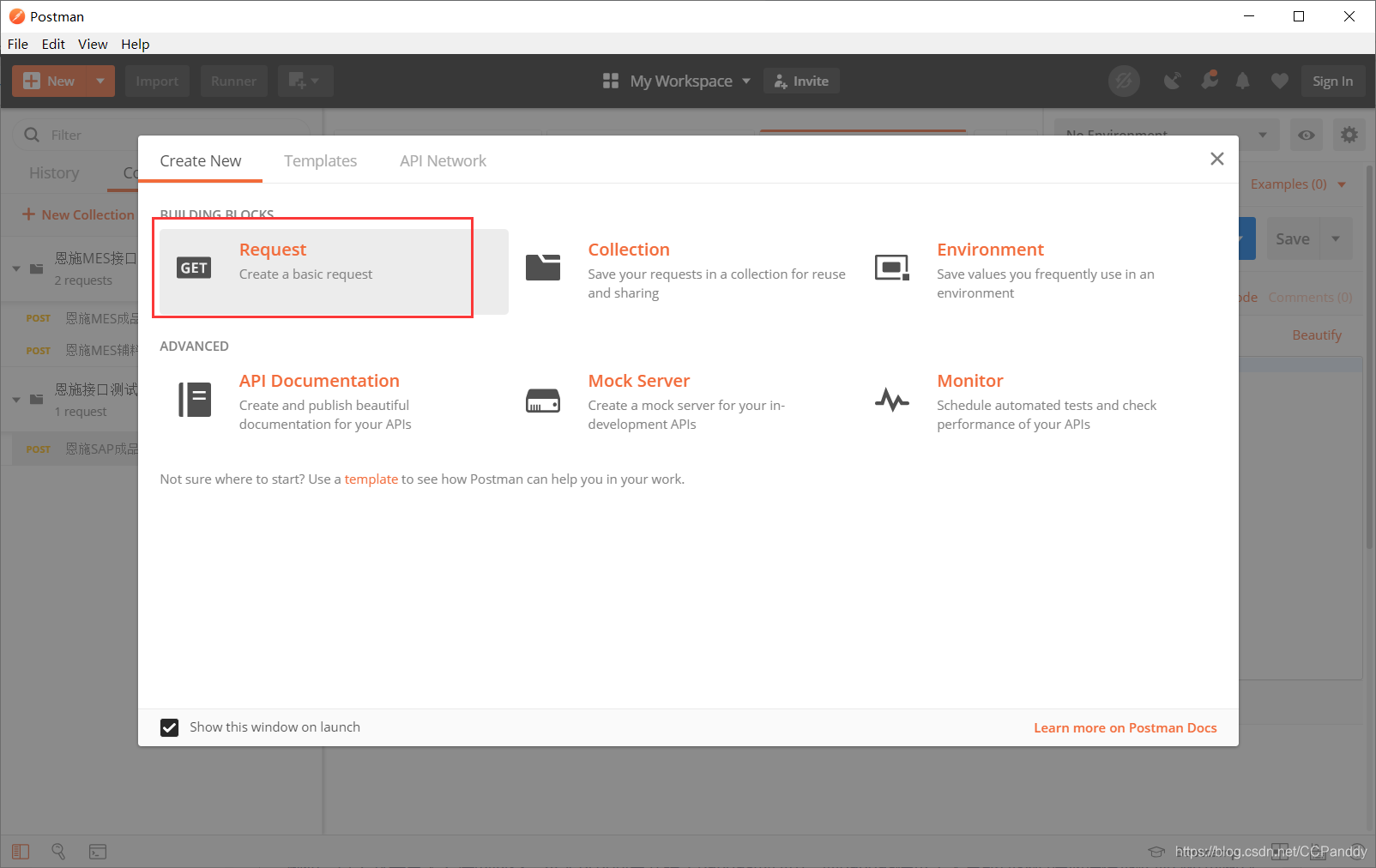
填写WSDL地址,直接复制到地址栏中,【http://xxx:xx/xx/xx/xx?WSDL】,其中 "?WSDL"可以不需要,去掉也没有什么关系。需要把请求方式GET改为POST方式。
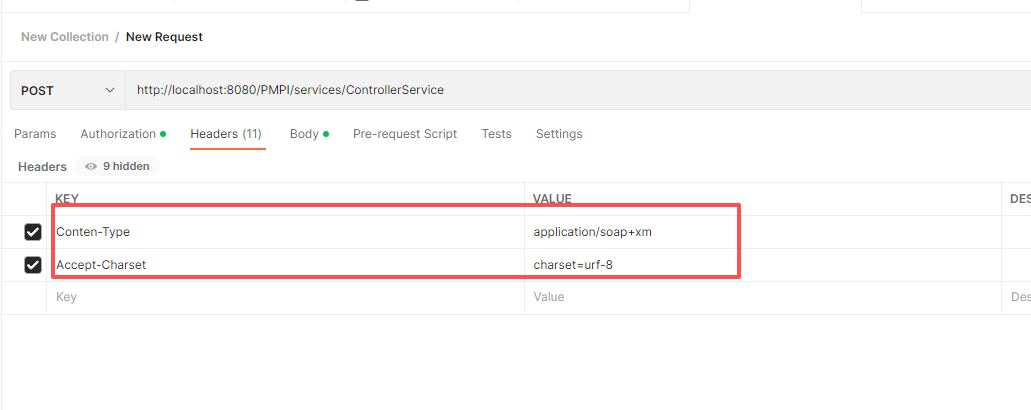
2、 配置Headers属性
3、用户校验
Authorization->TYPE->Basic Auth->有侧输入相关信息
请看下图:
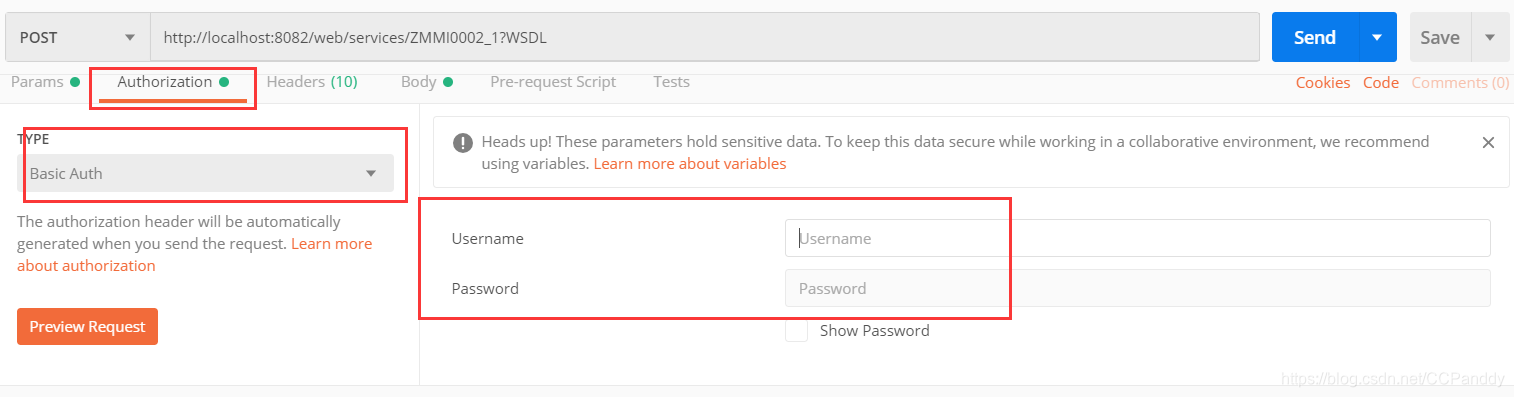
如果是SAP接口,请使用get方式发送请求。
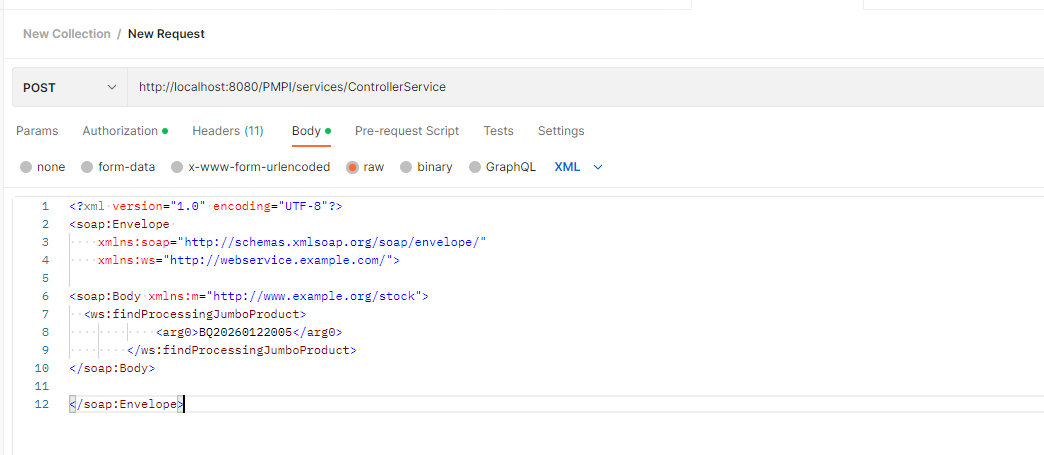
4、 配置请求内容,Body参数:
如下图:Body -> raw格式数据, 格式内容XML ,如果接口要求是其他格式请调整本处和Headers 中Content-Type的值。
四、使用中出错
客户端代码
java
@SuppressWarnings("unchecked")
	public static <T> T create(String url, Class<T> cls) {

		String address = url + "/" + cls.getSimpleName();

		JaxWsProxyFactoryBean jaxWsFactory = new JaxWsProxyFactoryBean();


		jaxWsFactory.setServiceClass(cls);
		jaxWsFactory.setAddress(address);

		reslut = (T) jaxWsFactory.create();
     Client client = ClientProxy.getClient(reslut);
      HTTPConduit http = (HTTPConduit) client.getConduit();
      HTTPClientPolicy httpClientPolicy = new HTTPClientPolicy();
      httpClientPolicy.setConnectionTimeout(TIMEOUT_CONNECTION);
      httpClientPolicy.setAllowChunking(false);
      httpClientPolicy.setReceiveTimeout(TIMEOUT_RECEIVE);
      http.setClient(httpClientPolicy);


        return reslut;
	}
java
@WebService
public interface ControllerService {
	public List<ProcessingJumboProduct> findProcessingJumboProduct(String requistionId);
}
服务端使用xml完成
xml
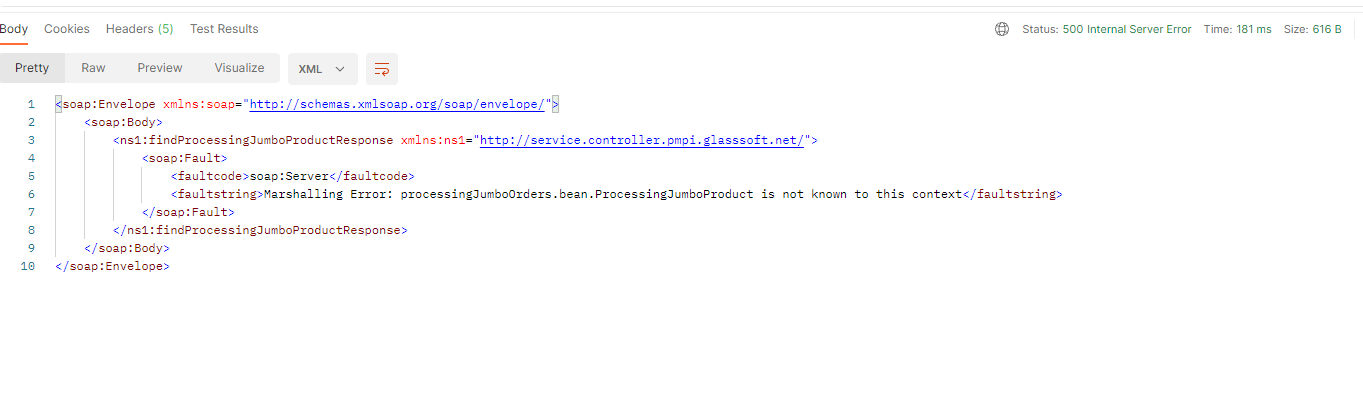
<jaxws:endpoint id="ControllerService" implementor="#controllerService" address="/ControllerService" />这里我们需要使用webService返回一个List,但一直返回不过来,
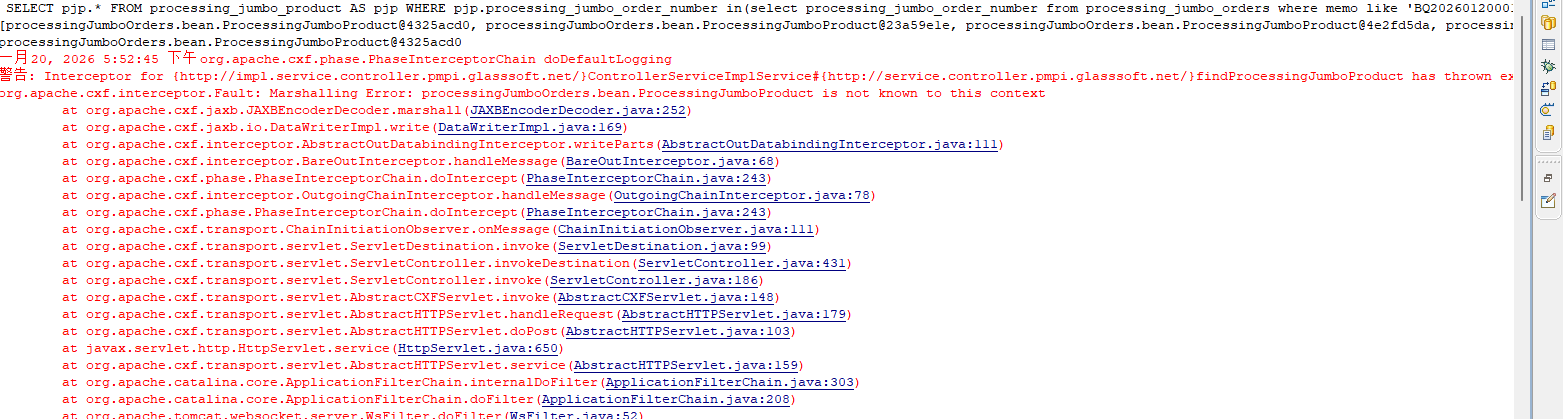
这个是由于我们返回的是list,但是在我们的xs:schema 这个命名空间中并没有一个List<ProcessingJumboProduct>,于是我们在每个List加上命名空间,即在webservice的方法上方写上
java
@WebResult(name = "return", targetNamespace = "http://service.controller.pmpi.glasssoft.net/")name可以自己设定,targetNamespace就是xml schema的命名空间
这里必须指定List中元素的类型。
如果使用List而不指定泛型(即裸类型),那么在序列化时,JAXB可能无法确定List中元素的类型,从而无法正确序列化。