需求描述
项目开发过程中遇到了需要对RuoYi-Vue-Plus UI前端页面布局进行调整的需求,主要是对菜单展示形式进行修改,以下为对比图:
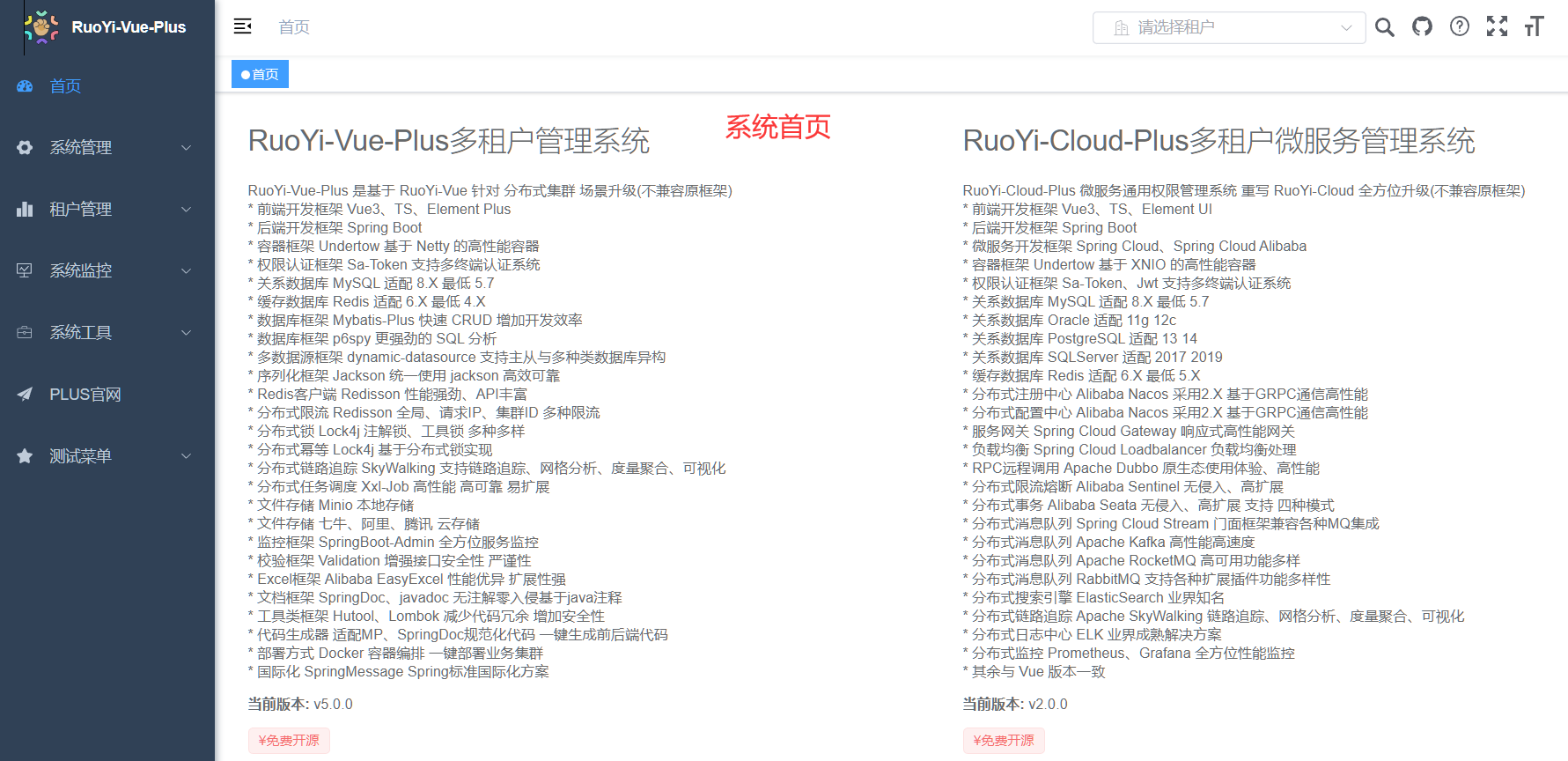 原始布局效果
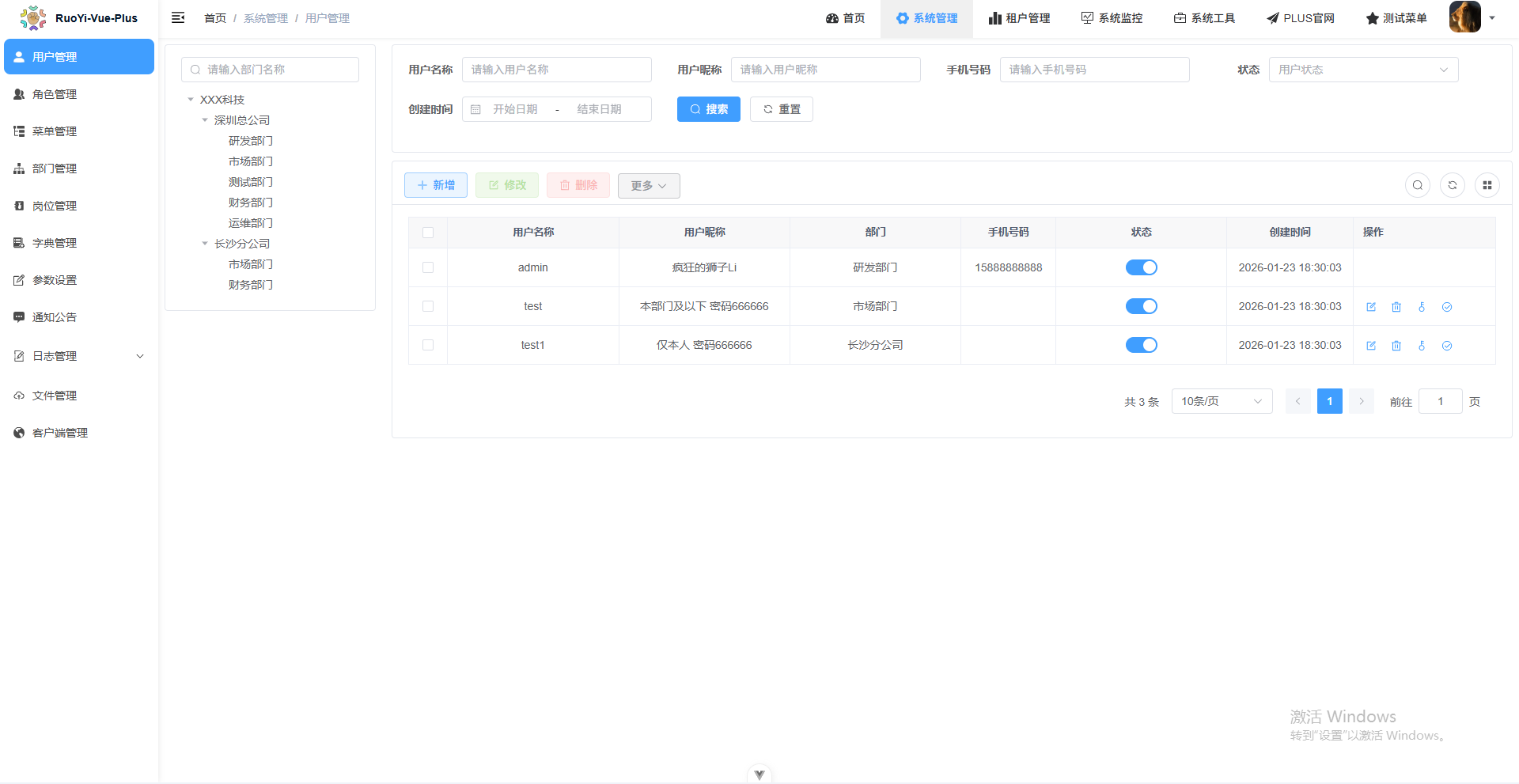 修改之后的页面布局效果
修改思路
下面记录一下修改思路(建议修改之前,结合++/dev-api/system/menu/getRouters接口++ ,重点梳理一下ruoyi-vue-plus前端动态菜单渲染流程,以及++src\layout\components\Sidebar++目录下的源代码)。
核心思路:
① 重新定义SidebarItem.vue组件的渲染逻辑,即:将一个递归组件替换为普通组件,用于渲染顶级菜单按钮;
② 记录并处理好顶级菜单按钮的激活状态(activeTopMenuPath),以及注意同步到全局状态(usePermissionStore)即可;
③ 根据顶级菜单的激活状态(activeTopMenuPath),对usePermissionStore提供的完整的菜单列表sidebarRouters进行过滤,然后交给src\layout\components\Sidebar组件组件渲染即可。
代码修改
右上角一级菜单定制
首先,需要将src\layout\components\Sidebar目录下的源代码拷贝一份,目录重命名为:TopNavMenu,用于定制右上角一级菜单。

子菜单组件修改
修改TopNavMenu目录下的SidebarItem.vue组件,修改之后的组件源码如下(可以根据需要将el-button替换为其他的定制化组件),
javascript
<template>
  <div v-if="!item.hidden" class="top-nav-item">
    <el-button
      v-if="
        hasOneShowingChild(item, item.children) && (!onlyOneChild.children || onlyOneChild.noShowingChildren) && !item.alwaysShow && onlyOneChild.meta
      "
      :class="['top-nav-button', { 'is-active': isActive }]"
      @click="handleClick(item)"
    >
      <svg-icon :icon-class="onlyOneChild.meta.icon || (item.meta && item.meta.icon)" />
      <span class="menu-title" :title="hasTitle(onlyOneChild.meta.title)">{{ onlyOneChild.meta.title }}</span>
    </el-button>

    <el-button v-else-if="item.meta" :class="['top-nav-button', { 'is-active': isActive }]" @click="handleClick(item)">
      <svg-icon :icon-class="item.meta.icon" />
      <span class="menu-title" :title="hasTitle(item.meta.title)">{{ item.meta.title }}</span>
    </el-button>
  </div>
</template>

<script setup lang="ts">
import { isString } from '@/utils/validate';
import { RouteRecordRaw } from 'vue-router';

const emits = defineEmits(['click']);
const props = defineProps({
  item: {
    type: Object as PropType<RouteRecordRaw>,
    required: true
  },
  isNest: {
    type: Boolean,
    default: false
  },
  basePath: {
    type: String,
    default: ''
  },
  activePath: {
    // 从父组件接收全局激活路径
    type: String,
    required: true
  }
});

const onlyOneChild = ref<any>({});

const isActive = computed(() => props.item.path === props.activePath);
// 处理点击导航
const handleClick = (target: any) => {
  emits('click', target.path);
};

const hasOneShowingChild = (parent: RouteRecordRaw, children?: RouteRecordRaw[]) => {
  if (!children) {
    children = [];
  }
  const showingChildren = children.filter((item) => {
    if (item.hidden) {
      return false;
    }
    onlyOneChild.value = item;
    return true;
  });

  // When there is only one child router, the child router is displayed by default
  if (showingChildren.length === 1) {
    return true;
  }

  // Show parent if there are no child router to display
  if (showingChildren.length === 0) {
    onlyOneChild.value = { ...parent, path: '', noShowingChildren: true };
    return true;
  }

  return false;
};
const hasTitle = (title: string | undefined): string => {
  if (!title || title.length <= 5) {
    return '';
  }
  return title;
};
</script>
<style lang="scss" scoped>
.top-nav-item {
  display: inline-block;
  height: 100%;

  .top-nav-button {
    height: 100%;
    border: none;
    background: transparent;
    color: #303133; /* 替换 v-bind(textColor) - 浅色主题文本颜色 */
    padding: 0 20px;
    margin: 0;
    font-size: 14px;
    transition: all 0.3s;
    display: flex;
    align-items: center;

    &:hover {
      background-color: rgba(0, 0, 0, 0.06);
      color: #409eff; /* 替换 v-bind(theme) - 主题色 */
    }

    &.is-active {
      background-color: rgba(0, 0, 0, 0.06);
      color: #409eff; /* 替换 v-bind(theme) - 主题色 */
      font-weight: 600;
    }

    :deep(.svg-icon) {
      margin-right: 5px;
      font-size: 16px;
    }

    .menu-title {
      max-width: 120px;
      overflow: hidden;
      text-overflow: ellipsis;
      white-space: nowrap;
    }
  }
}
</style>
子菜单激活状态处理
修改TopNavMenu目录下的index.vue组件,修改之后的组件源码如下,
javascript
<template>
  <div :style="{ backgroundColor: bgColor }">
    <el-scrollbar :class="sideTheme" wrap-class="scrollbar-wrapper">
      <transition :enter-active-class="proxy?.animate.menuSearchAnimate.enter" mode="out-in">
        <el-menu
          :default-active="activeMenu"
          :collapse="isCollapse"
          :background-color="bgColor"
          :text-color="textColor"
          :unique-opened="true"
          :active-text-color="theme"
          :collapse-transition="false"
          :popper-offset="12"
          mode="horizontal"
          :ellipsis="false"
        >
          <sidebar-item
            v-for="(r, index) in sidebarRouters"
            :active-path="activeTopMenuPath"
            :key="r.path + index"
            :item="r"
            :base-path="r.path"
            @click="handleSideBarItemClick"
          />
        </el-menu>
      </transition>
    </el-scrollbar>
  </div>
</template>

<script setup lang="ts">
import SidebarItem from './SidebarItem.vue';
import variables from '@/assets/styles/variables.module.scss';
import { useAppStore } from '@/store/modules/app';
import { useSettingsStore } from '@/store/modules/settings';
import { usePermissionStore } from '@/store/modules/permission';
import { RouteRecordRaw } from 'vue-router';

const { proxy } = getCurrentInstance() as ComponentInternalInstance;

const route = useRoute();
const appStore = useAppStore();
const settingsStore = useSettingsStore();
const permissionStore = usePermissionStore();
const { activeTopMenuPath } = storeToRefs(permissionStore);
const sidebarRouters = computed<RouteRecordRaw[]>(() => permissionStore.getSidebarRoutes());
const sideTheme = computed(() => settingsStore.sideTheme);
const theme = computed(() => settingsStore.theme);
const isCollapse = computed(() => !appStore.sidebar.opened);

const activeMenu = computed(() => {
  const { meta, path } = route;
  // if set path, the sidebar will highlight the path you set
  if (meta.activeMenu) {
    return meta.activeMenu;
  }
  return path;
});

const bgColor = computed(() => (sideTheme.value === 'theme-dark' ? variables.menuBackground : variables.menuLightBackground));
const textColor = computed(() => (sideTheme.value === 'theme-dark' ? variables.menuColor : variables.menuLightColor));

const handleSideBarItemClick = (_activePath: string) => {
  console.log('handleSideBarItemClick', _activePath);
  permissionStore.setActiveTopMenu(_activePath);
};

onMounted(() => {
  console.log('sidebar mounted', sidebarRouters.value);
  //获取hidden属性设置为true的菜单项
  const filterRouters = sidebarRouters.value.filter((item) => item.hidden);
  console.log('filterRouters', filterRouters);
});
</script>
注意点:其实这里的el-menu组件可以替换为普通的div或者其他容器元素都可,这里只是为了演示最小化修改,所以没做过多处理。
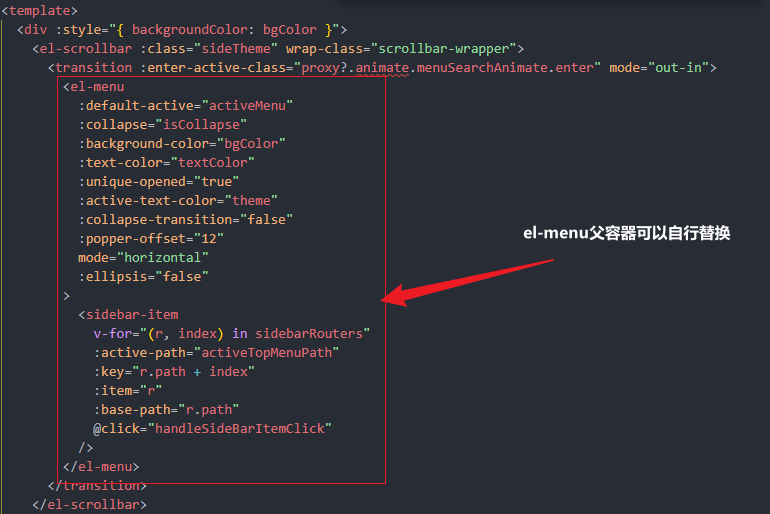 el-menu组件注意事项
权限菜单状态同步
既然是通过记录一级菜单激活状态,对二级菜单进行过滤展示,那么必定要修改一下用于记录权限菜单状态的usePermissionStore相关代码。修改之后的源码(src\store\modules\permission.ts)如下,
javascript
import { defineStore } from 'pinia';
import router, { constantRoutes, dynamicRoutes } from '@/router';
import store from '@/store';
import { getRouters } from '@/api/menu';
import auth from '@/plugins/auth';
import { RouteRecordRaw } from 'vue-router';
import Layout from '@/layout/index.vue';
import ParentView from '@/components/ParentView/index.vue';
import InnerLink from '@/layout/components/InnerLink/index.vue';
import { ref } from 'vue';
import { createCustomNameComponent } from '@/utils/createCustomNameComponent';

// 匹配views里面所有的.vue文件
const modules = import.meta.glob('./../../views/**/*.vue');
export const usePermissionStore = defineStore('permission', () => {
  const routes = ref<RouteRecordRaw[]>([]);
  const addRoutes = ref<RouteRecordRaw[]>([]);
  const defaultRoutes = ref<RouteRecordRaw[]>([]);
  const topbarRouters = ref<RouteRecordRaw[]>([]);
  const sidebarRouters = ref<RouteRecordRaw[]>([]);

  //当前激活的一级菜单路由
  const activeTopMenuPath = ref<string>('');

  const getRoutes = (): RouteRecordRaw[] => {
    return routes.value as RouteRecordRaw[];
  };
  const getDefaultRoutes = (): RouteRecordRaw[] => {
    return defaultRoutes.value as RouteRecordRaw[];
  };
  const getSidebarRoutes = (): RouteRecordRaw[] => {
    return sidebarRouters.value as RouteRecordRaw[];
  };
  const getTopbarRoutes = (): RouteRecordRaw[] => {
    return topbarRouters.value as RouteRecordRaw[];
  };

  // 当前激活的一级菜单路由
  const setActiveTopMenu = (menuPath: string) => {
    activeTopMenuPath.value = menuPath;
  };

  const setRoutes = (newRoutes: RouteRecordRaw[]): void => {
    addRoutes.value = newRoutes;
    routes.value = constantRoutes.concat(newRoutes);
  };
  const setDefaultRoutes = (routes: RouteRecordRaw[]): void => {
    defaultRoutes.value = constantRoutes.concat(routes);
  };
  const setTopbarRoutes = (routes: RouteRecordRaw[]): void => {
    topbarRouters.value = routes;
  };
  const setSidebarRouters = (routes: RouteRecordRaw[]): void => {
    sidebarRouters.value = routes;
  };
  const generateRoutes = async (): Promise<RouteRecordRaw[]> => {
    const res = await getRouters();
    const { data } = res;
    const sdata = JSON.parse(JSON.stringify(data));
    const rdata = JSON.parse(JSON.stringify(data));
    const defaultData = JSON.parse(JSON.stringify(data));
    const sidebarRoutes = filterAsyncRouter(sdata);
    const rewriteRoutes = filterAsyncRouter(rdata, undefined, true);
    const defaultRoutes = filterAsyncRouter(defaultData);
    const asyncRoutes = filterDynamicRoutes(dynamicRoutes);
    asyncRoutes.forEach((route) => {
      router.addRoute(route);
    });
    setRoutes(rewriteRoutes);
    setSidebarRouters(constantRoutes.concat(sidebarRoutes));
    setDefaultRoutes(sidebarRoutes);
    setTopbarRoutes(defaultRoutes);
    // 路由name重复检查
    duplicateRouteChecker(asyncRoutes, sidebarRoutes);
    return new Promise<RouteRecordRaw[]>((resolve) => resolve(rewriteRoutes));
  };

  /**
   * 遍历后台传来的路由字符串,转换为组件对象
   * @param asyncRouterMap 后台传来的路由字符串
   * @param lastRouter 上一级路由
   * @param type 是否是重写路由
   */
  const filterAsyncRouter = (asyncRouterMap: RouteRecordRaw[], lastRouter?: RouteRecordRaw, type = false): RouteRecordRaw[] => {
    return asyncRouterMap.filter((route) => {
      if (type && route.children) {
        route.children = filterChildren(route.children, undefined);
      }
      // Layout ParentView 组件特殊处理
      if (route.component?.toString() === 'Layout') {
        route.component = Layout;
      } else if (route.component?.toString() === 'ParentView') {
        route.component = ParentView;
      } else if (route.component?.toString() === 'InnerLink') {
        route.component = InnerLink;
      } else {
        route.component = loadView(route.component, route.name as string);
      }
      if (route.children != null && route.children && route.children.length) {
        route.children = filterAsyncRouter(route.children, route, type);
      } else {
        delete route.children;
        delete route.redirect;
      }
      return true;
    });
  };
  const filterChildren = (childrenMap: RouteRecordRaw[], lastRouter?: RouteRecordRaw): RouteRecordRaw[] => {
    let children: RouteRecordRaw[] = [];
    childrenMap.forEach((el) => {
      el.path = lastRouter ? lastRouter.path + '/' + el.path : el.path;
      if (el.children && el.children.length && el.component?.toString() === 'ParentView') {
        children = children.concat(filterChildren(el.children, el));
      } else {
        children.push(el);
      }
    });
    return children;
  };
  return {
    activeTopMenuPath,
    routes,
    topbarRouters,
    sidebarRouters,
    defaultRoutes,

    getRoutes,
    getDefaultRoutes,
    getSidebarRoutes,
    getTopbarRoutes,

    setActiveTopMenu,
    setRoutes,
    generateRoutes,
    setSidebarRouters
  };
});

// 动态路由遍历,验证是否具备权限
export const filterDynamicRoutes = (routes: RouteRecordRaw[]) => {
  const res: RouteRecordRaw[] = [];
  routes.forEach((route) => {
    if (route.permissions) {
      if (auth.hasPermiOr(route.permissions)) {
        res.push(route);
      }
    } else if (route.roles) {
      if (auth.hasRoleOr(route.roles)) {
        res.push(route);
      }
    }
  });
  return res;
};

export const loadView = (view: any, name: string) => {
  let res;
  for (const path in modules) {
    const viewsIndex = path.indexOf('/views/');
    let dir = path.substring(viewsIndex + 7);
    dir = dir.substring(0, dir.lastIndexOf('.vue'));
    if (dir === view) {
      res = createCustomNameComponent(modules[path], { name });
      return res;
    }
  }
  return res;
};

// 非setup
export const usePermissionStoreHook = () => {
  return usePermissionStore(store);
};

interface Route {
  name?: string | symbol;
  path: string;
  children?: Route[];
}

/**
 * 检查路由name是否重复
 * @param localRoutes 本地路由
 * @param routes 动态路由
 */
function duplicateRouteChecker(localRoutes: Route[], routes: Route[]) {
  // 展平
  function flatRoutes(routes: Route[]) {
    const res: Route[] = [];
    routes.forEach((route) => {
      if (route.children) {
        res.push(...flatRoutes(route.children));
      } else {
        res.push(route);
      }
    });
    return res;
  }

  const allRoutes = flatRoutes([...localRoutes, ...routes]);

  const nameList: string[] = [];
  allRoutes.forEach((route) => {
    const name = route.name.toString();
    if (name && nameList.includes(name)) {
      const message = `路由名称: [${name}] 重复, 会造成 404`;
      console.error(message);
      ElNotification({
        title: '路由名称重复',
        message,
        type: 'error'
      });
      return;
    }
    nameList.push(route.name.toString());
  });
}
使用定制后的一级菜单组件
以上步骤完成之后,想要看到实际效果,那么,只需要使用一下src\layout\components\TopNavMenu\index.vue组件即可。
由于右上角本来对应的是NavBar.vue组件(src\layout\components\Navbar.vue),那么可以在该组件内部使用即可。
src\layout\components\Navbar.vue修改之后的完整源码如下,
javascript
<template>
  <div class="navbar">
    <hamburger id="hamburger-container" :is-active="appStore.sidebar.opened" class="hamburger-container" @toggle-click="toggleSideBar" />
    <breadcrumb v-if="!settingsStore.topNav" id="breadcrumb-container" class="breadcrumb-container" />
    <top-nav v-if="settingsStore.topNav" id="topmenu-container" class="topmenu-container" />

    <div class="right-menu flex align-center">
      <template v-if="appStore.device !== 'mobile'">
        <top-nav-menu></top-nav-menu>
      </template>
      <div class="avatar-container">
        <el-dropdown class="right-menu-item hover-effect" trigger="click" @command="handleCommand">
          <div class="avatar-wrapper">
            <img :src="userStore.avatar" class="user-avatar" />
            <el-icon><caret-bottom /></el-icon>
          </div>
          <template #dropdown>
            <el-dropdown-menu>
              <router-link v-if="!dynamic" to="/user/profile">
                <el-dropdown-item>{{ proxy.$t('navbar.personalCenter') }}</el-dropdown-item>
              </router-link>
              <el-dropdown-item v-if="settingsStore.showSettings" command="setLayout">
                <span>{{ proxy.$t('navbar.layoutSetting') }}</span>
              </el-dropdown-item>
              <el-dropdown-item divided command="logout">
                <span>{{ proxy.$t('navbar.logout') }}</span>
              </el-dropdown-item>
            </el-dropdown-menu>
          </template>
        </el-dropdown>
      </div>
    </div>
  </div>
</template>

<script setup lang="ts">
import SearchMenu from './TopBar/search.vue';
import { useAppStore } from '@/store/modules/app';
import { useUserStore } from '@/store/modules/user';
import { useSettingsStore } from '@/store/modules/settings';
import { useNoticeStore } from '@/store/modules/notice';
import { getTenantList } from '@/api/login';
import { dynamicClear, dynamicTenant } from '@/api/system/tenant';
import { TenantVO } from '@/api/types';
import notice from './notice/index.vue';
import router from '@/router';
import { ElMessageBoxOptions } from 'element-plus/es/components/message-box/src/message-box.type';
import TopNavMenu from './TopNavMenu/index.vue';

const appStore = useAppStore();
const userStore = useUserStore();
const settingsStore = useSettingsStore();
const noticeStore = storeToRefs(useNoticeStore());
const newNotice = ref(<number>0);

const { proxy } = getCurrentInstance() as ComponentInternalInstance;

const userId = ref(userStore.userId);
const companyName = ref(undefined);
const tenantList = ref<TenantVO[]>([]);
// 是否切换了租户
const dynamic = ref(false);
// 租户开关
const tenantEnabled = ref(true);
// 搜索菜单
const searchMenuRef = ref<InstanceType<typeof SearchMenu>>();

const openSearchMenu = () => {
  searchMenuRef.value?.openSearch();
};

// 动态切换
const dynamicTenantEvent = async (tenantId: string) => {
  if (companyName.value != null && companyName.value !== '') {
    await dynamicTenant(tenantId);
    dynamic.value = true;
    await proxy?.$router.push('/');
    await proxy?.$tab.closeAllPage();
    await proxy?.$tab.refreshPage();
  }
};

const dynamicClearEvent = async () => {
  await dynamicClear();
  dynamic.value = false;
  await proxy?.$router.push('/');
  await proxy?.$tab.closeAllPage();
  await proxy?.$tab.refreshPage();
};

/** 租户列表 */
const initTenantList = async () => {
  const { data } = await getTenantList(true);
  tenantEnabled.value = data.tenantEnabled === undefined ? true : data.tenantEnabled;
  if (tenantEnabled.value) {
    tenantList.value = data.voList;
  }
};

defineExpose({
  initTenantList
});

const toggleSideBar = () => {
  appStore.toggleSideBar(false);
};

const logout = async () => {
  await ElMessageBox.confirm('确定注销并退出系统吗?', '提示', {
    confirmButtonText: '确定',
    cancelButtonText: '取消',
    type: 'warning'
  } as ElMessageBoxOptions);
  userStore.logout().then(() => {
    router.replace({
      path: '/login',
      query: {
        redirect: encodeURIComponent(router.currentRoute.value.fullPath || '/')
      }
    });
    proxy?.$tab.closeAllPage();
  });
};

const emits = defineEmits(['setLayout']);
const setLayout = () => {
  emits('setLayout');
};
// 定义Command方法对象 通过key直接调用方法
const commandMap: { [key: string]: any } = {
  setLayout,
  logout
};
const handleCommand = (command: string) => {
  // 判断是否存在该方法
  if (commandMap[command]) {
    commandMap[command]();
  }
};
//用深度监听 消息
watch(
  () => noticeStore.state.value.notices,
  (newVal) => {
    newNotice.value = newVal.filter((item: any) => !item.read).length;
  },
  { deep: true }
);
</script>

<style lang="scss" scoped>
:deep(.el-select .el-input__wrapper) {
  height: 30px;
}

:deep(.el-badge__content.is-fixed) {
  top: 12px;
}

.flex {
  display: flex;
}

.align-center {
  align-items: center;
}

.navbar {
  height: 50px;
  overflow: hidden;
  position: relative;
  //background: #fff;
  box-shadow: 0 1px 4px rgba(0, 21, 41, 0.08);

  .hamburger-container {
    line-height: 46px;
    height: 100%;
    float: left;
    cursor: pointer;
    transition: background 0.3s;
    -webkit-tap-highlight-color: transparent;

    &:hover {
      background: rgba(0, 0, 0, 0.025);
    }
  }

  .breadcrumb-container {
    float: left;
  }

  .topmenu-container {
    position: absolute;
    left: 50px;
  }

  .errLog-container {
    display: inline-block;
    vertical-align: top;
  }

  .right-menu {
    float: right;
    height: 100%;
    line-height: 50px;
    display: flex;

    &:focus {
      outline: none;
    }

    .right-menu-item {
      display: inline-block;
      padding: 0 8px;
      height: 100%;
      font-size: 18px;
      color: #5a5e66;
      vertical-align: text-bottom;

      &.hover-effect {
        cursor: pointer;
        transition: background 0.3s;

        &:hover {
          background: rgba(0, 0, 0, 0.025);
        }
      }
    }

    .avatar-container {
      margin-right: 40px;

      .avatar-wrapper {
        margin-top: 5px;
        position: relative;

        .user-avatar {
          cursor: pointer;
          width: 40px;
          height: 40px;
          border-radius: 10px;
          margin-top: 10px;
        }

        i {
          cursor: pointer;
          position: absolute;
          right: -20px;
          top: 25px;
          font-size: 12px;
        }
      }
    }
  }
}
</style>
左侧二级菜单加工
上面已经将一级菜单的激活状态信息记录到全局状态中了,接下来,只需要根据usePermissionStore中新增的activeTopMenuPath,按需渲染二级菜单列表即可。
需要修改的的代码部分即为原始的:src\layout\components\Sidebar下index.vue组件,
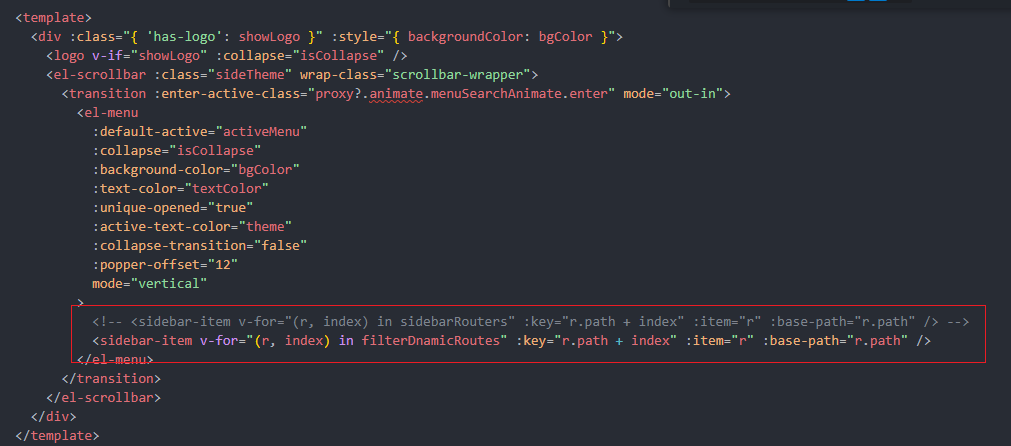 二级菜单按需渲染
注意:被注释掉的是原来的渲染逻辑,正在使用的是修改之后的渲染逻辑------只需要重新构造一个filterDnamicRoutes即可。
以下为修改之后的完整组件代码,
javascript
<template>
  <div :class="{ 'has-logo': showLogo }" :style="{ backgroundColor: bgColor }">
    <logo v-if="showLogo" :collapse="isCollapse" />
    <el-scrollbar :class="sideTheme" wrap-class="scrollbar-wrapper">
      <transition :enter-active-class="proxy?.animate.menuSearchAnimate.enter" mode="out-in">
        <el-menu
          :default-active="activeMenu"
          :collapse="isCollapse"
          :background-color="bgColor"
          :text-color="textColor"
          :unique-opened="true"
          :active-text-color="theme"
          :collapse-transition="false"
          :popper-offset="12"
          mode="vertical"
        >
          <!-- <sidebar-item v-for="(r, index) in sidebarRouters" :key="r.path + index" :item="r" :base-path="r.path" /> -->
          <sidebar-item v-for="(r, index) in filterDnamicRoutes" :key="r.path + index" :item="r" :base-path="r.path" />
        </el-menu>
      </transition>
    </el-scrollbar>
  </div>
</template>

<script setup lang="ts">
import Logo from './Logo.vue';
import SidebarItem from './SidebarItem.vue';
import variables from '@/assets/styles/variables.module.scss';
import { useAppStore } from '@/store/modules/app';
import { useSettingsStore } from '@/store/modules/settings';
import { usePermissionStore } from '@/store/modules/permission';
import { RouteRecordRaw } from 'vue-router';

const { proxy } = getCurrentInstance() as ComponentInternalInstance;

const route = useRoute();
const appStore = useAppStore();
const settingsStore = useSettingsStore();
const permissionStore = usePermissionStore();
const { activeTopMenuPath } = storeToRefs(permissionStore);
const sidebarRouters = computed<RouteRecordRaw[]>(() => permissionStore.getSidebarRoutes());
const showLogo = computed(() => settingsStore.sidebarLogo);
const sideTheme = computed(() => settingsStore.sideTheme);
const theme = computed(() => settingsStore.theme);
const isCollapse = computed(() => !appStore.sidebar.opened);

const activeMenu = computed(() => {
  const { meta, path } = route;
  // if set path, the sidebar will highlight the path you set
  if (meta.activeMenu) {
    return meta.activeMenu;
  }
  return path;
});

//二级菜单过滤
const filterDnamicRoutes = computed(() => {
  //根据activeTopMenuPath查找一级菜单项
  // return sidebarRouters.value.filter((item) => item.path === activeTopMenuPath.value);

  //不带一级菜单名称的
  const _topMenuItem = sidebarRouters.value.find((item) => item.path === activeTopMenuPath.value);
  const _topMenuPath = _topMenuItem?.path || '';
  const _chilren = (_topMenuItem.children || []).map((_item) => {
    return { ..._item, path: _topMenuPath + '/' + _item.path };
  });
  return _chilren; //Array.isArray(_topMenuItem?.children) && _topMenuItem?.children?.length > 0 ? _topMenuItem?.children : [];
});


const bgColor = computed(() => (sideTheme.value === 'theme-dark' ? variables.menuBackground : variables.menuLightBackground));
const textColor = computed(() => (sideTheme.value === 'theme-dark' ? variables.menuColor : variables.menuLightColor));
</script>
以上步骤做完,就可以看到修改之后的布局效果了。