国内用户在使用Debian系统时,使用官方的源进行更新的时候速度很慢,可通过更换国内镜像源(阿里云、清华大学、中科大),提升下载速度。
备份原始源文件
cpp
cd /etc/apt
cp sources.list sources.list.bak
阿里云镜像源
cpp
deb https://mirrors.aliyun.com/debian/ bookworm main non-free non-free-firmware contrib
deb-src https://mirrors.aliyun.com/debian/ bookworm main non-free non-free-firmware contrib
deb https://mirrors.aliyun.com/debian-security/ bookworm-security main
deb-src https://mirrors.aliyun.com/debian-security/ bookworm-security main
deb https://mirrors.aliyun.com/debian/ bookworm-updates main non-free non-free-firmware contrib
deb-src https://mirrors.aliyun.com/debian/ bookworm-updates main non-free non-free-firmware contrib
deb https://mirrors.aliyun.com/debian/ bookworm-backports main non-free non-free-firmware contrib
deb-src https://mirrors.aliyun.com/debian/ bookworm-backports main non-free non-free-firmware contrib
清华大学镜像源
cpp
deb https://mirrors.tuna.tsinghua.edu.cn/debian/ bookworm main contrib non-free non-free-firmware
deb-src https://mirrors.tuna.tsinghua.edu.cn/debian/ bookworm main contrib non-free non-free-firmware
deb https://mirrors.tuna.tsinghua.edu.cn/debian-security bookworm-security main contrib non-free non-free-firmware
deb-src https://mirrors.tuna.tsinghua.edu.cn/debian-security bookworm-security main contrib non-free non-free-firmware
deb https://mirrors.tuna.tsinghua.edu.cn/debian/ bookworm-updates main contrib non-free non-free-firmware
deb-src https://mirrors.tuna.tsinghua.edu.cn/debian/ bookworm-updates main contrib non-free non-free-firmware
deb https://mirrors.tuna.tsinghua.edu.cn/debian/ bookworm-backports main contrib non-free non-free-firmware
deb-src https://mirrors.tuna.tsinghua.edu.cn/debian/ bookworm-backports main contrib non-free non-free-firmware
中科大镜像源
cpp
deb https://mirrors.ustc.edu.cn/debian/ bookworm main contrib non-free non-free-firmware
deb-src https://mirrors.ustc.edu.cn/debian/ bookworm main contrib non-free non-free-firmware
deb https://mirrors.ustc.edu.cn/debian-security bookworm-security main contrib non-free non-free-firmware
deb-src https://mirrors.ustc.edu.cn/debian-security bookworm-security main contrib non-free non-free-firmware
保存文件后,执行以下命令,更新软件包
cpp
sudo apt update && sudo apt upgrade -y注意版本匹配的问题
将配置中的 bookworm 替换为实际Debian版本代号(如Debian 11为 bullseye),可通过以下命令查询
cpp
lsb_release -a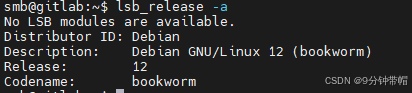
使用sudo apt update命令,进行系统软件更新的时候,若是遇到更新失败的问题,可检查一下nameserver的配置项。
在linux系统中,nameserver 是一个配置项,用于指定DNS服务器的IP 地址。nameserver 行告诉系统应该使用哪些 DNS 服务器来解析域名。
编辑/etc/resolv.conf的文件,以本机的系统为例,内网的ip是192.168.0.102,resolv.conf的内容如下:
cpp
nameserver 192.168.0.1