Flutter虚拟红包雨应用开发教程
项目简介
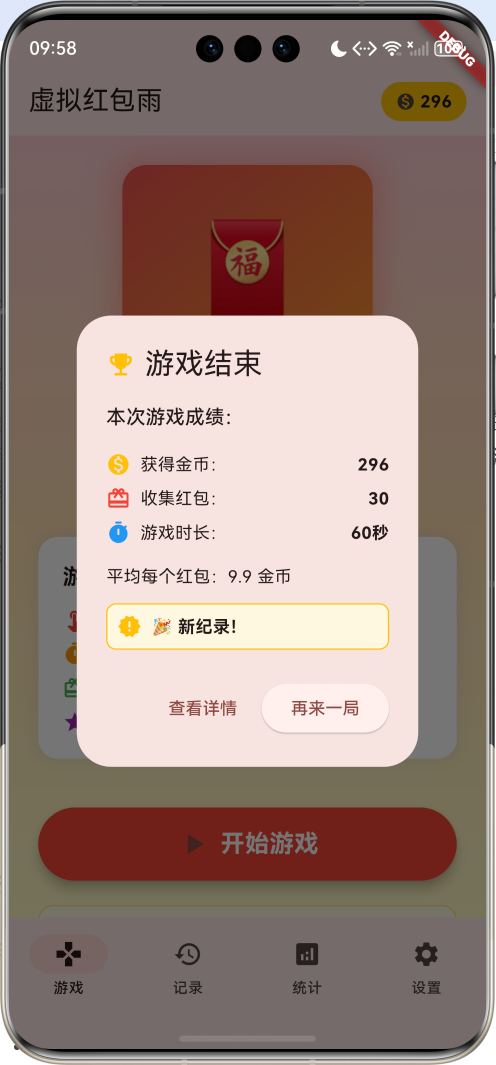
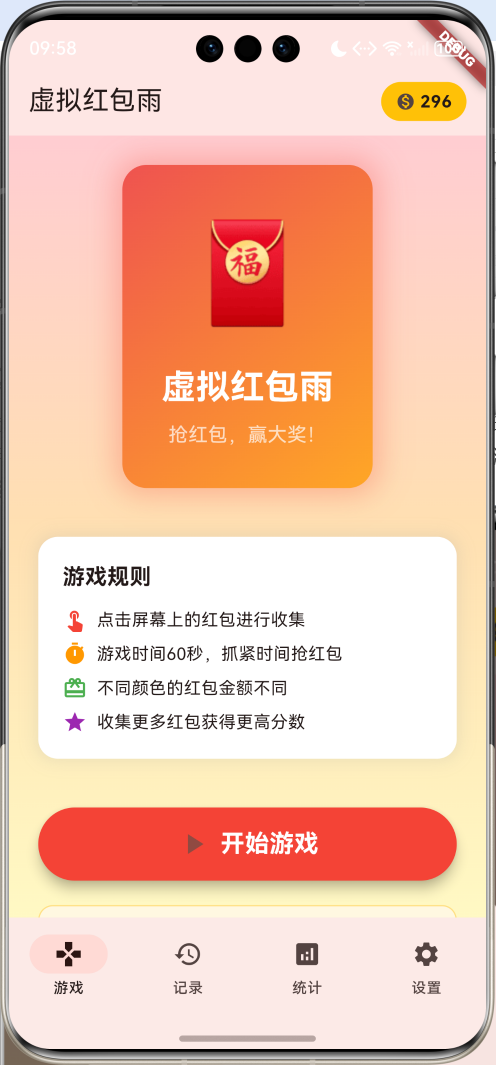
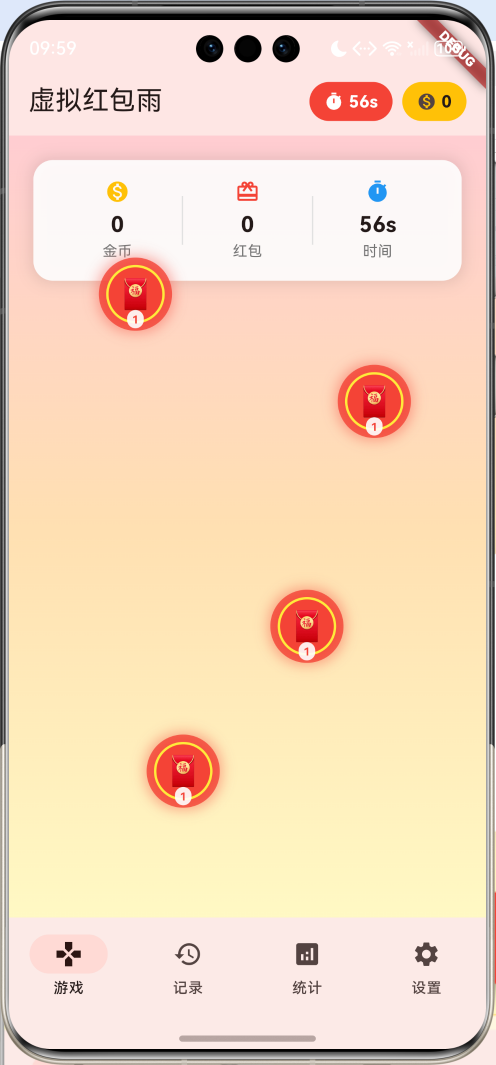
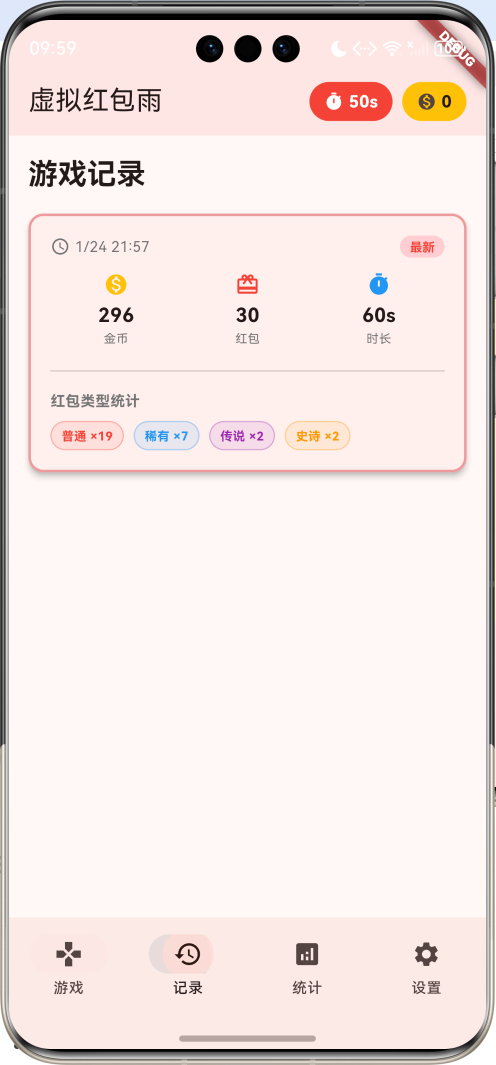
虚拟红包雨是一款有趣的休闲游戏应用,玩家需要在限定时间内点击屏幕收集从天而降的红包来获得金币。应用包含四种不同稀有度的红包、精美的动画效果、详细的游戏记录和统计分析功能。
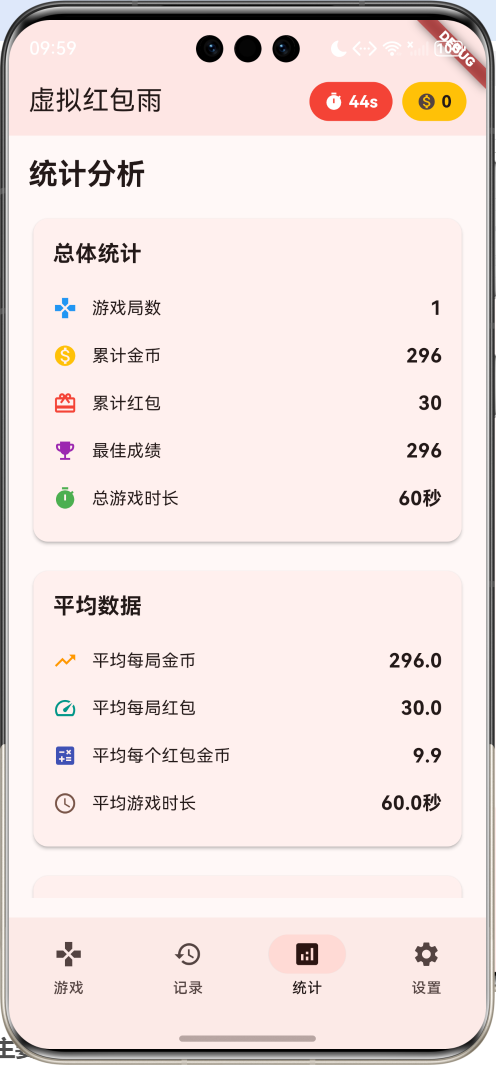
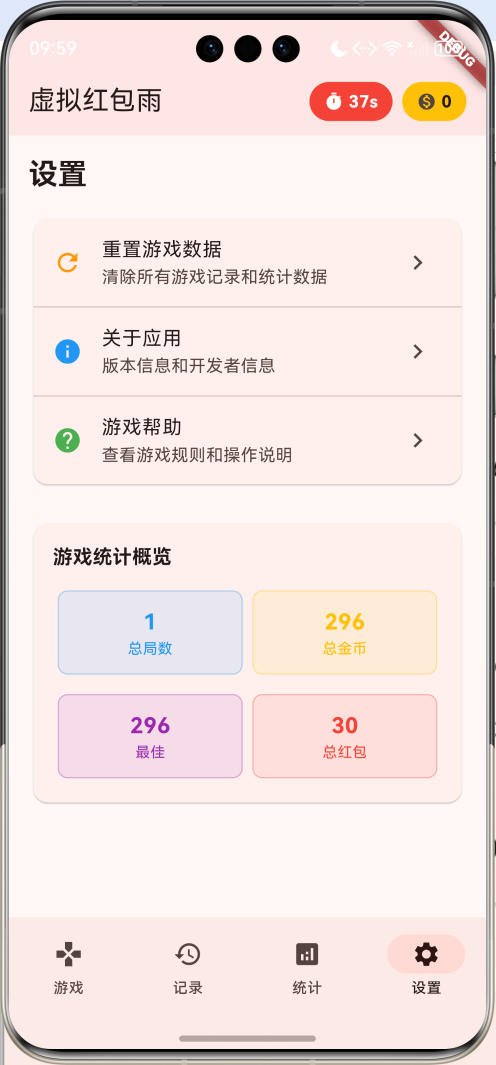
运行效果图
主要功能
- 红包雨游戏:60秒限时收集红包
- 四种稀有度:普通、稀有、史诗、传说红包
- 动画效果:红包掉落和收集动画
- 游戏记录:详细的历史游戏记录
- 统计分析:全面的数据统计和成就系统
- 设置管理:游戏设置和数据管理
技术架构
核心技术栈
- Flutter框架:跨平台UI开发
- Dart语言:应用逻辑实现
- Animation系统:动画效果实现
- Timer机制:游戏计时和红包生成
- State管理:应用状态管理
项目结构
lib/
├── main.dart                 # 应用入口和主要逻辑
├── models/                   # 数据模型
│   ├── red_packet.dart      # 红包模型
│   ├── game_session.dart    # 游戏会话模型
│   └── user_stats.dart      # 用户统计模型
└── widgets/                  # 自定义组件
    ├── game_area.dart       # 游戏区域组件
    ├── red_packet_widget.dart # 红包组件
    └── stats_card.dart      # 统计卡片组件
数据模型设计
红包模型
dart
class RedPacket {
  final String id;
  double x;
  double y;
  final double size;
  final double speed;
  final int amount;
  final String type;
  bool isCollected;
  bool isAnimating;
  final Color color;

  RedPacket({
    required this.id,
    required this.x,
    required this.y,
    required this.size,
    required this.speed,
    required this.amount,
    required this.type,
    this.isCollected = false,
    this.isAnimating = false,
    required this.color,
  });

  RedPacket copyWith({
    double? x,
    double? y,
    bool? isCollected,
    bool? isAnimating,
  }) {
    return RedPacket(
      id: id,
      x: x ?? this.x,
      y: y ?? this.y,
      size: size,
      speed: speed,
      amount: amount,
      type: type,
      isCollected: isCollected ?? this.isCollected,
      isAnimating: isAnimating ?? this.isAnimating,
      color: color,
    );
  }
}
游戏会话模型
dart
class GameSession {
  final String id;
  final DateTime startTime;
  DateTime? endTime;
  int totalAmount;
  int redPacketsCollected;
  int duration;
  Map<String, int> typeCount;

  GameSession({
    required this.id,
    required this.startTime,
    this.endTime,
    this.totalAmount = 0,
    this.redPacketsCollected = 0,
    this.duration = 0,
    Map<String, int>? typeCount,
  }) : typeCount = typeCount ?? {};
}
用户统计模型
dart
class UserStats {
  int totalSessions;
  int totalAmount;
  int totalRedPackets;
  int bestSession;
  int totalPlayTime;
  Map<String, int> typeStats;

  UserStats({
    this.totalSessions = 0,
    this.totalAmount = 0,
    this.totalRedPackets = 0,
    this.bestSession = 0,
    this.totalPlayTime = 0,
    Map<String, int>? typeStats,
  }) : typeStats = typeStats ?? {};
}
核心功能实现
1. 应用主框架
dart
class MyApp extends StatelessWidget {
  const MyApp({super.key});

  @override
  Widget build(BuildContext context) {
    return MaterialApp(
      title: '虚拟红包雨',
      theme: ThemeData(
        colorScheme: ColorScheme.fromSeed(seedColor: Colors.red),
        useMaterial3: true,
      ),
      home: const RedPacketRainHomePage(),
    );
  }
}
2. 主页面结构
dart
class RedPacketRainHomePage extends StatefulWidget {
  const RedPacketRainHomePage({super.key});

  @override
  State<RedPacketRainHomePage> createState() => _RedPacketRainHomePageState();
}

class _RedPacketRainHomePageState extends State<RedPacketRainHomePage>
    with TickerProviderStateMixin {
  int _selectedIndex = 0;
  List<RedPacket> _redPackets = [];
  List<GameSession> _gameSessions = [];
  UserStats _userStats = UserStats();

  bool _isGameActive = false;
  int _currentAmount = 0;
  int _currentRedPackets = 0;
  int _gameTimeLeft = 0;
  Timer? _gameTimer;
  Timer? _spawnTimer;
  Timer? _animationTimer;

  late AnimationController _collectAnimationController;
  late Animation<double> _collectScaleAnimation;

  GameSession? _currentSession;
  final Random _random = Random();
3. 动画系统设置
dart
void _setupAnimations() {
  _collectAnimationController = AnimationController(
    duration: const Duration(milliseconds: 600),
    vsync: this,
  );

  _collectScaleAnimation = Tween<double>(
    begin: 1.0,
    end: 0.0,
  ).animate(CurvedAnimation(
    parent: _collectAnimationController,
    curve: Curves.easeInBack,
  ));
}
4. 游戏逻辑实现
开始游戏
dart
void _startGame() {
  setState(() {
    _isGameActive = true;
    _currentAmount = 0;
    _currentRedPackets = 0;
    _gameTimeLeft = 60;
    _redPackets.clear();
  });

  _currentSession = GameSession(
    id: DateTime.now().millisecondsSinceEpoch.toString(),
    startTime: DateTime.now(),
  );

  // 游戏计时器
  _gameTimer = Timer.periodic(const Duration(seconds: 1), (timer) {
    setState(() {
      _gameTimeLeft--;
    });

    if (_gameTimeLeft <= 0) {
      _endGame();
    }
  });

  // 红包生成计时器
  _spawnTimer = Timer.periodic(const Duration(milliseconds: 800), (timer) {
    _spawnRedPacket();
  });

  // 动画更新计时器
  _animationTimer = Timer.periodic(const Duration(milliseconds: 16), (timer) {
    _updateRedPackets();
  });
}
红包生成算法
dart
void _spawnRedPacket() {
  if (!_isGameActive) return;

  final screenWidth = MediaQuery.of(context).size.width;
  final probabilities = [0.6, 0.25, 0.12, 0.03];

  // 根据概率选择红包类型
  double rand = _random.nextDouble();
  String type = '普通';
  Color color = Colors.red;
  int baseAmount = 1;
  double size = 60;

  if (rand < probabilities[3]) {
    type = '传说';
    color = Colors.purple;
    baseAmount = 50;
    size = 80;
  } else if (rand < probabilities[3] + probabilities[2]) {
    type = '史诗';
    color = Colors.orange;
    baseAmount = 20;
    size = 70;
  } else if (rand < probabilities[3] + probabilities[2] + probabilities[1]) {
    type = '稀有';
    color = Colors.blue;
    baseAmount = 8;
    size = 65;
  }

  final redPacket = RedPacket(
    id: DateTime.now().millisecondsSinceEpoch.toString(),
    x: _random.nextDouble() * (screenWidth - size),
    y: -size,
    size: size,
    speed: 2 + _random.nextDouble() * 3,
    amount: baseAmount + _random.nextInt(baseAmount),
    type: type,
    color: color,
  );

  setState(() {
    _redPackets.add(redPacket);
  });
}
红包更新逻辑
dart
void _updateRedPackets() {
  if (!_isGameActive) return;

  final screenHeight = MediaQuery.of(context).size.height;

  setState(() {
    _redPackets = _redPackets.where((redPacket) {
      if (redPacket.isCollected || redPacket.isAnimating) {
        return false;
      }

      redPacket.y += redPacket.speed;

      // 移除超出屏幕的红包
      return redPacket.y < screenHeight + redPacket.size;
    }).toList();
  });
}
5. 触摸交互处理
dart
void _handleTap(Offset position) {
  if (!_isGameActive) return;

  for (final redPacket in _redPackets) {
    if (redPacket.isCollected || redPacket.isAnimating) continue;

    final distance = (Offset(redPacket.x + redPacket.size / 2,
                            redPacket.y + redPacket.size / 2) - position).distance;

    if (distance <= redPacket.size / 2) {
      _collectRedPacket(redPacket);
      break;
    }
  }
}

void _collectRedPacket(RedPacket redPacket) {
  if (redPacket.isCollected || redPacket.isAnimating) return;

  setState(() {
    redPacket.isAnimating = true;
    _currentAmount += redPacket.amount;
    _currentRedPackets++;

    // 更新当前会话的类型统计
    if (_currentSession != null) {
      _currentSession!.typeCount[redPacket.type] =
          (_currentSession!.typeCount[redPacket.type] ?? 0) + 1;
    }
  });

  // 播放收集动画
  _collectAnimationController.forward().then((_) {
    _collectAnimationController.reset();
    setState(() {
      redPacket.isCollected = true;
    });
  });
}
UI界面设计
1. 游戏开始页面
dart
Widget _buildGameStart() {
  return Center(
    child: SingleChildScrollView(
      padding: const EdgeInsets.all(24),
      child: Column(
        mainAxisAlignment: MainAxisAlignment.center,
        children: [
          // 游戏标题
          Container(
            padding: const EdgeInsets.all(32),
            decoration: BoxDecoration(
              gradient: LinearGradient(
                colors: [Colors.red.shade400, Colors.orange.shade400],
                begin: Alignment.topLeft,
                end: Alignment.bottomRight,
              ),
              borderRadius: BorderRadius.circular(20),
              boxShadow: [
                BoxShadow(
                  color: Colors.red.withValues(alpha: 0.3),
                  blurRadius: 20,
                  spreadRadius: 5,
                ),
              ],
            ),
            child: const Column(
              children: [
                Text('🧧', style: TextStyle(fontSize: 80)),
                SizedBox(height: 16),
                Text(
                  '虚拟红包雨',
                  style: TextStyle(
                    fontSize: 28,
                    fontWeight: FontWeight.bold,
                    color: Colors.white,
                  ),
                ),
                SizedBox(height: 8),
                Text(
                  '抢红包,赢大奖!',
                  style: TextStyle(
                    fontSize: 16,
                    color: Colors.white70,
                  ),
                ),
              ],
            ),
          ),

          const SizedBox(height: 40),

          // 游戏规则说明
          _buildGameRules(),

          const SizedBox(height: 40),

          // 开始游戏按钮
          _buildStartButton(),
        ],
      ),
    ),
  );
}
2. 红包渲染组件
dart
Widget _buildRedPacket(RedPacket redPacket) {
  if (redPacket.isCollected) return const SizedBox.shrink();

  return Positioned(
    left: redPacket.x,
    top: redPacket.y,
    child: GestureDetector(
      onTap: () => _collectRedPacket(redPacket),
      child: Container(
        width: redPacket.size,
        height: redPacket.size,
        decoration: BoxDecoration(
          gradient: RadialGradient(
            colors: [
              redPacket.color,
              redPacket.color.withValues(alpha: 0.8),
            ],
          ),
          borderRadius: BorderRadius.circular(redPacket.size / 2),
          boxShadow: [
            BoxShadow(
              color: redPacket.color.withValues(alpha: 0.4),
              blurRadius: 8,
              spreadRadius: 2,
            ),
          ],
        ),
        child: Stack(
          children: [
            // 红包主体
            Center(
              child: Container(
                width: redPacket.size * 0.8,
                height: redPacket.size * 0.8,
                decoration: BoxDecoration(
                  color: redPacket.color,
                  borderRadius: BorderRadius.circular(redPacket.size * 0.4),
                  border: Border.all(color: Colors.yellow, width: 2),
                ),
                child: Center(
                  child: Text(
                    '🧧',
                    style: TextStyle(fontSize: redPacket.size * 0.4),
                  ),
                ),
              ),
            ),

            // 金额显示
            Positioned(
              bottom: 2,
              left: 0,
              right: 0,
              child: Center(
                child: Container(
                  padding: const EdgeInsets.symmetric(horizontal: 4, vertical: 1),
                  decoration: BoxDecoration(
                    color: Colors.white.withValues(alpha: 0.9),
                    borderRadius: BorderRadius.circular(8),
                  ),
                  child: Text(
                    '${redPacket.amount}',
                    style: TextStyle(
                      fontSize: redPacket.size * 0.15,
                      fontWeight: FontWeight.bold,
                      color: redPacket.color,
                    ),
                  ),
                ),
              ),
            ),
          ],
        ),
      ),
    ),
  );
}
3. 游戏状态显示
dart
Widget _buildGameStatus() {
  return Container(
    padding: const EdgeInsets.all(16),
    decoration: BoxDecoration(
      color: Colors.white.withValues(alpha: 0.9),
      borderRadius: BorderRadius.circular(16),
      boxShadow: [
        BoxShadow(
          color: Colors.black.withValues(alpha: 0.1),
          blurRadius: 10,
          spreadRadius: 2,
        ),
      ],
    ),
    child: Row(
      children: [
        Expanded(
          child: _buildStatusItem(
            '金币',
            '$_currentAmount',
            Icons.monetization_on,
            Colors.amber,
          ),
        ),
        Container(
          width: 1,
          height: 40,
          color: Colors.grey.shade300,
        ),
        Expanded(
          child: _buildStatusItem(
            '红包',
            '$_currentRedPackets',
            Icons.card_giftcard,
            Colors.red,
          ),
        ),
        Container(
          width: 1,
          height: 40,
          color: Colors.grey.shade300,
        ),
        Expanded(
          child: _buildStatusItem(
            '时间',
            '${_gameTimeLeft}s',
            Icons.timer,
            Colors.blue,
          ),
        ),
      ],
    ),
  );
}
游戏记录管理
1. 记录页面实现
dart
Widget _buildRecordsPage() {
  return Padding(
    padding: const EdgeInsets.all(16),
    child: Column(
      crossAxisAlignment: CrossAxisAlignment.start,
      children: [
        Text(
          '游戏记录',
          style: Theme.of(context).textTheme.headlineSmall?.copyWith(
            fontWeight: FontWeight.bold,
          ),
        ),
        const SizedBox(height: 16),

        if (_gameSessions.isEmpty)
          _buildEmptyRecords()
        else
          Expanded(
            child: ListView.builder(
              itemCount: _gameSessions.length,
              itemBuilder: (context, index) {
                final session = _gameSessions[_gameSessions.length - 1 - index];
                return _buildSessionCard(session, index == 0);
              },
            ),
          ),
      ],
    ),
  );
}
2. 游戏会话卡片
dart
Widget _buildSessionCard(GameSession session, bool isLatest) {
  return Card(
    margin: const EdgeInsets.only(bottom: 12),
    elevation: isLatest ? 4 : 2,
    child: Container(
      decoration: BoxDecoration(
        borderRadius: BorderRadius.circular(12),
        border: isLatest ? Border.all(color: Colors.red.shade200, width: 2) : null,
      ),
      child: Padding(
        padding: const EdgeInsets.all(16),
        child: Column(
          crossAxisAlignment: CrossAxisAlignment.start,
          children: [
            // 时间戳和标签
            Row(
              children: [
                Icon(Icons.access_time, size: 16, color: Colors.grey),
                const SizedBox(width: 4),
                Text(
                  _formatDateTime(session.startTime),
                  style: TextStyle(color: Colors.grey, fontSize: 12),
                ),
                const Spacer(),
                if (isLatest)
                  Container(
                    padding: const EdgeInsets.symmetric(horizontal: 8, vertical: 2),
                    decoration: BoxDecoration(
                      color: Colors.red.shade100,
                      borderRadius: BorderRadius.circular(12),
                    ),
                    child: Text(
                      '最新',
                      style: TextStyle(
                        color: Colors.red,
                        fontSize: 10,
                        fontWeight: FontWeight.bold,
                      ),
                    ),
                  ),
              ],
            ),
            const SizedBox(height: 12),

            // 统计数据
            Row(
              children: [
                Expanded(
                  child: _buildSessionStat(
                    '金币', '${session.totalAmount}',
                    Icons.monetization_on, Colors.amber,
                  ),
                ),
                Expanded(
                  child: _buildSessionStat(
                    '红包', '${session.redPacketsCollected}',
                    Icons.card_giftcard, Colors.red,
                  ),
                ),
                Expanded(
                  child: _buildSessionStat(
                    '时长', '${session.duration}s',
                    Icons.timer, Colors.blue,
                  ),
                ),
              ],
            ),

            // 红包类型统计
            if (session.typeCount.isNotEmpty) ...[
              const SizedBox(height: 12),
              const Divider(),
              const SizedBox(height: 8),
              Text(
                '红包类型统计',
                style: TextStyle(
                  fontSize: 12,
                  color: Colors.grey,
                  fontWeight: FontWeight.bold,
                ),
              ),
              const SizedBox(height: 8),
              _buildTypeCountChips(session.typeCount),
            ],
          ],
        ),
      ),
    ),
  );
}
统计分析功能
1. 统计页面结构
dart
Widget _buildStatsPage() {
  return Padding(
    padding: const EdgeInsets.all(16),
    child: Column(
      crossAxisAlignment: CrossAxisAlignment.start,
      children: [
        Text(
          '统计分析',
          style: Theme.of(context).textTheme.headlineSmall?.copyWith(
            fontWeight: FontWeight.bold,
          ),
        ),
        const SizedBox(height: 16),

        if (_userStats.totalSessions == 0)
          _buildEmptyStats()
        else
          Expanded(
            child: SingleChildScrollView(
              child: Column(
                children: [
                  _buildOverallStatsCard(),
                  const SizedBox(height: 16),
                  _buildAverageStatsCard(),
                  const SizedBox(height: 16),
                  _buildAchievementsCard(),
                ],
              ),
            ),
          ),
      ],
    ),
  );
}
2. 成就系统
dart
List<Map<String, dynamic>> _getAchievements() {
  return [
    {
      'title': '初出茅庐',
      'description': '完成第一局游戏',
      'icon': Icons.play_arrow,
      'unlocked': _userStats.totalSessions >= 1,
    },
    {
      'title': '小有成就',
      'description': '累计获得100金币',
      'icon': Icons.monetization_on,
      'unlocked': _userStats.totalAmount >= 100,
    },
    {
      'title': '红包达人',
      'description': '累计收集50个红包',
      'icon': Icons.card_giftcard,
      'unlocked': _userStats.totalRedPackets >= 50,
    },
    {
      'title': '游戏专家',
      'description': '完成10局游戏',
      'icon': Icons.games,
      'unlocked': _userStats.totalSessions >= 10,
    },
    {
      'title': '财富自由',
      'description': '单局获得100金币',
      'icon': Icons.emoji_events,
      'unlocked': _userStats.bestSession >= 100,
    },
    {
      'title': '时间管理大师',
      'description': '累计游戏时长超过10分钟',
      'icon': Icons.schedule,
      'unlocked': _userStats.totalPlayTime >= 600,
    },
  ];
}
3. 成就展示组件
dart
Widget _buildAchievementItem(Map<String, dynamic> achievement) {
  final bool isUnlocked = achievement['unlocked'];

  return Container(
    margin: const EdgeInsets.symmetric(vertical: 4),
    padding: const EdgeInsets.all(12),
    decoration: BoxDecoration(
      color: isUnlocked ? Colors.amber.shade50 : Colors.grey.shade100,
      borderRadius: BorderRadius.circular(8),
      border: Border.all(
        color: isUnlocked ? Colors.amber.shade200 : Colors.grey.shade300,
      ),
    ),
    child: Row(
      children: [
        Icon(
          achievement['icon'],
          color: isUnlocked ? Colors.amber : Colors.grey,
          size: 24,
        ),
        const SizedBox(width: 12),
        Expanded(
          child: Column(
            crossAxisAlignment: CrossAxisAlignment.start,
            children: [
              Text(
                achievement['title'],
                style: TextStyle(
                  fontWeight: FontWeight.bold,
                  color: isUnlocked ? Colors.amber : Colors.grey,
                ),
              ),
              Text(
                achievement['description'],
                style: TextStyle(
                  fontSize: 12,
                  color: isUnlocked ? Colors.amber : Colors.grey,
                ),
              ),
            ],
          ),
        ),
        if (isUnlocked)
          const Icon(Icons.check_circle, color: Colors.green, size: 20),
      ],
    ),
  );
}
设置和管理功能
1. 设置页面
dart
Widget _buildSettingsPage() {
  return Padding(
    padding: const EdgeInsets.all(16),
    child: Column(
      crossAxisAlignment: CrossAxisAlignment.start,
      children: [
        Text(
          '设置',
          style: Theme.of(context).textTheme.headlineSmall?.copyWith(
            fontWeight: FontWeight.bold,
          ),
        ),
        const SizedBox(height: 16),

        Card(
          child: Column(
            children: [
              ListTile(
                leading: const Icon(Icons.refresh, color: Colors.orange),
                title: const Text('重置游戏数据'),
                subtitle: const Text('清除所有游戏记录和统计数据'),
                trailing: const Icon(Icons.chevron_right),
                onTap: _showResetDialog,
              ),
              const Divider(height: 1),
              ListTile(
                leading: const Icon(Icons.info, color: Colors.blue),
                title: const Text('关于应用'),
                subtitle: const Text('版本信息和开发者信息'),
                trailing: const Icon(Icons.chevron_right),
                onTap: _showAboutDialog,
              ),
              const Divider(height: 1),
              ListTile(
                leading: const Icon(Icons.help, color: Colors.green),
                title: const Text('游戏帮助'),
                subtitle: const Text('查看游戏规则和操作说明'),
                trailing: const Icon(Icons.chevron_right),
                onTap: _showHelpDialog,
              ),
            ],
          ),
        ),

        const SizedBox(height: 24),

        // 统计概览卡片
        _buildQuickStatsCard(),
      ],
    ),
  );
}
2. 数据重置功能
dart
void _showResetDialog() {
  showDialog(
    context: context,
    builder: (context) => AlertDialog(
      title: const Row(
        children: [
          Icon(Icons.warning, color: Colors.orange),
          SizedBox(width: 8),
          Text('重置确认'),
        ],
      ),
      content: const Text('确定要重置所有游戏数据吗?此操作不可恢复。'),
      actions: [
        TextButton(
          onPressed: () => Navigator.of(context).pop(),
          child: const Text('取消'),
        ),
        ElevatedButton(
          onPressed: () {
            setState(() {
              _gameSessions.clear();
              _userStats = UserStats();
            });
            Navigator.of(context).pop();
            ScaffoldMessenger.of(context).showSnackBar(
              const SnackBar(content: Text('游戏数据已重置')),
            );
          },
          style: ElevatedButton.styleFrom(backgroundColor: Colors.red),
          child: const Text('确认重置', style: TextStyle(color: Colors.white)),
        ),
      ],
    ),
  );
}
游戏平衡性设计
红包稀有度系统
| 稀有度 | 概率 | 金币范围 | 尺寸 | 颜色 |
|---|---|---|---|---|
| 普通 | 60% | 1-2 | 60px | 红色 |
| 稀有 | 25% | 8-16 | 65px | 蓝色 |
| 史诗 | 12% | 20-40 | 70px | 橙色 |
| 传说 | 3% | 50-100 | 80px | 紫色 |
游戏参数配置
dart
// 游戏时长
const int GAME_DURATION = 60; // 秒

// 红包生成间隔
const int SPAWN_INTERVAL = 800; // 毫秒

// 动画更新频率
const int ANIMATION_FPS = 60; // 每秒帧数

// 红包掉落速度范围
const double MIN_SPEED = 2.0;
const double MAX_SPEED = 5.0;

// 概率配置
const List<double> RARITY_PROBABILITIES = [0.6, 0.25, 0.12, 0.03];
性能优化策略
1. 对象池管理
dart
class RedPacketPool {
  static final List<RedPacket> _pool = [];
  static const int MAX_POOL_SIZE = 50;

  static RedPacket getRedPacket({
    required String id,
    required double x,
    required double y,
    required double size,
    required double speed,
    required int amount,
    required String type,
    required Color color,
  }) {
    if (_pool.isNotEmpty) {
      final redPacket = _pool.removeLast();
      return redPacket.copyWith(
        x: x,
        y: y,
        isCollected: false,
        isAnimating: false,
      );
    }

    return RedPacket(
      id: id,
      x: x,
      y: y,
      size: size,
      speed: speed,
      amount: amount,
      type: type,
      color: color,
    );
  }

  static void returnRedPacket(RedPacket redPacket) {
    if (_pool.length < MAX_POOL_SIZE) {
      _pool.add(redPacket);
    }
  }
}
2. 渲染优化
dart
// 使用RepaintBoundary减少重绘
Widget _buildOptimizedRedPacket(RedPacket redPacket) {
  return RepaintBoundary(
    child: Positioned(
      left: redPacket.x,
      top: redPacket.y,
      child: _buildRedPacketWidget(redPacket),
    ),
  );
}

// 批量更新减少setState调用
void _batchUpdateRedPackets() {
  bool needsUpdate = false;

  for (final redPacket in _redPackets) {
    if (!redPacket.isCollected && !redPacket.isAnimating) {
      redPacket.y += redPacket.speed;
      needsUpdate = true;
    }
  }

  if (needsUpdate) {
    setState(() {
      _redPackets.removeWhere((rp) =>
        rp.y > MediaQuery.of(context).size.height + rp.size);
    });
  }
}
测试和调试
1. 单元测试
dart
import 'package:flutter_test/flutter_test.dart';
import 'package:red_packet_rain/models/red_packet.dart';
import 'package:red_packet_rain/models/game_session.dart';

void main() {
  group('RedPacket Tests', () {
    test('RedPacket creation', () {
      final redPacket = RedPacket(
        id: '1',
        x: 100,
        y: 200,
        size: 60,
        speed: 3,
        amount: 10,
        type: '普通',
        color: Colors.red,
      );

      expect(redPacket.id, '1');
      expect(redPacket.x, 100);
      expect(redPacket.y, 200);
      expect(redPacket.isCollected, false);
    });

    test('RedPacket copyWith', () {
      final original = RedPacket(
        id: '1',
        x: 100,
        y: 200,
        size: 60,
        speed: 3,
        amount: 10,
        type: '普通',
        color: Colors.red,
      );

      final copied = original.copyWith(x: 150, isCollected: true);

      expect(copied.x, 150);
      expect(copied.isCollected, true);
      expect(copied.y, 200); // 未改变的属性保持原值
    });
  });

  group('GameSession Tests', () {
    test('GameSession statistics', () {
      final session = GameSession(
        id: '1',
        startTime: DateTime.now(),
      );

      session.totalAmount = 100;
      session.redPacketsCollected = 10;
      session.typeCount['普通'] = 8;
      session.typeCount['稀有'] = 2;

      expect(session.totalAmount, 100);
      expect(session.redPacketsCollected, 10);
      expect(session.typeCount['普通'], 8);
      expect(session.typeCount['稀有'], 2);
    });
  });
}
2. 集成测试
dart
import 'package:flutter/material.dart';
import 'package:flutter_test/flutter_test.dart';
import 'package:integration_test/integration_test.dart';
import 'package:red_packet_rain/main.dart' as app;

void main() {
  IntegrationTestWidgetsFlutterBinding.ensureInitialized();

  group('Red Packet Rain Integration Tests', () {
    testWidgets('Complete game flow', (WidgetTester tester) async {
      app.main();
      await tester.pumpAndSettle();

      // 验证初始状态
      expect(find.text('虚拟红包雨'), findsOneWidget);
      expect(find.text('开始游戏'), findsOneWidget);

      // 开始游戏
      await tester.tap(find.text('开始游戏'));
      await tester.pumpAndSettle();

      // 验证游戏状态
      expect(find.text('60s'), findsOneWidget);
      expect(find.byIcon(Icons.monetization_on), findsWidgets);

      // 等待红包出现并点击
      await tester.pump(const Duration(seconds: 1));

      // 查找红包并点击
      final redPacketFinder = find.byType(GestureDetector);
      if (redPacketFinder.evaluate().isNotEmpty) {
        await tester.tap(redPacketFinder.first);
        await tester.pump();
      }

      // 验证分数更新
      // 这里可以添加更多验证逻辑
    });

    testWidgets('Navigation between tabs', (WidgetTester tester) async {
      app.main();
      await tester.pumpAndSettle();

      // 测试导航到记录页面
      await tester.tap(find.text('记录'));
      await tester.pumpAndSettle();
      expect(find.text('游戏记录'), findsOneWidget);

      // 测试导航到统计页面
      await tester.tap(find.text('统计'));
      await tester.pumpAndSettle();
      expect(find.text('统计分析'), findsOneWidget);

      // 测试导航到设置页面
      await tester.tap(find.text('设置'));
      await tester.pumpAndSettle();
      expect(find.text('设置'), findsOneWidget);
    });
  });
}
部署和发布
1. Android构建配置
gradle
// android/app/build.gradle
android {
    compileSdkVersion 34

    defaultConfig {
        applicationId "com.example.red_packet_rain"
        minSdkVersion 21
        targetSdkVersion 34
        versionCode 1
        versionName "1.0.0"
    }

    buildTypes {
        release {
            signingConfig signingConfigs.release
            minifyEnabled true
            proguardFiles getDefaultProguardFile('proguard-android.txt'), 'proguard-rules.pro'
        }
    }
}
2. 性能监控
dart
import 'package:flutter/foundation.dart';

class PerformanceMonitor {
  static int _frameCount = 0;
  static DateTime _lastFrameTime = DateTime.now();

  static void trackFrame() {
    _frameCount++;
    final now = DateTime.now();

    if (now.difference(_lastFrameTime).inSeconds >= 1) {
      if (kDebugMode) {
        print('FPS: $_frameCount');
      }
      _frameCount = 0;
      _lastFrameTime = now;
    }
  }

  static void trackMemoryUsage() {
    if (kDebugMode) {
      // 内存使用监控逻辑
    }
  }
}
总结
虚拟红包雨应用通过Flutter框架实现了一个完整的休闲游戏,包含了游戏逻辑、动画效果、数据统计、用户界面等多个方面的功能。
技术亮点
- 流畅的动画系统:使用Flutter的Animation框架实现红包掉落和收集动画
- 高效的碰撞检测:基于距离计算的触摸检测算法
- 科学的概率系统:四级稀有度的红包生成机制
- 完整的数据管理:游戏记录、统计分析、成就系统
- 优雅的UI设计:Material Design风格的用户界面
学习收获
- 掌握了Flutter动画系统的使用
- 学会了游戏循环和状态管理
- 理解了触摸事件处理机制
- 实践了数据模型设计和管理
- 体验了完整的应用开发流程
这个项目展示了如何使用Flutter开发一个功能完整、体验流畅的移动游戏应用,为进一步学习移动应用开发奠定了良好的基础。
欢迎加入开源鸿蒙跨平台社区:https://openharmonycrossplatform.csdn.net