文章目录
前言
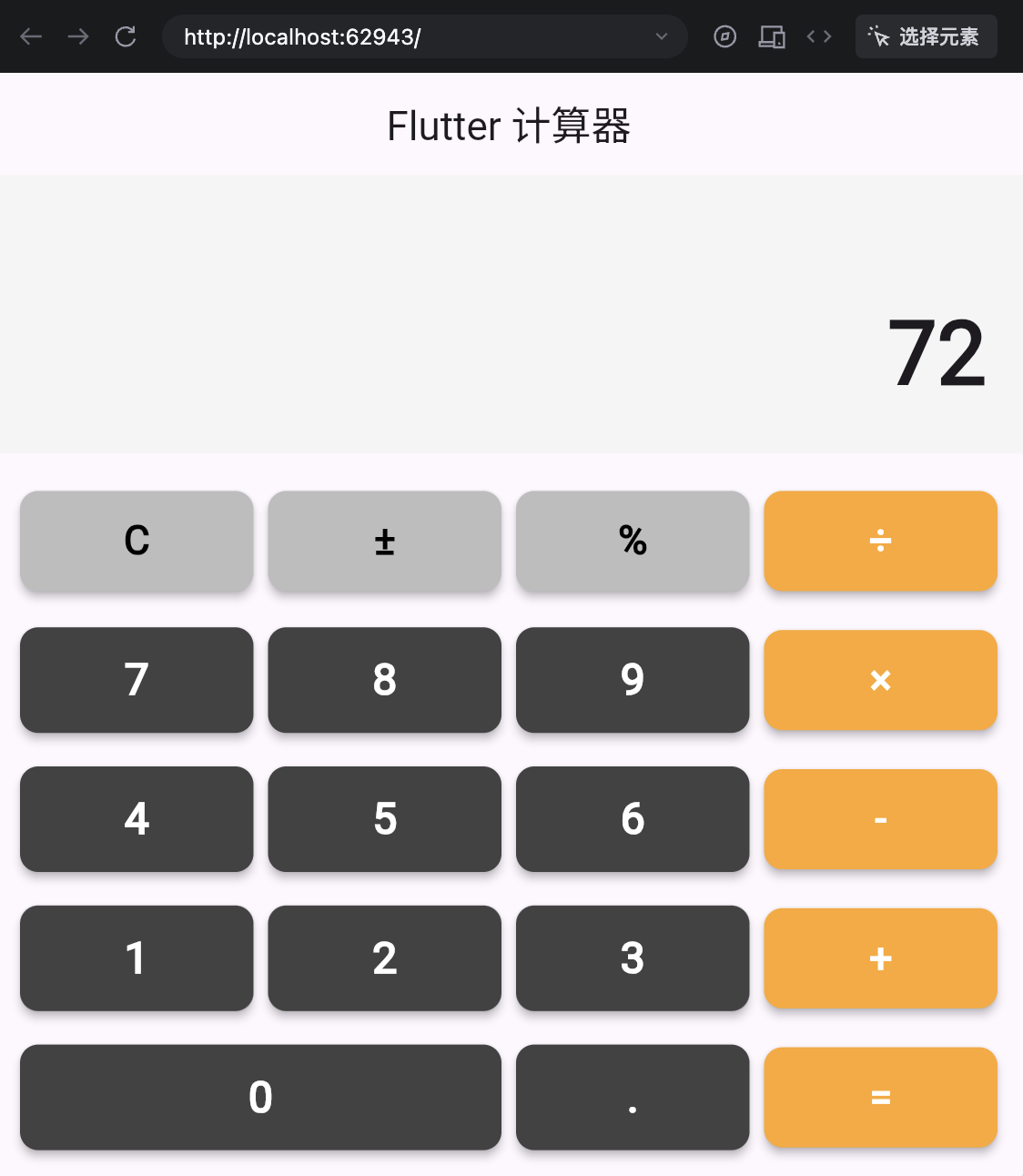
本项目是一个简单的 Flutter 计算器应用,用于学习 Flutter 应用的基本布局及组件应用。
效果如下:
页面分析
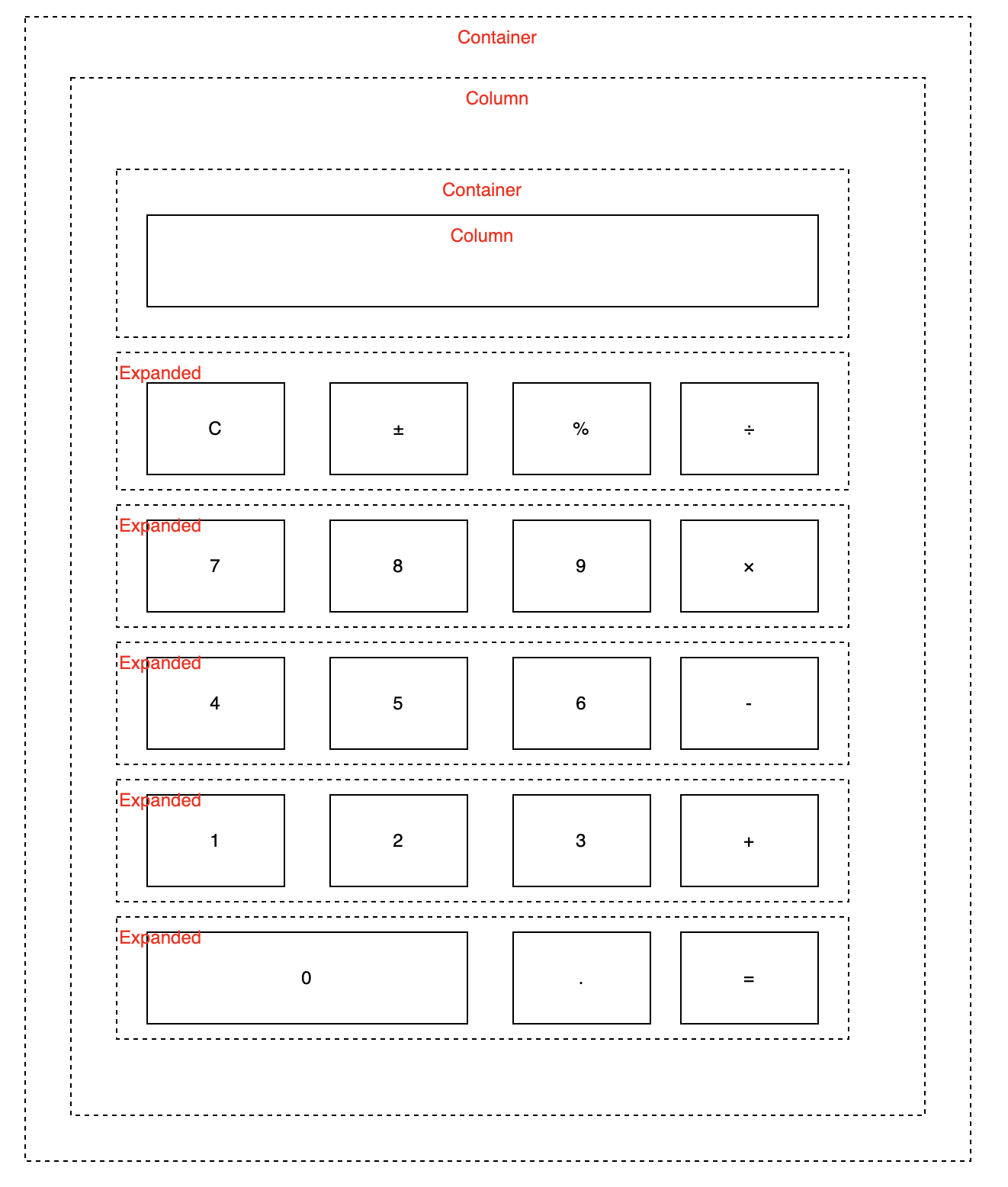
首先,我们分析计算器页面的布局,计算器页面包含 显示屏、数字及操作符按钮。
- 整个布局是一个容器
Container, 类比 html 中的div, 用于包裹所有元素 - 按钮按行排列
Expanded, 类比 html 中的柔性盒子display: flex, 按比例分配空间 - 每行做为一个单位, 它们按列排列
Column, 类比 html 中的div中的flex-direction: column
初始创建一个项目
bash
flutter create calc_app项目主要结构
定义计算器应用项目主要结构如下:
bash
lib
├── main.dart
├── models
│   └── calc_logic.dart
└── pages
    └── calc_page.dart
项目结构说明
main.dart: 应用入口文件,包含main()函数。models/calc_logic.dart: 计算器逻辑模型,包含计算方法。pages/calc_page.dart: 计算器页面,包含 UI 布局及事件处理。
main.dart
main.dart 是应用的入口文件,包含 main() 函数。在 main() 函数中,我们创建了一个 CalcApp 实例,并将其作为应用的根组件。
dart
import 'package:flutter/material.dart';
import '/pages/calc_page.dart';
void main(List<String> args) {
  runApp(const MyApp());
}

class MyApp extends StatelessWidget {
  const MyApp({super.key});

  @override
  Widget build(BuildContext context) {
    return MaterialApp(
      title: 'Flutter Demo',
      theme: ThemeData(
        primarySwatch: Colors.blue,
      ),
      home: const CalculatorScreen(),
      debugShowCheckedModeBanner: false,
    );
  }
}
calc_page.dart 说明
calc_page.dart 是计算器页面文件,包含 UI 布局及事件处理。在 CalculatorScreen 类中,我们定义了计算器的 UI 布局,包括数字按钮、操作符按钮、等号按钮等。同时也定义了事件处理方法,用于处理用户点击按钮的事件。
dart
import 'package:flutter/material.dart';
import '/models/calc_logic.dart';

class CalculatorScreen extends StatefulWidget {
  const CalculatorScreen({super.key});

  @override
  State<CalculatorScreen> createState() => _CalculatorScreenState();
}

class _CalculatorScreenState extends State<CalculatorScreen> {
  final CalculatorLogic _calculator = CalculatorLogic();
  String _displayText = '0';

  void _handleButtonPress(String buttonText) {
    setState(() {
      _displayText = _calculator.handleInput(buttonText);
    });
  }

  @override
  Widget build(BuildContext context) {
    return Scaffold(
      appBar: AppBar(
        title: const Text('Flutter 计算器'),
        centerTitle: true,
      ),
      body: Column(
        children: [
          // 显示屏
          _buildDisplay(),
          // 键盘
          Expanded(
            child: _buildKeyboard(),
          ),
        ],
      ),
    );
  }

  // 构建显示屏
  Widget _buildDisplay() {
    return Container(
      padding: const EdgeInsets.all(20),
      alignment: Alignment.centerRight,
      color: Colors.grey[100],
      child: Column(
        crossAxisAlignment: CrossAxisAlignment.end,
        children: [
          // 计算表达式
          Text(
            _calculator.expression,
            style: const TextStyle(
              fontSize: 24,
              color: Colors.grey,
            ),
          ),
          const SizedBox(height: 10),
          // 当前显示值
          Text(
            _displayText,
            style: const TextStyle(
              fontSize: 48,
              fontWeight: FontWeight.bold,
            ),
            overflow: TextOverflow.ellipsis,
            maxLines: 1,
          ),
        ],
      ),
    );
  }

  // 构建键盘
  Widget _buildKeyboard() {
    final List<List<String>> buttonLayout = [
      ['C', '±', '%', '÷'],
      ['7', '8', '9', '×'],
      ['4', '5', '6', '-'],
      ['1', '2', '3', '+'],
      ['0', '.', '='],
    ];

    return Container(
      padding: const EdgeInsets.all(10),
      child: Column(
        children: buttonLayout.map((row) {
          return Expanded(
            child: Row(
              children: row.map((buttonText) {
                return _buildButton(buttonText);
              }).toList(),
            ),
          );
        }).toList(),
      ),
    );
  }

  // 构建单个按钮
  Widget _buildButton(String buttonText) {
    // 判断按钮类型,设置不同的样式
    bool isNumber = double.tryParse(buttonText) != null || buttonText == '.';
    bool isOperator = ['÷', '×', '-', '+', '='].contains(buttonText);
    bool isSpecial = ['C', '±', '%'].contains(buttonText);
    bool isZero = buttonText == '0';

    // 按钮颜色
    Color? buttonColor;
    Color textColor = Colors.white;

    if (isSpecial) {
      buttonColor = Colors.grey[400];
      textColor = Colors.black;
    } else if (isOperator) {
      buttonColor = Colors.orange[400];
    } else if (isNumber) {
      buttonColor = Colors.grey[800];
    }

    // 按钮宽度(0按钮需要占两格)
    final flex = isZero ? 2 : 1;

    return Expanded(
      flex: flex,
      child: Padding(
        padding: const EdgeInsets.all(4.0),
        child: ElevatedButton(
          onPressed: () => _handleButtonPress(buttonText),
          style: ElevatedButton.styleFrom(
            backgroundColor: buttonColor,
            foregroundColor: textColor,
            shape: RoundedRectangleBorder(
              borderRadius: BorderRadius.circular(10),
            ),
            elevation: 4,
            padding: const EdgeInsets.all(20),
          ),
          child: Text(
            buttonText,
            style: TextStyle(
              fontSize: isOperator || isSpecial ? 22 : 24,
              fontWeight: FontWeight.bold,
            ),
          ),
        ),
      ),
    );
  }
}
calc_logic.dart 说明
calc_logic.dart 是计算器逻辑模型文件,包含计算方法。在 CalculatorLogic 类中,我们定义了计算器的计算方法,包括加法、减法、乘法、除法等。同时也定义了表达式的解析方法,用于将用户输入的表达式转换为可计算的格式。
dart
class CalculatorLogic {
  String _currentInput = '0';
  String _previousInput = '';
  String _operation = '';
  bool _shouldResetInput = false;

  String get expression {
    if (_previousInput.isEmpty || _operation.isEmpty) return '';
    return '$_previousInput $_operation';
  }

  String handleInput(String input) {
    if (input == 'C') {
      // 清除
      _currentInput = '0';
      _previousInput = '';
      _operation = '';
      _shouldResetInput = false;
    } else if (input == '±') {
      // 正负号切换
      if (_currentInput != '0') {
        if (_currentInput.startsWith('-')) {
          _currentInput = _currentInput.substring(1);
        } else {
          _currentInput = '-$_currentInput';
        }
      }
    } else if (input == '%') {
      // 百分比
      double value = double.parse(_currentInput);
      _currentInput = (value / 100).toString();
    } else if (['÷', '×', '-', '+'].contains(input)) {
      // 运算符
      if (_previousInput.isNotEmpty && _operation.isNotEmpty && !_shouldResetInput) {
        // 连续运算
        _calculate();
      }
      _previousInput = _currentInput;
      _operation = input;
      _shouldResetInput = true;
    } else if (input == '=') {
      // 等于
      if (_previousInput.isNotEmpty && _operation.isNotEmpty) {
        _calculate();
        _previousInput = '';
        _operation = '';
        _shouldResetInput = true;
      }
    } else if (input == '.') {
      // 小数点
      if (!_currentInput.contains('.')) {
        _currentInput = '$_currentInput.';
      }
    } else {
      // 数字
      if (_shouldResetInput || _currentInput == '0') {
        _currentInput = input;
        _shouldResetInput = false;
      } else {
        _currentInput = '$_currentInput$input';
      }
    }

    // 处理显示格式
    if (_currentInput.endsWith('.0')) {
      _currentInput = _currentInput.substring(0, _currentInput.length - 2);
    }

    return _currentInput;
  }

  void _calculate() {
    final double a = double.parse(_previousInput);
    final double b = double.parse(_currentInput);
    double result = 0;

    switch (_operation) {
      case '+':
        result = a + b;
        break;
      case '-':
        result = a - b;
        break;
      case '×':
        result = a * b;
        break;
      case '÷':
        if (b != 0) {
          result = a / b;
        } else {
          _currentInput = 'Error';
          return;
        }
        break;
    }

    // 处理精度问题
    if (result % 1 == 0) {
      _currentInput = result.toInt().toString();
    } else {
      _currentInput = result.toStringAsFixed(6).replaceAll(RegExp(r'0+$'), '').replaceAll(RegExp(r'\.$'), '');
    }
  }
}
总结
这个示例涵盖了Flutter的核心概念,包括组件构建、状态管理、布局设计等。
-
Widget 类型
- StatelessWidget:静态组件(如
CalculatorApp) - StatefulWidget:有状态组件(如
CalculatorScreen)
- StatelessWidget:静态组件(如
-
布局组件
Scaffold:页面脚手架Column/Row:垂直/水平布局Expanded:扩展空间Container:容器组件
-
状态管理
setState():触发界面重建- 分离UI和逻辑:界面和计算逻辑分开
-
样式设计
ThemeData:应用主题ElevatedButton.styleFrom():按钮样式TextStyle:文本样式
-
响应式设计
- 使用
Expanded和flex实现自适应布局 - 处理不同屏幕尺寸
- 使用