文章目录
- [打造跨端博客分类与标签组件:Flutter × OpenHarmony 实战](#打造跨端博客分类与标签组件:Flutter × OpenHarmony 实战)
-
- 前言
- 背景
- [Flutter × OpenHarmony 跨端开发介绍](#Flutter × OpenHarmony 跨端开发介绍)
- 开发核心代码(详细解析)
-
- [1. 构建分类和标签区域](#1. 构建分类和标签区域)
- [2. 构建分类 Chip](#2. 构建分类 Chip)
- [3. 构建标签 Chip](#3. 构建标签 Chip)
- 心得
- 总结
打造跨端博客分类与标签组件:Flutter × OpenHarmony 实战
前言
在现代应用开发中,分类和标签是内容组织的重要方式,它不仅能帮助用户快速定位所需内容,也提升了整体用户体验。随着跨端开发需求增加,如何在 Flutter × OpenHarmony 跨端环境下高效构建可交互的分类与标签组件成为了一个实际问题。本文将带你深入分析实现方案,并对核心代码逐行解析。
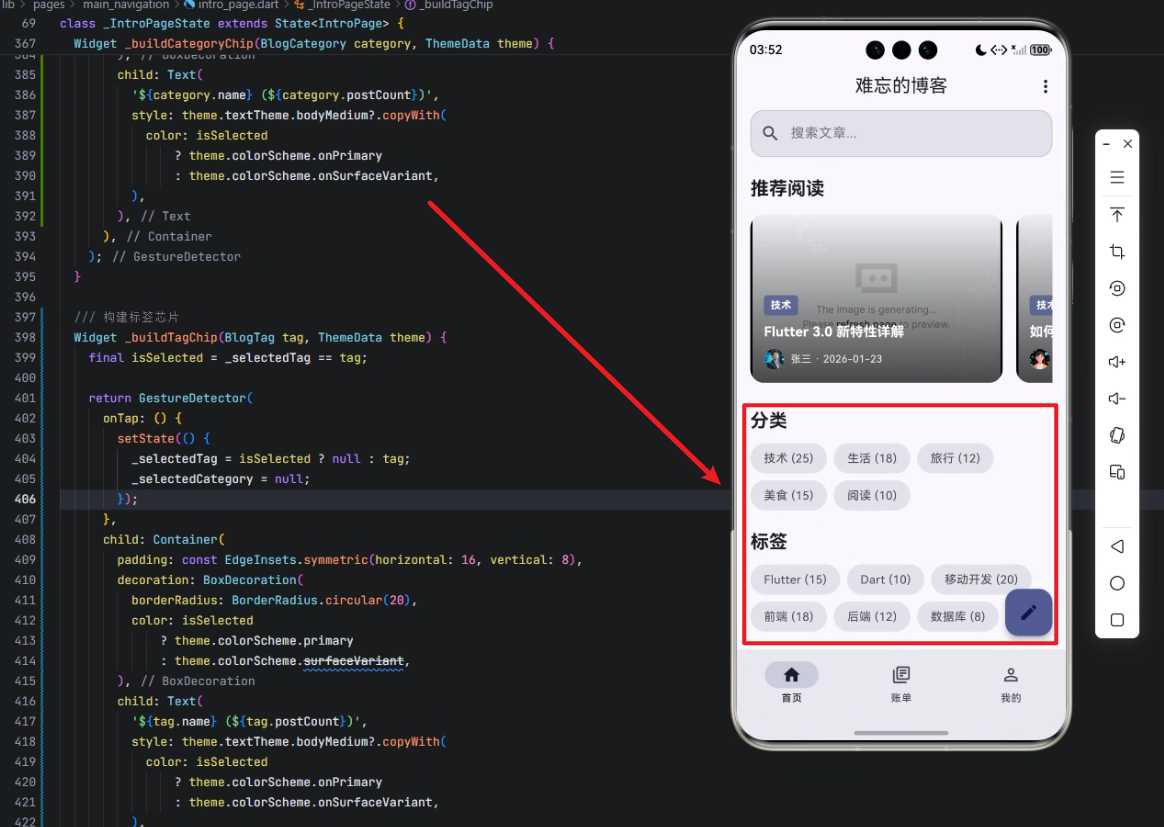
背景
在博客或内容管理类应用中,分类和标签系统通常用于:
- 内容分组:按主题或类型对文章进行整理。
- 内容筛选:用户可以通过点击分类或标签快速筛选文章。
- 用户体验优化:直观的视觉组件让用户操作更高效。
传统开发中,这类功能可能需要在不同平台分别实现,而使用 Flutter × OpenHarmony 可以实现 一次开发、多端运行,大大提高开发效率。

Flutter × OpenHarmony 跨端开发介绍
Flutter 是 Google 推出的跨平台 UI 框架,支持 iOS、Android、Web 等平台,同时在 OpenHarmony 上也可运行,实现多端统一 UI。
OpenHarmony 是华为推出的开源操作系统,适用于 IoT 设备、移动终端和可穿戴设备。通过与 Flutter 集成,我们可以:
- 使用统一的 UI 组件;
- 利用 Flutter 的热重载快速迭代;
- 在不同设备端获得一致体验。
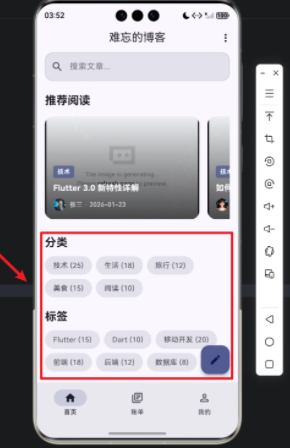
通过结合二者,我们可以快速构建跨端的分类与标签组件,并保证在不同设备上的视觉与交互一致性。
开发核心代码(详细解析)
下面是核心实现代码,我们逐段进行讲解:
1. 构建分类和标签区域
dart
Widget _buildCategoriesAndTagsSection(ThemeData theme) {
  return Column(
    crossAxisAlignment: CrossAxisAlignment.start,
    children: [
      // 分类
      Column(
        crossAxisAlignment: CrossAxisAlignment.start,
        children: [
          Text(
            '分类',
            style: theme.textTheme.titleLarge?.copyWith(fontWeight: FontWeight.bold),
          ),
          const SizedBox(height: 12),
          Wrap(
            spacing: 8,
            runSpacing: 8,
            children: _categories.map((category) {
              return _buildCategoryChip(category, theme);
            }).toList(),
          ),
        ],
      ),
      const SizedBox(height: 24),
      // 标签
      Column(
        crossAxisAlignment: CrossAxisAlignment.start,
        children: [
          Text(
            '标签',
            style: theme.textTheme.titleLarge?.copyWith(fontWeight: FontWeight.bold),
          ),
          const SizedBox(height: 12),
          Wrap(
            spacing: 8,
            runSpacing: 8,
            children: _tags.map((tag) {
              return _buildTagChip(tag, theme);
            }).toList(),
          ),
        ],
      ),
    ],
  );
}
解析:
- 使用
Column垂直排列整个区域,crossAxisAlignment: CrossAxisAlignment.start保证左对齐。 - 分类和标签各自是一个
Column,先显示标题Text,再通过Wrap自动换行排列多个芯片(Chip)。 Wrap的spacing和runSpacing控制水平和垂直间距。_categories.map和_tags.map分别生成分类和标签的 Chip 组件。
2. 构建分类 Chip
dart
Widget _buildCategoryChip(BlogCategory category, ThemeData theme) {
  final isSelected = _selectedCategory == category;

  return GestureDetector(
    onTap: () {
      setState(() {
        _selectedCategory = isSelected ? null : category;
        _selectedTag = null;
      });
    },
    child: Container(
      padding: const EdgeInsets.symmetric(horizontal: 16, vertical: 8),
      decoration: BoxDecoration(
        borderRadius: BorderRadius.circular(20),
        color: isSelected
            ? theme.colorScheme.primary
            : theme.colorScheme.surfaceVariant,
      ),
      child: Text(
        '${category.name} (${category.postCount})',
        style: theme.textTheme.bodyMedium?.copyWith(
          color: isSelected
              ? theme.colorScheme.onPrimary
              : theme.colorScheme.onSurfaceVariant,
        ),
      ),
    ),
  );
}
解析:
-
使用
GestureDetector监听点击事件,实现选中切换。 -
setState更新_selectedCategory,同时清空_selectedTag确保单选逻辑。 -
Container设置 内边距 、圆角 和 背景颜色。isSelected为 true 时,背景为主色primary,文本颜色为onPrimary;未选中时为浅色surfaceVariant。
-
文本显示分类名称和文章数量:
${category.name} (${category.postCount})。
3. 构建标签 Chip
dart
Widget _buildTagChip(BlogTag tag, ThemeData theme) {
  final isSelected = _selectedTag == tag;

  return GestureDetector(
    onTap: () {
      setState(() {
        _selectedTag = isSelected ? null : tag;
        _selectedCategory = null;
      });
    },
    child: Container(
      padding: const EdgeInsets.symmetric(horizontal: 16, vertical: 8),
      decoration: BoxDecoration(
        borderRadius: BorderRadius.circular(20),
        color: isSelected
            ? theme.colorScheme.primary
            : theme.colorScheme.surfaceVariant,
      ),
      child: Text(
        '${tag.name} (${tag.postCount})',
        style: theme.textTheme.bodyMedium?.copyWith(
          color: isSelected
              ? theme.colorScheme.onPrimary
              : theme.colorScheme.onSurfaceVariant,
        ),
      ),
    ),
  );
}
解析:
- 与分类 Chip 类似,但互斥逻辑反过来:选择标签时清空
_selectedCategory。 - UI 样式完全复用,保证统一视觉效果。
- 通过
Wrap可以实现响应式布局,适应不同屏幕宽度。
心得
通过这次实践,我有几点体会:
- 跨端一致性:Flutter × OpenHarmony 的组合能保证组件在手机、平板甚至 IoT 设备上视觉一致。
- 可复用性高 :通过
_buildCategoryChip和_buildTagChip封装,可以方便扩展到更多类似功能。 - 交互逻辑简单 :利用
GestureDetector和setState就能实现点击选中和互斥逻辑,代码简洁易懂。 - UI 灵活性 :
Wrap组件非常适合多行可变长度的 Chip 布局,无需手动处理换行。
总结
本文介绍了在 Flutter × OpenHarmony 环境下,如何高效构建博客应用的分类与标签组件。通过封装 Chip 组件、使用 Wrap 布局以及互斥选中逻辑,我们实现了跨端、响应式、易扩展的分类标签区域。
这套方案不仅适用于博客场景,也可推广到电商、社交、内容推荐等多种应用场景,是跨端 UI 开发中的实用参考。
欢迎加入开源鸿蒙跨平台社区:https://openharmonycrossplatform.csdn.net