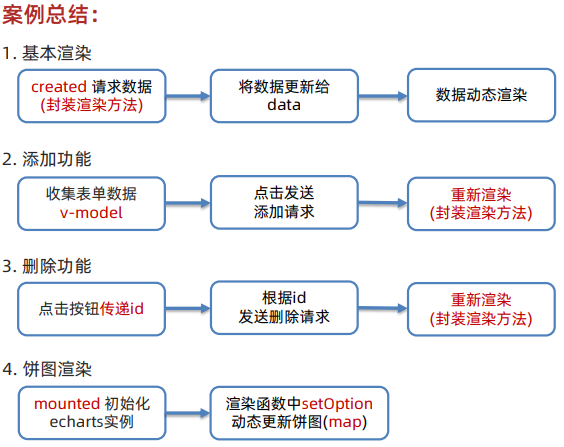
一、指令补充
**1.**指令修饰符
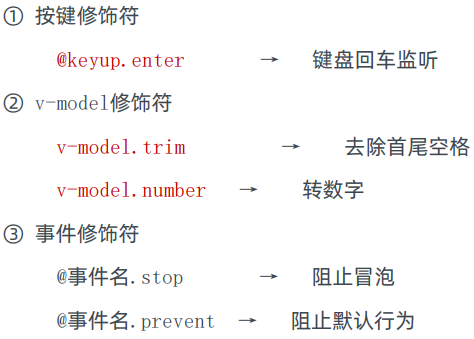
(1)按键修饰符
@keyup.enter → 键盘回车监听
javascript
<body>
  <div id="app">
    <h3>@keyup.enter => 监听键盘回车事件</h3>
    <input @keyup.enter="fn" v-model="username" type="text">
  </div>
  <script src="https://cdn.jsdelivr.net/npm/vue/dist/vue.js"></script>
  <script>
    const app = new Vue({
      el: '#app',
      data: {
        username: ''
      },
      methods: {
        fn (e) {
          if(e.key === 'enter') {
            console.log('键盘回车的时候触发', this.username)
          }
        }
      }
    })
  </script>
</body>
(2)v-model 修饰符

(3)事件修饰符

javascript
  <div id="app">
    <h3>v-model修饰符 .trim .number</h3>
    姓名:<input v-model.trim="username" type="text"><br>
    年纪:<input v-model.number="age" type="text"><br>


    <h3>@事件名.stop     →  阻止冒泡</h3>
    <div @click="fatherFn" class="father">
      <div @click.stop="sonFn" class="son">儿子</div>
    </div>

    <h3>@事件名.prevent  →  阻止默认行为</h3>
    <a @click.prevent href="http://www.baidu.com">阻止默认行为</a>
  </div>
  <script src="./vue.js"></script>
  <script>
    const app = new Vue({
      el: '#app',
      data: {
        username: '',
        age: '',
      },
      methods: {
        fatherFn () {
          alert('老父亲被点击了')
        },
        sonFn () {
          alert('儿子被点击了')
        }
      }
    })
  </script>
2. v-bind 对于样式操作的增强
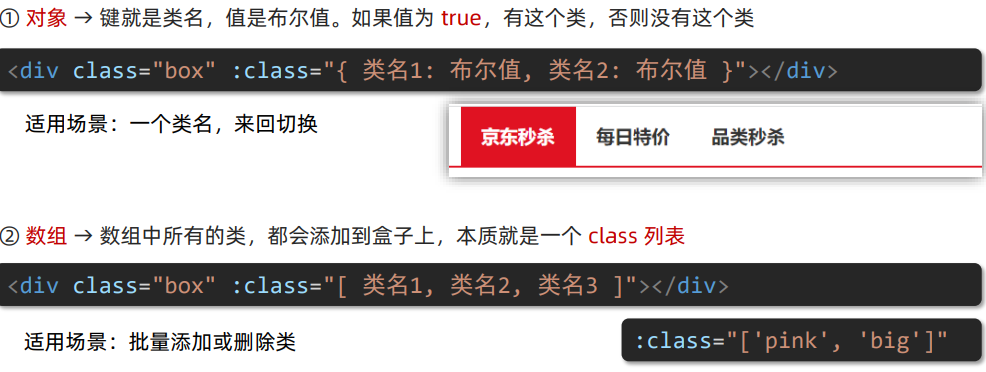
(1)操作 class
语法 :class = "对象/数组"
javascript
  <style>
    .box {
      width: 200px;
      height: 200px;
      border: 3px solid #000;
      font-size: 30px;
      margin-top: 10px;
    }
    .pink {
      background-color: pink;
    }
    .big {
      width: 300px;
      height: 300px;
    }
  </style>
<body>

  <div id="app">
    <div class="box" :class="{ pink: false, big: true}">黑马程序员</div>
    <div class="box" :class="['pink', 'big']">黑马程序员</div>
  </div>
  <script src="./vue.js"></script>
  <script>
    const app = new Vue({
      el: '#app',
      data: {

      }
    })
  </script>
</body>
(2)操作 style
语法 :style = "样式对象"
适用场景:某个具体属性的动态设置
javascript
<style>
    .box {
      width: 200px;
      height: 200px;
      background-color: rgb(187, 150, 156);
    }
  </style>

<body>
  <div id="app">
    <div class="box" :style="{ width: '400px', height: '400px', backgroundColor: 'skyblue'}"></div>
  </div>
  <script src="./vue.js"></script>
  <script>
    const app = new Vue({
      el: '#app',
      data: {

      }
    })
  </script>
</body>
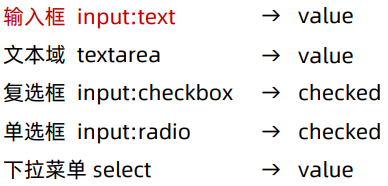
3. v-model 应用于其他表单元素
javascript
  <style>
    textarea {
      display: block;
      width: 240px;
      height: 100px;
      margin: 10px 0;
    }
  </style>


<body>
  <div id="app">
    <h3>小黑学习网</h3>

    姓名:
      <input type="text" v-model="username">
      <br><br>

    是否单身:
      <input type="checkbox" v-model="isSingle">
      <br><br>

    <!--
      前置理解:
        1. name:  给单选框加上 name 属性 可以分组 → 同一组互相会互斥
        2. value: 给单选框加上 value 属性,用于提交给后台的数据
      结合 Vue 使用 → v-model
    -->
    性别:
      <input v-model="gender" type="radio" name="gender" value="1">男
      <input v-model="gender" type="radio" name="gender" value="2">女
      <br><br>

    <!--
      前置理解:
        1. option 需要设置 value 值,提交给后台
        2. select 的 value 值,关联了选中的 option 的 value 值
      结合 Vue 使用 → v-model
    -->
    所在城市:
      <select v-model="cityId">
        <option value="101" >厦门</option>
        <option value="102" >漳州</option>
        <option value="103" >扬州</option>
        <option value="104" >南京</option>
      </select>
      <br><br>

    自我描述:
      <textarea v-model="desc"></textarea>

    <button>立即注册</button>
  </div>
  <script src="./vue.js"></script>
  <script>
    const app = new Vue({
      el: '#app',
      data: {
        username: '',
        isSingle: true,
        gender: "2",
        cityId: '102',
        desc: ""
      }
    })
  </script>
</body>
二、computed 计算属性
**1.**计算属性
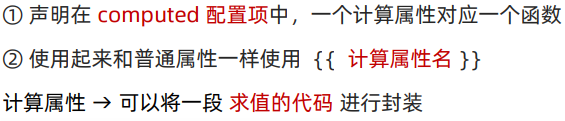
(1)定义:基于现有的数据,计算出来的新属性。依赖的数据变化,自动重新计算。
(2)语法:
javascript
<style>
    table {
      border: 1px solid #000;
      text-align: center;
      width: 240px;
    }
    th,td {
      border: 1px solid #000;
    }
    h3 {
      position: relative;
    }
  </style>

<body>

  <div id="app">
    <h3>小黑的礼物清单</h3>
    <table>
      <tr>
        <th>名字</th>
        <th>数量</th>
      </tr>
      <tr v-for="(item, index) in list" :key="item.id">
        <td>{{ item.name }}</td>
        <td>{{ item.num }}个</td>
      </tr>
    </table>

    <!-- 目标:统计求和,求得礼物总数 -->
    <p>礼物总数:{{ totalCount}} 个</p>
  </div>
  <script src="./vue.js"></script>
  <script>
    const app = new Vue({
      el: '#app',
      data: {
        // 现有的数据
        list: [
          { id: 1, name: '篮球', num: 1 },
          { id: 2, name: '玩具', num: 2 },
          { id: 3, name: '铅笔', num: 5 },
        ]
      },
      computed: {
        totalCount () {
          // 基于现有的数据,编写求值逻辑
          // 计算属性函数内部,可以直接通过 this 访问到 app 实例
          // console.log(this.list)

          // 需求:对 this.list 数组里面的 num 进行求和  => reduce
          let total = this.list.reduce((sum, item) => sum + item.num, 0)
          return total
        }
      }
    })
  </script>
</body>
2. computed 计算属性 与 methods 方法
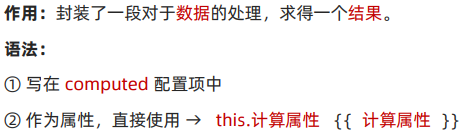
(1)计算属性
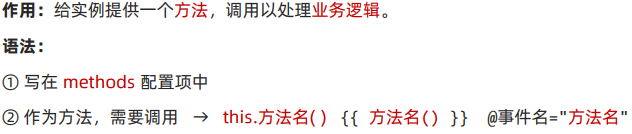
(2)方法
javascript
  <style>
    table {
      border: 1px solid #000;
      text-align: center;
      width: 300px;
    }
    th,td {
      border: 1px solid #000;
    }
    h3 {
      position: relative;
    }
    span {
      position: absolute;
      left: 145px;
      top: -4px;
      width: 16px;
      height: 16px;
      color: white;
      font-size: 12px;
      text-align: center;
      border-radius: 50%;
      background-color: #e63f32;
    }
  </style>

<body>

  <div id="app">
    <h3>小黑的礼物清单🛒<span>{{ totalCount }}</span></h3>
    <table>
      <tr>
        <th>名字</th>
        <th>数量</th>
      </tr>
      <tr v-for="(item, index) in list" :key="item.id">
        <td>{{ item.name }}</td>
        <td>{{ item.num }}个</td>
      </tr>
    </table>

    <p>礼物总数:{{ totalCount }} 个</p>
  </div>
  <script src="https://cdn.jsdelivr.net/npm/vue@2/dist/vue.js"></script>
  <script>
    const app = new Vue({
      el: '#app',
      data: {
        // 现有的数据
        list: [
          { id: 1, name: '篮球', num: 3 },
          { id: 2, name: '玩具', num: 2 },
          { id: 3, name: '铅笔', num: 5 },
        ]
      },
      computed: {
        // 计算属性:有缓存的,一旦计算出来啊结果,就会立刻缓存
        // 下次读取 => 直接读缓存执行 => 性能特别高
        totalCount () {
          console.log('计算属性执行了')
          let total = this.list.reduce((sum, item) => sum + item.num, 0)
          return total
        }
      }
    })
  </script>
</body>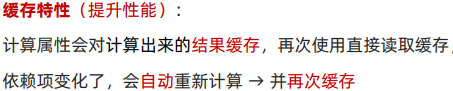
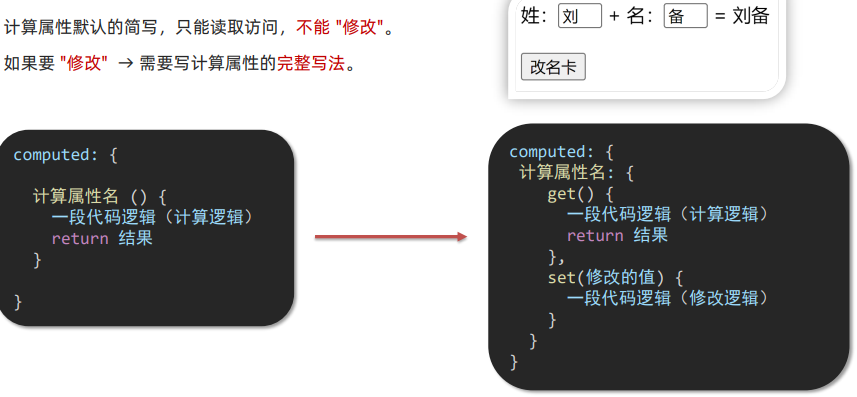
**3.**计算属性完整写法
语法:
javascript
  <div id="app">
    姓:<input type="text" v-model="firstName"><br>
    名:<input type="text" v-model="lastName"><br>
    <p>{{ fullName}}</p>
    <button @click="changeName">修改姓名</button>
  </div>
  <script src="https://cdn.jsdelivr.net/npm/vue@2/dist/vue.js"></script>
  <script>
    const app = new Vue({
      el: '#app',
      data: {
        firstName: '灰',
        lastName: '太狼',
      },
      computed: {
        // 简写 => 获取
        // fullName () {
        //   return this.firstName + this.lastName
        // }

        // 完整写法 => 获取 + 设置
        fullName: {
          // (1)当fullName计算属性,被获取求值时,执行get (有缓存,优先读缓存)
          //    会将返回值作为最终的求值结果
          get () {
            return this.firstName + this.lastName
          },
          // (2)当fullName计算属性,被修改赋值时,执行set
          //    修改的值,传递给set 方法的形参
          set (value) {
            this.firstName = value.slice(0, 1)
            this.lastName = value.slice(1)
          }
        }
      },
      methods: {
        changeName () {
          this.fullName = '红太狼'
        }
      }
    })
  </script>
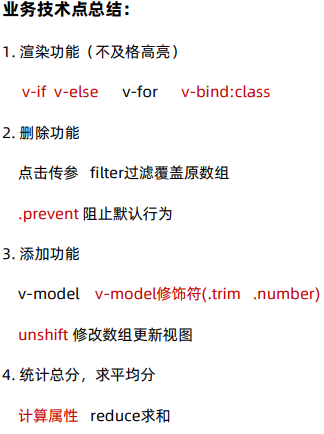
4.综合案例
三、watch 侦听器
1.作用:监视数据变化,执行一些 业务逻辑或异步操作。
2.语法:
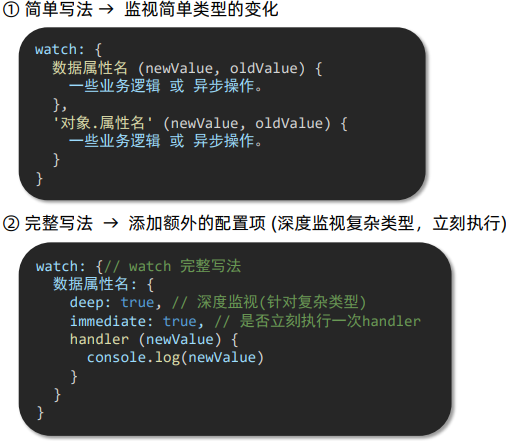
(1)简单写法
javascript
    <style>
      * {
        margin: 0;
        padding: 0;
        box-sizing: border-box;
        font-size: 18px;
      }
      #app {
        padding: 10px 20px;
      }
      .query {
        margin: 10px 0;
      }
      .box {
        display: flex;
      }
      textarea {
        width: 300px;
        height: 160px;
        font-size: 18px;
        border: 1px solid #dedede;
        outline: none;
        resize: none;
        padding: 10px;
      }
      textarea:hover {
        border: 1px solid #1589f5;
      }
      .transbox {
        width: 300px;
        height: 160px;
        background-color: #f0f0f0;
        padding: 10px;
        border: none;
      }
      .tip-box {
        width: 300px;
        height: 25px;
        line-height: 25px;
        display: flex;
      }
      .tip-box span {
        flex: 1;
        text-align: center;
      }
      .query span {
        font-size: 18px;
      }

      .input-wrap {
        position: relative;
      }
      .input-wrap span {
        position: absolute;
        right: 15px;
        bottom: 15px;
        font-size: 12px;
      }
      .input-wrap i {
        font-size: 20px;
        font-style: normal;
      }
    </style>

  <body>
    <div id="app">
      <!-- 条件选择框 -->
      <div class="query">
        <span>翻译成的语言:</span>
        <select>
          <option value="italy">意大利</option>
          <option value="english">英语</option>
          <option value="german">德语</option>
        </select>
      </div>

      <!-- 翻译框 -->
      <div class="box">
        <div class="input-wrap">
          <textarea v-model="obj.words"></textarea>
          <span><i>⌨️</i>文档翻译</span>
        </div>
        <div class="output-wrap">
          <div class="transbox">{{ result }}</div>
        </div>
      </div>
    </div>
    <script src="./vue.js"></script>
    <script src="./axios.js"></script>
    <script>
      // 接口地址:https://applet-base-api-t.itheima.net/api/translate
      // 请求方式:get
      // 请求参数:
      // (1)words:需要被翻译的文本(必传)
      // (2)lang:需要翻译成的语言(可选)默认值-意大利


      const app = new Vue({
        el: '#app',
        data: {
          // words: '',
          obj: {
            words: ''
          },

          result: '', // 翻译结果
          // timer: null  // 延时器id
        },
        // 具体讲解:(1) watch语法 (2) 具体业务实现
        watch: {
          // 该方法会在我数据变化时调用执行
          // newValue新值,oldValue老值(一般不用)
          // words (newValue) {
          //   console.log('变化了', newValue)
          // }

          'obj.words' (newValue) {
            // console.log('变化了', newValue)

            // 防抖:延迟执行 => 干啥事先等一等,延迟一会,一段时间内没有再次触发,才执行
            clearTimeout(this.timer)
            this.timer = setTimeout(async () => {
              const res = await axios({
                url: 'https://applet-base-api-t.itheima.net/api/translate',
                params: {
                  words: newValue
                }
              }, 300)
              this.result = res.data.data
            })
          }
        }
      })
    </script>
  </body>
(2)完整写法 → 添加额外配置项

javascript
    <style>
      * {
        margin: 0;
        padding: 0;
        box-sizing: border-box;
        font-size: 18px;
      }
      #app {
        padding: 10px 20px;
      }
      .query {
        margin: 10px 0;
      }
      .box {
        display: flex;
      }
      textarea {
        width: 300px;
        height: 160px;
        font-size: 18px;
        border: 1px solid #dedede;
        outline: none;
        resize: none;
        padding: 10px;
      }
      textarea:hover {
        border: 1px solid #1589f5;
      }
      .transbox {
        width: 300px;
        height: 160px;
        background-color: #f0f0f0;
        padding: 10px;
        border: none;
      }
      .tip-box {
        width: 300px;
        height: 25px;
        line-height: 25px;
        display: flex;
      }
      .tip-box span {
        flex: 1;
        text-align: center;
      }
      .query span {
        font-size: 18px;
      }

      .input-wrap {
        position: relative;
      }
      .input-wrap span {
        position: absolute;
        right: 15px;
        bottom: 15px;
        font-size: 12px;
      }
      .input-wrap i {
        font-size: 20px;
        font-style: normal;
      }
    </style>

  <body>
    <div id="app">
      <!-- 条件选择框 -->
      <div class="query">
        <span>翻译成的语言:</span>
        <select v-model="obj.lang">
          <option value="italy">意大利</option>
          <option value="english">英语</option>
          <option value="german">德语</option>
        </select>
      </div>

      <!-- 翻译框 -->
      <div class="box">
        <div class="input-wrap">
          <textarea v-model="obj.words"></textarea>
          <span><i>⌨️</i>文档翻译</span>
        </div>
        <div class="output-wrap">
          <div class="transbox">{{ result }}</div>
        </div>
      </div>
    </div>
    <script src="./vue.js"></script>
    <script src="./axios.js"></script>
    <script>
      // 需求:输入内容,修改语言,都实时翻译

      // 接口地址:https://applet-base-api-t.itheima.net/api/translate
      // 请求方式:get
      // 请求参数:
      // (1)words:需要被翻译的文本(必传)
      // (2)lang:需要翻译成的语言(可选)默认值-意大利

      const app = new Vue({
        el: '#app',
        data: {
          // words: '',
          obj: {
            words: '小黑',
            lang: 'italy'
          },

          result: '', // 翻译结果
        },
        // 具体讲解:(1) watch语法 (2) 具体业务实现
        watch: {
          obj: {
            deep: true, // 深度监视
            immediate: true, // 立刻执行,一进页面handler就立刻执行
            handler (newValue) {
              clearTimeout(this.timer)
              this.timer = setTimeout(async () => {
                const res = await axios({
                  url: 'https://applet-base-api-t.itheima.net/api/translate',
                  params: newValue
                }, 300)
                this.result = res.data.data
              })
            }
          }


          // 'obj.words' (newValue) {
          //   clearTimeout(this.timer)
          //   this.timer = setTimeout(async () => {
          //     const res = await axios({
          //       url: 'https://applet-base-api-t.itheima.net/api/translate',
          //       params: {
          //         words: newValue
          //       }
          //     }, 300)
          //     this.result = res.data.data
          //   })
          // }
        }
      })
    </script>
  </body>
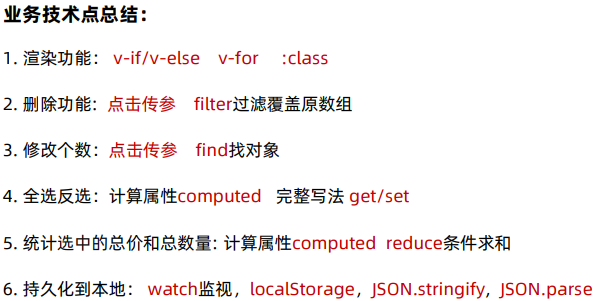
四、综合案例
五、生命周期
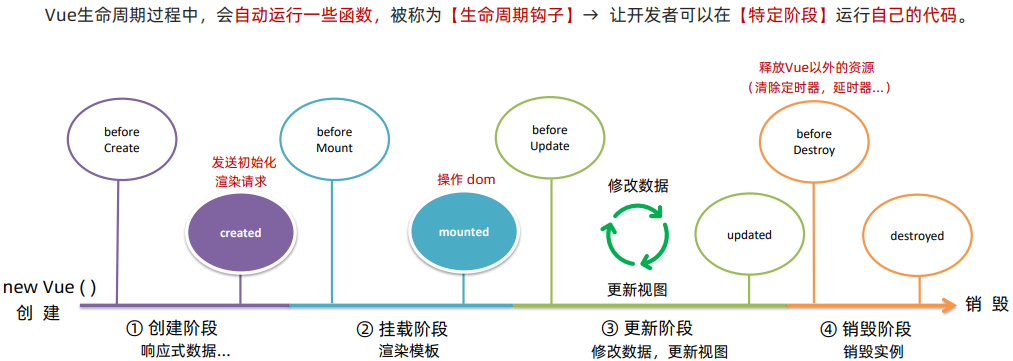
**1.**生命周期 & 生命周期四个阶段

**2.**生命周期钩子
**3.**综合案例
javascript
<body>

  <div id="app">
    <h3>{{ title }}</h3>
    <div>
      <button @click="count--">-</button>
      <span>{{ count }}</span>
      <button @click="count++">+</button>
    </div>
  </div>
  <script src="./vue.js"></script>
  <script>
    const app = new Vue({
      el: '#app',
      data: {
        count: 100,
        title: '计数器'
      },
      // 1. 创建阶段(准备数据)
      beforeCreate () {
        console.log('beforecreate 响应式数据准备好之前', this.count)
      },
      created () {
        console.log('created 响应式数据准备好之后', this.count)
        // this.数据名 = 请求回来的数据
        // 可以开始发送初始化渲染的请求了
      },

      // 2. 挂载阶段(渲染模板)
      beforeMount () {
        console.log('beforemount 模板渲染之前', document.querySelector('h3').innerHTML)
      },
      mounted () {
        console.log('mounted 模板渲染之后', document.querySelector('h3').innerHTML)
        // 可以开始操作dom了
      },

      // 3.更新阶段(修改数据 => 更新视图)
      beforeUpdate () {
        console.log('beforeUpdate 数据修改了,视图还没更新', document.querySelector('span').innerHTML)
      },
      updated () {
        console.log('updated 数据修改了,视图已经更新', document.querySelector('span').innerHTML)
      },

      // 4.卸载阶段
      beforeDestroy () {
        console.log('beforeDestroy 卸载前')
        console.log('清除掉一些Vue以外的资源占用,定时器,延时器···')

      },
      destroyed () {
        console.log('destroyed 卸载后')
      }
    })
  </script>
</body>
六、综合案例