1. 前言
在现代数据中心和园区网络的高可靠性设计中,M-LAG(Multichassis Link Aggregation Group,跨设备链路聚合组) 已经成为主流技术。它允许将两台物理交换机虚拟成一台逻辑交换机,从而实现跨设备的链路聚合。
本文将基于 ENSP Pro 模拟器,演示如何配置 M-LAG 双归接入三层网络。为了防止二层环路并优化拓扑,我们将采用 V-STP(虚拟生成树) 机制,确保 M-LAG 组在下游设备看来是一个单一的 STP 根桥。
功能实现
- 高可靠性:当一条接入链路或一台汇聚设备故障时,流量快速切换,业务不中断。
- 负载分担:接入侧的链路均处于 Active 状态,流量基于哈希算法在链路上负载分担。
- 三层网关:M-LAG 设备作为接入层的网关(Gateway),处理南北向流量。
2. 拓扑信息
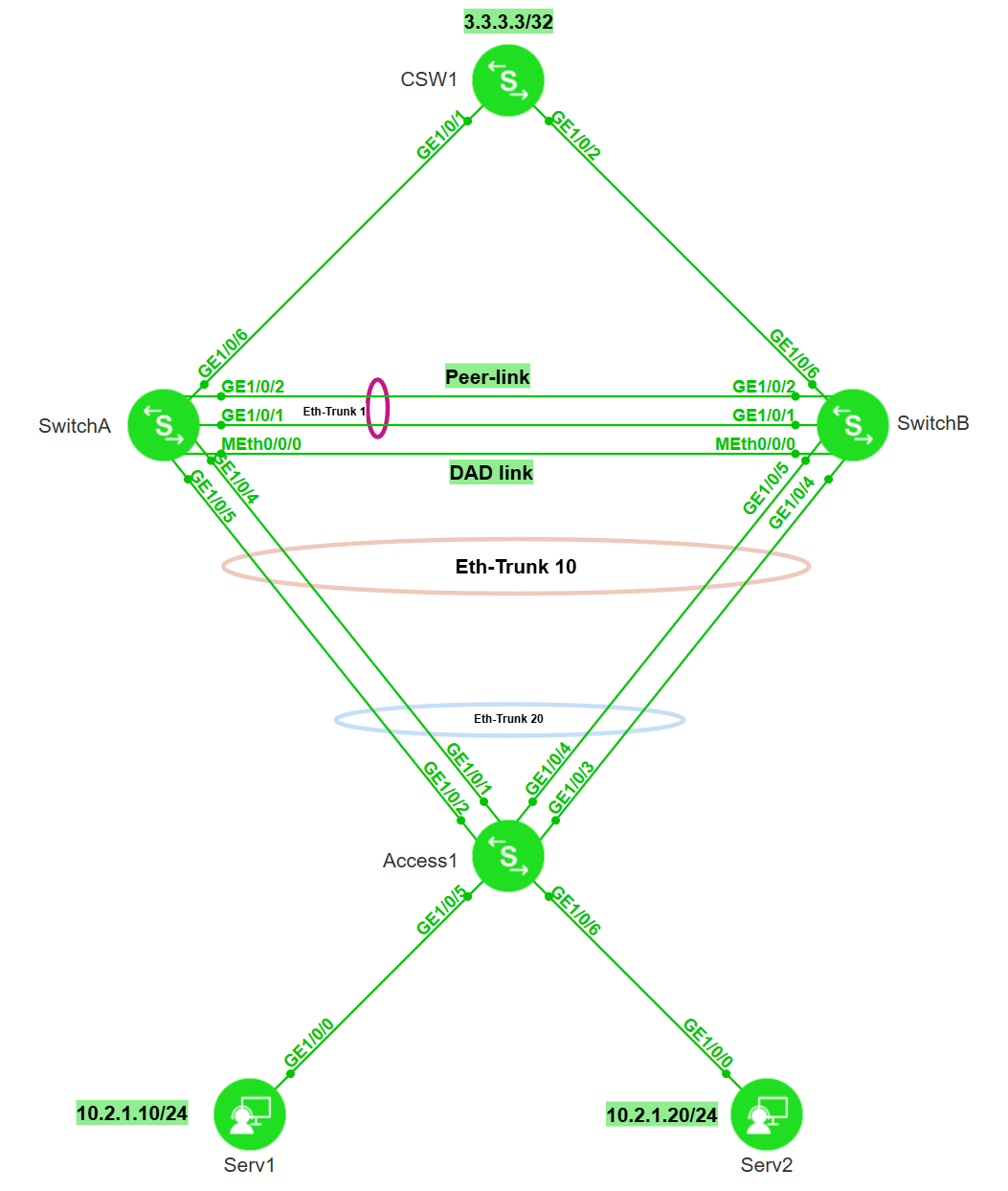
2.1 组网拓扑
- 核心交换机 (CSW1):模拟核心层,运行 OSPF,通过 Loopback 口模拟外部网络。
- M-LAG 设备 (SwitchA & SwitchB):模拟汇聚层,双活网关,运行 OSPF 上行,配置 V-STP 保证二层无环。
- 接入设备 (Access1):模拟接入层,通过 Eth-Trunk 双归接入 M-LAG 系统。
- 服务器 (Serv1 & Serv2):位于 VLAN 11,网关指向 M-LAG 的虚拟 IP。
2.2 关键配置参数表
| 设备 | 接口/参数 | 配置详情 | 备注 |
|---|---|---|---|
| CSW1 | GE1/0/1 | IP: 10.3.1.2/24 | 连接 SwitchA |
| GE1/0/2 | IP: 10.4.1.2/24 | 连接 SwitchB | |
| Loopback0 | IP: 3.3.3.3/32 | 模拟外网测试地址 | |
| SwitchA | MEth0/0/0 | IP: 10.200.1.1/24 | DAD (Keepalive) 检测链路 |
| Eth-Trunk 1 | Peer-Link | 成员口: GE1/0/1, GE1/0/2 | |
| Eth-Trunk 10 | M-LAG 成员口 | 成员口: GE1/0/4, GE1/0/5 | |
| GE1/0/6 | IP: 10.3.1.1/24 | 上行连接 CSW1 | |
| Vlanif 11 | IP: 10.2.1.1/24 | 业务网关 (配置虚拟MAC) | |
| SwitchB | MEth0/0/0 | IP: 10.200.1.2/24 | DAD (Keepalive) 检测链路 |
| Eth-Trunk 1 | Peer-Link | 成员口: GE1/0/1, GE1/0/2 | |
| Eth-Trunk 10 | M-LAG 成员口 | 成员口: GE1/0/4, GE1/0/5 | |
| GE1/0/6 | IP: 10.4.1.1/24 | 上行连接 CSW1 | |
| Vlanif 11 | IP: 10.2.1.1/24 | 业务网关 (配置虚拟MAC) | |
| Access1 | Eth-Trunk 20 | 上行聚合 | 成员口: GE1/0/1-4 |
3. 组网需求与配置思路
3.1 组网需求
- M-LAG双归接入:SwitchA与SwitchB组成M-LAG系统,Access1通过双活链路接入。
- V-STP防环:在M-LAG系统上通过V-STP功能,将两台设备模拟成一台逻辑根桥,避免接入侧端口被STP阻塞。
- 双活网关:SwitchA与SwitchB配置相同的IP和MAC,作为下行设备的网关。
- Monitor Link联动:关联上行接口(连接核心路由)与下行M-LAG接口。当上行链路故障时,自动关闭下行接口,触发流量切换到对端M-LAG设备,防止流量丢弃。
- 三层互通:使用OSPF,且上行区域(Area 0)与下行网关区域(Area 1)分离。
3.2 配置思路
- 接入层(Access1):配置普通Eth-Trunk,绑定上行接口。
- 汇聚层(SwitchA/B)基础:配置V-STP、创建DFS Group(配置认证与绑定管理口IP)、配置Peer-Link。
- 汇聚层(SwitchA/B)网关:配置VLANIF接口IP及虚拟MAC地址。
- 核心层(SwitchA/B/CSW1):配置OSPF。上行链路划入Area 0,下行业务网段划入Area 1。
- 可靠性(SwitchA/B):配置Monitor Link,关联上行物理口与下行Eth-Trunk。
4. 操作步骤详解
第一步:配置接入层设备 (Access1)
接入设备只需将上行端口加入聚合组,无需感知M-LAG的存在。
Access1 配置:
bash
[Access1]vlan batch 11
[Access1]int Eth-Trunk 20
[Access1-Eth-Trunk20]mode lacp-static
[Access1-Eth-Trunk20]port link-type trunk
[Access1-Eth-Trunk20]port trunk allow-pass vlan 11
[Access1-Eth-Trunk20]trunkport ge 1/0/1 to 1/0/4
[Access1-Eth-Trunk20]
第二步:配置 M-LAG 基础与 V-STP (SwitchA & SwitchB)
配置STP模式、开启V-STP、DFS Group认证及心跳、Peer-Link。
SwitchA 配置:
bash
# 开启 V-STP
[SwitchA] stp mode rstp
[SwitchA] stp v-stp enable

# 配置 DAD 检测口
[SwitchA] interface meth 0/0/0
[SwitchA-MEth0/0/0] ip address 10.200.1.1 24

# 配置 DFS Group (含认证)
[SwitchA] dfs-group 1
[SwitchA-dfs-group-1] dual-active detection source ip 10.200.1.1 peer 10.200.1.2
[SwitchA-dfs-group-1] priority 150  # 主设备优先级高

# 配置 Peer-Link (Eth-Trunk 1)
[SwitchA] interface eth-trunk 1
[SwitchA-Eth-Trunk1] trunkport GE 1/0/1
[SwitchA-Eth-Trunk1] trunkport GE 1/0/2
[SwitchA-Eth-Trunk1] mode lacp-static
[SwitchA-Eth-Trunk1] peer-link 1
[SwitchA-Eth-Trunk1] port vlan exclude 1  # 最佳实践:剔除VLAN 1
SwitchB 配置:
bash
# 开启 V-STP
[SwitchB] stp mode rstp
[SwitchB] stp v-stp enable

# 配置 DAD 检测口
[SwitchB] interface meth 0/0/0
[SwitchB-MEth0/0/0] ip address 10.200.1.2 24

# 配置 DFS Group
[SwitchB] dfs-group 1
[SwitchB-dfs-group-1] dual-active detection source ip 10.200.1.2 peer 10.200.1.1
[SwitchB-dfs-group-1] priority 120  # 备设备优先级低

# 配置 Peer-Link
[SwitchB] interface eth-trunk 1
[SwitchB-Eth-Trunk1] trunkport GE 1/0/1
[SwitchB-Eth-Trunk1] trunkport GE 1/0/2
[SwitchB-Eth-Trunk1] mode lacp-static
[SwitchB-Eth-Trunk1] peer-link 1
[SwitchB-Eth-Trunk1] port vlan exclude 1
第三步:配置 M-LAG 成员接口与业务网关
配置下行接口 Eth-Trunk 10,并配置分布式网关 VLANIF 11。
SwitchA 配置:
bash
# 配置 M-LAG 成员口
[SwitchA] vlan batch 11
[SwitchA] interface eth-trunk 10
[SwitchA-Eth-Trunk10] mode lacp-static
[SwitchA-Eth-Trunk10] port link-type trunk
[SwitchA-Eth-Trunk10] port trunk allow-pass vlan 11
[SwitchA-Eth-Trunk10] trunkport GE 1/0/4
[SwitchA-Eth-Trunk10] trunkport GE 1/0/5
[SwitchA-Eth-Trunk10] dfs-group 1 m-lag 1

# 配置双活网关
[SwitchA] interface vlanif 11
[SwitchA-Vlanif10] ip address 10.2.1.1 24
[SwitchA-Vlanif10] mac-address 0000-5e00-0101 # 虚拟MAC
SwitchB 配置:
bash
# 配置 M-LAG 成员口
[SwitchB] vlan batch 11
[SwitchB] interface eth-trunk 10
[SwitchB-Eth-Trunk10] mode lacp-static
[SwitchB-Eth-Trunk10] port link-type trunk
[SwitchB-Eth-Trunk10] port trunk allow-pass vlan 11
[SwitchB-Eth-Trunk10] trunkport GE 1/0/4
[SwitchB-Eth-Trunk10] trunkport GE 1/0/5
[SwitchB-Eth-Trunk10] dfs-group 1 m-lag 1

# 配置双活网关 (参数需与A完全一致)
[SwitchB] interface vlanif 11
[SwitchB-Vlanif10] ip address 10.2.1.1 24
[SwitchB-Vlanif10] mac-address 0000-5e00-0101
第四步:配置三层 OSPF 互通
注意区分区域:上行互联使用 Area 0 ,下行网关网段使用 Area 1。
CSW1 配置:
bash
[CSW1] interface LoopBack0
[CSW1-LoopBack0] ip address 3.3.3.3 32

[CSW1] interface GE 1/0/1
[CSW1-GE1/0/1] undo portswitch
[CSW1-GE1/0/1] ip address 10.3.1.2 24  # 连接SwitchA

[CSW1] interface GE 1/0/2
[CSW1-GE1/0/2] undo portswitch
[CSW1-GE1/0/2] ip address 10.4.1.2 24  # 连接SwitchB

[CSW1] ospf 1 router-id 3.3.3.3
[CSW1-ospf-1] area 0.0.0.0
[CSW1-ospf-1-area-0.0.0.0] network 3.3.3.3 0.0.0.0
[CSW1-ospf-1-area-0.0.0.0] network 10.3.1.0 0.0.0.255 # 涵盖互联段
[CSW1-ospf-1-area-0.0.0.0] network 10.4.1.0 0.0.0.255 # 涵盖互联段
SwitchA OSPF 配置:
bash
[SwitchA] interface GE 1/0/6
[SwitchA-GE1/0/6] undo portswitch
[SwitchA-GE1/0/6] ip address 10.3.1.1 24

[SwitchA] ospf 1 router-id 1.1.1.1
[SwitchA-ospf-1] area 0.0.0.0
[SwitchA-ospf-1-area-0.0.0.0] network 10.3.1.0 0.0.0.255  # 上行互联
[SwitchA-ospf-1] area 0.0.0.1
[SwitchA-ospf-1-area-0.0.0.1] network 10.2.1.0 0.0.0.255 # 下行网关
SwitchB OSPF 配置:
bash
[SwitchB] interface GE 1/0/6
[SwitchB-GE1/0/6] undo portswitch
[SwitchB-GE1/0/6] ip address 10.4.1.1 24

[SwitchB] ospf 1 router-id 2.2.2.2
[SwitchB-ospf-1] area 0.0.0.0
[SwitchB-ospf-1-area-0.0.0.0] network 10.4.1.0 0.0.0.255  # 上行互联
[SwitchB-ospf-1] area 0.0.0.1
[SwitchB-ospf-1-area-0.0.0.1] network 10.2.1.0 0.0.0.255 # 下行网关
第五步:配置 Monitor Link (SwitchA & SwitchB)
这是关键的一步。将上行接口(GE1/0/6)定义为 uplink,下行 Eth-Trunk 10 定义为 downlink。当上行 GE 口 Down 时,自动强制 Eth-Trunk 10 Down,迫使流量走 SwitchB。
SwitchA 配置:
bash
[SwitchA] monitor-link group 1
[SwitchA-mtlk-group1] port GE 1/0/6 uplink
[SwitchA-mtlk-group1] port eth-trunk 10 downlink 1
SwitchB 配置:
shell
[SwitchB] monitor-link group 1
[SwitchB-mtlk-group1] port GE 1/0/6 uplink
[SwitchB-mtlk-group1] port eth-trunk 10 downlink 1
5. 结果验证
5.1 检查 M-LAG 状态
在 SwitchA 上执行:
bash
[SwitchA]dis dfs-group 1 m-lag
*                     : Local node
Heart beat state      : OK
Node 1 *
  Dfs-Group ID        : 1
  Priority            : 150
  Dual-active Address : 10.200.1.1
  VPN-Instance        : public net
  State               : Master
  Causation           : -
  System ID           : fae8-d2bf-0011
  SysName             : SwitchA
  Version             : V600R024C10SPC500
  Device Type         : LSW
Node 2
  Dfs-Group ID        : 1
  Priority            : 120
  Dual-active Address : 10.200.1.2
  VPN-Instance        : public net
  State               : Backup
  Causation           : -
  System ID           : fae8-d2bf-0021
  SysName             : SwitchB
  Version             : V600R024C10SPC500
  Device Type         : LSW
[SwitchA]- Heart beat state :
OK - Node State :
Master - Causation :
-(建立成功)
在 SwitchA 上查看详细接口状态:
bash
[SwitchA]dis dfs-group 1 node 1 m-lag brief
* - Local node

M-Lag ID     Interface      Mode             Port State    Status                Consistency-check
       1     Eth-Trunk 10   active-active    Up            active(*)-active      --
Failed reason:
    1 -- Relationship between vlan and port is inconsistent
    2 -- STP configuration under the port is inconsistent
    3 -- STP port priority configuration is inconsistent
    4 -- LACP mode of M-LAG is inconsistent
    5 -- M-LAG configuration is inconsistent
    6 -- The number of M-LAG members is inconsistent
    7 -- LACP system-id of M-LAG is inconsistent
    8 -- LACP priority of M-LAG is inconsistent
    9 -- STP port edged configuration is inconsistent
    10 -- M-LAG mode configuration is inconsistent
    11 -- VCMP configuration on the port is inconsistent
    12 -- LINK-TYPE configuration on the port is inconsistent
[SwitchA]- Local Status :
active - Remote Status :
active - Port State :
Up
5.2 检查 OSPF 路由
在 CSW1 上查看路由表,应能看到去往 10.2.1.0/24 的路由有两条(负载分担):
bash
[CSW1]dis ip routing-table 10.2.1.0
Proto: Protocol        Pre: Preference
Route Flags: R - relay, D - download to fib, T - to vpn-instance, B - black hole route
------------------------------------------------------------------------------
Routing Table : _public_
Summary Count : 2

Destination/Mask    Proto   Pre  Cost        Flags NextHop                                  Interface

       10.2.1.0/24  OSPF    10   2             D   10.4.1.1                                 GE1/0/2
                    OSPF    10   2             D   10.3.1.1                                 GE1/0/1
[CSW1]
5.3 Monitor Link 测试
- 在 SwitchA 上手动 Shutdown 上行接口 GE1/0/6。
bash
[SwitchA-GE1/0/6]shutdown- 查看 SwitchA 的 Eth-Trunk 10 状态,应自动变为 Down(Monitor Link 生效)。
bash
[SwitchA]dis int eth-trunk 10
Eth-Trunk10 current state : ERROR DOWN(monitor-link) (ifindex: 17)
Line protocol current state : DOWN
Description:
Switch Port, PVID :    1, TPID : 8100(Hex), Hash Arithmetic : src-dst-ip, Maximal BW : 2Gbps, Current BW : 0Mbps, The Maximum Frame Length is 9216
Internet protocol processing : disabled
IP Sending Frames' Format is PKTFMT_ETHNT_2, Hardware address is fae8-d2bf-0011
Current system time: 2026-01-25 10:01:16
Physical is ETH_TRUNK
    Last 300 seconds input rate 253 bits/sec, 0 packets/sec
    Last 300 seconds output rate 434 bits/sec, 0 packets/sec
    Input: 4966 packets,671255 bytes
           10 unicast,2205 broadcast,2751 multicast
           0 errors,0 drops
    Output:12311 packets,1315104 bytes
           10 unicast,2205 broadcast,10096 multicast
           0 errors,0 drops
    Last 300 seconds input utility rate:  0.00%
    Last 300 seconds output utility rate: 0.00%
----------------------------------------------------------
PortName                      Status              Weight
----------------------------------------------------------
GE1/0/4                       DOWN                1
GE1/0/5                       DOWN                1
----------------------------------------------------------
The Number of Ports in Trunk : 2
The Number of Up Ports in Trunk : 0

[SwitchA]- Access1 的流量应无损切换至 SwitchB 的链路。
6. 关键配置
SwitchA
bash
sysname SwitchA
stp mode rstp
stp v-stp enable
#
dfs-group 1
 priority 150
 dual-active detection source ip 10.200.1.1 peer 10.200.1.2
#
vlan batch 11
#
interface MEth0/0/0
 ip address 10.200.1.1 255.255.255.0
#
interface Eth-Trunk1
 mode lacp-static
 peer-link 1
 port vlan exclude 1
 trunkport GE 1/0/1
 trunkport GE 1/0/2
#
interface Eth-Trunk10
 port link-type trunk
 port trunk allow-pass vlan 11
 mode lacp-static
 dfs-group 1 m-lag 1
 trunkport GE 1/0/4
 trunkport GE 1/0/5
#
interface Vlanif11
 ip address 10.2.1.1 255.255.255.0
 mac-address 0000-5e00-0101
#
interface GE1/0/6
 undo portswitch
 ip address 10.3.1.1 255.255.255.0
#
monitor-link group 1
 port GE1/0/6 uplink
 port Eth-Trunk10 downlink 1
#
ospf 1 router-id 1.1.1.1
 area 0.0.0.0
  network 10.3.1.0 0.0.0.255
 area 0.0.0.1
  network 10.2.1.0 0.0.0.255
SwitchB
bash
sysname SwitchB
stp mode rstp
stp v-stp enable
#
dfs-group 1
 priority 120
 dual-active detection source ip 10.200.1.2 peer 10.200.1.1
#
vlan batch 11
#
interface MEth0/0/0
 ip address 10.200.1.2 255.255.255.0
#
interface Eth-Trunk1
 mode lacp-static
 peer-link 1
 port vlan exclude 1
 trunkport GE 1/0/1
 trunkport GE 1/0/2
#
interface Eth-Trunk10
 port link-type trunk
 port trunk allow-pass vlan 11
 mode lacp-static
 dfs-group 1 m-lag 1
 trunkport GE 1/0/4
 trunkport GE 1/0/5
#
interface Vlanif11
 ip address 10.2.1.1 255.255.255.0
 mac-address 0000-5e00-0101
#
interface GE1/0/6
 undo portswitch
 ip address 10.4.1.0 255.255.255.0
#
monitor-link group 1
 port GE1/0/6 uplink
 port Eth-Trunk10 downlink 1
#
ospf 1 router-id 2.2.2.2
 area 0.0.0.0
  network 10.4.1.0 0.0.0.255
 area 0.0.0.1
  network 10.2.1.0 0.0.0.255