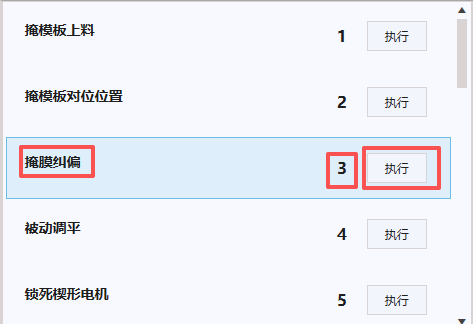
案例,一个ListBox绑定后台实体链表:
界面显示三个模块,自定义模板实现:
顺序一般来说在C#的链表里从0开始,我这里想让其从1开始,使用了这种方法,可以传递顺序到后台命令。
 <ListBox
     ItemContainerStyle="{StaticResource ActionItemStyle}"
     ItemsSource="{Binding OverallActions}"
     ScrollViewer.HorizontalScrollBarVisibility="Disabled">

     <ListBox.ItemTemplate>
         <DataTemplate>
             <Border
                 Margin="3"
                 BorderThickness="1"
                 CornerRadius="5">
                 <Grid>
                     <Grid.ColumnDefinitions>
                         <ColumnDefinition Width="*" />
                         <ColumnDefinition Width="Auto" />
                         <ColumnDefinition Width="Auto" />
                     </Grid.ColumnDefinitions>

                     <!--  显示配置信息  -->
                     <StackPanel Grid.Column="0" Margin="10">
                         <TextBlock
                             FontSize="14"
                             FontWeight="Bold"
                             Text="{Binding ActionDescription}" />

                     </StackPanel>

                     <!--  索引显示  -->
                     <TextBlock
                         Grid.Column="1"
                         Margin="10"
                         HorizontalAlignment="Center"
                         VerticalAlignment="Center"
                         FontSize="16"
                         FontWeight="Bold"
                         Text="{Binding RelativeSource={RelativeSource AncestorType={x:Type ListBoxItem}}, Converter={StaticResource IndexConverter}}" />

                     <!--  操作按钮  -->
                     <StackPanel
                         Grid.Column="2"
                         Margin="10"
                         Orientation="Horizontal">
                         <!--  主操作按钮  -->
                         <Button
                             Width="60"
                             Height="30"
                             Margin="0,0,5,0"
                             Command="{Binding DataContext.ExecuteActionHandleModelCommand, RelativeSource={RelativeSource AncestorType={x:Type ListBox}}}"
                             CommandParameter="{Binding RelativeSource={RelativeSource AncestorType={x:Type ListBoxItem}}, Converter={StaticResource IndexConverter}}"
                             Content="执行" />
                     </StackPanel>
                 </Grid>
             </Border>
         </DataTemplate>
     </ListBox.ItemTemplate>
 </ListBox>
传递参数:
XML
CommandParameter="{Binding RelativeSource={RelativeSource AncestorType={x:Type ListBoxItem}}, Converter={StaticResource IndexConverter}}"绑定索引的转换器:
cs
 public class ItemToIndexConverter : IValueConverter
 {
     // 单值转换(用于ListBoxItem/DataGridRow获取索引)
     public object Convert(object value, Type targetType, object parameter, CultureInfo culture)
     {
         if (value is ListBoxItem listBoxItem)
         {
             var listBox = ItemsControl.ItemsControlFromItemContainer(listBoxItem);
             if (listBox != null)
             {
                 int index = listBox.ItemContainerGenerator.IndexFromContainer(listBoxItem);
                 return index >= 0 ? (index + 1).ToString() : "N/A";
             }
         }
         else if (value is DataGridRow dataGridRow)
         {
             var dataGrid = ItemsControl.ItemsControlFromItemContainer(dataGridRow);
             if (dataGrid != null)
             {
                 int index = dataGrid.ItemContainerGenerator.IndexFromContainer(dataGridRow);
                 return index >= 0 ? (index + 1).ToString() : "N/A";
             }
         }

         return "N/A";
     }


     public object ConvertBack(object value, Type targetType, object parameter, CultureInfo culture)
     {
         throw new NotImplementedException();
     }


 }