Flutter for OpenHarmony 实战:贪吃蛇蛇的移动逻辑详解
文章目录
- [Flutter for OpenHarmony 实战:贪吃蛇蛇的移动逻辑详解](#Flutter for OpenHarmony 实战:贪吃蛇蛇的移动逻辑详解)
-
- 一、前言
- 二、坐标系统设计
-
- [2.1 30x20网格坐标系](#2.1 30x20网格坐标系)
- [2.2 坐标与像素映射](#2.2 坐标与像素映射)
- [2.3 Point类实现](#2.3 Point类实现)
- 三、Timer定时器实现自动移动
-
- [3.1 Timer.periodic原理](#3.1 Timer.periodic原理)
- [3.2 速度控制变量](#3.2 速度控制变量)
- [3.3 定时器生命周期](#3.3 定时器生命周期)
- 四、方向控制核心算法
-
- [4.1 四方向移动计算](#4.1 四方向移动计算)
- [4.2 nextDirection缓冲机制](#4.2 nextDirection缓冲机制)
- [4.3 防止180度转向判断逻辑](#4.3 防止180度转向判断逻辑)
- 五、蛇身移动实现
-
- [5.1 新头部插入算法](#5.1 新头部插入算法)
- [5.2 尾部移除逻辑](#5.2 尾部移除逻辑)
- [5.3 完整_update()方法解析](#5.3 完整_update()方法解析)
- 六、完整代码实现
- 七、总结
- 社区支持
一、前言
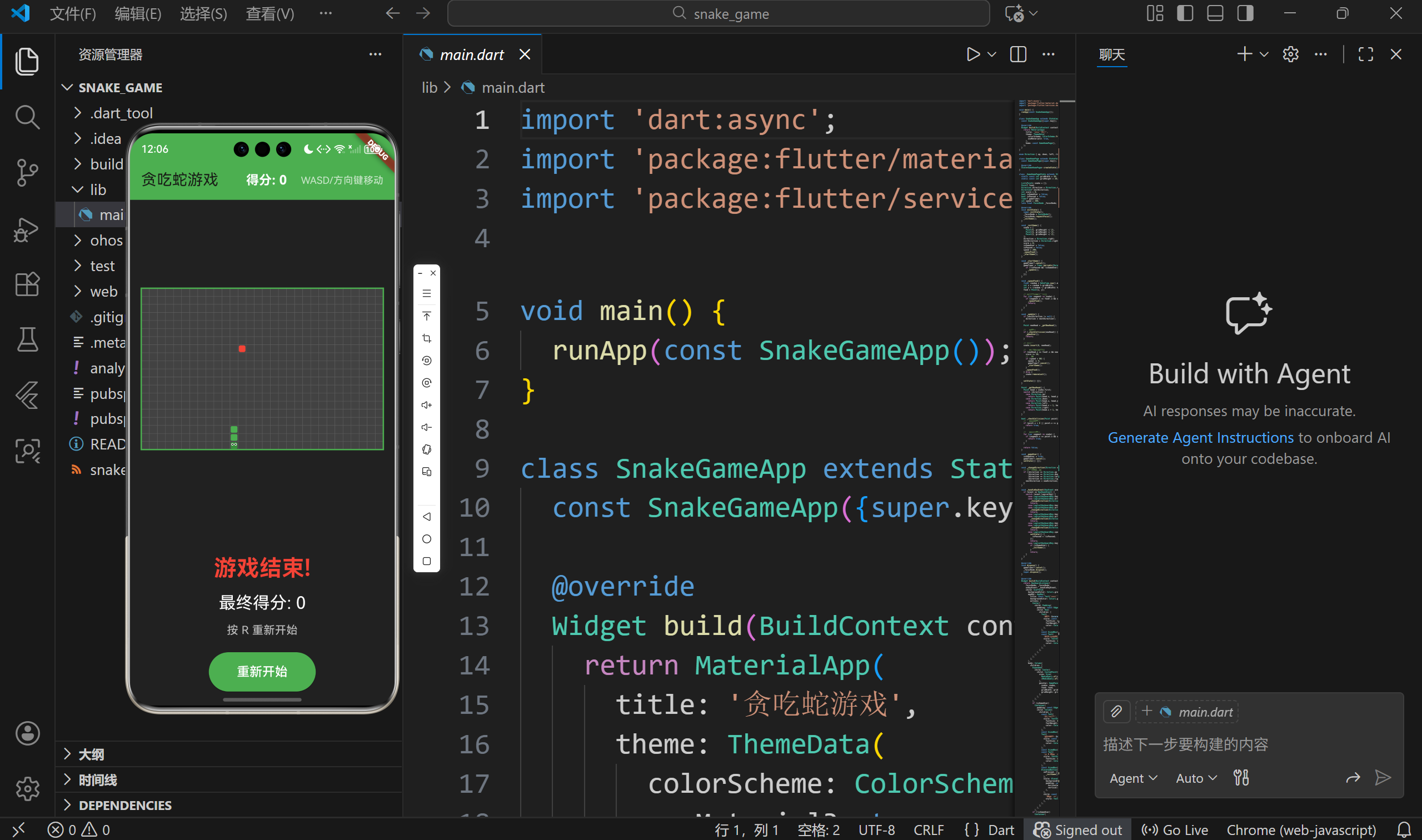
在贪吃蛇游戏中,蛇的移动是最核心的机制。本文将详细讲解如何在Flutter for OpenHarmony中实现蛇的自动移动,包括坐标系统设计、Timer定时器使用、方向控制算法以及防自杀机制。
二、坐标系统设计
2.1 30x20网格坐标系
我们采用长方形网格,而非传统的正方形:
dart
static const int gridWidth = 30;   // 30列
static const int gridHeight = 20;  // 20行
为什么选择长方形?
- 更符合现代手机屏幕比例(16:9)
- 游戏空间更大(30×20=600格,比20×20=400格多50%)
- 增加游戏趣味性
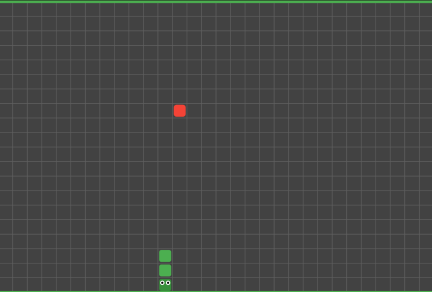
坐标规则:
- 原点(0,0)在左上角
- x轴向右增长(0→29)
- y轴向下增长(0→19)
- 每个坐标点对应一个格子
2.2 坐标与像素映射
在CustomPainter中,坐标需要映射到实际像素:
dart
final cellWidth = size.width / gridWidth;    // 每格宽度
final cellHeight = size.height / gridHeight; // 每格高度
示例计算:
- 如果Canvas宽度为360px,则每格宽 = 360/30 = 12px
- 如果Canvas高度为240px,则每格高 = 240/20 = 12px
2.3 Point类实现
dart
class Point {
  final int x;
  final int y;

  Point(this.x, this.y);
}
使用示例:
dart
// 创建蛇头位置
Point head = Point(5, 10);

// 创建食物位置
Point food = Point(15, 8);
三、Timer定时器实现自动移动
3.1 Timer.periodic原理
Flutter的Timer类用于定时任务:
dart
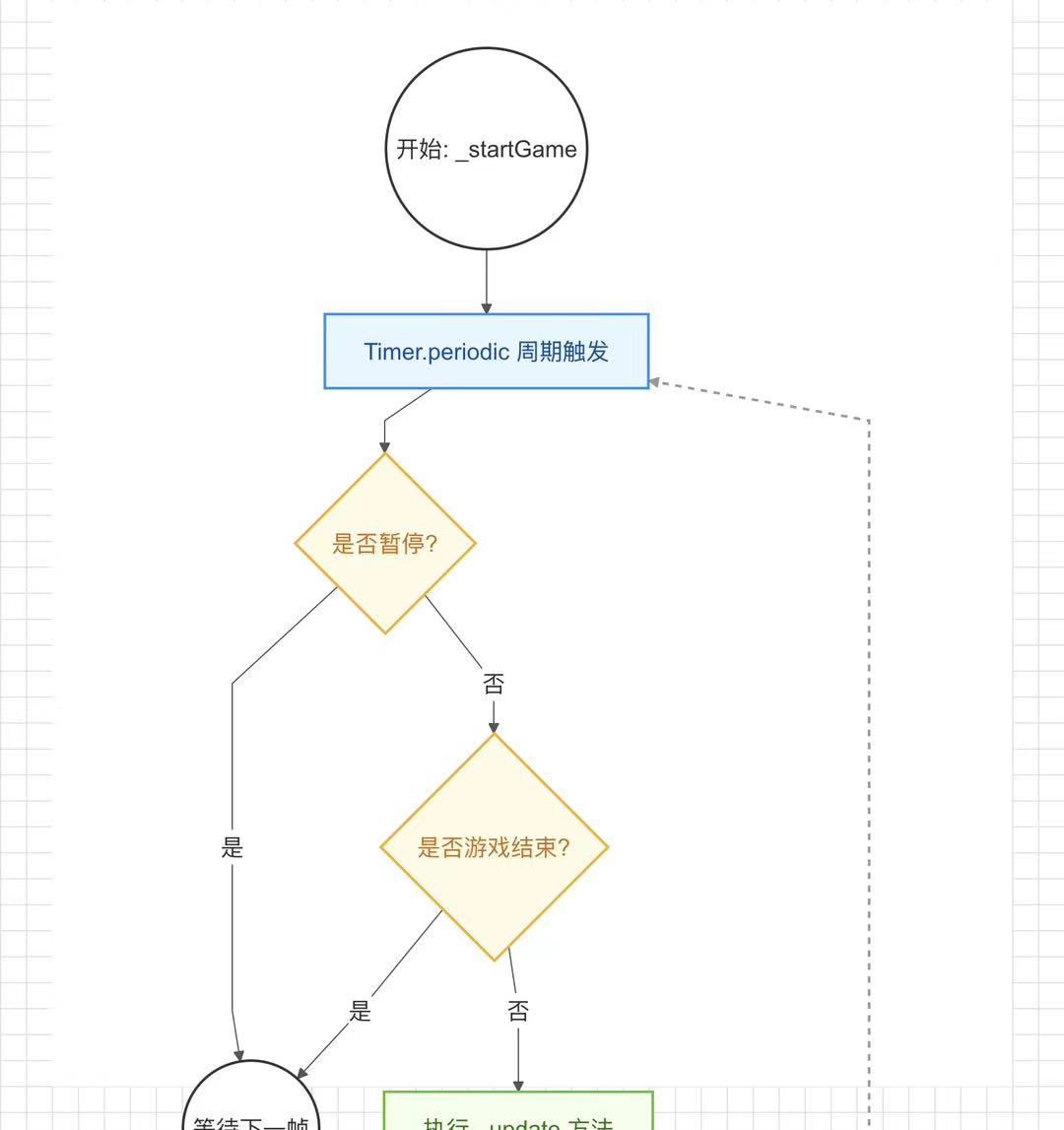
void _startGame() {
  gameTimer?.cancel();  // 先取消之前的定时器
  gameTimer = Timer.periodic(Duration(milliseconds: speed), (timer) {
    if (!isPaused && !isGameOver) {
      _update();  // 每200ms执行一次更新
    }
  });
}
Timer.periodic工作原理:
- 创建一个周期性定时器
- 每隔指定时间间隔执行回调函数
- 返回Timer对象,可用于取消定时器
3.2 速度控制变量
dart
int speed = 200; // 初始速度200ms速度变化规则:
- 初始:200ms/次(每秒5格)
- 吃到食物:speed -= 5(加速5ms)
- 最快:80ms/次(每秒12.5格)
dart
if (newHead.x == food!.x && newHead.y == food!.y) {
  score += 10;
  if (speed > 80) {  // 限制最快速度
    speed -= 5;
    gameTimer?.cancel();
    _startGame();  // 重新创建定时器
  }
  _spawnFood();
}
3.3 定时器生命周期
dart
// 创建:游戏初始化时
@override
void initState() {
  super.initState();
  _initGame();
}

// 重建:速度变化时
gameTimer?.cancel();
gameTimer = Timer.periodic(Duration(milliseconds: speed), (timer) {...});

// 销毁:游戏结束或组件销毁时
@override
void dispose() {
  gameTimer?.cancel();  // 必须取消,防止内存泄漏
  super.dispose();
}
重要提示: 一定要在dispose中取消定时器,否则会导致内存泄漏。
四、方向控制核心算法
4.1 四方向移动计算
蛇的移动本质是计算新的头部坐标:
dart
Point _getNewHead() {
  Point head = snake.first;  // 获取当前头部
  switch (direction) {
    case Direction.up:
      return Point(head.x, head.y - 1);  // 向上,y减1
    case Direction.down:
      return Point(head.x, head.y + 1);  // 向下,y加1
    case Direction.left:
      return Point(head.x - 1, head.y);  // 向左,x减1
    case Direction.right:
      return Point(head.x + 1, head.y);  // 向右,x加1
  }
}
坐标变化规则:
| 方向 | x变化 | y变化 |
|---|---|---|
| 上 | 0 | -1 |
| 下 | 0 | +1 |
| 左 | -1 | 0 |
| 右 | +1 | 0 |
4.2 nextDirection缓冲机制
问题:如果玩家快速按下"上→左",而蛇当前向右移动,会发生什么?
没有缓冲的情况:
- 当前方向:右
- 按下"上",direction变为上
- 按下"左",direction变为左
- 问题:从右直接变左是180度转向,蛇头会撞到自己的脖子
解决方案:使用nextDirection缓冲
dart
Direction direction = Direction.right;   // 当前实际方向
Direction? nextDirection;                // 下一步预存方向

void _update() {
  if (nextDirection != null) {
    direction = nextDirection!;  // 更新时才应用新方向
  }
  // ...
}

void _changeDirection(Direction newDirection) {
  // 基于当前方向判断,防止180度转向
  if ((direction == Direction.up && newDirection != Direction.down) ||
      (direction == Direction.down && newDirection != Direction.up) ||
      (direction == Direction.left && newDirection != Direction.right) ||
      (direction == Direction.right && newDirection != Direction.left)) {
    nextDirection = newDirection;  // 存储到nextDirection
  }
}
4.3 防止180度转向判断逻辑
核心思想:只能向左或向右转90度,不能掉头。
dart
void _changeDirection(Direction newDirection) {
  // 当前向上时,不能向下(但可以向左或向右)
  if (direction == Direction.up && newDirection == Direction.down) {
    return;  // 拒绝掉头
  }
  // 当前向下时,不能向上
  if (direction == Direction.down && newDirection == Direction.up) {
    return;
  }
  // 当前向左时,不能向右
  if (direction == Direction.left && newDirection == Direction.right) {
    return;
  }
  // 当前向右时,不能向左
  if (direction == Direction.right && newDirection == Direction.left) {
    return;
  }

  nextDirection = newDirection;  // 允许转向
}
状态转换表:
| 当前方向 | 可转向 | 禁止转向 |
|---|---|---|
| 上 | 左、右 | 下 |
| 下 | 左、右 | 上 |
| 左 | 上、下 | 右 |
| 右 | 上、下 | 左 |
五、蛇身移动实现
5.1 新头部插入算法
dart
void _update() {
  // 1. 获取新头部位置
  Point newHead = _getNewHead();

  // 2. 检查碰撞
  if (_checkCollision(newHead)) {
    _gameOver();
    return;
  }

  // 3. 插入新头部
  snake.insert(0, newHead);  // 在索引0位置插入

  // 4. 处理食物或移除尾部
  if (newHead.x == food!.x && newHead.y == food!.y) {
    // 吃到食物:不移除尾部,蛇变长
    score += 10;
    _spawnFood();
  } else {
    // 没吃到食物:移除尾部,保持长度
    snake.removeLast();
  }

  setState(() {});  // 更新UI
}
5.2 尾部移除逻辑
为什么需要移除尾部?
蛇移动的本质是:
- 头部增加一格
- 尾部减少一格
- 整体向移动方向平移一格
如果不移除尾部,蛇会不断变长,只有吃食物时才应该变长。
dart
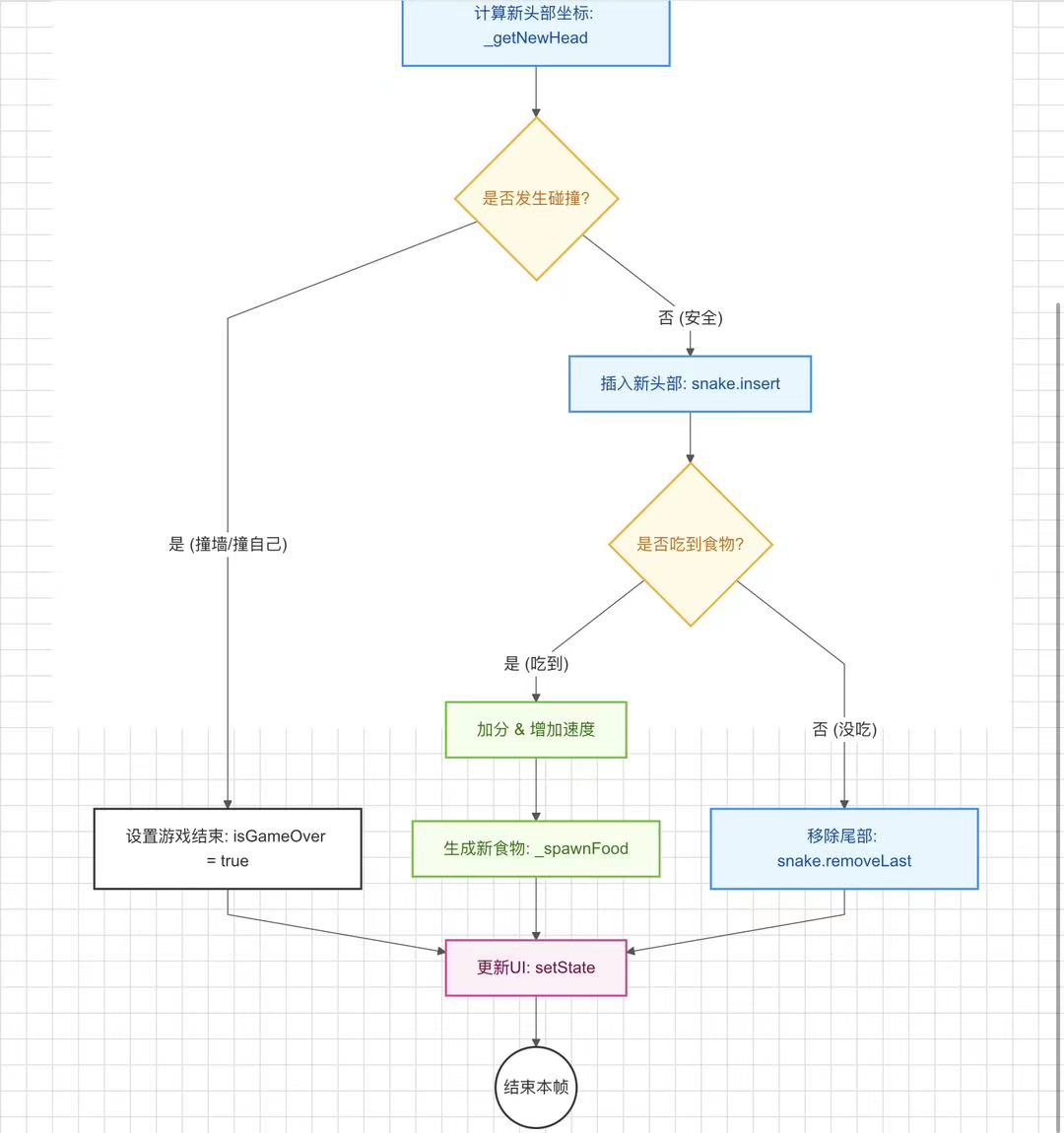
snake.removeLast(); // 移除列表最后一个元素(尾部)5.3 完整_update()方法解析
dart
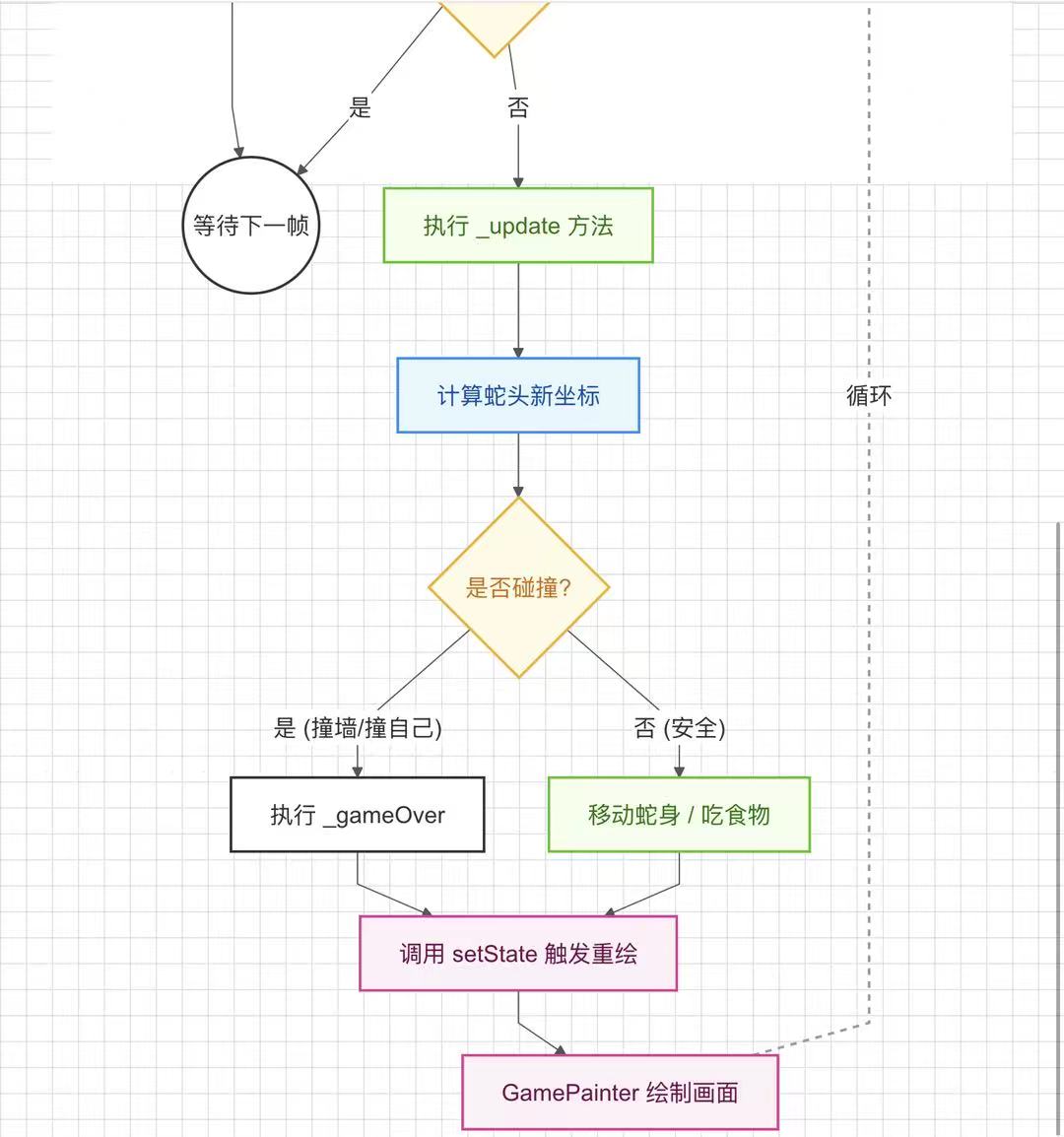
void _update() {
  // 步骤1:应用缓冲的方向
  if (nextDirection != null) {
    direction = nextDirection!;
  }

  // 步骤2:计算新头部位置
  Point newHead = _getNewHead();

  // 步骤3:碰撞检测
  if (_checkCollision(newHead)) {
    _gameOver();
    return;
  }

  // 步骤4:插入新头部
  snake.insert(0, newHead);

  // 步骤5:处理食物
  if (newHead.x == food!.x && newHead.y == food!.y) {
    // 吃到食物
    score += 10;

    // 速度递增
    if (speed > 80) {
      speed -= 5;
      gameTimer?.cancel();
      _startGame();
    }

    _spawnFood();
  } else {
    // 没吃到食物,移除尾部
    snake.removeLast();
  }

  // 步骤6:更新UI
  setState(() {});
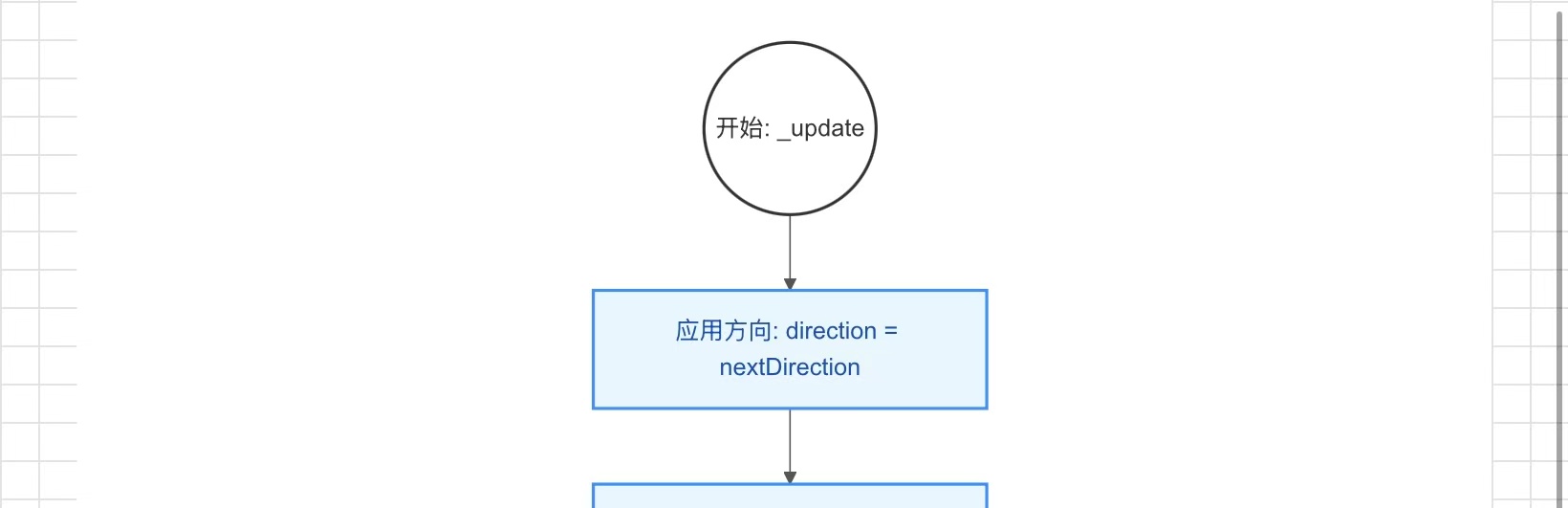
}
六、完整代码实现
以下是移动相关的核心代码:
dart
class _GameHomePageState extends State<GameHomePage> {
  // ... 其他变量

  void _startGame() {
    gameTimer?.cancel();
    gameTimer = Timer.periodic(Duration(milliseconds: speed), (timer) {
      if (!isPaused && !isGameOver) {
        _update();
      }
    });
  }

  Point _getNewHead() {
    Point head = snake.first;
    switch (direction) {
      case Direction.up:
        return Point(head.x, head.y - 1);
      case Direction.down:
        return Point(head.x, head.y + 1);
      case Direction.left:
        return Point(head.x - 1, head.y);
      case Direction.right:
        return Point(head.x + 1, head.y);
    }
  }

  void _changeDirection(Direction newDirection) {
    if ((direction == Direction.up && newDirection != Direction.down) ||
        (direction == Direction.down && newDirection != Direction.up) ||
        (direction == Direction.left && newDirection != Direction.right) ||
        (direction == Direction.right && newDirection != Direction.left)) {
      nextDirection = newDirection;
    }
  }

  void _update() {
    if (nextDirection != null) {
      direction = nextDirection!;
    }

    Point newHead = _getNewHead();

    if (_checkCollision(newHead)) {
      _gameOver();
      return;
    }

    snake.insert(0, newHead);

    if (newHead.x == food!.x && newHead.y == food!.y) {
      score += 10;
      if (speed > 80) {
        speed -= 5;
        gameTimer?.cancel();
        _startGame();
      }
      _spawnFood();
    } else {
      snake.removeLast();
    }

    setState(() {});
  }
}
七、总结
本文详细讲解了蛇的移动逻辑实现:
- 坐标系统:30x20长方形网格设计
- Timer定时器:实现自动移动和速度控制
- 方向控制:nextDirection缓冲防止180度转向
- 移动算法:头部插入、尾部移除的经典实现
核心要点:
- 使用List的insert(0)和removeLast()高效管理蛇身
- nextDirection缓冲是防止快速按键导致自杀的关键
- Timer必须在dispose中取消,避免内存泄漏
下篇预告:《Flutter for OpenHarmony 实战:碰撞检测算法与游戏结束处理》
社区支持
欢迎加入开源 OpenHarmony 跨平台社区,获取更多技术支持和资源:
- 社区论坛 :开源 OpenHarmony 跨平台开发者社区
- 技术交流:参与社区讨论,分享开发经验
如果本文对您有帮助,欢迎点赞、收藏和评论。您的支持是我持续创作的动力!