目录
因某些UI库/组件库的"全面兼容"能力过于"全面"、且还要看广告😂,使用时在手机app等环境下出现各种奇奇怪怪的问题。所以本人一气之下,气了一下,被逼手搓一个年月选择器,可以兼容h5、安卓、ios和微信小程序等(其他环境有待测试)
效果图:
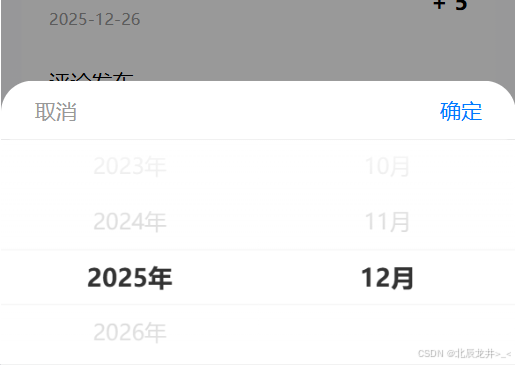
1.html部分
一个带遮罩层的模态框,放一个二级联动年-月选择器
html
<view v-show="show" class="date-box"
    <!-- 遮罩层, zIndex需要根据实际情况设置 -->
    <view class="lb-picker-mask"
      style="
        backgroundColor: rgba(0, 0, 0, 0.6),
        zIndex: 1
      "
      @tap.stop="handleMaskTap">
    </view>

    <!-- 顶部按钮组 -->
    <view class="lb-picker-header-actions">
          <view class="lb-picker-action"
            @tap.stop="handleCancel">
            <text v-else
              class="lb-picker-action-cancel-text"
              >取消</text>
          </view>

          <view class="lb-picker-action text-blue"
            @tap.stop="handleConfirm">
            <text v-else
              class="lb-picker-action-confirm-text"
              >确定</text>
          </view>
    </view>

    <!-- 选择器区域 -->
    <view class="year-month-picker">
            <picker-view
              class="picker-view"
              :value="pickerValue"
              @change="handlePickerChange"
              :indicator-style="indicatorStyle"
            >
              <!-- 年份列 -->
              <picker-view-column>
                <view
                  class="picker-item"
                  :class="{ 'active': pickerValue[0] === index }"
                  v-for="(year, index) in years"
                  :key="index"
                >
                  {{ year }}年
                </view>
              </picker-view-column>

              <!-- 月份列 -->
              <picker-view-column>
                <view
                  class="picker-item"
                  :class="{ 'active': pickerValue[1] === index }"
                  v-for="(month, index) in months"
                  :key="index"
                >
                  {{ month }}月
                </view>
              </picker-view-column>
            </picker-view>
     </view>
</view>
2.css部分
css
.date-box {
    width: 750rpx;
    height: 100vh;
    position: relative;
    z-index: 9999;
}

.lb-picker-mask {
	background-color: rgba(0, 0, 0, 0.0);
	position: fixed;
	top: 0;
	right: 0;
	left: 0;
	bottom: 0;
	transition-property: background-color;
	transition-duration: 0.3s;
}

.lb-picker-header-actions {
	height: 45px;
	/* #ifndef APP-NVUE */
	box-sizing: border-box;
	display: flex;
	/* #endif */
	flex-direction: row;
	justify-content: space-between;
	flex-wrap: nowrap;
}

.lb-picker-action {
	padding-left: 10px;
	padding-right: 10px;
	/* #ifndef APP-NVUE */
	display: flex;
	/* #endif */
	flex-direction: row;
	align-items: center;
	justify-content: center;
}

.text-blue {
    color: blue;
}

.year-month-picker {
  width: 100%;
  background-color: #fff;
  border-radius: 16rpx 16rpx 0 0;
  overflow: hidden;
}

.picker-view {
  height: 400rpx;
  width: 100%;
}

.picker-item {
  height: 80.78rpx;
  line-height: 80rpx;
  text-align: center;
  font-size: 32rpx;
  color: #999;
  transition: all 0.3s ease;
}

.picker-item.active {
  color: #333;
  font-size: 36rpx;
  font-weight: bold;
}
3.js部分
目前设置不显示未来日期,可根据需要自行修改
javascript
  data () {
    return {
      show: false,
      years: [],
      pickerValue: [0, 0], // 存放选中的年月数据
      minYear: 1900,
      maxYear: new Date().getFullYear(),
      selectedYear: 0,
      selectedMonth: 0,
      indicatorStyle: `height: 80rpx;`
    }
  },
  computed: {
    months() {// 因设置不显示未来日期,所以可选月份做处理
      const currentYear = new Date().getFullYear();
      const currentMonth = new Date().getMonth() + 1;
      // 在初始化阶段,如果selectedYear还未设置,则返回全年12个月
      if (this.selectedYear && this.selectedYear === currentYear) {
        return Array.from({ length: currentMonth }, (_, i) => i + 1);
      } else {
        return Array.from({ length: 12 }, (_, i) => i + 1);
      }
    }
  },
  created() {
    this.initYears()
    this.initDefaultValue()
  },
  methods: {
    // 初始化年份数组
    initYears() {
      this.years = []
      for (let i = this.minYear; i <= this.maxYear; i++) {
        this.years.push(i)
      }
    },
    // 初始化默认值,不显示未来的日期
    initDefaultValue() {
        const now = new Date();
        const currentYear = now.getFullYear();
        const currentMonth = now.getMonth() + 1;
        const yearIndex = this.years.indexOf(currentYear);
        // 限制月份不能超过当前月份
        const monthIndex = Math.min(this.months.indexOf(currentMonth), currentMonth - 1);
        this.pickerValue = [yearIndex, monthIndex];
        this.selectedYear = currentYear;
        this.selectedMonth = currentMonth;
    },
    // 处理选择器变化
    handlePickerChange(e) {
      const value = e.detail.value;
      this.pickerValue = [...value];
      this.selectedYear = this.years[value[0]];
      // 限制月份不能超过当前月份(仅当选择的是今年时)
      const currentYear = new Date().getFullYear();
      const currentMonth = new Date().getMonth() + 1;
      let monthIndex = value[1];
      if (this.selectedYear === currentYear) {
        monthIndex = Math.min(value[1], currentMonth - 1);
      }
      this.pickerValue[1] = monthIndex;
      this.selectedMonth = this.months[monthIndex];
    },
    handleCancel () {
      this.show = false
    },
    handleConfirm () {
      const selectedValue = `${this.selectedYear}-${this.selectedMonth.toString().padStart(2, '0')}`
      console.log('选中的年月', selectedValue);
    },
    // 点击遮罩层关闭模态框
    handleMaskTap () {
      this.show = false
    },
  }
以上就是年-月选择器的代码