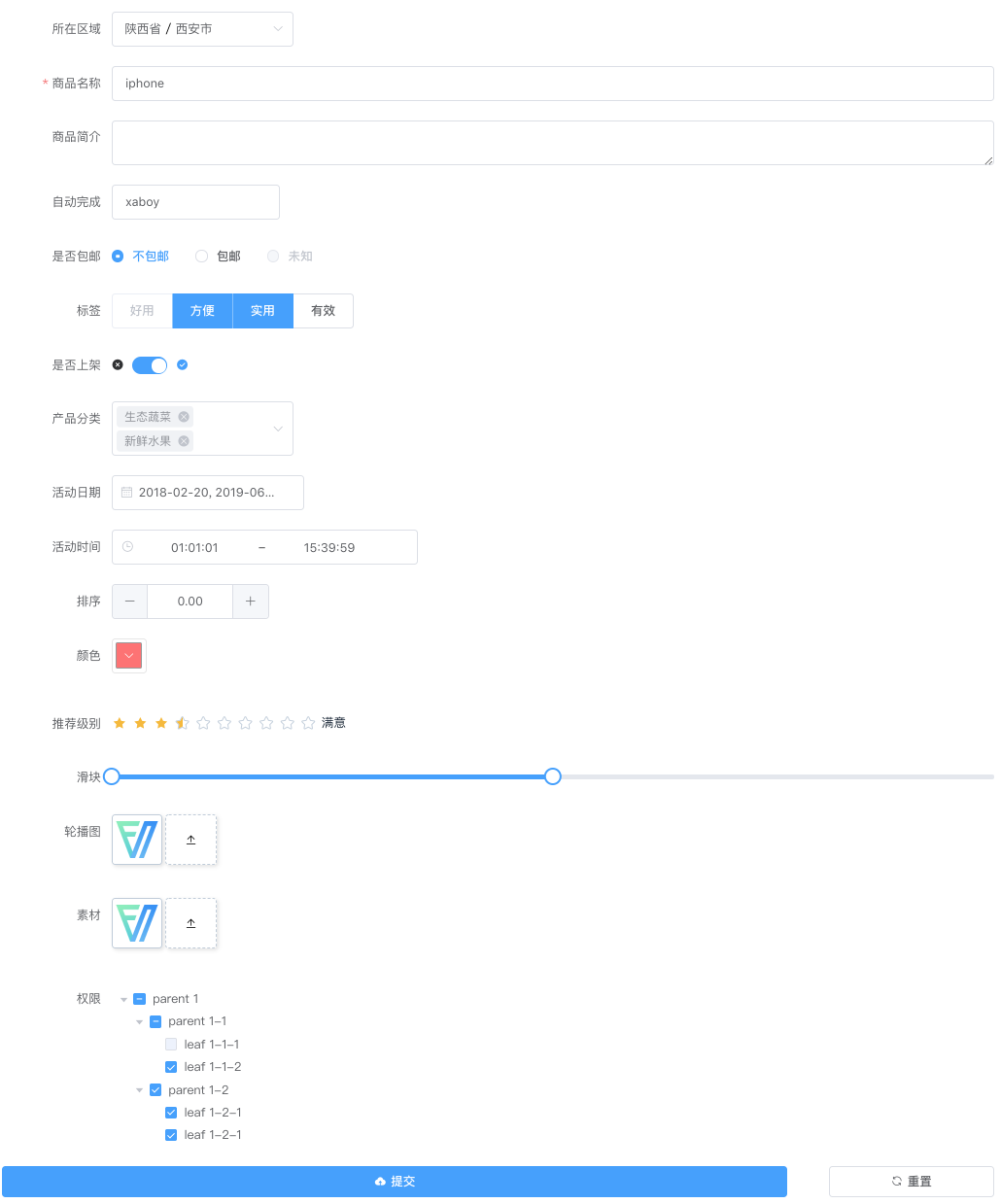
FormCreate 是一个可以通过 JSON 生成具有动态渲染、数据收集、验证和提交功能的低代码表单生成组件。它支持 7 个 UI 框架,适配移动端,并且支持生成任何 Vue 组件。内置 20+ 种常用表单组件和自定义组件,再复杂的表单都可以轻松搞定
安装
本文将介绍如何安装并使用 @form-create/element-ui 组件库,包括在浏览器环境和通过 npm 安装的方法。
使用 npm 安装
通过 npm 安装可以更好地与现代构建工具(如 Webpack)集成。
sh
npm i @form-create/element-ui@^3
npm i element-plus
引入和挂载
js
// 引入 form-create 组件库
import formCreate from '@form-create/element-ui';
import ElementPlus from 'element-plus';
import 'element-plus/dist/index.css';
// 创建 Vue 应用
const app = Vue.createApp({});
app.use(formCreate);
app.use(ElementPlus);
app.mount('#app');
CDN 引入
目前可以通过 unpkg.com/@form-create/element-ui 获取到最新版本的资源,在页面上引入
js 即可开始使用。
html
<!-- 引入 Vue -->
<script src="https://unpkg.com/vue"></script>
<!-- 引入 Element Plus -->
<script src="https://unpkg.com/element-plus/dist/index.full.js"></script>
<link href="https://unpkg.com/element-plus/dist/index.css" rel="stylesheet">
<!-- 引入 form-create -->
<script src="https://unpkg.com/@form-create/element-ui@^3/dist/form-create.min.js"></script>
<!-- 初始化 Vue 应用并挂载组件 -->
<script>
    const app = Vue.createApp({});
    app.use(ELEMENT); // 使用 Element Plus 组件库
    app.use(formCreate); // 使用 form-create 组件
    app.mount('#app');
</script>
创建表单
html
<template>
    <form-create :rule="rule" v-model:api="api" :option="options" />
</template>
<script setup>
    import { ref } from 'vue';
    const api = ref({});
    const options = ref({
        onSubmit: (formData) => {
            alert(JSON.stringify(formData));
        },
        resetBtn: true,
    });
    const rule = ref([
        {
            type: 'input',
            field: 'goods_name',
            title: '商品名称',
            value: 'form-create',
        },
        {
            type: 'checkbox',
            field: 'label',
            title: '标签',
            value: [0, 1, 2, 3],
            options: [
                { label: '好用', value: 0 },
                { label: '快速', value: 1 },
                { label: '高效', value: 2 },
                { label: '全能', value: 3 },
            ],
        },
    ]);
</script>
Input 输入框
基础示例
js
const rule = {
    type:"input",
    title:"商品名称",
    field:"goods_name",
    value:"iphone 7",
    col:{
    	span:12,
    	labelWidth:150
    },
    props: {
        type: "text",
    },
    validate:[
        { required: true, message: '请输入goods_name', trigger: 'blur' },
    ],
}
Props 配置示例
可清空输入框
js
const rule = {
    type:"input",
    title:"用户名",
    field:"username",
    props: {
        placeholder: "请输入用户名",
        clearable: true,
        prefixIcon: "User",
        suffixIcon: "Search",
    },
}
文本域(Textarea)
js
const rule = {
    type:"input",
    title:"商品描述",
    field:"description",
    props: {
        type: "textarea",
        placeholder: "请输入商品描述",
        rows: 4,
        autosize: { minRows: 3, maxRows: 6 },
        resize: "vertical",
    },
}
密码输入框(Password)
js
const rule = {
    type:"input",
    title:"商品描述",
    field:"description",
    props: {
        type: "password",
    },
}
禁用和只读
js
const rule = {
    type:"input",
    title:"订单号",
    field:"order_no",
    value:"ORD20240101001",
    props: {
        disabled: true,
        // 或使用 readonly: true,
    },
}
输入长度限制
js
const rule = {
    type:"input",
    title:"手机号",
    field:"phone",
    props: {
        placeholder: "请输入11位手机号",
        maxlength: 11,
        minlength: 11,
        clearable: true,
    },
    validate:[
        { required: true, message: '请输入手机号', trigger: 'blur' },
    ],
}
Checkbox 多选框
基础示例
js
const rule = {
    type:"checkbox",
    title:"标签",
    field:"label",
    value:["1","2","3"],
    options:[
        {value:"1",label:"好用",disabled:true},
        {value:"2",label:"方便",disabled:false},
        {value:"3",label:"实用",disabled:false},
        {value:"4",label:"有效",disabled:false},
    ]
}
Props 配置示例
按钮样式多选框
js
const rule = {
    type:"checkbox",
    title:"商品标签",
    field:"tags",
    value:["1","2"],
    options:[
        {value:"1",label:"热销"},
        {value:"2",label:"新品"},
        {value:"3",label:"推荐"},
        {value:"4",label:"限时"},
    ],
    props: {
        type: "button",
        size: "default",
    },
}
限制选择数量
js
const rule = {
    type:"checkbox",
    title:"商品分类",
    field:"categories",
    value:["1"],
    options:[
        {value:"1",label:"电子产品"},
        {value:"2",label:"服装配饰"},
        {value:"3",label:"家居用品"},
        {value:"4",label:"食品饮料"},
    ],
    props: {
        min: 1,
        max: 3,
    },
    validate:[
        { required: true, message: '请至少选择1个分类,最多选择3个', trigger: 'change' },
    ],
}
禁用状态
js
const rule = {
    type:"checkbox",
    title:"权限设置",
    field:"permissions",
    value:["1"],
    options:[
        {value:"1",label:"查看",disabled:false},
        {value:"2",label:"编辑",disabled:true},
        {value:"3",label:"删除",disabled:true},
    ],
    props: {
        disabled: false,
    },
}
DatePicker 日期选择器
基础示例
js
const rule = {
    type: "DatePicker",
    field: "section_day",
    title: "活动日期",
    value: ['2018-02-20', '2021-02-15'],
    props: {
        type: "datetimerange",
        format: "YYYY-MM-dd HH:mm:ss",
        placeholder:"请选择活动日期",
    }
}
Props 配置示例
日期选择
js
const rule = {
    type: "DatePicker",
    field: "date",
    title: "活动日期",
    value: "2024-01-01",
    props: {
        type: "date",
        format: "YYYY-MM-DD",
        valueFormat: "YYYY-MM-DD",
        placeholder: "请选择日期",
        clearable: true,
    }
}
日期时间选择
js
const rule = {
    type: "DatePicker",
    field: "datetime",
    title: "活动时间",
    value: "2024-01-01 12:00:00",
    props: {
        type: "datetime",
        format: "YYYY-MM-DD HH:mm:ss",
        valueFormat: "YYYY-MM-DD HH:mm:ss",
        placeholder: "请选择日期时间",
    }
}
日期范围选择
js
const rule = {
    type: "DatePicker",
    field: "dateRange",
    title: "活动期间",
    value: ["2024-01-01", "2024-01-31"],
    props: {
        type: "daterange",
        format: "YYYY-MM-DD",
        valueFormat: "YYYY-MM-DD",
        startPlaceholder: "开始日期",
        endPlaceholder: "结束日期",
    }
}
限制日期范围
js
const rule = {
    type: "DatePicker",
    field: "date",
    title: "预约日期",
    value: "",
    props: {
        type: "date",
        format: "YYYY-MM-DD",
        disabledDate: (time) => {
            // 禁用今天之前的日期
            return time.getTime() < Date.now() - 8.64e7;
        },
        placeholder: "请选择日期",
    }
}
快捷选项
js
const rule = {
    type: "DatePicker",
    field: "dateRange",
    title: "查询日期",
    value: [],
    props: {
        type: "daterange",
        format: "YYYY-MM-DD",
        shortcuts: [
            {
                text: '最近一周',
                value: () => {
                    const end = new Date();
                    const start = new Date();
                    start.setTime(start.getTime() - 3600 * 1000 * 24 * 7);
                    return [start, end];
                },
            },
            {
                text: '最近一个月',
                value: () => {
                    const end = new Date();
                    const start = new Date();
                    start.setTime(start.getTime() - 3600 * 1000 * 24 * 30);
                    return [start, end];
                },
            },
        ],
    }
}
Radio 单选框
基础示例
js
const rule = {
    type:"radio",
    title:"是否包邮",
    field:"is_postage",
    value:"0",
    options:[
        {value:"0",label:"不包邮",disabled:false},
        {value:"1",label:"包邮",disabled:true},
    ],
}
Props 配置示例
按钮样式单选框
js
const rule = {
    type:"radio",
    title:"配送方式",
    field:"delivery",
    value:"1",
    options:[
        {value:"1",label:"快递配送"},
        {value:"2",label:"门店自提"},
        {value:"3",label:"同城配送"},
    ],
    props: {
        type: "button",
        size: "default",
    },
}
不同尺寸
js
const rule = {
    type:"radio",
    title:"商品状态",
    field:"status",
    value:"1",
    options:[
        {value:"1",label:"上架"},
        {value:"2",label:"下架"},
        {value:"3",label:"待审核"},
    ],
    props: {
        size: "small",
    },
}
禁用选项
js
const rule = {
    type:"radio",
    title:"支付方式",
    field:"payment",
    value:"1",
    options:[
        {value:"1",label:"在线支付",disabled:false},
        {value:"2",label:"货到付款",disabled:true},
        {value:"3",label:"余额支付",disabled:false},
    ],
}
Select 下拉选择框
基础示例
js
const rule = {
    type: "select",
    field: "cate_id",
    title: "产品分类",
    value: ["104","105"],
    options: [
        {"value": "104", "label": "生态蔬菜", "disabled": false},
        {"value": "105", "label": "新鲜水果", "disabled": false},
     ],
    props: {
        multiple: true
    },
}
Props 配置示例
单选下拉框
js
const rule = {
    type: "select",
    field: "category",
    title: "商品分类",
    value: "104",
    options: [
        {"value": "104", "label": "生态蔬菜"},
        {"value": "105", "label": "新鲜水果"},
        {"value": "106", "label": "海鲜水产"},
    ],
    props: {
        placeholder: "请选择商品分类",
        clearable: true,
    },
}
多选下拉框
js
const rule = {
    type: "select",
    field: "tags",
    title: "商品标签",
    value: ["104","105"],
    options: [
        {"value": "104", "label": "热销"},
        {"value": "105", "label": "新品"},
        {"value": "106", "label": "推荐"},
    ],
    props: {
        multiple: true,
        collapseTags: true,
        collapseTagsTooltip: true,
        placeholder: "请选择标签",
    },
}
可搜索下拉框
js
const rule = {
    type: "select",
    field: "product",
    title: "商品名称",
    options: [
        {"value": "1", "label": "iPhone 15 Pro"},
        {"value": "2", "label": "MacBook Pro"},
        {"value": "3", "label": "iPad Air"},
    ],
    props: {
        filterable: true,
        placeholder: "请输入或选择商品",
        clearable: true,
    },
}
远程搜索
js
const rule = {
    type: "select",
    field: "user",
    title: "选择用户",
    props: {
        filterable: true,
        remote: true,
        remoteMethod: async (query) => {
            if (query) {
                // 调用远程搜索接口
                const res = await searchUsers(query);
                return res.data.map(item => ({
                    value: item.id,
                    label: item.name
                }));
            }
            return [];
        },
        placeholder: "请输入用户名搜索",
        loading: false,
    },
}
限制多选数量
js
const rule = {
    type: "select",
    field: "categories",
    title: "商品分类",
    value: ["104"],
    options: [
        {"value": "104", "label": "生态蔬菜"},
        {"value": "105", "label": "新鲜水果"},
        {"value": "106", "label": "海鲜水产"},
    ],
    props: {
        multiple: true,
        multipleLimit: 3,
        placeholder: "最多选择3个分类",
    },
}
TimePicker 时间选择器
基础示例
js
const rule = {
    type: "TimePicker",
    field: "section_time",
    title: "活动时间",
    value: [],
    props: {
        isRange: true
    },
}
Props 配置示例
单时间选择
js
const rule = {
    type: "TimePicker",
    field: "startTime",
    title: "开始时间",
    value: "09:00:00",
    props: {
        placeholder: "请选择时间",
        format: "HH:mm:ss",
        valueFormat: "HH:mm:ss",
        clearable: true,
    },
}
时间范围选择
js
const rule = {
    type: "TimePicker",
    field: "timeRange",
    title: "营业时间",
    value: ["09:00:00", "18:00:00"],
    props: {
        isRange: true,
        rangeSeparator: "至",
        startPlaceholder: "开始时间",
        endPlaceholder: "结束时间",
        format: "HH:mm:ss",
        valueFormat: "HH:mm:ss",
    },
}
箭头控制
js
const rule = {
    type: "TimePicker",
    field: "appointment",
    title: "预约时间",
    value: "14:30:00",
    props: {
        arrowControl: true,
        format: "HH:mm",
        valueFormat: "HH:mm",
    },
}
禁用部分时间
js
const rule = {
    type: "TimePicker",
    field: "workTime",
    title: "工作时间",
    value: "09:00:00",
    props: {
        format: "HH:mm:ss",
        disabledHours: () => {
            // 禁用 0-8 点和 18-23 点
            return [...Array(9).keys(), ...Array.from({length: 6}, (_, i) => i + 18)];
        },
        disabledMinutes: (hour) => {
            // 在特定小时禁用某些分钟
            if (hour === 12) {
                return [0, 30];
            }
            return [];
        },
    },
}
Upload 上传
基础示例
js
const rule = {
    type: "upload",
    field: "pic",
    title: "轮播图",
    value: [
        'http://img1.touxiang.cn/uploads/20131030/30-075657_191.jpg',
        'http://img1.touxiang.cn/uploads/20131030/30-075657_191.jpg'
        ],
    props: {
        type:"select",
        uploadType:"image",
        action: "/upload.php",
        name:"pic",
        multiple: true,
        accept:"image/*",
        limit: 2,
        onSuccess:function (res, file) {
            file.url = res.data.filePath;
        }
    },
}
Props 配置示例
单图片上传
js
const rule = {
    type: "upload",
    field: "avatar",
    title: "头像",
    value: [],
    props: {
        type: "select",
        uploadType: "image",
        action: "/upload.php",
        name: "file",
        accept: "image/*",
        limit: 1,
        onSuccess: function (res, file) {
            file.url = res.data.filePath;
        }
    },
}
多图片上传
js
const rule = {
    type: "upload",
    field: "gallery",
    title: "商品图片",
    value: [],
    props: {
        type: "select",
        uploadType: "image",
        action: "/upload.php",
        name: "file",
        multiple: true,
        accept: "image/*",
        limit: 9,
        listType: "picture-card",
        onSuccess: function (res, file) {
            file.url = res.data.filePath;
        }
    },
}
文件上传
js
const rule = {
    type: "upload",
    field: "document",
    title: "文档上传",
    value: [],
    props: {
        type: "select",
        uploadType: "file",
        action: "/upload.php",
        name: "file",
        accept: ".pdf,.doc,.docx",
        limit: 5,
        onSuccess: function (res, file) {
            file.url = res.data.filePath;
        }
    },
}
拖拽上传
js
const rule = {
    type: "upload",
    field: "images",
    title: "拖拽上传",
    value: [],
    props: {
        type: "select",
        uploadType: "image",
        action: "/upload.php",
        name: "file",
        drag: true,
        multiple: true,
        accept: "image/*",
        onSuccess: function (res, file) {
            file.url = res.data.filePath;
        }
    },
}
上传前验证
js
const rule = {
    type: "upload",
    field: "avatar",
    title: "头像",
    value: [],
    props: {
        type: "select",
        uploadType: "image",
        action: "/upload.php",
        name: "file",
        accept: "image/*",
        limit: 1,
        beforeUpload: function (file) {
            // 验证文件大小(2MB)
            const isLt2M = file.size / 1024 / 1024 < 2;
            if (!isLt2M) {
                alert('图片大小不能超过 2MB!');
                return false;
            }
            return true;
        },
        onSuccess: function (res, file) {
            file.url = res.data.filePath;
        }
    },
}
自定义上传请求
js
const rule = {
    type: "upload",
    field: "file",
    title: "文件上传",
    value: [],
    props: {
        type: "select",
        uploadType: "file",
        action: "#",
        name: "file",
        httpRequest: function (options) {
            // 自定义上传逻辑
            const formData = new FormData();
            formData.append('file', options.file);

            // 使用 fetch 或其他方式上传
            fetch('/custom-upload', {
                method: 'POST',
                body: formData
            }).then(res => res.json())
            .then(data => {
                options.onSuccess(data);
            })
            .catch(err => {
                options.onError(err);
            });
        },
        onSuccess: function (res, file) {
            file.url = res.data.filePath;
        }
    },
}