<!DOCTYPE html>
<html lang="zh-CN">
<head>
    <meta charset="UTF-8">
    <meta name="viewport" content="width=device-width, initial-scale=1.0">
    <title>现代倒计时器</title>
    <style>
        * {
            margin: 0;
            padding: 0;
            box-sizing: border-box;
            font-family: 'Arial', sans-serif;
        }

        body {
            display: flex;
            justify-content: center;
            align-items: center;
            min-height: 100vh;
            background-color: #f0f2f5;
        }

        .container {
            background-color: #ffffff;
            padding: 40px;
            border-radius: 15px;
            box-shadow: 0 10px 30px rgba(0, 0, 0, 0.1);
            text-align: center;
            width: 400px;
        }

        h1 {
            color: #333;
            margin-bottom: 30px;
            font-size: 28px;
        }

        .timer-display {
            font-size: 64px;
            font-weight: bold;
            color: #2c3e50;
            margin: 20px 0;
            letter-spacing: 2px;
            font-family: 'Courier New', monospace;
        }

        .buttons {
            display: grid;
            grid-template-columns: repeat(2, 1fr);
            gap: 15px;
            margin-top: 30px;
        }

        .btn {
            padding: 12px 20px;
            font-size: 16px;
            border: none;
            border-radius: 8px;
            cursor: pointer;
            transition: all 0.3s ease;
            font-weight: 500;
        }

        .btn-primary {
            background-color: #3498db;
            color: white;
        }

        .btn-primary:hover {
            background-color: #2980b9;
        }

        .btn-secondary {
            background-color: #95a5a6;
            color: white;
        }

        .btn-secondary:hover {
            background-color: #7f8c8d;
        }

        .btn-danger {
            background-color: #e74c3c;
            color: white;
        }

        .btn-danger:hover {
            background-color: #c0392b;
        }

        .btn-success {
            background-color: #2ecc71;
            color: white;
        }

        .btn-success:hover {
            background-color: #27ae60;
        }

        .notification {
            position: fixed;
            top: 20px;
            right: 20px;
            background-color: #2ecc71;
            color: white;
            padding: 15px 25px;
            border-radius: 8px;
            box-shadow: 0 5px 15px rgba(0, 0, 0, 0.2);
            display: none;
            animation: slideIn 0.5s ease;
        }

        @keyframes slideIn {
            from {
                transform: translateX(100%);
                opacity: 0;
            }
            to {
                transform: translateX(0);
                opacity: 1;
            }
        }

        .notification.show {
            display: block;
        }
    </style>
</head>
<body>
    <div class="container">
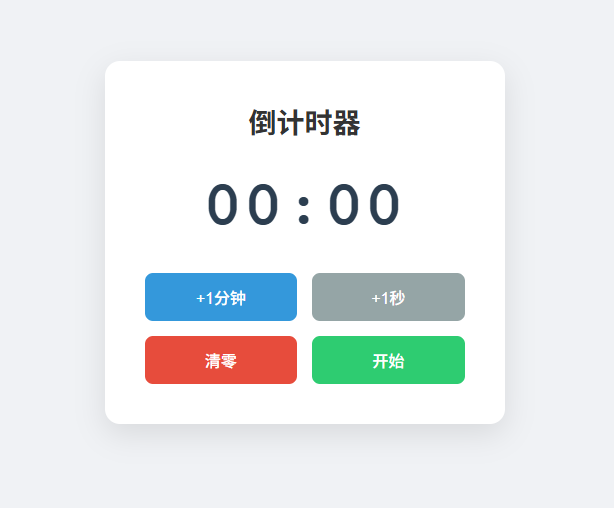
        <h1>倒计时器</h1>
        <div class="timer-display" id="timer">00:00</div>
        <div class="buttons">
            <button class="btn btn-primary" id="addMinute">+1分钟</button>
            <button class="btn btn-secondary" id="addSecond">+1秒</button>
            <button class="btn btn-danger" id="reset">清零</button>
            <button class="btn btn-success" id="startStop">开始</button>
        </div>
    </div>

    <div class="notification" id="notification">
        时间到!
    </div>

    <script>
        class CountdownTimer {
            constructor() {
                this.minutes = 0;
                this.seconds = 0;
                this.isRunning = false;
                this.intervalId = null;

                this.timerDisplay = document.getElementById('timer');
                this.addMinuteBtn = document.getElementById('addMinute');
                this.addSecondBtn = document.getElementById('addSecond');
                this.resetBtn = document.getElementById('reset');
                this.startStopBtn = document.getElementById('startStop');
                this.notification = document.getElementById('notification');

                this.addMinuteBtn.addEventListener('click', () => this.addMinute());
                this.addSecondBtn.addEventListener('click', () => this.addSecond());
                this.resetBtn.addEventListener('click', () => this.reset());
                this.startStopBtn.addEventListener('click', () => this.startStop());

                this.updateDisplay();
            }

            addMinute() {
                if (!this.isRunning) {
                    this.minutes++;
                    this.updateDisplay();
                }
            }

            addSecond() {
                if (!this.isRunning) {
                    this.seconds++;
                    if (this.seconds >= 60) {
                        this.seconds = 0;
                        this.minutes++;
                    }
                    this.updateDisplay();
                }
            }

            reset() {
                this.isRunning = false;
                this.minutes = 0;
                this.seconds = 0;
                this.clearInterval();
                this.updateDisplay();
                this.startStopBtn.textContent = '开始';
            }

            startStop() {
                if (!this.isRunning) {
                    if (this.minutes === 0 && this.seconds === 0) {
                        this.showNotification('请先设置时间!', 'warning');
                        return;
                    }

                    this.isRunning = true;
                    this.startStopBtn.textContent = '暂停';
                    this.runTimer();
                } else {
                    this.isRunning = false;
                    this.startStopBtn.textContent = '继续';
                    this.clearInterval();
                }
            }

            runTimer() {
                if (this.isRunning) {
                    const totalSeconds = this.minutes * 60 + this.seconds;

                    if (totalSeconds > 0) {
                        this.seconds--;
                        if (this.seconds < 0) {
                            this.seconds = 59;
                            this.minutes--;
                        }

                        this.updateDisplay();
                        this.intervalId = setTimeout(() => this.runTimer(), 1000);
                    } else {
                        this.isRunning = false;
                        this.startStopBtn.textContent = '开始';
                        this.timeUp();
                    }
                }
            }

            clearInterval() {
                if (this.intervalId) {
                    clearTimeout(this.intervalId);
                    this.intervalId = null;
                }
            }

            updateDisplay() {
                const displayMinutes = String(this.minutes).padStart(2, '0');
                const displaySeconds = String(this.seconds).padStart(2, '0');
                this.timerDisplay.textContent = `${displayMinutes}:${displaySeconds}`;
            }

            timeUp() {
                // 播放提示音
                this.playSound();

                // 显示通知
                this.showNotification('时间到!', 'success');
            }

            playSound() {
                // 使用Web Audio API播放提示音
                const audioContext = new (window.AudioContext || window.webkitAudioContext)();
                const oscillator = audioContext.createOscillator();
                const gainNode = audioContext.createGain();

                oscillator.connect(gainNode);
                gainNode.connect(audioContext.destination);

                oscillator.frequency.value = 800;
                oscillator.type = 'sine';

                gainNode.gain.setValueAtTime(0.3, audioContext.currentTime);
                gainNode.gain.exponentialRampToValueAtTime(0.01, audioContext.currentTime + 0.5);

                oscillator.start(audioContext.currentTime);
                oscillator.stop(audioContext.currentTime + 0.5);
            }

            showNotification(message, type) {
                this.notification.textContent = message;
                this.notification.className = 'notification show';

                if (type === 'warning') {
                    this.notification.style.backgroundColor = '#f39c12';
                } else if (type === 'success') {
                    this.notification.style.backgroundColor = '#2ecc71';
                }

                setTimeout(() => {
                    this.notification.className = 'notification';
                }, 3000);
            }
        }

        // 当页面加载完成后初始化倒计时器
        document.addEventListener('DOMContentLoaded', () => {
            new CountdownTimer();
        });
    </script>
</body>
</html>