Vue单文件组件
Vue 的单文件组件 (即 *.vue 文件,英文 Single-File Component,简称 SFC) 是一种特殊的文件格式,使我们能够将一个 Vue 组件的模板、逻辑与样式封装在单个文件中。
Vue 的单文件组件是网页开发中 HTML、CSS 和 JavaScript 三种语言经典组合的自然延伸。<template>、<script> 和 <style> 三个块在同一个文件中封装、组合了组件的视图 、逻辑 和样式。
html
<template>
<!-- 组件的结构 -->
</template>

<script>
// 组件交互相关的代码(数据、方法等等)
</script>

<style>
/* 组件的样式 */
</style>非单文件组件有一个弊病,样式不能跟着组件走 。相比非单文件组件,单文件组件代码分工明确 ,条理更清晰。
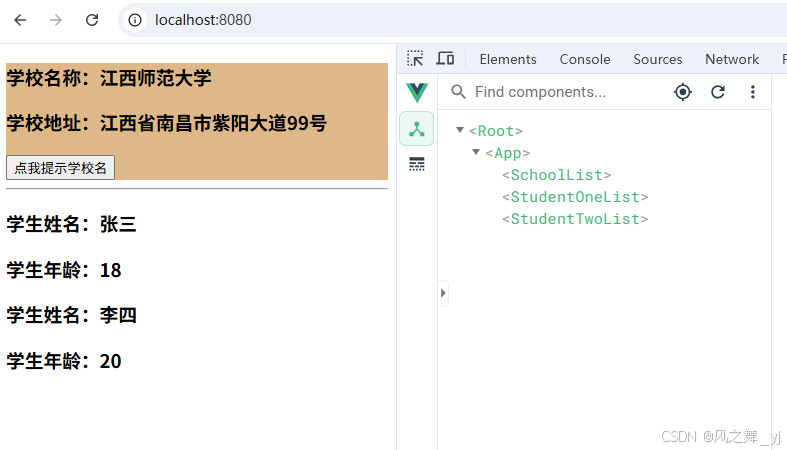
单文件组件(SchoolList.vue)示例:
javascript
<!-- 快捷键生成单文件模板(vetur插件功能):<v + 回车 -->
<template>
  <div class="box1">
    <h3>学校名称:{{ name }}</h3>
    <h3>学校地址:{{ address }}</h3>
    <button @click="showName">点我提示学校名</button>
  </div>
</template>

<script>
// 暴露组件
// 文件import引入该组件时,需要暴露该组件,以下是默认暴露:export default。
// Vue.extend可以省略。
export default {
  // name最好和文件名保持一致,开发者工具最终呈现也是该名字(首字母会自动转为大写)。
  name: "SchoolList",
  data() {
    return {
      name: "江西师范大学",
      address: "江西省南昌市紫阳大道99号",
    };
  },
  methods: {
    showName() {
      alert(this.name);
    },
  },
};
</script>

<style>
.box1 {
  background-color: burlywood;
}
</style>
单文件组件(StudentOneList.vue):
html
<template>
  <div>
    <h3>学生姓名:{{ name }}</h3>
    <h3>学生年龄:{{ age }}</h3>
  </div>
</template>

<script>
export default {
  name: 'StudentOneList',
  data() {
    return {
      name: "张三",
      age: 18,
    }
  }
}
</script>

<style>
</style>
单文件组件(StudentTwoList.vue):
html
<template>
  <div>
    <h3>学生姓名:{{ name }}</h3>
    <h3>学生年龄:{{ age }}</h3>
  </div>
</template>

<script>
export default {
  name: "StudentTwoList",
  data() {
    return {
      name: "李四",
      age: 20,
    }
  }
}
</script>

<style>
</style>
单文件组件(App.vue):
html
<template>
  <div>
    <SchoolList></SchoolList>
    <hr />
    <StudentOneList></StudentOneList>
    <StudentTwoList></StudentTwoList>
  </div>
</template>

<script>
// 引入组件
import SchoolList from './components/SchoolList.vue';
import StudentOneList from './components/StudentOneList.vue';
import StudentTwoList from './components/studentTwoList.vue';

export default {
  name: "App",
  components: {
    SchoolList,
    StudentOneList,
    StudentTwoList
  }
}
</script>

<style>
</style>
main.js(引入Vue,服务于app):
javascript
import Vue from 'vue'
import App from './App.vue'

Vue.config.productionTip = false

new Vue({
  render: h => h(App),
}).$mount('#app')
index.html(准备一个容器):
html
<!DOCTYPE html>
<html lang="zh">
  <head>
    <meta charset="utf-8">
    <meta http-equiv="X-UA-Compatible" content="IE=edge">
    <meta name="viewport" content="width=device-width,initial-scale=1.0">
    <link rel="icon" href="<%= BASE_URL %>favicon.ico">
    <title><%= htmlWebpackPlugin.options.title %></title>
  </head>
  <body>
    <noscript>
      <strong>对不起!你的js版本过低,请升级最新的js版本.</strong>
    </noscript>
    <div id="app"></div>
    <!-- built files will be auto injected -->
  </body>
</html>