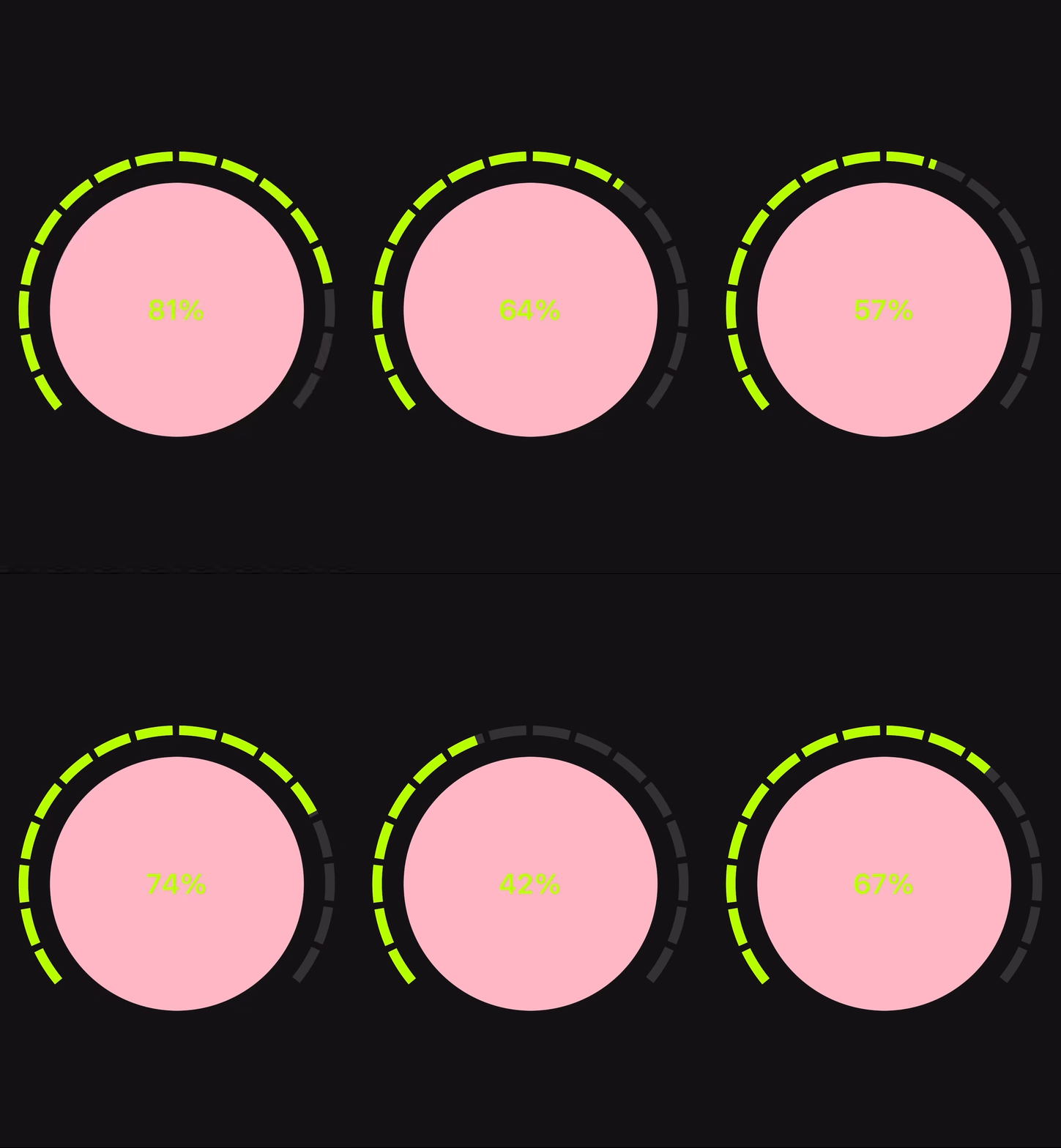
<template>
  <view class="container">
    <canvas
      canvas-id="fanCanvas"
      id="fanCanvas"
      class="fan-canvas"
      :style="{ width: canvasWidth + 'rpx', height: canvasHeight + 'rpx' }"
    ></canvas>

    <view class="progress-text">{{ isNaN(progress) ? 0 : Math.round(progress * 100) }}%</view>
  </view>
</template>

<script>
export default {
  data() {
    return {
      /**
       * @description 进度条的当前进度值,范围 0~1,0 表示 0%,1 表示 100%
       */
      progress: 0.65,

      /**
       * @description 画布元素的实际渲染宽度,单位:px,由 initCanvas() 方法根据配置的 canvasWidth 自动计算
       */
      canvasW: 0,

      /**
       * @description 画布元素的实际渲染高度,单位:px,由 initCanvas() 方法根据配置的 canvasHeight 自动计算
       */
      canvasH: 0,

      /**
       * @description 扇形进度条圆心的 X 坐标(相对于画布左上角),单位:px
       */
      centerX: 0,

      /**
       * @description 扇形进度条圆心的 Y 坐标(相对于画布左上角),单位:px
       */
      centerY: 0,

      /**
       * @description 扇形进度条的半径,单位:px,由 initCanvas() 方法根据画布大小自动计算
       */
      radius: 0,

      /**
       * @description 每段弧线的实际线宽,单位:px,由 initCanvas() 方法根据 segmentThicknessRatio 自动计算
       */
      lineWidth: 0,

      /**
       * @description 扇形进度条的起始角度(弧度制),从该角度开始绘制进度条
       */
      startAngle: Math.PI * 0.78,

      /**
       * @description 扇形进度条的总角度(弧度制),从 startAngle 开始,绘制 totalAngle 的角度
       */
      totalAngle: Math.PI * 1.45,

      // ========== 可配置参数 ==========

      /**
       * @description 进度条画布的宽度(单位:rpx)
       * @reference 参考值:400, 600, 800, 1000
       */
      canvasWidth: 680,

      /**
       * @description 进度条画布的高度(单位:rpx)
       * @reference 参考值:400, 600, 800, 1000
       */
      canvasHeight: 680,

      /**
       * @description 进度条已填充部分的颜色,表示当前进度值对应的部分
       * @reference 参考值:'#bfff00' (亮绿色), '#00ff00' (纯绿色), '#ff6b6b' (红色), '#4ecdc4' (青色)
       */
      activeColor: '#bfff00',

      /**
       * @description 进度条未填充部分的颜色,表示还未达到的进度部分
       * @reference 参考值:'#3a3a3a' (深灰色), '#666666' (中灰色), '#999999' (浅灰色), '#2c2c2c' (黑色)
       */
      inactiveColor: '#3a3a3a',

      /**
       * @description 整个扇形进度条被分成多少段,数值越大分段越细密
       * @reference 参考值:12, 18, 24, 30, 36
       */
      segmentCount: 16,

      /**
       * @description 每段之间的间隙比例,控制分段之间的空白大小(范围:0~1)
       * @reference 参考值:0.1 (间隙很小), 0.15 (间隙适中), 0.3 (间隙较大), 0.45 (间隙很大)
       */
      segmentGapRatio: 0.15,

      /**
       * @description 每段弧线的线宽,相对于画布最小边(宽和高中的较小值)的比例(范围:0~1)
       * @reference 参考值:0.03 (很细), 0.05 (较细), 0.09 (适中), 0.12 (较粗), 0.15 (很粗)
       */
      segmentThicknessRatio: 0.03,

      /**
       * @description 是否允许通过点击进度条来改变进度值
       * @reference 参考值:true (允许点击), false (禁止点击)
       */
      enableClickHighlight: false,

      /**
       * @description 是否允许通过拖动/滑动进度条来改变进度值
       * @reference 参考值:true (允许拖动), false (禁止拖动)
       */
      enableDragHighlight: true,

      /**
       * @description 触摸区域的内半径相对于弧线半径的偏移比例,用于设置触摸区域的内边界(范围:0~1)
       * @reference 参考值:0.2 (触摸区域较宽), 0.3 (触摸区域适中), 0.5 (触摸区域较窄), 0.7 (触摸区域很窄)
       */
      touchAreaInnerRatio: 0.5,

      /**
       * @description 触摸区域的外半径相对于弧线半径的偏移比例,用于设置触摸区域的外边界(范围:0~1)
       * @reference 参考值:0.2 (触摸区域较窄), 0.3 (触摸区域适中), 0.5 (触摸区域较宽), 0.7 (触摸区域很宽)
       */
      touchAreaOuterRatio: 0.5,

      // ========== 可配置参数结束 ==========

      /**
       * @description 标识用户是否正在拖动进度条,用于控制拖动过程中的交互行为
       */
      isDragging: false,

      /**
       * @description 用于节流绘制操作,提升拖动时的流畅度
       */
      _drawTimer: null
    }
  },
  mounted() {
    this.initCanvas();
    // H5 环境下,添加原生事件监听作为备用
    this.$nextTick(() => {
      const canvasEl = this.$el && this.$el.querySelector ? this.$el.querySelector('#fanCanvas') : null;
      if (canvasEl && typeof document !== 'undefined') {
        // 使用原生事件监听(H5 更可靠)
        canvasEl.addEventListener('touchstart', this.handleStart, { passive: false });
        canvasEl.addEventListener('touchmove', this.handleMove, { passive: false });
        canvasEl.addEventListener('touchend', this.handleEnd, { passive: false });
        canvasEl.addEventListener('touchcancel', this.handleEnd, { passive: false });
        canvasEl.addEventListener('mousedown', this.handleStart);
        canvasEl.addEventListener('mousemove', this.handleMove);
        canvasEl.addEventListener('mouseup', this.handleEnd);
        canvasEl.addEventListener('mouseleave', this.handleEnd);
      }
    });
  },
  beforeDestroy() {
    // 清理绘制定时器
    if (this._drawTimer !== null) {
      cancelAnimationFrame(this._drawTimer);
      this._drawTimer = null;
    }
    // 清理事件监听
    const canvasEl = this.$el && this.$el.querySelector ? this.$el.querySelector('#fanCanvas') : null;
    if (canvasEl && typeof document !== 'undefined') {
      canvasEl.removeEventListener('touchstart', this.handleStart);
      canvasEl.removeEventListener('touchmove', this.handleMove);
      canvasEl.removeEventListener('touchend', this.handleEnd);
      canvasEl.removeEventListener('touchcancel', this.handleEnd);
      canvasEl.removeEventListener('mousedown', this.handleStart);
      canvasEl.removeEventListener('mousemove', this.handleMove);
      canvasEl.removeEventListener('mouseup', this.handleEnd);
      canvasEl.removeEventListener('mouseleave', this.handleEnd);
    }
  },
  methods: {
    initCanvas() {
      // H5 / App / 小程序:统一用 boundingClientRect 拿真实展示尺寸(最稳)
      const query = uni.createSelectorQuery().in(this);
      query
        .select('#fanCanvas')
        .boundingClientRect(rect => {
          if (!rect) return;

          this.canvasW = rect.width;
          this.canvasH = rect.height;

          // 根据画布大小自适应几何参数
          const minSide = Math.min(this.canvasW, this.canvasH);
          this.lineWidth = minSide * this.segmentThicknessRatio;

          const padding = this.lineWidth * 0.7;
          const maxRByH = this.canvasH / 2 - padding;
          const maxRByW = this.canvasW / 2 - padding;
          this.radius = Math.max(10, Math.min(maxRByH, maxRByW));

          this.centerX = this.canvasW / 2;
          this.centerY = this.canvasH / 2;

          this.drawFan();
        })
        .exec();
    },

    drawFan() {
      // 安全检查:确保几何参数已初始化
      if (!this.totalAngle || this.totalAngle <= 0 || !this.radius || this.radius <= 0 ||
          !this.centerX || !this.centerY || isNaN(this.progress)) {
        return;
      }

      const ctx = uni.createCanvasContext('fanCanvas', this);
      const w = this.canvasW || 300;
      const h = this.canvasH || 300;

      // 清空画布
      ctx.clearRect(0, 0, w, h);
      ctx.save();

      // 分段弧线(使用配置的颜色和分割距离)
      ctx.setLineWidth(this.lineWidth);
      // 为了让每段中间"断开",用平头线帽 + 配置的角度间隙
      ctx.setLineCap('butt');
      const segmentAngle = this.totalAngle / this.segmentCount;
      // 使用配置的分割距离比例
      const gapRatio = this.segmentGapRatio;
      const segSpan = segmentAngle * (1 - gapRatio); // 每段真正绘制的角度

      for (let i = 0; i < this.segmentCount; i++) {
        const segStart = this.startAngle + i * segmentAngle;
        const segEnd = segStart + segSpan;

        const segProgressStart = i / this.segmentCount;
        const segProgressEnd = (i + 1) / this.segmentCount;

        // 计算当前进度在该段内的占比 0~1
        let activeRatio = 0;
        if (this.progress >= segProgressEnd) {
          activeRatio = 1;
        } else if (this.progress > segProgressStart) {
          activeRatio = (this.progress - segProgressStart) / (segProgressEnd - segProgressStart);
        }

        const activeEndAngle = segStart + (segEnd - segStart) * activeRatio;

        // 绘制高亮部分
        if (activeRatio > 0) {
          ctx.setStrokeStyle(this.activeColor);
          ctx.beginPath();
          ctx.arc(this.centerX, this.centerY, this.radius, segStart, activeEndAngle, false);
          ctx.stroke();
        }

        // 绘制未高亮剩余部分
        if (activeRatio < 1) {
          ctx.setStrokeStyle(this.inactiveColor);
          ctx.beginPath();
          ctx.arc(this.centerX, this.centerY, this.radius, activeEndAngle, segEnd, false);
          ctx.stroke();
        }
      }


      ctx.restore();
      ctx.draw();
    },

    /**
     * 节流版本的绘制方法
     * @description 在拖动时使用,通过节流减少绘制频率,提升流畅度
     * @note 使用 requestAnimationFrame 确保绘制在下一帧执行,避免频繁绘制导致卡顿
     */
    drawFanThrottled() {
      // 如果已有待执行的绘制请求,取消它
      if (this._drawTimer !== null) {
        cancelAnimationFrame(this._drawTimer);
      }
      // 使用 requestAnimationFrame 节流绘制
      this._drawTimer = requestAnimationFrame(() => {
        this.drawFan();
        this._drawTimer = null;
      });
    },

    /**
     * 从事件中获取进度值并更新
     * @param {Object} e - 事件对象
     * @param {Boolean} updateProgress - 是否真正更新进度值(true:更新进度,false:只检查是否在有效区域内)
     * @param {Boolean} isDragging - 是否正在拖动中(拖动中会放宽触摸区域判断,提升流畅度)
     * @returns {Boolean} - 是否在有效区域内
     */
    getProgressFromEvent(e, updateProgress = true, isDragging = false) {
      // 安全检查:确保几何参数已初始化
      if (!this.totalAngle || this.totalAngle <= 0 || !this.radius || this.radius <= 0) {
        return false;
      }

      let clientX, clientY;
      if (e.touches && e.touches[0]) {
        clientX = e.touches[0].clientX;
        clientY = e.touches[0].clientY;
      } else if (e.changedTouches && e.changedTouches[0]) {
        clientX = e.changedTouches[0].clientX;
        clientY = e.changedTouches[0].clientY;
      } else if (typeof e.clientX === 'number') {
        clientX = e.clientX;
        clientY = e.clientY;
      } else {
        return false;
      }

      const canvasEl = this.$el && this.$el.querySelector ? this.$el.querySelector('#fanCanvas') : null;
      if (!canvasEl) return false;

      const rect = canvasEl.getBoundingClientRect ? canvasEl.getBoundingClientRect() : { left: 0, top: 0 };
      const x = clientX - rect.left;
      const y = clientY - rect.top;

      const dx = x - this.centerX;
      const dy = y - this.centerY;
      const dist = Math.hypot(dx, dy);

      // 计算触摸点的角度并归一化到 [0, 2π)
      let angle = Math.atan2(dy, dx);
      if (angle < 0) angle += Math.PI * 2;

      // 计算扇形的起始和结束角度
      const twoPi = Math.PI * 2;
      let start = this.startAngle % twoPi;
      if (start < 0) start += twoPi;
      const end = start + this.totalAngle;

      // 将角度调整到 [start, end] 范围内
      let normalizedAngle = angle;
      while (normalizedAngle < start) normalizedAngle += twoPi;

      // 检查角度是否在扇形范围内
      if (normalizedAngle > end) {
        return false;
      }

      // 非拖动状态:需要检查触摸区域(半径范围)
      if (!isDragging) {
        const innerRadius = this.radius - this.lineWidth * this.touchAreaInnerRatio;
        const outerRadius = this.radius + this.lineWidth * this.touchAreaOuterRatio;

        // 判断触摸点是否在触摸区域内(环形区域:内半径 < 距离 < 外半径)
        if (dist < innerRadius || dist > outerRadius) {
          // 检查是否在末端圆块附近
          const currentAngle = this.startAngle + this.totalAngle * this.progress;
          const endX = this.centerX + this.radius * Math.cos(currentAngle);
          const endY = this.centerY + this.radius * Math.sin(currentAngle);
          const distToEnd = Math.hypot(x - endX, y - endY);
          const endTolerance = this.lineWidth * this.touchAreaOuterRatio;
          if (distToEnd > endTolerance) {
            return false;
          }
        }
      }

      // 防止除以 0 或 NaN
      const newProgress = (normalizedAngle - start) / this.totalAngle;
      if (isNaN(newProgress) || !isFinite(newProgress)) {
        return false;
      }

      // 根据参数决定是否更新进度值
      if (updateProgress) {
        this.progress = Math.max(0, Math.min(1, newProgress));
        // 如果正在拖动,使用节流绘制提升流畅度;否则立即绘制
        if (isDragging) {
          this.drawFanThrottled();
        } else {
          this.drawFan();
        }
      }
      return true;
    },

    // 阻止事件默认行为和冒泡
    preventEvent(e) {
      if (e && e.preventDefault) e.preventDefault();
      if (e && e.stopPropagation) e.stopPropagation();
    },

    handleStart(e) {
      this.preventEvent(e);
      // 根据配置参数决定是否允许点击高亮
      if (this.enableClickHighlight) {
        const result = this.getProgressFromEvent(e, true);
        this.isDragging = result;
      } else {
        const result = this.getProgressFromEvent(e, false);
        this.isDragging = result && this.enableDragHighlight;
      }
    },

    handleMove(e) {
      this.preventEvent(e);
      if (this.isDragging && this.enableDragHighlight) {
        this.getProgressFromEvent(e, true, true);
      }
    },

    handleEnd(e) {
      this.preventEvent(e);
      this.isDragging = false;
    }
  }
}
</script>

<style>
.container {
  width: 100vw;
  height: 100vh;
  background: #141214;
  display: flex;
  justify-content: center;
  align-items: center;
  position: relative;
}
.fan-canvas {
  touch-action: none;
}
.progress-text {
  position: absolute;
  top: 50%;
  left: 50%;

  transform: translate(-50%, -50%);
  color: #bfff00;
  font-size: 60rpx;
  font-weight: bold;
  background-color: pink;
  width: 280px;
  height: 280px;
  border-radius: 100%;
  text-align: center;
  line-height: 280px;
}

</style>