文章目录
- [Ⅰ. scoped 作用及原理](#Ⅰ. scoped 作用及原理)
-
- [一、scoped 的作用](#一、scoped 的作用)
- 二、scoped的原理
- [Ⅱ. 父子组件通信](#Ⅱ. 父子组件通信)
-
- 一、介绍
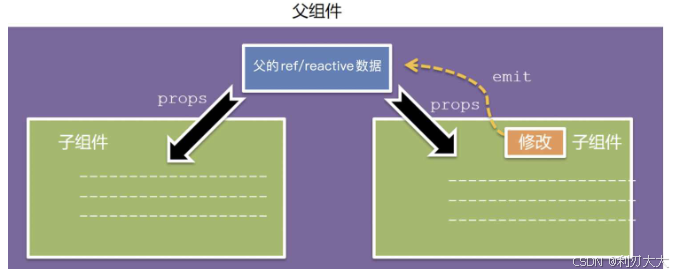
- 二、父传子:`props`
- [三、子传父:`v-on` && `emit`](#三、子传父:
v-on&&emit)

Ⅰ. scoped 作用及原理
一、scoped 的作用
默认情况下 ,写在组件中的 style 样式会 全局生效,因此很容易造成多个组件之间的样式冲突问题。
- 全局样式:默认组件中的样式会作用到全局,任何一个组件中都会受到此样式的影响
- 局部样式 :可以给组件加上
scoped属性,可以让样式只作用于当前组件的标签
MyLeft.vue 文件:
javascript
<script setup></script>

<template>
  <div
    class="my-left"
    style="
      flex: 1;
      align-items: center;
      height: 100px;
      background: paleturquoise;
      text-align: center;
    ">
    <h3>每天起床第一句</h3>
  </div>
</template>

<style>
h3 {
  color: red;
}
</style>
MyRight.vue 文件:
javascript
<script setup></script>

<template>
  <div
    class="my-right"
    style="
      flex: 1;
      align-items: center;
      height: 100px;
      background: plum;
      text-align: center;
    ">
    <h3>先给自己打个气</h3>
  </div>
</template>

<style></style>
App.vue 文件:
javascript
<script setup>
    import MyLeft from './components/MyLeft.vue'
    import MyRight from './components/MyRight.vue'
</script>

<template>
  <div class="container">
    <MyLeft />
    <MyRight />
  </div>
</template>

<style>
.container {
  display: flex;
}
</style>
至此,发现 MyRight.vue 中 h3 的样式受到了的影响。为了解决样式污染/冲突问题,可以给组件的 style 添加 scoped 属性,这样就避免了不同组件之前样式污染的问题。
二、scoped的原理
- 组件内所有标签都被添加
data-v-hash值的自定义属性 css选择器都被添加[data-v-hash值]的属性选择器
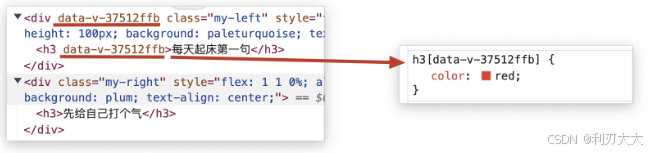
最终效果:必须是当前组件的元素,才会有这个自定义属性,从而保证了样式只能作用到当前组件。
Ⅱ. 父子组件通信
一、介绍
组件通信,是指一个把数组传递给另一个组件。
- 组件的数据是独立的,无法直接访问其他组件的数据。
- 想使用其他组件的数据,就需要组件通信
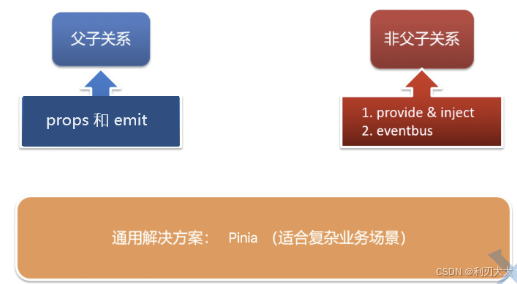
组件之间的关系:
- 父子关系:组件 A 使用了组件 B,则 A 是父,B 是子
- 非父子关系:比如祖先和孙子的关系,兄弟关系
二、父传子:props
当子组件的数据需要按需改变的时候,就得让父组件传递数据给子组件,从而提高组件的灵活性和复用性。
父组件通过 props (自定义属性) 将数据传递给子组件,如下所示:
javascript
<MyButton text="提交" color="blue" />其中 text 和 color 就是 props ,然后子组件通过内置方法 defineProps() 来接收这些自定义属性,如下所示:
javascript
<script setup>
    // 可以只写自定义属性,而不需要和下面一样写完整!
    // 完整写法如下所示:
    //     type:表示类型
    //     default:表示默认值
    //     required:表示是否必填
    const props = defineProps({
      text: String,
      color: {
        type: String,
        default: 'blue',
        required: false
      },
      price: Number
    })
</script>

<template>
    <button :style="{ backgroundColor: color }">{{ text }}</button>
</template>
在 <script setup> 中需要用到 defineProps() 中传入的属性时,必须先拿到 props 对象或者解构出对应的属性 ,否则是没办法在 <script setup> 中使用的;
但是在 <template> 中则不需要 ,因为有 "语法糖" 的好处,Vue 会自动解包 props,所以不需要拿到 props 对象就能直接使用对应的属性!
下面举个例子:
App.vue 文件:
javascript
<script setup>
    import MyGoods from './components1/MyGoods.vue';

    // 提供数据
    // 商品列表
    const goodsList = [
      {
        id: '4001172',
        name: '称心如意手摇咖啡磨豆机咖啡豆研磨机',
        price: 289,
        picture:
          'https://yanxuan-item.nosdn.127.net/84a59ff9c58a77032564e61f716846d6.jpg'
      },
      {
        id: '4001594',
        name: '日式黑陶功夫茶组双侧把茶具礼盒装',
        price: 288,
        picture:
          'https://yanxuan-item.nosdn.127.net/3346b7b92f9563c7a7e24c7ead883f18.jpg'
      },
      {
        id: '4001009',
        name: '竹制干泡茶盘正方形沥水茶台品茶盘',
        price: 109,
        picture:
          'https://yanxuan-item.nosdn.127.net/2d942d6bc94f1e230763e1a5a3b379e1.png'
      },
      {
        id: '4001874',
        name: '古法温酒汝瓷酒具套装白酒杯莲花温酒器',
        price: 488,
        picture:
          'https://yanxuan-item.nosdn.127.net/44e51622800e4fceb6bee8e616da85fd.png'
      },
      {
        id: '4001649',
        name: '大师监制龙泉青瓷茶叶罐',
        price: 139,
        picture:
          'https://yanxuan-item.nosdn.127.net/4356c9fc150753775fe56b465314f1eb.png'
      },
      {
        id: '3997185',
        name: '与众不同的口感汝瓷白酒杯套组1壶4杯',
        price: 108,
        picture:
          'https://yanxuan-item.nosdn.127.net/8e21c794dfd3a4e8573273ddae50bce2.jpg'
      },
      {
        id: '3997403',
        name: '手工吹制更厚实白酒杯壶套装6壶6杯',
        price: 100,
        picture:
          'https://yanxuan-item.nosdn.127.net/af2371a65f60bce152a61fc22745ff3f.jpg'
      },
      {
        id: '3998274',
        name: '德国百年工艺高端水晶玻璃红酒杯2支装',
        price: 139,
        picture:
          'https://yanxuan-item.nosdn.127.net/8896b897b3ec6639bbd1134d66b9715c.jpg'
      }
    ]
</script>

<template>
  <div class="list">
    <!-- 在子组件中,传入自定义属性 -->
    <MyGoods v-for="item in goodsList"
            :key="item.id"
            :imgUrl="item.picture"
            :price="item.price"
            :title="item.name"
    />
  </div>
</template>

<style lang="scss">
* {
  margin: 0;
  padding: 0;
  box-sizing: border-box;
}
.list {
  width: 1000px;
  margin: 0 auto;
  display: flex;
  flex-wrap: wrap;
}
</style>
子组件 MyGoods.vue:
javascript
<script setup>
    defineProps(['imgUrl', 'title', 'price']) // 采用简写的方式,不要求具体的类型等
</script>

<template>
  <div class="item">
    <img
      :src="imgUrl"
      :alt="title" />
    <p class="name">{{ title}}</p>
    <p class="price">{{ price }}.00</p>
  </div>
</template>

<style lang="scss" scoped>
.item {
  width: 240px;
  margin-left: 10px;
  padding: 20px 30px;
  transition: all 0.5s;
  margin-bottom: 20px;
  .item:nth-child(4n) {
    margin-left: 0;
  }
  &:hover {
    box-shadow: 0px 0px 5px rgba(0, 0, 0, 0.2);
    transform: translate3d(0, -4px, 0);
    cursor: pointer;
  }
  img {
    width: 100%;
  }
  .name {
    font-size: 18px;
    margin-bottom: 10px;
    color: #666;
  }
  .price {
    display: flex;
    align-items: center;
    font-size: 22px;
    color: firebrick;
    button {
      margin-left: 48px;
      font-size: 14px;
      outline: none;
    }
  }
  .price::before {
    content: '¥';
    font-size: 22px;
  }
}
</style>三、子传父:v-on && emit
在上面父传子的案例中,如果新增一个砍价功能的按钮,会发现子组件不能直接修改父组件传递的数据 ,因为 props 是只读的,子组件不能修改。
解决方案:
-
在父组件中提供砍价功能对应的方法,然后在使用子组件的时候将该方法绑定起来,和
props一起发送给子组件。绑定的语法实际上就是v-on,如下所示:javascript@自定义事件="父组件中修改数据的函数" -
在子组件中通过
defineEmits()拿到触发自定义事件的函数emit(),然后在砍价按钮中绑定点击事件,在该点击事件中去触发自定义事件,此时该自定义事件就会发送到父组件,父组件就会执行砍价功能对应的方法。emit()方法参数如下所示:javascriptemit('自定义事件', 父组件中对应方法所需的参数...)
defineEmits() 本质是一个编译宏 ,用于生成一个 "事件触发器函数",通常叫 emit,而 emit 才是真正用来发射事件的函数 ,所以不要搞错(直接拿 defineEmits() 去发射事件,那就错了)
App.vue 文件:
javascript
<script setup>
    import MyGoods from './components2/MyGoods.vue';
    import {ref} from 'vue'
    // 商品列表
    const goodsList = ref([
      {
        id: '4001172',
        name: '称心如意手摇咖啡磨豆机咖啡豆研磨机',
        price: 289,
        picture:
          'https://yanxuan-item.nosdn.127.net/84a59ff9c58a77032564e61f716846d6.jpg'
      },
      {
        id: '4001594',
        name: '日式黑陶功夫茶组双侧把茶具礼盒装',
        price: 288,
        picture:
          'https://yanxuan-item.nosdn.127.net/3346b7b92f9563c7a7e24c7ead883f18.jpg'
      },
      {
        id: '4001009',
        name: '竹制干泡茶盘正方形沥水茶台品茶盘',
        price: 109,
        picture:
          'https://yanxuan-item.nosdn.127.net/2d942d6bc94f1e230763e1a5a3b379e1.png'
      },
      {
        id: '4001874',
        name: '古法温酒汝瓷酒具套装白酒杯莲花温酒器',
        price: 488,
        picture:
          'https://yanxuan-item.nosdn.127.net/44e51622800e4fceb6bee8e616da85fd.png'
      },
      {
        id: '4001649',
        name: '大师监制龙泉青瓷茶叶罐',
        price: 139,
        picture:
          'https://yanxuan-item.nosdn.127.net/4356c9fc150753775fe56b465314f1eb.png'
      },
      {
        id: '3997185',
        name: '与众不同的口感汝瓷白酒杯套组1壶4杯',
        price: 108,
        picture:
          'https://yanxuan-item.nosdn.127.net/8e21c794dfd3a4e8573273ddae50bce2.jpg'
      },
      {
        id: '3997403',
        name: '手工吹制更厚实白酒杯壶套装6壶6杯',
        price: 100,
        picture:
          'https://yanxuan-item.nosdn.127.net/af2371a65f60bce152a61fc22745ff3f.jpg'
      },
      {
        id: '3998274',
        name: '德国百年工艺高端水晶玻璃红酒杯2支装',
        price: 139,
        picture:
          'https://yanxuan-item.nosdn.127.net/8896b897b3ec6639bbd1134d66b9715c.jpg'
      }
    ])

    // 砍价功能对应的方法,由父组件提供
    const bargain = (index, price) => {
        goodsList.value[index].price -= price
    }
</script>

<template>
  <div class="list">
    <!-- 在子组件中,传入自定义属性 -->
    <MyGoods
      v-for="(item, index) in goodsList"
      :key="item.id"
      :urlImg="item.picture"
      :price="item.price"
      :title="item.name"
      :idx="index"
      @ccc="bargain"
    />
  </div>
</template>

<style lang="scss">
* {
  margin: 0;
  padding: 0;
  box-sizing: border-box;
}
.list {
  width: 1000px;
  margin: 0 auto;
  display: flex;
  flex-wrap: wrap;
}
</style>
MyGoods.vue 文件:
javascript
<template>
    <div class="item">
      <img
        :src="urlImg"
        :alt="title" />
      <p class="name">{{ title }}</p>
      <p class="price">
        <span>{{ price }}.00</span>
        <button @click="cutPrice">砍价</button>
      </p>
    </div>
</template>

<script setup>
    const props = defineProps([
        'urlImg', 'title', 'price', 'idx'
    ])

    const emit = defineEmits();

    const cutPrice = () => {
      emit('ccc', props.idx, 3);
    }
</script>

<style scoped>
.item {
  width: 240px;
  margin-left: 10px;
  padding: 20px 30px;
  transition: all 0.5s;
  margin-bottom: 20px;
  .item:nth-child(4n) {
    margin-left: 0;
  }
  &:hover {
    box-shadow: 0px 0px 5px rgba(0, 0, 0, 0.2);
    transform: translate3d(0, -4px, 0);
    cursor: pointer;
  }
  img {
    width: 100%;
  }
  .name {
    font-size: 18px;
    margin-bottom: 10px;
    color: #666;
  }
  .price {
    font-size: 22px;
    color: firebrick;
    display: flex;
    align-items: center;
    height: 36px;

    button {
      font-size: 14px;
      margin-left: 50px;
    }
  }
  .price::before {
    content: '¥';
    font-size: 22px;
  }
}
</style>